





Effective productivity and collaboration are paramount for streamlining workflows, enabling remote work, and ensuring seamless communication in today's business landscape. To achieve this, many organizations turn to productivity suites like Google Workspace and Microsoft 365. These comprehensive platforms offer a suite of productivity tools, including email, document editing, cloud storage, and more, to enhance collaboration and productivity across teams.
However, choosing between Google Workspace and Microsoft 365 can be a challenging decision due to their wide-ranging features and capabilities. In this article, we aim to simplify your decision-making process by providing an in-depth comparison of Google Workspace vs Microsoft 365. We will delve into their key features, pricing models, and unique offerings, allowing you to make an informed choice that aligns with your organization's specific productivity and collaboration requirements.
- 01 Google Workspace vs Microsoft 365: overview
- 02 What's the difference between Google Workspace and Microsoft 365?
- 03 Google Workspace pros and cons
- 04 Microsoft 365 pros and cons
- 05 Google Workspace compared to Microsoft 365
- 06 Microsoft 365 compared to Google Workspace
- 07 Features comparison
- 08 Google Workspace vs Microsoft 365: Which is the best for your business?
- 09 Alternatives to Google Workspace & Microsoft 365
- 10 Promotions on Collaboration software
Start saving on the best SaaS
Secret has already helped tens of thousands of startups save millions on the best SaaS like Microsoft Teams, Google Workspace & many more. Join Secret now to buy software the smart way.

01 Google Workspace vs Microsoft 365: overview
Google Workspace and Microsoft 365 stand out as key players in the realm of productivity suites, each offering unique features and advantages tailored to diverse organizational needs.
Google Workspace, formerly known as G Suite, is renowned for its cloud-based collaboration tools and seamless integration with Google's ecosystem. It provides a comprehensive platform for email, document editing, cloud storage, and real-time collaboration, making it a preferred choice for organizations that rely on cloud-based productivity solutions. On the other hand, Microsoft 365, formerly Office 365, boasts a powerful suite of applications like Word, Excel, and Outlook, complemented by cloud-based services. It excels in providing a robust and familiar desktop productivity experience for organizations deeply embedded in the Microsoft ecosystem.
In this article, we will delve into the Google Workspace vs. Microsoft 365 comparison, dissecting their key features, pricing models, and unique strengths, to assist you in making an informed decision when selecting the right productivity suite for your specific organizational requirements.

Pricing Plan
Both tools have an entry price of $6 per user. However, your plan will dictate things like storage limits and the apps you can use.

Google Workspace
Microsoft 365
Customer Support
Both tools offer round-the-clock customer service. But while live phone support is easy to access from Microsoft, you’ll need a paid upgrade to get the same level of support service from Google.
Google Workspace
Microsoft 365
Customer Reviews
Google Workspace and Microsoft 365 have outstanding reviews, usually boasting an average better than 4.5 stars.
Google Workspace
Microsoft 365
Ease of Use
Google’s apps usually have a simpler user interface than their Microsoft equivalents. However, 365 is also user-friendly enough once you spend some time learning how it works.
Google Workspace
Microsoft 365
Integrations
Both Google Workspace and Microsoft 365 integrate with thousands of online services, including flexible tools like Zapier.
Google Workspace
Microsoft 365
Advanced functionality
To maintain a smooth user interface, Google Workspace apps cut down on some advanced functionalities that you’ll only find in Microsoft 365.
Google Workspace
Microsoft 365
Data Syncing
Both Google Workspace and Microsoft 365 offer advanced sync options. You can access your files from anywhere, and even work on them offline.
Google Workspace
Microsoft 365
Storage limits
Both Google Workspace and Microsoft 365 offer decent storage on their premium plans. Google’s limits on higher tiers are better, while Microsoft’s cheaper plans offer better caps.
Google Workspace
Microsoft 365
Collaboration
Both 365 and Google Workspace help teams collaborate on cloud-based documents. But Google’s browser-based interface makes it much easier to share and collaborate on any type of document.
Google Workspace
Microsoft 365
Email Client
Both Gmail and Outlook are two of the best email clients you can find. But while Gmail’s interface is better, Outlook lets you customize your inbox to a higher degree
Google Workspace
Microsoft 365
02 What's the difference between Google Workspace and Microsoft 365?

Docs, Slides and Spreadsheets have most of the features that an average user will need, so they’re a decent choice too.
Google Workspace
A complete suite to improve employee productivity

Microsoft 365 offers desktop apps that you can download on a lot of devices.
Microsoft 365
Microsoft 365 brings tremendous value to businesses by providing a comprehensive suite of productivity tools and cloud services. It combines familiar and powerful applications like Word, Excel, and PowerPoint with advanced collaboration features, cloud storage, and security.
Microsoft 365 offers desktop apps that you can download on a lot of devices. These desktop apps are more powerful than their Google Workspace counterparts. You can crunch more numbers in Excel, add more multimedia content in Word, and use a wider range of transitions for Powerpoint presentations.
You can’t get this advanced functionality from anything in Google Workspace, and this is the biggest difference between the two platforms. If you need Microsoft’s advanced file editing features, that’s the best choice for your company.
But Google’s apps aren’t cheap copies of their Microsoft counterparts. Docs, Slides and Spreadsheets have most of the features that an average user will need, so they’re a decent choice too.
Plus, Google’s limits on higher pricing tiers are ampler than what you get from Microsoft. Conversely, Google is pretty stringent with its caps on cheaper plans. You only get 30 GB for the $6 subscription, while Microsoft 365 offers 1 TB. Not to mention, email is measured separately in Microsoft 365.
Your preference for email clients can also play an important role in what you’ll choose. Both Gmail and Outlook are amazing email tools. But while Gmail’s interface is better, Outlook lets you customize your inbox to a higher degree.
The choice between Google Workspace vs Microsoft 365 also depends on what your partners and clients use. You can technically open Word documents in Google Docs, but the formatting won’t always be on point. So if you often get Word documents from your collaborators, Google Workspace is probably not the best pick.

Google Workspace
A complete suite to improve employee productivity
20% off Plus plans for 1 year
Save up to $518
03 Google Workspace pros and cons
What are the advantages of Google Workspace?
- Collaboration and communication: Google Workspace provides an array of collaboration and communication tools like Google Docs, Sheets, Slides, and Gmail. These tools enable real-time editing and seamless communication, making it easy for teams to work together, even remotely.

- Cloud-based productivity: Google Workspace operates in the cloud, allowing users to access their documents, emails, and files from anywhere with an internet connection.
- Cost-effective: Google Workspace offers competitive pricing with various plans to choose from, making it cost-effective for businesses of all sizes. It eliminates the need for expensive on-premises software installations and maintenance.
- Integration with third-party apps: Google Workspace integrates seamlessly with a wide range of third-party applications through the Google Workspace Marketplace, expanding its functionality and customizability to suit specific business needs.
- Security and compliance: Google Workspace includes robust security features, such as data encryption, two-factor authentication, and spam filtering. It also provides compliance tools to help organizations meet industry-specific regulations.
What are the disadvantages of Google Workspace?
- Internet dependency: Google Workspace relies heavily on an internet connection. Users may face limitations in accessing their documents or emails if they are in an area with poor or no internet connectivity.

- Data privacy concerns: Some users have raised concerns about data privacy, as Google may collect and analyze user data to improve its services and target advertisements. Organizations with strict data privacy requirements may find this concerning.
- Limited offline access: While Google Workspace offers offline access to some apps, the functionality is not as robust as with desktop-based software. Users may experience limitations when working offline.
- Learning curve: Transitioning to Google Workspace from other productivity suites may require a learning curve for some users. Familiarizing oneself with the interface and features can take time.
- Limited offline file editing: Offline file editing in Google Workspace is primarily designed for Google Docs, Sheets, and Slides. Editing other file formats offline can be more challenging, requiring file conversion or third-party apps.
Compare Google Workspace to other tools


Gmail vs Google Workspace


Microsoft Teams vs Google Workspace

Google Workspace vs Zoho Mail

Slack vs Google Workspace

Google Workspace vs Squarespace

Google Drive vs Google Workspace
04 Microsoft 365 pros and cons
What are the advantages of Microsoft 365?
- Comprehensive productivity suite: Microsoft 365 includes a comprehensive suite of productivity applications such as Word, Excel, PowerPoint, Outlook, and Teams, making it a one-stop solution for a wide range of office tasks.
- Integration with Windows and desktop apps: Microsoft 365 seamlessly integrates with Windows operating systems and desktop applications. This integration provides a familiar user experience for users already accustomed to Microsoft software.
- Advanced collaboration features: Microsoft Teams, included in Microsoft 365, offers advanced collaboration features like video conferencing, chat, file sharing, and integration with other Microsoft apps, facilitating efficient teamwork and communication.
- Offline access and desktop versions: Microsoft 365 allows users to work offline and offers desktop versions of its applications, ensuring productivity even without an internet connection. This can be crucial for users in areas with unreliable internet access.
- Robust security and compliance features: Microsoft 365 provides robust security features, including data encryption, threat protection, and compliance tools. It offers various security and compliance options to meet the needs of different organizations, including those with strict regulatory requirements.
What are the disadvantages of Microsoft 365?
- Cost: Microsoft 365 can be relatively expensive for businesses, especially when compared to some competing cloud-based productivity suites. The cost may be a significant factor for small businesses or individuals.
- Complexity: The extensive range of features in Microsoft 365 can be overwhelming for some users. Learning to navigate and utilize all the tools effectively may require training and time.
- Internet dependency for updates: While Microsoft 365 allows offline access to documents, users may still require an internet connection for software updates, which can be inconvenient for those with limited connectivity.
- Limited collaboration with non-Microsoft users: Collaboration with external partners or clients who use different productivity software may be less seamless, as some advanced collaboration features in Microsoft 365 work best when all users are within the Microsoft ecosystem.
- Resource intensive: Microsoft 365's desktop applications can be resource-intensive, particularly on older or less powerful devices. This may result in slower performance on such systems.
Compare Microsoft 365 to other tools


Microsoft Azure vs Microsoft 365
05 Google Workspace compared to Microsoft 365
Google Workspace and Microsoft 365 are two leading productivity suites. Google Workspace, cloud-based and known for its collaboration tools, offers Google Docs, Sheets, Slides, and Gmail. It emphasizes real-time collaboration and remote access.
In contrast, Microsoft 365, integrated with Windows and desktop apps, features Word, Excel, PowerPoint, Outlook, and Teams. It excels in familiarity for Windows users and offers advanced collaboration through Teams. Google Workspace may be cost-effective, while Microsoft 365 suits those seeking comprehensive productivity tools. The choice hinges on specific needs, cost considerations, and the level of integration desired with existing software and systems.
Is Google Workspace better than Microsoft 365?
 Is Google Workspace better than Microsoft 365?
The question of whether Google Workspace is better than Microsoft 365 depends on individual needs and preferences. Google Workspace excels in cloud-based collaboration, offering real-time editing, Gmail, and cost-effective plans. It's well-suited for remote work and small businesses.
On the other hand, Microsoft 365 offers a comprehensive suite of desktop and online apps, including Word, Excel, PowerPoint, Outlook, and Teams, making it ideal for larger enterprises and Windows users. The choice often comes down to factors like familiarity, integration with existing systems, and specific features required.
What is Google Workspace best used for?
Google Workspace is best used for enhancing collaboration, productivity, and communication within organizations. Its cloud-based suite includes tools like Google Docs, Sheets, Slides, and Gmail, which excel at real-time collaborative document editing, data analysis, and efficient email communication.
Google Workspace is particularly beneficial for remote work, fostering teamwork regardless of physical location. It's ideal for small to medium-sized businesses looking for cost-effective solutions and for those who prioritize seamless online collaboration. With its flexibility, accessibility, and affordability, Google Workspace empowers teams to work efficiently, share information effortlessly, and streamline tasks, making it a top choice for modern workplace needs.
Can Google Workspace replace Microsoft 365?
While Google Workspace offers robust productivity and collaboration tools, it may not entirely replace Microsoft 365 in every scenario. The choice depends on specific organizational needs. Google Workspace excels in cloud-based collaboration and is suitable for smaller businesses and remote work.
However, Microsoft 365 offers a comprehensive suite of desktop and online applications, making it a preferred choice for larger enterprises and Windows-centric environments. Some organizations may choose to integrate both platforms to benefit from the strengths of each. The decision to replace Microsoft 365 with Google Workspace should be based on careful evaluation and alignment with the organization's requirements.
Is Google Workspace cheaper than Microsoft 365?
Google Workspace and Microsoft 365 offer different pricing models, making direct cost comparisons complex. Google Workspace’s pricing structure tends to be more cost-effective for smaller businesses, with lower-priced plans and flexible payment options. Microsoft 365, while offering comprehensive features, may be more expensive, especially for larger enterprises.
However, the choice's cost-effectiveness depends on the specific features, number of users, and requirements of an organization. It's essential to evaluate pricing details and consider the value gained from each suite to determine which one aligns better with budget constraints and desired functionality. Ultimately, the cost comparison varies based on individual circumstances.
Is there a better Collaboration software than Google Workspace?
Whether there's a "better" software than Google Workspace depends on your specific productivity and collaboration needs. Google Workspace is celebrated for its cloud-based tools like Google Docs, Sheets, Slides, and Gmail, emphasizing real-time collaboration and remote accessibility, making it a strong choice for many businesses.
However, alternatives to Google Workspace, such as Microsoft 365, Zoho Workplace, Asana, Dropbox Business, and Apple iWork, may better align with certain organizational preferences. Microsoft 365 provides a comprehensive suite with desktop and online apps, while Zoho Workplace offers a wide range of productivity tools. Apple iWork is an option for users within the Apple ecosystem.
Google Workspace
A complete suite to improve employee productivity
20% off Plus plans for 1 year
Save up to $518
06 Microsoft 365 compared to Google Workspace
Microsoft 365 and Google Workspace are two leading productivity suites, each with distinct strengths. Microsoft 365 offers a comprehensive package with popular desktop applications like Word, Excel, and PowerPoint, along with cloud-based collaboration through Teams. It's favored by organizations that value the familiarity of Windows-based software.
In contrast, Google Workspace emphasizes cloud-first collaboration, featuring Google Docs, Sheets, Slides, and Gmail. It excels in real-time editing and accessibility. The choice between the two often comes down to familiarity, specific features needed, and the level of integration required within existing systems.
Is Microsoft 365 better than Google Workspace?
Determining whether Microsoft 365 is better than Google Workspace depends on individual or organizational preferences and needs. Microsoft 365 offers a robust suite of desktop and online applications like Word, Excel, and Teams, which can be advantageous for users already accustomed to Microsoft software. It's well-suited for businesses with a Windows-centric environment.
On the other hand, Google Workspace excels in cloud-based collaboration, real-time editing, and accessibility, making it ideal for remote work and smaller businesses. The choice hinges on factors like familiarity, integration requirements, specific features, and platform preferences, as both Microsoft 365 and Google Workspace provide powerful tools for productivity and collaboration.
What is Microsoft 365 best used for?
Microsoft 365 is best used for a wide range of productivity and collaboration tasks. It excels in providing a comprehensive suite of applications such as Word, Excel, PowerPoint, Outlook, and Teams, making it a versatile solution for document creation, data analysis, email communication, and team collaboration. It's particularly valuable for businesses and enterprises, offering advanced tools for large-scale operations and complex projects.
Microsoft 365's integration with Windows and desktop applications ensures a seamless experience for users already familiar with Microsoft software. Overall, it caters to a diverse set of needs, making it an ideal choice for organizations seeking a comprehensive productivity suite.
Can Microsoft 365 replace Google Workspace?
Microsoft 365 can potentially replace Google Workspace, but the feasibility depends on specific organizational requirements and preferences. Microsoft 365 offers a suite of productivity applications like Word, Excel, and Teams, integrated seamlessly with Windows environments, making it suitable for businesses that rely on Microsoft technologies.
However, replacing Google Workspace with Microsoft 365 may involve a transition and user adaptation period. Google Workspace is known for its cloud-based collaboration and real-time editing, making it preferable for some organizations, especially those emphasizing remote work. Whether Microsoft 365 can replace Google Workspace effectively depends on factors like workflow, existing systems, and the value placed on particular features.
Is Microsoft 365 cheaper than Google Workspace?
Determining whether Microsoft 365 is cheaper than Google Workspace is contingent on various factors. Both suites offer different pricing models and plans, making direct cost comparisons complex. Google Workspace tends to be cost-effective, especially for smaller businesses, with lower-priced options and flexible payment structures.
Conversely, Microsoft 365 can be more expensive, particularly for larger enterprises, but offers a comprehensive range of features. The cost-effectiveness depends on the number of users, specific features required, and the organization's needs. To make an informed decision, evaluating pricing details, features, and the value gained from each suite is essential.
Is there a better software than Microsoft 365?
Determining whether there's a superior software to Microsoft 365 depends on your specific productivity and collaboration needs. Various alternatives cater to different requirements.
Alternatives to Microsoft 365 include Google Workspace, Zoho Workplace, ClickUp, Box, and Apple iWork, each offering distinctive strengths. For example, Google Workspace excels in cloud-based collaboration and accessibility, while Zoho Workplace offers a wide range of productivity tools. The choice of the optimal software depends on individual or organizational preferences, platform requirements, and the specific features required. A thorough evaluation of these factors is essential to select the software that best aligns with your productivity and collaboration goals and suits your unique needs.
07 Features comparison
Google Workspace Excels Ahead of Microsoft 365 for User-Friendliness

Google Workspace shines when it comes to ease-of-use for its intuitive interface and user-friendly features, requiring minimal learning curves - even for full technology novices.
Google Workspace and Microsoft 365 both offer a range of productivity tools, yet one can be more accessible to users than the other. Google Workspace shines when it comes to ease-of-use for its intuitive interface and user-friendly features, requiring minimal learning curves - even for full technology novices.
For example, Google Workspace's suite of applications are built with simplicity in mind. Google Docs offers straightforward collaboration features, allowing multiple users to edit documents in real-time seamlessly. In contrast, while Microsoft 365 boasts powerful tools like Word, Excel, and Teams, some may find its interface more complex. For instance, Microsoft Word's extensive range of formatting options and features may be overwhelming for users accustomed to simpler word processors. Similarly, Microsoft Teams offers robust collaboration features but may require a learning curve for those unused to the Microsoft environment.
Microsoft 365 Leads Over Google Workspace in Integration Variety

Microsoft 365 integrates effortlessly with a wide array of third-party applications, offering a versatile ecosystem for users.
Both Google Workspace and Microsoft 365 are well-known for their integration possibilities, allowing other software and tools to function seamlessly with their platforms. However, when it comes to integrations, Microsoft 365 has a significant edge.
Microsoft 365 integrates effortlessly with a wide array of third-party applications, offering a versatile ecosystem for users. For instance, whether you're looking to connect your CRM system like Salesforce, project management tool like Trello, or any other enterprise software, Microsoft 365 likely has an integration readily available. This extensive compatibility extends to various industries and use cases, making it a preferred choice for businesses with diverse software needs.
On the other hand, Google Workspace also offers numerous integrations through its Marketplace, enhancing its functionality. However, its scope can be slightly more limited, especially when it comes to integrating with enterprise-level software or specific industry solutions. This limitation could potentially impact the functionality and versatility of Google Workspace, particularly for large-scale businesses with complex software requirements.
Microsoft Word's Superior Word Processing Over Google Docs
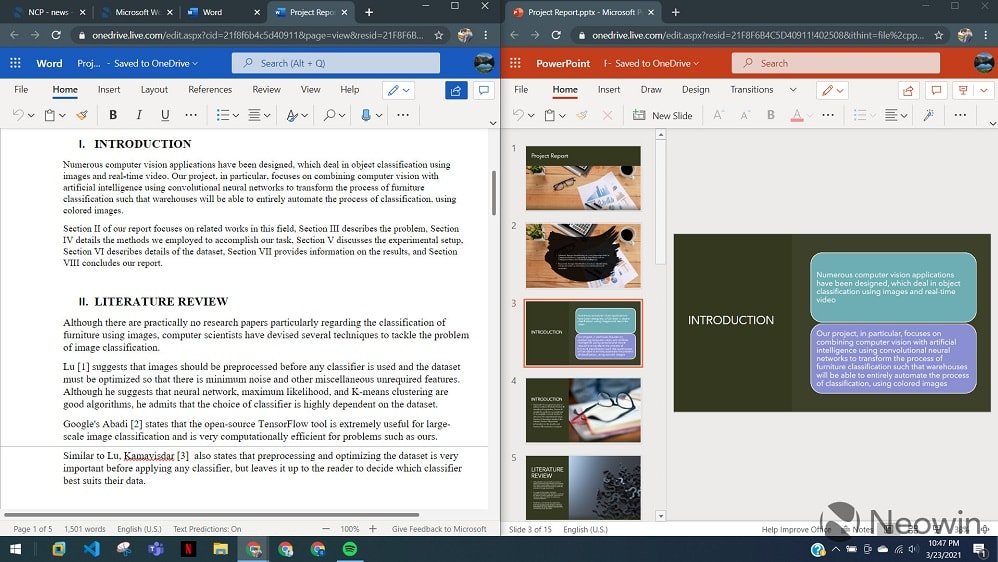
Microsoft Word has long held its status as the industry standard for word processing, and for good reason.
Microsoft Word has long held its status as the industry standard for word processing, and for good reason. When compared to Google Docs, it offers several advantages that make it the preferred choice for many users.
One of Microsoft Word's strengths lies in its extensive formatting capabilities. Users have access to a wide range of formatting options, from intricate layout designs to specialized fonts and styles. This level of customization allows for the creation of visually appealing and highly professional documents. Microsoft Word's superior word processing capabilities, extensive formatting options, advanced collaboration features, and seamless integration within the Microsoft 365 suite make it the go-to choice for users who require the utmost in document creation and editing capabilities. While Google Docs is a strong contender, Microsoft Word offers an edge in terms of functionality and user experience.
Google Workspace's Google Meet is Simpler to Use than Microsoft 365's Teams for Video Conferencing

Google Meet excels in hassle-free and quick video conferencing.
When it comes to video conferencing, Google Meet from Google Workspace and Microsoft Teams offer distinctive approaches to cater to varying user needs.
Google Meet excels in hassle-free and quick video conferencing. Its strength lies in its simplicity and accessibility. Users can initiate a video conference in mere seconds from virtually anywhere with an internet connection. This ease of use makes it an excellent choice for those who prioritize simplicity and speedy access.
On the other hand, Microsoft Teams offers a comprehensive unified platform that encompasses chat, video conferencing, and application integration. While it may be more feature-rich, its approach involves a slightly steeper learning curve. Teams caters to users who require an all-encompassing collaboration hub with various tools at their disposal.
Google Workspace and Microsoft 365 are Equally Robust as Storage Solutions
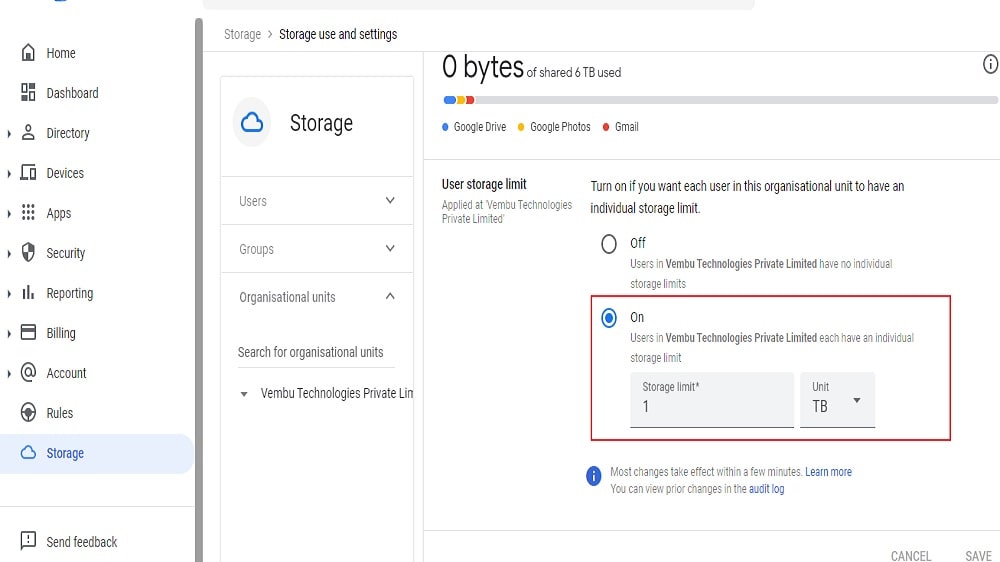
Google Workspace provides flexible storage on the Google Cloud platform.
Both Google Workspace and Microsoft 365 offer commendable storage solutions, but they do so with distinct advantages and integration capabilities.
Google Workspace provides flexible storage on the Google Cloud platform. It allows users to adapt their storage space to their needs, ensuring that they have ample room for documents, files, and other data. Google's cloud-based approach ensures that files are securely stored, accessible from any device, and shareable with ease.
On the other hand, Microsoft 365 boasts OneDrive, a cloud storage service that seamlessly integrates with other Microsoft apps. OneDrive simplifies the storage and accessibility of files within the Microsoft ecosystem. Files stored on OneDrive can be easily shared and collaborated on through applications like Word, Excel, and PowerPoint.
Google Workspace is Superior in Mobile Device Management than Microsoft 365
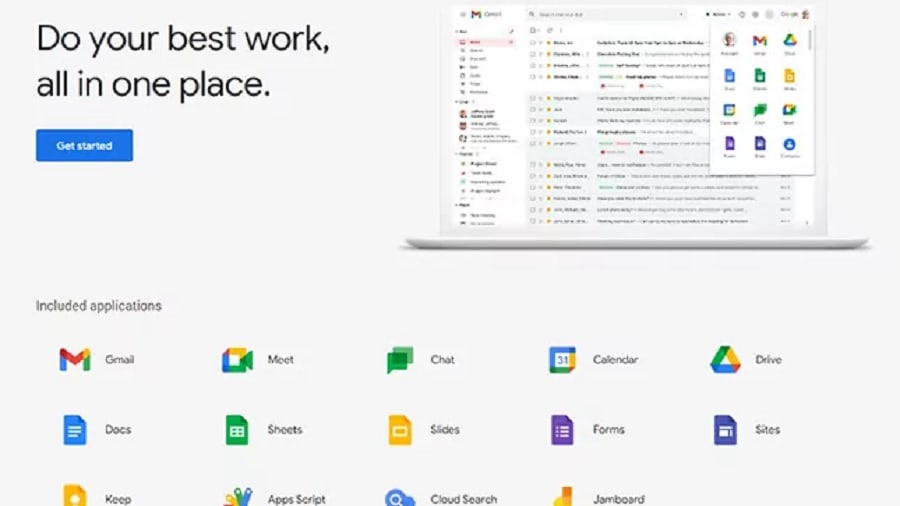
Google Workspace empowers administrators with powerful tools for enforcing stringent security policies on mobile devices.
While both Google Workspace and Microsoft 365 offer robust security features to safeguard business data, Google Workspace stands out in the realm of Mobile Device Management (MDM). It takes the lead with a more comprehensive MDM solution that bolsters mobile device security.
For instance, Google Workspace empowers administrators with powerful tools for enforcing stringent security policies on mobile devices. This includes the ability to configure settings, apply access controls, and mandate strong authentication methods, ensuring a higher level of protection for corporate data. In the event of a lost or stolen device, Google Workspace offers the capability to remotely wipe sensitive data, preventing unauthorized access and data breaches.
In comparison, while Microsoft 365 offers mobile device management features, some users find Google Workspace's MDM capabilities to be more user-friendly and comprehensive.
Microsoft 365’s Outlook is More Comprehensive than Google Workspace's Gmail

Outlook, part of Microsoft 365, goes beyond being a mere email client. It seamlessly integrates email, calendar, tasks, and contact lists into a unified platform.
Microsoft Outlook and Gmail are both robust email services, but their capabilities extend to different aspects of communication and scheduling, making them suitable for various user preferences.
Outlook, part of Microsoft 365, goes beyond being a mere email client. It seamlessly integrates email, calendar, tasks, and contact lists into a unified platform. Users can manage appointments, set reminders, and maintain detailed contact information within the same interface. Moreover, Outlook offers advanced features such as meeting scheduling, voting buttons, and focused inbox, enhancing productivity and organization.
In contrast, Gmail provides a powerful and secure email service, complete with features like conversation view and categorization of emails. Additionally, it offers Google Chat and Google Meet for instant messaging and video conferencing, facilitating real-time communication and collaboration.
08 Google Workspace vs Microsoft 365: Which is the best for your business?
Google Workspace is the best tool for you if:
- You need an integrated suite of productivity applications, offering seamless collaboration with tools like Docs, Sheets, and Slides.
- You're looking for a unified communication platform, combining email (Gmail), chat, and video conferencing (Meet) for efficient team interaction.
- You need secure, cloud-based storage and sharing capabilities, with Drive providing easy access and organization of files from any device, anywhere.
- You require advanced business tools such as custom email addresses, calendar sharing, and sophisticated admin controls for user management.
- You value streamlined workflows and automated processes, offering app integrations and custom scripts in Apps Script to tailor functions to specific business needs.
 You need an integrated suite of productivity applications, offering seamless collaboration with tools like Docs, Sheets, and Slides.
Microsoft 365 is the best tool for you if:
- You rely on professional-grade office applications like Word, Excel, and PowerPoint for document creation, data analysis, and presentations.
- You need comprehensive email and calendaring solutions, with Outlook offering robust features for email management, scheduling, and task organization in a corporate environment.
- You require advanced collaboration tools, offering Teams for seamless communication, file sharing, and project management within and across teams.
- You’re seeking integrated cloud storage and access, with OneDrive providing secure, accessible storage for files, enabling easy sharing and collaboration from any location or device.
- You value robust security and compliance features, offering advanced protection against cyber threats and compliance solutions for sensitive data management.
Google Workspace
A complete suite to improve employee productivity
20% off Plus plans for 1 year
Save up to $518
09 Alternatives to Google Workspace & Microsoft 365

Google Cloud (GCP)
Used by 11245 members
$2,000 in credits for 1 year if you never raised funds // $350,000 in credits for 2 years if you did
Save up to $350,000

Slack
Used by 3694 members
25% off new plan purchases
Save up to $9,000

Miro
Used by 3292 members
$1,000 in credits (lifetime validity)
Save up to $1,000

ClickUp
Used by 3264 members
Additional 20% off Unlimited and Business plans for 1 year
Save up to $1,000
10 Promotions on Collaboration and software
Google Workspace and Microsoft 365 are great tools, but Secret offers promo codes with discounts on over 2190+ different SaaS solutions. New deals are added regularly, helping you save money on your online subscriptions. Get access to codes for other Collaboration and software you might want to purchase

Promo code for Airtable
$1,000 in credits for 1 year

Discount for Notion
6 months free on the Business plan with Unlimited AI
Code for Slack
25% off new plan purchases
Credits for Miro
$1,000 in credits (lifetime validity)

Credits for Monday
First month free

Discount for Asana
75% off the annual Starter and Advanced plans for 1 year
ClickUp promo
Additional 20% off Unlimited and Business plans for 1 year

Discount for xTiles
20% off monthly or annual plans

Deal for Google Drive
20% off Plus plans for 1 year

Zoom Meetings coupon code 2026
$20 off per user on the annual Workplace Pro plan
Start saving on the best SaaS
Secret has already helped tens of thousands of startups save millions on the best SaaS like Microsoft Teams, Google Workspace & many more. Join Secret now to buy software the smart way.