


Payroll and accounting software are essential components of managing your business's financial affairs. They help you handle employee payments, track expenses, and ensure compliance with tax regulations. In the realm of payroll and accounting, Gusto and QuickBooks are two standout solutions that cater to the unique needs of businesses.
In this comprehensive guide, we will take a deep dive into the world of Gusto vs QuickBooks. We'll explore their common features, distinct capabilities, pricing models, and user experiences. By the end of this comparison, you'll have a better understanding of which payroll and accounting software, Gusto or QuickBooks, aligns best with your business requirements. Make an informed decision and streamline your financial management processes today.
- 01 Gusto vs QuickBooks: overview
- 02 What's the difference between Gusto and QuickBooks?
- 03 Gusto pros and cons
- 04 QuickBooks pros and cons
- 05 Gusto compared to QuickBooks
- 06 QuickBooks compared to Gusto
- 07 Features comparison
- 08 Gusto vs QuickBooks: Which is the best for your business?
- 09 Alternatives to Gusto & QuickBooks
- 10 Promotions on Payroll Management software
Start saving on the best SaaS
Secret has already helped tens of thousands of startups save millions on the best SaaS like Microsoft Teams, Google Workspace & many more. Join Secret now to buy software the smart way.

01 Gusto vs QuickBooks: overview
Gusto and QuickBooks are prominent contenders in the realm of payroll and accounting software, each bringing unique features and benefits to the table.
Gusto stands out for its user-friendly interface and seamless payroll processing. It offers a user-centric approach that simplifies complex payroll tasks and ensures compliance with payroll tax regulations. QuickBooks, on the other hand, offers a comprehensive suite of accounting tools, including invoicing, expense tracking, and financial reporting, making it a versatile choice for businesses seeking a complete financial management solution.
In this detailed Gusto vs QuickBooks comparison, we'll examine the key differences and similarities between these two solutions. Whether you're a small business owner or a financial manager, this comparison will help you make an informed decision to meet your specific payroll and accounting needs effectively.

Customer reviews
Gusto is often commended for its user-friendly interface and excellent customer service. QuickBooks is well-regarded for its comprehensive accounting features and integration with other financial tools.

Gusto
QuickBooks
Payroll Features
Gusto offers a robust payroll service that is often considered more user-friendly and automated, with features like auto-pilot payroll. QuickBooks provides strong payroll capabilities, especially for those already using its accounting software.
Gusto
QuickBooks
Pricing plans
Gusto's pricing is straightforward and all-inclusive, which can be higher for smaller businesses. QuickBooks offers tiered pricing, which can be more cost-effective for small to mid-sized businesses.
Gusto
QuickBooks
Customer support
Gusto provides personalized customer support and is known for being very responsive and helpful. QuickBooks has a wide range of support options but sometimes receives criticism for response times and support quality.
Gusto
QuickBooks
Employee Management
Gusto shines with a full suite of HR tools, including benefits administration and onboarding. QuickBooks offers employee management features but is more focused on financial aspects.
Gusto
QuickBooks
Reporting
Gusto provides comprehensive reports with insights into payroll and HR. QuickBooks offers more in-depth reporting features that cover a broad spectrum of financial data.
Gusto
QuickBooks
Ease of use
Gusto has a clear and intuitive interface, designed specifically for HR and payroll, making it easier for non-accountants to use. QuickBooks has a steeper learning curve due to its extensive features.
Gusto
QuickBooks
Tax Services
Gusto is known for automatic tax filings and excellent compliance support. QuickBooks also automates tax filings, but users may need to double-check for accuracy and compliance.
Gusto
QuickBooks
Accounting Features
Gusto includes basic accounting features but is primarily an HR and payroll platform. QuickBooks is an accounting powerhouse with extensive capabilities in financial management.
Gusto
QuickBooks
Integrations
Gusto integrates well with various HR-related platforms but has fewer integrations compared to QuickBooks, which can connect with a multitude of business applications, like Squarespace, Fathom, and Shopify.
Gusto
QuickBooks
02 What's the difference between Gusto and QuickBooks?

Gusto primarily excels in payroll and HR management.
Gusto
All-in-one HR platform

QuickBooks is a comprehensive accounting software that encompasses a broader range of financial management tasks.
QuickBooks
Quickbooks is a software that will allow you to manage your accounting quickly and easily. Record your expenses with simple photos, analyze your cash flow, manage your unpaid bills, and many other tasks that will simplify your accounting life.
Gusto and QuickBooks are both powerful tools for managing your business's financial affairs, but they have distinct differences that cater to varying business needs.
One of the primary differences between Gusto and QuickBooks is their core focus. Gusto primarily excels in payroll and HR management. It provides an intuitive platform for handling employee payroll, tax calculations, and compliance with labor laws. It simplifies tasks like onboarding, benefits management, and employee self-service. In contrast, QuickBooks is a comprehensive accounting software that encompasses a broader range of financial management tasks. It offers features for invoicing, expense tracking, financial reporting, and tax preparation.
Another key distinction lies in their pricing models. Gusto's pricing is primarily based on the number of employees, and it includes payroll processing, tax filings, and HR features. QuickBooks, on the other hand, offers different pricing tiers based on the level of financial functionality you need, with options for self-employed individuals, small businesses, and larger enterprises. This flexibility allows you to choose a plan that aligns with your specific financial management requirements.
Integration capabilities also set Gusto and QuickBooks apart. Gusto integrates with various third-party apps and accounting software, enhancing its functionality. However, its primary focus remains on payroll and HR, limiting its integrations compared to QuickBooks, which has a more extensive ecosystem and integrates with a wide range of third-party applications, allowing for a more comprehensive approach to business financial management.
If you require robust payroll and HR management with integration capabilities, Gusto may be the better choice. Conversely, if you need comprehensive accounting features alongside payroll, QuickBooks offers a broader financial management solution.

Gusto
Used by 376 members
First month free
Save up to $180

QuickBooks
Used by 888 members
30% off for 6 months
Save up to $423
03 Gusto pros and cons
What are the advantages of Gusto?
- User-friendly interface: Gusto offers an intuitive and user-friendly interface, making it easy for business owners and employees to navigate and use the platform efficiently.

- Streamlined payroll processing: Gusto simplifies payroll processing with features like automatic tax calculations, direct deposit, and the ability to handle various pay schedules, reducing the administrative burden.
- Compliance and tax filing: Gusto helps businesses stay compliant with federal, state, and local payroll tax regulations by automating tax filings and providing year-end tax forms for employees.
- Employee self-service: Gusto offers self-service options for employees, allowing them to access pay stubs, W-2s, and update personal information, reducing HR workload.
- Integration ecosystem: Gusto integrates with a variety of accounting, time tracking, and HR-related software, enhancing its functionality and adaptability to different business needs.
What are the disadvantages of Gusto?
- Pricing: Gusto's pricing can be relatively high for smaller businesses, especially if they have a large number of employees or require additional features beyond basic payroll.

- Limited advanced accounting features: While Gusto offers basic accounting features, it may not be as comprehensive as dedicated accounting software like QuickBooks for businesses with complex financial needs.
- Limited international support: Gusto primarily caters to businesses operating in the United States and may not be suitable for companies with international employees or global operations.
- Advanced HR functionality: Gusto's HR features are basic and may not meet the needs of larger organizations with more complex HR requirements.
- Limited customization: Some users may find Gusto's level of customization options limited, especially when compared to more advanced HR and payroll solutions.
Compare Gusto to other tools


Deel vs Gusto

Rippling vs Gusto
04 QuickBooks pros and cons
What are the advantages of QuickBooks?
- Comprehensive accounting: QuickBooks offers a wide range of accounting features, including invoicing, expense tracking, financial reporting, and tax preparation, making it suitable for businesses of all sizes and industries.
- User-friendly interface: QuickBooks provides an intuitive interface with user-friendly navigation, making it accessible to users with varying levels of accounting knowledge.
- Integration capabilities: QuickBooks integrates with numerous third-party applications and services, allowing businesses to customize and expand their financial management capabilities.
- Scalability: QuickBooks offers different versions and plans to accommodate the needs of both small businesses and larger enterprises, making it versatile and adaptable as businesses grow.
- Strong support and community: QuickBooks has a large user community, extensive online resources, and customer support, ensuring users have access to assistance when needed.
What are the disadvantages of QuickBooks?
- Cost: QuickBooks can be relatively expensive, especially when considering the cost of additional features, add-ons, and multiple user licenses.
- Learning curve: While QuickBooks is user-friendly, there may still be a learning curve for users who are new to accounting software, particularly when setting up advanced features.
- Overwhelming features: Some users may find QuickBooks' extensive feature set overwhelming, especially if they only require basic accounting functions.
- Limited international support: QuickBooks primarily caters to businesses in the United States, and its international versions may have fewer features and support options.
- Occasional bugs and technical issues: Like any software, QuickBooks may encounter occasional bugs or technical issues, which can disrupt workflow and require troubleshooting.
Compare QuickBooks to other tools


Pennylane vs QuickBooks

FreshBooks vs QuickBooks

HoneyBook vs QuickBooks

Xero vs QuickBooks

Zoho Books vs QuickBooks

Expensify vs QuickBooks
05 Gusto compared to QuickBooks
Gusto and QuickBooks are popular financial management tools, each with its own strengths. Gusto excels in payroll and HR, offering an intuitive interface, automatic tax calculations, and employee self-service features. It's ideal for small to mid-sized businesses focused on streamlined payroll processes.
QuickBooks, on the other hand, provides comprehensive accounting solutions, including invoicing, expense tracking, and financial reporting. It caters to a broader range of financial needs and integrates with various third-party apps. Choosing between Gusto and QuickBooks depends on your specific business requirements, with Gusto prioritizing payroll and HR and QuickBooks offering a more comprehensive financial management solution.
Is Gusto better than QuickBooks?
 Is Gusto better than QuickBooks?
In evaluating whether Gusto is better than QuickBooks, it's important to consider the specific needs of your business. While Gusto shines in payroll and human resource management, QuickBooks offers a wider spectrum of accounting features.
If your primary need is a streamlined, efficient payroll system with robust HR support, Gusto may be the better choice. However, for businesses seeking an all-encompassing tool for financial management, including advanced accounting, expense tracking, and detailed financial reporting, QuickBooks stands out.
What is Gusto best used for?
Gusto is best used for small to medium-sized businesses seeking efficient and user-friendly payroll and HR management. It excels in automating payroll processing, calculating taxes, and simplifying compliance with tax regulations.
Additionally, Gusto offers employee self-service features, making it a valuable tool for companies looking to empower their workforce. While it can handle payroll and HR needs effectively, it may not be the best choice for businesses with complex accounting requirements, as it lacks advanced financial management features found in dedicated accounting software like QuickBooks. Overall, Gusto is ideal for those focused on optimizing payroll and HR processes.
Can Gusto replace QuickBooks?
Gusto and QuickBooks serve different primary purposes in a business's financial management. Gusto specializes in payroll and HR management, offering features for payroll processing, tax calculations, and employee self-service. While it plays a crucial role in employee management, it doesn't provide the comprehensive accounting functionalities that QuickBooks does.
QuickBooks, on the other hand, is a full-fledged accounting software that covers invoicing, expense tracking, financial reporting, and tax preparation. While Gusto can complement QuickBooks by handling HR-related tasks, it cannot entirely replace QuickBooks for comprehensive accounting needs. The two can work together to provide a complete financial management solution for businesses.
Is Gusto cheaper than QuickBooks?
Gusto and QuickBooks have different pricing models that make direct cost comparisons somewhat complex. Gusto's pricing is primarily based on the number of employees, making it more predictable for businesses with fluctuating staff. QuickBooks, on the other hand, offers various plans catering to different business sizes and needs, with pricing tiers that may include additional features.
While Gusto may appear more cost-effective for basic payroll and HR services, QuickBooks' pricing varies depending on the specific version and features you require. Therefore, whether Gusto is cheaper than QuickBooks depends on your business's size, needs, and the features you require from each platform.
Is there a better Payroll Management software than Gusto?
While Gusto is a well-regarded payroll and HR management software, it's essential to explore whether there might be a better-suited solution for your specific needs.
There are several notable alternatives to Gusto in the payroll and HR software space, each with its unique strengths and capabilities. Some of these alternatives include QuickBooks, Zenefits, BambooHR, Paychex, and ADP.
The choice of payroll and HR software depends on factors such as your organization's size, complexity, industry, and the specific features you require. While Gusto excels in user-friendliness and streamlined payroll processes, other platforms may offer more extensive HR functionalities, advanced reporting options, or specialized services tailored to certain industries or larger enterprises.

Gusto
All-in-one HR platform
First month free
Save up to $180
06 QuickBooks compared to Gusto
QuickBooks and Gusto are distinct tools designed for different aspects of financial management. QuickBooks serves as a comprehensive accounting software, encompassing invoicing, expense tracking, financial reporting, and tax preparation. It caters to a wide range of businesses seeking robust financial management capabilities.
In contrast, Gusto excels in payroll and HR management, offering features like automated payroll processing, tax calculations, and employee self-service. While both are valuable for business operations, QuickBooks focuses on accounting and financial aspects, whereas Gusto prioritizes payroll and HR functions.
Is QuickBooks better than Gusto?
Determining if QuickBooks is superior to Gusto largely depends on your business's specific financial management needs. QuickBooks stands out for its extensive accounting functionalities, which are essential for businesses that require comprehensive financial oversight, including detailed invoicing, thorough expense tracking, and sophisticated financial reporting. This makes it a particularly valuable tool for companies seeking an all-in-one accounting solution.
On the other hand, while Gusto specializes in payroll and HR, QuickBooks offers a broader scope in financial management, making it more suitable for businesses that need more than just payroll solutions. In essence, QuickBooks is preferable for those prioritizing a wide range of accounting capabilities over specialized HR services.
What is QuickBooks best used for?
QuickBooks is best used for comprehensive financial management, making it a versatile tool for businesses of all sizes. It excels in handling various aspects of accounting, including invoicing, expense tracking, financial reporting, and tax preparation. Small businesses, freelancers, and larger enterprises can benefit from its user-friendly interface and robust features, aiding in financial organization and decision-making.
QuickBooks offers scalability, allowing businesses to adapt as they grow. While primarily an accounting software, QuickBooks also integrates with numerous third-party applications, making it an ideal choice for those seeking a customizable and comprehensive solution for their financial needs.
Can QuickBooks replace Gusto?
QuickBooks and Gusto serve distinct purposes within a business's financial management. While QuickBooks excels in comprehensive accounting tasks such as invoicing, expense tracking, and financial reporting, Gusto specializes in payroll and HR management, automating payroll processing, tax calculations, and employee self-service.
While both are valuable tools, QuickBooks cannot entirely replace Gusto for payroll and HR functions. Instead, they can complement each other, with QuickBooks handling accounting needs and Gusto focusing on payroll and HR tasks.
Is QuickBooks cheaper than Gusto?
Comparing the cost of QuickBooks and Gusto can be complex due to their different pricing models. Gusto's pricing primarily depends on the number of employees, offering predictability for businesses with varying staff sizes. QuickBooks’s pricing structure, on the other hand, offers various plans with pricing tiers catering to different business sizes and needs.
The cost comparison depends on factors such as your organization's size, the specific features you require, and the scalability of your business. While Gusto may appear more cost-effective for basic payroll and HR services, QuickBooks' pricing varies based on your needs and may be more competitive for comprehensive accounting functions.
Is there a better Accounting software than QuickBooks?
When considering business software solutions, it's essential to evaluate whether there might be a more suitable option than QuickBooks for your specific needs.
There are several noteworthy alternatives to QuickBooks in the realm of financial management software, each with its own strengths and capabilities. Notable alternatives include Xero, FreshBooks, Wave, and Sage Intacct.
The choice of financial management software depends on factors such as your organization's size, industry, complexity of financial processes, and the specific features you require. While QuickBooks offers a comprehensive suite of accounting tools, other platforms may cater better to niche industries, provide enhanced automation, or offer specialized financial features.

QuickBooks
Optimize your accounting and invoicing management with ease.
30% off for 6 months
Save up to $423
07 Features comparison
QuickBooks Surpasses Gusto in Comprehensive Tax Automation and Management
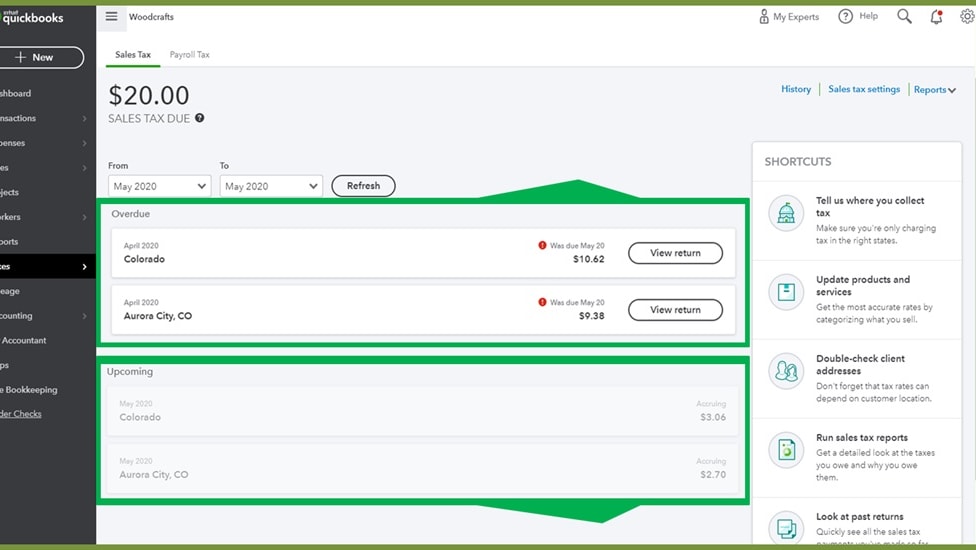
QuickBooks not only effectively streamlines the payroll process but also excels in automating tax calculations.
QuickBooks not only effectively streamlines the payroll process but also excels in automating tax calculations. It goes beyond managing just taxes on purchases and sales; it efficiently handles a wide array of payroll-related taxes. This comprehensive tax automation feature simplifies the intricacies of tax management for your business, ensuring compliance while saving valuable time.
QuickBooks' ability to seamlessly handle various tax calculations and filings sets it apart, making it a top choice for businesses seeking efficiency and accuracy in tax-related processes, an area where Gusto may not be as robust.
Both Gusto and QuickBooks Excel in Automating Key Business Operations

Gusto shines by automating the tracking of leave dates, time-off requests, and attendance, significantly reducing the manual effort required for HR and payroll tasks.
Both Gusto and QuickBooks have strong features to streamline task automation. Gusto shines by automating the tracking of leave dates, time-off requests, and attendance, significantly reducing the manual effort required for HR and payroll tasks. This automation streamlines workforce management and minimizes errors.
Conversely, QuickBooks focuses on accounting and financial task automation, ensuring that accounts are efficiently updated in compliance with accounting regulations. This includes automating processes related to invoicing, expense tracking, and financial reporting, which not only saves time but also enhances accuracy.
Gusto is Superior at Hiring New Talents than QuickBooks

Where Gusto truly excels is in its comprehensive onboarding capabilities.
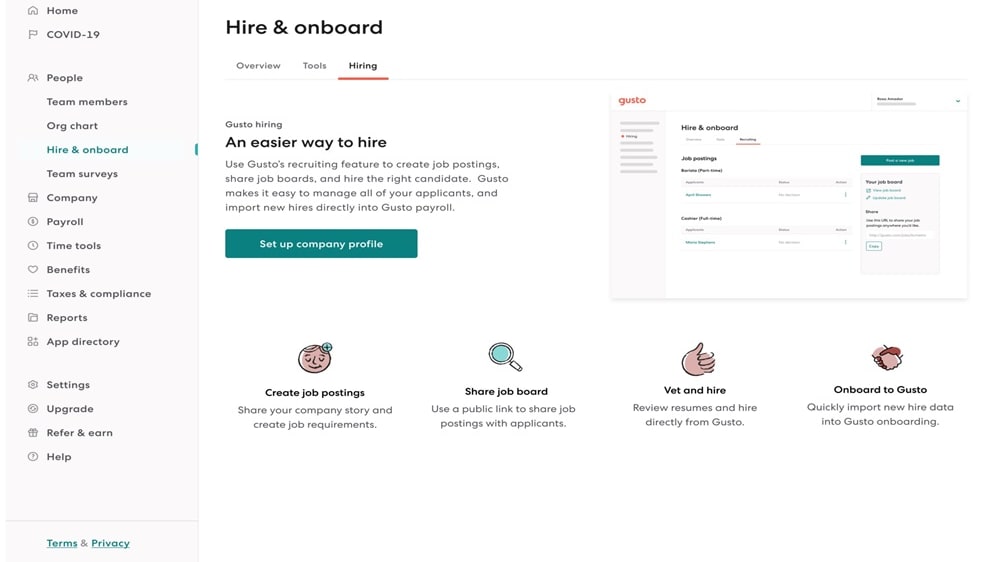
Gusto's integrated applicant tracking system and job posting features surpass what QuickBooks offers in this domain. It simplifies the hiring process by allowing businesses to post job openings and seamlessly manage candidate applications within the platform.
Where Gusto truly excels is in its comprehensive onboarding capabilities. It enables businesses to onboard new hires efficiently using customizable checklists, electronic signatures for documentation, and automated notifications. This end-to-end onboarding process streamlines the integration of new employees, ensuring a smooth and productive transition into the company.
In contrast, QuickBooks primarily focuses on financial management and accounting, lacking the specialized tools and features that Gusto provides for sourcing and onboarding talent. Thus, when it comes to hiring and onboarding, Gusto stands out as the preferred tool, offering a dedicated solution for HR-related tasks, an area where QuickBooks may not be as proficient.
Gusto Outperforms QuickBooks in User-Friendly Experience for Payroll and HR Management

Gusto's intuitive user interface and detailed step-by-step guides simplify the setup and management processes.
When it comes to ease-of-use, Gusto clearly surpasses QuickBooks. Gusto's intuitive user interface and detailed step-by-step guides simplify the setup and management processes. For instance, payroll processing on Gusto is a breeze, with easy-to-follow procedures, while benefits administration and tax management are equally straightforward.
In contrast, QuickBooks may require a steeper learning curve, and users often find it less intuitive in comparison. Gusto offers a streamlined and clutter-free experience, saving valuable time on these crucial functions, allowing you to allocate more resources to growing your business.
Gusto Excels at Employee Collaboration Compared to QuickBooks
Gusto offers a robust set of features designed to facilitate collaboration and informed decision-making within the organization.
When it comes to fostering employee collaboration and engagement, Gusto takes the lead. Gusto offers a robust set of features designed to facilitate collaboration and informed decision-making within the organization. One standout feature is the ability to connect with HR experts, providing valuable insights and guidance on HR-related matters.
Additionally, Gusto supports anonymous feedback from employees, enabling organizations to gather candid input on various aspects of the business, from workplace culture to benefits preferences. This collaborative approach empowers companies to make data-driven decisions that genuinely benefit both the organization and its staff, creating a more engaged and productive workforce—a domain where QuickBooks may not offer comparable features.
QuickBooks Outperforms Gusto in Monitoring Financial Performance
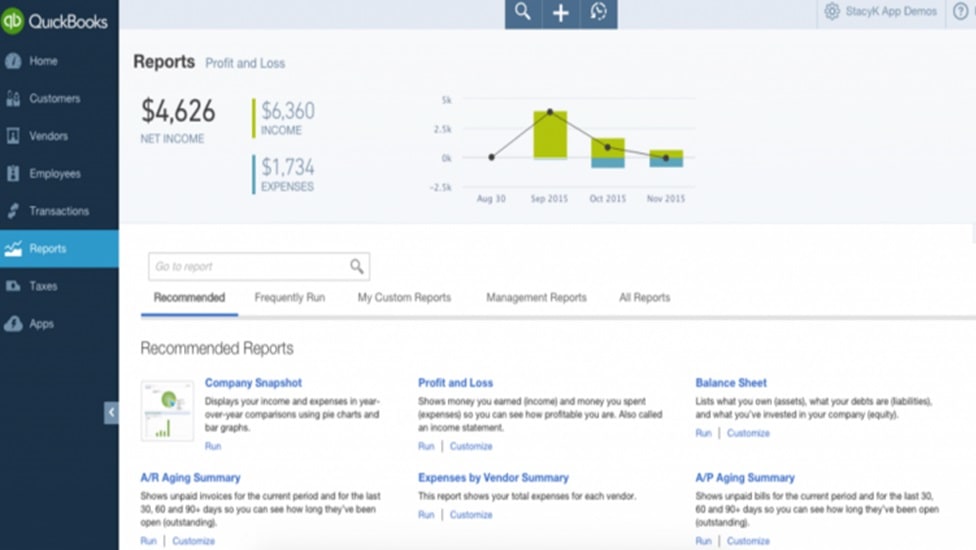
QuickBooks offers businesses a real-time dashboard that grants them easy access to a wealth of financial data.
QuickBooks offers a more comprehensive overview of financial performance than Gusto. QuickBooks offers businesses a real-time dashboard that grants them easy access to a wealth of financial data. Detailed reports enable companies to closely monitor their financial health, from cash flow and income statements to balance sheets. This depth of financial insight empowers businesses to make informed decisions, plan for growth, and ensure financial stability.
While Gusto excels in performance reviews, its primary focus is on human resource development and management, making it better suited for HR-related functions rather than in-depth financial analysis. Therefore, QuickBooks takes the lead when it comes to offering businesses a more extensive and robust financial performance analysis toolkit, a domain where Gusto may not provide the same depth of features.
QuickBooks Leads with Extensive Integration Network Over Gusto's Focused Connections
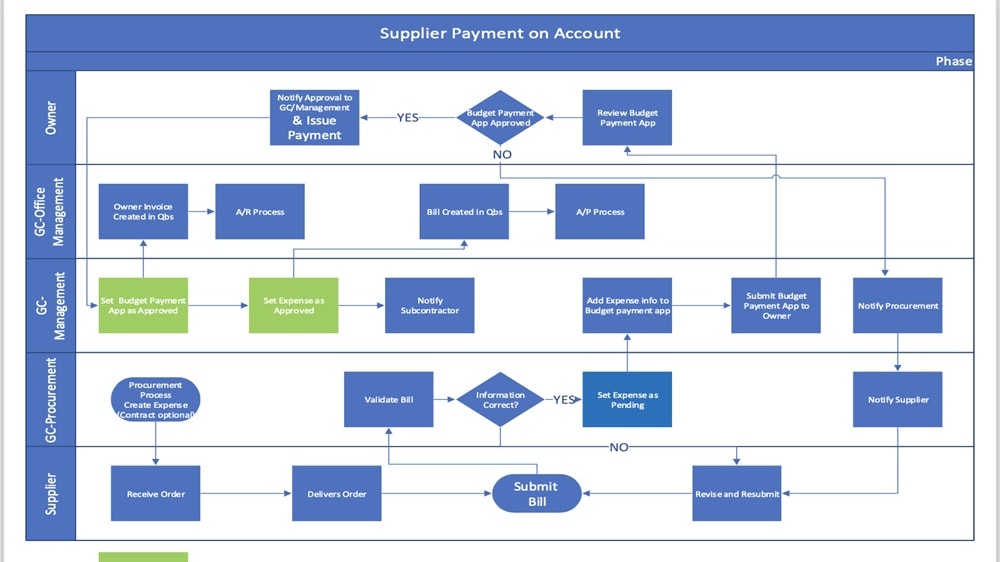
With a long history in the SaaS space, QuickBooks has cultivated a robust ecosystem of integrations over the years.
When it comes to integration capabilities, QuickBooks stands out. With a long history in the SaaS space, QuickBooks has cultivated a robust ecosystem of integrations over the years. It seamlessly synchronizes with hundreds of third-party applications, including well-known platforms such as PayPal, Square, Shopify, and Salesforce. This expansive integration network significantly broadens its functionality beyond accounting, empowering businesses to consolidate various aspects of their operations effortlessly.
In contrast, Gusto, while offering integration capabilities, does not possess the same extensive integration ecosystem as QuickBooks. Nevertheless, it integrates with essential platforms like Xero, FreshBooks, and even QuickBooks itself. This enhances Gusto's functionality, particularly in the realm of payroll and HR-related tasks, but it may not match the breadth of integration options provided by QuickBooks.
08 Gusto vs QuickBooks: Which is the best for your business?
Gusto is the best tool for you if:
- You prioritize payroll management and HR functions, as it offers automated payroll processing, benefits administration, and simplifies tax compliance with user-friendly interfaces and efficient tools.
- Your business seeks an intuitive platform with self-service options for employees, enabling them to manage their details, access payslips, and request time off easily.
- You value dedicated HR support, including compliance assistance and access to HR professionals, which can be especially beneficial for small to mid-sized businesses.
- Streamlined integration with accounting software like Xero and FreshBooks is important, as well as the ability to sync seamlessly with QuickBooks for a holistic approach.
- You are looking for a cost-effective solution that offers transparent pricing without hidden fees, making it an ideal choice for budget-conscious small businesses.
 You prioritize payroll management and HR functions, as it offers automated payroll processing, benefits administration, and simplifies tax compliance with user-friendly interfaces and efficient tools.
QuickBooks is the best tool for you if:
- Comprehensive financial management is your priority, with features for invoicing, expense tracking, and detailed financial reporting, catering to a wide range of accounting needs.
- You require a robust ecosystem of integrations, allowing for seamless synchronization with numerous third-party applications like PayPal, Square, Shopify, and Salesforce.
- Advanced tax management capabilities are essential for your business, including efficient handling of a variety of payroll-related taxes and compliance with accounting regulations.
- You're looking for a scalable solution that grows with your business, offering advanced features and customization options suitable for both small and large enterprises.
- You need real-time financial insights and the ability to track cash flow, generate profit and loss statements, and manage bills and payments efficiently.
Gusto
Used by 376 members
First month free
Save up to $180
QuickBooks
Used by 888 members
30% off for 6 months
Save up to $423
09 Alternatives to Gusto & QuickBooks

Slack
Used by 3696 members
25% off new plan purchases
Save up to $9,000

Xero
Used by 1456 members
90% off for 6 months
Save up to $432

Nova
Used by 724 members
3 months free
Save up to $30

Deel
Used by 459 members
$1,500 credit on Payroll, HR or IT plans
Save up to $1,500
10 Promotions on Payroll Management and Accounting software
Gusto and QuickBooks are great tools, but Secret offers promo codes with discounts on over 2190+ different SaaS solutions. New deals are added regularly, helping you save money on your online subscriptions. Get access to codes for other Payroll Management and Accounting software you might want to purchase
Xero discounts
90% off for 6 months

Qonto deal
2 months free on the Basic and Smart plans

Rippling discounts
3 months free

Stripe promo code
Waived Stripe fees on your next $20,000 in payment processing

BambooHR promotion code
50% off implementation services

FreshBooks promo code 2026
90% off for 3 months

Oyster HR coupon
30% off all plans for 1 year

Credits for Navan
Spend $500, Get $500 in Credit for your next booking
Promo code Deel
$1,500 credit on Payroll, HR or IT plans

Discount for doola
20% off your first purchase
Start saving on the best SaaS
Secret has already helped tens of thousands of startups save millions on the best SaaS like Microsoft Teams, Google Workspace & many more. Join Secret now to buy software the smart way.