


When preparing to create engaging presentations, selecting the right digital tool can greatly impact your ability to effectively communicate and captivate your audience. Whether you need to present complex ideas succinctly or enhance storytelling visuals, the choices are vast.
Prezi and Visme are leading platforms in this realm, each specializing in unique aspects of presentation design and delivery. On the other hand, Visme excels with its versatile features that allow the creation of not only presentations but also infographics and reports, suitable for businesses and marketers. In this article, we delve into the core features, pros and cons, and key differences of Prezi and Visme to help you determine the best tool for your presentation needs.
- 01 Prezi vs Visme: overview
- 02 What's the difference between Prezi and Visme?
- 03 Prezi pros and cons
- 04 Visme pros and cons
- 05 Prezi compared to Visme
- 06 Visme compared to Prezi
- 07 Features comparison
- 08 Prezi vs Visme: Which is the best for your business?
- 09 Alternatives to Prezi & Visme
- 10 Promotions on Presentation software
Start saving on the best SaaS
Secret has already helped tens of thousands of startups save millions on the best SaaS like Microsoft Teams, Google Workspace & many more. Join Secret now to buy software the smart way.

01 Prezi vs Visme: overview
Prezi and Visme are standout choices in the domain of presentation software, each offering distinctive features and benefits tailored to varied user needs.
Prezi is acclaimed for its non-linear presentation style and zoomable user interface, which allow presenters to focus on storytelling and maintain audience engagement through a visually interactive experience. This platform is particularly effective for educators and businesses that wish to present complex data and ideas in a memorable and dynamic manner. Conversely, Visme specializes in creating not only presentations but also a broad range of visual content such as infographics, documents, and videos. With its strong emphasis on design and data visualization, Visme is suited for marketers, data analysts, and businesses that require versatile and visually appealing communication tools.
Now, let's delve into the comparison between Prezi and Visme to help you make an informed decision on which presentation platform best fits your specific needs.

Customer support
Both platforms provide solid customer support with comprehensive help centers and online resources. Community support forums are also available for both services.

Prezi
Visme
Ease of use
Prezi has a unique interface that might require a learning curve but is very engaging once mastered. Visme is known for its user-friendly interface, making it easy to create professional designs quickly.
Prezi
Visme
Design flexibility
Prezi offers innovative design possibilities that are great for storytelling. Visme allows for high customization of presentations and other designs with access to extensive assets and templates.
Prezi
Visme
Pricing plans
Prezi offers several plans, including a basic free version with limited features. Visme's free tier is also limited, but its paid plans generally offer more value with access to more templates and tools.
Prezi
Visme
Presentation features
Prezi excels with its zoomable canvas and path-based navigation, offering a unique presentation experience. Visme provides strong presentation capabilities, with more traditional slide-based layouts and rich content.
Prezi
Visme
Mobile experience
Prezi has a functional mobile app that supports viewing and presenting on the go. Visme's mobile experience is mainly focused on viewing rather than creating or editing.
Prezi
Visme
Reporting & analytics
Prezi provides basic analytics on viewer engagement. Visme offers more detailed analytics, particularly useful for marketing content like infographics and online publications.
Prezi
Visme
Collaboration features
Prezi supports real-time collaboration for teams, which is great for simultaneous editing. Visme also offers collaboration features, allowing teams to work together on projects effectively.
Prezi
Visme
Positive reviews
Prezi is praised for its engaging, zoomable presentation interface which can make presentations more dynamic. Visme is highly regarded for its versatility in creating both presentations and a variety of graphic content.
Prezi
Visme
Integrations
Prezi integrates with tools like Slack for collaboration and Salesforce for business use. Visme offers integrations with tools like Google Analytics for tracking and Dropbox for storage.
Prezi
Visme
02 What's the difference between Prezi and Visme?
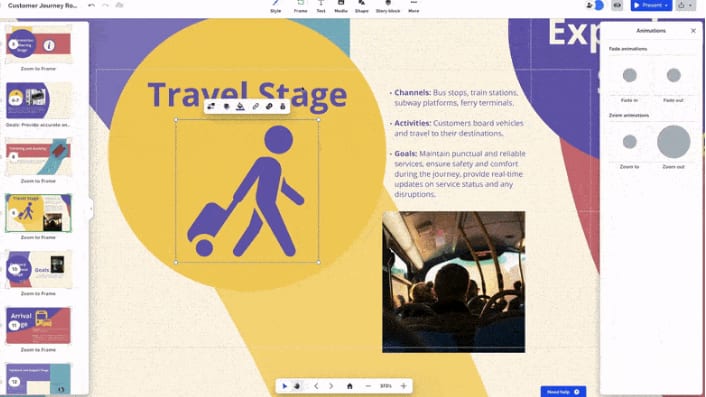
Prezi's Interface Allows You to Add Animations and More to Create More Captivating Presentations
Prezi
Engage, inspire, captivate.

Visme's Tools Can Be Used to Create Not Only Presentations but also Infographics, Documents, and Social Media Graphics
Visme
Visme transforms your ideas into stunning visual stories. The design platform brings presentations, infographics, and other visual content to life with ease, making professional storytelling accessible to everyone.
Prezi and Visme serve as innovative solutions for creating engaging presentations, but they cater to different aspects of presentation-making and audience engagement. Understanding their primary focuses and unique features can help you decide which tool better suits your needs.
Prezi is renowned for its unique zooming user interface, which allows presenters to navigate through a canvas of topics visually and dynamically. This method is particularly effective for storytelling and maintaining audience engagement, as it moves seamlessly from one point to another, creating a narrative flow. Prezi's design is geared towards presenters who wish to create a memorable experience by visually linking ideas and concepts. It’s excellent for educational settings and businesses that want to showcase relational data or processes.
On the other hand, Visme focuses on versatility in content creation, allowing users to produce not only presentations but also infographics, documents, and social media graphics. Visme comes equipped with extensive design templates and assets, which include icons, images, and data visualization tools like charts and graphs. This makes it suitable for marketers, data analysts, and businesses that need to create a variety of visually appealing and informative content. Visme’s strength lies in its ability to customize and brand content, making it a favorite for users who need to maintain brand consistency across multiple types of outputs.
In terms of integration, Prezi offers seamless collaboration features, making it ideal for teams that need to work together in real-time on presentations. Visme, while also offering collaboration options, includes more robust content management capabilities, allowing users to organize projects and assets effectively within the platform.
To sum up, while Prezi excels in creating dynamic, non-linear presentations that captivate audiences with their movement and flow, Visme provides a broader range of content creation tools with strong customization options, suitable for creating detailed, branded visual communications across various formats. Choosing between them depends largely on your specific presentation goals and the types of content you frequently produce.

Prezi
Used by 70 members
40% off for 1 year
Save up to $91

Visme
Used by 65 members
30% off the Pro plan for 1 year
Save up to $212
03 Prezi pros and cons
What are the advantages of Prezi?
- Engaging visuals: Prezi allows for dynamic, zoomable presentations that can captivate and engage audiences more effectively than static slides.

- Non-linear structure: Unlike traditional slides, Prezi presentations can follow non-linear paths, enabling presenters to emphasize connections between ideas and navigate freely through content.
- Cloud-based collaboration: Prezi offers cloud-based storage and collaboration features, allowing multiple users to work on presentations simultaneously from different locations.
- Accessibility: Prezi presentations can be accessed online, making it easy to share them with remote audiences or access them from various devices without compatibility issues.
- Creative freedom: Prezi's canvas-based approach provides users with greater creative freedom to design visually appealing presentations with customizable layouts, fonts, and multimedia elements.
What are the disadvantages of Prezi?
- Steep learning curve: Prezi's unique interface and non-linear structure may require some time for users to adapt to, especially those accustomed to traditional slide-based presentation software.

- Motion sickness: The zooming and rotating animations in Prezi presentations can sometimes cause motion sickness or discomfort for viewers, particularly if overused or poorly executed.
- Limited offline access: While Prezi presentations can be accessed online, offline access and editing capabilities are limited without an internet connection, which may be inconvenient for users in areas with poor connectivity.
- Cost: While Prezi offers a free version with basic features, more advanced functionality and collaboration tools are available through paid subscription plans, which may not be feasible for all users, especially individual presenters or small businesses.
- Compatibility issues: While Prezi presentations can be embedded in websites or shared via links, compatibility with certain devices or software platforms may be limited, potentially creating accessibility issues for some viewers.
Compare Prezi to other tools


Prezi vs Canva

Prezi vs Camtasia

Prezi vs Powtoon

Microsoft PowerPoint vs Prezi

Miro vs Prezi
04 Visme pros and cons
What are the advantages of Visme?
- User-friendly interface: Visme offers an intuitive drag-and-drop interface, making it easy for users with little design experience to create professional-looking visual content quickly.
- Versatility: Visme provides a wide range of templates and design elements, allowing users to create various types of visual content, including presentations, infographics, reports, social media graphics, and more.
- Collaboration features: Visme offers collaboration features that allow multiple users to work on projects simultaneously, making it suitable for team projects or group presentations.
- Interactivity: Visme allows users to create interactive content by adding clickable links, pop-up windows, embedded multimedia, and animations, enhancing audience engagement and interaction.
- Integration: Visme integrates with popular platforms such as Microsoft Office, Google Drive, and Dropbox, making it easy to import content and collaborate with existing files.
What are the disadvantages of Visme?
- Limited free plan: While Visme offers a free plan with basic features, access to advanced features such as premium templates, branding, and collaboration tools requires a paid subscription, which may be cost-prohibitive for some users.
- Learning curve: While Visme's interface is user-friendly, mastering its full range of features and design capabilities may require some time and practice, particularly for users new to design software.
- Customization limitations: While Visme provides a wide range of templates and design elements, some users may find its customization options limited compared to more advanced design tools.
- Performance issues: Some users have reported occasional performance issues with Visme, such as slow loading times or crashes, particularly when working on large or complex projects.
- Exporting limitations: While Visme allows users to export projects in various formats, including PDF, image, and HTML5, exporting presentations for offline use or compatibility with other software platforms may be limited.
Compare Visme to other tools


Visme vs Piktochart
Visme vs Canva
Visme vs Powtoon
05 Prezi compared to Visme
Prezi and Visme are both powerful tools for creating visually engaging presentations, but they differ in approach and features. Prezi's zoomable canvas offers a dynamic, non-linear structure, enabling seamless navigation and storytelling. It excels in creative freedom and engagement, yet requires adaptation due to its unique interface.
Visme, on the other hand, provides an intuitive drag-and-drop interface with versatile templates, suitable for users seeking quick, professional designs without a steep learning curve. While Prezi emphasizes storytelling and interactive presentations, Visme focuses on versatility and ease of use.
Is Prezi better than Visme?
 Is Prezi better than Visme?
Choosing between Prezi and Visme often depends on the user's specific needs and the nature of the presentation. Prezi allows presenters to captivate their audience with motion and zoom, which can be particularly effective for narrative-driven or educational scenarios where keeping the audience's attention is crucial. However, this can sometimes lead to complexity in design and navigation.
In contrast, Visme's straightforward interface and template-driven design make it ideal for business environments where time efficiency and clear, concise presentation of data are priorities. Both platforms excel in their domains, but the best choice hinges on the desired impact and audience engagement level.
What is Prezi best used for?
Prezi is best used for creating dynamic and engaging presentations that captivate audiences through its non-linear storytelling capabilities. It excels in conveying complex ideas or relationships between concepts by allowing presenters to zoom in and out of content, emphasizing connections in a visually compelling manner. Prezi's canvas-based approach fosters creativity, enabling users to design unique presentations that stand out from traditional slide-based formats.
It's particularly well-suited for educational purposes, sales pitches, storytelling, and any situation where captivating visuals and fluid navigation enhance communication effectiveness. Prezi empowers presenters to deliver memorable presentations that leave a lasting impact on their audience.
Can Prezi replace Visme?
Prezi and Visme serve distinct purposes in visual content creation, making them challenging to replace one another outright. While Prezi excels in dynamic presentations with its zoomable canvas and non-linear storytelling, Visme offers a broader spectrum of visual content creation, including presentations, infographics, reports, and social media graphics. While Prezi focuses on interactive storytelling, Visme emphasizes versatility and ease of use across multiple formats.
Whether Prezi can replace Visme depends on the specific needs of the user; Prezi may suffice for those prioritizing dynamic presentations, but Visme's comprehensive toolkit remains indispensable for diverse visual content creation requirements.
Is Prezi cheaper than Visme?
Determining whether Prezi is cheaper than Visme depends on various factors such as subscription plans, features needed, and frequency of use. Prezi’s pricing structure offers a range of subscription options, including a free version with basic features and paid plans with additional functionalities. Visme also provides a free plan along with paid subscription tiers offering more advanced features.
Comparing the cost-effectiveness involves assessing individual requirements against the features and pricing structures of each platform. While Prezi may offer more affordable options for those primarily interested in dynamic presentations, Visme's pricing may be advantageous for users needing a broader range of visual content creation tools.
Is there a better Presentation software than Prezi?
Determining whether there's a "better" software than Prezi hinges on your particular presentation needs and goals. Prezi stands out for its dynamic, non-linear presentation style, but alternatives exist.
Some alternatives to Prezi include Visme, Microsoft PowerPoint, Google Slides, and Canva Presentations, each offering distinct features and strengths. From customizable templates to collaborative capabilities, the best choice depends on your presentation objectives, design preferences, and budget constraints.

Prezi
Premium
Engage, inspire, captivate.
40% off for 1 year
Save up to $91
06 Visme compared to Prezi
Visme and Prezi are both potent tools for visual content creation, yet they diverge in their approach and capabilities. Visme offers a versatile platform catering to various visual content needs, including presentations, infographics, reports, and social media graphics, with an emphasis on user-friendly design and extensive template options.
In contrast, Prezi specializes in dynamic presentations with its zoomable canvas and non-linear storytelling, fostering engagement and creativity. While Visme prioritizes versatility and ease of use across different formats, Prezi excels in interactive storytelling, providing users with a unique canvas to craft visually captivating presentations that stand out from traditional slide-based formats.
Is Visme better than Prezi?
For those prioritizing a tool that supports a broad range of visual content needs and favors user accessibility, Visme may prove to be the superior choice over Prezi. It offers the adaptability required to create not only presentations but also comprehensive reports and eye-catching infographics, making it incredibly useful for professionals who need a multi-purpose tool. Additionally, its extensive array of templates allows users to quickly produce polished designs.
While Prezi is unparalleled in creating engaging, narrative presentations, Visme's simplicity and broad utility make it an excellent option for users who value time efficiency and ease of creation across various content types.
What is Visme best used for?
Visme serves as a versatile platform for creating a wide range of visually compelling content, making it an invaluable tool for various purposes. It excels in crafting engaging presentations, infographics, reports, social media graphics, and more, offering users the flexibility to convey complex information in a visually appealing manner.
With its user-friendly interface and extensive library of templates and design elements, Visme is ideal for professionals, educators, marketers, and anyone seeking to communicate effectively through visual storytelling. Whether it's simplifying data, enhancing brand messaging, or creating stunning visuals for online content, Visme empowers users to bring their ideas to life with ease and creativity.
Can Visme replace Prezi?
Determining whether Visme can replace Prezi depends on the specific needs and preferences of the user. While Visme excels in creating a wide range of visually compelling content, including presentations, infographics, reports, and social media graphics, it offers a different approach compared to Prezi's dynamic, zoomable canvas for non-linear storytelling.
While Visme prioritizes versatility and ease of use across various formats, Prezi specializes in interactive presentations, fostering engagement through its unique presentation style.
Is Visme cheaper than Prezi?
Determining whether Visme is cheaper than Prezi depends on factors such as subscription plans, required features, and usage frequency. Visme offers a range of subscription options, including a free plan with basic features and paid tiers with additional functionalities. Similarly, Prezi provides both free and paid plans, each offering varying levels of features and capabilities. Comparing the cost-effectiveness involves evaluating individual needs against the pricing structures of each platform.
While Visme’s pricing options may be more affordable for users seeking versatile visual content creation tools, the ultimate cost comparison depends on the specific requirements and budget constraints of the user.
Is there a better Presentation software than Visme?
Determining whether there's a "better" software than Visme hinges on your specific visual content creation needs and objectives. Visme offers a versatile platform for creating various types of visual content, but alternatives exist to consider.
Alternatives to Visme include Canva, Adobe Spark, Piktochart, and Venngage, each offering unique strengths and features. From customizable templates to advanced design tools, the best choice depends on your specific content creation goals, design preferences, and budget constraints.

Visme
Premium
Your ideas meet design
30% off the Pro plan for 1 year
Save up to $212
07 Features comparison
Visme Surpasses Prezi in User-Friendliness with Intuitive Design

Visme Provides You with Thousands of Customizable Templates to Create Your Own Branded Designs
Comparing the ease-of-use, Visme proves to be notably superior to Prezi due to its intuitive interface and user-friendly design. Visme offers a wide range of customizable templates and drag-and-drop functionality, making it accessible even for users with minimal design experience.
For instance, Visme's extensive library of pre-designed elements allows users to quickly create professional-looking presentations, infographics, reports, and social media graphics without the need for advanced design skills. In contrast, while Prezi offers dynamic presentation capabilities, its non-linear canvas and learning curve may present challenges for users seeking simplicity and ease of use.
Visme's Intuitive Design Editor Outclasses Prezi's Template-Based System

Create Your Designs with Custom Fonts, Sizes, and Colors Using Visme's Design Editor
Visme sets itself apart with its intuitive design editor, meticulously crafted for optimal user experience. Featuring an easy-to-navigate interface, Visme welcomes users of all proficiency levels, offering a seamless design journey. Users can delve into extensive customization options, from layouts to colors and fonts, tailoring their creations to perfection. For example, Visme empowers users to effortlessly design professional-looking presentations, infographics, reports, and more, with unparalleled personalization.
In contrast, Prezi's reliance on templates may limit users' creative freedom and flexibility, making Visme the preferred choice for those seeking intuitive design tools that cater to their unique vision and requirements.
Prezi's Superior Remote Accessibility Outshines Visme

Prezi's Remote Work Tools Allow You to Present Your Designs From Anywhere
In terms of remote access capabilities, Prezi shines with its robust features, enabling users to access and present presentations seamlessly from any location, whether in the office, on a business trip, or working remotely from home. Prezi's cloud-based platform ensures that presentations are readily accessible anytime, anywhere, with no compromise on performance or functionality.
For instance, users can effortlessly present their Prezi presentations during virtual meetings or conferences, enhancing collaboration and communication across remote teams. In contrast, Visme does not emphasize this aspect of accessibility, potentially limiting its appeal for professionals who prioritize on-the-go usability and flexibility in their visual content creation tools.
Visme Excels at Multimedia Integration Compared to Prezi
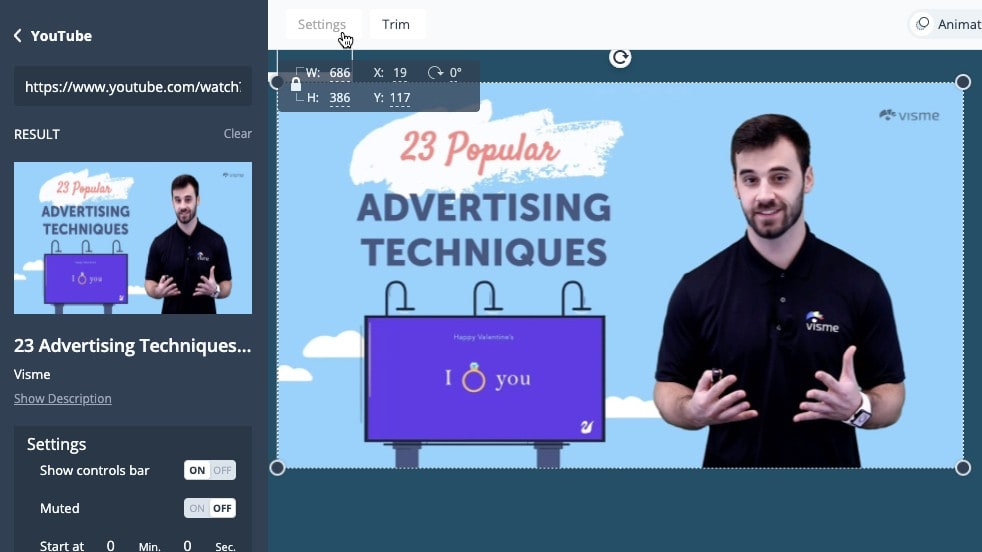
Embed Video Clips into Your Prezi Presentations Easily for Increased Engagement
Visme elevates presentations with its unparalleled multimedia integration capabilities, empowering users to seamlessly incorporate video and audio elements to enrich the viewer experience. For example, users can embed video clips to illustrate concepts or showcase products, and integrate background music or voiceovers to captivate audiences and convey messages more effectively.
This multifaceted approach engages multiple sensory channels, creating a dynamic and immersive presentation experience that resonates with viewers. In contrast, while Prezi offers the engaging zoom reveal function, it falls short of Visme's comprehensive multimedia integration, making Visme the preferred choice for users seeking to create captivating and interactive presentations.
Prezi and Visme Provide Robust Analytics for Audience Engagement Optimization

Prezi's Analytics Give You Insights into the Performance of Your Presentations
Both Prezi and Visme equip users with powerful analytics features to delve into audience interaction and refine content strategies for maximum impact. Prezi's analytics provide detailed insights into viewer engagement, offering data on views, zooms, and interactions to guide content optimization. For instance, Prezi enables users to track audience engagement levels throughout presentations, pinpointing areas of interest and identifying opportunities for improvement.
Similarly, Visme's analytics offer valuable metrics on viewer behavior, such as time spent on each slide and click-through rates, empowering users to tailor content to better resonate with their target demographic. These robust analytics capabilities make both Prezi and Visme indispensable tools for informed content creation and delivery strategies.
Prezi and Visme Have Equally Effective Collaboration Features
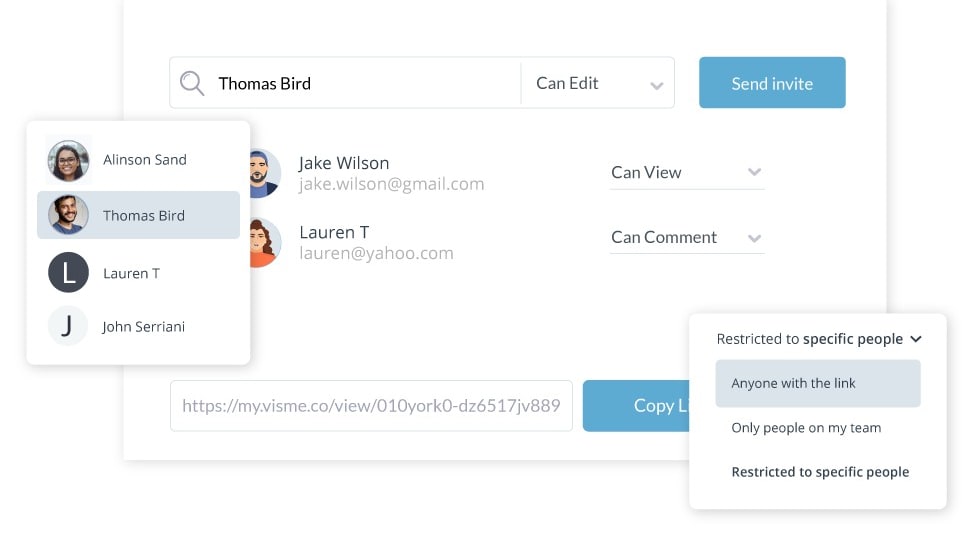
Decide Who Can View and Comment on Your Designs Using Visme's Collaboration Tools
Both Prezi and Visme facilitate seamless collaboration, enhancing teamwork and inclusivity in the creative process. With real-time collaboration features, users can work together on presentations simultaneously, regardless of geographical location. For example, Prezi enables team members to co-edit presentations in real-time, providing instant feedback and ensuring alignment of ideas.
Similarly, Visme's collaborative platform allows multiple users to contribute to projects simultaneously, fostering a collaborative environment where all voices are heard and valued. These collaborative features promote teamwork and productivity, making both Prezi and Visme ideal choices for teams seeking efficient and inclusive collaboration in visual content creation.
Visme Dominates Integration Versatility, Surpassing Prezi

Visme's Range of Integrations, from Storage and Video to Graphics and Marketing, Allow You to Streamline Your Workflow
When it comes to integration possibilities, Visme emerges as the frontrunner, boasting a diverse range of third-party application integrations that amplify its utility across various professional domains. Visme seamlessly integrates with an extensive array of platforms, including Google Sheets for streamlined data importation, Slack for efficient team collaboration, and popular cloud services like Dropbox and Google Drive for seamless file management. For instance, Visme enables users to embed interactive elements such as polls and surveys from various sources, enhancing audience engagement and data collection capabilities.
In contrast, while Prezi offers some basic integrations, it falls short of Visme's expansive connectivity, limiting its adaptability in complex, multifunctional environments.
08 Prezi vs Visme: Which is the best for your business?
Prezi is the best tool for you if:
- You value storytelling in your presentations and want to captivate your audience with a dynamic and visually interesting zoomable canvas that emphasizes your narrative flow.
- You're seeking to break away from traditional slide-based formats and are comfortable with embracing a unique, non-linear presentation style that allows for creative freedom and customization.
- Engaging your audience is a top priority, and you need a platform that supports interactive content, making each presentation a memorable experience that stands out.
- You're willing to invest time in learning a new interface, recognizing that the unique capabilities of Prezi can significantly enhance the visual impact of your communication.
- Your presentations require seamless transitions between topics and the ability to dive deep into details without losing the broader context, benefiting from Prezi's spatial journey layout.
 You value storytelling in your presentations and want to captivate your audience with a dynamic and visually interesting zoomable canvas that emphasizes your narrative flow.
Visme is the best tool for you if:
- You need a versatile tool for creating not just presentations but also infographics, reports, and social media graphics with a wide selection of templates and design elements.
- You prefer an intuitive user experience that allows for quick, professional results without a steep learning curve, making it ideal for both beginners and experienced users.
- Efficiency and quick turnaround are critical to you, as Visme's drag-and-drop interface helps you produce high-quality visuals swiftly, enhancing productivity.
- Consistency in branding is essential; Visme offers extensive customization options to ensure your content aligns with your brand identity across all types of visual projects.
- You value accessibility and ease of collaboration, needing a tool that supports real-time teamwork and easy sharing options to streamline feedback and revisions.
Prezi
Used by 70 members
40% off for 1 year
Save up to $91
Visme
Used by 65 members
30% off the Pro plan for 1 year
Save up to $212
09 Alternatives to Prezi & Visme

Notion
Used by 16967 members
6 months free on the Business plan with Unlimited AI
Save up to $12,000

Gamma
Used by 3524 members
400 credits + 25% off annual plans for Individuals
Save up to $52

Miro
Used by 3296 members
$1,000 in credits (lifetime validity)
Save up to $1,000

Canva
Used by 798 members
10 Promotions on Presentation software
Prezi and Visme are great tools, but Secret offers promo codes with discounts on over 2190+ different SaaS solutions. New deals are added regularly, helping you save money on your online subscriptions. Get access to codes for other Presentation software you might want to purchase


Start saving on the best SaaS
Secret has already helped tens of thousands of startups save millions on the best SaaS like Microsoft Teams, Google Workspace & many more. Join Secret now to buy software the smart way.