


Website-building platforms are crucial for creating a strong online presence, and two of the most popular choices are Webflow and Squarespace. These platforms empower users to design and host websites efficiently. However, selecting the right one can be challenging.
In this article, we'll compare Webflow vs. Squarespace, providing a comprehensive analysis of their features, advantages, disadvantages, and primary use cases. By examining these aspects closely, you'll gain valuable insights to make an informed decision about which platform best suits your web design and hosting needs. Let's dive in and explore the differences between these leading website-building tools.
- 01 Webflow vs Squarespace: overview
- 02 What's the difference between Webflow and Squarespace?
- 03 Webflow pros and cons
- 04 Squarespace pros and cons
- 05 Webflow compared to Squarespace
- 06 Squarespace compared to Webflow
- 07 Features comparison
- 08 Webflow vs Squarespace: Which is the best for your business?
- 09 Alternatives to Webflow & Squarespace
- 10 Promotions on No-Code Development software
Start saving on the best SaaS
Secret has already helped tens of thousands of startups save millions on the best SaaS like Microsoft Teams, Google Workspace & many more. Join Secret now to buy software the smart way.

01 Webflow vs Squarespace: overview
Webflow and Squarespace are prominent contenders in the world of website design and hosting platforms, each bringing unique strengths and advantages to the table, catering to a wide range of website creation needs.
Webflow is celebrated for its flexibility and design capabilities. It empowers users with a robust visual design editor, allowing for precise control over every element of a website's layout and appearance. This makes it an excellent choice for designers and developers seeking creative freedom and customization options. In contrast, Squarespace distinguishes itself with its user-friendly, all-in-one approach. It provides an intuitive website builder that simplifies the web design process, making it an attractive choice for small businesses and individuals looking for a hassle-free website creation experience.
Let's delve deeper into the Webflow vs. Squarespace comparison to help you make an informed decision when it comes to selecting the right website design and hosting platform for your specific needs.

CMS
Both Squarespace and Webflow have robust features for blogging. They don’t compare with WordPress, but they’re good enough to get started with content management.

Webflow
Squarespace
Ease of Use
Squarespace is much more user-friendly, and it has more templates you can try for free. By contrast, Webflow’s user interface can be intimidating for beginners.
Webflow
Squarespace
Ecommerce
Squarespace is better for ecommerce because it lets you upload unlimited products, and it gets rid of transaction fees on cheaper plans than Webflow.
Webflow
Squarespace
Performance
Webflow can perform better than Squarespace thanks to its responsive design and clean code. But Squarespace won’t have a slow loading time either.
Webflow
Squarespace
Pricing Plan
Webflow and Squarespace have a similar price. Webflow can be more expensive, especially if you need ecommerce features. But conversely, Squarespace doesn’t offer a free plan.
Webflow
Squarespace
Customer Reviews
Squarespace and Webflow have outstanding reviews from most aggregators, boasting scores around the 4.5 stars mark.
Webflow
Squarespace
Templates
Webflow has hundreds more templates than Squarespace, but only a few dozen of them are free. Meanwhile, Squarespace offers over 100 templates for free, and they’re all beautiful.
Webflow
Squarespace
Customization
Webflow gives you comprehensive control over how your site looks, while Squarespace is more limiting, and relies heavily on pre-built elements.
Webflow
Squarespace
Integrations
Both Webflow and Squarespace offer integrations that complement their core tools, including apps like Zapier or Stripe.
Webflow
Squarespace
Customer Support
While Webflow offers great customer service, the best support is only offered to Enterprise clients. Squarespace helps all users with live phone support, and more.
Webflow
Squarespace
02 What's the difference between Webflow and Squarespace?
Webflow is made for slightly more experienced users
Webflow
Build beautiful and powerful websites with Webflow
Squarespace also helps beginners with 24/7 support, including live phone support.
Squarespace
Squarespace is a comprehensive platform that empowers you to create beautifully designed websites with ease and without any coding knowledge, offering a variety of customizable templates that are both elegant and functional.
Webflow and Squarespace are relatively similar. They offer an easy-to-use website building tool, managed hosting, ecommerce features, and they’re similarly priced.
But while you can build beautiful sites with both, Webflow is made for slightly more experienced users. Its interface can be daunting for a beginner, and you can use it to customize sections of your site to a higher extent.
For example, you get more control over a page’s containers, the size of elements, and more. You can even add your own snippets of code, making Webflow a great choice for designers that know their CSS, but don’t want to bother building something from scratch.
Squarespace also offers decent customization options. But it doesn’t give you as much control as Weblflow.
Instead, you’ll rely on their over 100 beautiful templates to create a site with pre-made blocks. While this process can seem limiting for experienced users, it’s perfect for beginners that want to create a simple portfolio or the website for a brick-and-mortar business. Not to mention, you can create a beautiful site in an afternoon.
Squarespace also helps beginners with 24/7 support, including live phone support. Plus, if you’re planning to open an online store, Squarespace is much better than Webflow. It offers unlimited products and bandwidth, and they don’t charge transaction fees for the Commerce plan (and above). Webflow still charges you 2% transaction fees at the same price point.

Webflow
Used by 4659 members
1 year free on a CMS site plan
Save up to $348

Squarespace
Used by 266 members
Additional 10% off across all plans
Save up to $50
03 Webflow pros and cons
What are the advantages of Webflow?
- Design flexibility: Webflow provides an extensive set of design tools and features that give you a high degree of flexibility in creating custom, responsive designs. You can design websites that are truly unique and tailored to your specific needs.

- No coding required: While Webflow allows for advanced coding if desired, it also caters to users with no coding experience. You can design and build websites visually using a user-friendly interface, which makes it accessible to a wide range of users.
- Interactions and animations: Webflow excels in creating interactive and animated websites. You can easily add animations, transitions, and interactions to enhance user engagement and create visually appealing websites.
- Hosting included: Webflow offers hosting as part of its service, which simplifies the process of launching and maintaining your website. It also provides fast and secure hosting with features like content delivery network (CDN) integration.
- E-commerce capabilities: Webflow has a robust e-commerce platform that allows you to create online stores with ease. It offers features like product management, secure checkout, and customizable templates for online businesses.
What are the disadvantages of Webflow?
- Learning curve: While Webflow is user-friendly, it still has a learning curve, especially if you're new to web design. Mastering its advanced features may take some time and effort.

- Cost: Webflow offers a free plan with limitations, but more advanced features and hosting options come at a cost. It can be relatively expensive, especially for small businesses and individuals on a tight budget.
- Limited SEO features: Webflow's SEO capabilities are decent but may not be as robust as some specialized SEO tools or platforms. It's essential to have a good understanding of SEO best practices to optimize your site effectively.
- Dependency on Webflow hosting: While Webflow hosting is reliable, you are somewhat locked into their hosting services. Migrating your website to another hosting provider can be challenging and may require technical expertise.
- Limited third-party integrations: While Webflow does support integrations with various third-party services, it may not offer the same extensive ecosystem of plugins and integrations as some other website builders or content management systems.
Compare Webflow to other tools


Webflow vs Wix

Unbounce vs Webflow

Webflow vs Bubble

Webflow vs WordPress.com

Softr vs Webflow
04 Squarespace pros and cons
What are the advantages of Squarespace?
- Beautiful templates: Squarespace offers a wide range of professionally designed templates that are visually appealing and responsive. These templates can help you create a polished and attractive website without the need for extensive design skills.
- User-friendly interface: Squarespace's drag-and-drop editor is intuitive and beginner-friendly. You can easily customize your website's layout and content, making it accessible to users with varying levels of technical expertise.
- Built-in features: Squarespace includes a variety of built-in features and tools such as blogging, e-commerce, SEO, and analytics. This all-in-one approach simplifies the process of creating and managing your website, especially for small businesses and individuals.
- Reliable hosting: Squarespace provides hosting as part of its service, ensuring that your website is hosted on their stable and secure platform. This eliminates the need to manage hosting separately.
- Customer support: Squarespace offers excellent customer support, including live chat, email support, and a comprehensive knowledge base. This can be invaluable if you encounter issues or have questions while building or maintaining your site.
What are the disadvantages of Squarespace?
- Limited design customization: While Squarespace templates are visually appealing, they may limit your ability to create highly unique and customized designs. Advanced customization options may require CSS and coding skills.
- Pricey for e-commerce: Squarespace's e-commerce features are robust, but they can become relatively expensive for businesses with a large number of products. Transaction fees may also apply unless you subscribe to a higher-tier plan.
- No third-party plugins: Squarespace has a limited selection of third-party integrations and plugins compared to some other platforms like WordPress. This can be a drawback if you need specific functionality that isn't available natively.
- Less control over SEO: While Squarespace offers SEO tools, it may not provide the same level of control and flexibility as dedicated SEO platforms or content management systems. Advanced SEO users may find it limiting.
- Content export difficulty: Migrating your content and website away from Squarespace can be challenging. The platform doesn't provide a straightforward export feature, making it potentially difficult to move to another platform in the future.
Compare Squarespace to other tools


Google Workspace vs Squarespace
Wix vs Squarespace

Squarespace vs Jimdo

Pixpa vs Squarespace
05 Webflow compared to Squarespace
Webflow and Squarespace are prominent website-building platforms, each with distinct strengths. Webflow excels in design flexibility, offering advanced customization options and the ability to create truly unique, responsive designs. It caters to users with varying technical skills, allowing for both visual design and coding.
Squarespace, on the other hand, emphasizes simplicity and user-friendliness. It provides professionally designed templates and an intuitive drag-and-drop editor, making it an ideal choice for beginners and those seeking a hassle-free website creation experience. Consider your design preferences and technical proficiency when choosing between these platforms for your website needs.
Is Webflow better than Squarespace?
 Is Webflow better than Squarespace?
Determining whether Webflow is better than Squarespace depends on your specific needs. Webflow offers unparalleled design flexibility and advanced customization options, making it a top choice for designers and developers seeking creative freedom. It's also suitable for users with coding skills.
Squarespace, on the other hand, is renowned for its user-friendly interface and beautifully designed templates, making it a great option for beginners and those looking for simplicity. Your decision should hinge on factors like your design preferences, technical expertise, and the level of control you desire. Both platforms have their merits, so consider your priorities when making your choice.
What is Webflow best used for?
Webflow is best used for creating custom, visually stunning websites with a high degree of design flexibility. It's an excellent choice for designers and developers who want to build unique, responsive sites without being limited by templates. Webflow accommodates users with varying technical skills, offering both a user-friendly visual design interface and the option for advanced coding.
Whether you're designing portfolios, blogs, business websites, or e-commerce stores, Webflow empowers you to craft tailored, interactive experiences. Its hosting and CMS capabilities further enhance its suitability for a wide range of web design projects, making it a versatile tool for web professionals.
Can Webflow replace Squarespace?
Webflow can replace Squarespace depending on your specific needs and preferences. It offers advanced design flexibility and customization options, making it an excellent choice for users who want complete control over their website's design and functionality. Webflow is particularly suitable for designers, developers, and those with coding skills.
However, if you value simplicity and ease of use, Squarespace may remain a better option, especially for beginners and those seeking a more streamlined website-building experience. Both platforms have their strengths, so the decision should be based on factors such as your design goals, technical proficiency, and desired level of customization.
Is Webflow cheaper than Squarespace?
The cost comparison between Webflow and Squarespace depends on your specific requirements. Webflow’s pricing includes a free plan with limitations and various paid plans with different pricing tiers, depending on your needs. Squarespace, too, has different pricing tiers, including a more affordable Personal plan and higher-priced Business and Commerce plans, which are necessary for advanced features.
While Webflow might have more flexibility in pricing, it can become costly when opting for advanced features and hosting. Ultimately, the affordability of either platform depends on the specific features and resources you require for your website, so it's essential to evaluate your budget and needs carefully.
Is there a better No-Code Development software than Webflow?
Determining if there's a "better" software than Webflow depends on your specific web design and hosting requirements. Webflow excels in providing advanced design flexibility and customization options, making it an excellent choice for designers and developers seeking creative freedom.
However, alternatives to Webflow like Squarespace, Bubble, Hostinger, and Wix may be more suitable for certain users. Squarespace offers beautifully designed templates and a user-friendly interface, ideal for beginners and those looking for simplicity. Wix provides a wide range of features and a user-friendly drag-and-drop builder. The choice of the "better" software depends on your specific design preferences, technical expertise, and the level of control you desire over your website.

Webflow
Premium
Build beautiful and powerful websites with Webflow
1 year free on a CMS site plan
Save up to $348
06 Squarespace compared to Webflow
Squarespace and Webflow are prominent website builders, each with distinct strengths. Squarespace stands out for its beautifully designed templates and user-friendly, all-in-one approach, making it an excellent choice for beginners and those valuing simplicity. It simplifies website creation, including e-commerce, with an intuitive drag-and-drop editor.
In contrast, Webflow excels in design flexibility, catering to designers and developers seeking complete creative control. It offers advanced customization options and supports both visual design and coding. The choice between Squarespace and Webflow hinges on your design preferences, technical expertise, and the level of customization you require for your website-building project.
Is Squarespace better than Webflow?
Determining whether Squarespace is better than Webflow depends on your specific needs. Squarespace is known for its user-friendly interface and beautifully designed templates, making it an excellent choice for beginners and those seeking a hassle-free website-building experience. It simplifies the process, including e-commerce, with its intuitive drag-and-drop editor.
Webflow, on the other hand, offers unparalleled design flexibility and advanced customization options, making it a top choice for designers and developers who want complete creative control. The decision between Squarespace and Webflow should be based on factors such as your design preferences, technical proficiency, and the level of customization you require for your website. Both platforms have their strengths.
What is Squarespace best used for?
Squarespace is best used for creating visually stunning, professionally designed websites with ease. It shines in providing a user-friendly platform that empowers individuals and businesses to build beautiful online presences. Its selection of templates caters to a variety of purposes, from portfolios and blogs to e-commerce stores.
Squarespace simplifies the website-building process, offering intuitive tools for customization and content management. It's an ideal choice for those who prioritize aesthetics and a seamless user experience without the need for extensive technical skills. Whether you're an artist, entrepreneur, blogger, or small business owner, Squarespace can help you create a polished and attractive online presence.
Can Squarespace replace Webflow?
Whether Squarespace can replace Webflow depends on your specific web design needs. Squarespace offers a user-friendly, template-based approach ideal for individuals and small businesses looking for an easy and visually appealing website-building experience. It simplifies design, hosting, and content management.
In contrast, Webflow is renowned for its advanced design flexibility and customization options, catering to designers and developers seeking complete creative control. It supports both visual design and coding, offering more intricate and unique website designs. Consider your design preferences, technical expertise, and the level of customization you require when deciding between Squarespace and Webflow. They serve different purposes and audiences, so choose the one that aligns with your specific goals.
Is Squarespace cheaper than Webflow?
Comparing the cost of Squarespace and Webflow depends on your specific project requirements and budget. Squarespace offers a range of pricing tiers, including an affordable Personal plan, which can be suitable for individuals and small businesses. However, for more advanced features, such as e-commerce capabilities, higher-tier plans come at a higher cost.
Webflow, on the other hand, provides pricing flexibility with various plans catering to different needs. While it offers a free plan with limitations, more advanced features and hosting options can be relatively expensive. Ultimately, the affordability of either platform depends on the specific features and resources you require for your website, so it's essential to assess your budget and needs carefully.
Is there a better Website Builder software than Squarespace?
Determining if there's a superior software to Squarespace depends on your specific web design and hosting needs. Squarespace offers a user-friendly, template-based approach, making it an excellent choice for individuals and small businesses seeking an easy and visually appealing website-building experience.
However, alternatives to Squarespace like WordPress, Webflow, and Wix may be more suitable for certain users. WordPress provides extensive customization options and a vast plugin ecosystem, while Webflow offers advanced design flexibility and control. Wix combines ease of use with a wide range of features. The choice of the most suitable software should consider your design preferences, technical skills, and the level of customization required for your website project.

Squarespace
Create your e-commerce website easily
Additional 10% off across all plans
Save up to $50
07 Features comparison
SEO Optimization is Comparable between Webflow and Squarespace
Both Webflow and Squarespace deliver commendable tools to enhance your website's visibility in search engine rankings. Webflow equips users with a range of SEO-friendly features, including the ability to customize meta tags, craft SEO-friendly URLs, and optimize image alt text. These capabilities empower website owners to fine-tune their on-page SEO elements for better search engine performance.
Squarespace, on the other hand, boasts its set of SEO tools, which it continually refines to ensure your website's SEO needs are met. It provides features like customizable meta titles and descriptions, header tag optimization, and automatic XML sitemaps to aid search engine indexing.
In this SEO showdown, it's a closely contested match, with both Webflow and Squarespace offering robust SEO optimization capabilities. The choice between the two ultimately depends on your specific preferences and the level of control you desire over your website's SEO efforts.
Squarespace Outshines Webflow in User-Friendliness and Accessibility

Squarespace's intuitive interface simplifies website creation, making it exceptionally accessible for individuals with limited design experience.
When comparing the user-friendliness of Webflow and Squarespace, it's evident that Squarespace holds a distinct advantage. Squarespace's intuitive interface simplifies website creation, making it exceptionally accessible for individuals with limited design experience. Its user-friendly platform offers pre-designed templates and drag-and-drop functionality, enabling users to swiftly build professional websites.
In contrast, Webflow, while renowned for its flexibility and design control, presents a steeper learning curve. Beginners in web design may find its complex custom design features daunting. Webflow's extensive customization options and coding capabilities cater more to experienced designers and developers. For those seeking a quick and hassle-free website setup, Squarespace stands as the more user-friendly choice.
Squarespace Simplifies Appointment Scheduling Better than Webflow

Squarespace's built-in appointment scheduling feature offers seamless and convenient booking options, allowing clients to schedule appointments based on your availability.
When it comes to booking appointments, Squarespace is the clear winner. Squarespace's built-in appointment scheduling feature offers seamless and convenient booking options, allowing clients to schedule appointments based on your availability. This functionality is particularly beneficial for service-oriented businesses such as wellness centers, salons, or consultancies, streamlining the booking process and enhancing the user experience.
Conversely, while Webflow boasts a robust content management system (CMS) and an array of powerful web design tools, it doesn't include a dedicated appointment scheduling feature in its toolkit. While Webflow excels in web design versatility, it falls short in providing this specialized functionality.
If your business heavily relies on appointment-based interactions with clients and customers, Squarespace stands as the superior choice, offering a streamlined and integrated scheduling solution that caters directly to service-based industries.
Webflow's Customizable Templates are More Varied than Squarespace's
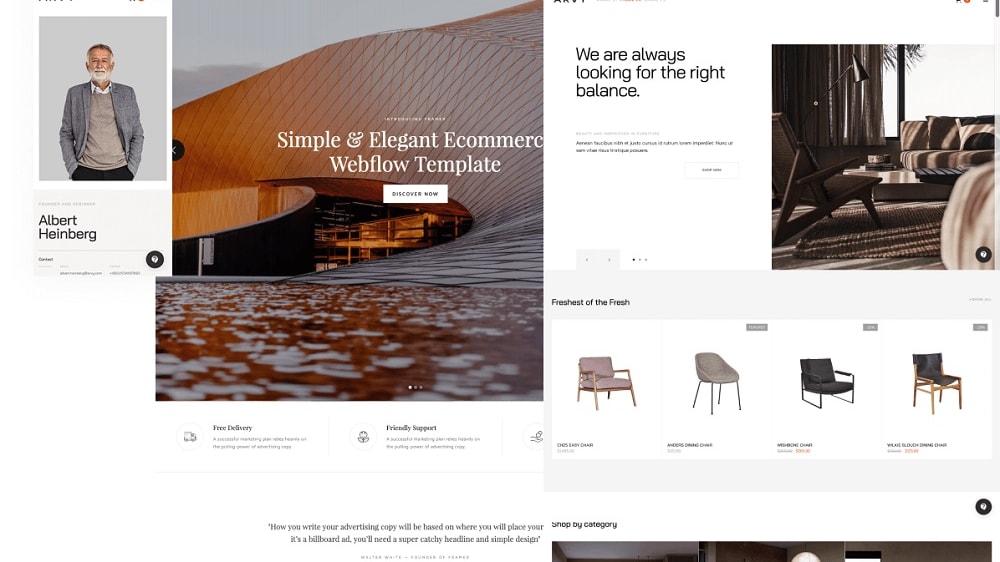
Webflow's template selection stands out with its extensive variety, catering to diverse needs such as portfolios, e-commerce websites, blogs, and more.
In the realm of professionally-designed website templates, Webflow emerges as the superior choice, offering a wider array of customizable themes compared to Squarespace. Webflow's template selection stands out with its extensive variety, catering to diverse needs such as portfolios, e-commerce websites, blogs, and more. This diversity grants users the creative freedom to craft a site that precisely aligns with their unique vision and requirements.
While Squarespace does offer a commendable range of templates, it lags behind Webflow in terms of sheer variety and specificity. Squarespace's templates are undoubtedly well-designed, but they may not encompass as many niche or industry-specific options as Webflow provides. If you prioritize a broader range of customizable templates to suit your specific business or personal website needs, Webflow undoubtedly takes the lead, offering more flexibility and choices for your web design journey.
Webflow's CMS Outperforms Squarespace's Content Management Capabilities
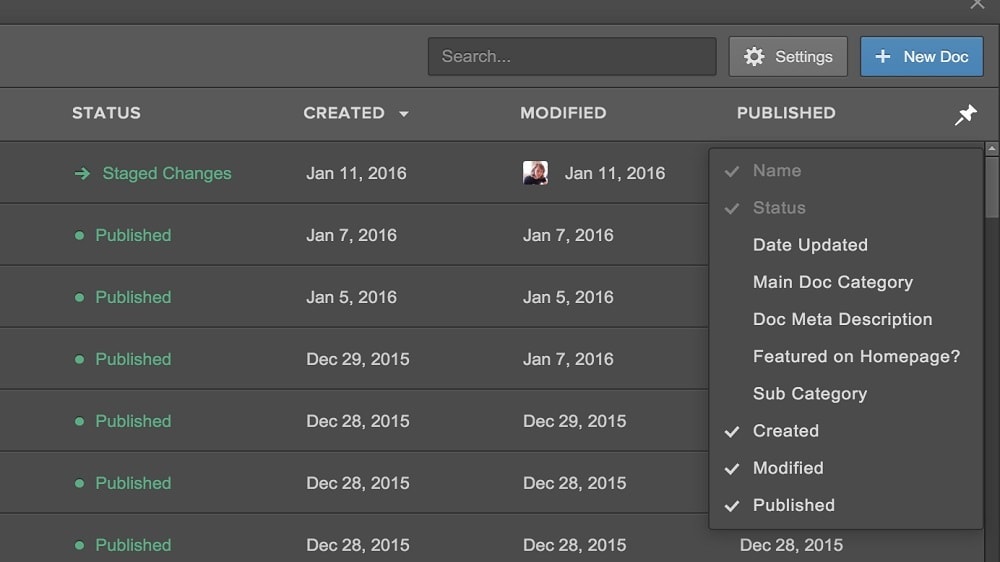
Webflow's built-in content management system (CMS) offers a seamless experience for creating, organizing, and updating dynamic content.
When it comes to content management, Webflow unquestionably shines, making it the preferred choice for dynamic websites like blogs and news sites. Webflow's built-in content management system (CMS) offers a seamless experience for creating, organizing, and updating dynamic content. Users can easily publish articles, blog posts, and news updates, making it an essential tool for content-driven websites.
In contrast, while Squarespace does provide content management capabilities, its CMS falls short in terms of flexibility and robustness when compared to Webflow. Squarespace's focus leans more towards simplicity and design, making it a solid choice for static websites and portfolios. However, for content-heavy sites that require frequent updates and dynamic content, Webflow's CMS offers a more versatile and powerful solution, giving it a clear advantage in this domain.
Webflow and Squarespace Equally Deliver on Ease of Website Creation
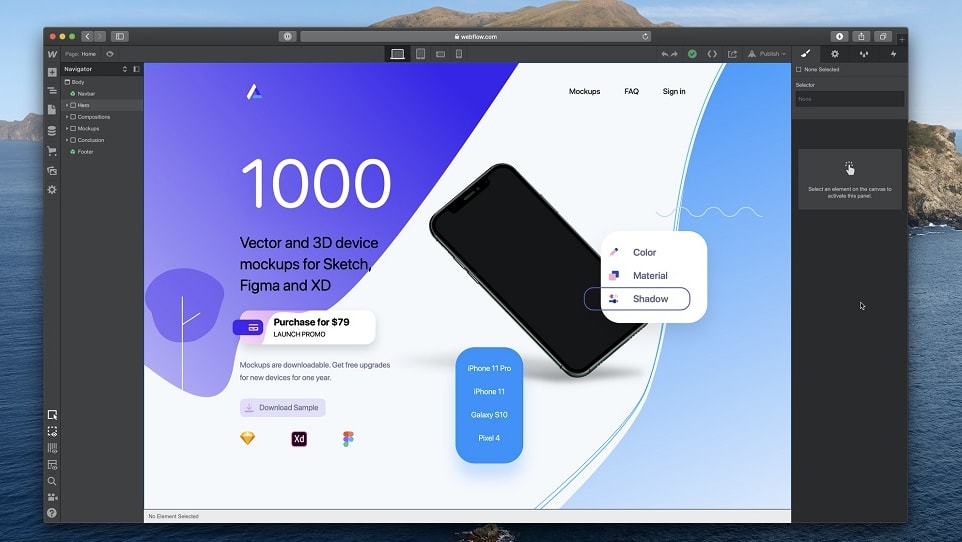
Webflow stands out with its visual website builder and intuitive drag-and-drop editor, enabling users to craft impressive websites without the need for coding expertise
When it comes to ease of use, both Webflow and Squarespace offer compelling solutions that cater to users of all design backgrounds. Webflow stands out with its visual website builder and intuitive drag-and-drop editor, enabling users to craft impressive websites without the need for coding expertise. This approach empowers beginners and seasoned designers alike to bring their web design visions to life effortlessly.
On the other hand, Squarespace equally embraces a user-friendly ethos, presenting a straightforward drag-and-drop interface for website creation and customization. The platform prioritizes accessibility and simplicity, ensuring that users, regardless of their familiarity with web design, can navigate and design their websites with ease.
Whether you opt for Webflow or Squarespace, you'll find a welcoming environment for web design, making both platforms highly appealing to those new to website creation. The choice ultimately hinges on your specific design preferences and desired level of customization.
Webflow Leads Over Squarespace in Integration Variety

With Webflow, your workflow becomes a symphony of efficiency, as you can effortlessly incorporate the tools you already rely on into your web design process
In the realm of integration capabilities, Webflow emerges as the unequivocal leader. Its open API empowers users with the freedom to seamlessly integrate their website with a plethora of third-party software and tools. With Webflow, your workflow becomes a symphony of efficiency, as you can effortlessly incorporate the tools you already rely on into your web design process. For example, you can seamlessly integrate Webflow with popular services like Google Analytics for advanced website tracking and analysis, or even connect it with e-commerce platforms like Shopify for a robust online store.
Conversely, Squarespace, while not lacking in integration options, does fall short in comparison. It offers several integrations with commonly used marketing, social media, and e-commerce tools, but its versatility is limited when you require more specific or industry-specific integrations. If your priority is the ability to craft a web design ecosystem that seamlessly interacts with your preferred tools and services, Webflow unquestionably takes the lead, offering a broader and more adaptable range of integration possibilities.
08 Webflow vs Squarespace: Which is the best for your business?
Webflow is the best tool for you if:
- You're a web designer or developer seeking unparalleled design flexibility and customization options.
- You want to create visually stunning and unique websites without coding expertise.
- You value the ability to control every aspect of your website's layout and appearance.
- You're looking for a platform that seamlessly integrates with third-party tools and services to enhance your web design workflow.
- You're willing to invest time in learning its features and want the freedom to create highly customized and responsive websites.
 You're a web designer or developer seeking unparalleled design flexibility and customization options.
Squarespace is the best tool for you if:
- You prioritize a user-friendly, template-based approach to web design, ideal for beginners and those seeking a hassle-free website-building experience.
- You want access to beautifully designed templates that simplify the process of creating polished and attractive websites.
- You're a small business owner, artist, blogger, or individual looking for an all-in-one platform that offers not only website building but also hosting and content management.
- You need a reliable and secure hosting solution without the need to manage hosting separately.
- You value design aesthetics and ease of use, allowing you to quickly set up a professional online presence without extensive technical skills.
Webflow
Used by 4659 members
1 year free on a CMS site plan
Save up to $348
Squarespace
Used by 266 members
Additional 10% off across all plans
Save up to $50
09 Alternatives to Webflow & Squarespace

Carrd
Used by 2347 members
30% off for 1 year
Save up to $300

Shopify
Used by 2149 members
$1/month for the first 3 months + 25% off annual plans
Save up to $2,734

Framer
Used by 1856 members
1 year free on the Pro Plan
Save up to $360

Bubble
Used by 1764 members
30% off on monthly plans for 1 year
Save up to $957
10 Promotions on No-Code Development software
Webflow and Squarespace are great tools, but Secret offers promo codes with discounts on over 2190+ different SaaS solutions. New deals are added regularly, helping you save money on your online subscriptions. Get access to codes for other No-Code Development software you might want to purchase

Make promo
3 months free on the Teams plan (240k credits included)
Shopify coupon code 2026
$1/month for the first 3 months + 25% off annual plans

Softr coupon code
20% off monthly or annual Professional plan

Deal for Lovable
15% off annual Pro and Business plans
Bubble promo
30% off on monthly plans for 1 year

Deal for WordPress.com
30% off all monthly plans

Airtable discount code
$1,000 in credits for 1 year

Elementor: Website Builder promotion
17% off the annual One Agency plan

Notion deal
6 months free on the Business plan with Unlimited AI

Weglot discount code
14 days free + 15% off annual plans
Start saving on the best SaaS
Secret has already helped tens of thousands of startups save millions on the best SaaS like Microsoft Teams, Google Workspace & many more. Join Secret now to buy software the smart way.