





If you handle contract management and document signing in your business, then a reliable electronic signature solution is essential. These tools not only facilitate the easy signing of documents but also ensure legal compliance and improve operational efficiency. With numerous electronic signature platforms available, choosing the right one can be challenging.
This article serves as an informative guide, focusing specifically on two leading electronic signature platforms—Yousign vs DocuSign. We offer a comprehensive comparison of their key features, notable differences, and pricing models to equip you with the information necessary to make an informed decision.
- 01 Yousign vs Docusign: overview
- 02 What's the difference between Yousign and Docusign?
- 03 Yousign pros and cons
- 04 Docusign pros and cons
- 05 Yousign compared to Docusign
- 06 Docusign compared to Yousign
- 07 Features comparison
- 08 Yousign vs Docusign: Which is the best for your business?
- 09 Alternatives to Yousign & Docusign
- 10 Promotions on Digital Signature software
Start saving on the best SaaS
Secret has already helped tens of thousands of startups save millions on the best SaaS like Microsoft Teams, Google Workspace & many more. Join Secret now to buy software the smart way.

01 Yousign vs Docusign: overview
Yousign and DocuSign are two prominent players in the electronic signature software arena, each offering unique features to cater to different business needs.
Yousign is celebrated for its intuitive interface and focus on simplicity, making it an ideal choice for small to medium-sized enterprises that require a straightforward, easy-to-use solution for securing signatures on documents. On the other hand, DocuSign is a more comprehensive electronic signature solution with a wide range of features including advanced security measures, extensive integration capabilities, and features for complex workflow automations.
Choosing between Yousign and DocuSign depends heavily on your specific business needs, the scale of your document management requirements, and your team’s familiarity with digital tools. Yousign is an excellent choice for those who prioritize user-friendliness and efficiency, while DocuSign is better suited for businesses looking for extensive features and customization options to manage a high volume of complex transactions.

International use
Yousign is highly suitable for European markets with multilingual support. DocuSign’s global presence and support for various languages make it ideal for international use.

Yousign
Docusign
Pricing plans
Yousign offers competitive pricing, especially attractive for small to medium European businesses. DocuSign's pricing is higher but is justified by its extensive features and global reach.
Yousign
Docusign
Mobile experience
Yousign provides a competent mobile signing experience. DocuSign offers a highly polished mobile app that is versatile for users on the go.
Yousign
Docusign
API flexibility
Yousign offers a flexible API suitable for integrating electronic signature workflows. DocuSign's API is more comprehensive, with extensive documentation and support for a variety of use cases.
Yousign
Docusign
Security & compliance
Yousign is eIDAS certified and focuses on high-level security standards, especially for EU regulations. DocuSign also meets stringent security standards like ISO 27001 and offers global compliance.
Yousign
Docusign
Ease of use
Yousign is noted for its straightforward and user-friendly interface. DocuSign provides a robust platform that can be complex but is feature-rich.
Yousign
Docusign
Document management
Yousign allows efficient document management with tracking features. DocuSign offers more advanced document management features, including a wide range of templates and custom fields.
Yousign
Docusign
Positive reviews
Yousign is commended for its ease of use and strong presence in Europe. DocuSign is highly praised for its widespread adoption and reliability.
Yousign
Docusign
Customer support
Yousign provides solid support with a focus on European time zones. DocuSign offers comprehensive support, though some users note it can vary depending on the service tier.
Yousign
Docusign
Integrations
Yousign offers integrations with tools like Salesforce, HubSpot, and Aircall. DocuSign integrates with a vast array of systems including Salesforce, Google, Microsoft, Apple, and more.
Yousign
Docusign
02 What's the difference between Yousign and Docusign?

Yousign's Pricing Gives You 4 Different Options for its Application, Starting From Free
Yousign
Get your documents signed legally online

DocuSign's Pricing Includes 4 Different Tiers for eSignature Capabilities and Others for Real Estate and Developer API
Docusign
Docusign provides electronic signature and digital transaction management services that enable businesses to streamline and digitize their agreements and approvals. It eliminates the hassle of manual paperwork, increases efficiency, decreases turnaround time, and ultimately improves the customer experience.
Yousign and DocuSign are both renowned for their electronic signature solutions, but they have distinct differences that might influence your choice depending on your business needs.
DocuSign is a global leader in the digital transaction management field, widely recognized for its extensive suite of features that accommodate complex, large-scale operations. It offers advanced security measures, comprehensive workflow integrations, and a vast array of customization options, making it ideal for large enterprises or businesses with sophisticated needs. DocuSign supports a wide range of integrations with other software systems, which facilitates seamless operations across various departments and tools.
In contrast, Yousign focuses on simplicity and ease of use, catering primarily to small and medium-sized businesses. It offers a more streamlined interface that is easy to navigate, making the process of obtaining electronic signatures straightforward and efficient. While it may not boast as broad a feature set as DocuSign, Yousign provides all the essential functions required for secure and legally binding electronic signatures, with an emphasis on user experience and customer support.
Another key difference lies in their market presence and regulatory compliance. DocuSign has a strong international presence and complies with a wide array of international laws and standards, making it a reliable choice for businesses operating in multiple countries. Yousign, while compliant with European regulations, such as the eIDAS (Electronic Identification, Authentication and Trust Services), is more focused on the European market, which could be a determining factor for companies primarily dealing within Europe.
Lastly, pricing structures between Yousign and DocuSign also vary, with Yousign often being perceived as the more cost-effective option, particularly attractive to smaller businesses or those with more straightforward needs. In contrast, DocuSign's pricing can reflect its broader feature set and extensive integration capabilities, potentially offering a higher overall value for larger organizations that can leverage its full potential.

Docusign
The world's #1 eSignature solution
First month free and 40% off annual plans
Save up to $350
03 Yousign pros and cons
What are the advantages of Yousign?
- Convenience: Yousign allows users to sign documents electronically from anywhere at any time, eliminating the need for physical signatures. This convenience is especially beneficial for remote teams or individuals who need to sign documents on the go.

- Time-saving: With Yousign, the signing process can be completed within minutes, significantly reducing the time it takes to finalize agreements or contracts compared to traditional paper-based methods, which often involve printing, signing, scanning, and sending documents back and forth.
- Cost-effective: By eliminating the need for paper, ink, postage, and physical storage space for documents, Yousign can help businesses save money in the long run. Additionally, it reduces administrative costs associated with manual document handling.
- Legally binding: Yousign ensures that electronically signed documents are legally binding and comply with various international regulations, such as eIDAS in the European Union and the ESIGN Act in the United States. This provides assurance to users that their electronically signed documents hold the same legal weight as traditional paper documents.
- Enhanced security: Yousign employs advanced encryption and authentication measures to secure electronic signatures and documents, reducing the risk of forgery or tampering. Additionally, audit trails and authentication methods provide transparency and accountability throughout the signing process.
What are the disadvantages of Yousign?
- Dependence on technology: While electronic signatures offer convenience, they also introduce a level of dependence on technology. If the Yousign platform experiences technical issues or downtime, it may disrupt the signing process and delay the completion of important agreements or contracts.

- Learning curve: Users who are unfamiliar with electronic signature platforms may experience a learning curve when first using Yousign. While the platform strives to be user-friendly, some individuals may require time to adapt to the new digital signing process.
- Internet connection required: Yousign operates online, which means users need a stable internet connection to access the platform and sign documents. In areas with poor internet connectivity, this dependency on the internet may pose challenges.
- Compatibility issues: While Yousign aims to be compatible with various devices and file formats, compatibility issues may still arise, especially when working with older software versions or proprietary file formats.
- Privacy concerns: Like any online service, there are potential privacy concerns associated with sharing sensitive documents and personal information over the internet. Users should ensure that they understand Yousign's privacy policies and security measures to mitigate these concerns.
04 Docusign pros and cons
What are the advantages of Docusign?
- Global acceptance: DocuSign is widely recognized and accepted globally as a secure and legally binding electronic signature solution. It complies with various international regulations, including the ESIGN Act in the United States and eIDAS in the European Union, ensuring that electronically signed documents hold legal validity.
- Convenience and efficiency: DocuSign streamlines the signing process, allowing users to sign documents electronically from anywhere at any time. This convenience saves time and eliminates the need for physical paperwork, printing, scanning, and mailing.
- Integration capabilities: DocuSign offers seamless integration with a wide range of third-party applications and business software, including CRM systems, document management platforms, and cloud storage services. This integration enhances workflow efficiency and productivity by allowing users to initiate and complete the signing process directly within their existing workflows.
- Enhanced security: DocuSign employs robust encryption and authentication measures to ensure the security and integrity of electronically signed documents. Advanced features such as multi-factor authentication, tamper-evident seals, and audit trails provide additional layers of security, reducing the risk of forgery or tampering.
- Customization options: DocuSign offers a range of customization options, allowing users to tailor the signing experience to their specific needs and branding requirements. Customizable templates, branding elements, and workflow automation tools enable users to create a personalized and professional signing experience for their clients and partners.
What are the disadvantages of Docusign?
- Cost: While DocuSign offers various pricing plans to accommodate different needs and budgets, some users may find the subscription fees and transaction costs associated with the platform to be relatively high, especially for businesses with large volumes of document signings.
- Learning curve: Like any new software tool, there may be a learning curve for users who are unfamiliar with electronic signature platforms. While DocuSign strives to be user-friendly, some individuals may require time to adapt to the new digital signing process and features.
- Dependence on technology: DocuSign's functionality relies on internet connectivity and access to compatible devices and software. If users experience technical issues or downtime with the DocuSign platform or their internet connection, it may disrupt the signing process and delay the completion of important agreements or contracts.
- Privacy concerns: Sharing sensitive documents and personal information over the internet always carries inherent privacy risks. While DocuSign implements robust security measures to protect user data, there is still a potential risk of data breaches or unauthorized access to documents.
- Limited offline capabilities: While DocuSign offers mobile apps that allow users to sign documents on the go, offline functionality is limited. Users may encounter challenges signing documents in environments with poor or no internet connectivity, requiring them to wait until they regain access to an internet connection to complete the signing process.
Compare Docusign to other tools


PandaDoc vs Docusign


Docusign vs Jotform

signNow vs Docusign

DocSend vs Docusign

Docusign vs Signaturit

GetAccept vs Docusign
05 Yousign compared to Docusign
Yousign and DocuSign are both prominent electronic signature solutions, offering convenience, security, and efficiency in document signing. Yousign stands out for its user-friendly interface, catering well to small to medium-sized businesses. It provides a cost-effective solution with legally binding signatures, ideal for those prioritizing simplicity and value.
On the other hand, DocuSign boasts global recognition, extensive integration capabilities, and advanced security features, making it suitable for large enterprises with complex workflows and compliance requirements. While Yousign excels in ease of use and affordability, DocuSign offers unparalleled scalability and customization options.
Is Yousign better than Docusign?
 Is Yousign better than Docusign?
Choosing between Yousign and DocuSign depends largely on the specific needs of a business. For smaller companies or those just integrating digital workflows, Yousign may be the preferable option, thanks to its straightforward design and attractive pricing.
Conversely, larger organizations or those with intricate document handling requirements might find DocuSign's robust features more beneficial. Its comprehensive integrations and high-level security measures are tailored to handle a wide array of compliance demands and large-scale operations.
What is Yousign best used for?
Yousign is best used for streamlining the process of electronic document signing, particularly for small to medium-sized businesses seeking simplicity and affordability. Its user-friendly interface and straightforward features make it ideal for organizations looking to transition from traditional paper-based methods to digital workflows. Yousign excels in facilitating remote collaboration and accelerating the signing process, saving time and resources.
Whether it's contracts, agreements, or consent forms, Yousign offers a reliable and legally binding solution that ensures the security and integrity of electronically signed documents. It's particularly beneficial for businesses looking to enhance efficiency and productivity while maintaining compliance with regulations.
Can Yousign replace Docusign?
While Yousign offers a user-friendly and cost-effective electronic signature solution suitable for many businesses, it may not entirely replace DocuSign for larger enterprises with complex workflows and extensive integration needs.
DocuSign's global recognition, advanced features, and robust integration capabilities make it a preferred choice for organizations requiring scalability and customization options. However, Yousign can serve as a viable alternative for small to medium-sized businesses seeking simplicity and affordability in document signing processes.
Is Yousign cheaper than Docusign?
Determining whether Yousign is cheaper than DocuSign depends on several factors, including the size of the organization, the volume of document signings, and the specific features required.
Yousign typically offers more affordable pricing plans, making it an attractive option for small to medium-sized businesses looking to manage costs while implementing electronic signature solutions. However, larger enterprises with extensive integration needs and complex workflows may find that DocuSign's higher-priced plans offer greater scalability and customization options.
Is there a better Digital Signature software than Yousign?
When considering electronic signature solutions, it's crucial to explore alternatives to Yousign to ensure you find the best fit for your business needs.
Several notable alternatives to Yousign in the electronic signature software landscape include DocuSign, Adobe Sign, HelloSign, and SignNow.
Determining the ideal electronic signature software depends on factors such as your organization's size, industry compliance requirements, integration needs, and budget considerations. While Yousign offers user-friendly features and affordability, exploring these alternatives can help you make a well-informed decision that aligns perfectly with your electronic signature needs and objectives for efficiency and compliance.
06 Docusign compared to Yousign
When comparing DocuSign to Yousign, both electronic signature solutions offer convenience and security, but they differ in key aspects. DocuSign boasts global recognition, extensive integration capabilities, and advanced security features, making it suitable for large enterprises with complex workflows and compliance needs.
Conversely, Yousign focuses on simplicity and affordability, catering well to small to medium-sized businesses seeking an intuitive solution. While DocuSign excels in scalability and customization, Yousign stands out for its user-friendly interface and cost-effectiveness.
Is Docusign better than Yousign?
Determining whether DocuSign is superior to Yousign hinges on an organization's size and requirements. DocuSign's extensive functionality and global presence make it an invaluable tool for large enterprises that require advanced security measures and the ability to integrate with multiple other systems seamlessly. Its capability to handle complex document processes and maintain compliance across various jurisdictions is particularly beneficial for multinational corporations.
In contrast, smaller businesses might find the advanced features of DocuSign more than they need, opting for the more straightforward and economically favorable Yousign, which efficiently meets less complex needs.
What is Docusign best used for?
DocuSign excels as an electronic signature solution, ideal for organizations of all sizes seeking streamlined document signing processes. Its robust features cater to various industries, facilitating efficient contract management, agreement signings, and document workflows. DocuSign is particularly beneficial for large enterprises with complex compliance requirements, offering advanced security measures and extensive integration capabilities with third-party applications.
With its global recognition and legally binding signatures, DocuSign ensures the integrity and authenticity of electronically signed documents, making it a preferred choice for businesses looking to enhance productivity, streamline operations, and maintain compliance with regulations across diverse industries.
Can Docusign replace Yousign?
While DocuSign offers extensive features and scalability, whether it can entirely replace Yousign depends on specific business needs. DocuSign's global recognition, advanced security measures, and robust integration capabilities make it a preferred choice for large enterprises with complex workflows and compliance requirements.
However, Yousign may be more suitable for smaller businesses seeking simplicity and affordability in electronic signature solutions. Both platforms offer convenience and legality in document signing, but the decision to replace Yousign with DocuSign hinges on factors such as organization size, industry compliance needs, and desired feature set, ensuring the selected solution aligns perfectly with business requirements and objectives.
Is Docusign cheaper than Yousign?
Determining whether DocuSign is cheaper than Yousign involves assessing various factors such as organization size, document volume, and required features.
While DocuSign typically offers higher-priced plans due to its extensive features and scalability, Yousign’s pricing may provide a more cost-effective solution for small to medium-sized businesses seeking simplicity and affordability in electronic signature software. However, larger enterprises with complex workflows and integration needs may find that DocuSign's higher-priced plans offer greater value and customization options.
Is there a better Digital Signature software than Docusign?
When considering electronic signature solutions, it's crucial to explore alternatives to DocuSign to ensure you find the best fit for your business needs.
Several notable alternatives to DocSend in the electronic signature software landscape include Yousign, PandaDoc, Box, DocHub, and Signaturely.
Determining the ideal electronic signature software depends on factors such as your organization's size, industry compliance requirements, integration needs, and budget considerations. If you prioritize extensive features and scalability, DocuSign may be a strong contender. However, exploring these alternatives can provide valuable insights and help you make an informed decision that aligns perfectly with your electronic signature needs and objectives for efficiency and compliance.
Docusign
The world's #1 eSignature solution
First month free and 40% off annual plans
Save up to $350
07 Features comparison
DocuSign's Robust Document Capture and Automation Edge Over Yousign

Connect DocuSign With Other Cloud Storage Platforms, Setting Your Prefences on How Your Documents are Stored
DocuSign's document capture and automation functionalities streamline document management processes by enabling users to import documents from various sources, securely store them in the cloud, and automate document generation and distribution. For example, DocuSign's integration with cloud storage platforms like Google Drive and Dropbox allows users to seamlessly pull in documents for signing or processing, enhancing workflow efficiency.
While Yousign offers collaboration features impacting document creation and sharing, DocuSign's integrated solutions provide a broader spectrum of document management capabilities, giving it a slight edge in this regard. Its comprehensive approach not only saves significant time but also reduces errors, making it a preferred choice for organizations seeking efficient document management solutions.
DocuSign's Bank-Level Security Surpasses Yousign for Document Protection

DocuSign's Agreement Security Package Ensures Your Documents and Agreements are Kept Safe
When it comes to security, DocuSign sets the bar high with its bank-level security measures, offering robust protection for documents. DocuSign guarantees top-tier encryption, authentication protocols, and comprehensive audit trails to safeguard sensitive information. For instance, its advanced encryption technology ensures that documents remain secure throughout the signing process, protecting them from unauthorized access or tampering.
While Yousign also prioritizes user security and ensures all signatures are legally binding and encrypted, the bank-level safeguarding provided by DocuSign is widely regarded as more secure in the digital space. This higher level of security assurance makes DocuSign a preferred choice for businesses handling confidential or sensitive documents, ensuring peace of mind and compliance with data protection regulations.
Yousign and DocuSign Deliver Seamless Mobile Signing Experiences

Access Your Forms Directly From DocuSign's Mobile App
Both Yousign and DocuSign offer exceptional mobile capabilities, allowing users to sign, edit, and send documents on the go. Whether it's on your phone or tablet, both tools ensure that you no longer need to rely on printing or scanning for document signing. For example, users can effortlessly review and sign contracts or agreements while traveling or attending meetings, ensuring business processes remain efficient and uninterrupted.
With both Yousign and DocuSign, users can enjoy streamlined workflows and accelerated business processes anytime, anywhere, thanks to their intuitive mobile apps. Whether it's a quick signature approval or document edits on the fly, both tools provide the convenience and flexibility needed for modern business operations on mobile devices.
Yousign's Streamlined Automation Trumps DocuSign for Efficiency

Yousign Gives You Real-Time Insights and Visibility into Your Documents for a Streamlined Process
Yousign's automation capabilities provide users with a comprehensive toolkit to streamline the document signing process, giving it an edge over DocuSign. Through Yousign's automation features, users can automate key aspects of document signing, including template creation, reminders, workflows, real-time insights, and document sharing. For example, users can set up automated reminders to ensure timely signature completion and automate document routing based on predefined workflows, optimizing efficiency.
While DocuSign also offers advanced workflow features and process automation, Yousign's integration and seamless flow are specifically tailored to enhance productivity and expedite the closing process. Its intuitive automation tools empower users to automate repetitive tasks, reducing manual intervention and accelerating document turnaround times. Thus, for businesses prioritizing efficiency and workflow optimization in document signing processes, Yousign emerges as the preferred choice for streamlined automation.
Yousign's Intuitive Interface Surpasses DocuSign for User-Friendliness
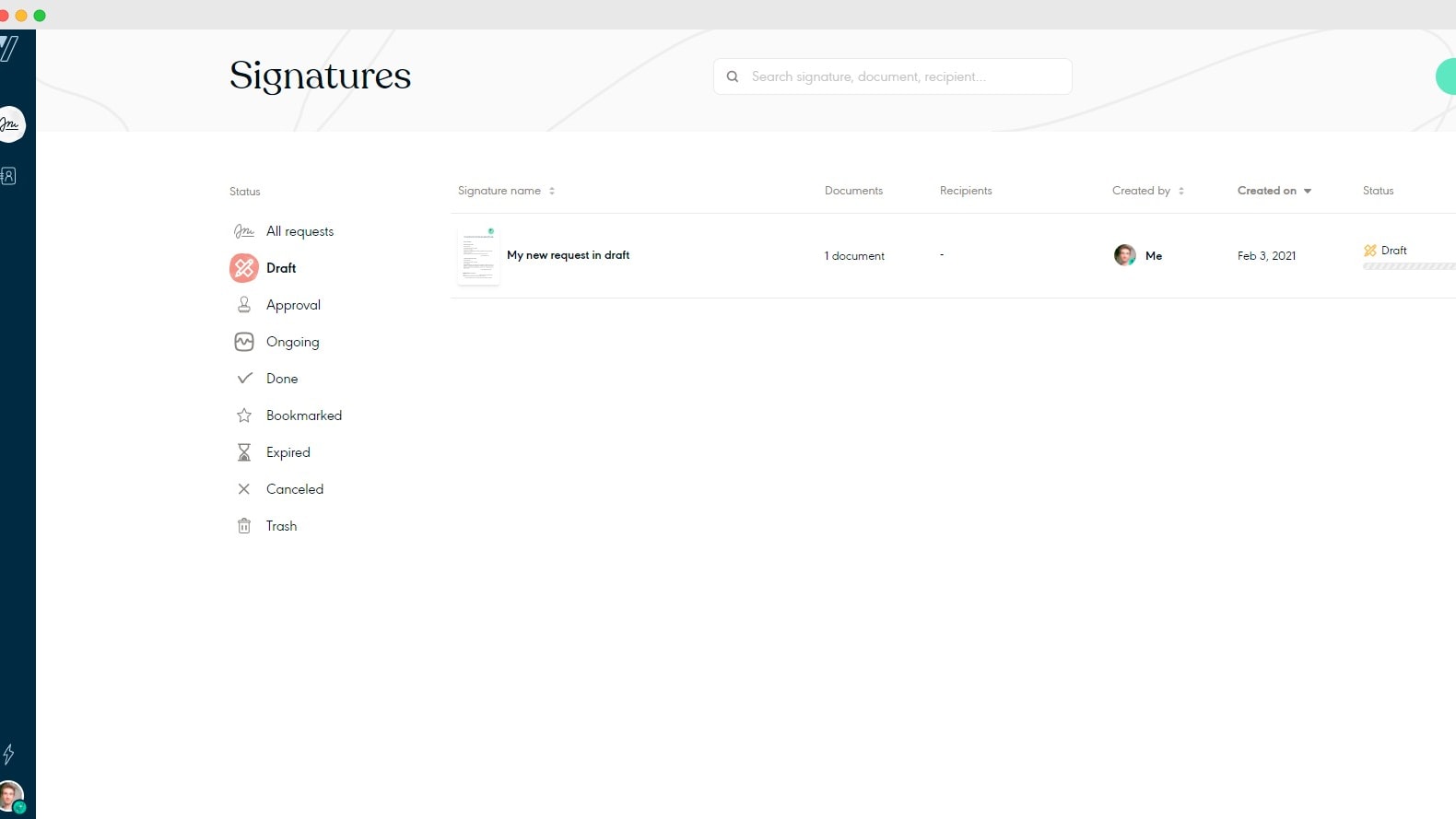
Yousign's Intuitive Interface Allows You To Easily Manage Your Signatures in Real-Time
When it comes to of ease-of-use, Yousign is a clear winner. Its interface is meticulously crafted for simplicity, catering to users of all technical abilities. Yousign stands out with features like intuitive navigation and straightforward document setup, employing drag-and-drop functionality and step-by-step guidance. For instance, users can easily upload documents and add signature fields with minimal effort, ensuring a seamless signing experience.
Conversely, while DocuSign also prioritizes user-friendliness, it may present a steeper learning curve, especially with more complex functions. Some users have found its interface initially overwhelming, hindering swift adoption. Thus, if prioritizing accessibility and ease of use, Yousign presents itself as the prime choice.
Yousign's Developer-Friendly Electronic Signature API Outshines DocuSign

Integrate eSignature Features Directly Into Your Solutions to Close Deals Faster
Yousign's Electronic Signature API garners praise for its developer-friendly approach, offering a plethora of customization options tailored for seamless integration into third-party applications or websites. Developers appreciate Yousign's API for its simplicity and flexibility, allowing for smooth implementation of electronic signature functionalities. For instance, Yousign's API enables developers to embed signature capabilities directly into their custom applications or workflows, enhancing user experience and workflow efficiency.
While DocuSign also provides an API for automating business processes, Yousign's emphasis on API accessibility and customization sets it apart. Its robust API ecosystem empowers developers to create tailored solutions that meet specific business needs, making Yousign the preferred choice for organizations seeking a developer-friendly electronic signature solution.
DocuSign Leads the Pack for Comprehensive Integrations
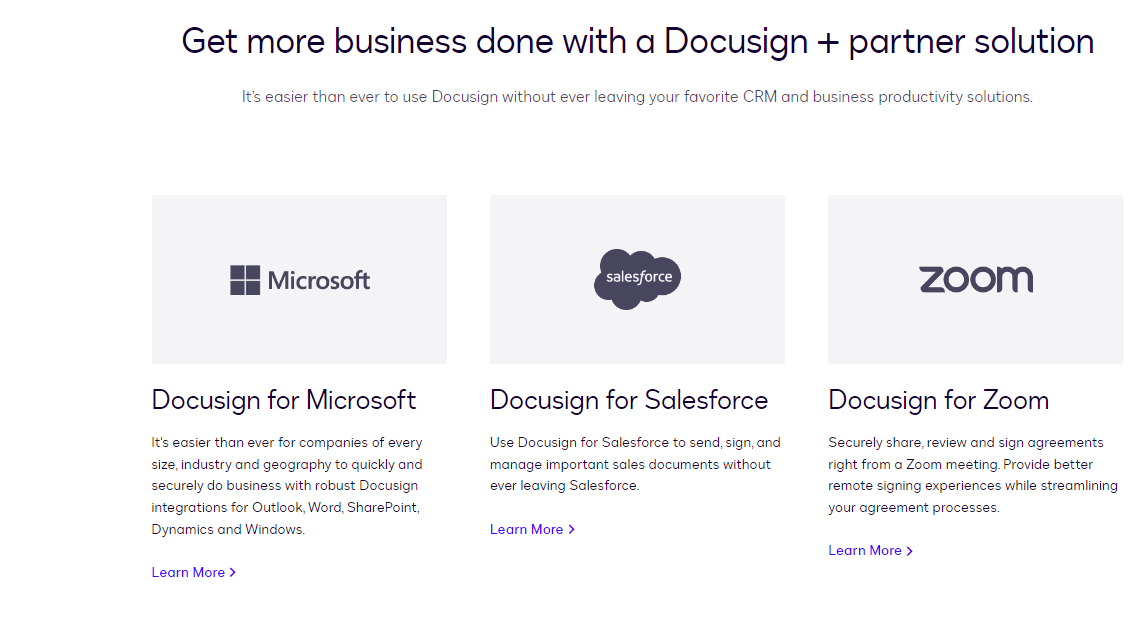
DocuSign's 400+ Integrations Include Microsoft, Salesforce, Zoom, and More
Shifting our focus to integrations, DocuSign takes the lead with its extensive array of third-party connections. Being a trailblazer in the digital signing sphere, DocuSign has forged robust integrations with industry giants like Salesforce, Google Cloud, Microsoft Office 365, and more. For instance, its seamless integration with Salesforce enables users to initiate signing processes directly from Salesforce records, enhancing workflow efficiency. This breadth of integration possibilities ensures DocuSign's compatibility with various business ecosystems, from CRM to project management tools, catering to diverse organizational needs.
Conversely, while Yousign does offer integration capabilities, its scope is more limited. It supports connections with popular platforms like Slack, Zapier, and Dropbox, but lacks the breadth of integrations seen with DocuSign. Thus, for businesses reliant on a multitude of software solutions seeking a versatile e-signature tool, DocuSign emerges as the optimal choice for seamless integration and workflow cohesion.
08 Yousign vs Docusign: Which is the best for your business?
Yousign is the best tool for you if:
- You're a small to medium-sized business looking for an affordable, straightforward solution without the need for extensive customizations or integrations.
- Simplicity and user-friendliness are your top priorities in software, ensuring you can set up and start processing documents with minimal training.
- You prefer a service that offers straightforward pricing structures with no hidden fees, making it easier to budget for your business needs.
- Your operations are primarily within Europe and you need an e-signature solution that complies fully with EU regulations and standards.
- You value responsive customer support tailored to smaller enterprises, providing quick and effective help when needed.
 You're a small to medium-sized business looking for an affordable, straightforward solution without the need for extensive customizations or integrations.
Docusign is the best tool for you if:
- Your business demands extensive integration capabilities with other systems like CRM, ERP, and custom apps, facilitating a seamless workflow across various platforms.
- You require robust security features, including advanced encryption and compliance with global standards, to protect sensitive information in a multinational corporate environment.
- Scalability is crucial for you as your business grows or operates globally, needing a platform that can handle increasing volumes and complexity of transactions.
- Customization options are a priority, enabling you to tailor the signing process and user experience to fit specific business needs and branding.
- You operate in a heavily regulated industry where meeting compliance requirements across different jurisdictions is necessary for legal and operational integrity.
Docusign
The world's #1 eSignature solution
First month free and 40% off annual plans
Save up to $350
09 Alternatives to Yousign & Docusign

PandaDoc
Used by 1104 members
20% off monthly Starter and Business plans for 12 months
Save up to $156

Signaturit
Used by 170 members
50% off on Business, Business + and API plans
Save up to $1,497

Dropbox Sign (ex. HelloSign)
Used by 127 members

GetAccept
Used by 117 members
10 Promotions on Digital Signature software
Yousign and Docusign are great tools, but Secret offers promo codes with discounts on over 2190+ different SaaS solutions. New deals are added regularly, helping you save money on your online subscriptions. Get access to codes for other Digital Signature software you might want to purchase

DocSend coupon
90% off your annual DocSend plan

Promo code for signNow
60% off annual plans
Signaturit promo code
50% off on Business, Business + and API plans
Deal for PandaDoc
20% off monthly Starter and Business plans for 12 months

Signitic promo code
30% off for 1 year

pdfFiller promo code 2026
First month free

Legalstart promotion code
25% discount

Snapchat Ads discount
Spend $350, get $375 FREE ad credit

Contract-factory discounts
30% off

SignerX discount
100% off the Business plan for 12 months
Start saving on the best SaaS
Secret has already helped tens of thousands of startups save millions on the best SaaS like Microsoft Teams, Google Workspace & many more. Join Secret now to buy software the smart way.