


While it's never going to be "coming up" with the next big idea when it comes to visual production; it's usually about the time spent to make the usable asset that is of a standard quality and branded properly, and has been vetted for legal compliance before publishing. The reason for that is why tools such as OpenArt and Freepik have become the top options for growth teams, content creators and designers to include into their workflow.
This article will give you a real-world comparison between the two options - library size and capabilities compared to AI generated images, how much control you have over your edits, how they charge you (Credits or Subscriptions) and what you really get from using each option with regards to commercial usage.
If you'd rather take a look at the savings first, go to the Freepik promo code to save 50% off on Business plan and OpenArt discounts to save 15% off monthly plans for 1 year.
- 01 Magnific (ex. Freepik) vs OpenArt: resumen
- 02 ¿Cuál es la diferencia entre Magnific (ex. Freepik) y OpenArt?
- 03 Pros y contras de Magnific (ex. Freepik)
- 04 Pros y contras de OpenArt
- 05 Magnific (ex. Freepik) en comparación con OpenArt
- 06 OpenArt en comparación con Magnific (ex. Freepik)
- 07 Comparación de funciones
- 08 Magnific (ex. Freepik) vs OpenArt: ¿Cuál es el mejor para tu negocio?
- 09 Alternativas a Magnific (ex. Freepik) y OpenArt
- 10 Promociones en software de Diseño
- 11 Magnific (ex. Freepik) vs OpenArt: Conclusión
Empieza a ahorrar en los mejores SaaS
Secret ya ha ayudado a decenas de miles de startups a ahorrar millones en los mejores SaaS como Microsoft Teams, Google Workspace y muchos más. Únete a Secret ahora para comprar software de forma inteligente.

01 Magnific (ex. Freepik) vs OpenArt: resumen
The first is Freepik. The approach taken by Freepik is to be "asset-first". This means you will browse through Freepik's library of ready-to-use creative assets (vector graphics, photos, PSD files, icons) and download the ones that best fit into your design system.
Then there is OpenArt which uses a "generation-first" approach. With OpenArt you create images (and in many cases, short video clips) based upon prompts, and continue to edit/iterate the created image until it meets your requirements.
A primary strength of Freepik is as a source of production-grade building blocks, and it is well-suited for providing editable vector graphics to be used as brand illustration; stock photos for blog headers; PSD files to be edited to meet specific professional design requirements; and so forth. In this way, Freepik is the "creative supply chain" tool to be used when reliability of a product is more important than creativity or surprise.
An alternative strength of OpenArt is its ability to provide a platform for experimentation and variation, for generating images from prompts, and for performing tasks such as inpainting, style modification, and up-scaling of images. In essence, OpenArt is ideal for teams who are looking for ways to generate new ideas and creative directions (i.e., new hooks, new angles, new aesthetics) without requiring a complete design cycle to achieve these goals.
To illustrate these philosophical differences, we have provided a side-by-side comparison of the key feature sets of both platforms, based upon how each feature set supports common workflows.

Ease of use
Freepik is straightforward for “search, download, design.” OpenArt is easy once you have a prompt system, but iteration is required.

Magnific (ex. Freepik)
OpenArt
Customer support
Freepik offers priority support for paid users. OpenArt includes priority support in team-oriented plans.
Magnific (ex. Freepik)
OpenArt
Customer reviews
Review sentiment often mirrors expectations, Freepik is praised for breadth and speed, OpenArt for creative control and iteration power.
Magnific (ex. Freepik)
OpenArt
Asset library breadth
Freepik is built around a huge catalog of stock and design assets. OpenArt is better viewed as an AI studio, not a marketplace library.
Magnific (ex. Freepik)
OpenArt
Text-to-image generation
Both generate images, but OpenArt is centered on prompt workflows and scaling variations with credits and parallel generations.
Magnific (ex. Freepik)
OpenArt
Image editing (inpainting, targeted edits)
OpenArt is purpose-built for AI edits, fixing parts of an image without restarting. Freepik’s strength is editing source files like PSDs and vectors.
Magnific (ex. Freepik)
OpenArt
Upscaling, enhancement
Freepik includes upscaling in its plans. OpenArt also supports upscaling to turn draft generations into sharper final assets.
Magnific (ex. Freepik)
OpenArt
Style exploration
OpenArt is faster for “same concept, 10 styles” experimentation. Freepik can match styles through curation, but it’s more manual.
Magnific (ex. Freepik)
OpenArt
Consistent characters, brand continuity
Both mention training styles and characters, but OpenArt quantifies consistent character capacity, which makes production planning easier.
Magnific (ex. Freepik)
OpenArt
Pricing structure
Freepik uses annual AI credits, plus unlimited usage on selected models. OpenArt is monthly credits with tiers and optional extra credit packs.
Magnific (ex. Freepik)
OpenArt
02 ¿Cuál es la diferencia entre Magnific (ex. Freepik) y OpenArt?

Freepik's AI tools and creation suite
Magnific (ex. Freepik)
Diseña más rápido con inteligencia artificial inteligente

OpenArt's iterative AI video and scene creation
OpenArt
OpenArt es una plataforma creativa impulsada por IA que permite generar y editar imágenes y videos cortos a partir de descripciones de texto. Ofrece herramientas para edición puntual, transferencia de estilo, coherencia de personajes e iteraciones basadas en prompts.
You can distinguish between Freepik and OpenArt by where your workflow begins. Typically, you begin with an asset (a vector illustration, a stock photo, a PSD template, an icon set) when using Freepik. If you operate as if you were part of a production team and you're sending assets across channels and want to make sure they all look the same and don't disrupt your branding, then this is a good way to work. When working with OpenArt, you begin with a direction (a description of the scene, the mood, the composition, etc., and possibly a brand feel). Then, the value is in iterative development. You generate options, edit the options until you find the one you like, use focused edits, and then upscale your selected option(s). This works best when you have to create something new (novelty) or your creative strategy depends on creating multiple iterations.
The "free" aspect is also significant. The OpenArt free trial is intended to allow users to test out the tool through trial credits. While the free trial is suitable for testing and evaluating the tool, it is not suitable for long-term, ongoing production. The free trial does not provide access to the full range of features available in the paid version. The Freepik ecosystem is larger than OpenArt's and includes both premium stock and AI creation tools (OpenArt currently has a single AI creation tool), as well as an editor and clear rules regarding when you are required to give attribution to the creators of the images you use from Freepik.

Magnific (ex. Freepik)
Usado por 1213 miembros
50% de descuento en el plan Business (Equipos) por 1 año
Ahorra hasta un $352

OpenArt
Usado por 222 miembros
15% de descuento en planes mensuales
Ahorra hasta un $100
03 Pros y contras de Magnific (ex. Freepik)
¿Cuáles son las ventajas de Magnific (ex. Freepik)?
- Massive production-ready library, Freepik is hard to beat for sheer volume of vectors, photos, PSDs, and icons, which makes it a reliable engine for day-to-day creative throughput.

- Editable file formats, PSD and vector assets aren’t just “nice to have,” they reduce rework because your designers can adapt assets precisely to brand constraints.
- Commercial AI license built into plans, Freepik’s pricing pages highlight commercial AI usage, which helps when you’re producing assets for paid channels and client work.
- Useful AI stack beyond images, Freepik bundles image, video, and audio models plus editing tools, so it can become a broader content production hub.
- Attribution can be removed on paid tiers, Freepik explains that “no attribution” applies on certain paid plans, which simplifies publishing workflows.
¿Cuáles son las desventajas de Magnific (ex. Freepik)?
- “Stock DNA” can show, even great assets can feel familiar if you don’t customize them, brands that rely on uniqueness may need heavier editing or AI generation.

- Editorial-use restrictions exist, some content is restricted to editorial contexts only, which can be risky if you use assets in marketing without checking labels.
- Commercial use still requires diligence, Freepik is clear that users must ensure compliance with laws and third-party rights, especially for branding, merchandising, and identity use cases.
- AI credit economics can be opaque, plans include large yearly credit buckets and unlimited usage on selected models, but teams still need a usage policy to avoid waste.
- Not optimized for deep AI iteration loops, if your workflow is “generate, inpaint, regenerate, upscale” all day, OpenArt’s AI-first structure can feel more native.
04 Pros y contras de OpenArt
¿Cuáles son las ventajas de OpenArt?
- Clear AI creation workflow, OpenArt is built around prompt-based generation and scaling variations efficiently, which is ideal for iterative creative testing.
- Strong editing leverage, inpainting is a practical advantage, it lets you fix a localized problem, such as hands, background clutter, or object placement, without starting from scratch.
- Parallel generations improve speed, higher tiers allow more parallel generations, which matters when you need many options quickly for stakeholders or A/B testing.
- Consistent character planning is explicit, plans communicate approximate capacities for consistent characters, which is helpful for series content or branded mascots.
- Team-ready options, team plans include shared workspaces, pooled credits, role management, and priority support, useful when creation is collaborative.
¿Cuáles son las desventajas de OpenArt?
- Free is trial-oriented, the free tier is positioned around trial credits, good for evaluation but not a long-term production plan.
- Prompting skill is non-negotiable, without a prompt framework, such as style tokens, negative prompts, and reference strategy, results can drift and credits get burned.
- Monthly credit caps require governance, for teams, “who uses credits for what” must be defined, otherwise high-variance experimentation can become expensive.
- Less useful for classic design assets, if your workflow needs clean icon sets, vectors, or layered PSD templates, OpenArt isn’t the natural place to source them.
- Quality control becomes a process, AI output still needs review for brand compliance, legal and rights concerns, and visual consistency, especially when scaling ads.
05 Magnific (ex. Freepik) en comparación con OpenArt
The reason Freepik has an advantage over OpenArt is reliability, and as a result of this it offers a powerful library of ready-to-use assets along with an increasingly large array of AI tools to support today's content development pipelines. The reason OpenArt has an advantage over Freepik is creative freedom, and by doing so it allows users to generate new ideas, to refine those ideas, and to move quickly when you are unwilling to wait for a stock image to become available.
If you are choosing between Freepik and OpenArt then the correct question you should be asking yourself is; Do you primarily need to use these platforms to build out assets (Freepik), or do you need to use them to create and refine images (OpenArt)?
¿Es Magnific (ex. Freepik) mejor que OpenArt?
 ¿Es Magnific (ex. Freepik) mejor que OpenArt?
Freepik is better when your end product needs to be highly predictable and brand safe under a tight deadline, particularly for teams who are operating in a very structured and defined design workflow. When you begin with high-quality professional assets (vectors, PSDs) you will consistently get good results without needing to iterate back-and-forth through a lot of iterations.
OpenArt is better when you require a high level of original creativity and you have no problem treating prompts like a form of art. If however, your team's main barrier to progress is how quickly they can complete projects and not generating enough new ideas, then Freepik will likely feel much more readily shippable than OpenArt.
¿Para qué se utiliza mejor Magnific (ex. Freepik)?
Freepik is best suited for scaling everyday marketing production, such as social media posts, blog visuals, ad variations, landing page illustrations and presentation graphics where you need a number of options and editable source formats.
Freepik is also a strong fit for marketing agencies that need to provide a steady supply of creative assets across multiple client accounts as the library-based approach saves agencies time on having to continually develop common building block assets.
¿Puede Magnific (ex. Freepik) reemplazar a OpenArt?
Freepik could potentially replace OpenArt if your organization is already comfortable utilizing stock imagery as the base layer of your creative strategy and your competitive advantage lies in developing unique copy, layouts and brand styles.
However, if your competitive advantage is based on developing completely new and innovative, concept driven visual content, for example, a unique hero scene for each campaign angle, then Freepik alone may not be able to meet the demands of OpenArt's generation and refinement workflows.
¿Es Magnific (ex. Freepik) más barato que OpenArt?
Freepik could be less expensive than OpenArt when your team is able to extract a significant amount of value from the library, and therefore the more assets your team uses and remixes, the lower your cost-per-publishable-creative is likely to be. This is a model that rewards organized production.
If you want to reduce costs, please see the Freepik promo code page before subscribing.
¿Existe un mejor software de Diseño que Magnific (ex. Freepik)?
If you are looking for a higher end of AI creation rather than just using them to get stock assets, you may want to consider specialized generators such as Midjourney or other model-driven tools. Freepik is best used as a hybrid - a single tool that uses both stock, AI, and editing capabilities.
You can also explore other design tools by browsing the best Freepik alternatives and compare tools based on your workflow, library-first vs AI-first.
Is it okay to use images from Freepik?
Yes, in most cases, but there are specific rules that depend on what you download and how you use the image. Specifically, Freepik’s website has a set of terms that outline limitations such as only using assets for editorial purposes, and under what conditions you will need to provide attribution (specifically important for commercial or paid advertising).
For serious workflows I would suggest developing two simple rules – only use the assets that have been identified as being for editorial use only, and develop your plan accordingly, based on whether you want to be able to publish without needing to include attribution.

Magnific (ex. Freepik)
Diseña más rápido con inteligencia artificial inteligente
50% de descuento en el plan Business (Equipos) por 1 año
Ahorra hasta un $352
06 OpenArt en comparación con Magnific (ex. Freepik)
The reason OpenArt has an advantage over Freepik is creative control, and as a result of this it enables users to generate entirely new visuals, iterate quickly, and fine-tune outputs until they match a specific idea or style. The reason Freepik has an advantage over OpenArt is reliability, and by doing so it gives users immediate access to a vast library of polished, ready-to-use assets that can be deployed with minimal effort.
If you are choosing between OpenArt and Freepik then the correct question you should be asking yourself is; Do you primarily need to generate original visuals from scratch (OpenArt), or do you need fast access to high-quality assets you can adapt and ship quickly (Freepik)?
¿Es OpenArt mejor que Magnific (ex. Freepik)?
OpenArt is better if your competitive advantage is originality, fresh scenes, uncommon compositions, and new creative angles. Its credit-based tiers and parallel generation support are designed for output volume, and its workflow encourages iteration until you get something that feels bespoke.
Freepik is better if your edge is operational excellence, shipping consistent assets at scale with minimal unpredictability. If “we need 20 assets by end of day” is a common request, a stock-first approach is often the safer bet.
¿Para qué se utiliza mejor OpenArt?
Use OpenArt for developing concepts and variations. Use it to create 2-5 different creative direction alternatives for the same offer. Develop a consistent character series. Generate quick ad concept ideas and then do a detailed polished version.
Also, OpenArt is especially well-suited to what we call "surgical" enhancements where all of an image is correct except for one detail which needs to be changed, and you don't want to regenerate the entire image.
¿Puede OpenArt reemplazar a Magnific (ex. Freepik)?
OpenArt will likely replace Freepik for those teams who have transitioned to being able to create the majority of their visual elements from scratch. And those teams who do not rely heavily on vectors, icons, or layered PSD templates.
However, if you have a traditional design process that includes standard graphic assets, icon sets, vector illustrations, or reusable PSD templates, Freepik provides a level of production service that is currently unmet by AI-generated designs.
¿Es OpenArt más barato que Magnific (ex. Freepik)?
OpenArt can be cheaper when you’re disciplined, you reuse prompt frameworks, you iterate with intent, and you avoid credit burn from random experimentation. Its pricing is structured around monthly credits across tiers and optional add-ons.
Before you subscribe, check OpenArt’s promo codes to reduce your cost.
¿Existe un mejor software de Diseño IA que OpenArt?
OpenArt has the potential to save you money if you are disciplined, you build reusable prompt structures, you create iterations with purpose, and you avoid burning credits for randomly experimenting. Pricing for OpenArt is tiered based on monthly credit allocations and additional optional features. Before subscribing to OpenArt, see the top OpenArt alternatives and shortlist based on your output goals, ads, brand characters, product scenes, or stylized art.
Is OpenArt AI actually free?
The "free" version is essentially an evaluation model, so you can try out some of its premium features with a certain number of trial credits and see how the process works. This will allow you to assess the quality of the generated images and feel comfortable working in OpenArt's user interface.
However, for continuous production, specifically when creating content on a regular basis (weekly) and/or when working as part of a team, you would need to upgrade to one of the paid models which includes a monthly credit allocation for the generation of assets, the ability to generate multiple images at once and more consistent character limit.

OpenArt
Imagina. Propón. Crea.
15% de descuento en planes mensuales
Ahorra hasta un $100
07 Comparación de funciones
Freepik Dominates OpenArt for Library-Based Production Workflows

Freepik's extensive asset library
Freepik has far more OpenArt in terms of library-based production workflows.
If your workflow is based on finding and building with sources, Freepik will be your obvious choice. With an enormous library of vectors, stock photos and PSD files, you are able to choose source files that have already been designed within "the language" of marketing graphics (clear subjects, readable layouts, and high reuse potential).
OpenArt creates a wonderful hero graphic, but it will never replace a large collection of reusable stock images if you are looking for multiple consistent images by format. Stock may be boring, but it can quickly become a very powerful tool when you are working with many images that all have the same look and feel to create a uniform brand at a low cost and/or a large volume.
When you would like to decrease cost, but keep the library benefit, Freepik promo code and deals is the best starting point.
OpenArt Beats Freepik for Prompt-Driven Concept Generation

Precision AI editing with OpenArt
The "blank page" experience is exactly what OpenArt is built for. Describe an image, get options instantly. This is super valuable when you are exploring themes for a campaign or creating a story around a new product and do not have the constraints of existing images in stock libraries that can limit your creative direction.
While Freepik's AI is becoming better at generating content and adapting it for use; it still is a selection/adaptation tool. If you're running creative tests with multiple variants of images (and each needs to be substantially unique), OpenArt's ability to generate a continuous stream of new ideas is typically faster than Freepik. If you want to learn more about the legal rights associated with using AI generated imagery and best practices, OpenAi has made their documentation available publicly.
OpenArt Pulls Ahead on Targeted Image Editing (Inpainting)

Seamless inpainting with OpenArt
Targeted image editing is one of these features that has technical-sounding names until you actually use it as part of the production process. If an image is 90 percent correct but there is one small detail that is wrong; a placement of objects, removal of unwanted artifacts, a distraction element, etc., OpenArt’s targeted edit capabilities can help eliminate the need for additional generation cycles to get the image correct.
On the other hand, Freepik’s editing advantages are much more traditional. The primary advantage to using Freepik is that, if you begin with a layered PSD or a vector file, you can determine specific, pixel-precise edits. However, this may be preferred when you require more stringent brand control over the creative output versus having AI provide the corrections.
Freepik and OpenArt Are Surprisingly Close on Upscaling, With Different Strengths
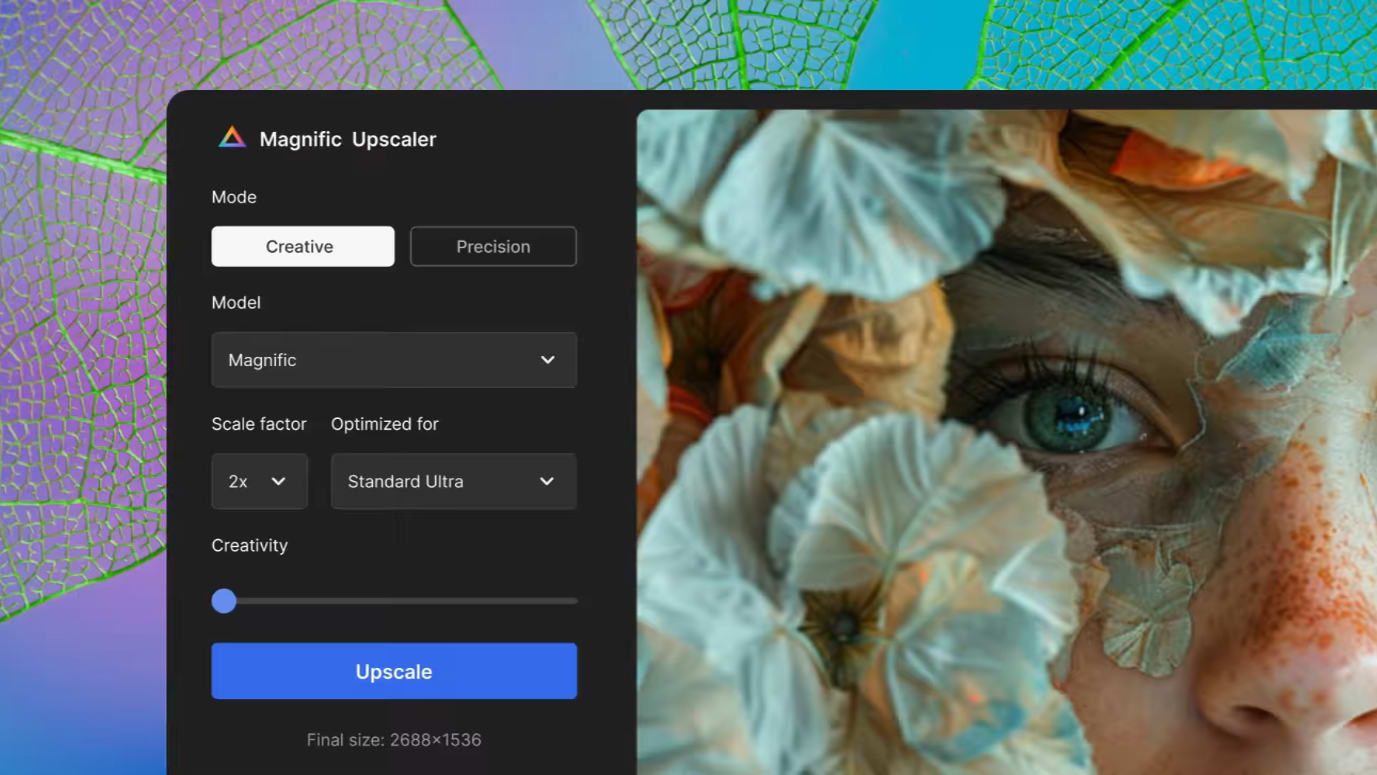
AI-powered image upscaling with Freepik
Both platforms have acknowledged that turning drafts into final assets is a major requirement. Upscaling is the function that allows users to take a draft and increase its level of sharpness and detail to produce a publishable-quality image.
Freepik’s advantage in upscaling is that vectors do not have to undergo upscaling because they inherently scale. OpenArt’s advantage is that it can natively upscale AI-generated images as part of a generation workflow, thereby reducing the amount of tool-switching required.
If you consistently create and ship vector-rich creative content, then Freepik will be a more natural workflow option. On the other hand, if you ship prompt-generated images, then OpenArt’s upscaling functionality will be the most natural path.
OpenArt Is Better for Controlled Style Exploration and Variation at Scale

OpenArt's grid for rapid creative testing and iteration
When you require ten creative interpretations based on a single brief, OpenArt’s workflow provides a more direct pathway to creating prompt variations, stylistic shifts and iterative refinements. This type of workflow is ideal for paid acquisition teams who require constant innovation and creative ideas to promote their campaigns without having to continuously develop new strategies for their target audience.
While Freepik also supports style exploration through curation by selecting various packages, templates, and assets, this is primarily a browsing problem and does not relate to a generation problem. While it is reliable, it offers less flexibility.
If your brand is attempting to establish a signature aesthetic that cannot be classified as "stock-coded," OpenArt often provides more creative space to work with.
OpenArt Is Stronger for Consistent Characters (When You Build a System)

Create reusable characters for multi-scene storytelling with OpenArt
Character consistency is difficult, as it is not simply about style; it is about maintaining identity over time within a scene. OpenArt's plans reference consistent character capacity, which provides a better means of forecasting if a series can be created without "character drift".
While Freepik can also help maintain character consistency, it is generally done through curation and designer decisions to manually design the character. This is beneficial when your designers are able to create and edit the character in vector form, but it does not lend itself to "same character, multiple scenes" story telling.
If your strategy involves a branded mascot or serialized content, OpenArt will generally be a better choice.
Freepik Is Stronger for Stock Licensing Clarity, OpenArt Is Stronger for AI Credit Planning

Transparent credit allocation and generation limits in OpenArt
Licensing is where most teams experience the most anxiety and rightfully so. While Freepik is very clear in their terms regarding editorial-only use, attribution requirements, and liability for ensuring compliance, this clarity decreases operational risks for agencies and large-scale publishers.
OpenArt's pricing advantage is in the ability to plan and generate more images, while utilizing monthly credits, and a tiered system for creating multiple images in parallel, and additional credits and team pooling. This is much easier to relate back to your production goals, i.e., "we need X number of images per month," vs. ambiguous "unlimited creativity" marketing messages.
08 Magnific (ex. Freepik) vs OpenArt: ¿Cuál es el mejor para tu negocio?
Magnific (ex. Freepik) es la mejor herramienta para ti si:
- You need a dependable pipeline of vectors, photos, PSDs, and icons for continuous marketing production.
- Your team prioritizes editable source files over AI-generated images that may require iterative cleanup.
- You want to minimize creative uncertainty and ship assets with predictable quality.
- Your brand depends on structured design systems where consistency beats novelty.
- You want one subscription that mixes stock, AI creation, and editing for a broad content operation.
 You need a dependable pipeline of vectors, photos, PSDs, and icons for continuous marketing production.
OpenArt es la mejor herramienta para ti si:
- You need original concepts quickly, not just assets that already exist in a library.
- You care about targeted AI edits (inpainting) to fix details without restarting generation.
- You run frequent creative tests and need high-velocity variation.
- Your strategy includes consistent character storytelling or series-based content.
- You want a pricing model that maps cleanly to output via monthly credits and team pooling.
Magnific (ex. Freepik)
Usado por 1213 miembros
50% de descuento en el plan Business (Equipos) por 1 año
Ahorra hasta un $352
OpenArt
Usado por 222 miembros
15% de descuento en planes mensuales
Ahorra hasta un $100
09 Alternativas a Magnific (ex. Freepik) y OpenArt

Canva
Usado por 798 miembros

Mobbin
Usado por 283 miembros
20% de descuento durante 1 año en el plan Pro
Ahorra hasta un $36

Shutterstock
Usado por 112 miembros
25% de descuento en todos los paquetes y planes
Ahorra hasta un $300

MonsterONE
Usado por 67 miembros
30% de descuento durante 1 año
Ahorra hasta un $320
10 Promociones en software de Diseño y Diseño IA
Magnific (ex. Freepik) y OpenArt son excelentes herramientas, pero Secret ofrece códigos promocionales con descuentos en más de 2190+ soluciones SaaS diferentes. Se añaden nuevas promos regularmente, ayudándote a ahorrar dinero en tus suscripciones en línea. Obtén acceso a códigos para otros softwares de Diseño y Diseño IA que puedas querer comprar.

Código para OpenAI - ChatGPT
$300 en créditos gratuitos a través de los modelos de OpenAI mediante LLM API

Código promocional de Descript 2026
35% de descuento en planes anuales

Código para Picsart
10% de descuento en planes mensuales o anuales

Promoción de Riverside.fm
20% de descuento en tu primer pago para cualquier plan mensual o anual

Código de promoción de Miro
$1,000 en créditos (validez de por vida)

LetsEnhance código promocional
50% de descuento en suscripciones mensuales de 100 y 300 imágenes durante 1 año

Promo de Piktochart
50% de descuento en el plan anual Business

Código para Bonsai
2 meses gratis en planes anuales

Código de descuento de CapCut
7 días gratis + 25% de descuento en planes anuales

Código de descuento de Klap
50% de descuento en planes mensuales y anuales durante 1 año
11 Magnific (ex. Freepik) vs OpenArt: Conclusión
Both Freepik and OpenArt do not only compete against each other but also are complementary at times. To put this in a nutshell, Freepik gets you to ship faster using the building blocks of reliable assets, while OpenArt gets you to ship faster through direction generation and refinement. Which one will give you the best results will depend on how much of your daily/week/month workflow is driven by assembling existing pieces (assembly) vs creating something that doesn't exist yet (invention).
My practical suggestion would be to make your decision based on your next 30 deliverables. If you have the ability to build the majority of them from existing stock assets with smart customization then Freepik is likely your safe operational bet. If you need new concepts, rapid iterations, and AI first edit control then OpenArt has the potential to be the stronger creative engine.
In either case, don't pay full price unless you absolutely have to, get Freepik discounts and OpenArt promo code before committing.
Empieza a ahorrar en los mejores SaaS
Secret ya ha ayudado a decenas de miles de startups a ahorrar millones en los mejores SaaS como Microsoft Teams, Google Workspace y muchos más. Únete a Secret ahora para comprar software de forma inteligente.