





Managing your online security is more critical than ever, and password managers are at the forefront of this battle. They not only store and organize passwords but also enhance security by generating strong, unique passwords for every account. However, with so many options on the market, choosing the right password manager for your needs can be challenging.
To aid in your decision-making, we've conducted a detailed comparison of two of the industry's heavyweights: 1Password vs LastPass. We'll delve into their features, assess their strengths and weaknesses, and highlight the key differences. By the end of this exploration, you'll have a clear understanding of which password manager aligns more closely with your security requirements and digital habits.
- 01 1Password vs LastPass: overview
- 02 What's the difference between 1Password and LastPass?
- 03 1Password pros and cons
- 04 LastPass pros and cons
- 05 1Password compared to LastPass
- 06 LastPass compared to 1Password
- 07 Features comparison
- 08 1Password vs LastPass: Which is the best for your business?
- 09 Alternatives to 1Password & LastPass
- 10 Promotions on Security software
Start saving on the best SaaS
Secret has already helped tens of thousands of startups save millions on the best SaaS like Microsoft Teams, Google Workspace & many more. Join Secret now to buy software the smart way.

01 1Password vs LastPass: overview
1Password and LastPass stand out as leading contenders in the domain of password management solutions, each boasting distinctive features aimed at catering to the varied demands of users and enterprises.
1Password is celebrated for its intuitive interface, which simplifies securing passwords, documents, and sensitive information. It offers seamless integration across multiple platforms, coupled with a strong focus on user privacy and a robust security model that includes features like the Watchtower for regular security audits. Conversely, LastPass is recognized for its versatility and comprehensive feature set that extends beyond password management to include form filling and encrypted notes.
Embarking on a 1Password vs LastPass journey, we aim to provide you with a detailed analysis that will assist you in identifying the password manager that best fits your personal security strategies or business protocols. Through this comparison, you will be equipped to make a well-informed choice that ensures your digital life is both manageable and secure.

Pricing Plan
1Password offers a straightforward pricing model but is generally considered a bit more expensive. LastPass has a very attractive free tier and its premium options are competitively priced.

1Password
LastPass
Customer Reviews
Both 1Password and LastPass are leaders in the password management space, with strong reputations for their comprehensive security measures and ease of use.
1Password
LastPass
Customer Support
Both services provide extensive support through FAQs, forums, and email. 1Password is known for its responsive customer service, while LastPass offers a wide range of self-help resources.
1Password
LastPass
Multi-platform compatibility
Both services offer excellent cross-platform support, with apps for Windows, macOS, iOS, Android, and browser extensions, ensuring a seamless experience across devices.
1Password
LastPass
Shared access options
1Password and LastPass both offer sharing features, suitable for families and teams, with secure options to manage shared passwords and access rights.
1Password
LastPass
Security features
1Password's Watchtower feature offers advanced security monitoring, while LastPass also provides strong encryption but has had some minor security concerns in the past.
1Password
LastPass
Ease of Use
1Password's interface is clean and intuitive, while LastPass is lauded for its user-friendly dashboard and simpler navigation for all user levels.
1Password
LastPass
Advanced authentication methods
1Password supports a variety of two-factor authentication methods, and LastPass also offers multi-factor authentication options, though 1Password's methods are slightly more diverse.
1Password
LastPass
Backup and recovery options
Both provide secure backup options and recovery methods. 1Password has a slightly more comprehensive recovery process for account recovery, while LastPass offers a simple and effective recovery process.
1Password
LastPass
Integrations
1Password integrates with various apps and browsers, and offers tools like 1PasswordX. LastPass has extensive integrations as well, particularly with browsers and offers a similar tool with LastPass browser extensions.
1Password
LastPass
02 What's the difference between 1Password and LastPass?
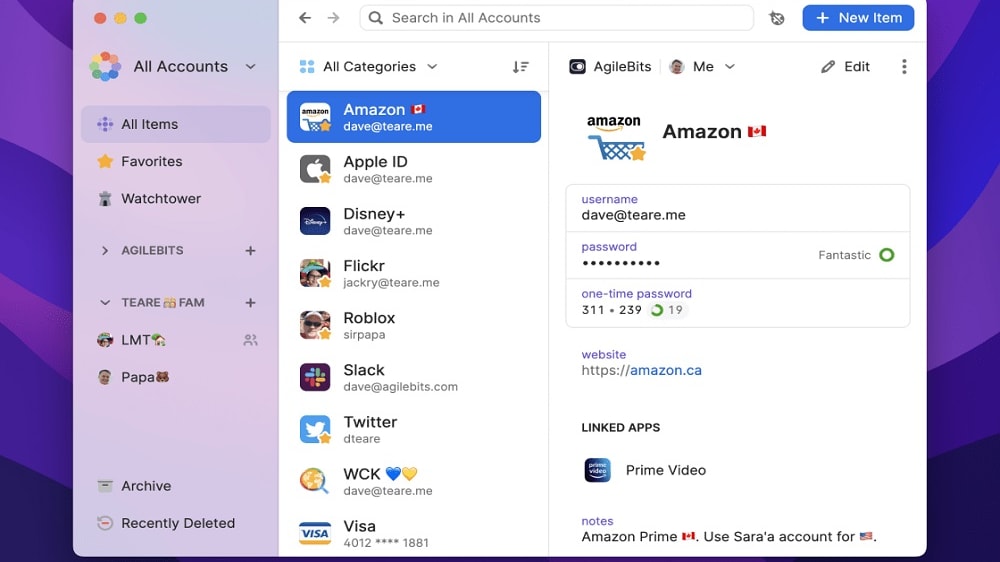
1Password is acclaimed for its polished interface and emphasis on security through features like the secret key, which adds an extra layer of encryption, and Watchtower, which alerts users to security breaches and compromised websites.
1Password
The simplest way to secure your passwords

LastPass's strength lies in its form-filling capabilities and its ability to securely share passwords and notes, making it a solid option for users looking for comprehensive functionality without a price tag
LastPass
LastPass is a leading password management tool that brings convenience, security, and peace of mind to its users. With LastPass, you can store all your passwords in one secure location, generate strong passwords, and automatically fill in login information for websites and applications.
1Password and LastPass are both esteemed password management tools, yet they offer distinct experiences shaped by differences in design philosophy, features, and user interface. The primary distinction lies in their approach to password management and additional security services.
1Password is acclaimed for its polished interface and emphasis on security through features like the secret key, which adds an extra layer of encryption, and Watchtower, which alerts users to security breaches and compromised websites. It caters to a user base that values a streamlined experience combined with sophisticated security measures. The tool integrates smoothly with multiple devices and platforms, and it extends its capabilities beyond password management to secure storage for documents and information.
LastPass, in contrast, stands out for its versatility and broad feature set. It’s particularly known for its accessible free tier, which offers users a strong starting point for password management and security. LastPass's strength lies in its form-filling capabilities and its ability to securely share passwords and notes, making it a solid option for users looking for comprehensive functionality without a price tag. While it does have a security challenge feature for auditing password strength, it lacks the more advanced security alerts found in 1Password’s Watchtower.
In terms of user interface, 1Password sports a more consistent design across various platforms, while LastPass's interface can vary, sometimes offering a more complex navigation due to its wide array of features.
The templates that each service provides also differ. 1Password offers Travel Mode, which helps secure data during border crossings, and LastPass provides an emergency access feature that grants loved ones access to your passwords in case of an emergency.
When it comes to pricing, both offer tiered plans. 1Password's plans typically start at a higher price point but offer extensive features even at the lower tiers. LastPass may be more appealing for individual users due to its robust free option and lower entry price for premium features.

1Password
The simplest way to secure your passwords
14 days free on 1Password Business
Save up to $48
03 1Password pros and cons
What are the advantages of 1Password?
- Robust security measures: 1Password is known for its strong focus on security, with features like a unique secret key for encryption, end-to-end encryption, and secure vaults that add an additional layer of security to your passwords and sensitive information.

- User-friendly interface: The tool boasts a clean and intuitive design, making it easy for users to navigate and manage their passwords. This user-friendly approach is consistent across various platforms, including web browsers, desktop applications, and mobile apps.
- Cross-platform support: 1Password offers applications for a variety of platforms, including Windows, macOS, Android, iOS, and Linux, as well as browser extensions, which allows for a seamless password management experience across all your devices.
- Watchtower feature: This feature keeps an eye on password breaches and reused passwords, and it alerts you to security vulnerabilities, helping you to keep your online accounts secure.
- Flexible sharing options: 1Password provides features that allow secure sharing of passwords and sensitive documents with family members or team members, which is particularly useful for collaborative environments.
What are the disadvantages of 1Password?
- Higher cost: Compared to other password managers, 1Password generally has a higher price point, especially if you’re looking for family or team plans, which may be a significant factor for cost-conscious users.

- No free version: Unlike some of its competitors, 1Password does not offer a free tier, which can be a barrier for users wanting to try the service before committing to a subscription.
- Learning curve: While the interface is intuitive, the wealth of features can be overwhelming for new users, who may find there's a learning curve to using the software effectively.
- Limited two-factor authentication storage: 1Password's support for storing two-factor authentication tokens is not as extensive as some specialized two-factor authentication apps.
- Dependence on subscription: The move to a subscription-based model means that users must continue to pay to access the service, as opposed to a one-time purchase that was available in earlier versions of the software.
Compare 1Password to other tools


Keeper Security vs 1Password


Dashlane vs 1Password

Bitwarden vs 1Password
04 LastPass pros and cons
What are the advantages of LastPass?
- Free tier: LastPass offers a robust free version with essential password management features, making it accessible to users who don't want to pay for a premium service.
- Wide range of features: LastPass goes beyond basic password management, offering features like secure password sharing, form filling, and a digital wallet for payment information, making it a comprehensive tool for managing online information.
- Cross-platform support: LastPass is available on various platforms, including Windows, macOS, Android, iOS, and has browser extensions for seamless integration with popular web browsers, ensuring accessibility across all your devices.
- Security audits and alerts: LastPass provides security audits that help you identify weak or reused passwords. It also offers security alerts to notify you of potential security breaches, helping you keep your accounts safe.
- Emergency access: The service allows you to designate trusted individuals for emergency access to your vault in case of unforeseen circumstances, ensuring continuity of access to your accounts.
What are the disadvantages of LastPass?
- Limited free features: While LastPass has a free tier, some advanced features like password sharing and emergency access are restricted to premium users, which can be a limitation for those on a budget.
- Complex interface for new users: The extensive feature set and customization options can make LastPass feel overwhelming for new users, especially those who are not tech-savvy.
- Security concerns in the past: LastPass has experienced security incidents in the past, which, while resolved, may raise concerns among users regarding the platform's overall security.
- Subscription pricing: The premium plans come with a subscription fee, and some users might prefer a one-time purchase option for a password manager.
- Autofill inconsistencies: While LastPass generally performs well with autofill, it may have occasional inconsistencies on some websites, requiring manual adjustments.
Compare LastPass to other tools

Keeper Security vs LastPass
05 1Password compared to LastPass
1Password and LastPass are two prominent password managers, each with its unique strengths. 1Password is renowned for its robust security features, including a unique secret key and end-to-end encryption. It boasts a user-friendly interface and extensive platform support, making it a top choice for those prioritizing security.
On the other hand, LastPass stands out for its versatility, offering a free tier and a wide range of features, including form filling and secure sharing. While 1Password excels in security and user experience, LastPass appeals to users seeking a comprehensive solution with budget-friendly options.
Is 1Password better than LastPass?
 Is 1Password better than LastPass?
When comparing 1Password and LastPass, it's evident that both cater to different user preferences in the realm of password management. 1Password's emphasis on advanced security measures and an intuitive interface positions it as a leading option for users who prioritize high-level security without compromising on ease of use. Its comprehensive platform support further enhances its appeal.
Conversely, LastPass distinguishes itself through its flexibility and accessibility. Its free version and an array of features like form filling and secure sharing cater to a broader audience, especially those looking for an all-encompassing solution without a significant financial commitment. Ultimately, the choice between 1Password and LastPass hinges on individual needs and priorities, with each offering distinct advantages in security and versatility.
What is 1Password best used for?
1Password is best used for securing and managing sensitive information, primarily focusing on passwords. It excels in creating and storing complex, unique passwords for various online accounts, enhancing digital security.
Additionally, it safeguards sensitive documents, credit card information, and secure notes, providing a secure vault for personal and business use. With its robust security features, including end-to-end encryption and the secret key, 1Password ensures the protection of critical data. Its versatility extends to team and family plans, making it an ideal choice for individuals, businesses, and families looking to enhance their online security and streamline password management.
Can 1Password replace LastPass?
1Password can indeed replace LastPass as a password management solution, but the decision to do so depends on individual preferences and needs. 1Password offers robust security features, user-friendly interface, and seamless cross-platform support, making it a compelling alternative. It excels in creating and managing complex passwords, enhancing overall digital security.
However, whether it's a suitable replacement depends on factors such as the user's current setup, existing passwords, and specific feature requirements. Migrating from LastPass to 1Password can be a smooth transition, but it's essential to evaluate both options to ensure that 1Password aligns with your password management goals and preferences.
Is 1Password cheaper than LastPass?
1Password and LastPass offer various pricing options, and whether 1Password is cheaper than LastPass depends on the specific plan and user requirements. 1Password’s pricing structure tends to have a higher starting price point for its premium plans, which may make it appear more expensive initially. In contrast, LastPass offers a free tier with essential features and competitive pricing for its premium plans, making it an attractive choice for cost-conscious users.
However, the overall cost-effectiveness of either service depends on factors like the number of users, feature needs, and the level of security desired. It's advisable to compare plans and features to determine which aligns better with your budget and requirements.
Is there a better Security software than 1Password?
When evaluating password managers, it's crucial to consider if there's a better software than 1Password that caters more precisely to your specific needs.
Several alternatives to 1Password in the password management space include LastPass, Dashlane, Bitwarden, and Keeper. The choice of a password manager depends on your security priorities, ease of use, feature requirements, and budget constraints. While 1Password excels in robust security and a user-friendly interface, other tools may offer unique features, different pricing structures, or integrations that better suit your password management preferences and objectives. It's essential to explore these alternatives to ensure you're selecting the best fit for your digital security needs.
1Password
The simplest way to secure your passwords
14 days free on 1Password Business
Save up to $48
06 LastPass compared to 1Password
LastPass and 1Password are two prominent password management tools, each with distinct characteristics. LastPass is recognized for its versatility, offering a robust free tier and a wide range of features, including form filling and secure sharing. It appeals to users looking for comprehensive functionality without the cost.
In contrast, 1Password stands out for its strong security measures, intuitive interface, and seamless cross-platform support. Its Watchtower feature enhances security by monitoring breaches. The choice between LastPass and 1Password hinges on factors like security priorities, budget, and preferred features. Both are solid choices, catering to diverse user needs in the realm of password management.
Is LastPass better than 1Password?
In the debate between LastPass and 1Password, LastPass often emerges as the more versatile and accessible option for many users. Its free tier, a significant draw, offers a wide array of features that cater to the needs of a diverse user base, including both individuals and businesses. The flexibility of LastPass, seen in its form-filling and secure sharing capabilities, makes it a practical choice for those who seek a comprehensive password management tool without incurring extra costs.
While 1Password is acclaimed for its high-end security features and user-friendly experience, LastPass holds its ground by offering substantial functionality at no cost, making it especially appealing for budget-conscious users who do not want to compromise on features. The preference between the two ultimately boils down to individual requirements regarding security, cost, and user experience, with LastPass being an optimal choice for those valuing versatility and affordability.
What is LastPass best used for?
LastPass is best used for simplifying password management and enhancing online security. It excels at creating and storing complex, unique passwords for numerous accounts, reducing the risk of password-related security breaches. Additionally, LastPass offers convenient features like form filling and secure sharing, streamlining online activities. It's ideal for individuals, businesses, and families looking to centralize and secure their login credentials and sensitive information.
LastPass's versatility extends to safeguarding digital wallets and secure notes, making it an all-encompassing tool for managing online data. Overall, LastPass is a valuable solution for those seeking to fortify their digital security and improve password management efficiency.
Can LastPass replace 1Password?
LastPass can replace 1Password as a password management solution, but the decision hinges on individual preferences and needs. LastPass offers a feature-rich experience with a versatile free tier, catering to users looking for comprehensive functionality without a hefty price tag. It excels in areas like form filling and secure sharing.
However, 1Password prioritizes robust security measures, a user-friendly interface, and seamless cross-platform support. It is an excellent choice for those who prioritize password security and user experience. Whether LastPass can effectively replace 1Password depends on factors like your security priorities, budget, and specific feature requirements. Evaluate both options to make an informed choice.
Is LastPass cheaper than 1Password?
The cost comparison between LastPass and 1Password depends on the specific plans and features required. LastPass’s pricing structure offers a free tier with competitive pricing for its premium plans, making it an attractive option for budget-conscious users.
In contrast, 1Password generally has a higher starting price point for its premium plans, which might appear more expensive initially. However, the cost-effectiveness of each service varies depending on factors like the number of users, feature needs, and desired level of security. It's advisable to compare plans, features, and pricing structures to determine which option aligns better with your budget and requirements.
Is there a better Security software than LastPass?
When exploring alternatives to LastPass in the password management landscape, it's essential to ascertain if there's a better software that aligns more closely with your unique security needs.
Several noteworthy alternatives to LastPass in the password management realm include 1Password, Dashlane, Bitwarden, Keeper, and NordPass.
Selecting a password manager depends on factors such as your security priorities, desired feature set, user interface preferences, and pricing considerations. While LastPass offers versatility and a free tier, other options may excel in areas like advanced security measures, cross-platform support, or unique integration capabilities.
07 Features comparison
1Password Takes the Lead in Cross-Platform Accessibility
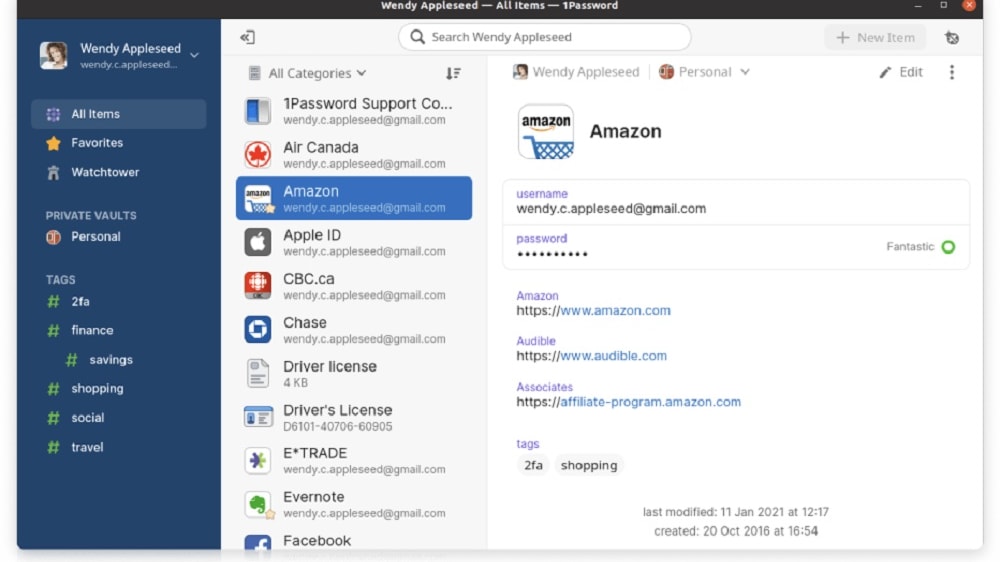
1Password's strength lies in its automatic data synchronization.
While both tools provide cross-platform accessibility, 1Password stands out with its exceptional ability to seamlessly function on all devices and browsers, providing users with a truly interconnected experience.
1Password's strength lies in its automatic data synchronization. Whether you're using a Windows PC, a Mac, an iPhone, an Android tablet, or any other device, 1Password ensures that your information is consistently up to date. For instance, if you add a new login credential on your desktop, it instantly becomes available on your mobile device and vice versa, allowing for a fluid and efficient workflow.
While LastPass also provides dedicated apps and extensions for major platforms, the seamless synchronization capability of 1Password gives it a slight edge in terms of cross-platform accessibility. With 1Password, you can have confidence that your data is readily accessible, no matter where you are or which device you're using.
LastPass is Better at Automating Form Filling than 1Password

LastPass not only autofills your saved passwords but also handles the auto-completion of payment details and personal information on web forms.
Both 1Password and LastPass offer automatic form filling. However, LastPass takes this feature to the next level by offering comprehensive form-filling capabilities that extend beyond passwords, giving it a notable edge.
LastPass not only autofills your saved passwords but also handles the auto-completion of payment details and personal information on web forms. This functionality proves invaluable for online shoppers and users engaging in frequent account sign-ups. For instance, when making an online purchase, LastPass can effortlessly fill in your credit card details, billing address, and shipping information, streamlining the checkout process.
While 1Password offers automated password filling, LastPass's ability to manage a broader spectrum of data makes it superior in this feature. Its comprehensive form-filling prowess simplifies various online interactions, making it a standout choice for users seeking convenience in their digital endeavors.
1Password and LastPass are On-Par for Secure Storage of Passwords
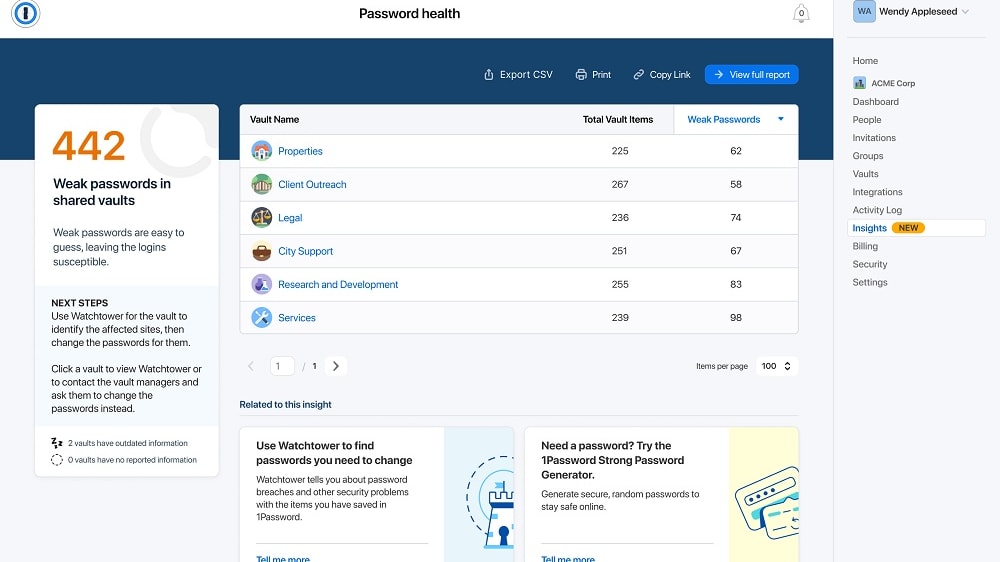
1Password's "safety store" employs state-of-the-art encryption techniques to secure your data
Both 1Password and LastPass offer excellent security to protect your passwords and sensitive information. These password management titans employ a robust array of measures to protect your passwords and sensitive information.
1Password's "safety store" employs state-of-the-art encryption techniques to secure your data. It combines end-to-end encryption with a unique secret key, ensuring that only you have access to your vault. For example, if you opt for 1Password's Watchtower feature, it regularly scans for compromised passwords and notifies you of security breaches, adding an extra layer of protection.
On the other hand, LastPass offers a similarly impregnable "password vault." It uses strong encryption methods to store and protect your digital credentials. LastPass also provides security alerts to keep you informed about potential security risks, ensuring that your sensitive information remains shielded.
LastPass Takes the Lead in User-Friendliness Over 1Password

LastPass's interface stands out for its simplicity and accessibility across various platforms.
When it comes to ease-of-use, both 1Password and LastPass deliver intuitive interfaces. However, when it comes to sheer ease of use, LastPass takes the lead.
LastPass's interface stands out for its simplicity and accessibility across various platforms. It offers a straightforward onboarding process, making it ideal for users of all technical levels. An example of this is LastPass's user-friendly browser extension, which seamlessly integrates with web browsers, allowing users to manage passwords effortlessly.
While 1Password is user-friendly, LastPass's consistent and straightforward design makes it slightly more accessible, particularly for those new to password management tools. This ease of use can be a significant advantage for individuals and businesses seeking hassle-free password security solutions.
1Password's 'Families' Feature Elevates Secure Password Sharing

1Password's 'Families' feature allows users to create a shared vault specifically designed for family members or colleagues.
Secure password sharing is a critical aspect of password management tools, and both 1Password and LastPass excel in this area. However, 1Password gains the upper hand with its 'Families' feature, which offers a more comprehensive solution for sharing passwords and sensitive information safely, particularly for teams and families.
1Password's 'Families' feature allows users to create a shared vault specifically designed for family members or colleagues. This shared vault ensures that everyone in the group can access essential passwords and sensitive documents while maintaining robust security. For instance, a family can securely share household account passwords or important documents like insurance policies, wills, or financial records.
While LastPass also supports secure password sharing, 1Password's 'Families' feature provides a dedicated and well-organized solution, making it the preferred choice for groups looking for a seamless and secure way to share sensitive information within their trusted circle.
LastPass's Comprehensive Security Audit Outshines 1Password

LastPass's Security Challenge goes beyond password health monitoring.
While 1Password's Watchtower feature keeps track of your password's health and notifies you of any security breaches or vulnerabilities, LastPass's Security Challenge takes the lead by providing a more thorough and comprehensive security audit, making it the superior choice for users with heightened security concerns.
LastPass's Security Challenge goes beyond password health monitoring. It conducts a meticulous audit of all stored passwords, scrutinizing them for weaknesses and duplicates. For example, if it detects a weak or reused password, it promptly alerts the user and recommends a stronger replacement. This proactive approach ensures that your password portfolio is optimized for security.
While 1Password's Watchtower feature also monitors password health and notifies users of security breaches, LastPass's Security Challenge offers a deeper and more proactive audit, making it an excellent choice for individuals who prioritize stringent online security practices.
LastPass Leads the Way in Integration Flexibility Over 1Password
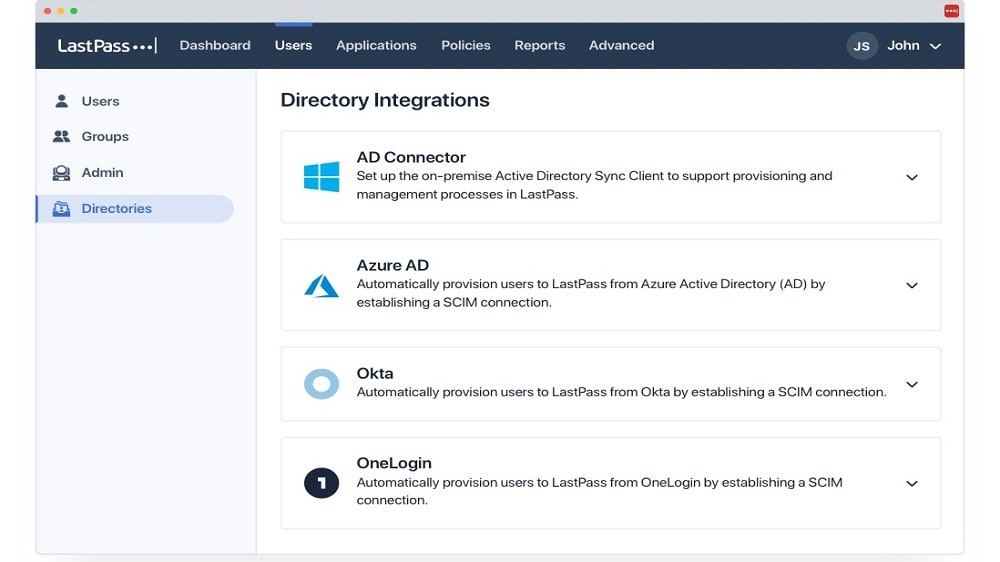
LastPass has built a reputation for its extensive range of integrations, making it a versatile choice for users across various platforms and devices.
In terms of integrations, LastPass shines brighter than 1Password. LastPass has built a reputation for its extensive range of integrations, making it a versatile choice for users across various platforms and devices.
One notable example is LastPass's compatibility with multiple operating systems, including Windows, Mac, iOS, Android, Linux, and Chrome OS. This breadth of compatibility ensures that LastPass can seamlessly integrate into a wide range of devices, catering to diverse user preferences.
While 1Password also offers a respectable array of integrations, its compatibility range is not as expansive as LastPass's, giving the latter a competitive edge in terms of integration flexibility. If your priority is seamless integration across a wide variety of platforms and browsers, LastPass emerges as the more suitable option for your password management needs.
08 1Password vs LastPass: Which is the best for your business?
1Password is the best tool for you if:
- You prioritize top-tier password security with end-to-end encryption and a unique secret key.
- Cross-platform accessibility is essential, as it seamlessly syncs your data across all devices and browsers.
- You require a user-friendly interface for effortless password management.
- Sharing passwords and sensitive information with family members or colleagues is a common practice, thanks to its 'Families' feature.
- A comprehensive security audit and proactive password improvement through features like Security Challenge align with your security objectives.
 You prioritize top-tier password security with end-to-end encryption and a unique secret key.
LastPass is the best tool for you if:
- Versatility matters, with a free tier and broad platform compatibility, including browsers and operating systems.
- Automated form filling, including payment details and personal information, simplifies online interactions.
- You prioritize seamless integration across various platforms and devices.
- Secure password sharing within teams or families is a frequent requirement.
- A comprehensive security audit with the Security Challenge feature is vital for maintaining robust online security.
1Password
The simplest way to secure your passwords
14 days free on 1Password Business
Save up to $48
09 Alternatives to 1Password & LastPass

Auth0
Used by 1263 members
12 months free
Save up to $20,000

Proton Pass
Used by 321 members
60% off the Pass Professional plan for 1 year
Save up to $35

Keeper Security
Used by 276 members
50% off personal and 30% off Business Starter for 1 year
Save up to $180

Rippling
Used by 121 members
3 months free
Save up to $2,500
10 Promotions on Security software
1Password and LastPass are great tools, but Secret offers promo codes with discounts on over 2190+ different SaaS solutions. New deals are added regularly, helping you save money on your online subscriptions. Get access to codes for other Security software you might want to purchase
Discount for Auth0
12 months free

Avast free credits
50% off for 1 year

Cloudflare promo code 2026
$5,000 in credits for self-funded startups // $250,000 in credits funded startups

McAfee discount code
$100 off your yearly subscription

Surfshark promo code
79% off and 2 months free on 2 year plans

NordVPN promotion code
60% off for 1 year or 74% off for 2 years

Discount for AWS Activate
Up to $100,000 in credits or 20-50% off your monthly spend through an AWS partner (must be spending $100+/month)

Credits for PureVPN
70% off annual plans for 1 year

Code for Microsoft Azure
$5,000 in credits for 6 months if you didn't raise funds // Up to $150,000 in credits for 2 years if you did

Drata discount code
30% off for 1 year
Start saving on the best SaaS
Secret has already helped tens of thousands of startups save millions on the best SaaS like Microsoft Teams, Google Workspace & many more. Join Secret now to buy software the smart way.