





Password management is a crucial aspect of online security, safeguarding your digital life with a strong line of defense. The average return on investment for investing in robust password management is immeasurable, given the protection it offers against data breaches and cyber threats. However, navigating the landscape of password management solutions can be daunting.
In this regard, Dashlane and 1Password stand out as leading contenders. But how do you decide which one is the best fit for your needs? Our detailed comparison below delves into the strengths and weaknesses of both Dashlane and 1Password, highlighting their key features and differences. This comparison will empower you to make an informed decision, ensuring you choose the tool that aligns best with your security requirements and usability preferences.
- 01 Dashlane vs 1Password: overview
- 02 What's the difference between Dashlane and 1Password?
- 03 Dashlane pros and cons
- 04 1Password pros and cons
- 05 Dashlane compared to 1Password
- 06 1Password compared to Dashlane
- 07 Features comparison
- 08 Dashlane vs 1Password: Which is the best for your business?
- 09 Alternatives to Dashlane & 1Password
- 10 Promotions on Security software
Start saving on the best SaaS
Secret has already helped tens of thousands of startups save millions on the best SaaS like Microsoft Teams, Google Workspace & many more. Join Secret now to buy software the smart way.

01 Dashlane vs 1Password: overview
Dashlane and 1Password stand out as leading contenders in the realm of password management, each catering to distinct user preferences and security requirements.
Dashlane excels with its feature-rich password management solution. It offers a wide array of tools to help users securely store and autofill passwords, protect digital identities, and even monitor the dark web for potential breaches. On the other hand, 1Password boasts a reputation for strong encryption and user-friendly interfaces, making it a popular choice among those seeking a seamless and secure password management experience.
To help you navigate the Dashlane vs. 1Password decision, we'll conduct a detailed examination of their key attributes. We'll assess factors such as password storage and generation, multi-device compatibility, two-factor authentication, and pricing structures. By the end of this comparison, you'll have the insights needed to make an educated choice between Dashlane and 1Password, ensuring that your digital life remains protected with the ideal password manager for your unique requirements.

Password sharing features
Dashlane allows for secure password sharing with limited rights for recipients, while 1Password also offers sharing but with more granular control in its business plan.

Dashlane
1Password
Pricing Plan
Dashlane offers competitive pricing with a free tier for basic use, while 1Password provides a range of plans tailored to individuals, families, and businesses.
Dashlane
1Password
Ease of Use
Both Dashlane and 1Password offer user-friendly interfaces, although Dashlane’s automatic form and payment filling are particularly appreciated by users.
Dashlane
1Password
Emergency access
Dashlane provides emergency contact access, whereas 1Password's Emergency Kit allows users to plan for digital legacy and emergency situations more comprehensively.
Dashlane
1Password
Security protocols
Both services use industry-standard AES-256 bit encryption. Dashlane has patented security architecture, while 1Password offers the Watchtower feature for breach monitoring.
Dashlane
1Password
Two-factor authentication (2FA) options
Both offer 2FA options, with Dashlane providing an in-built 2FA token generator. 1Password integrates smoothly with third-party 2FA apps like Authy.
Dashlane
1Password
Customer Reviews
Dashlane and 1Password both have strong reputations for reliability and customer satisfaction. They have similar high ratings on review platforms like Trustpilot and G2.
Dashlane
1Password
User interface & experience
Dashlane has a clean interface, but some users find it less intuitive compared to 1Password’s simple, well-organized layout.
Dashlane
1Password
Customer Support
Dashlane provides solid support with extensive FAQs and email support. 1Password is known for its responsive customer service and helpful community forums.
Dashlane
1Password
Integrations
Dashlane and 1Password offer browser extension integrations, but 1Password also has a command-line tool for developers and advanced users.
Dashlane
1Password
02 What's the difference between Dashlane and 1Password?
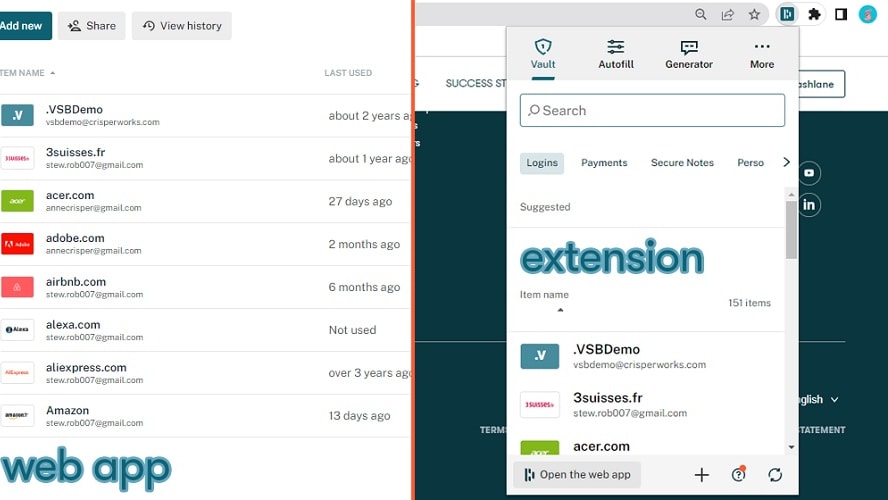
Dashlane focuses on delivering a comprehensive suite of features designed to enhance password security
Dashlane
Your key to a secure digital life
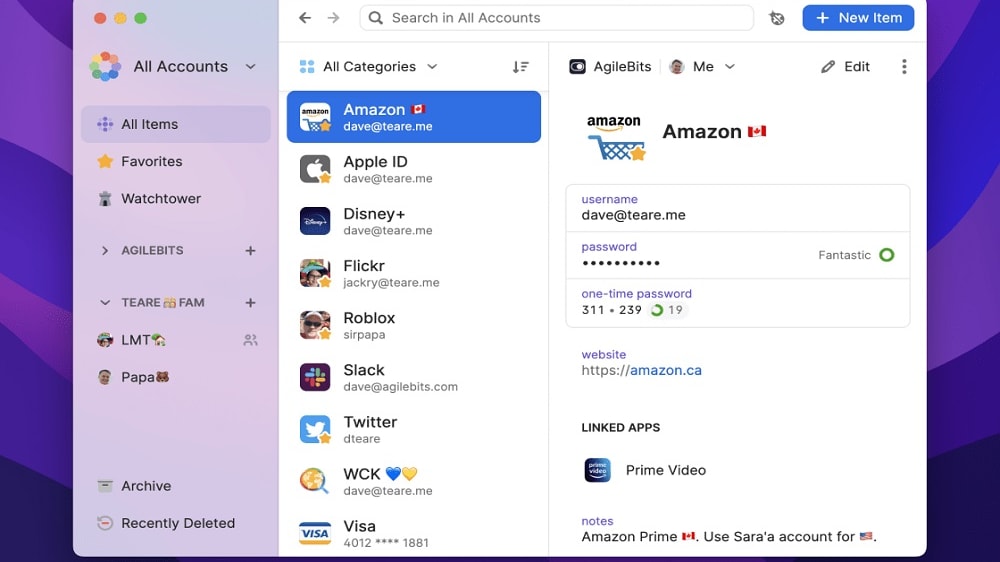
1Password shines in its commitment to strong encryption and user-friendly interfaces.
1Password
1Password makes it easy to create and store unique passwords. With this tool, your passwords will always be secured, and you'll only need one click to log in to all your accounts.
Dashlane and 1Password are both highly reputable password management solutions, but they have distinct differences in their approach and feature sets, catering to diverse user preferences and security needs.
One of the primary distinctions between Dashlane and 1Password is their emphasis on different aspects of password management. Dashlane focuses on delivering a comprehensive suite of features designed to enhance password security. It excels in password storage and generation, offering a secure vault for storing sensitive information, robust password generation tools, and a feature that monitors the dark web for potential security breaches. Dashlane also provides the convenience of auto-filling passwords across devices, making it a go-to choice for those seeking strong security and user-friendly functionality.
On the other hand, 1Password shines in its commitment to strong encryption and user-friendly interfaces. It prioritizes a seamless and intuitive user experience while maintaining the highest levels of security. 1Password's user interface is known for its simplicity and ease of use, making it an attractive option for those who prioritize a straightforward yet secure password management solution.
To help you make an informed decision between Dashlane and 1Password, it's essential to consider factors such as multi-device compatibility, two-factor authentication options, and pricing structures. Dashlane may be more suitable for users who desire an extensive feature set and robust security measures, while 1Password appeals to those who prioritize a user-friendly interface and efficient password management.

1Password
The simplest way to secure your passwords
14 days free on 1Password Business
Save up to $48
03 Dashlane pros and cons
What are the advantages of Dashlane?
- Strong password generator: Dashlane offers a robust password generator that creates complex and unique passwords, enhancing your online security.

- Secure password storage: It securely stores your passwords and sensitive information in an encrypted vault, protecting them from unauthorized access.
- Automatic form filling: Dashlane can automatically fill in your passwords, personal information, and payment details on websites and apps, saving you time and effort.
- Two-factor authentication (2FA): Dashlane supports two-factor authentication, adding an extra layer of security to your account.
- Dark web monitoring: Dashlane monitors the dark web for compromised accounts and sends alerts if your login credentials appear in data breaches, helping you take prompt action to secure your accounts.
What are the disadvantages of Dashlane?
- Pricing: While Dashlane offers a free version, its premium features require a subscription, which may be considered relatively expensive compared to some other password managers.

- No self-hosted option: Dashlane is a cloud-based service, which means you must rely on their servers for synchronization and storage, making it less suitable for users who prefer complete control over their data.
- Limited secure sharing: While Dashlane allows secure password sharing with trusted contacts, its sharing options are somewhat limited compared to other password managers.
- Browser extension dependency: Dashlane's full functionality relies heavily on browser extensions, which may be less convenient for users who prefer standalone desktop applications.
- Occasional synchronization issues: Some users have reported occasional synchronization problems between devices, leading to password and data inconsistencies.
04 1Password pros and cons
What are the advantages of 1Password?
- Strong security: 1Password is known for its robust security features, including end-to-end encryption and zero-knowledge architecture, ensuring your data remains highly secure.
- Cross-platform support: It offers compatibility with a wide range of devices and platforms, including Windows, macOS, Android, iOS, and web browsers, allowing seamless synchronization.
- User-friendly interface: 1Password is praised for its intuitive and user-friendly interface, making it easy for individuals and teams to manage passwords and sensitive information.
- Password sharing: It provides a convenient and secure way to share passwords and other data with trusted contacts or team members, without revealing the actual passwords.
- Two-factor authentication (2FA): 1Password supports 2FA, adding an extra layer of security to your account.
What are the disadvantages of 1Password?
- Pricing: While 1Password offers a free trial, its premium features require a subscription, which may be considered relatively expensive compared to some other password managers.
- No dark web monitoring: Unlike some competitors, 1Password does not include built-in dark web monitoring to alert you if your credentials appear in data breaches. You may need to rely on third-party services for this feature.
- Limited secure notes: While it excels at password management, the secure notes feature in 1Password may not be as feature-rich or organized as some users prefer.
- Limited password sharing: While 1Password allows password sharing, the process can be a bit less intuitive and flexible compared to some other password managers, which may be a drawback for teams.
- Lack of built-in VPN: Some password managers offer integrated VPN services for added security, but 1Password does not include this feature.
Compare 1Password to other tools


Keeper Security vs 1Password


Bitwarden vs 1Password

1Password vs LastPass
05 Dashlane compared to 1Password
Dashlane and 1Password are two prominent password managers with distinct strengths. Dashlane stands out for its robust password generation, secure storage, and dark web monitoring, providing comprehensive security features. However, it leans towards a higher price point.
In contrast, 1Password excels in simplicity and user-friendliness, appealing to those seeking a seamless interface. It prioritizes strong encryption and cross-platform compatibility. While 1Password's pricing may also be considered relatively higher, it offers a compelling balance between usability and security. Choosing between Dashlane and 1Password depends on your specific preferences, whether prioritizing advanced security or user-friendly convenience.
Is Dashlane better than 1Password?
 Is Dashlane better than 1Password?
Determining whether Dashlane is superior to 1Password largely hinges on individual preferences and needs. While Dashlane shines with its advanced security measures and dark web monitoring, making it a top choice for those who prioritize comprehensive online protection, its higher price might be a consideration for budget-conscious users.
Conversely, 1Password's allure lies in its intuitive design and ease of use, catering to users who value simplicity without compromising on security. Both offer strong encryption and secure storage, but the choice ultimately boils down to whether one prefers Dashlane's extensive security features or the straightforward, user-centric approach of 1Password.
What is Dashlane best used for?
Dashlane is best used as a comprehensive password management solution. It excels at securely storing and generating complex passwords, simplifying the process of managing numerous online accounts. Additionally, Dashlane provides robust security features, such as dark web monitoring and two-factor authentication, enhancing the protection of your digital identity. Its password autofill and digital wallet features streamline online transactions and form-filling, saving time and improving convenience.
While it offers other features like secure notes and a VPN, Dashlane's primary strength lies in password management, making it an excellent choice for individuals and businesses seeking enhanced online security and password organization.
Can Dashlane replace 1Password?
Dashlane can effectively replace 1Password as a password manager. Both Dashlane and 1Password offer robust password management features, including secure storage, password generation, and two-factor authentication. Dashlane's dark web monitoring and breach alerts provide additional security layers.
However, switching from 1Password to Dashlane requires migrating your data, which is typically straightforward using Dashlane's importing tools. Ultimately, the choice between the two should depend on your specific preferences and needs. Dashlane offers a strong alternative, particularly if you seek a comprehensive password manager with advanced security features and user-friendly functionality.
Is Dashlane cheaper than 1Password?
The pricing comparison between Dashlane and 1Password depends on the specific plan and features you require. Generally, Dashlane’s pricing structure offers both free and premium plans, while 1Password primarily operates on a subscription-based model. Dashlane's premium plans can be competitive in terms of pricing, particularly for individuals.
However, for businesses and teams, 1Password offers a more cost-effective solution with its per-user pricing structure. It's essential to evaluate your specific needs and budget constraints when determining which password manager is more cost-effective for your particular use case. The relative affordability of Dashlane or 1Password may vary depending on your requirements.
Is there a better Security software than Dashlane?
When evaluating password management software, it's crucial to explore alternatives to Dashlane to determine the best fit for your unique requirements.
Several reputable password managers compete with Dashlane in the market. Notable options include 1Password, LastPass, Bitwarden, and Keeper Security.
Selecting the ideal password management software hinges on factors such as your prioritized features, security concerns, pricing preferences, and user experience expectations. However, if you seek a password manager renowned for its comprehensive feature set, strong security measures, and user-friendly interface, Dashlane may indeed prove to be the ideal choice for your password management needs. It's essential to assess your specific criteria to determine whether another password manager surpasses Dashlane in addressing your preferences and requirements.
06 1Password compared to Dashlane
1Password and Dashlane are both robust password managers, each with distinct strengths. 1Password excels in its user-friendly interface and simplicity, making it an appealing choice for those seeking an easy-to-use solution with strong encryption.
In contrast, Dashlane offers a more extensive feature set, including dark web monitoring and a digital wallet, prioritizing advanced security and convenience. The choice between the two depends on individual preferences; 1Password is great for straightforward, secure password management, while Dashlane provides a comprehensive solution for users who value additional security layers and features. Both aim to enhance online security and password organization, catering to diverse user needs.
Is 1Password better than Dashlane?
When comparing 1Password to Dashlane, it's important to consider your specific requirements for password management. 1Password's edge lies in its user-centric design, offering a seamless and intuitive interface that is particularly attractive to those who value simplicity in their digital security tools. Its straightforward approach, coupled with robust encryption, makes it a compelling choice for users who prioritize ease of use without sacrificing security.
On the other hand, Dashlane's appeal stems from its broader range of features, including dark web monitoring and enhanced security options, catering to users who seek a more comprehensive online protection suite. Ultimately, the decision hinges on whether you favor 1Password's streamlined, user-friendly experience or Dashlane's extensive feature set for advanced security needs.
What is 1Password best used for?
1Password is primarily designed for effective password management. It excels in securely storing and organizing your numerous online passwords, ensuring strong security through robust encryption and user-friendly interfaces. Additionally, 1Password provides seamless integration across various devices and platforms, offering cross-platform compatibility.
Beyond passwords, it assists in securely storing sensitive information such as credit card details, secure notes, and personal data, enhancing overall online security and convenience. Whether you're an individual looking to safeguard your digital life or part of a team needing secure password sharing, 1Password is an excellent choice for anyone seeking efficient and reliable password management.
Can 1Password replace Dashlane?
1Password can effectively replace Dashlane as a password manager. Both 1Password and Dashlane offer strong password management capabilities, including secure storage, password generation, and two-factor authentication. While the transition may involve migrating your data, it's typically straightforward using 1Password's importing tools.
The choice between the two should depend on your specific preferences and needs. 1Password offers a compelling alternative, particularly if you value a user-friendly interface, strong encryption, and cross-platform compatibility. Ultimately, the decision to switch from Dashlane to 1Password hinges on your requirements, and 1Password provides a solid option for those seeking reliable password management.
Is 1Password cheaper than Dashlane?
The cost comparison between 1Password and Dashlane depends on the specific plans and features you require. In general, both 1Password’s price and Dashlane’s price offer subscription-based pricing models for their premium features. The relative affordability of one over the other may vary depending on your individual needs and preferences.
It's essential to evaluate the pricing tiers and the specific features included in each plan to determine which password manager aligns better with your budget and requirements. The cost-effectiveness of 1Password versus Dashlane will ultimately depend on factors like the level of security, usability, and additional features that you prioritize.
Is there a better Security software than 1Password?
When evaluating password management software, it's wise to explore alternatives to 1Password to determine the best fit for your unique needs.
There are several reputable password managers in the market that can be considered as alternatives to 1Password. Some of these options include Dashlane, Zoho Vault, Bitwarden, and NordPass.
Choosing the ideal password management software should be based on your specific criteria, such as security features, pricing, and user experience. However, if you seek a password manager renowned for its user-friendly interface, strong encryption, and seamless cross-platform compatibility, 1Password may indeed prove to be the ideal choice for your password management needs. It's essential to assess your specific requirements to determine whether another password manager surpasses 1Password in addressing your preferences and demands.
1Password
The simplest way to secure your passwords
14 days free on 1Password Business
Save up to $48
07 Features comparison
1Password's Watchtower Enhances Password Security and Awareness

1Password's Watchtower actively monitors the health of your passwords, highlighting weak, reused, or compromised passwords
When comparing password management solutions, 1Password stands out with its valuable Watchtower feature, which provides a distinct advantage in tracking password health and staying informed about security breaches and vulnerabilities. This feature elevates password security to a new level.
1Password's Watchtower actively monitors the health of your passwords, highlighting weak, reused, or compromised passwords. It alerts users to potential security threats, ensuring that they can take prompt action to enhance their digital security. For example, Watchtower notifies users if their login credentials are part of a data breach, prompting them to update passwords and bolster security measures.
In contrast, while Dashlane offers a comprehensive password health analysis, it falls short in alerting users to potential security breaches or vulnerabilities, making 1Password a preferred choice for individuals and organizations seeking heightened password security and awareness.
Dashlane's User-Friendly Interface and Advanced Automation Outshine 1Password

Dashlane's immediate usability stands out, providing features like auto-fill, which simplifies the login process
When it comes to password management, Dashlane and 1Password both offer excellent user-friendly interfaces, but Dashlane takes the lead in this comparison. Dashlane boasts a clean and intuitive platform that caters to both beginners and tech-savvy users.
For instance, Dashlane's immediate usability stands out. It provides features like auto-fill, which simplifies the login process, while 1Password may require initial setup time. Moreover, Dashlane's automatic password changer is a game-changer. With a single click, you can update all your passwords, offering unparalleled convenience. This advanced automation feature sets Dashlane apart and makes it a top choice for users seeking a hassle-free and efficient password management experience.
Dashlane and 1Password are Equally Robust in Data Security

Dashlane impresses with its Secure Digital Wallet and Secure Document Storage
Dashlane and 1Password are renowned for their unwavering commitment to data security, each offering distinct features to safeguard your sensitive information.
Dashlane impresses with its Secure Digital Wallet and Secure Document Storage. These features employ robust encryption techniques to shield your sensitive data from potential hackers. For instance, the Secure Digital Wallet ensures that your payment information remains secure during online transactions, while Secure Document Storage protects important files from unauthorized access.
On the other hand, 1Password's encryption measures guarantee that only you can access your stored documents and passwords, reinforcing the integrity of your data.
Dashlane's Advanced Password Management Outperforms 1Password

This functionality elevates Dashlane's capabilities, allowing users to effortlessly update passwords across all accounts with a single click.
When it comes to password management, both Dashlane and 1Password provide reliable solutions, but Dashlane offers a notable advantage with its innovative One-click Password Changer feature. This functionality elevates Dashlane's capabilities, allowing users to effortlessly update passwords across all accounts with a single click.
Dashlane's One-click Password Changer not only simplifies the process but also enhances security by generating strong, unique passwords for each site. This automated approach ensures that your online accounts remain well-protected without the hassle of manually updating passwords individually.
In contrast, while 1Password excels in securely storing and managing passwords, it lacks the convenience and efficiency of Dashlane's one-click mass password update function. This key differentiation makes Dashlane a preferred choice for users seeking advanced and time-saving password management.
Dashlane's Secure Digital Wallet Streamlines Online Transactions
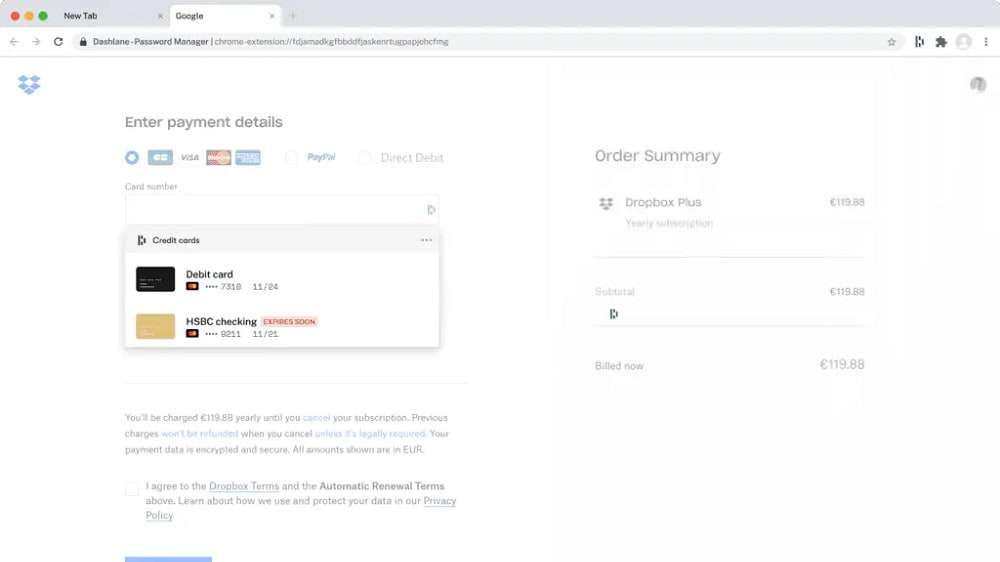
Dashlane's Digital Wallet allows users to store credit card details, billing addresses, and other payment information securely.
Dashlane gains an edge with its Secure Digital Wallet, which enhances online transactions and convenience. This specialized feature not only securely stores payment information but also streamlines the online shopping experience with its one-click autofill functionality.
Dashlane's Digital Wallet allows users to store credit card details, billing addresses, and other payment information securely. When making online purchases, the one-click autofill feature populates the required fields instantly, significantly reducing the time and effort required for checkout. This seamless integration with online shopping platforms simplifies the entire process.
On the other hand, while 1Password effectively stores passwords and data securely, it lacks the dedicated feature for optimized online transactions that Dashlane offers. This makes Dashlane the preferred choice for users seeking a comprehensive password management solution with enhanced online shopping convenience.
1Password's Seamless Password Sharing Enhances Security

1Password Families allows users to create designated vaults for sharing, granting controlled access to specific individuals without compromising the overall security of their accounts.
When it comes to password management, 1Password shines with its exceptional 1Password Families feature, which offers a superior solution for secure password sharing compared to Dashlane. This feature simplifies the process of sharing passwords and sensitive information among family members or colleagues, ensuring both ease of use and robust security.
1Password Families allows users to create designated vaults for sharing, granting controlled access to specific individuals without compromising the overall security of their accounts. For instance, family members can securely share access to streaming service logins or jointly manage important financial accounts.
In contrast, while Dashlane provides solid password storage and management, it lacks the dedicated feature for safe and efficient password sharing that 1Password offers. This sets 1Password apart as the preferred choice for users seeking a comprehensive password management solution with advanced sharing capabilities.
1Password Leads in Integration Flexibility Over Dashlane
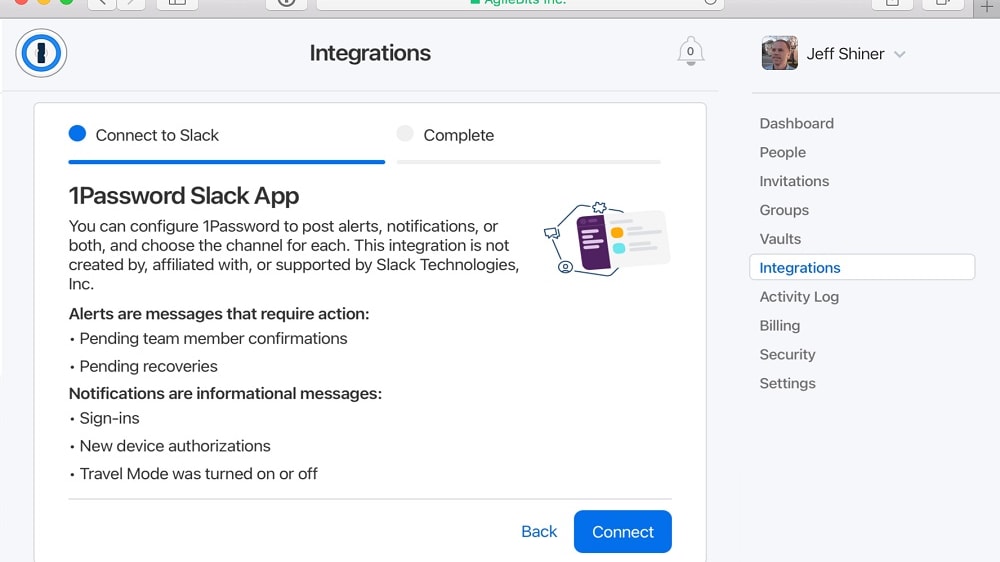
1Password seamlessly integrates with a wider range of popular tools and systems.
When it comes to integration capabilities, 1Password gains a slight advantage over Dashlane. While both tools offer support for various platforms and browsers, 1Password's extensive integrations set it apart.
1Password seamlessly integrates with a wider range of popular tools and systems. Its robust API facilitates smooth integration with business systems such as Active Directory and Okta. This becomes particularly crucial for organizations dealing with substantial user and credential management requirements.
Furthermore, 1Password excels in browser compatibility, functioning seamlessly on Chrome, Firefox, Opera, and Edge, which enhances its adaptability across different environments. While Dashlane offers a comprehensive range of compatibility, 1Password's versatility and extensive integration options make it the preferred choice for those seeking a highly adaptable password management solution.
08 Dashlane vs 1Password: Which is the best for your business?
Dashlane is the best tool for you if:
- You're seeking a password manager with extra layers of security, including dark web monitoring and alerts, ensuring comprehensive protection beyond just password storage.
- You prefer having a digital wallet feature for secure online transactions, making Dashlane not just a password manager but also a tool for safer online shopping.
- You value high-level password generation and management, as Dashlane offers advanced options to create and store complex passwords, reducing the risk of password-related breaches.
- You're interested in a tool that not only manages passwords but also monitors and reports potential security breaches, keeping you informed and proactive about digital threats.
- You're looking for a versatile solution that integrates with various platforms and devices, offering flexibility and ease of access to your passwords and secure information across different ecosystems.
 You're seeking a password manager with extra layers of security, including dark web monitoring and alerts, ensuring comprehensive protection beyond just password storage.
1Password is the best tool for you if:
- You prioritize a user-friendly interface that simplifies password management, making it easy for individuals of all tech levels to secure their online information efficiently.
- You need a password manager that seamlessly integrates with multiple platforms and devices, providing consistent and reliable access to your passwords wherever you are.
- You are looking for strong encryption and security measures without the complexity of additional features, focusing purely on the fundamental aspects of password management.
- You appreciate a straightforward subscription model with transparent pricing, offering essential password management features without overwhelming you with too many options.
- You value a password manager that includes family and team plans, making it an ideal choice for sharing secure information within a controlled and safe environment.
1Password
The simplest way to secure your passwords
14 days free on 1Password Business
Save up to $48
09 Alternatives to Dashlane & 1Password

Auth0
Used by 1270 members
12 months free
Save up to $20,000

Keeper Security
Used by 279 members
50% off personal and 30% off Business Starter for 1 year
Save up to $180

Hypervault
Used by 70 members
50% off all plans for 1 year
Save up to $238

LastPass
Used by 23 members
10 Promotions on Security software
Dashlane and 1Password are great tools, but Secret offers promo codes with discounts on over 2200+ different SaaS solutions. New deals are added regularly, helping you save money on your online subscriptions. Get access to codes for other Security software you might want to purchase
Auth0 coupon code 2026
12 months free

Avast discounts
50% off for 1 year

Promo code for Cloudflare
$5,000 in credits for self-funded startups // $250,000 in credits funded startups

McAfee coupon
$100 off your yearly subscription

Surfshark free credits
79% off and 2 months free on 2 year plans

NordVPN coupon code
60% off for 1 year or 74% off for 2 years

AWS Activate coupon code 2026
Up to $100,000 in credits or 20-50% off your monthly spend through an AWS partner (must be spending $100+/month)

PureVPN discount code
70% off annual plans for 1 year

Microsoft Azure discount
$5,000 in credits for 6 months if you didn't raise funds // Up to $150,000 in credits for 2 years if you did

Drata coupon
30% off for 1 year
Start saving on the best SaaS
Secret has already helped tens of thousands of startups save millions on the best SaaS like Microsoft Teams, Google Workspace & many more. Join Secret now to buy software the smart way.