


Discovering the right productivity solution can be a game-changer for your business. Tools like task management, data organization, and collaboration features can significantly improve your time management and overall efficiency. But finding the best productivity tool for your business can feel like searching for a needle in a haystack. There are various solutions available, each catering to different needs.
In this article, we compare two of the most popular no-code productivity tools—Airtable vs Notion. We explore their features, real-world applications, and differences to empower you to decide which tool best aligns with your needs. Let’s kick things off with an overview of the two solutions.
- 01 Airtable vs Notion: overview
- 02 What's the difference between Airtable and Notion?
- 03 Airtable pros and cons
- 04 Notion pros and cons
- 05 Airtable compared to Notion
- 06 Notion compared to Airtable
- 07 Features comparison
- 08 Airtable vs Notion: Which is the best for your business?
- 09 Alternatives to Airtable & Notion
- 10 Promotions on Collaboration software
Start saving on the best SaaS
Secret has already helped tens of thousands of startups save millions on the best SaaS like Microsoft Teams, Google Workspace & many more. Join Secret now to buy software the smart way.

01 Airtable vs Notion: overview
Airtable and Notion are two leading players in the realm of productivity software and data management tools, each with its own distinct set of capabilities tailored to meet the needs of different users.
Airtable is renowned for its robust database features and versatility in handling structured data. It offers a user-friendly interface for creating databases, tables, and custom apps without the need for complex coding. On the other hand, Notion provides a comprehensive workspace solution that seamlessly combines note-taking, task management, knowledge base creation, and team collaboration.
Now, let's dive into the Airtable vs. Notion comparison to help you make an informed decision when selecting the right tool for your specific productivity and data management needs.

Task and project management
Both offer solid project and task management functionality, including customizable templates.

Airtable
Notion
Customer support
Airtable offers in-app support plus email support on its Business and Enterprise plans. Notion offers 24/7 service support on all paid plans.
Airtable
Notion
Positive reviews
Both receive a 4.7 Capterra rating. Several Airtable reviews request further extensions, while some Notion users report experiencing an initial learning curve.
Airtable
Notion
Ease of use
Notion has a simple, user-friendly interface and Airtable’s is also intuitive. Some users experience an initial learning curve with both due to their range of features.
Airtable
Notion
AI features
Airtable AI is currently in beta and free with all paid plans. It will become a paid add-on. Notion offers an AI writing and automation tool add-on.
Airtable
Notion
Database management
Airtable is designed to manage large volumes of data. Notion’s databases come with multiple views, although they’re not as customizable.
Airtable
Notion
Templates
Both offer a range of templates, although Notion has the wider choice.
Airtable
Notion
Pricing plans
Notion’s free plan is for individuals; Airtable’s is for individuals and very small teams. Airtable’s paid plans start at $20/seat/month, while Notion’s start at $8/user/month.
Airtable
Notion
Workflow automation
Airtable lets you create recurring tasks, update records, run code, and create custom apps. Notion offers automation via Notion AI.
Airtable
Notion
Integrations
Airtable offers 100s of extensions, including Typeform and Jira Cloud. Notion has 62+ integrations, including Slack, Google Drive, and GitHub.
Airtable
Notion
02 What's the difference between Airtable and Notion?

A New Airtable Base with the Import Data Menu Open to Import from Google Sheets
Airtable
Easily store and organize your data
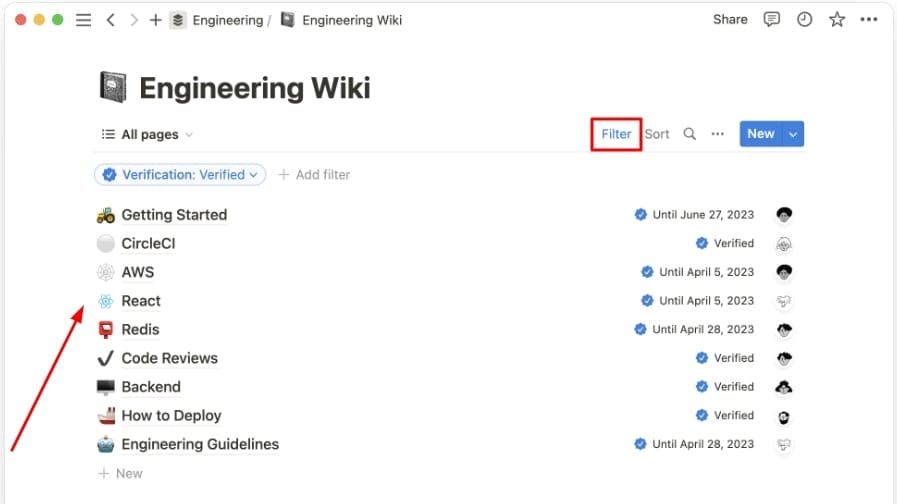
An Engineering Wiki on Notion Listing Pages including Getting Started and with the Filter Option Highlighted
Notion
Knowledge base, project management, note taking, and more. Notion leverages AI to centralize your team's work, facilitate collaboration, ensure proper project follow-up, and boost overall productivity and efficiency.
Airtable and Notion are versatile productivity platforms requiring minimal technical skills and no coding. They share common use cases like project management, CRM, and content planning. However, their strengths differ significantly. Starting as a note-taking tool, Notion excels in document and information management. It now offers adaptable features for a wide range of applications, focusing on document and knowledge management. A good illustration of this is its customizable wikis, powerful tools for organizing and sharing information in your organization.
In comparison, Airtable shines when it comes to managing large relational databases, making it ideal for tasks like inventory management. If you’re used to Google Sheets or Excel, you’ll find Airtable’s spreadsheet-based interface intuitive for handling structured data. It enables you to easily navigate your data by creating links between records. While Notion does offer database features, they can be less customizable and slower compared to Airtable. However, if your work is heavily text-focused, Notion may be your better solution.
Additionally, both platforms offer different views or layouts. Airtable has seven views—calendar, form, Gannt chart, gallery, Kanban, list, and timeline. Notion provides six—table, board, timeline, calendar, list, and gallery. When comparing free plans, there are also several differences to note. Airtable’s free plan accommodates unlimited bases and up to five editors. However, it limits attachment sizes to 1GB per base and caps automation runs at 100. Notion’s free plan limits the number of blocks for more than 2 members, but it allows you to invite up to 10 guest collaborators. Its file uploads are limited to 5 MB and it includes a collaborative workspace, ideal for teamwork. Ultimately, the right choice for you depends on the unique needs of your business, including how you plan to use the software.

Airtable
Used by 8175 members
$1,000 in credits for 1 year
Save up to $1,000

Notion
Used by 16911 members
6 months free on the Business plan with Unlimited AI
Save up to $12,000
03 Airtable pros and cons
What are the advantages of Airtable?
- User-friendly interface: Airtable's interface is intuitive and resembles a spreadsheet, making it easy for users with varying levels of technical expertise to get started quickly.

- Customizable: Users can create custom databases and tables to fit their specific needs, allowing for flexibility in organizing and structuring data.
- Collaboration: Airtable excels at collaboration, allowing multiple users to work on the same database in real-time. You can set permissions and track changes to keep everyone on the same page.
- Integration: Airtable offers numerous integrations with popular apps and services, enabling you to connect your data to other tools, like Zapier, Slack, and Google Workspace, to streamline workflows.
- Automation: With the help of automation features like "Automations" and "Scripts," you can automate repetitive tasks and processes, reducing manual work and improving efficiency.
What are the disadvantages of Airtable?
- Limited complexity: While Airtable is more powerful than a traditional spreadsheet, it may not be as robust as dedicated database management systems for handling extremely complex data relationships or large datasets.

- Pricing: As your usage and storage needs grow, Airtable can become expensive, especially if you require advanced features and integrations. The free plan has limitations, and the cost of premium plans can add up.
- Scaling challenges: Airtable may not be the best choice for large-scale enterprise applications due to performance issues that can arise when dealing with extensive data sets or complex queries.
- Security concerns: Storing sensitive or confidential data on a cloud-based platform like Airtable can raise security concerns. While Airtable offers security features, organizations with strict security requirements may need to consider alternatives.
- Limited reporting and analytics: While Airtable provides basic reporting and visualization capabilities, it lacks the advanced analytics features that some businesses may require.
Compare Airtable to other tools


Airtable vs Monday

Airtable vs Asana

Airtable vs Coda

Airtable vs Excel

Airtable vs Google Sheets

Airtable vs Smartsheet
04 Notion pros and cons
What are the advantages of Notion?
- Flexibility and customization: Notion's greatest strength is its flexibility. Users can create a wide variety of content, from simple notes to complex databases, using customizable templates and structures.
- All-in-one solution: Notion serves as a centralized hub for personal and team productivity, allowing you to manage tasks, notes, documents, wikis, and more in one place.
- Real-time collaboration: Notion enables real-time collaboration, making it easy for teams to work together on documents, projects, and databases. It also provides comments and mentions for effective communication.
- Cross-platform compatibility: Notion is available on web browsers, desktop (Windows and macOS), and mobile (iOS and Android) devices, ensuring that you can access your data from anywhere.
- Integrations: Notion offers integrations with popular apps and services like Google Drive, Slack, and Zapier, allowing you to connect your workspace to other tools and automate workflows.
What are the disadvantages of Notion?
- Learning curve: Notion's flexibility can be overwhelming for new users, leading to a steep learning curve. Understanding how to structure and organize content effectively can take time.
- Pricing: While Notion offers a free plan, its advanced features and team collaboration capabilities are locked behind a paid subscription, which can be relatively expensive for teams or organizations.
- Performance: Some users have reported performance issues, particularly when working with large databases or complex workspaces, which can lead to slower load times and responsiveness.
- Limited offline access: While Notion does offer offline access on its desktop and mobile apps, it's not as robust as some other productivity tools. You may encounter limitations when working without an internet connection.
- Export and data portability: Exporting data from Notion can be challenging, and some users have raised concerns about data portability.
Compare Notion to other tools

Notion vs Monday
Notion vs Asana
Coda vs Notion

Notion vs OneNote

Notion vs Trello

Notion vs Slab
05 Airtable compared to Notion
When comparing Airtable and Notion, Airtable distinguishes itself with its simplicity and flexibility, making it an attractive option for individuals and teams seeking a straightforward yet versatile data management platform. Airtable offers a user-friendly interface that resembles a spreadsheet, making it easy for users with varying levels of technical expertise to get started quickly. It excels in organizing and structuring data, allowing users to create custom databases and tables tailored to their specific needs.
While both Airtable and Notion offer powerful collaboration and organization features, the choice between the two depends on your specific requirements. Airtable provides a more focused and customizable solution, ideal for users who prioritize data management and organization with an interface reminiscent of traditional spreadsheets. It's particularly well-suited for tasks like project tracking, content calendars, and inventory management, offering a straightforward yet robust platform for data organization without the need for extensive customization or a significant learning curve.
Is Airtable better than Notion?
 Is Airtable better than Notion?
The answer depends on your specific data management and collaboration needs. Airtable has its strengths with its simplicity, customizable structure, and ease of use, making it a compelling choice for users looking for a straightforward and flexible data management platform. Its interface is reminiscent of a spreadsheet, making it approachable for users of all technical backgrounds.
The decision between Airtable and Notion comes down to your specific requirements. If you prioritize simplicity, data organization, and a spreadsheet-like interface, Airtable may be the better choice. However, if you need a comprehensive all-in-one solution for various productivity and collaboration tasks, including data management, note-taking, and project planning, Notion offers a more expansive feature set to accommodate your needs.
What is Airtable best used for?
Airtable is primarily best used for data management and organization. It provides a user-friendly platform to create, store, and manipulate structured data effectively. Its simplicity and flexibility make it ideal for a wide range of use cases, particularly for individuals and teams looking to streamline data-related tasks.
Airtable excels in scenarios such as project tracking, content calendars, task management, inventory tracking, and customer relationship management (CRM). Users can create custom databases and tables to suit their specific needs, whether it's tracking project milestones, organizing product inventories, or maintaining a client database.
Can Airtable replace Notion?
Airtable offers a more focused and customizable approach to data organization and management, making it a potential alternative for users looking for a straightforward and flexible platform.
If your primary use case revolves around structured data, project tracking, or database management, Airtable can serve as a viable replacement for Notion. It provides an intuitive interface with spreadsheet-like functionality and is particularly well-suited for tasks like content calendars, inventory management, and client tracking.
However, it's important to note that Notion offers a broader range of features beyond data management, including note-taking, task management, wikis, and more. If your requirements extend to these areas, or if you rely on Notion for comprehensive team collaboration and workspace organization, Airtable may not fully replace Notion's versatility and all-in-one capabilities.
Is Airtable cheaper than Notion?
In terms of cost-effectiveness, Airtable’s pricing often presents a more expensive yet more comprehensive option when compared to Notion. Airtable offers a free plan with basic features, making it accessible to individuals and smaller teams with limited budgets.
Notion, on the other hand, offers a free plan as well, but its advanced collaboration and organization features, which many users find essential, are typically locked behind paid subscriptions. While both Airtable and Notion have their own strengths and feature sets, if you're looking for a more budget-conscious choice for data management and collaboration, Airtable's pricing structure may make it a more attractive option.
Is there a better Collaboration software than Airtable?
When it comes to data management and collaboration tools, it's essential to explore whether there might be a more suitable option for your specific requirements.
Some notable alternatives to Airtable in the data management and organization space include Notion, Trello, Asana, Microsoft Excel, and Google Sheets.
The choice of data management software depends on your organization's unique objectives, data complexity, team collaboration needs, and scalability requirements. While Airtable offers simplicity and flexibility, other tools may provide more specialized features, project management capabilities, or integration options that align better with your data management strategy.

Airtable
Premium
Easily store and organize your data
$1,000 in credits for 1 year
Save up to $1,000
06 Notion compared to Airtable
When comparing Notion and Airtable, Notion distinguishes itself with its expansive approach to productivity and collaboration, making it a compelling choice for individuals and teams seeking an all-in-one workspace solution. Notion provides a wide range of features, including note-taking, task management, project planning, wikis, and more, catering to various use cases. It offers both free and paid plans, accommodating users with diverse needs, from personal projects to large-scale team collaborations.
While both Notion and Airtable excel in their respective areas, the choice between the two depends on your specific data management and collaboration requirements. Notion stands out as a comprehensive and versatile platform for those looking to consolidate their various productivity and collaboration tools into a single workspace.
Is Notion better than Airtable?
Notion offers a more expansive feature set, including note-taking, task management, wikis, and more, making it a versatile all-in-one workspace tool. Its strength lies in providing a centralized hub for productivity and collaboration across various domains.
Airtable, on the other hand, excels in data management and organization. It offers a simpler, spreadsheet-like interface that is highly customizable, making it an excellent choice for structured data tasks, such as project tracking, content calendars, and database management.
The choice between Notion and Airtable comes down to your specific needs. If you prioritize a comprehensive workspace tool with a wide range of features and adaptability across multiple use cases, Notion may be the better fit.
What is Notion best used for?
Notion is best used as an all-in-one workspace tool for productivity and collaboration. It excels in helping individuals and teams organize notes, manage projects, create wikis, track tasks, and more.
With a user-friendly interface, Notion can be adapted for various purposes, from creating knowledge bases to centralizing team workflows. Its flexibility accommodates personal and professional needs, making it an ideal choice for streamlining work processes and centralizing information. Whether you're taking notes, planning projects, or collaborating with colleagues, Notion's versatility and adaptability make it a valuable tool for a wide range of productivity and organization tasks.
Can Notion replace Airtable?
Notion offers a broader range of features, including note-taking, project management, wikis, and more, making it a versatile all-in-one workspace tool. It can serve as a centralized hub for personal and team productivity. Airtable, however, specializes in data management and organization. It offers a simplified, spreadsheet-like interface that is highly customizable, making it an excellent choice for structured data tasks, such as project tracking, content calendars, and database management.
The decision to replace Airtable with Notion or vice versa hinges on your specific needs and preferences. If you require a comprehensive all-in-one solution for various productivity and collaboration tasks beyond data management, Notion may work better for your team. However, if your primary focus is on structured data and you value the simplicity and flexibility of a spreadsheet-like interface, Airtable might remain the more suitable choice.
Is Notion cheaper than Airtable?
Notion and Airtable have different pricing structures, and the cost-effectiveness of each depends on the scale and complexity of your usage. Notion offers a free plan with basic features and affordable paid plans that unlock more advanced capabilities. Airtable also has a free plan but charges based on the number of records, with additional features available in paid plans.
For smaller teams or individuals with basic data management needs, Notion's pricing may prove more cost-effective, especially if you require features beyond just data organization. However, as your data needs and team size grow, Airtable's pricing structure may become more competitive and more suitable for your data management requirements.
Is there a better Collaboration software than Notion?
When considering alternatives to Notion, it's essential to explore whether there might be a more suitable solution for your specific requirements.
Some notable alternatives to Notion in the productivity and collaboration space include Airtable, Trello, Asana, Microsoft OneNote, and ClickUp.
The choice of productivity and collaboration software depends on your unique objectives, team size, and the specific features you require. While Notion offers a wide range of features and customization options, other tools may excel in specific areas such as project management, note-taking, or database management.

Notion
Organize teamwork and increase productivity
6 months free on the Business plan with Unlimited AI
Save up to $12,000
07 Features comparison
Notion Excels Over Airtable at Project Management

The interactive timeline view within Notion proves invaluable for visualizing project timelines, planning tasks, and managing schedules efficiently
Notion excels in project management, offering a comprehensive suite of features. Its built-in task assignment functionality allows teams to delegate responsibilities easily, enhancing accountability. Moreover, Notion's notification system ensures that team members stay informed about updates and deadlines, improving communication and coordination.
The interactive timeline view within Notion proves invaluable for visualizing project timelines, planning tasks, and managing schedules efficiently. For example, you can use this feature to create Gantt charts to track project progress and identify potential bottlenecks.
While Airtable does provide real-time collaborative capabilities and reminders, it lacks the specific task assignment and timeline views that make Notion a more holistic project management tool. Notion's comprehensive approach to project management makes it an excellent choice for teams looking to streamline workflows, enhance collaboration, and stay on top of deadlines effectively.
Notion Pulls Ahead of Airtable for User-Friendliness

Notion offers an intuitive design with straightforward navigation menus, making it a breeze to get started
Airtable and Notion are both user-friendly, but Notion stands out for its exceptional ease-of-use. While Airtable may have a slight learning curve, especially for beginners, Notion offers an intuitive design with straightforward navigation menus, making it a breeze to get started. Notion employs a block-based structure for creating pages and databases, providing a seamless customization and organization experience.
For instance, in Notion, creating a project management board with tasks, deadlines, and collaborative notes is as simple as adding and arranging blocks. Even complex projects involving multiple teams can be managed effortlessly. This makes Notion an ideal choice for startups aiming to streamline their workflows and centralize their operations, all within an easy-to-grasp interface.
Airtable is Superior for Data Visualization Compared to Notion

Airtable stands out for its robust data visualization capabilities
Airtable and Notion both provide tools for data organization, but Airtable stands out for its robust data visualization capabilities. Airtable's built-in charting and graphing features empower users to effortlessly transform data into visually informative representations. For instance, you can create pie charts to illustrate the distribution of project tasks or bar graphs to track team performance over time. These visualizations aid in identifying patterns, trends, and relationships within data.
In contrast, Notion's database gallery feature is oriented toward creating interactive galleries and boards, which, while valuable for visual organization, may not offer the same depth of data analysis as Airtable. Airtable's capacity for versatile data visualization makes it an ideal choice for businesses seeking to gain deeper insights from their data and make informed decisions.
Airtable Provides Better Automation than Notion

Airtable distinguishes itself with its robust automation capabilities, allowing users to streamline data-driven business processes effortlessly.
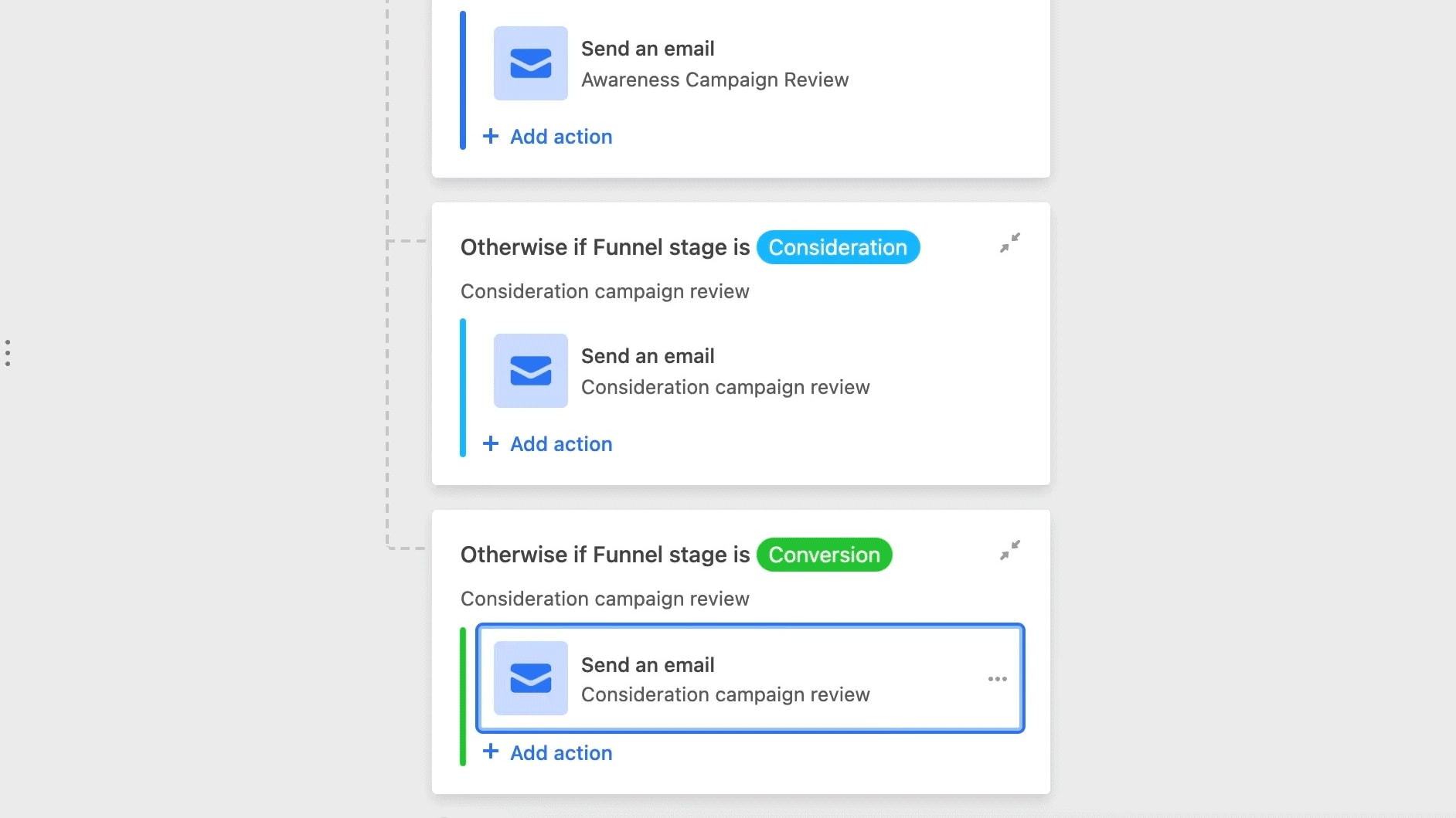
Airtable distinguishes itself with its robust automation capabilities, allowing users to streamline data-driven business processes effortlessly. For instance, you can set up automated workflows to trigger actions like sending emails, updating records, or generating reports when specific conditions are met. This automation simplifies complex data handling and boosts overall efficiency, making Airtable an invaluable tool for data-centric operations.
In contrast, Notion primarily focuses on task and project management, along with note-taking functionalities. While it excels in organizing and managing tasks and notes, it doesn't provide the same level of automation for data-driven processes as Airtable. Notion's strengths lie in task delegation, progress tracking, and collaborative note-taking, while Airtable's automation capabilities make it an ideal choice for businesses seeking to optimize and automate their data workflows seamlessly.
Airtable and Notion Excel in Real-Time Collaboration

Airtable facilitates real-time collaboration, enabling multiple users to update the same base simultaneously.
Airtable and Notion excel as team collaboration tools, offering features that enhance productivity and coordination. Airtable facilitates real-time collaboration, enabling multiple users to update the same base simultaneously. For example, a marketing team can collaboratively manage campaign data, with each member contributing updates in real-time.
Similarly, Notion provides a platform for collaborative work within its task database. Teams can track progress, manage deadlines, and coordinate on projects, all in one place. For instance, a product development team can use Notion to assign tasks, share project updates, and ensure everyone is aligned on project milestones.
This simultaneous access and real-time updating in both Airtable and Notion foster increased productivity and seamless team collaboration, making them valuable tools for organizations aiming to streamline workflows and enhance teamwork.
Both Airtable and Notion are Equal for Custom Resource Creation

With Airtable, you can tailor your databases to capture specific data with a wide array of field types.
Both Airtable and Notion offer robust customization options for resource management. With Airtable, you can tailor your databases to capture specific data with a wide array of field types. For instance, you can create a product inventory database with fields for product name, price, and stock level, each with its data type. Airtable also allows you to set up notifications and reminders, ensuring you stay on top of important tasks and deadlines.
Notion complements this by allowing users to create custom templates, enabling them to design resource layouts that suit their unique requirements. Moreover, Notion provides an extensive library of expert-crafted templates, offering a starting point for various use cases. For instance, you can find templates for project management, meeting notes, or knowledge bases. These customization features make both Airtable and Notion powerful tools for tailoring resources to specific business needs.
Airtable’s App Directory Triumphs Over Notion
Airtable clearly leads in this regard. It boasts support for numerous third-party apps, from communication software to customer relationship management (CRM) systems, including popular ones like Slack, Google Drive, Dropbox, Evernote, and Salesforce.
When it comes to integration capabilities, Airtable shines with its extensive range of options. While both Airtable and Notion offer various integrations, Airtable clearly leads in this regard. It boasts support for numerous third-party apps, from communication software to customer relationship management (CRM) systems, including popular ones like Slack, Google Drive, Dropbox, Evernote, and Salesforce. This broad spectrum of integrations empowers businesses to connect multiple tools seamlessly, optimizing efficiency and productivity.
For instance, using Airtable, you can sync your project management data with your team's Slack channels, ensuring everyone stays informed in real-time. Furthermore, Airtable's API is robust and extensively documented, simplifying the process of creating custom integrations with other tools. This flexibility is invaluable for startups seeking to tailor their workflows and operations precisely to their needs. With Airtable's integration capabilities, you can enhance collaboration, automate processes, and streamline operations effortlessly.
08 Airtable vs Notion: Which is the best for your business?
Airtable is the best tool for you if:
- You’re looking for a platform to manage and collaborate on structured data or large relational databases, which you can customize and automate to meet project requirements
- You want a tool to assist with data visualization tasks like content scheduling, project tracking, inventory management, and customer relationship management
- You prefer working with a user-friendly spreadsheet interface like Excel or Google Sheets
- You’re part of a growing team on the lookout for a competitively-price data management platform that is both straightforward to use and versatile
- Your business relies on various other third-party apps and needs a data management solution that offers a broad spectrum of integrations
 You’re looking for a platform to manage and collaborate on structured data or large relational databases, which you can customize and automate to meet project requirements
Notion is the best tool for you if:
- You need a comprehensive productivity and collaboration solution that’s easy to use and can centralize task management, project planning, and note-taking
- Your projects require advanced document and knowledge management features and you’re searching for a tool that excels at managing text-based documents
- You want to create custom wikis and knowledge bases to centrally store and share internal information within your organization
- You’re in the market for a highly flexible productivity and collaboration tool that you can tailor to suit the needs of your business, team, and projects
- You’re an individual or part of a small team looking for a cost-effective solution that offers more than data organization
Airtable
Used by 8175 members
$1,000 in credits for 1 year
Save up to $1,000
Notion
Used by 16911 members
6 months free on the Business plan with Unlimited AI
Save up to $12,000
09 Alternatives to Airtable & Notion

Make
Used by 11555 members
3 months free on the Teams plan (240k credits included)
Save up to $600

Slack
Used by 3694 members
25% off new plan purchases
Save up to $9,000

ClickUp
Used by 3264 members
Additional 20% off Unlimited and Business plans for 1 year
Save up to $1,000

Bubble
Used by 1764 members
30% off on monthly plans for 1 year
Save up to $957
10 Promotions on Collaboration software
Airtable and Notion are great tools, but Secret offers promo codes with discounts on over 2190+ different SaaS solutions. New deals are added regularly, helping you save money on your online subscriptions. Get access to codes for other Collaboration software you might want to purchase

Google Workspace promo code 2026
20% off Plus plans for 1 year
Slack promo code
25% off new plan purchases

Miro coupon
$1,000 in credits (lifetime validity)

Monday coupon
First month free

Asana deal
75% off the annual Starter and Advanced plans for 1 year
Promo code for ClickUp
Additional 20% off Unlimited and Business plans for 1 year

xTiles deal
20% off monthly or annual plans

Google Drive coupon code 2026
20% off Plus plans for 1 year

Zoom Meetings promotion code
$20 off per user on the annual Workplace Pro plan

Descript discount
35% off annual plans
Start saving on the best SaaS
Secret has already helped tens of thousands of startups save millions on the best SaaS like Microsoft Teams, Google Workspace & many more. Join Secret now to buy software the smart way.