


A powerful team collaboration and communication toolset can significantly improve productivity and streamline workflows within your organization. When it comes to selecting the right tools, Asana and Slack are two popular options that offer distinct features and benefits, making it important to evaluate which one suits your team's needs best.
This article will provide an in-depth comparison of Asana vs Slack, shedding light on their unique strengths and purposes. While both tools contribute to enhanced team communication and collaboration, they excel in different aspects. Understanding these differences and their core functionalities will assist you in making an informed decision about which platform is the ideal fit for your team. So, let's dive into the comparison of Asana and Slack.
- 01 Asana vs Slack: overview
- 02 What's the difference between Asana and Slack?
- 03 Asana pros and cons
- 04 Slack pros and cons
- 05 Asana compared to Slack
- 06 Slack compared to Asana
- 07 Features comparison
- 08 Asana vs Slack: Which is the best for your business?
- 09 Alternatives to Asana & Slack
- 10 Promotions on Collaboration software
Start saving on the best SaaS
Secret has already helped tens of thousands of startups save millions on the best SaaS like Microsoft Teams, Google Workspace & many more. Join Secret now to buy software the smart way.

01 Asana vs Slack: overview
Asana and Slack are two prominent players in the realm of team collaboration and communication tools, each bringing unique strengths to meet various organizational needs.
Asana is renowned for its user-friendly project management and task tracking capabilities. Its intuitive interface simplifies task management, making it an excellent choice for teams seeking to organize their workflows, track project progress, and ensure tasks are completed efficiently. Slack, on the other hand, excels in real-time communication and team collaboration. With its chat-based interface and integration capabilities, Slack is a preferred choice for teams seeking seamless communication, quick information sharing, and collaboration on various projects.
When deciding between Asana and Slack, it's crucial to consider your organization's specific needs and communication requirements. If you prioritize structured task management and project tracking, Asana may be the more suitable choice. Conversely, if your primary focus is on fostering real-time communication and team collaboration, Slack is the ideal option to boost your team's productivity.

Project management
Project management is Asana’s game. They have advanced functionalities for task management, analytics, calendars, Gantt charts and more. Slack doesn’t have any built-in features for project management.

Asana
Slack
Pricing Plan
Both tools come at a decent price for what they offer, and both have a free plan that’s more than enough for small companies.
Asana
Slack
Customer Support
Asana offers real-time customer service through chat, while Slack only provides a ticketing system to most users. Neither seems to offer phone support.
Asana
Slack
Customer Reviews
Slack has slightly better reviews on some aggregators, but both tools hover around 4.5 stars.
Asana
Slack
Ease of Use
Both Slack and Asana are as user-friendly as possible. Despite Asana’s user interface being slightly more complicated, you can get the hang of both tools in no time.
Asana
Slack
Integrations
Asana only offers around 100 integrations, while Slack helps you use thousands of third-party apps, including Zapier and Canvas.
Asana
Slack
File sharing
Both Slack and Asana have comprehensive file sharing suites, but Slack lets you upload bigger files.
Asana
Slack
Security
Both Asana and Slack offer some security features, like 2FA. But neither have end-to-end encryption for regular users, and Slack even sells your activity data to third-party advertisers.
Asana
Slack
Messaging
Text messaging is Slack’s main feature, and it’s leagues ahead of Asana. The latter does have some messaging features too, but they’re limited compared to Slack.
Asana
Slack
Archive and data limits
Slack and Asana impose strict limits in different areas. While Slack lets you upload larger files and unlimited users, Asana offers an unlimited activity log.
Asana
Slack
02 What's the difference between Asana and Slack?

Asana excels as a robust project management tool, while Slack is primarily designed for text messaging and video calls.
Asana
Project management platform

Slack allows users to upload larger files, with a cap of 1 GB
Slack
Easily collaborate, stay organized, and boost productivity with Slack — the intelligent platform that brings together your team’s messages, projects, tools, and AI into one streamlined workspace.
Asana and Slack are distinctly different platforms, each tailored to serve specific organizational needs. Asana excels as a robust project management tool, while Slack is primarily designed for text messaging and video calls. While they do share some common features like file sharing, impressive integrations, and robust free plans, there are more differences than similarities between the two.
One notable distinction lies in their file-sharing capabilities. Slack allows users to upload larger files, with a cap of 1 GB, whereas Asana limits file sharing to a maximum of 100 MB. Additionally, Asana permits up to 15 users on cheaper plans, while Slack generously offers unlimited guest access to all channels.
It's worth mentioning that Slack does have the capability to manage tasks, albeit not its primary focus. Through integrations like Canvas, you can technically handle tasks within the platform. However, Asana remains the superior choice when it comes to dedicated task management.
Another significant difference is in data retention policies. Slack deletes messaging history after 90 days, while Asana retains your activity logs, messages, projects, and tasks indefinitely. However, it's important to note that Asana is not ideally suited for real-time communication, and Slack excels in this regard.
In practice, many organizations find it beneficial to use both Asana and Slack together. Asana is indispensable for managing tasks and projects, while Slack facilitates real-time communication and collaboration. It's crucial to be aware that both tools have limitations in terms of security. While they offer some encryption features and two-factor authentication, neither provides end-to-end encryption for regular users. Additionally, Slack has raised concerns by selling user activity data to third parties, which may be a privacy consideration for some users.

Asana
Used by 874 members
75% off the annual Starter and Advanced plans for 1 year
Save up to $22,491

Slack
Used by 3708 members
25% off new plan purchases
Save up to $9,000
03 Asana pros and cons
What are the advantages of Asana?
- Effective task management: Asana excels in task management. It offers a clear and intuitive interface that allows teams to create, assign, and track tasks efficiently. You can organize tasks into projects, set due dates, and prioritize them for better workflow management.

- Collaboration and communication: Asana facilitates collaboration within teams by providing tools for discussions, comments, and file sharing within tasks. It keeps all relevant information and discussions tied to specific tasks, making it easier to track progress and decisions.
- Project planning: Asana allows users to create project timelines, set dependencies, and visualize project progress through features like Gantt charts and Kanban boards. This helps teams plan and execute complex projects more effectively.
- Integration capabilities: Asana offers a wide range of integrations with other popular productivity and collaboration tools like Slack, Google Workspace, and Microsoft Office 365. This enables users to connect Asana with their existing workflows and tools.
- Customization: Asana offers flexibility through customizable fields, templates, and automation rules. This allows organizations to tailor the platform to their specific needs and automate repetitive tasks, saving time and reducing errors.
What are the disadvantages of Asana?
- Learning curve: While Asana is powerful, it can have a steep learning curve for new users. Understanding its features and best practices may require time and training.

- Pricing: Asana's pricing can be considered relatively high for small businesses or individual users, especially when compared to some other task management tools.
- Complexity for simple tasks: Asana's feature-rich environment can sometimes feel overwhelming for straightforward tasks or small projects, leading to unnecessary complexity.
- Limited free plan: The free plan of Asana has limitations on the number of team members and functionalities available, which may not be sufficient for larger teams or organizations with complex needs.
- Dependency on internet connectivity: Asana is primarily a cloud-based tool, so it requires a stable internet connection. This can be a limitation for users in areas with unreliable connectivity or those who prefer offline access.
Compare Asana to other tools


Asana vs Monday

Asana vs ClickUp

Notion vs Asana

Airtable vs Asana

Asana vs Process Street

Asana vs Trello
04 Slack pros and cons
What are the advantages of Slack?
- Efficient communication: Slack provides real-time messaging and collaboration features, making it easy for teams to communicate quickly and efficiently. This can lead to faster decision-making and problem-solving.
- Integration capabilities: Slack offers a wide range of integrations with other productivity tools and services, allowing users to centralize their work and access information from various sources within Slack. This enhances workflow and productivity.
- Channel organization: Slack allows users to create channels for different teams, projects, or topics. This structure helps keep discussions organized, reducing clutter and ensuring that team members can find relevant information easily.
- File sharing: Slack makes it simple to share files and documents with team members, and it automatically indexes and archives these files, making them easily searchable for future reference.
- Customization and automation: Slack provides tools for customizing your workspace with apps, bots, and automation tools. Users can automate routine tasks and customize notifications to reduce distractions and enhance productivity.
What are the disadvantages of Slack?
- Message overload: The real-time nature of Slack can lead to message overload, making it challenging to keep up with conversations, especially in larger teams or busy channels.
- Learning curve: Slack's feature-rich environment can be overwhelming for new users. Learning to navigate and utilize its many features effectively may take time.
- Search limitations: While Slack does offer a search function, it may not always provide the most accurate results, especially when searching for older messages or specific content within files.
- Cost: Slack's pricing can be relatively high, especially for organizations with larger teams or those requiring advanced features. The cost may be a concern for budget-conscious users.
- Privacy and data security: Slack stores user data and messages on its servers, raising potential privacy and security concerns, especially for organizations handling sensitive information. While Slack offers security features, users should carefully manage access and permissions to mitigate risks.
Compare Slack to other tools

Slack vs Monday

Slack vs Microsoft Teams

Slack vs Google Workspace

Slack vs WhatsApp

Lark vs Slack
ClickUp vs Slack
05 Asana compared to Slack
Asana and Slack are distinct collaboration tools with complementary functionalities. Asana primarily serves as a task and project management platform, enabling teams to organize work, set priorities, and track progress efficiently. It excels in structured project planning and task assignment.
On the other hand, Slack is primarily a real-time communication tool that enhances team collaboration through instant messaging, file sharing, and integrations. While Asana fosters task management and project organization, Slack facilitates quick, real-time discussions and information sharing. Many organizations find value in using both platforms in tandem, with Asana for structured work management and Slack for seamless communication.
Is Asana better than Slack?
 Is Asana better than Slack?
Asana and Slack serve different core purposes, making it challenging to directly compare them as better or worse. Asana excels in project and task management, offering features for planning, tracking, and organizing work. In contrast, Slack focuses on real-time communication and collaboration through instant messaging and integrations.
The choice between them depends on your organization's specific needs. If you prioritize structured task management and project planning, Asana may be the better choice. However, if seamless real-time communication and collaboration are paramount, Slack could be the preferred option. Many teams use both tools together to optimize productivity by leveraging their respective strengths.
What is Asana best used for?
Asana is best used for efficient task and project management. It's ideal for organizations and teams looking to streamline their work processes, plan and assign tasks, set deadlines, and track progress effectively.
Asana excels at organizing and prioritizing work, making it a valuable tool for project managers, teams, and individuals seeking to improve productivity. It's especially useful for coordinating complex projects, collaborating on tasks, and ensuring that team members stay on the same page. Asana's flexibility and features make it suitable for a wide range of industries and purposes, from marketing campaigns and product development to event planning and daily task management.
Can Asana replace Slack?
Asana and Slack serve distinct purposes, and while they can complement each other, one cannot entirely replace the other. Asana excels in project and task management, facilitating structured work organization, task assignment, and project tracking. In contrast, Slack is designed for real-time communication and collaboration through instant messaging and integrations.
While Asana helps manage tasks and projects efficiently, Slack fosters quick, real-time discussions and information sharing. Many organizations find value in using both platforms together to optimize productivity, leveraging the strengths of each. Attempting to replace Slack with Asana or vice versa would likely result in a gap in communication and collaboration needs.
Is Asana cheaper than Slack?
The cost comparison between Asana and Slack depends on the specific needs and usage of an organization. Asana’s pricing generally offers a variety of tiers, including a free plan with limited features and paid plans that can accommodate different team sizes and requirements.
Slack also provides a free plan, but its paid plans can be relatively more expensive, particularly for larger teams. The pricing difference becomes more evident when considering the premium features and integrations offered by both platforms. Therefore, while Asana may be perceived as more cost-effective for some organizations, the ultimate cost-effectiveness depends on the organization's specific needs and budget considerations.
Is there a better Collaboration software than Asana?
It's essential to explore alternative project management tools to determine the best fit for your organization's distinct requirements.
There are several notable alternatives to Asana, including Trello, Monday.com, Wrike, and ClickUp.
The choice of the ideal project management software depends on your team's specific needs, project complexities, and workflow preferences. If you value Asana's user-friendly interface, task tracking capabilities, and robust integrations, it might align well with your objectives. However, exploring these alternatives can provide valuable insights and assist you in making an informed decision that caters to your precise project management needs.

Asana
Premium
Project management platform
75% off the annual Starter and Advanced plans for 1 year
Save up to $22,491
06 Slack compared to Asana
Slack and Asana are two distinct collaboration tools, each excelling in its respective domain. Slack is primarily focused on real-time communication and instant messaging, facilitating quick discussions and team interaction. It offers channels for organizing conversations and integrates well with various apps.
In contrast, Asana specializes in task and project management, providing features for structured work organization, task assignment, and progress tracking. While both platforms support team collaboration and integrations, they serve different purposes. Slack fosters real-time communication, while Asana excels in managing tasks and projects. Many organizations choose to use them together to optimize both communication and productivity.
Is Slack better than Asana?
Determining whether Slack is better than Asana depends on your organization's specific needs. Slack excels in real-time communication, offering instant messaging and collaboration tools for seamless team interactions. It's highly effective for quick discussions and sharing information. Asana, on the other hand, specializes in task and project management, providing structured work organization, task assignment, and progress tracking.
The choice between them hinges on your priorities. If streamlined communication and collaboration are paramount, Slack may be preferable. However, if you require robust task and project management, Asana is likely the better choice. Often, organizations benefit from using both in tandem to balance these crucial aspects.
What is Slack best used for?
Slack is best used as a real-time communication and collaboration platform. It excels in facilitating instant messaging, team discussions, and seamless information sharing. Organizations often leverage Slack for quick and efficient team communication, project collaboration, and file sharing. Its channel-based organization allows teams to create dedicated spaces for various topics or projects, reducing clutter and improving organization.
Slack also offers numerous integrations with other tools, enhancing productivity by centralizing work-related information. Overall, Slack is a valuable tool for enhancing team communication, streamlining collaboration, and fostering a dynamic work environment in both remote and in-office settings.
Can Slack replace Asana?
Slack and Asana serve different primary purposes, so one cannot entirely replace the other. Slack is a real-time communication and collaboration tool, while Asana is a task and project management platform.
While Slack allows for instant messaging and team discussions, Asana excels in organizing tasks, setting priorities, and tracking project progress. However, many organizations find value in using both tools in tandem. Slack complements Asana by providing a channel for quick communication and notifications related to tasks and projects managed in Asana. In this way, they work together to enhance both communication and task management within teams.
Is Slack cheaper than Asana?
The cost comparison between Slack and Asana depends on various factors, including the size of your organization and your specific needs. Both platforms offer free plans with limited features. However, when considering paid plans, it's important to note that the pricing structures differ. Asana offers tiered pricing based on the number of users, while Slack's pricing is often per active user.
Depending on your team's size and requirements, one may appear more cost-effective than the other. Ultimately, the choice should be based on your organization's unique needs and budget considerations, as well as the features and capabilities each platform provides.
Is there a better Collaboration software than Slack?
It's essential to explore alternative communication and collaboration tools to determine the best fit for your team's unique requirements.
Several notable alternatives to Slack in this space include Microsoft Teams, Zoom, Google Chat, and Discord.
The choice of the ideal communication and collaboration software depends on your team's specific needs, preferred features, and integration requirements. If you prioritize seamless real-time messaging and efficient collaboration, Slack might be the right choice. However, exploring these alternatives can provide valuable insights and help you make an informed decision that best aligns with your communication and collaboration needs.

Slack
Enhance team communication and collaboration.
25% off new plan purchases
Save up to $9,000
07 Features comparison
Asana's Advanced Automation Capabilities Lead the Way Ahead of Slack in Boosting Productivity

Asana allows users to create custom rules and forms, automating repetitive tasks to minimize errors and enhance efficiency.
Automation plays a pivotal role in boosting productivity, and in this regard, Asana shines by offering advanced automation capabilities. Asana allows users to create custom rules and forms, automating repetitive tasks to minimize errors and enhance efficiency. For instance, you can automate task assignments, notifications, and project workflows based on specific triggers, ensuring that routine processes are executed flawlessly. Asana's automation prowess also extends to streamlining work requests, saving valuable time by automating request handling and task creation.
While Slack does offer automation through app integrations and bots, it doesn't reach the same level of task automation depth that Asana provides. Slack's automation primarily relies on third-party integrations and custom bots to perform specific actions, such as sending automated notifications or managing workflows.
Asana's Streamlined Interface Triumphs Over Slack for User-Friendliness

Asana's clean and well-organized layout allows users to effortlessly track tasks and projects at a glance
When it comes to user-friendliness and accessibility, Asana stands out as a top choice. While both Asana and Slack offer interfaces designed for ease of use, Asana takes the lead by providing a more streamlined and intuitive experience.
Asana's clean and well-organized layout allows users to effortlessly track tasks and projects at a glance. It offers diverse visual organization options, including task lists, boards, and timeline views. For instance, teams can create project boards to visualize their progress through different project stages, helping everyone stay on the same page.
In contrast, Slack places a stronger emphasis on communication threads, which, although efficient for real-time discussions, can become overwhelming if not managed meticulously. While Slack excels in facilitating team conversations, it may require more effort to maintain a structured overview of tasks and projects.
Slack Dominates in Integration Versatility, Outshining Asana
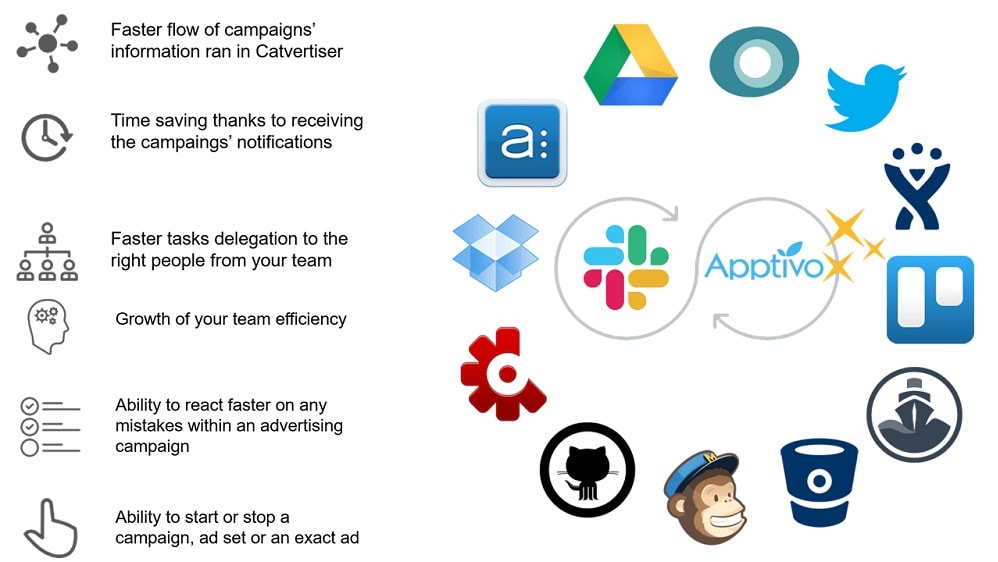
Slack, designed primarily as a communication platform, prioritizes interoperability, effortlessly linking with a broad spectrum of third-party apps.
The strength of any SaaS tool lies in its ability to seamlessly integrate with other essential applications, and in this arena, Slack emerges as the frontrunner. While both Asana and Slack offer a respectable array of integrations, it's Slack that boasts a more extensive and diverse catalog.
Slack, designed primarily as a communication platform, prioritizes interoperability, effortlessly linking with a broad spectrum of third-party apps. Examples include Google Drive for document collaboration, Dropbox for file sharing, Zendesk for customer support, and numerous others. Slack's commitment to integrations makes it a versatile hub for consolidating workflows and centralizing information.
In contrast, Asana, while robust in its project management capabilities, lags slightly behind Slack in terms of the sheer number and variety of integrations. While it integrates well with popular tools like Google Workspace and Microsoft Office 365, it may not cover the breadth of applications that Slack does.
Asana's Reporting Capabilities Shine Brighter than Slack’s for Comprehensive Project Insights

Asana's reporting capabilities provide in-depth insights into task progress, workloads, and project health, offering project managers a comprehensive view of their projects.
Data is king in project management, and Asana takes the lead with its sophisticated reporting tools. Asana's reporting capabilities provide in-depth insights into task progress, workloads, and project health, offering project managers a comprehensive view of their projects.
For example, Asana's reporting can help identify bottlenecks in project workflows, allocate resources more efficiently, and proactively address potential issues. It enables teams to track key performance metrics and make data-driven decisions.
In contrast, while Slack maintains a log of communications and file-sharing activities, it doesn't offer the same level of robust reporting functionality found in Asana. While Slack excels in facilitating real-time communication and collaboration, it may not provide the detailed data analysis crucial for project management and decision-making.
Slack is Superior Compared to Asana for Direct Messaging
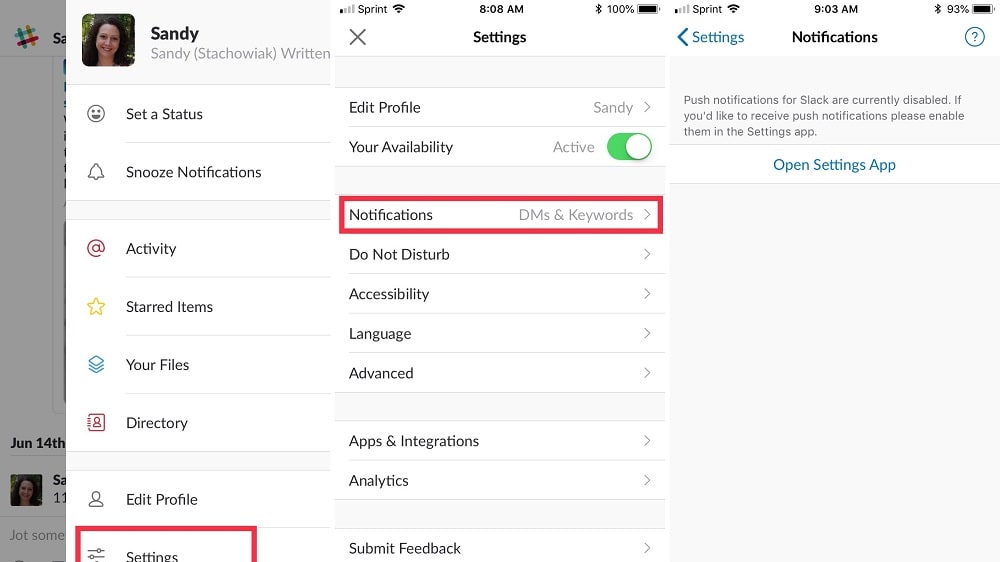
Cette fonctionnalité est particulièrement précieuse pour les organisations qui accordent la priorité à la confidentialité et à une communication interpersonnelle efficace.
When it comes to quick, private, and targeted communication, Slack's direct messaging feature stands out as an ideal solution. It offers a platform for seamless one-on-one conversations or small group discussions, making it effortless to share sensitive information securely.
For example, Slack's direct messaging allows team members to have confidential discussions, share project-specific details, or collaborate on specific tasks without broadcasting information to the entire team. This feature is particularly valuable for organizations that prioritize privacy and efficient interpersonal communication.
In contrast, while Asana provides a communication platform within its ecosystem, its primary focus revolves around task-oriented discussions. It may lack the same level of user-friendly direct messaging capabilities found in Slack.
Asana's Timeline View Sets It Apart for Project Management Clarity When Compared to Slack

Asana's timeline view presents users with a visual representation of project schedules and impending tasks.
When it comes to managing intricate projects, the effectiveness of a tool often hinges on its ability to provide a clear overview of timelines and tasks. Asana, in this regard, offers a powerful advantage through its distinctive timeline view feature.
Asana's timeline view presents users with a visual representation of project schedules and impending tasks. This visual clarity is particularly valuable for product development ventures and complex creative projects. For instance, you can easily identify potential bottlenecks, allocate resources efficiently, and make necessary adjustments to meet deadlines.
In contrast, Slack, while excelling in real-time communication and collaboration, lacks this comprehensive project visualization feature. While Slack is indispensable for fostering quick discussions and sharing information, it may not offer the same level of project management clarity as Asana's timeline view.
Asana and Slack Both Excel at Work Organization

Asana stands out by providing multiple project views, including lists, timelines, and tables.
Both Asana and Slack offer valuable features to enhance the organization of business operations, but they do so in distinct ways.
Asana stands out by providing multiple project views, including lists, timelines, and tables. These versatile views allow teams to visualize projects from various angles, track tasks effectively, and tailor their approach to suit specific project requirements. For instance, a marketing team can use the timeline view to plan campaign milestones, while a product development team might prefer the list view to manage feature requests.
On the other hand, Slack excels in organizing conversations through dedicated channels, each designed for particular topics, projects, or teams. This approach keeps discussions streamlined and facilitates easy access to stored conversations. For example, a marketing department can have a dedicated channel for campaign discussions, while a customer support team can maintain a separate channel for handling customer inquiries.
08 Asana vs Slack: Which is the best for your business?
Asana is the best tool for you if:
- You need versatile project views like lists and timelines for comprehensive project management.
- Customizable automation rules are essential to streamline repetitive tasks and boost productivity.
- Visualizing project timelines and task dependencies is crucial for your workflow.
- You require detailed reporting and analytics to track project progress and performance.
- Organizing discussions in dedicated channels while maintaining effective communication is a priority.
 You need versatile project views like lists and timelines for comprehensive project management.
Slack is the best tool for you if:
- Real-time, direct messaging and group chat are essential for your team's communication and collaboration.
- You prefer a channel-centric approach to organize discussions around specific topics, projects, or teams.
- Integrating with a wide range of third-party apps is crucial for your workflow.
- Quick, private, and secure communication is a top priority for your team's needs.
- You need a versatile platform for remote work, team coordination, and sharing information efficiently.
Asana
Used by 874 members
75% off the annual Starter and Advanced plans for 1 year
Save up to $22,491
Slack
Used by 3708 members
25% off new plan purchases
Save up to $9,000
09 Alternatives to Asana & Slack

Notion
Used by 16967 members
6 months free on the Business plan with Unlimited AI
Save up to $12,000

Google Workspace
Used by 9022 members
20% off Plus plans for 1 year
Save up to $518

Airtable
Used by 8192 members
$1,000 in credits for 1 year
Save up to $1,000

ClickUp
Used by 3270 members
Additional 20% off Unlimited and Business plans for 1 year
Save up to $1,000
10 Promotions on Collaboration software
Asana and Slack are great tools, but Secret offers promo codes with discounts on over 2190+ different SaaS solutions. New deals are added regularly, helping you save money on your online subscriptions. Get access to codes for other Collaboration software you might want to purchase
Google Workspace deal
20% off Plus plans for 1 year
Code for Airtable
$1,000 in credits for 1 year
Notion promo
6 months free on the Business plan with Unlimited AI

Miro discount
$1,000 in credits (lifetime validity)

Monday discount
First month free
ClickUp promotion code
Additional 20% off Unlimited and Business plans for 1 year

xTiles promo
20% off monthly or annual plans

Promo codes for Google Drive
20% off Plus plans for 1 year

Zoom Meetings promo code 2026
$20 off per user on the annual Workplace Pro plan

Descript discount code
35% off annual plans
Start saving on the best SaaS
Secret has already helped tens of thousands of startups save millions on the best SaaS like Microsoft Teams, Google Workspace & many more. Join Secret now to buy software the smart way.