


When you have a large team to manage, it can lead to many complexities. You have to cater to different aspects of team collaboration and productivity. The challenge of keeping everything organized demands for the right management tool.
After diligently exploring the pool of alternatives, we have narrowed down our search to two best Saas players - Clickup and Slack. Both tools offer distinctive features to support the specific needs of the organizations. From streamlining tasks, seamless collaborations to real time communication, they help enhance the team productivity. Through this comprehensive guide between ClickUp vs Slack we will elevate the weakness and strength to find the ideal solution that simplifies your team's coordination and ensures effective communication.
- 01 ClickUp vs Slack: overview
- 02 What's the difference between ClickUp and Slack?
- 03 ClickUp pros and cons
- 04 Slack pros and cons
- 05 ClickUp compared to Slack
- 06 Slack compared to ClickUp
- 07 Features comparison
- 08 ClickUp vs Slack: Which is the best for your business?
- 09 Alternatives to ClickUp & Slack
- 10 Promotions on Task Management software
Start saving on the best SaaS
Secret has already helped tens of thousands of startups save millions on the best SaaS like Microsoft Teams, Google Workspace & many more. Join Secret now to buy software the smart way.

01 ClickUp vs Slack: overview
ClickUp and Slack are both popular collaboration and communication tools, each with its own strengths and focus to enhance productivity and teamwork for businesses.
ClickUp, known for its versatility and comprehensive approach, offers a wide range of tools to manage tasks, projects, documents, time tracking, and communication all within a single platform. Slack, on the other hand, excels in real-time team communication with its chat-based interface and integration capabilities. It provides a centralized platform for team members to collaborate, share files, and stay connected.
Now, let's delve into the comparison of ClickUp vs Slack. We'll explore their key features and functionalities to help you make an informed decision when selecting the ideal collaboration and communication platform for your business.

Customer support
Both ClickUp and Slack offer excellent customer support, however ClickUp offers 24/7 support with its free plan whereas Slack provides standard support.

ClickUp
Slack
Automation
ClickUp is the preferred choice for comprehensive automation within project management workflows, while Slack's automation is geared more towards optimizing real-time communication and notifications.
ClickUp
Slack
Pricing plans
Both ClickUp and Slack offer free plans with limited features, although ClickUp offers more cost-effective plans with key features and support.
ClickUp
Slack
Document Sharing
ClickUp and Slack offer efficient document sharing capabilities, with Slack more suited for quick file exchanges during conversations.
ClickUp
Slack
Ease of use
ClickUp and Slack prioritize ease of use, but ClickUp leans towards intuitive project management, while Slack emphasizes streamlined team communication.
ClickUp
Slack
Time Tracking
ClickUp excels in time tracking with built-in functionality. Slack does not have native tracking capabilities and relies on integrations with external platforms.
ClickUp
Slack
Project Views
ClickUp's extensive project views enhance project management, while Slack prioritizes real-time communication with project view capabilities available through integrations.
ClickUp
Slack
Integrations
Slack boasts a larger library with over 2,600 apps available to integrate while ClickUp offers 1,000+ tools, both providing open APIs for custom app integrations.
ClickUp
Slack
Positive reviews
ClickUp and Slack both receive positive user reviews, each earning praise for different aspects of their platforms.
ClickUp
Slack
Voice/Video Calling
Slack excels in real-time voice and video calling for instant communication, while ClickUp's strength lies in its project management capabilities with communication integrations for voice and video calling.
ClickUp
Slack
02 What's the difference between ClickUp and Slack?

ClickUp's Board View Dashboard
ClickUp
Boost your productivity
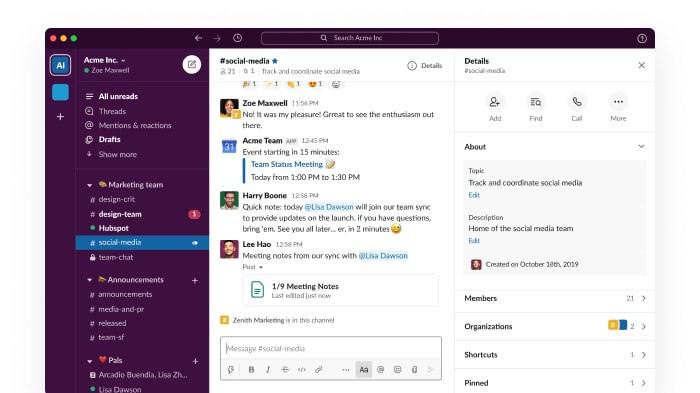
Slack's Chat and Channels Interface
Slack
Easily collaborate, stay organized, and boost productivity with Slack — the intelligent platform that brings together your team’s messages, projects, tools, and AI into one streamlined workspace.
As a part of a large team, managing our projects efficiently is crucial, and that's why we often explore various tools to find the best fit. ClickUp is an all-in-one management tool that centralizes tasks, documents, and communication. This makes it easy for our team to streamline the workflow and stay organized. The tool allows users to create, organize and document, thus reducing redundancy. Clickup empowers the team members to work cohesively and stay on top of the project by maintaining a clear communication.
Slack on the other hand is a valuable tool for real time communication. It helps foster collaborations and quick interaction increasing efficiency. Many teams rely on Slack’s intuitive interface to create dedicated channels for projects, focusing on discussions and sharing resources efficiently between the members. Further, you can integrate Slack to other third-party apps such as Google Drive or Trello to enhance workflow and seamlessly work across various platforms.
The main difference between these two platforms lies in their primary functionality. While ClickUp is an all-in-one project management solution, Slack is a real time communication platform. ClickUp helps organize and track progress efficiently while Slack is more agile. Slack’s features let you collaborate and share real time information creating a more responsive team environment.

ClickUp
Used by 3270 members
Additional 20% off Unlimited and Business plans for 1 year
Save up to $1,000

Slack
Used by 3708 members
25% off new plan purchases
Save up to $9,000
03 ClickUp pros and cons
What are the advantages of ClickUp?
- Versatile project views: ClickUp offers various project views like Kanban boards, Gantt charts, and calendars, allowing teams to visualize tasks and projects in multiple formats to suit their preferences.

- Customizable workflows: ClickUp's flexibility allows users to customize workflows, statuses, and task dependencies, making it suitable for different project management methodologies.
- Seamless collaboration: ClickUp fosters team collaboration through its commenting, mentioning, and document sharing features, improving communication and reducing reliance on external communication tools.
- Comprehensive integrations: ClickUp integrates with numerous third-party apps and tools, enhancing its functionality and making it easier to centralize project information.
- User-friendly interface: Despite its rich feature set, ClickUp maintains an intuitive and user-friendly interface, reducing the learning curve for new users.
What are the disadvantages of ClickUp?
- Steep learning curve: Due to its extensive features, ClickUp can be overwhelming for new users, requiring time to fully grasp its capabilities.

- Integration compatibility issues: While ClickUp offers extensive integrations with other tools, some users have encountered compatibility issues or limited functionality when integrating with certain third-party apps.
- Complex pricing tiers: ClickUp's pricing structure can be complex, especially for large teams or organizations with specific requirements.
- Potential performance issues: Some users have reported occasional performance issues, such as slow loading times or glitches, which can impact productivity.
- Mobile app experience: Some users have mentioned that the mobile app's user experience is not as seamless as the web version, leading to challenges in managing tasks and projects on-the-go.
Compare ClickUp to other tools


ClickUp vs Monday

Asana vs ClickUp

ClickUp vs Coda

ClickUp vs Trello

ClickUp vs Jira

ClickUp vs Todoist
04 Slack pros and cons
What are the advantages of Slack?
- Real-time communication: Slack provides instant messaging and real-time communication, enabling quick collaboration and efficient team communication.
- Channel organization: Slack's channel-based system allows teams to organize discussions based on topics, projects, or departments, keeping conversations focused and easily accessible.
- Integrations: Slack integrates with numerous third-party tools, such as project management, file sharing, and productivity apps, enhancing workflow efficiency.
- File sharing: Users can easily share files and documents within Slack, reducing the need for separate email attachments and streamlining file collaboration.
- Search functionality: Slack's powerful search feature enables users to find past messages, files, and information quickly, saving time and improving productivity.
What are the disadvantages of Slack?
- Notification overload: Frequent notifications can become overwhelming and lead to distraction, especially in large teams or busy channels.
- Limited message history: The free version of Slack has limitations on message history storage, and users may need to upgrade to access older conversations.
- Learning curve: New users may find Slack's interface and features confusing initially, requiring some time to adapt and fully utilize its functionalities.
- Limited customization: Slack's customization options for the user interface and notification settings are somewhat limited, which may not cater to every team's preferences.
- Message organization: As conversations continue, finding specific information within channels can become difficult, and some users may experience difficulty in keeping discussions organized and clutter-free.
Compare Slack to other tools

Slack vs Monday

Slack vs Microsoft Teams

Slack vs Google Workspace

Slack vs WhatsApp
Asana vs Slack

Lark vs Slack
05 ClickUp compared to Slack
When comparing ClickUp and Slack, ClickUp stands out with its feature-rich project management capabilities. ClickUp's interface is designed to streamline team collaboration and task management, making it easy for users to organize and prioritize their work.
Slack, meanwhile, is renowned for its real-time messaging and team communication features. It excels in providing a seamless chat platform for instant communication and collaboration.
ClickUp's visual indicators allow users to quickly assess the status of tasks and identify any pending activities, making it efficient for teams to stay on top of their projects. Additionally, ClickUp's robust pipeline management tools enable users to visualize their workflows and ensure tasks are progressing smoothly.
Is ClickUp better than Slack?
 Is ClickUp better than Slack?
Determining whether ClickUp is better than Slack depends on the specific requirements and priorities of your organization. Both platforms are powerful tools, but they serve different purposes and excel in different areas.
ClickUp is primarily a project management platform, offering a wide range of features to handle complex projects, tasks, and workflows. On the other hand, Slack is a messaging and collaboration platform, providing real-time communication, file sharing, and integration with various third-party tools.
The decision between ClickUp and Slack will depend on what your organization values more. If you need a platform primarily focused on project management with advanced features, ClickUp might be the better choice. If seamless team communication and collaboration are top priorities, then Slack may be the preferred option. Some organizations may even choose to use both platforms in conjunction, leveraging the strengths of each tool for different aspects of their workflow.
What is ClickUp best used for?
ClickUp is best used for streamlining project and task management. Its robust features allow users to create and organize tasks and subtasks, assign them to team members, set deadlines, and track progress effectively. The platform's time tracking capabilities help in monitoring project duration and team performance.
Additionally, ClickUp facilitates easy document sharing and collaboration, making it a valuable tool for teams working on complex projects. Furthermore, the platform's ability to integrate with various third-party apps enhances its functionality and adaptability to specific business needs.
ClickUp's all-in-one approach to project management makes it an excellent choice for businesses aiming to optimize workflows and increase productivity.
Can ClickUp replace Slack?
While ClickUp has its own messaging system for team communication, it is not intended to replace a dedicated communication tool like Slack.
Slack excels in real-time communication, channel-based discussions, and seamless integration with various other apps and services. ClickUp, on the other hand, is primarily focused on project and task management. While it offers some communication features, it may not provide the same level of collaboration and instant messaging capabilities as Slack.
For comprehensive team collaboration, using both ClickUp and Slack together can provide a powerful and well-rounded solution for managing tasks and fostering effective communication within the team.
Is ClickUp cheaper than Slack?
Comparing the pricing plans, ClickUp offers a free forever plan, making it a cost-effective option for small teams or those with limited requirements and giving access to key features such as unlimited tasks, unlimited members and collaborative documents.
On the other hand, Slack's free plan has certain limitations, and its paid plans start at $7.25 per user/month. While both tools have different pricing structures and feature sets, ClickUp's entry-level paid plan starts at $7 per user/month, which could be more budget-friendly for some users with access to more advanced features.
However, the final decision on which tool is cheaper would depend on your team size, specific needs, and the features you require.
Is there a better Task Management software than ClickUp?
Determining whether there is a better project management software than ClickUp is subjective and depends on the specific needs and preferences of your team.
While ClickUp is known for its comprehensive features and affordability, other tools like Asana, Trello, or Jira may offer different strengths that align better with certain business needs. Asana is praised for its user-friendly interface, Trello for its simplicity, and Jira for its robustness, making them viable alternatives to consider.
To determine the best project management software for your team, consider factors such as the size and nature of your projects, the level of complexity in your workflows, the ease of use for your team members, and any specific features, like time tracking or document sharing, or integrations you require.

ClickUp
Boost your productivity
Additional 20% off Unlimited and Business plans for 1 year
Save up to $1,000
06 Slack compared to ClickUp
When comparing Slack and ClickUp, Slack shines with its real-time messaging and communication features. With a user-friendly interface, you can quickly start conversations and collaborate with team members seamlessly. Slack's chat-based approach fosters instant communication and ensures teams can exchange information efficiently.
While Slack offers integrations with project management tools, its primary focus remains on communication. ClickUp, with its robust project management features, dominates in providing visual indicators for task progress and customizable workflows. This ensures teams can easily assess the status of tasks and identify any pending activities, facilitating efficient project execution.
Is Slack better than ClickUp?
Determining whether Slack is better than ClickUp depends on your specific needs and priorities as both platforms serve different purposes.
Slack is primarily a communication and collaboration platform, offering real-time messaging, file sharing, and integrations with various tools. Moreover, ClickUp is a comprehensive project management platform with robust task management features, time tracking, document sharing, and integrations.
If your team requires a platform primarily focused on communication and real-time collaboration, Slack may be the preferred choice. However, if your team's main priority is efficient project management with advanced task tracking and organization, ClickUp may be the better fit.
In some cases, teams may use both Slack and ClickUp in conjunction to leverage the strengths of each platform. For example, using Slack for quick communication and collaboration, while managing project tasks and workflows in ClickUp.
What is Slack best used for?
Slack is best used as a communication platform for teams. Its real-time chat capabilities, file sharing, video conferencing, and extensive integrations make it ideal for facilitating seamless communication within a company or among project teams.
With channels organized around specific topics or projects, Slack allows team members to collaborate, share updates, and stay informed in a centralized and efficient manner. Its searchable archive ensures that important discussions and information are easily accessible.
Whether you need to communicate with your immediate team, collaborate with cross-functional groups, or connect with external partners, Slack provides a powerful and user-friendly solution for effective team communication and collaboration.
Can Slack replace ClickUp?
Slack cannot fully replace ClickUp as a comprehensive project management tool. While Slack offers some task management features, its primary focus is on real-time communication and team collaboration. ClickUp, on the other hand, provides a wide range of powerful project management capabilities, including task organization, assignment, dependencies, timelines, and integrations with other tools.
While Slack is excellent for communication, it lacks the advanced project management functionalities that ClickUp offers. Therefore, both tools can complement each other in enhancing team productivity and efficiency, with Slack facilitating communication and ClickUp handling project planning and execution.
Is Slack cheaper than ClickUp?
Slack's basic paid plan starts from $7.25 per user/month, while ClickUp's basic paid plan starts from $7 per user/month. However, it's important to consider the overall value and functionality offered by each tool at their respective price points.
While Slack's pricing can increase as you add more team members or require additional features, ClickUp offers a more comprehensive set of functions at a lower price. ClickUp provides robust project management features, such as task dependencies, timelines, and custom statuses, which may justify its slightly higher cost compared to Slack.
When evaluating the cost-effectiveness of Slack and ClickUp, consider the specific needs and requirements of your team. If your team heavily relies on seamless communication and collaboration, Slack might be the better option. However, if efficient project management and task organization are more critical, ClickUp's additional features may justify its slightly higher cost.
Is there a better Collaboration software than Slack?
While Slack offers some project management capabilities, it is primarily known as a communication and collaboration platform. As a result, there are other dedicated project management software options that may be a better fit for specific organizational needs.
ClickUp, Asana, Trello, and Jira are all excellent alternatives to consider. Each of these tools is designed to provide comprehensive project management functionalities, task tracking, and team collaboration, but they may offer different approaches and features that align better with certain business requirements.
To determine the best project management software for your organization, consider factors such as the size and complexity of your projects, the level of collaboration needed, the ease of use for your team members, and any other important aspects of your business.

Slack
Enhance team communication and collaboration.
25% off new plan purchases
Save up to $9,000
07 Features comparison
ClickUp's Multitask View is More Efficient than Slack's Projects Feature
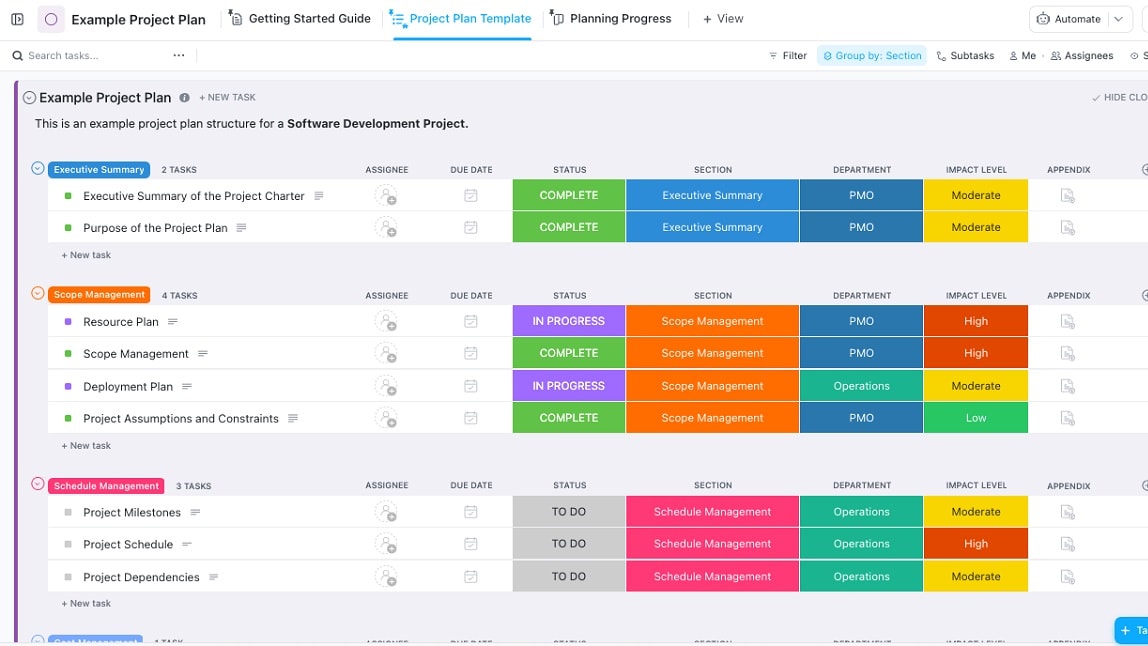
ClickUp's Multitask view provides a more efficient and intuitive way to handle multiple projects, making it a preferred choice for organizations that require robust project management capabilities.
ClickUp's Multitask View is a powerful tool for managing multiple projects within one workspace. With this feature, users can seamlessly switch between different tasks and projects, making it easier to stay organized and focused on various responsibilities.
On the other hand, Slack's Projects feature allows users to create channels for different projects, but it lacks the same level of organization and ease of navigation as ClickUp's Multitask view. Users may find it less efficient to manage tasks across multiple projects within Slack compared to ClickUp.
Overall, ClickUp's Multitask view provides a more efficient and intuitive way to handle multiple projects, making it a preferred choice for organizations that require robust project management capabilities.
Both ClickUp and Slack Facilitating File and Document Sharing
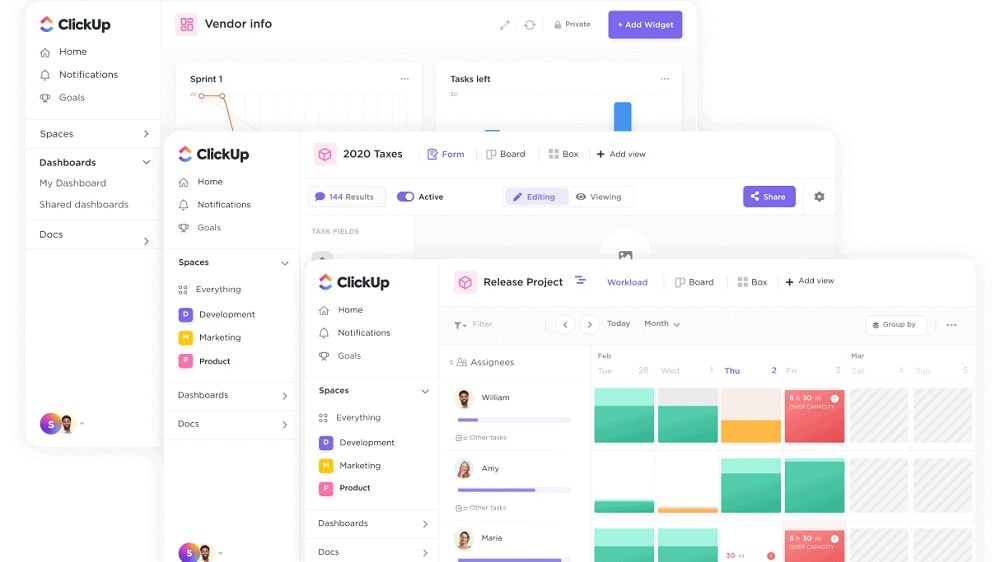
With ClickUp, users can upload and share files directly within tasks and comments, providing a centralized location for all project-related documents.
Both ClickUp and Slack excel in facilitating file and document sharing, making it convenient for teams to collaborate and access important files within their respective platforms.
With ClickUp, users can upload and share files directly within tasks and comments, providing a centralized location for all project-related documents. Furthermore, the platform offers real-time editing and collaboration on shared documents, streamlining the review process and enhancing team productivity.
On the other hand, Slack also offers seamless file sharing capabilities, allowing users to send documents and files in one-on-one or group chats. With its integration options, Slack can also connect to cloud storage platforms like Google Drive or Dropbox, making it easy to share files stored in external repositories.
Whether you prefer ClickUp's task-oriented approach to file sharing or Slack's instant messaging system for document exchange, both platforms offer efficient and user-friendly solutions to meet your document sharing needs. Ultimately, the choice between ClickUp and Slack will depend on the broader requirements of your team and the nature of your projects.
ClickUp Takes the Lead Against Slack for Ease of Use

ClickUp offers a simpler learning curve that makes onboarding new team members a breeze.
When comparing ease of use, ClickUp takes the lead against Slack.
With its intuitive interface, ClickUp offers a simpler learning curve that makes onboarding new team members a breeze. While Slack also provides an easy-to-navigate platform, it's primarily a communication tool and thus lacks the comprehensive project management features that ClickUp brings to the table.
In essence, ClickUp's unified workspace allows users to manage tasks, docs, goals, and chat in one place - making it significantly easier to use for day-to-day operations.
Time Tracking is More Detailed in ClickUp Compared to Slack
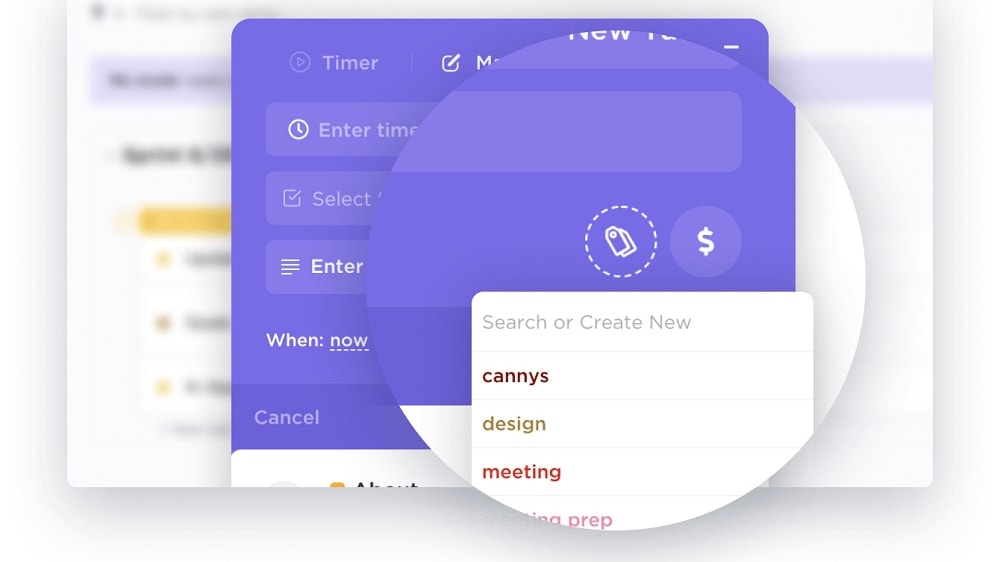
ClickUp's time tracking feature proves to be a more suitable choice.
Indeed, ClickUp's time tracking feature offers a more detailed and accurate method for monitoring time spent on tasks compared to Slack's automating tasks and reminders. ClickUp's dedicated time tracking tool allows users to track the time spent on each task with precision, providing valuable insights into team productivity and project progress.
On the other hand, while Slack's automation and reminders are useful for task management and communication, they lack the granularity required for in-depth time tracking.
For organizations that prioritize detailed time tracking and want a comprehensive overview of their team's productivity, ClickUp's time tracking feature proves to be a more suitable choice. However, for teams primarily focused on real-time communication and collaboration, Slack's automation and chat features may be sufficient. The decision between the two ultimately depends on the specific needs and preferences of each organization.
Slack Offers Better Collaboration than ClickUp
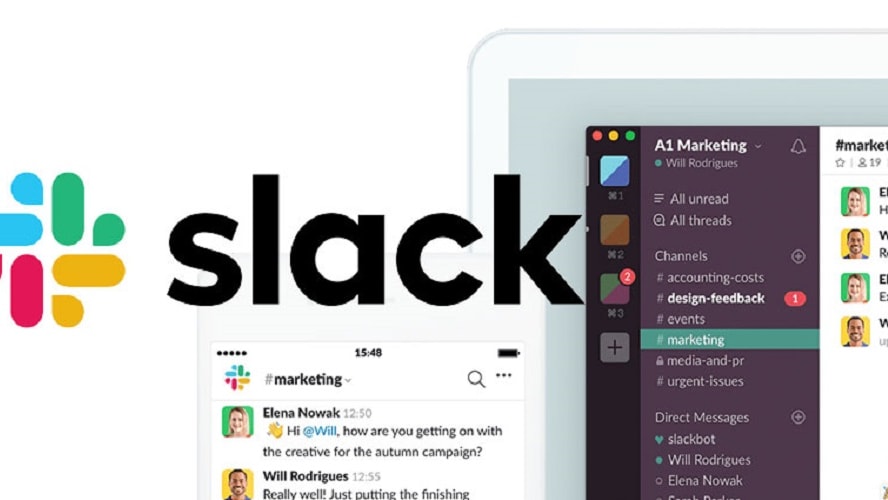
Slack's superior collaboration functionality makes it a preferred choice for businesses that frequently collaborate with external partners or clients.
Slack's collaboration capabilities indeed stand out, particularly with its ability to seamlessly integrate external collaborators from other companies or clients into channels. This enhances cross-team communication and fosters a more collaborative working environment.
On the other hand, while ClickUp also offers collaboration features, it may require more effort to incorporate external collaborators, which can hinder smooth communication between teams.
In conclusion, Slack's superior collaboration functionality makes it a preferred choice for businesses that frequently collaborate with external partners or clients. However, for organizations primarily focused on internal project management and task tracking, ClickUp's robust features in those areas may still be the preferred option. The choice ultimately depends on the specific collaboration needs of each organization.
Slack Outperforms ClickUp with its Extensive App Directory

With Slack, you can connect to over 2,600 apps, allowing you to seamlessly integrate and automate workflows with other software used within your company.
In terms of integration capabilities, both ClickUp and Slack boast a wide range of possibilities. However, Slack somewhat outperforms ClickUp due to its extensive app directory.
With Slack, you can connect to over 2,600 apps, allowing you to seamlessly integrate and automate workflows with other software used within your company. Whilst ClickUp does offer integrations with many popular tools like Google Drive, GitHub, and several others, it doesn’t quite match Slack's vast array of options. Therefore, if your business relies heavily on various software tools, Slack’s superior integration capability may make it a better choice for seamless communication and workflow management.
Slack Surpasses ClickUp in Video Conferences Organization

With Slack, users can effortlessly initiate video calls, making it convenient for remote teams to conduct face-to-face discussions and maintain a sense of connectedness.
Slack's video conferencing and screen sharing capabilities provide a significant advantage over ClickUp when it comes to organizing virtual meetings and facilitating real-time collaboration among team members.
With Slack, users can effortlessly initiate video calls, making it convenient for remote teams to conduct face-to-face discussions and maintain a sense of connectedness. Additionally, the screen sharing feature allows team members to present their work, share ideas, and collaborate effectively on various projects.
While ClickUp excels in project management and task tracking, its focus is primarily on organizing and managing tasks rather than providing dedicated video conferencing functionality.
For organizations that prioritize seamless video conferences and real-time collaboration, Slack's video calling feature proves to be a more suitable choice. However, for teams mainly focused on project management and task organization, ClickUp's capabilities may suffice. The choice between the two tools depends on the specific communication and collaboration needs of each organization.
08 ClickUp vs Slack: Which is the best for your business?
ClickUp is the best tool for you if:
- You need a comprehensive tool project management solution with task organization, time tracking, and collaboration features.
- You are looking for an all-in-one solution to centralize tasks and documents to increase the team efficiency.
- Your project management needs are for customizable workflows and various project views.
- You prefer a user interface that is easy to learn and allows a wide range of integration options to increase the work flow.
- Your team needs advanced level document sharing and collaboration options for projects.
 You need a comprehensive tool project management solution with task organization, time tracking, and collaboration features.
Slack is the best tool for you if:
- Your top priorities are real-time communication, instant messaging, and team collaboration.
- For streamlining workflow management you are looking for a seamless integration with various third-party apps.
- You need dedicated video conferencing and screen sharing capabilities that are crucial for conducting virtual meetings.
- Efficient file sharing and document exchange within your team are significant requirements.
- For your team organizing discussions through channels and searchable message history are important.
ClickUp
Used by 3270 members
Additional 20% off Unlimited and Business plans for 1 year
Save up to $1,000
Slack
Used by 3708 members
25% off new plan purchases
Save up to $9,000
09 Alternatives to ClickUp & Slack

Notion
Used by 16967 members
6 months free on the Business plan with Unlimited AI
Save up to $12,000

Google Workspace
Used by 9021 members
20% off Plus plans for 1 year
Save up to $518

Airtable
Used by 8192 members
$1,000 in credits for 1 year
Save up to $1,000

Miro
Used by 3296 members
$1,000 in credits (lifetime validity)
Save up to $1,000
10 Promotions on Task Management software
ClickUp and Slack are great tools, but Secret offers promo codes with discounts on over 2190+ different SaaS solutions. New deals are added regularly, helping you save money on your online subscriptions. Get access to codes for other Task Management software you might want to purchase

Monday deal
First month free
Google Workspace promotion
20% off Plus plans for 1 year
Airtable coupon code 2026
$1,000 in credits for 1 year
Miro deal
$1,000 in credits (lifetime validity)
Notion free credits
6 months free on the Business plan with Unlimited AI

xTiles free credits
20% off monthly or annual plans

Credits for Todoist
20% off annual plans

Google Drive promo code
20% off Plus plans for 1 year

Asana free credits
75% off the annual Starter and Advanced plans for 1 year

Zoom Meetings discounts
$20 off per user on the annual Workplace Pro plan
Start saving on the best SaaS
Secret has already helped tens of thousands of startups save millions on the best SaaS like Microsoft Teams, Google Workspace & many more. Join Secret now to buy software the smart way.