


With companies now shifting to remote and hybrid setups, it has become mandatory for us as project managers to find better tools to assign tasks, automate systems, and track deadlines more than ever.
If we wish to oversee all our projects in one place, Monday and ClickUp are great choices. Integrated with sophisticated features, these are highly acclaimed tools in the market and suitable for workflow management for our teams that are in-office, in the field, or totally remote. Here, we’ve drawn a head-to-head comparison between these two reputed management tools to help us find the best fit.
- 01 ClickUp vs Monday: overview
- 02 What's the difference between ClickUp and Monday?
- 03 ClickUp pros and cons
- 04 Monday pros and cons
- 05 ClickUp compared to Monday
- 06 Monday compared to ClickUp
- 07 Features comparison
- 08 ClickUp vs Monday: Which is the best for your business?
- 09 Alternatives to ClickUp & Monday
- 10 Promotions on Task Management software
Start saving on the best SaaS
Secret has already helped tens of thousands of startups save millions on the best SaaS like Microsoft Teams, Google Workspace & many more. Join Secret now to buy software the smart way.

01 ClickUp vs Monday: overview
To start off, let's make it clear that ClickUp and Monday are both popular project management and team collaboration platforms, designed to streamline workflows and boost productivity for businesses of all sizes.
ClickUp, known for its versatility and comprehensive approach, offers a wide range of tools and features to manage tasks, projects, documents, time tracking, and communication all within a single platform. On the other hand, Monday focuses on visual project management with its signature color-coded boards and timelines.
Now, let's delve into the comparison of ClickUp vs Monday. We'll explore their key features and functionalities to help you make an informed decision when selecting the ideal project management platform for your business

Positive reviews
Both Monday and ClickUp have comparable reviews, with similar user ratings

ClickUp
Monday
Task Management
ClickUp provides more comprehensive and flexible task management tools than Monday, with more customization options available
ClickUp
Monday
Ease of use
Both Monday and ClickUp have a simple and intuitive interface for easy use
ClickUp
Monday
Integrations
ClickUp offers a more extensive library of 1,000+ integrations with tools like Slack and Intercom, than that of Monday with 350+
ClickUp
Monday
Storage
ClickUp offers 100MB of free storage as part of the free plan, whereas Monday’s storage is available only in paid plans
ClickUp
Monday
Time Tracking
ClickUp and Monday both offer robust time tracking features for efficient project management
ClickUp
Monday
Visualization options
Monday’s views are more aesthetically pleasing and emphasize more important data than the visual options provided by ClickUp
ClickUp
Monday
Team Collaboration
ClickUp has a slight edge over Monday with the flexibility, usability and integrations available for collaboration
ClickUp
Monday
Pricing plans
Both Monday and ClickUp offer free plans, but ClickUp provides more key features under its plan to facilitate free users
ClickUp
Monday
Customer support
ClickUp’s 24/7 support is included in all plans, as well as email and technical support. Monday, however, only offers premium support for their most expensive plan, or email support for all users
ClickUp
Monday
02 What's the difference between ClickUp and Monday?

Clickup's Project Overview Dashboard
ClickUp
Boost your productivity
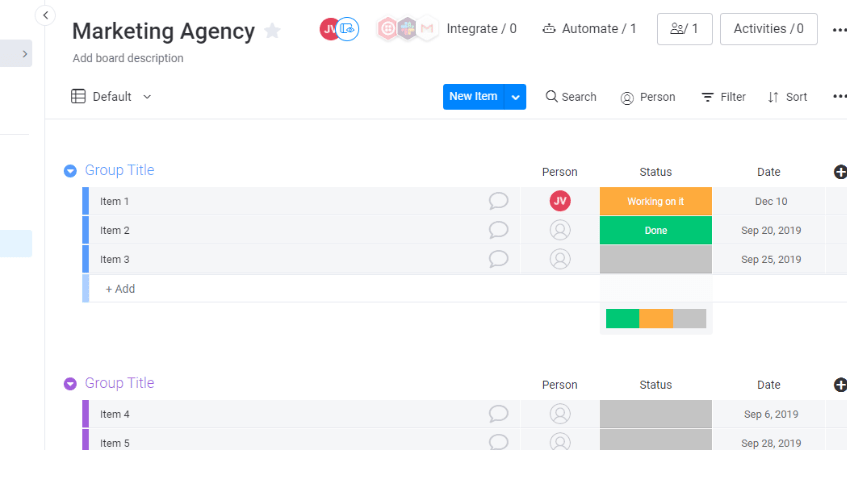
Monday's Board View Creation Dashboard
Monday
monday.com lets you manage projects from planning to delivery on a single platform, utilizing AI to streamline workflows and enhance team collaboration, ensuring you can track everyone's progress effectively.
We, as a team, have discovered ClickUp and Monday to be excellent choices as project management tools. Both are Software-as-a-Service (SaaS) companies and allow us, as users, to track and manage projects via the cloud. But while Monday is appreciated for its user-friendly design and simple functionality, ClickUp is best known for its ability to record video in-app. Besides, both ClickUp and Monday follow a per-member pricing structure. The more people we have on our team, the more cost-prohibitive the tool will become.
We believe that both ClickUp and Monday are primarily designed to cater to small and medium businesses requirements. Both have a customizable team dashboard and give us a fresh layout. As project managers, you can easily add the preferred widgets to Monday, so the team can see important information and remain on the same page. It is thoughtfully designed for teams preferring a straightforward, user-friendly layout with tools like drag and drop. ClickUp, on the other hand, is more flexible and scalable; hence works best for everyone, including a more extensive range of team sizes, small teams, or large corporations.
Speaking of pricing, both these project management tools have free forever options with limited features and four paid tiers. However, the pricing for Monday is complicated and changes depending on the seats you need. On the contrary, Clickup believes in simplicity and offers a convenient pricing structure. Additionally, its free plan is more substantial than its counterpart. It allows project managers to create 100 lists per space

ClickUp
Used by 3266 members
Additional 20% off Unlimited and Business plans for 1 year
Save up to $1,000

Monday
Used by 1434 members
First month free
Save up to $80
03 ClickUp pros and cons
What are the advantages of ClickUp?
- Versatile project management: ClickUp offers a wide range of features and tools to manage tasks, projects, and workflows, making it suitable for various industries and team sizes.

- Customizable workspaces: Users can create customizable workspaces, views, and dashboards, allowing teams to tailor ClickUp to their specific needs and preferences.
- Intuitive interface: ClickUp's user-friendly design and intuitive navigation make it easy for team members to collaborate and stay organized.
- Seamless collaboration: ClickUp enables seamless communication and collaboration through comments, mentions, and task assignments, promoting efficient teamwork.
- Extensive integrations: ClickUp integrates with over 1,000 apps, including popular tools like Zapier, Google Workspace, and Slack, enhancing productivity and workflow efficiency.
- Time tracking and reporting: ClickUp offers built-in time tracking and reporting features, allowing users to monitor progress, identify bottlenecks, and make data-driven decisions.
- Agile and scrum support: ClickUp provides agile and scrum features, making it suitable for teams following agile methodologies and sprint planning.
What are the disadvantages of ClickUp?
- Learning curve: The extensive range of features in ClickUp may lead to a steeper learning curve for new users, especially those unfamiliar with project management software.

- Overwhelming for small teams: Smaller teams or solo users might find ClickUp's extensive capabilities overwhelming, as they may not need all the available features.
- Occasional performance issues: Some users have reported occasional performance issues, such as slow loading times or glitches, which can affect productivity.
- Limited free version: While ClickUp offers a free version, it comes with limitations on features and storage space, which may be a concern for budget-conscious users.
- Mobile app limitations: The ClickUp mobile app, while functional, may lack some features available on the web version, impacting on-the-go productivity for some users.
Compare ClickUp to other tools


Asana vs ClickUp

ClickUp vs Coda

ClickUp vs Airtable

ClickUp vs Notion

ClickUp vs Trello

ClickUp vs Jira
04 Monday pros and cons
What are the advantages of Monday?
- Visual project management: Monday's intuitive and visually appealing interface, with color-coded boards and timelines, makes it easy for teams to organize and track projects.
- Customizable workflows: Users can easily create and customize workflows, boards, and columns to match their team's unique processes and preferences.
- Collaboration features: Monday enables seamless collaboration through comments, file sharing, and task assignments, facilitating efficient communication among team members.
- Integration options: Monday integrates with various popular tools and apps, including Google Workspace, Slack, and Zapier, enhancing workflow efficiency and productivity.
- Time tracking: Monday offers built-in time tracking capabilities, allowing users to monitor project progress and track time spent on specific tasks.
- Automation: With its automation features, Monday enables users to automate repetitive tasks and notifications, streamlining workflow processes.
- Easy onboarding: Monday's user-friendly interface and straightforward setup make it easy for new users to get started quickly.
What are the disadvantages of Monday?
- Limited reporting and analytics: While Monday provides basic reporting features, some users may find the reporting and analytics capabilities lacking in depth and customization.
- Steeper learning curve for complex workflows: For more complex workflows and project management needs, setting up and customizing boards may require additional time and effort to learn.
- Limited free version: The free version of Monday comes with limitations on the number of users and features, which might be restrictive for larger teams or businesses.
- Mobile app limitations: Some users have reported that the mobile app lacks certain functionalities available on the web version, affecting on-the-go productivity.
- File storage limitations: Monday's file storage capacity may be limited in the lower-tier plans, necessitating additional costs for more significant storage requirements
Compare Monday to other tools

Asana vs Monday

Zoho Projects vs Monday
Trello vs Monday
Airtable vs Monday

Pipedrive vs Monday
Notion vs Monday
05 ClickUp compared to Monday
ClickUp and Monday each offer unique strengths that cater to different user preferences. ClickUp stands out with its feature-rich platform and user-friendly interface. It provides a centralized hub where teams can easily collaborate and manage tasks efficiently. Monday, meanwhile, offers a robust range of customization options and automation features. It caters to users seeking a high level of flexibility in organizing and automating workflows.
ClickUp's emphasis on simplicity and ease of use makes it an ideal choice for teams that prioritize straightforward project management, while Monday caters to users who desire more advanced customization and automation options.
Is ClickUp better than Monday?
 Is ClickUp better than Monday?
The answer depends on the specific needs and preferences of your team. If your team requires a wide range of features to manage complex projects, ClickUp might be the preferable choice. For example, ClickUp offers customizable task views, time tracking, integrations with third-party apps, and advanced reporting features, making it suitable for teams that require robust functionality.
On the other hand, if your team values visual project management and user-friendliness, Monday might align better with your needs. Monday's intuitive interface, drag-and-drop functionality, and visual project timelines can be advantageous for teams that prioritize simplicity and easy collaboration.
Both platforms excel in their unique strengths, catering to diverse preferences and workstyles. By analyzing your team's specific demands and evaluating each software's capabilities in line with those needs, you can make the optimal decision for your project management endeavors.
What is ClickUp best used for?
ClickUp thrives in settings where customization and meticulous task management play a crucial role.
It proves exceptionally valuable for businesses seeking an all-in-one solution to consolidate their work, encompassing project management, document sharing, goal tracking, and time management. By providing a versatile platform that caters to various facets of business operations, ClickUp streamlines workflows and enhances efficiency.
Whether you're a growing startup or an established enterprise, ClickUp empowers teams to optimize their processes, foster collaboration, and achieve their objectives with ease.
Can ClickUp replace Monday?
ClickUp presents a viable alternative to Monday, but the decision to replace it should be based on individual business needs and financial considerations.
For teams seeking extensive customization and analytical capabilities, ClickUp could be a superior fit. However, the transition may require a learning curve, particularly for teams accustomed to Monday's interface.
Ultimately, both platforms offer unique strengths, and choosing the right one will optimize project management efficiency and collaboration within your organization.
Is ClickUp cheaper than Monday?
ClickUp stands out as a more cost-effective option, especially for smaller teams or startups.
Both ClickUp and Monday offer multiple pricing tiers. As your business grows, ClickUp offers the flexibility to upgrade to higher tiers, ensuring that you only pay for the features you need at each stage of your expansion. Embracing ClickUp's budget-friendly approach allows you to maximize value and allocate resources more efficiently, empowering your team to achieve its goals without unnecessary financial burden.
Is there a better Task Management software than ClickUp?
Identifying the ultimate project management software can be a challenging task, as it heavily relies on aligning with your company's specific needs. While ClickUp stands out as one of the top solutions in the market, several factors must be considered to make an informed decision. Elements such as pricing, included features, intuitive interface, and customer support all play a crucial role.
Alternatives to ClickUp include, but are not limited to, Monday.com, Notion, Asana, Trello, Coda, Wrike and Smartsheet.
ClickUp, however, is a great choice for startups looking for a complete project management solution.

ClickUp
Boost your productivity
Additional 20% off Unlimited and Business plans for 1 year
Save up to $1,000
06 Monday compared to ClickUp
In the comparison between ClickUp and Monday, Monday stands out with its user-friendly interface and visual project tracking. It allows users to create boards, timelines, and dashboards, enabling teams to visualize project progress at a glance. This simplicity and visual appeal make Monday a preferred choice for teams seeking an accessible and visually engaging project management tool.
ClickUp's comprehensive approach suits businesses of all sizes, offering scalability for startups and larger enterprises alike. Meanwhile, Monday's emphasis on intuitive design and ease of use makes it an ideal choice for teams that prioritize a straightforward and visually appealing project management experience.
Is Monday better than ClickUp?
Deciding whether Monday is better than ClickUp is subjective and relies on individual preferences and team needs.
For small to medium-sized teams that prioritize seamless collaboration and an aesthetically pleasing interface, Monday stands out as a strong option. Its user-friendly interface and visual project management features can enhance team communication and productivity.
On the other hand, larger teams that value comprehensive customization and advanced functionality might find ClickUp more suitable. ClickUp offers a wide range of features, including customizable task views, automation options, and extensive integrations, making it appealing to teams with complex workflows.
Both platforms excel in their own ways and cater to different team sizes and work requirements. Therefore, it is essential for each team to assess its specific needs and preferences before deciding which platform would be the better fit for their project management needs
What is Monday best used for?
Monday is best used for facilitating streamlined and collaborative workspaces, making it an ideal choice for small-to-mid-sized teams. Its board-style layout is especially advantageous for visual project management, providing an intuitive way to organize and monitor tasks.
If your team values user-friendly and visually-driven task management, Monday is the go-to tool for maximizing productivity and fostering efficient collaboration. By leveraging its exceptional features, you can propel your projects forward with ease, optimize workflows, and achieve your goals effectively. The platform's user-friendly interface and visual project timelines can enhance team communication and keep everyone on the same page.
In summary, Monday is best suited for teams that prioritize ease of use, visual organization, and efficient collaboration, making it a valuable asset for project management and task tracking.
Can Monday replace ClickUp?
In certain business scenarios, Monday can indeed serve as a suitable replacement for ClickUp.
If prioritizing an eye-catching interface and seamless collaboration takes precedence over extensive customization, Monday emerges as an appropriate option. Consider your team's size, workflow, and ease-of-use preferences when making this decision.
Is Monday cheaper than ClickUp?
When considering the cost factor between Monday.com and ClickUp, it becomes evident that Monday.com tends to be the pricier option, especially for larger teams.
The platform operates on a per-user charging model, which can significantly impact the overall expenses for companies with sizable staff.
On the other hand, ClickUp offers a potentially more budget-friendly approach, making it an appealing choice for businesses seeking cost-effective solutions. It provides greater flexibility with its pricing plans, including a free version with basic functionality, allowing startups and small teams to begin their journey without financial constraints.
Is there a better Collaboration software than Monday?
Determining the superior project management software is a complex task, as it heavily relies on the specific requirements of your company. While Monday.com certainly holds its strengths, considering alternatives is essential for an informed decision. Various factors, such as price, features, intuitiveness, and customer support, must be weighed when selecting the ideal software.
Among the alternatives to Monday.com are ClickUp, Asana, Trello, and Jira, each catering to different needs and workstyles.
Analyzing your team's needs and priorities will guide you towards the most suitable project management solution, ensuring seamless collaboration, enhanced productivity, and successful project execution.

Monday
Easily manage all your projects and become more productive and efficient.
First month free
Save up to $80
07 Features comparison
ClickUp is Best for Task Management

ClickUp's task management capabilities are comprehensive and highly flexible, setting it apart as the standout choice for teams of all sizes and industries.
When it comes to task management features, ClickUp emerges as the more robust and versatile platform, offering powerful solutions designed to streamline workflows and boost team productivity.
ClickUp's task management capabilities are comprehensive and highly flexible, setting it apart as the standout choice for teams of all sizes and industries. With ClickUp, users benefit from a wide range of customizable options, allowing them to create tasks with ease while adding due dates, priority levels, tags, and other relevant details. The platform's intuitive interface and efficient drag-and-drop functionality make task assignment and prioritization an effortless process.
In contrast, Monday offers a visually appealing task management system with color-coded boards and timelines. While it provides a user-friendly experience, ClickUp's task management features outshine Monday in terms of sheer versatility and customization options. ClickUp's ability to nest tasks within larger projects and provide a hierarchical view simplifies complex project organization, giving teams more control over their task structures.
Both ClickUp and Monday are User-Friendly Platforms

ClickUp's drag-and-drop functionality makes it easy to move tasks and projects across boards and lists, providing a seamless experience for teams of all sizes.
When it comes to ease of use, ClickUp and Monday both offer user-friendly interfaces, but there are notable differences in their approach.
ClickUp takes pride in its versatility while maintaining an intuitive design. The platform's user-friendly layout ensures that navigating through various features and tools is a breeze. ClickUp's drag-and-drop functionality makes it easy to move tasks and projects across boards and lists, providing a seamless experience for teams of all sizes.
On the other hand, Monday also boasts a user-friendly interface with a focus on visual project management. The platform's color-coded boards and intuitive navigation make setting up projects and collaborating with team members straightforward.
However, one key distinction lies in the process of creating tasks and projects. With ClickUp, adding a task or project is as simple as clicking the "+" button, and you can immediately fill in the necessary details. This streamlined approach allows for quick and efficient task creation.
Ultimately, both ClickUp and Monday offer ease of use, but the specific needs and preferences of your team will determine which platform aligns better with your workflow and enhances overall productivity.
ClickUp Outstands Monday for Seamless Integrations
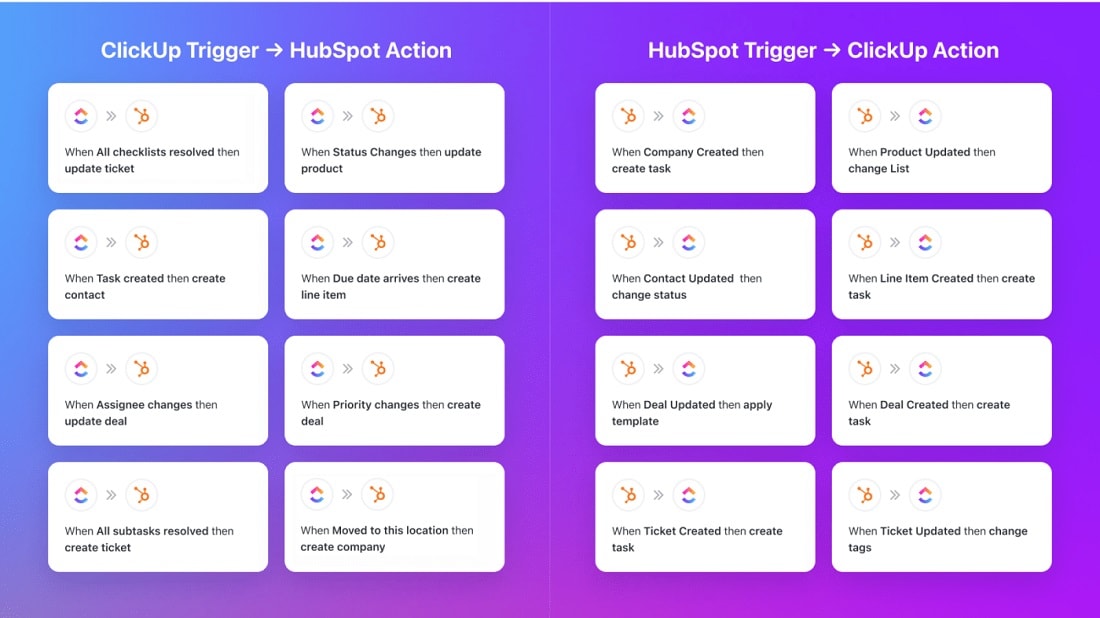
Notably, ClickUp enables you to integrate not only with sales-related apps but also with various other business domains, including marketing, customer service, productivity, and finance.
When it comes to integrations, Monday offers a selection of 200+ integrations on software like Zendesk, Stripe and Mailchimp, providing seamless connections in key sales areas such as lead capture, nurturing, client outreach, and proposal creation. With popular platforms like Zapier, you can extend the integration capabilities even further, linking Monday with a wide range of apps and services.
However, ClickUp takes integrations to a whole new level, outshining Monday with an extensive library of over 1,000+ integrations, with tools like Slack, GitHub and Intercom. Notably, ClickUp enables you to integrate not only with sales-related apps but also with various other business domains, including marketing, customer service, productivity, and finance.
In conclusion, ClickUp surpasses Monday in terms of integration versatility and scope, offering a comprehensive ecosystem that effortlessly connects your project management and team collaboration workflows with an extensive range of applications across multiple business domains.
ClickUp Provides Better Storage Options than Monday

ClickUp provides ample storage space for files and documents, with options available based on the plan selected.
When it comes to storage features, both ClickUp and Monday offer robust solutions to meet various team needs.
ClickUp provides ample storage space for files and documents, with options available based on the plan selected. The platform offers multiple tiers of storage, ranging from generous storage capacities in its higher-tier plans to more limited capacities in the lower-tier plans. This allows teams to choose a plan that aligns with their specific storage requirements and budget.
In contrast, Monday also offers storage options based on different plan levels. While it provides sufficient storage for most teams in its higher-tier plans, users on lower-tier plans may have more restricted storage capacities. Businesses with extensive file storage needs may need to consider the higher-tier plans to accommodate their requirements.
ClickUp and Monday are Evenly Matched in Time Tracking

With ClickUp, users can easily track time directly within tasks and projects.
ClickUp and Monday offer robust time tracking features, enhancing productivity and enabling teams to manage their tasks efficiently.
With ClickUp, users can easily track time directly within tasks and projects. The platform provides time tracking functionality, allowing team members to log the time they spend on each task, ensuring accurate time management and project billing. ClickUp's time tracking feature can be especially valuable for teams that bill clients based on hours worked or for those seeking to analyze time allocation across various projects.
Similarly, Monday also provides time tracking capabilities to help teams monitor task durations and project progress. Users can record time spent on tasks and visualize the time data on the platform's customizable boards and timelines. This feature empowers teams to optimize their workflows, identify bottlenecks, and make informed decisions to improve efficiency.
Monday Surpasses ClickUp’s Visualization Options

Monday's visualization capabilities are designed to provide teams with a clear and intuitive view of their projects and tasks.
Monday stands out as the superior platform for visualization options, offering a wide array of visually appealing features that enhance project tracking and team collaboration.
Monday's visualization capabilities are designed to provide teams with a clear and intuitive view of their projects and tasks. The platform offers color-coded boards and timelines, making it easy to distinguish between different projects and their respective stages. This visual representation helps teams quickly assess project progress and identify any potential bottlenecks.
While ClickUp also offers visualization options, Monday surpasses it in terms of ease of use and the variety of visualization tools available. Monday's visually appealing interface and user-friendly design make it an ideal choice for teams seeking a comprehensive and intuitive visualization experience.
ClickUp Excels in Team Collaboration

ClickUp's team collaboration tools are designed to enhance productivity and streamline communication within projects
ClickUp provides a comprehensive set of features that foster seamless communication and cooperation among team members.
ClickUp's team collaboration tools are designed to enhance productivity and streamline communication within projects. The platform offers various communication channels, including in-task comments, chat functionality, and direct mentions, enabling teams to stay connected and share updates in real-time.
While Monday also offers team collaboration features, ClickUp outshines it in terms of flexibility, usability, and integrations. ClickUp's all-in-one platform ensures that team members can easily access all the tools they need for efficient collaboration without having to switch between different applications.
08 ClickUp vs Monday: Which is the best for your business?
ClickUp is the best tool for you if:
- You need a versatile and comprehensive project management platform that provides task organization, time tracking, and communication capabilities.
- Seamless integration with a wide range of apps is essential for streamlining your workflow and boosting productivity.
- You need robust customer support, with 24/7 assistance and technical help available in all plans.
- Your team requires a simple and intuitive interface for easy adoption and collaboration.
- Customizable workspaces and task views are crucial for tailoring the platform to your specific business needs.
 You need a versatile and comprehensive project management platform that provides task organization, time tracking, and communication capabilities.
Monday is the best tool for you if:
- You value visual project management with color-coded boards and timelines.
- You need collaboration features, such as comments, file sharing, and task assignments, for efficient teamwork.
- You prioritize an easy onboarding process and user-friendly design for quick team adoption.
- You want integration with various popular tools like Google Workspace, Slack, and Zapier for your workflow.
- Your team prefers a straightforward and visually-driven layout with drag-and-drop functionality for easy project management.
ClickUp
Used by 3266 members
Additional 20% off Unlimited and Business plans for 1 year
Save up to $1,000
Monday
Used by 1434 members
First month free
Save up to $80
09 Alternatives to ClickUp & Monday

Notion
Used by 16930 members
6 months free on the Business plan with Unlimited AI
Save up to $12,000

Google Workspace
Used by 9006 members
20% off Plus plans for 1 year
Save up to $518

Airtable
Used by 8184 members
$1,000 in credits for 1 year
Save up to $1,000

Slack
Used by 3699 members
25% off new plan purchases
Save up to $9,000
10 Promotions on Task Management software
ClickUp and Monday are great tools, but Secret offers promo codes with discounts on over 2190+ different SaaS solutions. New deals are added regularly, helping you save money on your online subscriptions. Get access to codes for other Task Management software you might want to purchase
Airtable promotion code
$1,000 in credits for 1 year
Discount for Google Workspace
20% off Plus plans for 1 year
Notion offer
6 months free on the Business plan with Unlimited AI

Miro coupon code
$1,000 in credits (lifetime validity)
Credits for Slack
25% off new plan purchases

xTiles offer
20% off monthly or annual plans

Todoist coupon
20% off annual plans

Google Drive discounts
20% off Plus plans for 1 year

Asana offer
75% off the annual Starter and Advanced plans for 1 year

Promo codes for Zoom Meetings
$20 off per user on the annual Workplace Pro plan
Start saving on the best SaaS
Secret has already helped tens of thousands of startups save millions on the best SaaS like Microsoft Teams, Google Workspace & many more. Join Secret now to buy software the smart way.