


To optimise the resources at your disposal and unite energies around common objectives, project management tools are essential. They incorporate a host of features that make work easier and speed up team processes. But with so much software on the market, it can be hard to find the tool you're looking for.
Two platforms stand out from the crowd. To help you choose the best project management software, we're going to take a look at Clickup vs Trello. We'll be comparing the differences and features of these two offerings to identify the one that's best for your business.
- 01 ClickUp vs Trello: overview
- 02 What's the difference between ClickUp and Trello?
- 03 ClickUp pros and cons
- 04 Trello pros and cons
- 05 ClickUp compared to Trello
- 06 Trello compared to ClickUp
- 07 Features comparison
- 08 ClickUp vs Trello: Which is the best for your business?
- 09 Alternatives to ClickUp & Trello
- 10 Promotions on Task Management software
Start saving on the best SaaS
Secret has already helped tens of thousands of startups save millions on the best SaaS like Microsoft Teams, Google Workspace & many more. Join Secret now to buy software the smart way.

01 ClickUp vs Trello: overview
ClickUp and Trello are two prominent contenders in the realm of project management and team collaboration, each offering unique strengths to cater to distinct user requirements.
ClickUp is celebrated for its versatile array of project management features. It offers a comprehensive platform encompassing task management, goal tracking, time tracking, and customizable workflows. On the other hand, Trello provides a user-friendly and visually intuitive approach to project management. Its Kanban-style boards are perfect for teams that prefer a simple yet effective way to organize tasks and collaborate.
Now, let's dive into the ClickUp vs. Trello comparison to help you make an educated choice when selecting the ideal project management and collaboration solution for your specific needs.

Customer support
Clickup customer service is immediately accessible, whereas Trello software only offers help by email or form.

ClickUp
Trello
Positive reviews
Clickup has a higher average score than its competitor, but according to customers, Trello is better in terms of ease of use.
ClickUp
Trello
Customization
Each tool can be modified to suit your needs. Clickup has more advanced customisation functions, particularly for task management.
ClickUp
Trello
Time tracking
Clickup offers full native time tracking, which requires third-party integration in the case of Trello.
ClickUp
Trello
Pricing plans
Both products offer price plans for each type of use. However, Trello's free plan is more comprehensive.
ClickUp
Trello
Integrations
Trello offers a wide range of integrations, including Teams, Evernote and Dropbox. Clickup connects to various tools such as Hubspot, Zoom and Trello.
ClickUp
Trello
Data analysis
Data analysis is not Trello's strong point. With Clickup, you can generate task management reports.
ClickUp
Trello
Ease of use
Trello's user interface is attractive and based on drag and drop. Clickup's is less attractive and more complex.
ClickUp
Trello
Collaborative tools
Trello lets you comment on tasks when working in a team. Clickup goes even further, with a host of collaborative features.
ClickUp
Trello
Agile methodologies
Both platforms can be used for agile projects. However, Clickup offers a wider range of features.
ClickUp
Trello
02 What's the difference between ClickUp and Trello?

ClickUp's Task View with Sidebar Highlighted Showing Spaces, Folders or Lists
ClickUp
Boost your productivity
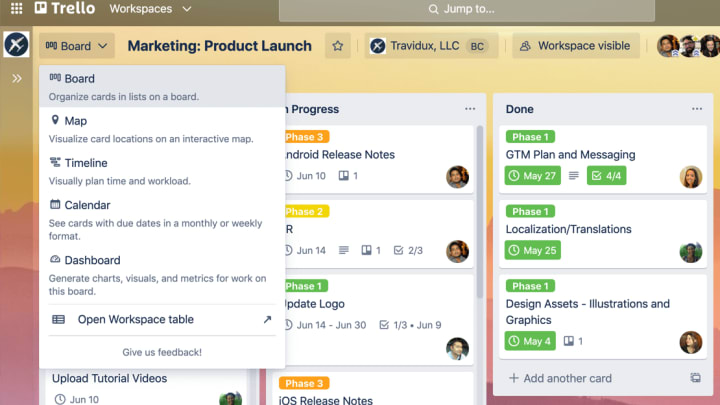
Trello's Board View Showing Step-By-Step Project Details
Trello
Trello brings value by providing a visual organization and collaboration tool for individuals and teams, helping to streamline workflows, improve productivity, and increase transparency across projects.
The Clickup and Trello software tools are both platforms for managing team projects. However, their target audiences are very different. While Trello is designed to be quickly deployable, easy to use and primarily geared to small projects, Clickup offers comprehensive functionality for larger projects. In other words, while both tools are powerful and useful for your business, you need to choose the one that best suits your needs.
Clickup is a project management tool that can be complex to use, with a slight learning curve if you're not used to project management software. However, it's more flexible and customizable than Trello. With it, you can set up a complete project tracking system. A dashboard lets you track the progress of tasks and the performance indicators you've selected. Clickup is therefore ideally suited to all projects in small and medium-sized businesses.
Trello's difference, on the other hand, lies in its simplicity. If, above all, you're looking for software that's easy to deploy and requires no technical expertise, Trello is ideal. In fact, what makes Trello different from Clickup is its accessibility to the widest possible audience. It takes just a few minutes to get to grips with it, as its user interface is as simple as it is attractive. Trello is inexpensive, and you can add functionality by connecting it to a variety of other software tools via the many third-party integrations Trello offers its users.

ClickUp
Used by 3268 members
Additional 20% off Unlimited and Business plans for 1 year
Save up to $1,000

Trello
Used by 731 members
Free forever for up to 10 users
Save up to $600
03 ClickUp pros and cons
What are the advantages of ClickUp?
- Comprehensive features: ClickUp offers a wide range of features, including task management, goal tracking, time tracking, document sharing, and customizable workflows. This breadth of functionality allows teams to manage various aspects of their projects within a single platform.

- Customizability: ClickUp is highly customizable, allowing users to tailor their workspace to their specific needs. You can create custom fields, statuses, and workflows to match your team's unique processes and requirements.
- Integration capabilities: ClickUp integrates seamlessly with many other popular productivity tools and apps, such as Google Workspace, Slack, Trello, and more. This makes it easy to connect your existing tools and streamline your workflow.
- User-friendly interface: ClickUp's user interface is designed to be intuitive and user-friendly. It's easy for team members to learn and use, reducing the learning curve for new users and increasing overall productivity.
- Pricing options: ClickUp offers a variety of pricing plans, including a free tier, which makes it accessible to startups and small businesses with limited budgets. The paid plans provide more advanced features and customization options for larger teams.
What are the disadvantages of ClickUp?
- Complexity for beginners: While ClickUp's flexibility is a strength, it can also be overwhelming for beginners. The extensive customization options and features may require some time to fully grasp and configure.

- Pricing tiers: While ClickUp offers a free plan, some advanced features are only available in the paid plans, and the pricing can become costly as your team and feature needs grow.
- Steep learning curve: Due to its extensive feature set, ClickUp may have a steeper learning curve compared to simpler project management tools like Trello. Users may need time to familiarize themselves with all the functionalities.
- Mobile app limitations: While ClickUp has a mobile app, it may not offer the same level of functionality and ease of use as the desktop version, which can be a drawback for teams on the go.
- Resource intensive: For very large teams or organizations with complex workflows, ClickUp's extensive features and customization options can require significant resources to set up and maintain effectively.
Compare ClickUp to other tools


ClickUp vs Monday

Asana vs ClickUp

ClickUp vs Coda

ClickUp vs Notion

ClickUp vs Jira

ClickUp vs Todoist
04 Trello pros and cons
What are the advantages of Trello?
- User-friendly interface: Trello is known for its simple and intuitive Kanban board interface. Users can quickly create boards, lists, and cards to organize tasks and projects visually. This simplicity makes it easy for teams to get started without a steep learning curve.
- Collaborative: Trello is highly collaborative, allowing team members to easily share boards, assign tasks, and comment on cards. It fosters transparency and communication within teams.
- Integration options: Trello offers a wide range of integrations with other popular tools and services, including Google Drive, Slack, and Dropbox. This flexibility allows users to connect Trello with their existing workflow and tools.
- Mobile accessibility: Trello has a user-friendly mobile app that provides on-the-go access to boards and tasks. This is especially valuable for teams with remote or mobile workers.
- Free plan: Trello offers a free plan with basic features, making it accessible to small teams and individuals with limited budgets. This free plan is often sufficient for simple project management needs.
What are the disadvantages of Trello?
- Limited complexity: While Trello's simplicity is a strength, it can also be a limitation for teams with complex project management requirements. It may lack the advanced features and customization options needed for more intricate workflows.
- Dependency on third-party integrations: While Trello integrates with many external tools, some advanced features that are commonly found in other project management tools may require additional integrations, adding complexity to the setup.
- Limited reporting and analytics: Trello's reporting and analytics capabilities are limited compared to more specialized project management tools. Users looking for in-depth data analysis may need to rely on third-party solutions.
- Card overload: In larger projects or organizations, the sheer volume of cards on boards can become overwhelming and lead to decreased clarity and organization.
- Paid plans can be pricey: While Trello offers a free plan, the premium features, such as unlimited integrations and advanced automation, are available only in paid plans. The cost of these plans can add up, especially for larger teams.
Compare Trello to other tools

Trello vs Monday
Asana vs Trello
Trello vs Todoist

Flow vs Trello

Pipedrive vs Trello
Notion vs Trello
05 ClickUp compared to Trello
When comparing ClickUp and Trello, ClickUp stands out for its comprehensive features and versatility, making it an appealing choice for individuals and teams seeking a powerful project management and collaboration tool. ClickUp's pricing structure, which includes a free plan and competitive paid options, caters to startups and small businesses aiming to enhance their project management without a substantial financial commitment.
Both ClickUp and Trello excel in boosting team productivity, but the choice between the two depends on your specific requirements. ClickUp offers a robust and customizable solution, making it a top choice for teams looking to streamline project workflows and adapt to evolving needs. In contrast, Trello offers a user-friendly, visual approach to project management, making it ideal for teams that prefer simplicity and ease of use, especially for smaller projects or businesses.
Is ClickUp better than Trello?
 Is ClickUp better than Trello?
The decision between ClickUp and Trello depends on your specific project management and collaboration needs. ClickUp presents a compelling option for those who value versatility and user-friendliness. Its intuitive interface and extensive feature set accommodate various workflows, spanning from task management to goal tracking. ClickUp's customization options enable you to tailor task lists, create intricate project workflows, and seamlessly integrate with external tools, making it a suitable choice for teams with diverse project requirements.
ClickUp offers extensive customization and a user-friendly experience, while Trello provides a simpler and visually intuitive platform. Trello's strength lies in its straightforward approach to task and project management, making it ideal for teams that prioritize ease of use and visual organization.
What is ClickUp best used for?
ClickUp is best used as a versatile project management and collaboration tool that streamlines tasks, goals, and communication for teams of all sizes. It excels in providing a unified platform for organizing projects, tracking tasks, setting and monitoring goals, and facilitating team collaboration. ClickUp's customizable features, intuitive interface, and extensive integrations make it ideal for businesses seeking to enhance productivity while maintaining flexibility.
Whether you're managing complex projects, coordinating team efforts, or aligning with organizational objectives, ClickUp offers a scalable and adaptable solution. Its suitability spans various industries and project types, making it a valuable asset for optimizing workflows and achieving project success.
Can ClickUp replace Trello?
ClickUp can potentially replace Trello depending on your project management needs. Trello's simplicity and visual approach make it a great choice for smaller teams and straightforward task tracking. However, ClickUp offers a more comprehensive platform with customizable features, making it suitable for a wider range of project types and industries.
If your projects require advanced task management, custom workflows, and in-depth reporting, ClickUp may be a better fit. It's important to assess your team's specific requirements, project complexity, and preferred workflow to determine whether ClickUp can effectively replace Trello for your organization.
Is ClickUp cheaper than Trello?
Comparing ClickUp and Trello in terms of pricing reveals distinctions that hinge on your team's size, needs, and budget. ClickUp’s pricing is competitive, including a free plan with robust capabilities and reasonably priced paid options. This makes ClickUp an attractive choice for startups, small businesses, and larger teams seeking cost-effective project management solutions.
Trello, on the other hand, offers a free plan with basic features, which is perfect for smaller teams or individuals. However, as your requirements grow or if you need advanced features like automation, you may find that Trello's pricing tiers become comparatively expensive.
Is there a better Task Management software than ClickUp?
Whether there's a better project management software than ClickUp depends on your specific needs and preferences. ClickUp is a versatile and feature-rich tool that works well for many teams, but there are numerous alternatives to consider.
Some popular project management software alternatives to ClickUp include Trello, Asana, Monday.com, Jira, and Wrike, among others. Each of these tools has its own strengths and focuses on different aspects of project management, such as task tracking, collaboration, or specialized features for specific industries.

ClickUp
Boost your productivity
Additional 20% off Unlimited and Business plans for 1 year
Save up to $1,000
06 Trello compared to ClickUp
When comparing Trello and ClickUp, Trello distinguishes itself with its simplicity and user-friendly interface, making it an attractive choice for individuals and teams seeking an easy-to-use project management and task-tracking solution. Trello's pricing structure, which includes a free plan and affordable paid options, caters to startups and small businesses looking to improve their project organization without a substantial financial commitment.
While both Trello and ClickUp are effective in enhancing team productivity, the choice between the two depends on your specific requirements. Trello offers a straightforward and visually intuitive approach to project management, making it a top choice for teams that value simplicity and ease of use. It's particularly suitable for smaller projects or businesses seeking a quick and accessible solution.
Is Trello better than ClickUp?
The comparison between Trello and ClickUp depends on specific project management needs and team preferences. Trello is known for its simplicity and visual approach to task and project management, making it a preferred choice for teams seeking a straightforward and intuitive tool. Its Kanban boards and card-based system are designed for easy task tracking and collaboration, particularly in smaller projects or teams.
In contrast, ClickUp provides a more versatile platform suitable for a broader range of industries and project types. It offers customizable features, an intuitive interface, and a wide array of integrations, making it appealing to teams looking for flexibility and adaptability in their project management tool.
What is Trello best used for?
Trello excels as a versatile and user-friendly tool, ideal for visual task and project management. Its strengths lie in providing a simple and intuitive platform for organizing tasks, collaborating with teams, and tracking progress.
Trello's visual approach, using boards, lists, and cards, is particularly effective for small to medium-sized projects and teams. It is valuable for tasks such as project planning, content management, event coordination, and personal to-do lists. Trello's simplicity makes it accessible to a wide range of users, from individuals looking to streamline their daily tasks to small teams seeking an easy-to-use project management solution.
Can Trello replace ClickUp?
The possibility of Trello replacing ClickUp depends on your team's particular project management and task-tracking requirements. Trello is known for its simplicity and visual approach to project management, making it a preferred choice for teams seeking an intuitive and user-friendly tool.
Trello's Kanban-style boards and card-based system are particularly effective for smaller projects, personal task management, and teams looking for straightforward project organization. If your primary focus is on simplicity, ease of use, and visual task management, Trello may serve as a viable alternative to ClickUp.
Is Trello cheaper than ClickUp?
When comparing the pricing of Trello to ClickUp, there are distinct differences to consider. Trello offers a free plan with basic features, which is ideal for smaller teams or individuals with limited budgets. However, as your team and project management needs grow, you may find that Trello's pricing tiers can become costlier, especially when you require more advanced features.
In contrast, ClickUp provides a competitive pricing structure, including a free plan and reasonably priced paid options. This makes ClickUp an accessible choice for startups and small businesses, as well as larger teams looking for cost-effective project management solutions.
Is there a better Collaboration software than Trello?
Trello is a versatile and user-friendly tool for project management, but it's essential to explore whether there might be a more suitable software for your particular needs.
In the project management landscape, there are several notable alternatives to Trello, including ClickUp, Smartsheet, Basecamp, and Asana.
The choice of project management software should align with your organization's unique requirements, project complexities, and team preferences. While Trello excels in simplicity and visual task management, other tools may offer more advanced features or cater to different industries.

Trello
Organize anything, together
Free forever for up to 10 users
Save up to $600
07 Features comparison
ClickUp Offers Superior Time Tracking Compared to Trello

Effective time tracking is essential for managing efficiency and productivity, and ClickUp has honed this feature to perfection.
When it comes to time tracking, ClickUp stands out as the superior choice compared to Trello. Effective time tracking is essential for managing efficiency and productivity, and ClickUp has honed this feature to perfection. Whether you bill clients by the hour or simply wish to monitor your team's productivity accurately, ClickUp's time tracking feature is ideally suited for these purposes. With ClickUp, users can effortlessly log and track the time spent on individual tasks and projects, helping teams stay on top of deadlines and budgets.
In contrast, Trello, while proficient in various aspects of task and project management, does not include explicit time tracking capabilities within its core features. This absence makes ClickUp the preferred choice for organizations and teams that prioritize precise time management and reporting.
Trello Outshines ClickUp in Data Synchronization

Trello's hallmark is its ability to seamlessly maintain data accuracy and accessibility across various devices and platforms.
In the arena of data synchronization, Trello undeniably takes the lead, particularly with its real-time synchronization capabilities. Trello's hallmark is its ability to seamlessly maintain data accuracy and accessibility across various devices and platforms. This feature proves invaluable for teams that are always on the move or embrace remote work, ensuring that everyone remains in sync regardless of their location. For instance, when a team member updates a task or adds a comment, it instantly reflects across all devices, promoting seamless collaboration.
In contrast, ClickUp, while efficient in numerous aspects of project management, doesn't emphasize real-time data synchronization as prominently as Trello. While ClickUp certainly offers synchronization capabilities, it may not prioritize this feature to the same extent. Depending on your team's mobility and remote work requirements, Trello's robust data synchronization may be the deciding factor in favor of this platform.
ClickUp Offers a Wider Range of Integrations Compared to Trello

ClickUp's robust API seamlessly connects with over 1,400 applications, from communication software to analytics platforms, including heavyweights like Google Drive, Slack, and GitHub
When it comes to integration capabilities, both ClickUp and Trello provide support for a diverse array of third-party applications. Nevertheless, ClickUp boasts a more comprehensive integration ecosystem compared to Trello. Trello, although offering integrations via power-ups, doesn't quite match the extensive depth and breadth of integrations available within ClickUp's toolkit.
ClickUp's robust API seamlessly connects with over 1,400 applications, from communication software to analytics platforms, including heavyweights like Google Drive, Slack, and GitHub, as well as an array of specialized tools. This extensive range of integrations ensures that ClickUp caters to a wide spectrum of business needs, enhancing cross-platform compatibility and ultimately bolstering productivity.
ClickUp and Trello Provide Equally Effective Collaboration with Your Team
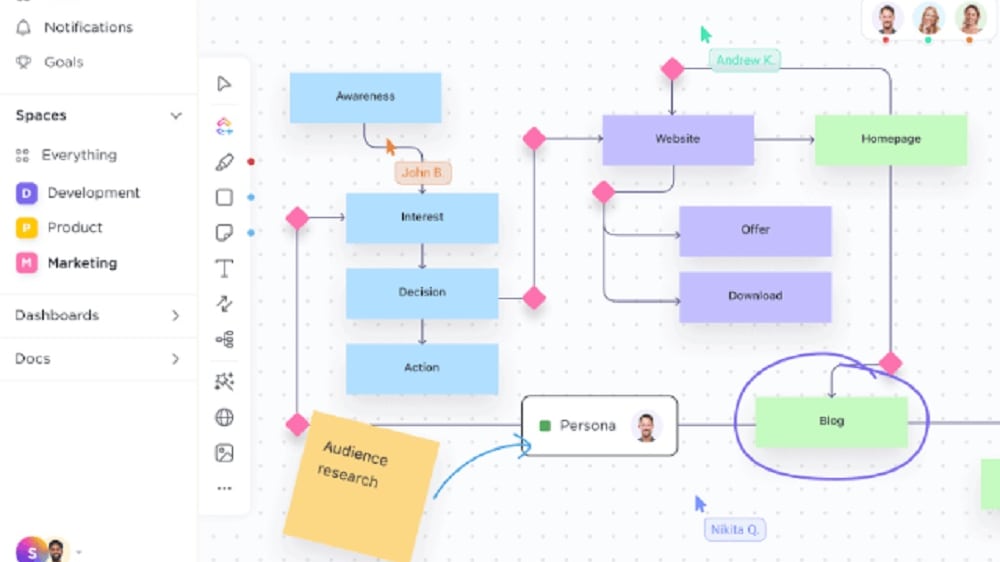
ClickUp enhances teamwork through seamless project and task collaboration, allowing team members to edit shared documents in real time.
When it comes to team collaboration, both ClickUp and Trello shine with their respective sets of robust features. ClickUp enhances teamwork through seamless project and task collaboration, allowing team members to edit shared documents in real time. This feature ensures that teams can work together efficiently and maintain document accuracy without the hassle of version control. For example, team members can simultaneously collaborate on a project proposal, making real-time changes and additions.
On the other hand, Trello offers a collaborative environment where teams can collaborate on tasks, share documents, and collectively track progress directly on the boards. This approach simplifies project management and fosters collaboration by visualizing tasks and enabling team members to interact within the context of the project.
Trello Pulls Ahead of ClickUp for User-Friendliness
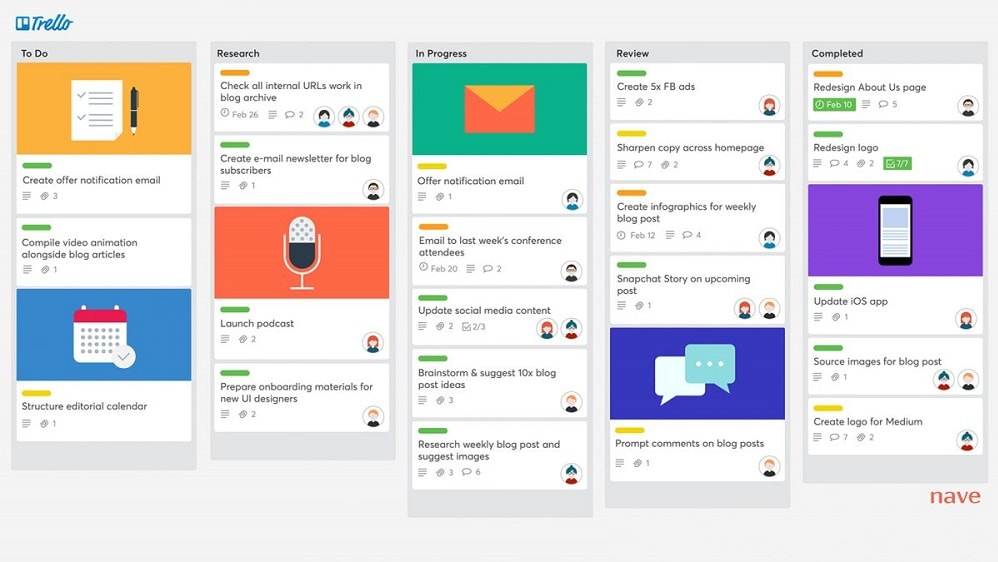
Trello simplifies task management and project organization, making it exceptionally user-friendly for teams and individuals.
In the realm of user-friendliness, Trello distinctly outshines ClickUp. The intuitive interface of Trello simplifies task management and project organization, making it exceptionally user-friendly for teams and individuals. For instance, Trello's Kanban-style boards offer a visual and easily understandable way to track tasks, mirroring physical boards with cards that represent tasks. This simplicity allows users to quickly grasp and adopt the platform.
In contrast, while ClickUp offers powerful features and customizability, its extensive capabilities may present a steeper learning curve, particularly for new users. The flexibility that ClickUp offers comes at the cost of a more complex interface, which can be less intuitive for those seeking a straightforward and user-friendly experience.
ClickUp's Intuitive Task Management is Better Than Trello

ClickUp's interface excels in simplifying the process of task creation and assignment, rendering it effortless for users.
ClickUp distinctly surpasses Trello when it comes to intuitive task management. ClickUp's interface excels in simplifying the process of task creation and assignment, rendering it effortless for users. Moreover, the intuitive design extends to tracking progress, ensuring that every team member can seamlessly utilize this feature to monitor project developments.
Trello, while facilitating task collaboration and tracking, doesn't quite reach the same level of intuitive design that makes ClickUp a user-friendly choice. While Trello certainly enables task management, its interface may require more familiarity, and the process of creating and tracking tasks might not be as straightforward as ClickUp's streamlined approach. This clarity and ease-of-use in ClickUp can significantly enhance team efficiency and project management.
Trello's Organizing and Prioritizing Abilities Are Better Than ClickUp's

Trello's distinctive board format provides an exceptional visual tool for task organization and prioritization.
In terms of organizing and prioritizing tasks, Trello undoubtedly excels, surpassing ClickUp in this aspect. Trello's distinctive board format provides an exceptional visual tool for task organization and prioritization. The ability to effortlessly move cards across the board promotes a dynamic and intuitive task management experience, providing immediate clarity on what requires attention and what can be deferred. For instance, teams can create boards for different projects or phases and populate them with cards representing individual tasks, making it easy to visualize progress and allocate resources effectively.
While ClickUp offers a multitasking view that allows for switching between projects, it doesn't provide the same level of straightforward and visually impactful planning that Trello delivers. Trello's simplicity and effectiveness in organizing and prioritizing tasks make it an optimal choice for teams seeking a visual and user-friendly task management solution.
08 ClickUp vs Trello: Which is the best for your business?
ClickUp is the best tool for you if:
- You need a versatile project management platform with customizable features for your specific workflow requirements
- Collaboration and team communication are essential, as ClickUp offers built-in chat, document sharing, and task assignments
- Your organization values efficiency, thanks to ClickUp's automation capabilities, integrations, and time-tracking features
- Scalability is a priority, as ClickUp accommodates both small teams and large enterprises with ease
- You prefer an intuitive, user-friendly interface that ensures quick adoption and minimal learning curve for your team
 You need a versatile project management platform with customizable features for your specific workflow requirements
Trello is the best tool for you if:
- You prefer a simple, visual project management system that's easy for teams to grasp and use effectively
- Your projects involve agile methodologies, as Trello's boards and cards facilitate flexible task management and prioritization
- Collaboration and real-time updates are essential, as Trello enables seamless communication and file sharing among team members
- Your team's needs vary from personal task tracking to complex project management, thanks to Trello's customizable features and power-ups
- You value affordability, as Trello offers a free plan with essential features and reasonably priced premium options for enhanced functionality
ClickUp
Used by 3268 members
Additional 20% off Unlimited and Business plans for 1 year
Save up to $1,000
Trello
Used by 731 members
Free forever for up to 10 users
Save up to $600
09 Alternatives to ClickUp & Trello

Notion
Used by 16939 members
6 months free on the Business plan with Unlimited AI
Save up to $12,000

Google Workspace
Used by 9007 members
20% off Plus plans for 1 year
Save up to $518

Airtable
Used by 8184 members
$1,000 in credits for 1 year
Save up to $1,000

Slack
Used by 3703 members
25% off new plan purchases
Save up to $9,000
10 Promotions on Task Management software
ClickUp and Trello are great tools, but Secret offers promo codes with discounts on over 2190+ different SaaS solutions. New deals are added regularly, helping you save money on your online subscriptions. Get access to codes for other Task Management software you might want to purchase

Code for Monday
First month free
Google Workspace coupon code 2026
20% off Plus plans for 1 year
Airtable coupon code
$1,000 in credits for 1 year

Code for Miro
$1,000 in credits (lifetime validity)
Promo codes for Notion
6 months free on the Business plan with Unlimited AI

Promo codes for xTiles
20% off monthly or annual plans
Slack discount code
25% off new plan purchases

Google Drive offer
20% off Plus plans for 1 year

Promo code Todoist
20% off annual plans

Zoom Meetings promo
$20 off per user on the annual Workplace Pro plan
Start saving on the best SaaS
Secret has already helped tens of thousands of startups save millions on the best SaaS like Microsoft Teams, Google Workspace & many more. Join Secret now to buy software the smart way.