


In the modern business landscape, where remote work, digital transformation, and cross-functional collaboration have become the norm, choosing the right project management tool can be a game-changer. Having the right tool not only streamlines workflow but also enhances productivity, fosters team collaboration, and ultimately helps in achieving business goals more efficiently. In a crowded marketplace filled with various options, it's critical to understand which platform offers the better solution for your unique business needs. But how do you choose the best among the rest?
In this blog, we dive deep into a head-to-head comparison between two popular project management tools: ClickUp and Todoist. We'll evaluate them across a variety of parameters, such as user experience, customizability, features, pricing, and community reviews. Whether you're an individual looking for a platform to manage personal projects or a business leader seeking to improve team collaboration, this blog aims to help you make an informed decision about which tool is the best fit for you.
- 01 ClickUp vs Todoist: overview
- 02 What's the difference between ClickUp and Todoist?
- 03 ClickUp pros and cons
- 04 Todoist pros and cons
- 05 ClickUp compared to Todoist
- 06 Todoist compared to ClickUp
- 07 Features comparison
- 08 ClickUp vs Todoist: Which is the best for your business?
- 09 Alternatives to ClickUp & Todoist
- 10 Promotions on Task Management software
Start saving on the best SaaS
Secret has already helped tens of thousands of startups save millions on the best SaaS like Microsoft Teams, Google Workspace & many more. Join Secret now to buy software the smart way.

01 ClickUp vs Todoist: overview
ClickUp and Todoist are prominent players in the world of task management and productivity apps, each offering unique features and advantages tailored to distinct user preferences.
ClickUp stands out for its robust project management capabilities and versatile task customization. It provides a comprehensive platform for organizing tasks, projects, and teams efficiently. On the other hand, Todoist is known for its simplicity and user-friendly interface. It excels in helping individuals manage personal to-do lists and simple tasks seamlessly.
Now, let's delve into the ClickUp vs. Todoist comparison to help you make an informed decision when selecting the ideal task management and productivity tool for your specific requirements.

Customer Support
Both platforms offer excellent customer support complete with online documentation, tutorials, and responsive customer service teams. Users of both services generally report positive support experiences.

ClickUp
Todoist
Real-Time Reporting
ClickUp provides more extensive real-time reporting and analytics, useful for in-depth project oversight. Todoist offers simpler reporting features, focusing more on task completion and productivity.
ClickUp
Todoist
Pricing Plan
ClickUp offers a feature-rich free plan that outclasses many competitors, including Todoist. Todoist's free plan is useful but lacks some advanced features that could require an upgrade. Todoist’s paid plan starts at $5/month when billed monthly, whereas Clickup starts at $10/month, billed monthly
ClickUp
Todoist
Ease of Use
Todoist is generally recognized for its superior ease of use and intuitive interface. ClickUp, while powerful, has a steeper learning curve due to its extensive set of features.
ClickUp
Todoist
Mobile App
Todoist offers a more robust mobile experience with nearly all features available on the go. ClickUp's mobile app lacks some desktop features but is continually improving.
ClickUp
Todoist
Collaboration
ClickUp offers more robust collaboration features, including real-time chat and editing capabilities. Todoist focuses on task delegation and commenting but lacks real-time collaborative editing.
ClickUp
Todoist
Task Management
Todoist specializes in task management, offering a streamlined and focused experience. ClickUp, while extremely feature-rich, can sometimes overwhelm users with its extensive options.
ClickUp
Todoist
Customer Reviews
Both platforms receive strong reviews overall, indicating that users are generally happy with both. These scores reflect broad satisfaction in reliability, usability, and feature sets.
ClickUp
Todoist
Customization
ClickUp leads in customizability, allowing users to adjust many aspects of their workspace. Todoist offers fewer customization options, focusing on delivering a streamlined experience.
ClickUp
Todoist
Integrations
ClickUp has a broader array of third-party integrations, catering to diverse needs. Todoist offers a more curated list of integrations, which covers essential services but is less extensive.
ClickUp
Todoist
02 What's the difference between ClickUp and Todoist?
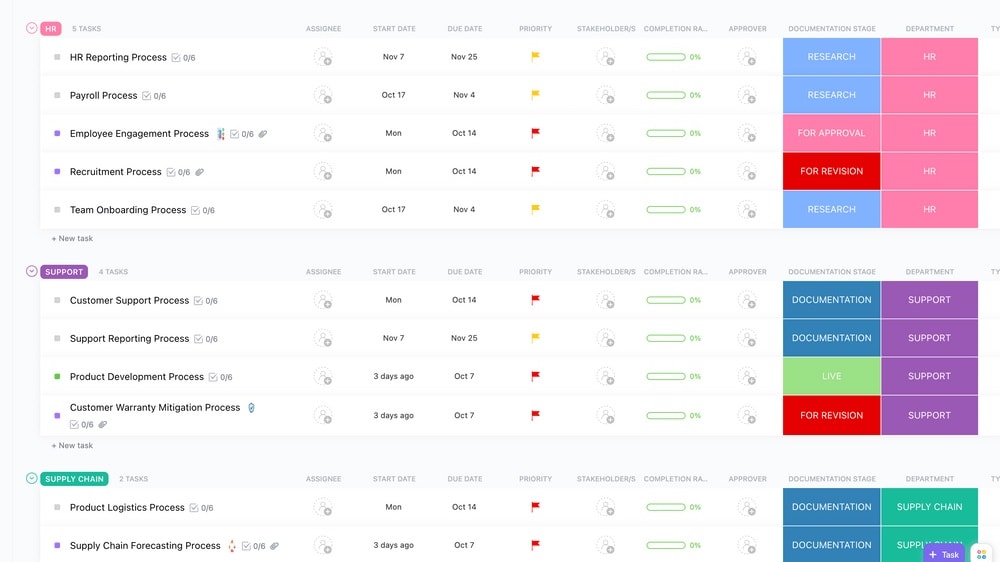
ClickUp features robust customizability with its custom fields, allowing teams to adapt the platform to their specific workflow requirements.
ClickUp
Boost your productivity

Todoist specializes in offering a streamlined experience designed for quick task management.
Todoist
Todoist is a highly efficient task management and to-do list application, designed to help individuals and teams organize their work. With its user-friendly interface, Todoist allows users to create tasks, set deadlines, and categorize them with labels and priorities.
ClickUp is a comprehensive project management platform that offers a wide range of features, including task management, time tracking, Gantt charts, Kanban boards, calendars, and reporting. It is also highly customizable, allowing users to tailor the platform to their specific needs. Todoist is a simple and intuitive task management app that focuses on helping users to get things done. It offers features such as task lists, due dates, priorities, and subtasks. Todoist also integrates with a variety of other apps, such as Google Calendar and Slack. The main difference between ClickUp and Todoist is their focus. ClickUp is an all-encompassing project management platform, while Todoist is a task management app. This means that ClickUp offers more features and customization options, but it can also be more complex to use. Todoist is simpler to use, but it may not have all the features that some users need.
Compared to Todoist, ClickUp excels in the sheer breadth of its capabilities. It offers a multitude of views like Gantt charts, Kanban boards, and lists. This makes it a more versatile tool, suitable for various types of projects ranging from software development to marketing campaigns. Additionally, ClickUp features robust customizability with its custom fields, allowing teams to adapt the platform to their specific workflow requirements. It also provides advanced reporting features, real-time collaboration, and a more expansive set of integrations with third-party applications. However, this broad range of features can sometimes be a double-edged sword, making the platform intimidating for new users who may find the numerous options overwhelming.
On the other hand, Todoist specializes in offering a streamlined experience designed for quick task management. The user interface is straightforward and easy to navigate, making it ideal for users who are new to project management software or those who need to quickly onboard a team. The platform focuses on individual tasks and subtasks, allowing for priority setting and due dates. While it may not offer the wide range of view types and customizations that ClickUp provides, Todoist excels in its simplicity and ease of use. The platform is particularly good for personal projects or smaller teams where advanced project planning tools are less crucial. Its quick add feature, natural language processing for task dates, and real-time sync across devices are top-class, aimed at facilitating quick and efficient task management.

ClickUp
Used by 3268 members
Additional 20% off Unlimited and Business plans for 1 year
Save up to $1,000

Todoist
Used by 1852 members
20% off annual plans
Save up to $24
03 ClickUp pros and cons
What are the advantages of ClickUp?
- Versatility: ClickUp is highly adaptable and can be customized to fit various workflows and project management needs. It offers a wide range of features, making it suitable for individuals, small teams, and large organizations.

- Feature-rich: ClickUp boasts an extensive feature set, including task management, goal tracking, time tracking, document sharing, calendars, and more. This makes it a one-stop solution for many productivity and project management needs.
- Customization: ClickUp allows users to customize task views, statuses, and workflows, making it possible to tailor the platform to your specific requirements. This flexibility is particularly valuable for teams with unique processes.
- Collaboration: ClickUp emphasizes team collaboration with features like comments, mentions, document sharing, and real-time editing. It's designed to improve communication and coordination among team members.
- Integrations: ClickUp offers a wide range of integrations with popular apps and tools like Slack, Google Workspace, Trello, and more. This allows users to connect ClickUp with their existing tech stack seamlessly.
What are the disadvantages of ClickUp?
- Complexity: While ClickUp's versatility is an advantage, it can also be a drawback for some users. The platform's extensive feature set can make it overwhelming, especially for individuals or small teams looking for a simpler solution.

- Learning curve: Due to its many features and customization options, ClickUp has a learning curve. Users may need time to explore and fully understand all the available functionalities.
- Pricing: ClickUp offers a free plan, but its more advanced features are available in paid plans, which can be relatively expensive for larger teams or organizations.
- Mobile app: While ClickUp has a mobile app, some users have reported that it may not be as feature-rich or intuitive as the desktop version, which could be a limitation for those who rely on mobile productivity.
- Overwhelming for small projects: ClickUp's extensive capabilities might be overkill for small, simple projects or personal task management. In such cases, a more streamlined tool might be more suitable.
Compare ClickUp to other tools


ClickUp vs Monday

Asana vs ClickUp

ClickUp vs Coda

ClickUp vs Notion

ClickUp vs Trello

ClickUp vs Jira
04 Todoist pros and cons
What are the advantages of Todoist?
- Simplicity and ease of use: Todoist is incredibly user-friendly, making it easy for individuals to quickly create and manage their to-do lists and tasks. The clean interface and straightforward design are appealing to many users.
- Cross-platform compatibility: Todoist is available on various platforms, including web browsers, mobile devices, and desktop applications. This means you can access your tasks and lists from almost anywhere, ensuring you're always organized.
- Task organization: The app offers a robust task organization system with projects, labels, and priorities. You can categorize tasks, set due dates, and create sub-tasks to keep your to-do list well-structured.
- Natural language input: Todoist supports natural language input, allowing you to add tasks quickly by typing or speaking in a way that feels natural to you. For example, you can enter "Tomorrow at 2 PM" to set a due date and time.
- Collaboration features: Todoist offers collaboration features, such as sharing projects and tasks with others, making it a useful tool for both personal and team productivity. It also integrates with popular communication tools like Slack.
What are the disadvantages of Todoist?
- Limited free plan: While Todoist offers a free plan, some of its more advanced features are only available in the premium version. This can be a drawback for users who require those features but want to stick to a free plan.
- Complex task dependencies: Todoist is primarily designed for simple task management. Handling complex dependencies or project management with intricate workflows may not be as efficient in Todoist as in more robust project management tools.
- Lack of advanced features: Compared to some other project management and task management tools, Todoist may lack certain advanced features, such as time tracking, advanced reporting, or complex automation.
- Subpar offline functionality: While Todoist offers offline access, some users have reported limitations in offline functionality, which can be frustrating when you need to access your tasks without an internet connection.
- Limited integration options: While Todoist does offer integrations with popular apps and services, it may not have the extensive integration options found in some other task management tools, limiting its flexibility in connecting with your existing workflow.
Compare Todoist to other tools

Asana vs Todoist
Trello vs Todoist
Notion vs Todoist

Todoist vs Taskade

Todoist vs Microsoft To Do
05 ClickUp compared to Todoist
When comparing ClickUp and Todoist, ClickUp sets itself apart with its comprehensive project management capabilities and extensive task customization features. It's the go-to choice for users who require robust project planning, task tracking, and team collaboration. ClickUp's strength lies in its capacity to handle complex workflows and project management needs effectively.
The decision between ClickUp and Todoist hinges on the complexity of your task and project management requirements. ClickUp shines in its ability to handle intricate project structures and customized workflows, while Todoist is geared toward simpler task management and personal to-do lists, offering a straightforward and user-friendly approach to productivity.
Is ClickUp better than Todoist?
 Is ClickUp better than Todoist?
Determining whether ClickUp is better than Todoist depends on your specific task and project management needs. ClickUp stands out with its extensive project management capabilities and advanced task customization features. It's the preferred choice for users who require robust project planning, task tracking, and comprehensive team collaboration. ClickUp's strengths lie in its ability to handle complex workflows and offer a high degree of customization.
On the other hand, Todoist is known for its simplicity and user-friendly approach to task management. It excels at helping individuals and small teams manage personal to-do lists and simple tasks efficiently. The choice between ClickUp and Todoist depends on the complexity of your task management requirements and your preference for a more straightforward, streamlined task management solution versus a more comprehensive project management platform.
What is ClickUp best used for?
ClickUp excels as a versatile project management and productivity platform. It is best used for individuals and teams seeking comprehensive task and project management capabilities, efficient collaboration, and customization options. ClickUp empowers users to plan and track projects, assign tasks, set priorities, and manage resources effectively. This makes it ideal for businesses and teams of all sizes looking to streamline their workflows, improve project organization, and boost productivity.
With its extensive range of features and integrations, it enables users to create customized workflows, track progress, and centralize communication and documentation. ClickUp's strength lies in its ability to adapt to various project management needs, making it a valuable tool for businesses and teams aiming to enhance their project planning and task management efforts.
Can ClickUp replace Todoist?
Whether ClickUp can replace Todoist depends on the complexity and scale of your task and project management needs. ClickUp excels in offering robust project management capabilities, extensive task customization, and comprehensive team collaboration features. It's an ideal choice for businesses and individuals requiring sophisticated project planning, task tracking, and versatile project management.
Todoist, on the other hand, is known for its simplicity and user-friendly task management approach, making it a great fit for personal to-do lists and straightforward task tracking. The decision between ClickUp and Todoist hinges on the depth of your task management requirements and your preference for a more comprehensive project management solution or a simpler, streamlined task manager. ClickUp is suited for those seeking advanced project management features, while Todoist is best for those who value a straightforward and efficient task management experience.
Is ClickUp cheaper than Todoist?
When it comes to pricing, it's worth noting the differences between ClickUp and Todoist. ClickUp's pricing structure can be more cost-effective for businesses and individuals due to its flexibility. It allows you to pay for the features and user capacity you actually need, making it suitable for those looking to customize their expenses based on their specific requirements.
On the other hand, Todoist follows a simpler pricing model, with a free plan and a premium plan that offers additional features. While this straightforward approach can be budget-friendly for basic task management needs, it may not provide the same level of flexibility and customization options as ClickUp's pricing structure. Depending on your task management requirements and budget constraints, ClickUp's pricing may offer a more cost-effective solution.
Is there a better Task Management software than ClickUp?
While ClickUp is a robust and versatile project management and productivity platform, it's essential to explore whether there might be a better-suited software for your specific needs.
Several notable alternatives to ClickUp in the project management and task management space include Todoist, Asana, Trello, and Monday.com.
The choice of project management software depends on your organization's unique requirements, project complexity, collaboration needs, and budget constraints. While ClickUp excels in many areas, other platforms may offer specific features, integrations, or interface designs that better align with your project management and task tracking objectives.

ClickUp
Boost your productivity
Additional 20% off Unlimited and Business plans for 1 year
Save up to $1,000
06 Todoist compared to ClickUp
When comparing Todoist and ClickUp, Todoist stands out for its simplicity and user-friendly interface. It is well-suited for individuals and smaller teams seeking straightforward task management and to-do list organization.
The choice between Todoist and ClickUp depends on the depth and complexity of your task and project management requirements. ClickUp offers advanced features like customizable project structures, time tracking, and extensive team collaboration capabilities, making it a suitable option for those dealing with intricate project workflows. In contrast, Todoist's strengths lie in its simplicity and ease of use, catering to those with more basic task management needs and a preference for a streamlined user experience.
Is Todoist better than ClickUp?
Determining whether Todoist is better than ClickUp depends on your particular task and project management requirements and preferences. Todoist excels in its simplicity and user-friendly approach, making it an ideal choice for individuals and small teams seeking straightforward task management and to-do list organization.
The decision between Todoist and ClickUp should consider the depth and complexity of your task and project management needs. If you prioritize simplicity and a streamlined user experience, Todoist may be the better option. Conversely, if you require more advanced project management capabilities and collaboration features, ClickUp could be the preferable choice for your specific requirements.
What is Todoist best used for?
Todoist is an efficient task management and to-do list application, primarily best suited for individuals and small teams. It excels in simplifying personal task management and maintaining to-do lists with its user-friendly interface. With cross-platform accessibility and minimal learning curve, Todoist is ideal for those looking to enhance their personal productivity and organize tasks seamlessly.
While it offers basic task collaboration features, its primary strength lies in managing individual tasks and ensuring tasks are efficiently tracked and completed. Whether on a computer or mobile device, Todoist provides a straightforward solution for users seeking uncomplicated task management.
Can Todoist replace ClickUp?
Determining whether Todoist can effectively replace ClickUp depends on the depth and complexity of your task and project management needs. Todoist is primarily designed for simple task management and personal to-do lists, offering a straightforward and user-friendly experience.
The decision to replace ClickUp with Todoist hinges on the complexity of your task and project management requirements. If you prioritize simplicity and have basic task management needs, Todoist may suffice. However, if you require advanced project management features, team collaboration, and customization options, ClickUp is likely the more suitable choice for your specific requirements.
Is Todoist cheaper than ClickUp?
When comparing the cost of Todoist and ClickUp, it's essential to consider their pricing structures, which cater to different task and project management needs.
Todoist’s pricing model is straightforward with a free plan and a premium plan that provides additional features. This pricing approach can be budget-friendly for users with basic task management requirements.
In contrast, ClickUp offers a more complex pricing structure that includes different plans and pricing tiers, depending on the features and user capacity you need. While ClickUp may offer more advanced project management capabilities, it may also come with a higher price tag, particularly for users requiring a broader range of features.
Ultimately, whether Todoist is cheaper than ClickUp depends on your specific task and project management needs and the features you require. Users with simpler task management needs may find Todoist to be a more cost-effective option, while those needing the extensive project management capabilities of ClickUp may be willing to invest in its pricing plans.
Is there a better Task Management software than Todoist?
While Todoist is a well-established task management and to-do list application, it's worth exploring whether there might be a more suitable software solution for your specific task management needs.
Several noteworthy alternatives to Todoist in the task management and productivity software space include ClickUp, Asana, Trello, Notion, and Monday.com.
The choice of task management software should align with your unique requirements, the complexity of your task workflows, and your preference for features and interface design. While Todoist offers simplicity and ease of use, other platforms may offer advanced task customization, project management capabilities, or team collaboration features that better suit your task management objectives and preferences.

Todoist
Simplify your tasks and boost your productivity
20% off annual plans
Save up to $24
07 Features comparison
Todoist Outperforms ClickUp in Time and Expense Tracking
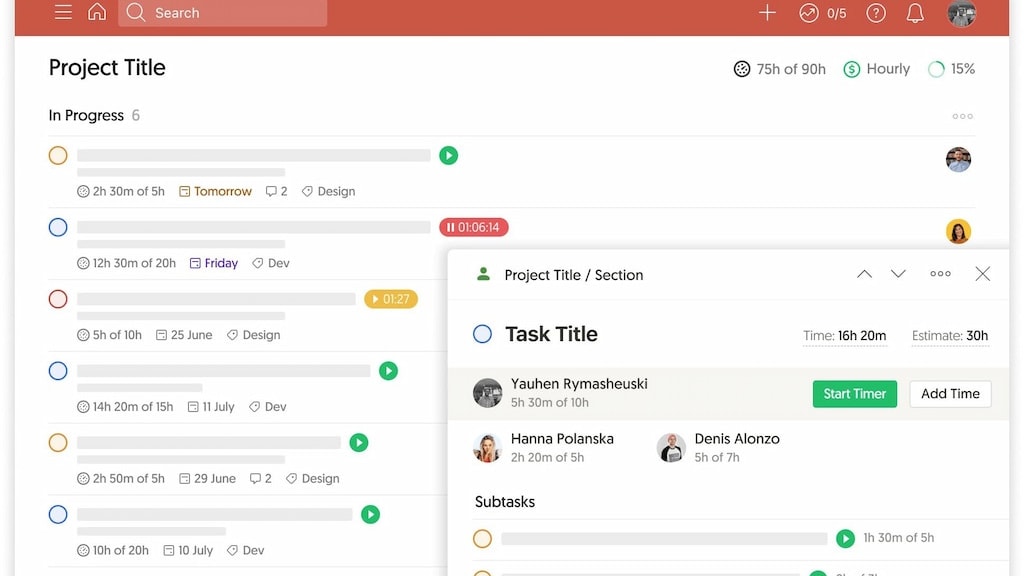
Todoist takes the lead in this arena by offering a comprehensive overview of the time and financial resources allocated to each task and project.
Effective time and expense tracking is integral to ensuring profitability and operational efficiency. Todoist takes the lead in this arena by offering a comprehensive overview of the time and financial resources allocated to each task and project. This detailed insight proves invaluable for identifying optimization opportunities, adhering to budgets, and ensuring resource allocation aligns with project goals.
While ClickUp does provide time tracking capabilities, it falls short in comparison to Todoist's robust cost accounting functionality. Todoist's ability to offer both time and cost tracking sets it apart as an ideal choice for individuals and businesses seeking thorough project management and financial oversight.
Todoist Excels Ahead of ClickUp in User-Friendly Design

With minimal learning curve, Todoist simplifies task organization and to-do list management.
When evaluating the user-friendliness of ClickUp and Todoist, Todoist gains a subtle advantage in terms of ease of use. Its intuitive interface and straightforward design make it particularly accessible for users seeking a seamless task management experience. With minimal learning curve, Todoist simplifies task organization and to-do list management.
On the other hand, ClickUp, while feature-rich and versatile, may require a bit more familiarization due to its comprehensive capabilities. Ultimately, the choice between ClickUp and Todoist hinges on the user's preference for simplicity versus the desire for advanced task and project management features. Todoist's edge in ease of use caters to those valuing a streamlined experience.
Todoist Leads in Mobile Accessibility Over ClickUp
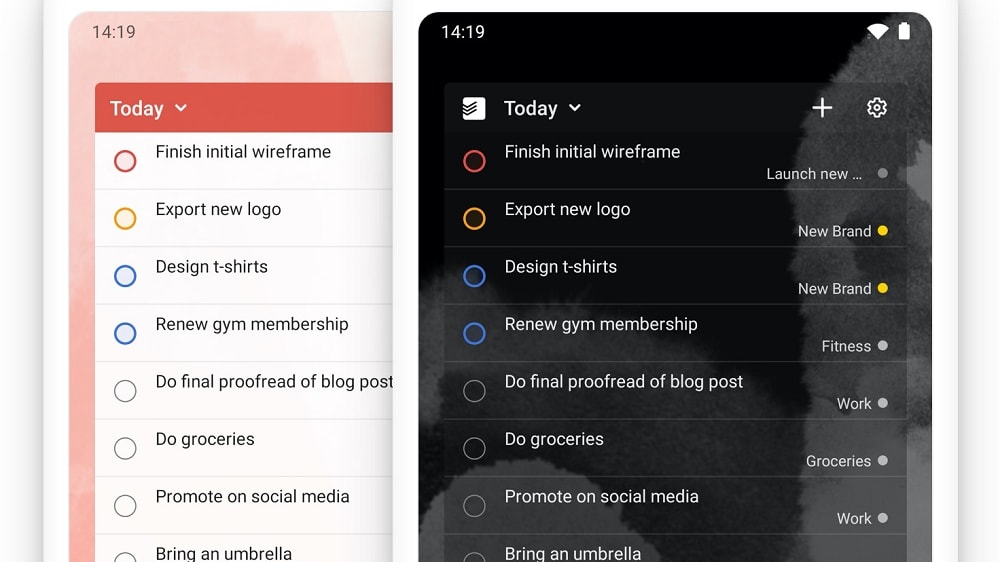
Todoist offers voice command functionality, enabling users to stay organized and productive regardless of their location.
Todoist stands out as the preferred choice for users who prioritize task management on the go. Its distinct advantage lies in its seamless compatibility across various devices, including computers, smartphones, and tablets. Moreover, Todoist offers voice command functionality, enabling users to stay organized and productive regardless of their location.
While ClickUp does provide a mobile version, it doesn't place the same emphasis on mobile accessibility as Todoist. Todoist's commitment to cross-device functionality and intuitive mobile experiences makes it the top pick for individuals who require task management flexibility while on the move, setting it apart from ClickUp in this regard.
ClickUp and Todoist are Equal in Terms of Team Collaboration

ClickUp excels in its ability to foster effective team collaboration
ClickUp and Todoist both shine in their ability to foster effective team collaboration. These platforms empower users with features such as document sharing, real-time editing, comment threads, and task assignment, ensuring seamless communication and coordination among team members. With these robust collaboration capabilities, both tools are excellent choices for teams striving to elevate their cooperative efforts.
Whether you choose ClickUp or Todoist, you'll find a versatile platform that supports and enhances teamwork, making it easier for teams to work together efficiently and achieve their goals with ease.
Todoist Boasts Superior Task Scheduling Compared to ClickUp

Todoist's robust scheduling tools offer a superior solution for users seeking more sophisticated task management and deadline tracking functionalities.
Effective task scheduling plays a pivotal role in team workload management, and Todoist excels in this regard. Todoist's system offers users an intuitive and visually informative way to schedule and prioritize tasks. These features empower users to maintain a clear understanding of task importance and deadlines, reducing the risk of missing crucial dates.
While ClickUp does enable task creation and due date assignments, it falls short in comparison to Todoist when it comes to advanced scheduling capabilities. Todoist's robust scheduling tools offer a superior solution for users seeking more sophisticated task management and deadline tracking functionalities.
ClickUp Offers More Comprehensive Project Management than Todoist

ClickUp allows users to monitor project progress in real-time, providing a holistic view of ongoing work.
While both ClickUp and Todoist offer project management capabilities, ClickUp stands out with its more comprehensive functionality. Beyond task creation and assignment, ClickUp allows users to monitor project progress in real-time, providing a holistic view of ongoing work. The platform's customizable status updates enhance workflow tracking, ensuring effective project management from initiation to completion.
In contrast, Todoist's project management feature is relatively basic, concentrating primarily on task creation and organization. While suitable for simpler task management needs, Todoist may be less adept at handling complex project workflows that require advanced tracking and customization, where ClickUp excels.
ClickUp’s Impressive Integration Ecosystem Outperforms Todoist’s

ClickUp boasts an extensive ecosystem with over 1000 integrations, encompassing popular communications software, analytics tools, and productivity apps such as Slack, GitHub, Google Drive, Calendar, Dropbox, and many others.
Both ClickUp and Todoist offer robust integration capabilities, but ClickUp holds a slight advantage in this regard. ClickUp boasts an extensive ecosystem with over 1000 integrations, encompassing popular communications software, analytics tools, and productivity apps such as Slack, GitHub, Google Drive, Calendar, Dropbox, and many others. This rich array of integration options empowers users to seamlessly connect their preferred apps, streamlining their workflows within a unified platform.
Todoist, on the other hand, also offers solid integration capabilities, with connections to platforms like Google Calendar, Alexa, Zapier, and Slack, among others. While Todoist's integrations are noteworthy, they are somewhat less expansive compared to ClickUp.
08 ClickUp vs Todoist: Which is the best for your business?
ClickUp is the best tool for you if:
- If you are in need of a versatile project management platform that offers customizable workflows and comprehensive task tracking capabilities.
- Collaboration among cross-functional teams and different departments is a vital component for achieving success in your projects.
- You have a requirement for robust reporting and analytics features that enable you to closely monitor project performance and base decisions on data-driven insights.
- The seamless integration of various third-party applications and services is crucial to optimizing and automating your workflow.
- Your objective is to find a user-friendly interface coupled with a scalable solution that caters to the unique needs of businesses, regardless of their size.
 If you are in need of a versatile project management platform that offers customizable workflows and comprehensive task tracking capabilities.
Todoist is the best tool for you if:
- Your focus is on prioritizing simplicity in task and project management, achieved through an intuitive and straightforward user interface.
- Seamless cross-platform accessibility and synchronization are of utmost importance to ensure the efficiency of your workflow across devices and locations.
- You are seeking a task manager that goes beyond individual task tracking and actively supports collaborative teamwork and shared project planning.
- Customizability is a key requirement, allowing you to tailor task labels, priorities, and due dates to align with your specific organizational needs and processes.
- Recognizing the importance of efficiency, you consider integration with other apps and services as an essential feature to boost productivity and streamline your daily tasks effectively.
ClickUp
Used by 3268 members
Additional 20% off Unlimited and Business plans for 1 year
Save up to $1,000
Todoist
Used by 1852 members
20% off annual plans
Save up to $24
09 Alternatives to ClickUp & Todoist

Notion
Used by 16931 members
6 months free on the Business plan with Unlimited AI
Save up to $12,000

Google Workspace
Used by 9006 members
20% off Plus plans for 1 year
Save up to $518

Airtable
Used by 8184 members
$1,000 in credits for 1 year
Save up to $1,000

Slack
Used by 3699 members
25% off new plan purchases
Save up to $9,000
10 Promotions on Task Management software
ClickUp and Todoist are great tools, but Secret offers promo codes with discounts on over 2190+ different SaaS solutions. New deals are added regularly, helping you save money on your online subscriptions. Get access to codes for other Task Management software you might want to purchase

Credits for Monday
First month free
Promo code for Airtable
$1,000 in credits for 1 year
Discount for Notion
6 months free on the Business plan with Unlimited AI
Code for Slack
25% off new plan purchases

Discount for Asana
75% off the annual Starter and Advanced plans for 1 year

Process Street promo code
6 months free on the Startup plan

nTask coupon code 2026
25% off all plans for 1 year

GanttPRO promo code
Up to $3,000 in credits

Trello promo
Free forever for up to 10 users

Discount for DoneDone
$500 in credits (up to 3 months)
Start saving on the best SaaS
Secret has already helped tens of thousands of startups save millions on the best SaaS like Microsoft Teams, Google Workspace & many more. Join Secret now to buy software the smart way.