


To achieve its objectives and accelerate its growth, your start-up needs project management software. In particular, they enable you to centralize actions and optimize collaborative processes. However, finding the platform that best meets your needs is a tricky business.
In the category of project management tools, we can cite Clickup and Jira in particular. To help you decide which is best, we compare their respective differences and features in this Clickup vs Jira duel. This will show you which SaaS solution is best suited to your business.
- 01 ClickUp vs Jira: overview
- 02 What's the difference between ClickUp and Jira?
- 03 ClickUp pros and cons
- 04 Jira pros and cons
- 05 ClickUp compared to Jira
- 06 Jira compared to ClickUp
- 07 Features comparison
- 08 ClickUp vs Jira: Which is the best for your business?
- 09 Alternatives to ClickUp & Jira
- 10 Promotions on Task Management software
Start saving on the best SaaS
Secret has already helped tens of thousands of startups save millions on the best SaaS like Microsoft Teams, Google Workspace & many more. Join Secret now to buy software the smart way.

01 ClickUp vs Jira: overview
ClickUp and Jira are two prominent contenders in the realm of project management and team collaboration, each offering unique strengths to cater to distinct user requirements.
ClickUp is celebrated for its versatile array of project management features. It offers a comprehensive platform encompassing task management, goal tracking, time tracking, and customizable workflows. On the flip side, Jira provides a robust suite of project management and issue tracking tools, making it a go-to choice for software development teams, with features like agile boards, Scrum, and Kanban support.
Now, let's dive into the ClickUp vs. Jira comparison to help you make an educated choice when selecting the ideal project management and collaboration solution for your specific needs.

Customer support
ClickUp offers 24/7 customer service. At Jira, this type of support is only offered in the premium and enterprise plans.

ClickUp
Jira
Pricing plans
Both platforms offer several pricing plans, including a free package. However, Clickup's pricing is more flexible.
ClickUp
Jira
Positive reviews
Clickup is rated better than Jira on average. Its strengths include customer service and ease of use.
ClickUp
Jira
Ease of use
Clickup's user interface is relatively easy to learn. There is a learning curve for the Jira tool.
ClickUp
Jira
Collaborative tools
The Clickup platform integrates complete solutions for teamwork. Jira focuses on problem solving.
ClickUp
Jira
Time tracking
Clickup provides time tracking at task level and Jira provides time tracking for working days.
ClickUp
Jira
Agile methodologies
Both tools support the Kanban or Scrum methods. However, Jira excels in this area compared with Clickup.
ClickUp
Jira
Automation features
Automation is integrated natively into Clickup. With Jira, it is necessary to use third-party applications for this purpose.
ClickUp
Jira
Data analysis
Jira's reports focus on agile methods and sprint objectives. Clickup reports focus on individual and team performance.
ClickUp
Jira
Integrations
ClickUp offers over 1,000 integrations with services such as Zendesk and Zapier. Jira does better, with over 3,000 software integrations including aws, Teams and Slack.
ClickUp
Jira
02 What's the difference between ClickUp and Jira?
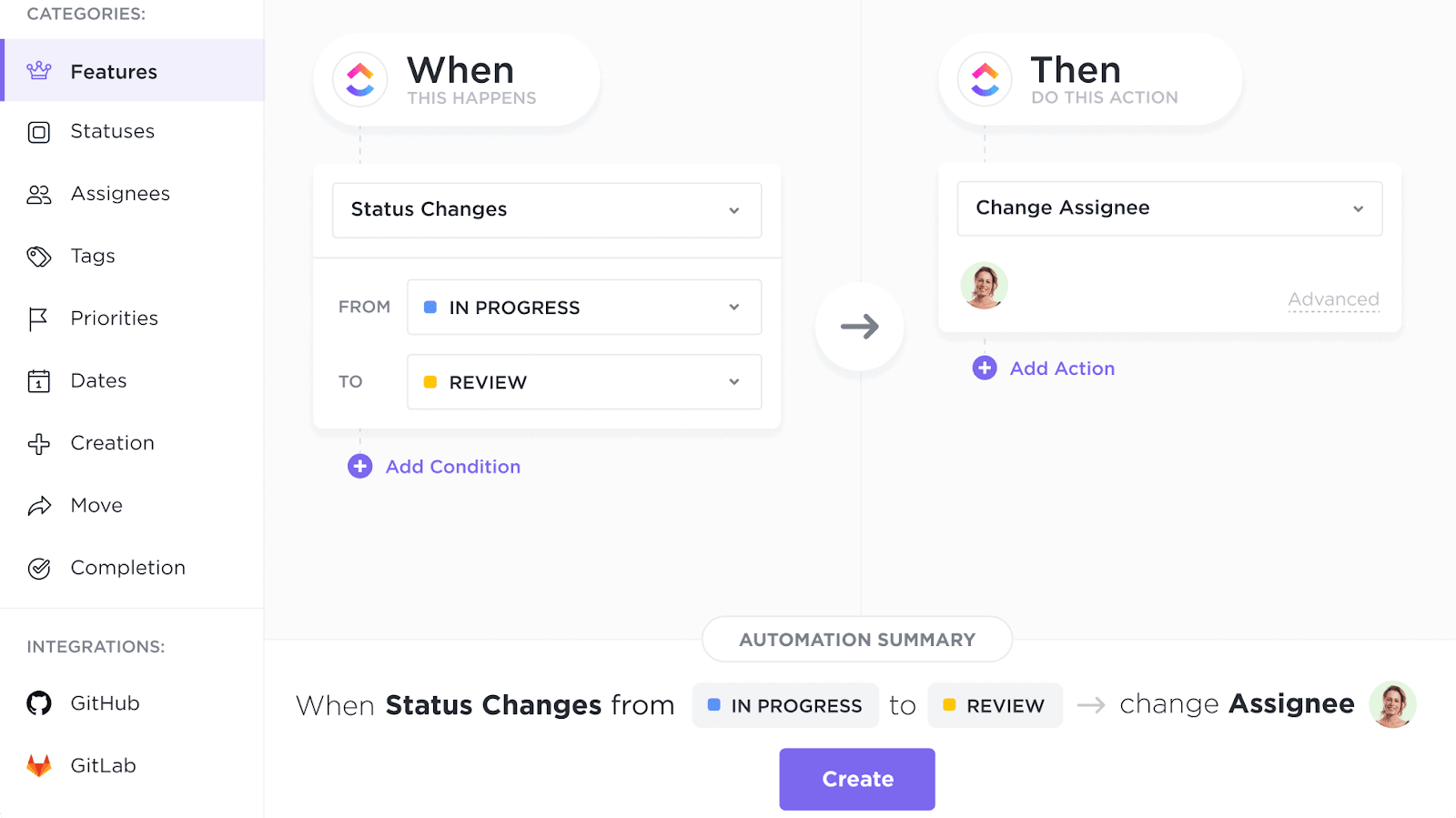
ClickUp's Automated Workflows to Streamline Repetitive Tasks
ClickUp
Boost your productivity
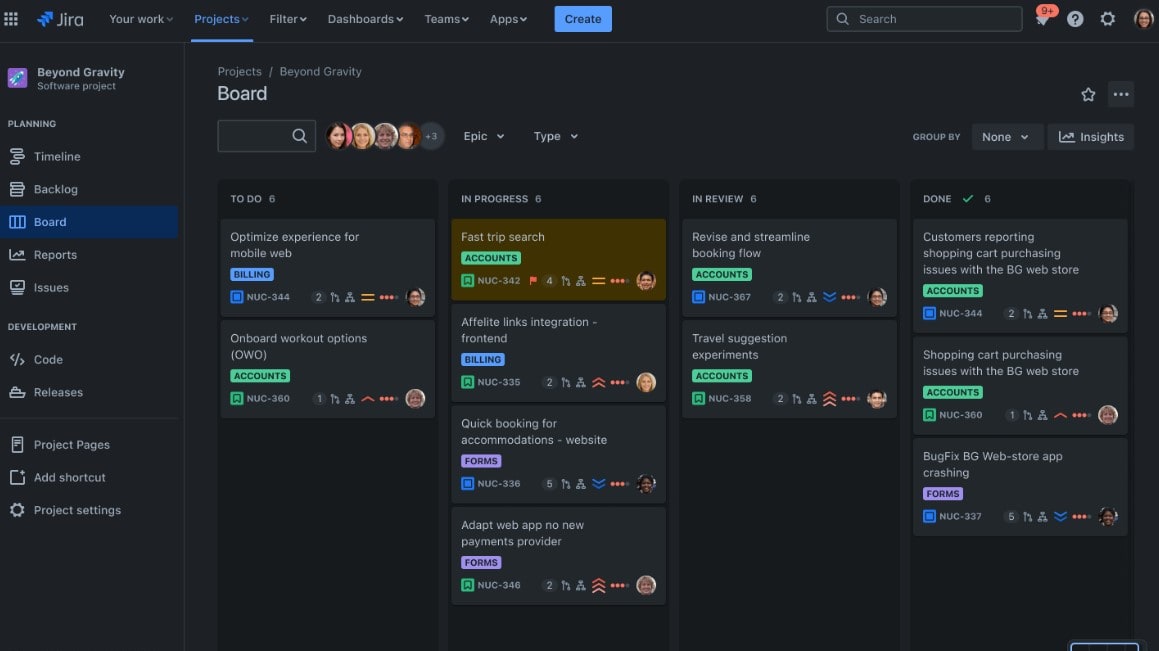
Jira's Customizable & Agile Scrum Board Tool
Jira
Jira is a powerful project management tool designed to help your team organize, track, and manage their work efficiently. It offers versatile features for breaking down complex projects into manageable tasks, setting milestones, and mapping dependencies.
While the two tools we are comparing are digital project management solutions, their use cases vary. Clickup is an easy-to-use, versatile solution. It is capable of meeting the needs of start-ups and small teams looking for software that makes organizing and planning projects easier. Jira, on the other hand, is a platform designed primarily for project development or agile team management. It is therefore more specialized and generally meets the needs of larger companies.
As a general-purpose tool, ClickUp’s software incorporates a large number of highly relevant native features. Automation, budget management and risk management are all native features of the software. All the teams that use it therefore have, from the outset, all the components they need to bring their project to a successful conclusion by effectively planning its various aspects. Clickup is particularly well suited to teams who want to get straight to the point and have limited resources. They will have everything they need to achieve their objectives in the best possible way.
Jira, on the other hand, is a tool whose main function is to meet the needs of companies looking for a customizable solution. This is because the great strength of this platform is that it offers a huge number of software integrations. In other words, it is designed to be modified for use on complex projects. For this reason, the learning curve is greater and it is much more complex to get to grips with than Clickup. However, for companies with experienced staff who regularly use agile methods, Jira is the perfect project management software.

ClickUp
Used by 3267 members
Additional 20% off Unlimited and Business plans for 1 year
Save up to $1,000

Jira
Used by 445 members
Free forever for up to 10 users
Save up to $980
03 ClickUp pros and cons
What are the advantages of ClickUp?
- Versatile task management: ClickUp offers a wide range of task management features, including customizable task lists, due dates, priority levels, and dependencies, making it suitable for various project types and workflows.

- Customizable workspaces: ClickUp allows you to create custom workspaces, folders, lists, and views, making it adaptable to different teams and projects. You can tailor the interface to match your specific needs.
- Automation: ClickUp offers automation features that can help streamline repetitive tasks and workflows, saving time and reducing manual work.
- Integration options: ClickUp provides integrations with numerous third-party apps and services like Google Drive, Slack, and Trello, allowing you to connect and centralize your work in one place.
- Pricing structure: ClickUp offers a free plan with robust features, making it accessible for small teams and individuals. Additionally, its paid plans are competitively priced and offer advanced features.
What are the disadvantages of ClickUp?
- Learning curve: Due to its extensive feature set and customization options, ClickUp may have a steep learning curve for new users. It can take some time to become proficient in using all of its functionalities.

- Complexity for simple projects: ClickUp's feature-rich environment might be overwhelming for small or straightforward projects, potentially leading to unnecessary complexity.
- Resource intensive: When used extensively with numerous integrations and large teams, ClickUp may demand more system resources and potentially slow down performance.
- Mobile app limitations: Some users have reported limitations with ClickUp's mobile app, including occasional glitches and less functionality compared to the desktop version.
- Limited reporting: While ClickUp provides reporting features, some users may find the reporting options to be less advanced or customizable compared to specialized project management tools focused on reporting and analytics.
Compare ClickUp to other tools


ClickUp vs Monday

Asana vs ClickUp

ClickUp vs Coda

ClickUp vs Notion

ClickUp vs Trello

ClickUp vs Todoist
04 Jira pros and cons
What are the advantages of Jira?
- Powerful issue tracking: Jira excels in issue and bug tracking, making it an ideal choice for software development and IT teams. It offers robust features for creating, prioritizing, and managing issues efficiently.
- Customization: Jira is highly customizable, allowing you to create customized workflows, issue types, and fields to match your team's specific needs and processes. This flexibility is valuable for adapting Jira to various industries and project types.
- Integration ecosystem: Jira offers a vast array of integrations with popular development, collaboration, and communication tools such as Confluence, Bitbucket, Slack, and more. This integration capability helps centralize work and streamline processes.
- Advanced reporting and analytics: Jira provides extensive reporting and analytics features, allowing teams to gain insights into project progress, identify bottlenecks, and make data-driven decisions.
- Scalability: Jira is suitable for both small teams and large enterprises. It can scale with your organization's growth, making it a long-term solution for project management and issue tracking.
What are the disadvantages of Jira?
- Complexity: Jira's extensive feature set can be overwhelming for new users and may require a learning curve. Teams may need dedicated time and training to harness its full potential.
- Cost: Jira's pricing can be relatively high, especially for larger teams and organizations. The cost of add-ons and plugins can also add up quickly.
- Resource intensive: Running Jira and its associated services can be resource-intensive, both in terms of server resources and administrative effort.
- Customization complexity: While Jira's customization is a strength, it can also lead to over-customization if not managed properly. This can result in complex workflows that are hard to maintain.
- User interface: Some users find Jira's user interface less intuitive compared to other project management tools, especially for non-technical team members.
Compare Jira to other tools

Asana vs Jira

Zendesk vs Jira
Notion vs Jira

Freshservice vs Jira
05 ClickUp compared to Jira
When comparing ClickUp and Jira, ClickUp distinguishes itself with its user-friendly interface and wide-ranging versatility, making it a compelling choice for individuals and teams seeking robust project management and collaboration solutions. ClickUp's pricing structure, which includes a free plan and competitive paid options, accommodates startups and small businesses looking to enhance their project workflows without a significant financial commitment.
While both ClickUp and Jira excel in boosting team productivity, the choice between the two depends on your specific requirements. ClickUp offers a cost-effective solution with an emphasis on versatility and customization, making it a preferred option for teams aiming to streamline their project management processes.
Is ClickUp better than Jira?
 Is ClickUp better than Jira?
Deciding between ClickUp and Jira hinges on your specific project management and collaboration needs. ClickUp is a compelling choice for those who prioritize versatility and user-friendliness. Its intuitive interface and wide array of features cater to various workflows, from task management to goal tracking. For instance, you can customize task lists, create intricate project workflows, and integrate with external tools, making it suitable for teams with diverse project requirements.
ClickUp offers extensive customization and a user-friendly experience, while Jira provides a more specialized platform, especially well-suited for software development and issue tracking.
What is ClickUp best used for?
ClickUp excels as a versatile project management and collaboration tool, suitable for a wide range of teams and tasks. Its strengths lie in providing a unified platform for project planning, task management, team communication, and goal tracking.
Whether you're managing complex projects, coordinating team efforts, or tracking your organization's objectives, ClickUp's customizable features, intuitive interface, and extensive integrations make it the ideal choice. Its adaptability and scalability cater to the unique needs of startups, small businesses, and large enterprises alike, making ClickUp an indispensable tool for enhancing productivity and streamlining workflows across various industries.
Can ClickUp replace Jira?
ClickUp offers a compelling alternative to Jira for teams seeking versatile project management and issue tracking solutions. While Jira excels in software development and issue management, ClickUp's adaptability caters to a broader range of project types and industries.
With ClickUp, you can create customizable workflows, manage tasks efficiently, and track progress seamlessly. Its user-friendly interface and comprehensive feature set make it a suitable choice for teams looking to streamline project management without sacrificing flexibility. Whether you're in software development or need a versatile project management tool, ClickUp presents a robust option that can potentially replace Jira while catering to a broader set of organizational needs.
Is ClickUp cheaper than Jira?
When comparing the pricing of ClickUp and Jira, there are significant distinctions to consider. ClickUp’s pricing structure offers a free plan with robust features, making it an appealing option for small teams and budget-conscious users. In contrast, Jira tends to be more expensive, especially for larger teams and enterprises, which can be a significant factor in the decision-making process.
While both platforms offer advanced functionalities, ClickUp provides an affordable entry point and competitive pricing tiers, potentially making it a more cost-effective choice for teams looking to optimize project management without breaking the bank.
Is there a better Task Management software than ClickUp?
While ClickUp is a powerful project management and collaboration tool, it's essential to explore whether there might be a better-suited software for your unique needs.
Some notable alternatives to ClickUp in the project management space include Trello, Asana, Monday.com, and Jira.
The choice of project management software depends on factors such as project complexity, team size, and preferred workflow. While ClickUp offers a wide range of features, including customization and automation, other tools may excel in specific areas or offer a more straightforward approach.

ClickUp
Boost your productivity
Additional 20% off Unlimited and Business plans for 1 year
Save up to $1,000
06 Jira compared to ClickUp
Jira distinguishes itself with its specialization in project management and issue tracking, making it a top choice for software development teams. Jira's pricing structure, while more focused on enterprise-level needs, offers a range of plans that cater to various team sizes and complexities.
While both Jira and ClickUp excel in project management, the choice between the two depends on your specific requirements. Jira is the go-to choice for software development teams seeking specialized issue tracking and agile management tools. In contrast, ClickUp provides a more versatile and customizable platform suitable for a broader range of project types and industries.
Is Jira better than ClickUp?
The comparison between Jira and ClickUp hinges on specific project management needs and team preferences. Jira excels in specialized issue tracking and agile project management, making it a preferred choice for software development teams. Its robust Agile and Scrum features are designed to optimize software development processes, offering advanced capabilities for this domain.
On the other hand, ClickUp provides a more versatile platform suitable for various industries and project types. It offers customizable features, user-friendly interface, and a wide array of integrations, making it appealing to teams seeking flexibility and adaptability in their project management tool.
What is Jira best used for?
Jira shines as a specialized tool designed primarily for project management and issue tracking, making it a top choice for software development teams. Its robust set of features includes agile project management, Scrum and Kanban boards, and advanced issue tracking capabilities. Jira's strengths lie in optimizing software development processes, ensuring efficient bug tracking, task management, and release planning.
Moreover, Jira is invaluable for teams requiring detailed issue workflows, version control, and comprehensive project management reporting. Its specialization in software development and issue tracking makes it an essential tool for businesses in this domain, streamlining their processes and enhancing project visibility.
Can Jira replace ClickUp?
Jira can potentially replace ClickUp, depending on the specific project management and issue tracking requirements of your team. Jira specializes in software development project management, offering advanced features like agile boards, Scrum, and Kanban support, making it a preferred choice for software development teams.
If your primary focus is on optimizing software development processes, issue tracking, and detailed project management reporting, Jira's specialization in these areas may make it a suitable replacement for ClickUp. However, the decision should align with your team's specific needs and industry, as ClickUp offers a more versatile platform catering to a broader range of project types and workflows.
Is Jira cheaper than ClickUp?
Comparing the cost of Jira to ClickUp reveals distinct pricing structures. Jira’s pricing typically leans towards a higher cost, particularly for larger teams and enterprises. While it offers a range of plans to accommodate various needs, the pricing may not align with smaller budgets.
In contrast, ClickUp provides a more budget-friendly option, including a free plan with robust features, making it accessible to startups and small businesses. Their paid plans are competitively priced, offering advanced features at affordable rates.
Is there a better IT Management software than Jira?
Jira is a formidable tool for project management and issue tracking, yet it's crucial to explore if there might be a more fitting software for your particular needs.
Some notable alternatives to Jira in the project management space include ClickUp, Airtable, Asana, and Notion.
The selection of project management software hinges on your organization's unique requirements, project complexities, and team inclinations. While Jira excels in software development and agile methodologies, other tools may offer a more straightforward approach to project management or cater to different industries.

Jira
From ideas to action
Free forever for up to 10 users
Save up to $980
07 Features comparison
ClickUp Pulls Ahead of Jira for User-Friendliness

ClickUp's interface boasts a sleek and modern design, providing a seamless and accessible platform for users of all levels.
ClickUp outshines Jira in terms of user-friendliness, making it a top choice for those seeking an intuitive project management experience. ClickUp's interface boasts a sleek and modern design, providing a seamless and accessible platform for users of all levels. Novices can swiftly get started, managing tasks, assembling teams, and customizing workspaces without the need for technical expertise. Creating task lists, setting priorities, and tracking progress are straightforward tasks in ClickUp.
Conversely, Jira, while robust and favored by developers, presents a steeper learning curve. Its interface is intricate and may overwhelm newcomers, necessitating a significant investment of time and patience to unlock its extensive capabilities.
ClickUp's Project Management is More Intuitive than Jira's

However, ClickUp excels in delivering a user-friendly interface, making it particularly appealing to teams new to SaaS tools.
ClickUp surpasses Jira in the realm of project management, offering an exceptionally intuitive experience. Both platforms support essential project management features like project creation, task assignment, due date setting, and progress tracking. However, ClickUp excels in delivering a user-friendly interface, making it particularly appealing to teams new to SaaS tools.
Navigating ClickUp's intuitive task management system is a breeze, ensuring that users swiftly adapt to its functionalities. For example, creating detailed project plans, assigning tasks to team members, and setting task dependencies are straightforward tasks in ClickUp. This simplicity facilitates seamless collaboration and efficient project execution, enhancing the overall user experience and productivity of teams.
Jira's Reports and Insights Feature Surpasses that of ClickUp

Jira offers customizable dashboards that allow teams to visualize data and KPIs relevant to their specific projects, enhancing strategic decision-making.
Jira outperforms ClickUp notably in its reports and insights feature, a critical aspect of project management and analytics. While both platforms provide status updates and tracking capabilities, Jira's strength lies in its out-of-the-box reports and dashboards. These resources go beyond basic tracking by delivering comprehensive insights into project progress and performance.
For instance, Jira offers customizable dashboards that allow teams to visualize data and KPIs relevant to their specific projects, enhancing strategic decision-making. With Jira, teams can create burndown charts, velocity reports, and sprint health gadgets, providing valuable information in the context of ongoing work and helping them make informed, data-driven decisions for project success.
ClickUp's User-Friendly Multitasking Takes the Lead Over Jira

ClickUp's multitask view proves invaluable for teams juggling multiple projects simultaneously.
When it comes to project management, choosing between ClickUp and Jira often boils down to your team's priorities. ClickUp's multitask view proves invaluable for teams juggling multiple projects simultaneously. It offers a seamless way to switch between different projects and tasks, streamlining workflow management. For instance, marketing teams can swiftly transition from campaign planning to content creation within a few clicks.
On the other hand, Jira's 'Plan' feature excels in detailed project planning. It simplifies the process of breaking down complex ideas into manageable tasks, making collaboration across teams a breeze. Software development teams, for instance, can efficiently outline and assign tasks for a complex coding project, ensuring meticulous planning and execution.
ClickUp and Jira are On Par with Customizable Workflows

Users can create workflows that align with agile methodologies, Kanban boards, or any other workflow style that suits their project requirements.
ClickUp and Jira exhibit comparable strengths when it comes to customizable workflows, offering users the freedom to tailor their work processes to their specific needs. Both platforms empower users with customizable status updates, a pivotal feature for creating bespoke workflows. This flexibility allows teams to adapt their workflows to various styles of work seamlessly, regardless of their choice between ClickUp and Jira.
For example, users can create workflows that align with agile methodologies, Kanban boards, or any other workflow style that suits their project requirements. This adaptability ensures that teams can optimize their processes and enhance productivity, regardless of the tool they select.
ClickUp Takes the Lead in Time Tracking Over Jira

ClickUp's dedicated time tracking feature provides teams with a robust tool for precise measurement of time spent on tasks.
In the realm of time tracking, ClickUp emerges as the frontrunner when compared to Jira. ClickUp's dedicated time tracking feature provides teams with a robust tool for precise measurement of time spent on tasks. This functionality empowers users to manage their time efficiently, enhance productivity, and ensure accurate billing for client projects. For instance, freelancers can effortlessly track billable hours, simplifying their invoicing process.
On the other hand, while Jira does offer the 'Track' feature, its primary focus leans more toward task prioritization and collaboration rather than meticulous time tracking. Jira users often find it ideal for Agile project management, where the emphasis is on sprint planning and issue management rather than tracking hours.
Jira’s App Directory Triumphs Over ClickUp

Jira emerges as the leader with its extensive library of over 3,000 integrations.
Jira's App Directory stands as a formidable advantage over ClickUp in the realm of integration capabilities. While both platforms offer robust integration options, Jira emerges as the leader with its extensive library of over 3,000 integrations. This vast array includes integrations with popular development tools like Bitbucket, GitHub, and Confluence, streamlining the workflow for software development teams. Furthermore, Jira's integration with testing tools such as Selenium and automation platforms like Zapier enhances its adaptability to various industries and workflows.
While ClickUp provides a solid integration ecosystem of over 1,000 applications, Jira's extensive integration offerings cater to a broader range of specialized needs, making it a preferred choice for those requiring seamless connectivity with multiple tools.
08 ClickUp vs Jira: Which is the best for your business?
ClickUp is the best tool for you if:
- Your work demands a project management and productivity platform that's incredibly versatile and can be tailored to your needs
- You're searching for an all-in-one hub, offering a unified workspace for effective management of tasks, projects, and goals
- Team collaboration plays a central role in your operations, and you require tools like real-time chat and document sharing
- You're looking to optimize your workflow by automating repetitive tasks and seamlessly integrating with other essential applications
- In-depth insights matter, with ClickUp offering robust time tracking, reporting, and analytics to enhance your performance monitoring and decision-making
 Your work demands a project management and productivity platform that's incredibly versatile and can be tailored to your needs
Jira is the best tool for you if:
- You find yourself in need of a comprehensive solution that seamlessly combines project management and issue tracking functionalities
- Your team is driven by the principles of agile project management, such as Scrum and Kanban methodologies
- You're seeking a tool that effortlessly integrates with other key Atlassian products like Confluence and Bitbucket
- Your workflow demands a high degree of adaptability and customization to cater to your unique business processes and needs
- You place significant emphasis on harnessing data-driven insights for informed decision-making, robust reporting, and advanced project analytics
ClickUp
Used by 3267 members
Additional 20% off Unlimited and Business plans for 1 year
Save up to $1,000
Jira
Used by 445 members
Free forever for up to 10 users
Save up to $980
09 Alternatives to ClickUp & Jira

Notion
Used by 16930 members
6 months free on the Business plan with Unlimited AI
Save up to $12,000

Google Workspace
Used by 9006 members
20% off Plus plans for 1 year
Save up to $518

Airtable
Used by 8184 members
$1,000 in credits for 1 year
Save up to $1,000

Slack
Used by 3699 members
25% off new plan purchases
Save up to $9,000
10 Promotions on Task Management and IT Management software
ClickUp and Jira are great tools, but Secret offers promo codes with discounts on over 2190+ different SaaS solutions. New deals are added regularly, helping you save money on your online subscriptions. Get access to codes for other Task Management and IT Management software you might want to purchase

Monday promotion code
First month free

CCleaner coupon code
20% off for 1 year
Airtable deal
$1,000 in credits for 1 year

Discount for GitHub
$10,000 in credits for 12 months
Notion discounts
6 months free on the Business plan with Unlimited AI

Code for GitLab
12 months free on the Ultimate license
Promo code for Slack
25% off new plan purchases

Freshservice free credits
14 days free

Todoist discount code
20% off annual plans

Avast discounts
50% off for 1 year
Start saving on the best SaaS
Secret has already helped tens of thousands of startups save millions on the best SaaS like Microsoft Teams, Google Workspace & many more. Join Secret now to buy software the smart way.