


Have you launched your start-up and want to offer your customers exceptional customer service? This is highly relevant, as it's the best solution for building long-term loyalty among your customer base. To achieve your goals, however, you need to use a platform dedicated to customer service management in order to deliver a smooth, high-quality customer experience.
In terms of customer service software, we can mention Zendesk and Jira in particular. These two tools are renowned for their rich functionality and reliability. In this Zendesk vs Jira duel, we'll look at the differences between the two so that you can identify which one best suits your needs.
- 01 Zendesk vs Jira: overview
- 02 What's the difference between Zendesk and Jira?
- 03 Zendesk pros and cons
- 04 Jira pros and cons
- 05 Zendesk compared to Jira
- 06 Jira compared to Zendesk
- 07 Features comparison
- 08 Zendesk vs Jira: Which is the best for your business?
- 09 Alternatives to Zendesk & Jira
- 10 Promotions on Customer Support software
Start saving on the best SaaS
Secret has already helped tens of thousands of startups save millions on the best SaaS like Microsoft Teams, Google Workspace & many more. Join Secret now to buy software the smart way.

01 Zendesk vs Jira: overview
Zendesk and Jira are two prominent tools in the realm of customer support and project management, each excelling in distinct areas to address diverse organizational needs.
Zendesk is renowned for its exceptional customer support capabilities, offering a comprehensive suite for managing customer interactions, tickets, and support channels. It empowers teams to provide efficient, personalized assistance and boasts robust reporting and analytics features. In contrast, Jira is a powerhouse for project management, particularly in agile environments. It excels at issue tracking, sprint planning, and team collaboration, making it an ideal choice for software development and project-driven organizations.
Now, let's explore the Zendesk vs. Jira comparison to assist you in making an informed decision when selecting the right solution for your customer support and project management needs.

Pricing plans
Jira offers a free plan and three price plans, and is less expensive than Zendesk, which does not include a free package.

Zendesk
Jira
Positive reviews
The two platforms have similar ratings, but Jira has more customer reviews. Jira is valued for its value for money, while Zendesk is valued for its ease of use and customer service.
Zendesk
Jira
Customer support
Zendesk's customer service is generally more popular with customers. In particular, it offers 24/7 support on the most expensive plans.
Zendesk
Jira
Ease of use
Zendesk's user interface is less attractive and the learning curve is greater than for Jira.
Zendesk
Jira
Data security
Both platforms offer a high level of information security through compliance with SOC2, RGPP and ISO 27001 standards.
Zendesk
Jira
Ticket management
Zendesk includes automatic ticket creation across all channels, time tracking and routing. Jira offers less extensive functionality, but supports tickets and filing.
Zendesk
Jira
Knowledge management
Both tools offer knowledge bases, but it is much more difficult to navigate the Jira knowledge base, which has a relatively complex interface.
Zendesk
Jira
Automation features
Jira has solid automation functionality via templates and triggers. Zendesk offers automation via triggers only.
Zendesk
Jira
Reports
Zendesk offers multi-channel reporting and numerous customisation options. With Jira, customisation is less important and data export more complex.
Zendesk
Jira
Integrations
Zendesk offers over 1,300 integrations, including Salesforce and Slack, and Jira offers over 3,000, including Zapier.
Zendesk
Jira
02 What's the difference between Zendesk and Jira?

Zendesk's Multichannel Customer Support Suite Dashboard
Zendesk
Create a customer success support suite that is accessible and available to your customers at all times.

Jira's Project Timeline Tracker with Status and Sprints
Jira
Jira is a powerful project management tool designed to help your team organize, track, and manage their work efficiently. It offers versatile features for breaking down complex projects into manageable tasks, setting milestones, and mapping dependencies.
Zendesk and Jira are two powerful professional tools. They give you the opportunity to manage customer tickets efficiently and offer your customers a high-quality, personalized experience. However, while both platforms can be used to track incident tickets as part of the support service, their main objective differs. Zendesk is primarily designed to stimulate customer interaction, improve communication with your audience and develop lasting relationships. Jira, on the other hand, is relevant to project management from concept to launch.
Zendesk is one of the best-known platforms for managing customer tickets. It enables continuous, high-quality communication with customers and employees across all the necessary channels. User-oriented and highly flexible, the Zendesk platform offers powerful reporting and analysis tools. So if you're a start-up looking for an affordable and effective software solution for managing and tracking customer enquiries, Zendesk is a platform we'd recommend.
The Jira platform is generally used to manage projects from concept creation through to product or service launch. While it includes functionality for tracking customer tickets, it is much more than that. Its project-level activity flows, asset management and change and issue management make it an excellent tool for product managers and development teams. With its many modules, Jira may be able to handle support tickets, but it won't have the advanced and specific features of Zendesk. More suited to IT support teams, Jira is relevant for larger companies that have a variety of needs and can set up training sessions to learn how to use and master the tool.

Zendesk
Used by 2597 members
6 months free (with AI Agents and Copilot)
Save up to $50,000

Jira
Used by 445 members
Free forever for up to 10 users
Save up to $980
03 Zendesk pros and cons
What are the advantages of Zendesk?
- Efficient customer support: Zendesk offers a comprehensive suite of tools for managing customer support, including ticketing, live chat, email, and social media integration, streamlining customer interactions.

- Scalability: It is suitable for businesses of all sizes, from small startups to large enterprises, and can scale with your growing customer support needs.
- Customization: Zendesk allows you to tailor your support system with customizable ticket forms, automations, and integrations to adapt to your specific workflow.
- Robust analytics: It provides in-depth reporting and analytics tools, helping you track support team performance, customer satisfaction, and identify areas for improvement.
- Knowledge base: Zendesk offers a knowledge base feature that allows you to create and maintain self-service resources for customers, reducing support ticket volume.
What are the disadvantages of Zendesk?
- Cost: Zendesk can be expensive, especially if you need advanced features. The pricing may not be suitable for small businesses with tight budgets.

- Complexity: The platform can be complex to set up and configure, requiring time and expertise to optimize for your needs.
- Learning curve: Training your support team and agents to effectively use Zendesk may take some time, impacting immediate productivity.
- Limited features in lower tiers: Some advanced features are only available in higher-tier plans, which can be a limitation for businesses on a budget.
- Dependency on third-party integrations: While Zendesk has integrations with many other tools, relying heavily on these integrations may lead to potential issues if they break or have compatibility problems.
Compare Zendesk to other tools


Zendesk vs Intercom

Salesforce Service Cloud vs Zendesk

Zoho Desk vs Zendesk

Zendesk vs Gorgias

Zendesk vs Salesforce

Help Scout vs Zendesk
04 Jira pros and cons
What are the advantages of Jira?
- Robust project management: Jira excels in project management, offering powerful tools for issue tracking, task management, and project planning, especially in agile methodologies like Scrum and Kanban.
- Customization: It allows extensive customization to adapt to your unique workflow and project requirements, making it suitable for various industries and teams.
- Integration: Jira seamlessly integrates with a wide range of third-party tools and apps, enhancing its functionality and compatibility with your existing software stack.
- Reporting and analytics: Jira provides detailed reporting and analytics, helping teams track progress, identify bottlenecks, and make data-driven decisions.
- Community and support: With a large user community and extensive documentation, Jira offers substantial support resources and a wealth of user-generated content for problem-solving and best practices.
What are the disadvantages of Jira?
- Complexity: Jira's extensive feature set can lead to a steep learning curve for new users, requiring time and training to fully harness its capabilities.
- Cost: Jira's pricing can be relatively high, especially for larger teams or organizations, making it less accessible for small businesses or startups.
- Overwhelming options: The extensive customization options can lead to overcomplication if not carefully managed, potentially affecting efficiency and user experience.
- Resource intensive: Running Jira can be resource-intensive, both in terms of hardware requirements and IT support, which might be a challenge for some organizations.
- User interface: While Jira has improved its user interface over time, some users may still find it less intuitive compared to other project management tools.
Compare Jira to other tools


Asana vs Jira

ClickUp vs Jira

Notion vs Jira

Freshservice vs Jira
05 Zendesk compared to Jira
When comparing Zendesk and Jira, Zendesk stands out for its user-friendly interface and exceptional customer support capabilities, making it an appealing choice for businesses focused on improving customer service and engagement. Zendesk's pricing options, including a range of plans to fit different budgets, cater to startups and larger enterprises alike, aiming to enhance their customer support operations without excessive costs.
Both Zendesk and Jira excel in boosting organizational efficiency, yet the decision between them depends on your specific needs. Zendesk provides a cost-effective solution with a strong emphasis on customer support and flexibility, making it ideal for teams aiming to optimize their customer service processes.
Is Zendesk better than Jira?
 Is Zendesk better than Jira?
Deciding whether Zendesk is better than Jira hinges on your specific customer support and project management needs. Zendesk shines with its user-friendly interface and robust customer support capabilities, providing a seamless experience for managing customer interactions and support tickets. It's a versatile choice for businesses seeking effective customer service solutions.
On the other hand, Jira specializes in project management, especially in agile environments. It offers powerful tools for issue tracking, task management, and project planning. Jira excels when it comes to handling complex workflows and agile methodologies like Scrum and Kanban.
Zendesk prioritizes customer support and user-friendliness, while Jira is more focused on project management and collaboration.
What is Zendesk best used for?
Zendesk excels as a comprehensive customer support and engagement platform, ideally suited for businesses looking to enhance their customer service operations. Its strengths lie in providing a unified system for managing customer interactions, tickets, and support channels.
Whether you're a startup aiming to establish efficient customer support processes or a large organization seeking to improve customer satisfaction, Zendesk's versatile features, user-friendly interface, and robust reporting capabilities make it the ideal choice. Its adaptability and scalability cater to the unique needs of businesses of all sizes, making Zendesk an indispensable tool for optimizing customer support and engagement across various industries.
Can Zendesk replace Jira?
Zendesk offers a potential alternative to Jira for organizations seeking a unified platform to manage both customer support and project management needs. While Jira excels in agile project management and issue tracking, Zendesk provides strong customer support capabilities, including ticketing, live chat, and customer engagement tools.
With Zendesk, you can streamline your customer interactions and support processes while also managing projects and tasks efficiently. Its user-friendly interface and adaptable features make it a viable choice for teams looking to consolidate their customer support and project management workflows. Whether you require advanced issue tracking or robust customer support, Zendesk can serve as a versatile solution that might replace Jira while addressing a broader spectrum of organizational demands.
Is Zendesk cheaper than Jira?
When assessing the cost of Zendesk compared to Jira, it's essential to consider the pricing models and how they align with your organization's needs. Zendesk’s pricing plans vary and cater to different budgetary requirements, including a free trial and more affordable options suitable for smaller teams. In contrast, Jira's pricing structure tends to be on the higher side, especially for larger teams and enterprises.
While both platforms provide valuable customer support and project management features, Zendesk's pricing options may offer a more cost-effective entry point and competitive pricing tiers. This makes Zendesk a potentially more budget-friendly choice for organizations looking to manage customer support and projects without straining their financial resources.
Is there a better Customer Support software than Zendesk?
While Zendesk is a powerful customer support and engagement platform, it's important to explore whether there might be a better-suited software for your unique requirements.
There are several noteworthy alternatives to Zendesk in the customer support and engagement arena, including Freshdesk, Intercom, Help Scout, and Zoho Desk.
The selection of software depends on factors like the size and nature of your customer support operations, desired features, and budget considerations. While Zendesk offers robust capabilities, other solutions may offer specialized features or more cost-effective options tailored to specific needs.

Zendesk
Create a customer success support suite that is accessible and available to your customers at all times.
6 months free (with AI Agents and Copilot)
Save up to $50,000
06 Jira compared to Zendesk
Jira stands out with its specialization in project management and issue tracking, making it a top choice for organizations focused on agile methodologies and project-driven workflows. Jira's pricing structure, although it can be on the higher end, offers scalability and features that cater to various project management needs.
While both Jira and Zendesk excel in their respective areas, the choice between the two depends on your specific requirements. Jira is the preferred option for organizations seeking robust project management tools, issue tracking, and agile methodology support. In contrast, Zendesk provides a comprehensive customer support and engagement platform suitable for organizations that prioritize customer service and engagement as their primary focus.
Is Jira better than Zendesk?
The comparison of whether Jira is better than Zendesk depends on your organization's specific needs for project management and customer support.
Jira excels in project management, especially in agile methodologies like Scrum and Kanban. It offers powerful tools for issue tracking, task management, and team collaboration. If your organization prioritizes efficient project management and agile workflows, Jira may be the better choice.
On the other hand, Zendesk specializes in customer support and engagement. It provides features for managing customer interactions, support tickets, and support channels. If your primary focus is on delivering exceptional customer service, Zendesk might be the preferred option.
What is Jira best used for?
Jira excels as a specialized tool designed primarily for project management, issue tracking, and agile methodologies. It is an ideal choice for organizations and teams seeking to efficiently plan, track, and execute projects, especially in software development and project-driven environments.
Jira's strengths lie in its robust set of features for issue tracking, task management, sprint planning, and team collaboration. It is invaluable for teams requiring detailed project management workflows, agile methodology support, and comprehensive project reporting and analytics. Its specialization in project management makes it an essential tool for businesses aiming to centralize their project-related activities, optimize workflows, and enhance collaboration and productivity across teams.
Can Jira replace Zendesk?
Jira can potentially replace Zendesk, depending on the specific customer support and engagement requirements of your organization. Jira excels in project management, issue tracking, and agile methodologies, making it a preferred choice for organizations with project-driven workflows.
If your organization seeks to consolidate customer support and project management within a single platform and prioritizes project management features, such as issue tracking and sprint planning, Jira's specialization in these areas may make it a suitable replacement for Zendesk. However, the decision should align with your organization's primary objectives, as Zendesk offers a comprehensive customer support and engagement platform that excels in managing customer interactions, support tickets, and support channels, catering to businesses with a strong emphasis on customer service and engagement.
Is Jira cheaper than Zendesk?
When comparing the cost of Jira to Zendesk, it's essential to consider the pricing models and how they align with your organization's needs.
Jira’s pricing structure typically offers various subscription plans, and the cost can vary based on factors like the number of users and specific features required. Each plan provides you with the key features you need for effective project management, from the number of users of your site to customizable workflows.
The cost comparison depends on your organization's size, the scope of your customer support operations, and the desired features. While Zendesk may have a higher initial cost, it's important to evaluate the long-term value and return on investment based on your organization's specific objectives and budget constraints.
Is there a better IT Management software than Jira?
Jira is a powerful tool for project management and issue tracking, yet it's crucial to explore whether there might be a more suitable software for your specific requirements.
Several notable alternatives to Jira in the project management and issue tracking space include Trello, Asana, Monday.com, and ClickUp.
The choice of project management and issue tracking software depends on factors such as the nature of your projects, team collaboration preferences, and the need for specialized features. While Jira excels in agile methodologies and issue tracking, other tools may offer a more user-friendly or customizable approach to project management.

Jira
From ideas to action
Free forever for up to 10 users
Save up to $980
07 Features comparison
Jira Excels Ahead of Zendesk for User-Friendliness

Jira's user-friendliness becomes apparent through its intuitively designed dashboard, which offers a clear overview of ongoing projects, tasks, and issues.
Jira's user-friendliness becomes apparent through its intuitively designed dashboard, which offers a clear overview of ongoing projects, tasks, and issues. Navigating through Jira is a breeze, thanks to its straightforward menu structure and customizable project boards. For example, teams can easily create agile boards for Scrum or Kanban workflows, simplifying project tracking.
In contrast, Zendesk, while robust in customer support features, may require more effort in acclimating to its interface, especially for users new to the platform. Jira's focus on agile project management ensures that even complex workflows are managed with ease, making it a preferred choice for teams seeking a streamlined and user-friendly project management experience.
Zendesk is Better for Multichannel Support than Jira

Zendesk shines in its capacity for comprehensive multichannel support, granting businesses the flexibility to engage customers through a diverse array of communication channels.
Zendesk shines in its capacity for comprehensive multichannel support, granting businesses the flexibility to engage customers through a diverse array of communication channels. For instance, it effortlessly manages support inquiries via email, chat, social media platforms, phone, and web forms, tailoring the customer experience to individual preferences.
In contrast, Jira, while excelling in task management and issue tracking, doesn't prioritize multichannel support like Zendesk. The emphasis of Jira predominantly revolves around project workflows rather than diverse customer interaction channels.
Zendesk's dedication to offering customers their preferred communication method fosters a more approachable and customer-centric support environment, enhancing overall customer satisfaction and engagement. This attribute makes Zendesk the superior choice for businesses seeking versatile multichannel support solutions.
Jira’s Custom Workflow Outperform Zendesk’s
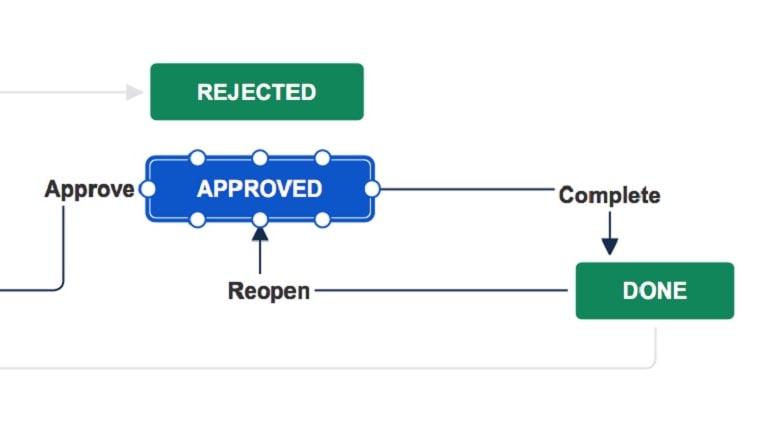
Jira excels in the realm of workflow customization, offering teams unparalleled flexibility in designing project stages and transitions to align with their precise project management needs.
Jira excels in the realm of workflow customization, offering teams unparalleled flexibility in designing project stages and transitions to align with their precise project management needs. Teams can craft workflows tailored to their unique processes, accommodating everything from software development sprints to marketing campaigns. For instance, in Jira, you can define intricate workflows for issue tracking, including custom states like "in review" or "awaiting approval”, along with automated transitions that move tasks seamlessly through these stages.
In contrast, Zendesk, while offering automation and workflow tools, leans more toward predefined rules. While these rules can be powerful for certain tasks, they may not provide the same level of granular control and customization that Jira's custom workflows offer. This flexibility makes Jira the preferred choice for organizations seeking fine-tuned workflow management to optimize their project processes.
Zendesk and Jira are Equal at Reporting and Analytics
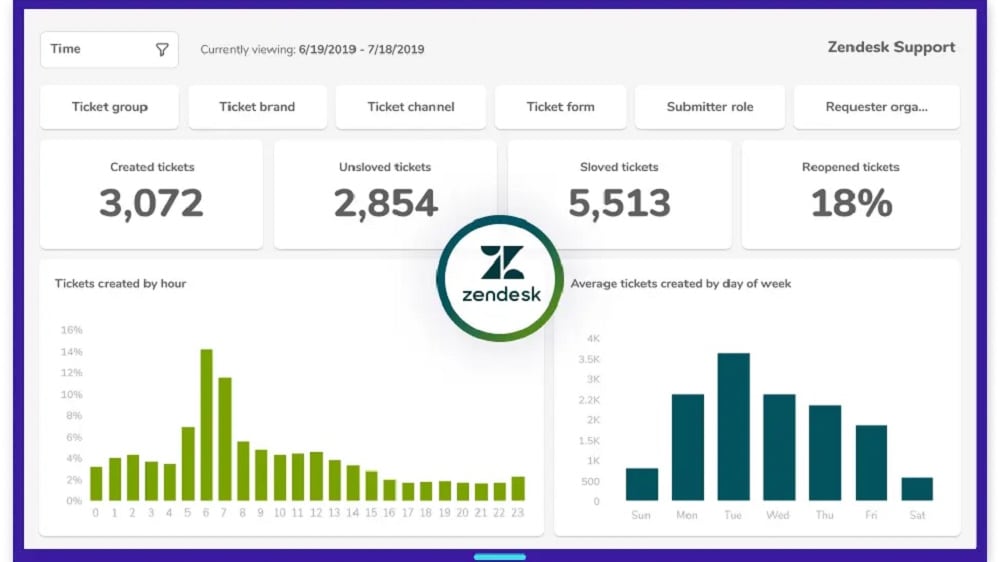
In Zendesk, businesses can effortlessly monitor critical metrics such as ticket volumes, response times, and customer satisfaction scores.
Zendesk and Jira indeed stand on equal footing when it comes to their comprehensive reporting and analytics capabilities. In Zendesk, businesses can effortlessly monitor critical metrics such as ticket volumes, response times, and customer satisfaction scores. This data aids in fine-tuning customer support operations and enhancing overall service quality.
On the other hand, Jira excels in project performance analysis, allowing teams to track progress, identify bottlenecks, and optimize workflows. Users can generate reports on sprint velocity, issue resolution times, and sprint burndown charts, among other valuable project management metrics.
Both platforms empower data-driven decision-making, offering a wealth of insights that guide strategic improvements across customer support and project management domains, ensuring that businesses can make informed choices to drive success.
Jira is Superior in Agile Project Management Compared to Zendesk

Jira's superiority in agile project management becomes evident through its comprehensive support for agile methodologies like Scrum and Kanban.
Jira's superiority in agile project management becomes evident through its comprehensive support for agile methodologies like Scrum and Kanban. It offers a wealth of agile-specific features, including sprint planning, backlog management, and agile boards. Teams can create and manage sprints with ease, prioritize tasks within backlogs, and visualize work progress through agile boards, fostering an efficient project management environment. For example, Jira's agile boards enable teams to visualize tasks in various stages, such as "to-do," "in progress," and "done," facilitating a streamlined workflow.
In contrast, while Zendesk excels in customer support and engagement, it doesn't possess the same depth of agile project management functionalities that Jira offers. This difference makes Jira the preferred choice for organizations seeking agile-specific project management tools to enhance productivity, transparency, and collaboration within their projects.
Zendesk Provides Better Customer Engagement than Jira

Zendesk excels in delivering exceptional customer engagement capabilities that prioritize real-time interactions.
Zendesk excels in delivering exceptional customer engagement capabilities that prioritize real-time interactions. Its live chat and messaging features empower businesses to actively engage with customers, addressing their inquiries and concerns promptly. For example, Zendesk's live chat enables immediate assistance, ensuring customers receive timely responses and enhancing overall satisfaction.
In contrast, Jira, with its primary focus on issue tracking and project management, doesn't emphasize real-time customer engagement to the same degree. While it excels in managing complex project workflows, it may not provide the same level of interactive customer support features as Zendesk.
Zendesk's dedication to proactive customer engagement through live chat and messaging positions it as the preferred choice for businesses prioritizing real-time customer interactions and aiming to boost customer satisfaction through immediate support and engagement.
Jira Takes the Lead with its Extensive Integration Capabilities

Jira stands out for its exceptional integration capabilities, especially considering its strong ecosystem within the Atlassian software family.
Jira stands out for its exceptional integration capabilities, especially considering its strong ecosystem within the Atlassian software family. One noteworthy advantage is Jira's seamless integration with popular Atlassian tools like Confluence, Bitbucket, and Trello. The software also integrates with over 3,000 other tools, from customer relationship management (CRM) systems to design tools.
While Zendesk also offers a range of integrations with applications like Slack and Salesforce, achieving a similar level of native, out-of-the-box integration as Jira often necessitates additional plug-ins or custom configurations. This distinction becomes crucial for businesses seeking deep inter-software functionality to enhance collaboration and workflow automation.
08 Zendesk vs Jira: Which is the best for your business?
Zendesk is the best tool for you if:
- You require a versatile customer support platform with robust ticketing, live chat, and self-service options
- Scalability is essential, as Zendesk accommodates businesses of all sizes and industries
- Data-driven decision-making is crucial, thanks to its analytics and reporting capabilities
- You value a user-friendly interface, promoting efficient agent workflows and customer interactions
- Integration with third-party apps and customization options are essential for tailoring your support ecosystem
 You require a versatile customer support platform with robust ticketing, live chat, and self-service options
Jira is the best tool for you if:
- You need comprehensive project management and issue tracking, ideal for software development and Agile methodologies
- Collaborative teamwork across multiple teams and departments is a priority
- Customization and extensibility are crucial, with numerous add-ons and integrations available
- You require robust reporting and analytics to monitor project progress and identify bottlenecks and inefficiencies
- Scalability is essential, accommodating both small teams and large enterprises with ease
Zendesk
Used by 2597 members
6 months free (with AI Agents and Copilot)
Save up to $50,000
Jira
Used by 445 members
Free forever for up to 10 users
Save up to $980
09 Alternatives to Zendesk & Jira

Manychat
Used by 4251 members
First month free on Pro plan
Save up to $14

Slack
Used by 3699 members
25% off new plan purchases
Save up to $9,000

Intercom
Used by 3194 members
1 year free on the Advanced plan (300 monthly Fin resolutions included)
Save up to $3,108

HubSpot
Used by 2763 members
30% off Professional and Enterprise plans for 1 year across all Hubspot products
Save up to $2,000
10 Promotions on Customer Support and IT Management software
Zendesk and Jira are great tools, but Secret offers promo codes with discounts on over 2190+ different SaaS solutions. New deals are added regularly, helping you save money on your online subscriptions. Get access to codes for other Customer Support and IT Management software you might want to purchase
Code for Intercom
1 year free on the Advanced plan (300 monthly Fin resolutions included)

Code for CCleaner
20% off for 1 year

Freshdesk coupon code 2026
14 days free

Promo codes for GitHub
$10,000 in credits for 12 months

Deal for LiveChat
$150 credits (Team, Business and Enterprise Plans)

Deal for Asana
75% off the annual Starter and Advanced plans for 1 year
Manychat promo
First month free on Pro plan

GitLab discount code
12 months free on the Ultimate license

LiveAgent promo code
$120 credits on any plan

Freshservice promotion
14 days free
Start saving on the best SaaS
Secret has already helped tens of thousands of startups save millions on the best SaaS like Microsoft Teams, Google Workspace & many more. Join Secret now to buy software the smart way.