





A robust DevOps and version control solution is crucial for modern software development, facilitating efficient collaboration, code management, and deployment processes. It provides a foundation for effective DevOps practices and ensures version control and code quality. Two leading platforms in this space are Azure DevOps and GitHub. While both platforms offer essential DevOps capabilities, they have distinct features and focus areas.
Understanding the differences and unique strengths of Azure DevOps and GitHub is essential for organizations looking to choose the right platform for their software development and DevOps needs. Let's delve deeper into the comparison of Azure DevOps vs GitHub to help you make an informed decision for your development workflow.
- 01 Azure DevOps vs GitHub: overview
- 02 What's the difference between Azure DevOps and GitHub?
- 03 Azure DevOps pros and cons
- 04 GitHub pros and cons
- 05 Azure DevOps compared to GitHub
- 06 GitHub compared to Azure DevOps
- 07 Features comparison
- 08 Azure DevOps vs GitHub: Which is the best for your business?
- 09 Alternatives to Azure DevOps & GitHub
- 10 Promotions on Application Development software
Start saving on the best SaaS
Secret has already helped tens of thousands of startups save millions on the best SaaS like Microsoft Teams, Google Workspace & many more. Join Secret now to buy software the smart way.

01 Azure DevOps vs GitHub: overview
Azure DevOps and GitHub are two prominent platforms in the world of software development and DevOps, each with its own distinct strengths catering to different aspects of the development lifecycle.
Azure DevOps, a comprehensive DevOps platform by Microsoft, excels in providing end-to-end solutions for development teams. It offers tools for project planning, code development, testing, and deployment, making it a robust choice for organizations looking to streamline their entire development pipeline. GitHub, on the other hand, is renowned for its exceptional version control and code collaboration features. It's the go-to platform for developers and open-source projects, offering a user-friendly interface for hosting, sharing, and collaborating on code.
When making a decision between Azure DevOps and GitHub, you should carefully evaluate your specific development needs and objectives. If you're looking for a one-stop-shop that covers all aspects of DevOps and integrates well with Microsoft technologies, Azure DevOps might be your choice. Conversely, if your primary focus is on version control, code collaboration, and CI/CD workflows, GitHub offers a specialized solution that is beloved by developers worldwide.

CI/CD tools
Azure DevOps has powerful built-in CI/CD capabilities with Azure Pipelines. GitHub Actions offers CI/CD functionality, but Azure DevOps is more mature and feature-rich in this area.

Azure DevOps
GitHub
Project management
Azure DevOps includes comprehensive project management tools like boards, backlogs, and sprints. GitHub provides project boards which are more simplistic but integrate seamlessly with issue tracking.
Azure DevOps
GitHub
Integrations
Azure DevOps provides extensive integrations, especially within the Microsoft ecosystem (like Azure, Office 365). GitHub integrates well with many tools and has a large marketplace, but Azure DevOps has the edge in enterprise integrations.
Azure DevOps
GitHub
Repository management
Azure Repos provides robust git repository hosting, but GitHub is the standard for git repository management with a larger community and better collaboration features.
Azure DevOps
GitHub
Security and compliance
Both platforms offer strong security features and compliance standards. GitHub has made significant strides in security features recently, bringing it closer to parity with Azure DevOps.
Azure DevOps
GitHub
Documentation and community
Azure DevOps has good documentation, but its community is smaller compared to GitHub, which boasts a massive community and extensive resources for learning and collaboration.
Azure DevOps
GitHub
Ease of Use
Azure DevOps offers a wide range of tools which can have a steeper learning curve. GitHub is known for its user-friendly interface and is often preferred for its ease of use in repository management.
Azure DevOps
GitHub
Customer Reviews
Azure DevOps is praised for its comprehensive suite of development tools and integration with other Microsoft products. GitHub is highly regarded for its vast open-source community and seamless git repository management.
Azure DevOps
GitHub
Customer Support
Azure DevOps has robust support, particularly for enterprise users, and integrates well with other Microsoft support services. GitHub's support is competent but sometimes considered less responsive for individual users.
Azure DevOps
GitHub
Pricing Plan
Azure DevOps offers a free tier and flexible pricing based on usage. GitHub also provides a free tier with private repositories and a range of paid plans, which are straightforward and scalable.
Azure DevOps
GitHub
02 What's the difference between Azure DevOps and GitHub?

Azure DevOps is a comprehensive DevOps platform provided by Microsoft, offering a wide range of tools and services that cover the entire development pipeline.
Azure DevOps
Agile development and DevOps practices

GitHub's core features include Git version control, code review, issue tracking, and pull requests.
GitHub
GitHub, an online solution, allows you to store and manage source code for your IT projects using advanced AI for version control. This helps maintain a history of modifications and facilitates code sharing with collaborators, partners, or customers.
Azure DevOps and GitHub are both prominent players in the software development and DevOps space, but they have key differences that cater to distinct needs within the development lifecycle.
The fundamental difference between Azure DevOps and GitHub lies in their scope and primary focus. Azure DevOps is a comprehensive DevOps platform provided by Microsoft, offering a wide range of tools and services that cover the entire development pipeline. It includes features for project planning, code development, testing, release management, and monitoring. Azure DevOps is designed to be an all-in-one solution for teams looking to streamline their DevOps processes and manage the entire software development lifecycle within a single platform.
On the other hand, GitHub is primarily a code hosting and collaboration platform, with a strong emphasis on version control and code collaboration. It provides developers with a centralized platform to host, share, and collaborate on code repositories. GitHub's core features include Git version control, code review, issue tracking, and pull requests. While it offers CI/CD capabilities through GitHub Actions, its primary strength lies in code-related tasks and collaboration.
When making a decision between Azure DevOps and GitHub, consider your specific development needs and objectives. If you're looking for a comprehensive DevOps platform that covers project management, code development, and deployment, Azure DevOps is a suitable choice. It's also beneficial for teams already invested in the Microsoft ecosystem. On the other hand, if your primary focus is on version control, code collaboration, and a developer-centric environment, GitHub is the preferred option. It's highly popular among open-source projects and developer communities worldwide.

GitHub
Premium
Version management platform
$10,000 in credits for 12 months
Save up to $7,560
03 Azure DevOps pros and cons
What are the advantages of Azure DevOps?
- Comprehensive DevOps platform: Azure DevOps provides a comprehensive set of tools and services that cover the entire software development lifecycle. This includes capabilities for project planning, version control, continuous integration/continuous deployment (CI/CD), testing, and monitoring, making it a one-stop solution for DevOps teams.

- Seamless integration: Azure DevOps seamlessly integrates with other Microsoft products and services, such as Azure Cloud, Visual Studio, and Microsoft Teams. This integration can enhance collaboration and productivity for teams already using Microsoft's ecosystem.
- Scalability: Azure DevOps can scale to meet the needs of both small startups and large enterprises. It allows you to start with basic features and gradually expand as your project or organization grows, making it flexible and cost-effective.
- Built-in CI/CD: Azure DevOps offers robust CI/CD capabilities through Azure Pipelines. It enables you to automate the building, testing, and deployment of applications, which can significantly reduce manual tasks and improve software quality.
- Analytics and insights: Azure DevOps provides valuable analytics and reporting features, allowing teams to gain insights into their development processes. This data-driven approach can help identify bottlenecks, improve efficiency, and make informed decisions.
What are the disadvantages of Azure DevOps?
- Learning curve: Due to its extensive feature set, Azure DevOps can have a steep learning curve, especially for smaller teams or those new to DevOps practices. It may take time for team members to become proficient with all the tools and services.

- Cost: While Azure DevOps offers a free tier with limited usage, more extensive usage or advanced features can incur costs. Organizations need to carefully manage their usage to avoid unexpected expenses.
- Complexity: The all-in-one nature of Azure DevOps can sometimes result in complexity, particularly for smaller projects or teams with simpler requirements. Unnecessary features may lead to confusion or resource overhead.
- Limited language support: Azure DevOps may have limited support for certain programming languages compared to other specialized tools. It's important to ensure that it supports the languages your team uses.
- Integration challenges: While it integrates seamlessly with Microsoft products, integrating Azure DevOps with third-party tools or services may require additional effort and customization. Compatibility issues can arise in some cases.
Compare Azure DevOps to other tools


GitLab vs Azure DevOps

04 GitHub pros and cons
What are the advantages of GitHub?
- Robust version control: GitHub is renowned for its robust Git-based version control system, making it easy for developers to collaborate, track changes, and manage code repositories effectively.
- Large developer community: GitHub boasts a vast and active developer community, making it an excellent platform for open-source projects. This community can provide support, contributions, and code reviews, enhancing the quality of projects.
- Collaborative features: GitHub offers collaboration features such as pull requests, code reviews, issue tracking, and wikis. These tools facilitate seamless teamwork and communication among developers and project contributors.
- Powerful CI/CD with GitHub Actions: GitHub Actions allows for easy integration of continuous integration and continuous deployment (CI/CD) pipelines directly into your repositories. It provides automation capabilities for building, testing, and deploying code, streamlining development workflows.
- Extensive integrations: GitHub integrates seamlessly with a wide range of third-party tools and services. You can connect it with project management, monitoring, code analysis, and other development tools to create a tailored development environment.
What are the disadvantages of GitHub?
- Limited private repositories: The free tier of GitHub has limitations, including a limit on the number of private repositories. Organizations and projects requiring more private repositories may need to subscribe to a paid plan.
- Pricing for larger teams: While GitHub offers free plans for individual developers and small teams, pricing can become a concern as team sizes grow or when advanced features are needed.
- Learning curve: Git and GitHub have a learning curve, especially for beginners and non-technical stakeholders. Understanding Git concepts and using GitHub effectively may require training and practice.
- Dependency on internet connectivity: GitHub is a cloud-based platform, which means it relies on an internet connection. Developers may face challenges when working offline or in areas with limited connectivity.
- Security concerns: While GitHub has robust security features, there have been instances of security breaches and leaks of sensitive information in the past. Organizations need to take appropriate security measures to protect their repositories and data.
Compare GitHub to other tools

GitLab vs GitHub
05 Azure DevOps compared to GitHub
Azure DevOps and GitHub are both valuable tools in the world of software development, but they serve different primary purposes. Azure DevOps is a comprehensive DevOps platform by Microsoft, offering end-to-end solutions for project planning, code development, testing, deployment, and monitoring. It's suitable for teams looking for an all-in-one solution within the Microsoft ecosystem.
In contrast, GitHub is a code hosting and collaboration platform with a strong focus on version control and code collaboration. It excels in providing a developer-centric environment for code management and collaboration. Choosing between them depends on your specific needs, with Azure DevOps covering a broader DevOps spectrum and GitHub excelling in code-related tasks.
Is Azure DevOps better than GitHub?
 Is Azure DevOps better than GitHub?
Deciding whether Azure DevOps or GitHub is superior depends largely on the specific requirements of a project or team. While Azure DevOps presents a more holistic approach to the entire software development lifecycle, GitHub shines in its specialized role for code hosting and collaborative development. For teams seeking a platform that integrates seamlessly with various Microsoft tools and offers a wide range of functionalities beyond just coding, Azure DevOps is a strong contender.
However, for projects where code collaboration and version control are at the forefront, GitHub's streamlined and intuitive interface makes it a preferred choice. The decision hinges on whether a comprehensive suite or a focused, code-centric platform is more aligned with the team's objectives and workflow.
What is Azure DevOps best used for?
Azure DevOps is best used for streamlining and optimizing the entire software development lifecycle. It offers a comprehensive set of tools and services for project planning, version control, continuous integration and continuous deployment (CI/CD), testing, and monitoring. This makes it ideal for teams and organizations seeking a centralized platform to manage their DevOps processes efficiently.
Azure DevOps is particularly valuable for projects that require end-to-end automation, collaboration, and integration within the Microsoft ecosystem. It supports the creation and delivery of high-quality software, making it suitable for a wide range of development tasks, from small projects to large-scale enterprise applications.
Can Azure DevOps replace GitHub?
Azure DevOps and GitHub serve different primary purposes, making it challenging to replace one with the other completely. Azure DevOps is a comprehensive DevOps platform by Microsoft, while GitHub is a code hosting and collaboration platform with a focus on version control.
While Azure DevOps includes version control features, GitHub excels in this area. Organizations can use both platforms together, with Azure DevOps for end-to-end DevOps processes and GitHub for code hosting and collaboration. This combination leverages the strengths of each platform, enhancing software development, but typically, one does not entirely replace the other.
Is Azure DevOps cheaper than GitHub?
Azure DevOps and GitHub have varying pricing models and structures, making it challenging to determine definitively which is cheaper. Azure DevOps’s pricing structure offers a free tier with limitations, and its pricing depends on the number of users and the level of features required. GitHub also offers a free tier with restrictions, while its paid plans depend on factors like the number of collaborators and advanced features.
Cost-effectiveness depends on your specific needs and team size. Smaller teams may find GitHub's free tier more cost-effective, while larger organizations may benefit from Azure DevOps' scalability. It's essential to evaluate both platforms' pricing details and choose based on your requirements.
Is there a better Application Development software than Azure DevOps?
While Azure DevOps offers a comprehensive suite of DevOps tools and features, it's important to explore alternative DevOps software options to ensure you find the best fit for your specific development and deployment requirements.
Several notable alternatives to Azure DevOps in the DevOps landscape include GitHub Actions, Jenkins, GitLab CI/CD, and Jira, among others.
The choice of the ideal DevOps software depends on your organization's unique needs, development methodologies, and technology stack. If you're seeking a fully integrated DevOps platform with a strong Microsoft ecosystem integration, Azure DevOps may align perfectly with your goals. However, considering these alternatives can provide valuable insights and help you make an informed decision that best suits your specific DevOps needs.
06 GitHub compared to Azure DevOps
GitHub and Azure DevOps are essential tools in the world of software development, but they serve different primary purposes. GitHub is primarily a code hosting and collaboration platform with a strong focus on version control and code collaboration. It excels in providing a developer-centric environment for code management and collaboration.
Azure DevOps, on the other hand, is a comprehensive DevOps platform offered by Microsoft. It covers a broader spectrum of DevOps activities, including project planning, code development, testing, deployment, and monitoring. The choice between GitHub and Azure DevOps depends on your specific needs, with GitHub excelling in code-related tasks and Azure DevOps offering end-to-end DevOps solutions.
Is GitHub better than Azure DevOps?
The superiority of GitHub over Azure DevOps is a matter of context and specific requirements. GitHub's prominence lies in its highly efficient and user-friendly platform for code hosting and collaborative development, making it ideal for teams primarily focused on version control and coding collaboration. Its simplicity and developer-centric features cater perfectly to projects where code management and collaboration are paramount.
Conversely, Azure DevOps offers a more expansive range of DevOps services, but for projects that don't require such extensive features, GitHub's streamlined approach can be more effective. Ultimately, choosing GitHub hinges on the need for a specialized, code-focused environment over a broader, all-encompassing DevOps platform.
What is GitHub best used for?
GitHub is best used as a code hosting and collaboration platform that facilitates version control and code management. It provides a centralized hub for developers to store, share, and collaborate on code repositories. GitHub's primary strengths lie in its robust Git-based version control system, code review features, issue tracking, and pull request management.
It is particularly valuable for open-source projects and collaborative development efforts, enabling seamless teamwork and efficient code collaboration. GitHub enhances transparency, fosters community engagement, and empowers developers to work together on code projects, making it an essential tool for code-related tasks and collaborative software development.
Can GitHub replace Azure DevOps?
GitHub and Azure DevOps serve distinct purposes in the software development and DevOps landscape, making it challenging to replace one with the other entirely. GitHub primarily excels in code hosting, version control, and collaboration.
In contrast, Azure DevOps offers a comprehensive suite of tools and services for end-to-end DevOps processes, including project planning, code development, testing, deployment, and monitoring. While GitHub Actions can handle CI/CD workflows, it doesn't provide the same level of project management and DevOps features as Azure DevOps. Organizations may use both platforms together, leveraging the strengths of each, but typically, one does not entirely replace the other due to their different focuses.
Is GitHub cheaper than Azure DevOps?
Determining whether GitHub is cheaper than Azure DevOps depends on various factors, including the size of your team, usage requirements, and specific features needed. Both platforms offer free tiers with limitations. GitHub's free tier includes certain features, while Azure DevOps offers a limited number of users and basic features for free. As usage scales or additional features are required, costs can vary.
GitHub's pricing depends on the number of collaborators and feature requirements, whereas Azure DevOps pricing considers users and usage level. Cost-effectiveness ultimately hinges on your unique needs, and a careful assessment of both platforms' pricing details is essential to make an informed decision.
Is there a better Web Development software than GitHub?
While GitHub is a powerful and widely used platform for version control and code collaboration, it's essential to explore alternative code hosting and collaboration software options to ensure you find the best match for your specific development and collaboration requirements.
Several notable alternatives to GitHub in the code hosting and collaboration space include GitLab, Bitbucket, CircleCI, and AWS CodeCommit.
The choice of the ideal code hosting and collaboration software depends on your organization's unique needs, development methodologies, and technology stack. If you're looking for a platform renowned for its Git-based version control, code review features, and developer community, GitHub may align perfectly with your goals. However, considering these alternatives can provide valuable insights and help you make an informed decision that best suits your specific code collaboration needs.
GitHub
Premium
Version management platform
$10,000 in credits for 12 months
Save up to $7,560
07 Features comparison
Azure DevOps' Version Control Dominance Over GitHub
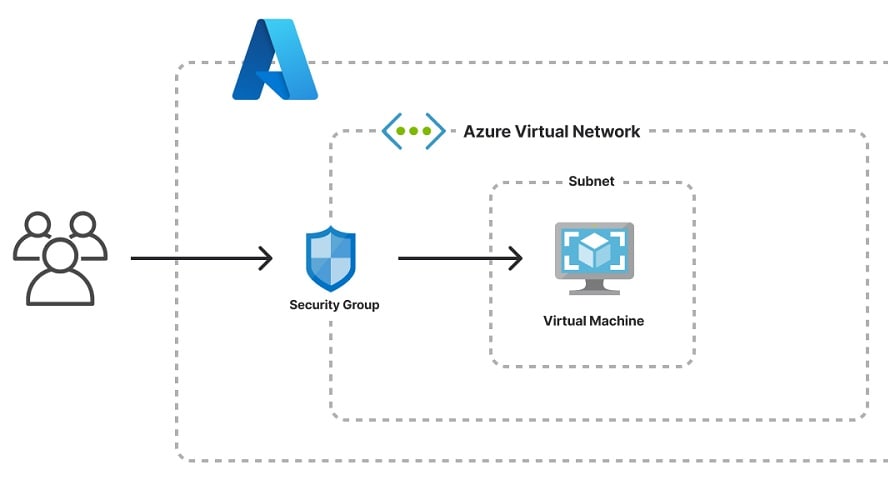
Azure DevOps boasts a comprehensive set of version control systems, including Git and Team Foundation Version Control (TFVC)
When assessing version control capabilities, Azure DevOps and GitHub offer different approaches, with Azure DevOps holding a notable advantage.
Azure DevOps boasts a comprehensive set of version control systems, including Git and Team Foundation Version Control (TFVC). Git is a widely adopted distributed version control system known for its flexibility and speed. In contrast, TFVC offers centralized version control, ideal for enterprises with strict access control and large codebases.
GitHub, while proficient in code hosting and collaboration, lacks a dedicated version control feature equivalent to Azure DevOps' TFVC. GitHub primarily relies on Git for version control, which may be limiting for organizations requiring centralized control and specific versioning capabilities.
GitHub's Comprehensive Collaboration Tools Surpass Azure DevOps
GitHub provides a rich ecosystem of integrations, such as Slack and Trello, further enhancing communication and productivity.
When evaluating collaboration tools, GitHub emerges as a frontrunner, offering a more comprehensive toolset compared to Azure DevOps.
GitHub excels in fostering collaboration among developers and teams. Its robust version control features, including pull requests and code review workflows, facilitate efficient tracking of changes and seamless code collaboration. Additionally, GitHub provides a rich ecosystem of integrations, such as Slack and Trello, further enhancing communication and productivity.
While Azure DevOps offers collaborative elements like wikis, dashboards, and reporting, GitHub's dedicated focus on code collaboration results in a more refined and specialized set of tools. For instance, GitHub's issue tracking system is widely praised for its simplicity and effectiveness in managing tasks and project workflows.
Azure DevOps Outperforms GitHub in Integrations
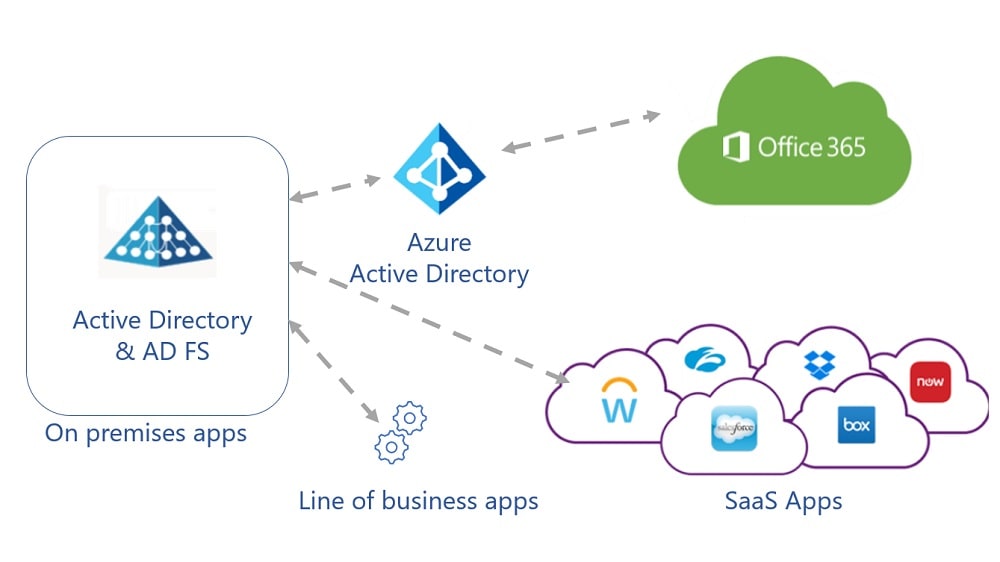
Azure DevOps shines by seamlessly integrating with a wide array of Microsoft products, including MS Office, Power BI, and Azure Cloud Services.
When assessing integration capabilities between Azure DevOps and GitHub, it becomes evident that Azure DevOps holds a significant advantage in this domain.
Azure DevOps shines by seamlessly integrating with a wide array of Microsoft products, including MS Office, Power BI, and Azure Cloud Services. This deep integration within the Microsoft ecosystem enhances collaboration, synergy, and overall productivity. For instance, Azure DevOps seamlessly connects with Azure Cloud Services, facilitating the effortless deployment and monitoring of applications hosted on Azure.
In contrast, while GitHub offers a range of integrations, it cannot match the depth and breadth of Azure DevOps' Microsoft-focused integrations. GitHub's strengths lie more in its open-source community and collaborations. While GitHub's integrations, including tools like Trello, Jira, and Travis CI, cater to diverse needs, Azure DevOps offers a specialized and seamless experience within the Microsoft environment.
Azure DevOps' Robust CI/CD Supersedes GitHub's Offerings
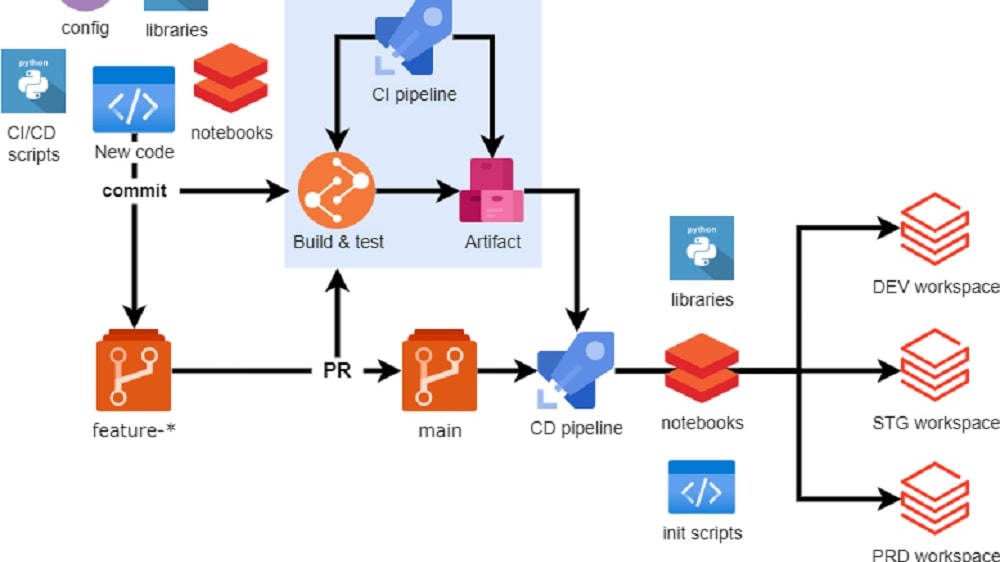
Azure DevOps offers a comprehensive CI/CD pipeline, allowing teams to automate the entire software delivery process.
Azure DevOps offers a comprehensive CI/CD pipeline, allowing teams to automate the entire software delivery process. It seamlessly integrates with tools for building, testing, and deploying applications. For instance, you can use Azure DevOps to automatically trigger builds whenever code changes are pushed to repositories. The built-in release management enables orchestrated deployments, ensuring code quality and consistency as it progresses from development to production stages.
While GitHub does provide automation through GitHub Actions, it doesn't match the depth and breadth of Azure DevOps' CI/CD features. GitHub Actions allow you to automate workflows, but it primarily focuses on code-related tasks and lacks the full range of deployment management features found in Azure DevOps.
Both Azure DevOps and GitHub Equally Support Project Management
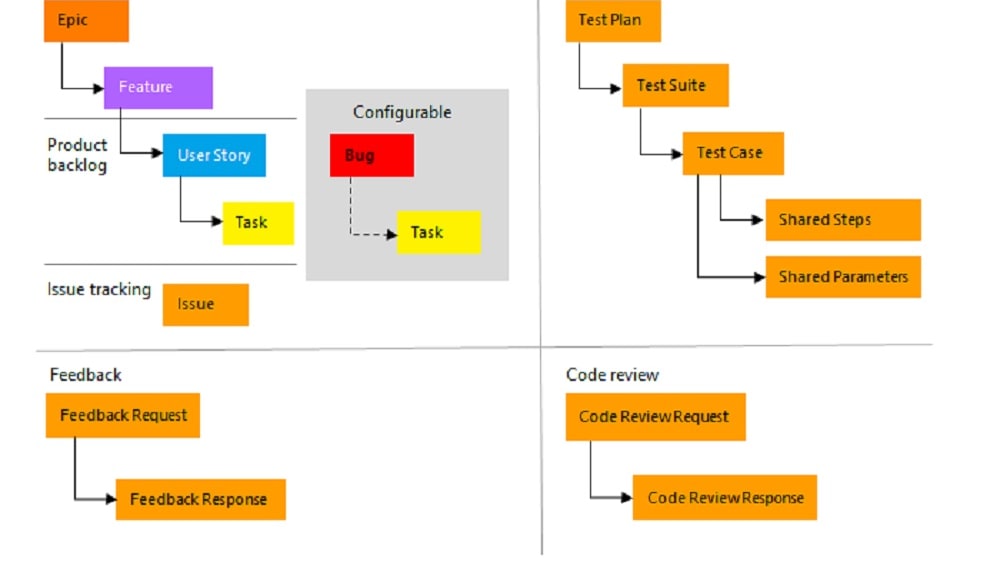
Azure DevOps leverages agile methodologies, providing a suite of planning and tracking tools.
Azure DevOps and GitHub both provide robust project management tools, including task tracking, priority setting, and progress monitoring.
Azure DevOps leverages agile methodologies, providing a suite of planning and tracking tools. It includes work items, backlogs, and customizable boards, allowing teams to plan sprints, prioritize tasks, and monitor progress efficiently. For example, teams can use Azure Boards to create, assign, and track work items, facilitating agile project management.
GitHub, while primarily known for code collaboration, offers built-in project management tools that allow teams to visualize tasks, create task lists, and monitor progress in real-time. GitHub Projects, for instance, enables teams to create project boards, automate workflows, and track project milestones seamlessly.
GitHub's AI-Powered Code Assistance Surpasses Azure DevOps

GitHub takes a substantial lead with its implementation of OpenAI codex, revolutionizing the development experience.
GitHub takes a substantial lead with its implementation of OpenAI codex, revolutionizing the development experience. When coding in GitHub's editor, this AI engine offers real-time code and feature suggestions, greatly enhancing productivity by saving valuable time. For example, it can suggest entire code blocks, correct syntax errors, or propose optimal solutions to programming challenges, all while developers are actively engaged in the coding process.
Conversely, Azure DevOps currently lacks AI-based code suggestions, placing GitHub at a significant advantage in this innovative realm. GitHub's integration of AI not only streamlines development but also fosters efficient and error-free coding practices, making it an invaluable tool for developers seeking productivity and code quality improvements.
GitHub's User-Friendly Interface Trumps Azure DevOps
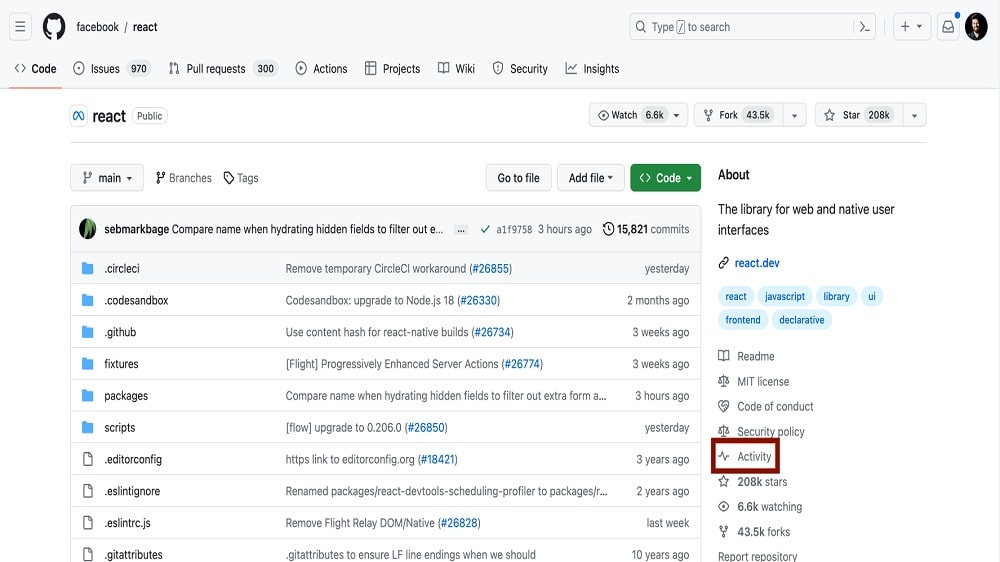
GitHub's emphasis on community-driven collaboration further enhances its user adoption, as users can tap into a wealth of shared knowledge and resources.
When comparing the ease of use between Azure DevOps and GitHub, it becomes apparent that each tool possesses distinct advantages and drawbacks. Azure DevOps, while feature-rich and powerful, can pose a steep learning curve, particularly for beginners. Its interface, though comprehensive, may not be as intuitive as some users would prefer, and navigating through its various components can be challenging, especially for those new to Microsoft's ecosystem.
Conversely, GitHub has garnered a reputation for its user-friendliness. Its interface is clean, logically structured, and easy to navigate, making it accessible even for individuals with limited experience in software development workflows. GitHub's emphasis on community-driven collaboration further enhances its user adoption, as users can tap into a wealth of shared knowledge and resources. When evaluating ease of use, GitHub emerges as the more user-friendly option, providing a smoother experience for developers of all levels.
08 Azure DevOps vs GitHub: Which is the best for your business?
Azure DevOps is the best tool for you if:
- You require an all-in-one solution for project management, code development, testing, deployment, and monitoring, especially within the Microsoft ecosystem.
- Seamless integration with other Microsoft services like Azure cloud services and Office 365 is essential for your workflow.
- Your project demands comprehensive DevOps functionalities including advanced CI/CD pipelines, artifact management, and automated testing.
- You prefer a tool that offers customizable dashboards and detailed analytics for tracking project progress and team performance.
- Your team needs a platform that supports both Agile and other project management methodologies, allowing for flexible adaptation to various project needs.
 You require an all-in-one solution for project management, code development, testing, deployment, and monitoring, especially within the Microsoft ecosystem.
GitHub is the best tool for you if:
- Your primary focus is on code hosting, version control, and collaboration, with an emphasis on a developer-friendly interface and community interaction.
- You value a large, active community for collaboration, open-source contributions, and accessing a vast array of repositories for inspiration and reuse.
- Integration with a wide array of development tools and services is crucial, especially for CI/CD, code review, and issue tracking processes.
- You're looking for a platform with robust security features like branch protection rules, code scanning, and secret scanning for secure development.
- Your team prefers a straightforward, intuitive platform that prioritizes ease of use in code management without the need for extensive DevOps functionalities.
GitHub
Premium
Version management platform
$10,000 in credits for 12 months
Save up to $7,560
09 Alternatives to Azure DevOps & GitHub

Asana
Used by 881 members
75% off the annual Starter and Advanced plans for 1 year
Save up to $22,491

GitLab
Used by 662 members
12 months free on the Ultimate license
Save up to $10,440

Microsoft for Startups
Used by 509 members
$5,000 credit for 6 months
Save up to $5,000

Jira
Used by 456 members
Free forever for up to 10 users
Save up to $980
10 Promotions on Application Development software
Azure DevOps and GitHub are great tools, but Secret offers promo codes with discounts on over 2190+ different SaaS solutions. New deals are added regularly, helping you save money on your online subscriptions. Get access to codes for other Application Development software you might want to purchase

OpenAI - ChatGPT free credits
$300 in free credits across OpenAI's models through LLM API

Promo codes for Shopify
$1/month for the first 3 months + 25% off annual plans

Retool coupon code 2026
1 year free on the monthly Team or Business plan

Apify promo code 2026
20% off monthly plans for 3 months

Auth0 coupon code
12 months free

Promo code for Typeform
40% off all annual plans

Deal for Mobbin
20% off for 1 year on the Pro plan

Tally free credits
50% off for 1 year

Lovable discounts
15% off annual Pro and Business plans

Cobalt coupon code 2026
75% off the Growth and Scale plans for 1 year
Start saving on the best SaaS
Secret has already helped tens of thousands of startups save millions on the best SaaS like Microsoft Teams, Google Workspace & many more. Join Secret now to buy software the smart way.