


When it comes to managing your software development projects, choosing the right version control and collaboration platform is essential for maximizing productivity and ensuring seamless workflows. Two of the most popular platforms available today are GitLab and GitHub. Each offers unique features and benefits tailored to different development needs, making the decision between them an important one.
In this article, we take a closer look at the main features and differences between GitLab and GitHub to help you determine which platform best aligns with your development needs. We'll explore their capabilities, ease of use, pricing models, and customer support options, providing you with the insights needed to make an informed decision. Whether you're a solo developer seeking streamlined processes or a large team looking for comprehensive integration and automation tools, understanding the strengths and limitations of each platform is key to optimizing your development workflow.
- 01 GitLab vs GitHub: overview
- 02 What's the difference between GitLab and GitHub?
- 03 GitLab pros and cons
- 04 GitHub pros and cons
- 05 GitLab compared to GitHub
- 06 GitHub compared to GitLab
- 07 Features comparison
- 08 GitLab vs GitHub: Which is the best for your business?
- 09 Alternatives to GitLab & GitHub
- 10 Promotions on Web Development software
Start saving on the best SaaS
Secret has already helped tens of thousands of startups save millions on the best SaaS like Microsoft Teams, Google Workspace & many more. Join Secret now to buy software the smart way.

01 GitLab vs GitHub: overview
GitLab and GitHub are two prominent platforms in the software development world, each offering unique strengths to cater to different project needs.
GitLab is designed to streamline the entire DevOps lifecycle by providing a comprehensive set of tools in a single interface. It excels in offering built-in continuous integration and continuous deployment (CI/CD) pipelines, making it easy for teams to automate testing and deployment. GitHub, on the other hand, is a well-established platform renowned for its user-friendly interface and vast community support. It offers a wide range of functionalities, including seamless collaboration through pull requests, extensive integration options with third-party applications, and strong support for open-source projects.
Now, let's delve into the comparison of GitLab vs. GitHub. We'll explore their key features and functionalities to help you make an informed decision when selecting the ideal platform for your development projects. Whether you prioritize the all-in-one DevOps capabilities and automation offered by GitLab or require the collaborative environment and extensive integrations available with GitHub, understanding the strengths and limitations of each platform is essential for optimizing your software development workflow.

Community support
GitLab has a strong user community and active forums, offering valuable peer support. GitHub boasts a massive global community, with extensive resources and support from fellow developers across numerous open-source projects.

GitLab
GitHub
Project management
GitLab includes project management features like issue boards and time tracking, providing a comprehensive suite for managing projects. GitHub Projects offer kanban-style boards and automation features for effective project management.
GitLab
GitHub
Security features
GitLab provides robust security features, including container scanning and vulnerability management. GitHub offers solid security features, such as code scanning and dependency alerts, with additional security tools available for enterprise users.
GitLab
GitHub
Collaboration
GitLab offers collaboration tools like issue tracking and merge requests but lacks some of the community interaction features found in GitHub. GitHub is renowned for its collaboration features, including pull requests, wikis, and discussions.
GitLab
GitHub
Ease of use
GitLab offers a comprehensive platform with a learning curve for new users, but it is intuitive for DevOps professionals. GitHub is user-friendly, with a clean interface and intuitive navigation, appealing to both beginners and experts.
GitLab
GitHub
Continuous integration
GitLab excels with its built-in CI/CD tools, allowing seamless integration and deployment pipelines. GitHub Actions provide powerful CI/CD capabilities but require more setup compared to GitLab’s integrated solution.
GitLab
GitHub
Pricing plans
GitLab offers a free tier with basic features and several paid tiers for advanced features. GitHub also offers a free tier and competitive pricing for its Pro and Team plans, providing flexibility for different user needs.
GitLab
GitHub
Customer support
GitLab offers customer support through email, a comprehensive documentation portal, and community forums. GitHub provides extensive documentation, community support, and paid support options for enterprise users.
GitLab
GitHub
Integrations
GitLab integrates with tools like Jira, Slack, and Jenkins, enhancing its CI/CD pipeline capabilities. GitHub offers integrations with various tools, including Microsoft Teams, Trello, and CircleCI, supporting extensive workflows.
GitLab
GitHub
Positive reviews
GitLab is praised for its comprehensive DevOps lifecycle features and CI/CD capabilities. GitHub is widely celebrated for its ease of use, community support, and collaboration tools, making it popular among developers.
GitLab
GitHub
02 What's the difference between GitLab and GitHub?
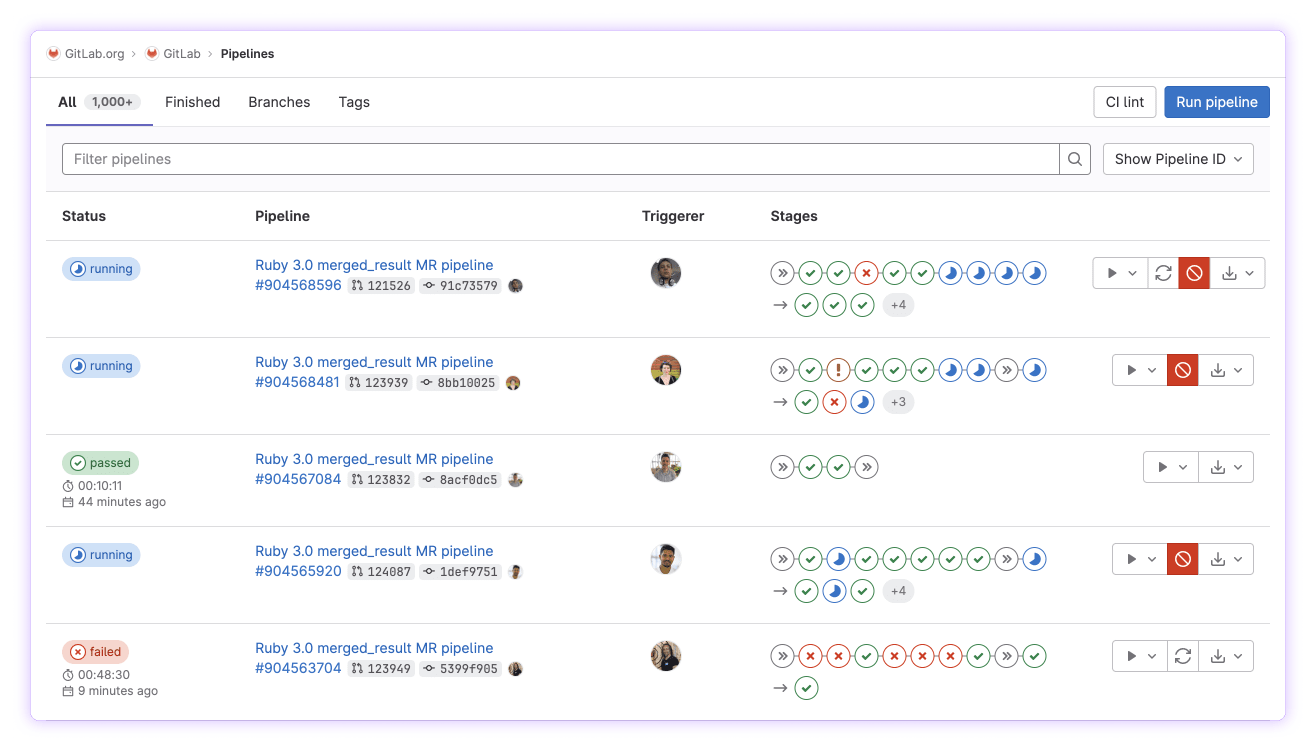
GitLab
Build better software, faster with GitLab.

GitHub
GitHub, an online solution, allows you to store and manage source code for your IT projects using advanced AI for version control. This helps maintain a history of modifications and facilitates code sharing with collaborators, partners, or customers.
Both GitLab and GitHub are leading platforms in the realm of version control and collaborative software development, offering a suite of tools designed to help teams manage their projects efficiently. While both platforms provide essential features such as version control, issue tracking, and collaboration tools, they differ significantly in their specific offerings and user experiences.
GitLab is renowned for its comprehensive approach to DevOps, providing an all-in-one platform that supports the entire software development lifecycle. It excels in offering integrated continuous integration and continuous deployment (CI/CD) pipelines, allowing teams to automate testing and deployment directly within the platform. GitLab also provides robust security features and project management tools, such as issue boards and milestone tracking, which help teams plan and execute projects more effectively. Its emphasis on providing a single interface for all development activities makes it a preferred choice for organizations seeking a streamlined DevOps solution.
In contrast, GitHub is widely recognized for its simplicity and strong community engagement. It offers a user-friendly interface with features that facilitate seamless collaboration, such as pull requests and code reviews. GitHub is particularly popular in the open-source community, thanks to its extensive ecosystem and support for social coding. It provides powerful integrations with third-party applications, allowing developers to extend its functionality according to their needs. This flexibility makes GitHub ideal for teams focused on collaboration and those who leverage open-source technologies.
A notable difference lies in their deployment options and user interface. GitLab offers both self-hosted and cloud-hosted versions, providing greater control over data and customization. GitHub primarily focuses on its cloud-hosted service, emphasizing ease of use and accessibility. GitLab's interface is feature-rich, catering to detailed project management, while GitHub's design emphasizes simplicity and ease of navigation.
In terms of pricing, GitLab offers a range of plans, including a free tier with essential features, while its premium tiers provide additional enterprise-level functionalities. GitHub also provides a free plan with core features, with more advanced options available in its paid plans, catering to larger organizations and teams with specific needs.

GitLab
Used by 648 members
12 months free on the Ultimate license
Save up to $10,440

GitHub
Used by 1801 members
$10,000 in credits for 12 months
Save up to $7,560
03 GitLab pros and cons
What are the advantages of GitLab?
- Comprehensive DevOps platform: GitLab offers an all-in-one solution for the entire DevOps lifecycle, including planning, source code management, CI/CD, monitoring, and security.

- Built-in CI/CD pipelines: GitLab has robust continuous integration and continuous deployment features built directly into the platform.
- Self-hosted and cloud options: GitLab provides both self-hosted (GitLab EE and CE) and cloud-hosted (GitLab.com) deployment options.
- Advanced security features: GitLab offers comprehensive security features, including vulnerability management, code quality analysis, and access controls.
- Strong project management tools: GitLab includes integrated project management capabilities, such as issue tracking, milestones, and kanban boards.
What are the disadvantages of GitLab?
- Steeper learning curve: GitLab’s extensive feature set and interface can be complex, particularly for new users or smaller teams.

- Performance issues at scale: Some users report performance challenges when managing very large repositories or when many users are active simultaneously.
- Less popular for open source projects: Compared to GitHub, GitLab has a smaller presence in the open-source community.
- Fewer third-party integrations: While GitLab integrates with many third-party tools, it has fewer integrations than GitHub.
- Limited free tier for cloud hosting: GitLab's free tier for cloud hosting has limitations on some advanced features and user capacities.
Compare GitLab to other tools


GitLab vs Azure DevOps
04 GitHub pros and cons
What are the advantages of GitHub?
- Strong community and ecosystem: GitHub is the most popular platform for hosting open-source projects, with a vast and active community of developers.
- User-friendly interface: GitHub offers an intuitive and easy-to-navigate interface that simplifies collaboration and code management.
- Powerful collaboration tools: GitHub provides robust tools for code review, issue tracking, and project management, such as pull requests, issues, and project boards.
- Extensive third-party integrations: GitHub integrates seamlessly with a wide range of third-party services and tools, including CI/CD pipelines, project management applications, and development tools.
- GitHub actions for CI/CD: GitHub Actions is a powerful CI/CD tool integrated directly into the platform, enabling automation of build, test, and deployment processes.
What are the disadvantages of GitHub?
- Limited built-in project management features: While GitHub offers basic project management tools, they may not be as comprehensive as those found in dedicated project management platforms.
- Privacy concerns for private repositories: GitHub's free plan offers unlimited public repositories but has limitations on private repositories and features.
- Less comprehensive security features: GitHub provides basic security features but may not offer as many built-in security tools as some competitors.
- Performance issues with large repositories: Users have reported performance challenges when handling very large repositories or large numbers of contributors.
- Limited customization for self-hosted solutions: GitHub offers a cloud-hosted service but provides fewer options for self-hosting compared to platforms like GitLab.
Compare GitHub to other tools

Azure DevOps vs GitHub
05 GitLab compared to GitHub
GitLab and GitHub are two leading platforms in the realm of version control and collaborative software development. GitLab is known for its comprehensive DevOps capabilities, offering an all-in-one solution with integrated CI/CD pipelines, project management tools, and advanced security features, making it ideal for teams seeking a streamlined workflow.
In contrast, GitHub is celebrated for its simplicity, strong community engagement, and extensive ecosystem of third-party integrations. It excels in fostering collaboration with intuitive interfaces and powerful code review features. While GitLab provides flexible self-hosting options, GitHub's focus on open-source projects and ease of use makes it popular among developers.
Is GitLab better than GitHub?
 Is GitLab better than GitHub?
Whether GitLab is better than GitHub depends on the specific needs of your team and project. GitLab excels in providing a comprehensive DevOps solution with features like integrated CI/CD pipelines, advanced security options, and project management tools, making it ideal for teams that need a unified platform for the entire software development lifecycle. Its self-hosting capabilities offer more control over infrastructure, appealing to enterprises with strict security and compliance requirements.
On the other hand, GitHub's user-friendly interface, strong community engagement, and extensive third-party integrations make it a favorite for developers focused on collaboration, especially in open-source environments.
What is GitLab best used for?
GitLab is best used for managing the entire software development lifecycle in a unified platform. It excels in providing robust DevOps capabilities, including built-in continuous integration and continuous deployment (CI/CD) pipelines, which automate testing and deployment processes. GitLab is ideal for teams seeking comprehensive project management tools, such as issue tracking, milestones, and kanban boards, all integrated into one platform.
Its advanced security features, like vulnerability management and access controls, make it suitable for enterprises requiring compliance and security. Additionally, GitLab offers flexible deployment options, including self-hosting, allowing organizations to maintain control over their infrastructure and data.
Can GitLab replace GitHub?
GitLab can potentially replace GitHub for teams seeking an integrated DevOps platform that covers the entire software development lifecycle. GitLab offers comprehensive features such as built-in continuous integration and deployment (CI/CD), robust project management tools, and advanced security measures, making it a viable alternative for organizations that need more than just code hosting.
However, GitHub's strength lies in its vast open-source community, ease of use, and extensive third-party integrations, which might appeal more to developers focusing on collaboration and open-source projects.
Is GitLab cheaper than GitHub?
Whether GitLab is cheaper than GitHub depends on the specific features and services required by a team or organization. GitLab’s pricing structure offers a free tier with a comprehensive set of features, including CI/CD pipelines, which can be appealing for smaller teams or projects. Its paid plans provide additional enterprise-level capabilities and are generally competitively priced.
GitHub also offers a free tier but may require paid plans for advanced features like additional actions, enterprise security, and analytics. Pricing varies based on the level of service, number of users, and specific needs, so cost-effectiveness depends on an organization's particular requirements and usage.
Is there a better Web Development software than GitLab?
While GitLab is a powerful DevOps platform with comprehensive features like integrated CI/CD, robust security, and project management tools, several alternatives might better suit specific development needs and preferences.
Suitable alternatives to GitLab include GitHub, which excels in community collaboration and offers a user-friendly interface with extensive third-party integrations, making it ideal for open-source projects. Bitbucket is another option, particularly appealing for teams using Atlassian products, as it provides seamless integration with tools like Jira and Confluence. For organizations seeking cloud-native solutions, Azure DevOps offers strong integration with Microsoft services and advanced pipeline capabilities. The best platform for your team will depend on factors such as the specific features required, the complexity of your projects, budget constraints, and your organization's focus on collaboration or security.

GitLab
Premium
Build better software, faster with GitLab.
12 months free on the Ultimate license
Save up to $10,440
06 GitHub compared to GitLab
GitHub and GitLab are two leading platforms for version control and collaboration in software development. GitHub is renowned for its simplicity, ease of use, and strong community engagement, making it a favorite for open-source projects and developers seeking seamless collaboration through features like pull requests and extensive third-party integrations.
In contrast, GitLab offers a comprehensive DevOps solution, providing built-in CI/CD pipelines, advanced security features, and robust project management tools, making it ideal for teams requiring an all-in-one platform for the entire software development lifecycle.
Is GitHub better than GitLab?
Whether GitHub is better than GitLab depends on your project's specific requirements and your team's workflow preferences. GitHub is an excellent choice for developers who prioritize ease of use and community engagement. Its intuitive interface and strong ecosystem of third-party integrations make it particularly suitable for open-source projects and teams focusing on collaboration and code review.
GitHub's popularity in the open-source community provides unparalleled opportunities for developers to contribute and learn. However, for teams that need integrated DevOps capabilities, advanced security features, and comprehensive project management tools, GitLab might be the better option.
What is GitHub best used for?
GitHub is best used for version control, collaborative coding, and project management, particularly in open-source software development. Its user-friendly interface and features like pull requests, issues, and code reviews make it an excellent platform for fostering collaboration among developers worldwide.
GitHub's extensive ecosystem of third-party integrations enhances productivity by seamlessly connecting with tools for continuous integration, deployment, and project management. Its strong community support and social coding features allow developers to contribute to and discover projects easily. GitHub is ideal for teams and individuals looking to share code, collaborate on projects, and participate in the vibrant open-source community.
Can GitHub replace GitLab?
GitHub can replace GitLab for teams that prioritize collaboration, open-source contributions, and a vast ecosystem of integrations. It excels in providing an intuitive interface, social coding features, and seamless integration with various development tools, making it ideal for projects focused on community engagement and collaborative workflows.
However, GitHub may not offer the same level of built-in DevOps capabilities as GitLab, which includes comprehensive CI/CD pipelines and advanced security features. Organizations needing an all-in-one DevOps platform might find GitLab more suitable.
Is GitHub cheaper than GitLab?
Whether GitHub is cheaper than GitLab depends on the specific needs and features required by a team. Both platforms offer free tiers with essential features, but their pricing structures for advanced capabilities differ. GitHub's paid plans are generally more cost-effective for smaller teams or open-source projects, providing features like advanced security and additional action minutes.
GitLab's pricing includes a comprehensive suite of DevOps tools, such as integrated CI/CD and security scanning, which might justify a higher cost for organizations needing these features.
Is there a better Web Development software than GitHub?
While GitHub is a leading platform for version control and collaboration, several alternatives might better suit specific project needs.
Alternatives to GitHub include GitLab, which offers a comprehensive DevOps platform with built-in CI/CD pipelines and advanced security features, making it ideal for teams seeking an all-in-one solution. CircleCI specializes in continuous integration and deployment, providing efficient automation for testing and building code. JetBrains offers a suite of integrated development environments (IDEs) with robust tools for coding and collaboration, catering to developers who prioritize high-performance development environments. Jenkins is a highly customizable automation server, perfect for teams requiring flexible CI/CD solutions across various environments. Assembla provides enterprise-grade source code management and project collaboration features, suited for teams needing secure version control and project management capabilities.

GitHub
Premium
Version management platform
$10,000 in credits for 12 months
Save up to $7,560
07 Features comparison
Both GitHub and GitLab Offer Excellent Source Code Management Capabilities
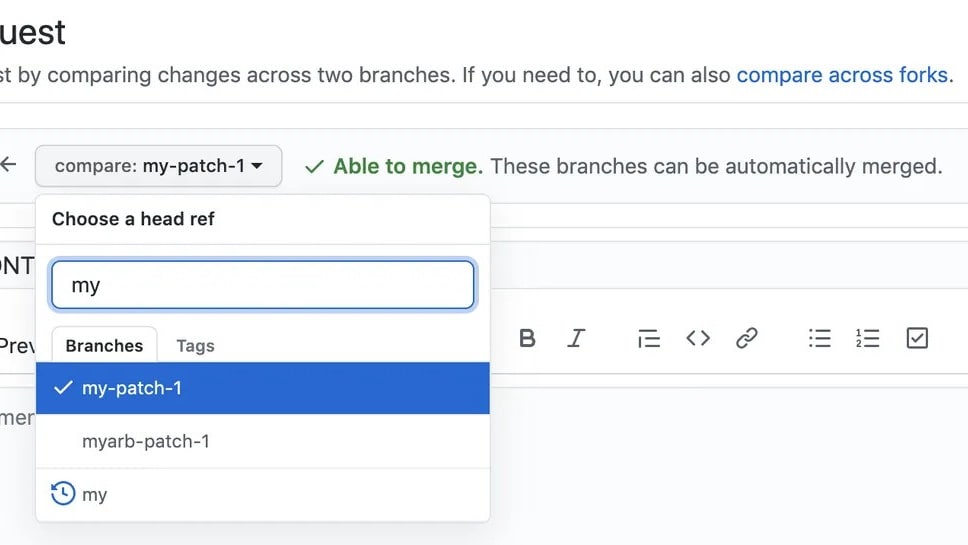
Both GitHub and GitLab provide robust source code management tools that facilitate version control and collaboration on code. They support essential features such as branching, merging, and reviewing, which are crucial for enhancing code quality and team coordination. With GitHub, developers can easily create pull requests for peer review, making it simple to propose, discuss, and commit changes. Similarly, GitLab offers merge requests, allowing for comprehensive code reviews and discussions directly within the platform.
Both platforms support Git workflows, which help teams manage code changes and maintain a clean commit history. Additionally, they provide features like code highlighting, inline commenting, and conflict resolution to streamline the development process. GitHub and GitLab integrate seamlessly with various development environments, enhancing their versatility and making them ideal for teams of all sizes. Therefore, when it comes to source code management, both GitLab and GitHub offer top-notch services, making this feature a tie between the two tools. Both platforms empower developers to collaborate effectively and maintain high-quality codebases.
GitHub Actions Streamline Automation Beyond GitLab's Testing Capabilities

GitHub Actions allow you to automate tasks and workflows directly from your repository, saving time and boosting efficiency by eliminating manual processes. With GitHub Actions, developers can easily set up continuous integration and deployment workflows using simple YAML configuration files, integrating seamlessly with existing repositories and enabling automation for tasks such as code testing, deployment, and notifications. This simplicity and direct integration make GitHub Actions a powerful tool for managing workflows without the need for additional setup.
While GitLab does offer automated testing across multiple testing types, such as unit and integration testing through its built-in CI/CD pipelines, GitHub Actions outshine GitLab in terms of simplicity and direct integration with the repository. GitHub's extensive marketplace provides a wide range of pre-built actions, allowing users to quickly implement automation for various tasks without writing complex scripts. This makes GitHub Actions particularly appealing for teams looking to quickly automate their development processes while maintaining flexibility and control over their workflows.
GitHub's Community-Driven Security Enhances Code Protection Over GitLab

While both platforms offer security features, GitHub leverages the power of a vast open-source community to enhance the security of your source code. This community feedback helps identify vulnerabilities and improve the performance of your applications by providing continuous insights and updates. GitHub's extensive network of developers frequently reviews and contributes to code, allowing for rapid identification and resolution of security issues through features like Dependabot alerts, which automatically notify developers of vulnerable dependencies.
Despite GitLab's powerful built-in security scanning that automatically detects vulnerabilities, such as static and dynamic application security testing (SAST/DAST), the community-driven approach of GitHub gives it an edge in this regard. GitHub also benefits from collaborative initiatives like GitHub Security Lab, which unites security researchers worldwide to find and fix vulnerabilities across various projects. This collaborative environment fosters a proactive security culture, making GitHub a more dynamic option for teams looking to leverage external expertise alongside their security practices.
GitLab Integrates Project Management More Seamlessly Than GitHub

GitLab combines issue tracking with project management capabilities all within the same platform, improving efficiency and collaboration. GitLab’s robust tools include issue tracking, project planning tools, and Kanban boards, allowing teams to organize tasks, prioritize work, and track progress visually. These features enable developers to manage entire projects directly from the GitLab interface, integrating discussions, milestones, and time tracking, which enhances workflow continuity. GitLab’s milestones allow teams to set goals and deadlines, while the Kanban boards provide a clear visual representation of project status.
GitHub, however, while offering built-in project management tools and issue tracking, doesn't provide the same depth of integration between these features as GitLab does. GitHub’s project boards and issues are effective for managing tasks, but they often require additional plugins or integrations to achieve the same comprehensive project management functionality as GitLab. This difference means that GitLab users can experience a more unified and efficient project management experience without needing external tools, making it particularly advantageous for teams looking to streamline their development processes within a single platform.
GitHub Edges Out GitLab for User-Friendliness

GitLab and GitHub, both popular SaaS tools for version control and collaboration, offer a range of features but differ significantly in their ease of use.
Considered through the lens of intuitiveness and user-friendliness, GitHub edges out GitLab as the more straightforward tool to use. One of GitHub's biggest strengths lies in its simplicity and clean, streamlined interface. For example, GitHub's intuitive design enables users to quickly access repositories, manage branches, and initiate pull requests with minimal learning curve. This ease of use extends to its collaborative features, such as code reviews and issue tracking, which are seamlessly integrated into the workflow. It's specifically designed for a seamless user experience, making it easy for newcomers to navigate and get to grips with quickly. This accessibility has made GitHub the go-to resource for many programmers worldwide.
In contrast, GitLab, while offering powerful DevOps capabilities and extensive CI/CD integrations, presents a steeper learning curve due to its more complex interface and feature-rich environment. GitLab's comprehensive tools may overwhelm beginners, requiring more time to master compared to GitHub's user-friendly approach. Despite GitLab's strengths in project management and security, its complexity may prove more daunting for beginners than GitHub's more user-friendly approach.
GitLab Surpasses GitHub with Comprehensive CI/CD Integration
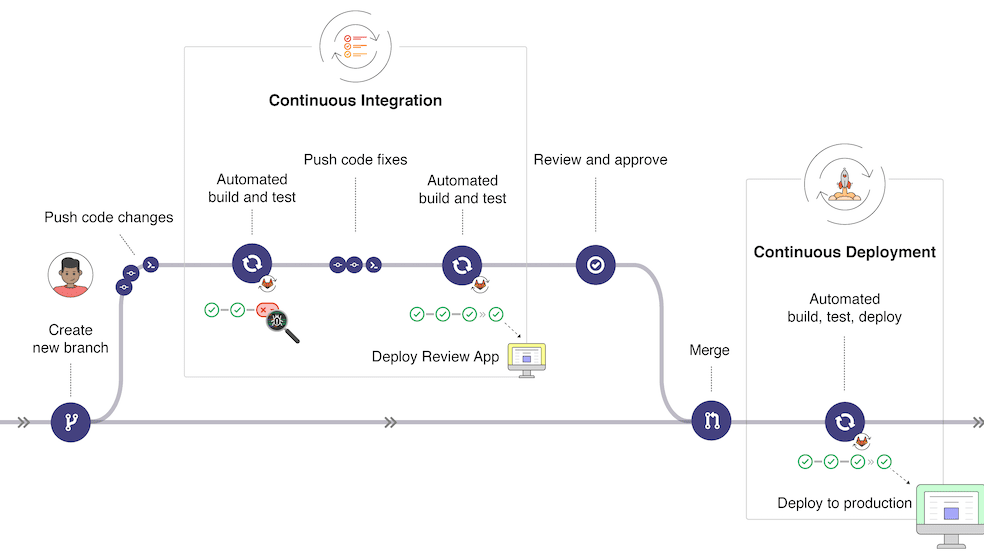
GitLab's Continuous Integration and Delivery (CI/CD) feature sets it apart from GitHub by providing a fully integrated solution that covers the entire development pipeline. GitLab CI/CD not only automates the testing and deployment of code, enabling faster releases with less risk, but also streamlines workflows from code commit to production. This integration allows developers to define CI/CD processes using a .gitlab-ci.yml file, ensuring consistency and efficiency across projects.
On the other hand, while GitHub does offer GitHub Actions for automating tasks and workflows, it falls short of providing an integrated solution for the entire development pipeline as seamlessly as GitLab does. GitHub Actions requires additional configuration and often relies on third-party tools to achieve full CI/CD capabilities, which can lead to fragmentation in the development process. In contrast, GitLab’s native support for stages, jobs, and pipelines ensures that all aspects of development, from building and testing to deployment, are managed within a single platform, providing a more cohesive and efficient workflow for development teams.
GitLab Leads GitHub in Integration Capabilities

Both GitLab and GitHub can be integrated with various tools and platforms, enhancing their functionalities according to the users' specific needs. However, the comparison between their integration possibilities presents a different winner.
On this front, GitLab takes the lead. GitLab stands out for its extensive breadth of built-in continuous integration/delivery (CI/CD) features, making it unnecessary for users to integrate with third-party applications. For example, GitLab’s CI/CD pipelines allow users to automate testing, deployment, and monitoring directly within the platform, streamlining the entire DevOps lifecycle. Furthermore, it offers a wider array of pre-configured integrations compared to GitHub, thus broadening its applicability across different workflows. GitLab integrates seamlessly with tools like Kubernetes for container orchestration and Prometheus for monitoring, enhancing its native functionality.
While GitHub also includes integrations with major productivity platforms, such as Jira and Slack, its reliance on third-party applications for certain functionalities may not always provide the smooth, unified experience available with GitLab. GitHub Actions, for instance, offers CI/CD capabilities but often requires additional configuration and extensions to match GitLab’s comprehensive built-in features. Consequently, from an integration perspective, GitLab may prove the more efficient and versatile choice for developers seeking an all-encompassing development environment.
08 GitLab vs GitHub: Which is the best for your business?
GitLab is the best tool for you if:
- You need an all-in-one DevOps solution that integrates code management, continuous integration, continuous deployment (CI/CD), and security features, providing seamless workflows from development to production within a single platform.
- Your team values built-in project management tools, such as issue tracking, kanban boards, and milestones, enabling effective collaboration, planning, and monitoring of project progress without requiring additional software.
- You require advanced security capabilities, including static and dynamic application security testing (SAST/DAST), vulnerability management, and compliance tracking, to ensure code security and maintain regulatory standards throughout the development lifecycle.
- You want the flexibility of both cloud-hosted and self-hosted deployment options, allowing you to maintain control over your infrastructure, data, and custom configurations according to your organization’s requirements.
- Your development process benefits from extensive automation capabilities with GitLab’s integrated CI/CD pipelines, enabling automatic testing, deployment, and monitoring to accelerate release cycles and reduce manual intervention.
 You need an all-in-one DevOps solution that integrates code management, continuous integration, continuous deployment (CI/CD), and security features, providing seamless workflows from development to production within a single platform.
GitHub is the best tool for you if:
- You prioritize collaboration and community engagement, as GitHub provides an extensive network of developers, facilitating open-source contributions and enabling efficient collaboration through features like pull requests and issue tracking.
- You prefer a user-friendly interface with intuitive navigation, making it easy for developers of all levels to manage repositories, perform code reviews, and collaborate on projects seamlessly without a steep learning curve.
- Your team leverages third-party integrations extensively, as GitHub offers a vast ecosystem of tools and services, including GitHub Actions for automation and integrations with popular project management and CI/CD tools.
- You want a platform with robust social coding features, allowing developers to engage with the broader developer community, participate in discussions, and showcase their work through profiles and repositories.
- You require strong support for open-source projects, as GitHub provides excellent visibility, collaboration tools, and community support, making it the go-to platform for hosting and managing open-source initiatives.
GitLab
Used by 648 members
12 months free on the Ultimate license
Save up to $10,440
GitHub
Used by 1801 members
$10,000 in credits for 12 months
Save up to $7,560
09 Alternatives to GitLab & GitHub

Lovable
Used by 3370 members
15% off annual Pro and Business plans
Save up to $500

Microsoft Azure
Used by 2398 members
$5,000 in credits for 6 months if you didn't raise funds // Up to $150,000 in credits for 2 years if you did
Save up to $150,000

Linear
Used by 874 members

Replit
Used by 558 members
10 Promotions on Web Development software
GitLab and GitHub are great tools, but Secret offers promo codes with discounts on over 2190+ different SaaS solutions. New deals are added regularly, helping you save money on your online subscriptions. Get access to codes for other Web Development software you might want to purchase

Deal for Shopify
$1/month for the first 3 months + 25% off annual plans

JetBrains free credits
6 months free + 50% off all JetBrains tools (up to 10 licences)

Typeform deal
40% off all annual plans

Tally coupon
50% off for 1 year

Cobalt offer
75% off the Growth and Scale plans for 1 year

Namecheap promo code
Additional 10% off domain registration / 65% off Shared hosting packages for 1 year

Unbounce promotion
20% off for 3 months or 35% off for 1 year

Webflow discounts
1 year free on a CMS site plan

Promo codes for Squarespace
Additional 10% off across all plans

QuickNode free credits
$600 in credits for 12 months
Start saving on the best SaaS
Secret has already helped tens of thousands of startups save millions on the best SaaS like Microsoft Teams, Google Workspace & many more. Join Secret now to buy software the smart way.