





A powerful no-code development platform can accelerate your application-building process, making it easier to create web and mobile apps without extensive coding knowledge. It can save you time and resources while allowing you to focus on bringing your ideas to life.
In this article, we'll compare two popular no-code development platforms, Bubble and Flutterflow. While both platforms offer no-code app development capabilities, they have distinct differences in terms of their features and target audiences. By exploring these differences and understanding the key features of each platform, you can make an informed decision about whether Bubble or Flutterflow is the right choice for your app development needs. Let's dive into the Bubble vs Flutterflow comparison.
- 01 Bubble vs FlutterFlow: overview
- 02 What's the difference between Bubble and FlutterFlow?
- 03 Bubble pros and cons
- 04 FlutterFlow pros and cons
- 05 Bubble compared to FlutterFlow
- 06 FlutterFlow compared to Bubble
- 07 Features comparison
- 08 Bubble vs FlutterFlow: Which is the best for your business?
- 09 Alternatives to Bubble & FlutterFlow
- 10 Promotions on No-Code Development software
Start saving on the best SaaS
Secret has already helped tens of thousands of startups save millions on the best SaaS like Microsoft Teams, Google Workspace & many more. Join Secret now to buy software the smart way.

01 Bubble vs FlutterFlow: overview
Bubble and Flutterflow are two prominent contenders in the world of no-code development platforms, each bringing unique strengths to the table to address diverse application development needs.
Bubble distinguishes itself with its intuitive visual interface and robust capabilities for creating web applications. It is favored by entrepreneurs and startups for its versatility in building complex web apps without coding. Flutterflow, on the other hand, excels in simplifying the creation of responsive web and mobile applications through its no-code framework. It stands out by offering a user-friendly platform for designing and developing applications that work seamlessly across various devices and screen sizes.
When deliberating between Bubble and Flutterflow, it's essential to assess your specific project requirements and development objectives. If your goal is to build custom web applications with intricate functionality, Bubble's visual development environment may be the ideal choice. Conversely, if you prioritize creating responsive web and mobile apps swiftly and efficiently, Flutterflow's no-code framework might be the better fit for your needs.

SEO
FlutterFlow is a convenient tool for rapidly creating web applications that are both responsive and robust. However, its effectiveness in terms of optimizing websites for natural SEO may be limited. Firebase integration helps solve the issues, though. Bubble, however, provides users with the option to personalize their website in a way that facilitates easy indexing on search engines. While the automated tool is already highly optimized, users have the flexibility to fine-tune the settings in order to enhance the SEO of their site.

Bubble
FlutterFlow
Responsiveness
When considering responsiveness, FlutterFlow, and Bubble both provide a responsive engine that enables the creation of applications that appear visually appealing on different screen dimensions.
Bubble
FlutterFlow
Integrations
Bubble provides a solid integration ecosystem although it may not have as extensive a library of integrations as Flutterflow which has over 1,000 integrations available, including popular tools like Shopify, Zapier, and Airtable.
Bubble
FlutterFlow
Collaboration
Bubble, similar to FlutterFlow, provides an extensive array of native functionalities that promote effective teamwork. FlutterFlow stands out with its innovative real-time collaboration feature, enabling multiple developers to collaborate on the same project or page simultaneously. This unique functionality empowers each developer to make individual changes to the page without disrupting the progress of others.
Bubble
FlutterFlow
Pricing Plan
Both platforms offer similar value for money, meaning that if you need such a solution, both are equally valid solutions.
Bubble
FlutterFlow
Customization
Flutterflow offers an extensive assortment of pre-made elements and templates, granting users the ability to extensively personalize app interfaces and arrangements. Conversely, Bubble places a greater emphasis on flexibility and customization.
Bubble
FlutterFlow
Customer Reviews
Both platforms are highly rated by users on Capterra, with Bubble coming on top only slightly.
Bubble
FlutterFlow
Customer Support
Neither platform offers a perfect customer service experience. Yet, Bubble comes out on top as they’re quicker to respond compared to FlutterFlow.
Bubble
FlutterFlow
Plugin library
FlutterFlow offers a wide range of plugins for various functionalities. One of these is FlutterFire, which includes integrated services like Auth, cloud functions, and firestorm. Additionally, there is Flutter Secure Storage, which ensures the protection of sensitive data within the application. Bubble also offers a variety of plugins. If you need to access external APIs and retrieve data for your application, you can utilize the Bubble API connector. Additionally, there is Stripe.js available, which enables you to seamlessly incorporate the Stripe online payment system into your applications.
Bubble
FlutterFlow
Ease of Use
Users rate Bubble as harder to use compared to FlutterFlow, whereas our experience is completely reversed, with FlutterFlow being the more complex solution overall.
Bubble
FlutterFlow
02 What's the difference between Bubble and FlutterFlow?

Bubble.io is notable for its potent visual editor.
Bubble
You don't need to be a coder to build software.

FlutterFlow simplifies app development with its user-friendly interface.
FlutterFlow
FlutterFlow is a revolutionary app development platform that simplifies the process of creating mobile applications. With its intuitive, drag-and-drop interface, it empowers both novice and experienced developers to design, develop, and deploy fully-functional apps with ease.
Bubble.io is notable for its potent visual editor. Although it has a steeper learning curve compared to other platforms, users can access its extensive customization capabilities and advanced features once they master its interface. The platform’s drag-and-drop interface and responsive design tools allow users to create customized web applications that adjust to various screen sizes and devices seamlessly. When it comes to team-based projects, Bubble.io’s robust collaboration capabilities shine. The platform supports multiple users working on a single application, fostering effective teamwork. Additionally, Bubble.io’s recently updated version control system allows admins to manage permissions based on roles, leading to streamlined collaboration and efficient resource management.
Contrastingly, FlutterFlow simplifies app development with its user-friendly interface. It offers customizable branding and responsive layouts, allowing users to focus on visual elements without worrying about the underlying structure. A key feature is the extensive collection of pre-built widgets, which can be easily customized. These widgets serve as reusable components, ensuring consistent functionality and design throughout the app. By utilizing components, users can save time and adhere to the DRY principle, avoiding repetitive work and enabling efficient app maintenance and updates. On the other hand, FlutterFlow stands out with its support for real-time collaboration. Users can simultaneously work on different pages of a project, enhancing productivity. The platform provides flexibility with the option to enable or disable real-time collaboration based on specific workflow requirements. By assigning roles to team members, different levels of access can be granted. Additionally, FlutterFlow incorporates history logs that track changes made to the project, allowing easy tracking and reference of modifications.
In the end, the decision between these two platforms will come down to your specific needs. While they have similarities, there are quite a few differences that can help you choose the best tool for your needs.

Bubble
You don't need to be a coder to build software.
30% off on monthly plans for 1 year
Save up to $957
03 Bubble pros and cons
What are the advantages of Bubble?
- No-code development: Bubble allows users with little to no coding experience to create web applications. Its visual development interface and drag-and-drop functionality make it accessible to a wide range of users.

- Rapid prototyping: You can quickly prototype and build minimum viable products (MVPs) and proof-of-concept applications, which is great for startups and entrepreneurs looking to validate their ideas.
- Extensive feature set: Bubble offers a rich set of features, including databases, user authentication, APIs, and more. This versatility enables the creation of complex web apps.
- Scalability: While Bubble is great for getting started, it can also support the growth of your application. You can scale your app as your user base expands.
- Community and support: Bubble has an active user community and offers resources like forums, tutorials, and templates to help users get started and solve problems.
What are the disadvantages of Bubble?
- Learning curve: Despite being a no-code platform, Bubble still has a learning curve, especially for those who are new to web development concepts and best practices.

- Limited control: While Bubble offers extensive functionality, there may be cases where you need more fine-grained control over the code or specific features that aren't readily available.
- Pricing: Bubble's pricing can become costly as your app grows and attracts more users, making it less suitable for budget-constrained projects.
- Performance: Some users have reported performance issues with Bubble-based applications, especially when dealing with large datasets or complex logic.
- Vendor lock-in: When you build an application with Bubble, you're tied to their platform. Migrating your application to another platform or technology can be challenging, which may limit your flexibility in the long term.
Compare Bubble to other tools


AppGyver vs Bubble


Bildr vs Bubble

Webflow vs Bubble

Retool vs Bubble

Bubble vs Airtable

Softr vs Bubble
04 FlutterFlow pros and cons
What are the advantages of FlutterFlow?
- Rapid development: FlutterFlow allows for the rapid development of both web and mobile applications. You can create functional prototypes and even production-ready apps quickly.
- Native-like performance: Apps built with FlutterFlow benefit from the native-like performance of Flutter, ensuring smooth and responsive user experiences.
- No-code or low-code: FlutterFlow offers a visual, no-code interface for building applications, making it accessible to individuals without extensive coding experience. However, it also supports custom code integration for more advanced users.
- Cross-platform: FlutterFlow facilitates the development of applications that work seamlessly across various platforms, including iOS, Android, and web. This cross-platform compatibility can save time and effort.
- Rich component library: FlutterFlow provides a library of pre-designed components and templates, speeding up the development process and reducing the need for designing from scratch.
What are the disadvantages of FlutterFlow?
- Limited customization: While FlutterFlow offers a variety of components and widgets, you may encounter limitations when trying to implement highly customized or unique features.
- Learning curve: Despite being a no-code platform, FlutterFlow has a learning curve, especially for individuals who are not familiar with Flutter's ecosystem and widget-based development.
- Dependency on third-party services: Some advanced features may require integration with third-party services or custom code, which can add complexity to your project.
- Limited documentation: As a relatively new platform, FlutterFlow's documentation may not be as extensive or mature as other development tools, which can make troubleshooting and learning more challenging.
- Pricing: While there is a free plan, more extensive or commercial projects may incur costs, and pricing can increase as your app grows and attracts more users, impacting the affordability of the platform.
05 Bubble compared to FlutterFlow
Bubble and Flutterflow are both no-code development platforms, but they differ in key ways. Bubble excels in web app development, offering a robust visual interface and features for creating complex web applications. It's user-friendly but can have a learning curve for novices.
In contrast, Flutterflow is ideal for building responsive web and mobile apps using Google's Flutter framework. It provides a seamless cross-platform experience with native-like performance. While Bubble offers versatility, Flutterflow prioritizes mobile compatibility. The choice between them depends on your project's needs: Bubble for web apps with a steeper learning curve, or Flutterflow for cross-platform mobile and web apps with faster development.
Is Bubble better than FlutterFlow?
 Is Bubble better than FlutterFlow?
The question of whether Bubble is better than Flutterflow depends on your specific needs and preferences. Bubble is a robust no-code platform known for web app development, offering a wide range of features but with a learning curve. In contrast, Flutterflow specializes in cross-platform mobile and web app development, providing native-like performance. Bubble may be preferable for complex web applications, while Flutterflow excels in responsive and fast cross-platform app creation.
The choice should align with your project's objectives, with Bubble's versatility catering to web-focused projects and Flutterflow prioritizing mobile compatibility and rapid development.
What is Bubble best used for?
Bubble is best used for creating web applications with diverse functionalities. It excels in no-code web development, making it ideal for entrepreneurs, startups, and businesses looking to build custom web apps without extensive coding.
Bubble's visual interface and drag-and-drop features enable users to prototype, design, and develop web applications quickly. It's well-suited for projects like CRM systems, e-commerce platforms, marketplaces, and data-driven web apps. While it can handle various complex features and integrations, Bubble may have a learning curve for those new to web development. Nonetheless, it offers a powerful toolset for turning creative ideas into functional web applications.
Can Bubble replace FlutterFlow?
Bubble and Flutterflow serve different purposes in the no-code development landscape. Bubble specializes in web application development, offering a visual interface for creating complex web apps. In contrast, Flutterflow focuses on cross-platform mobile and web app development using Google's Flutter framework.
While both platforms share some similarities, they are not direct replacements for each other. Bubble is best suited for web app projects, while Flutterflow shines in building responsive cross-platform mobile and web apps. The choice between them should be based on your specific project requirements and whether you prioritize web or cross-platform mobile development.
Is Bubble cheaper than FlutterFlow?
Bubble and Flutterflow offer different pricing structures that can vary depending on your usage and requirements. Bubble’s pricing includes a free plan and a tiered subscription model based on features and usage. While it can be cost-effective for smaller projects, costs may increase as your app grows and attracts more users.
Flutterflow also offers a free plan and various pricing tiers. The cost depends on factors like the number of projects, collaborators, and features you need. It can be competitively priced for cross-platform mobile and web app development.
Is there a better No-Code Development software than Bubble?
Determining if there is a "better" software than Bubble relies on your specific no-code development needs. Bubble stands out with its robust web app creation capabilities and visual interface.
However, alternatives to Bubble like Adalo, OutSystems, and Appgyver may be more suitable for certain users. Adalo offers a user-friendly environment for building mobile apps with a focus on design. OutSystems is a low-code platform that caters to enterprise-level app development with a broader scope. Appgyver provides a versatile and cost-effective option for building web and mobile apps.
Bubble
You don't need to be a coder to build software.
30% off on monthly plans for 1 year
Save up to $957
06 FlutterFlow compared to Bubble
Flutterflow and Bubble are both no-code development platforms, but they have distinct strengths. Flutterflow is geared towards cross-platform mobile and web app development using Google's Flutter framework. It provides native-like performance, real-time previews, and a mobile-first approach.
In contrast, Bubble excels in web app creation with a visual interface for designing complex web applications. It offers a wide array of features, including databases and integrations. The choice between Flutterflow and Bubble depends on your project requirements. Flutterflow is ideal for responsive cross-platform apps, while Bubble is well-suited for web-focused applications.
Is FlutterFlow better than Bubble?
Whether Flutterflow is better than Bubble depends on your specific development goals and preferences. Flutterflow is designed for cross-platform mobile and web app development using Google's Flutter framework. It offers native-like performance and is ideal for responsive, fast apps. On the other hand, Bubble is a web-focused no-code platform, excelling in web application development with a robust visual interface.
The choice between Flutterflow and Bubble hinges on your project requirements. If you prioritize cross-platform mobile and web app development with a mobile-first approach, Flutterflow may be the better fit. However, if your focus is primarily web app development, then Bubble's web-centric features might make it a more suitable choice.
What is FlutterFlow best used for?
Flutterflow is best used for creating responsive cross-platform mobile and web applications with ease. Leveraging Google's Flutter framework, it offers a visual no-code or low-code interface for app development. This platform excels in delivering native-like performance, ensuring a smooth user experience across various devices.
It's particularly suitable for building applications where a mobile-first approach is essential, such as e-commerce apps, productivity tools, or mobile-responsive websites. Flutterflow's real-time previews and extensive component library make it an excellent choice for both novice and experienced developers looking to expedite the development of high-quality, responsive applications for a wide range of purposes.
Can FlutterFlow replace Bubble?
Flutterflow and Bubble serve different purposes in the no-code development realm, and whether one can replace the other depends on your specific project needs. Flutterflow excels in cross-platform mobile and web app development using Google's Flutter framework, focusing on responsive, native-like performance. In contrast, Bubble is designed for web application development with a visual interface. While Flutterflow can handle some web app development, it may not offer the same extensive web-focused features as Bubble.
The decision to replace Bubble with Flutterflow should be based on your target platforms, project requirements, and your familiarity with each platform.
Is FlutterFlow cheaper than Bubble?
The relative cost of Flutterflow versus Bubble depends on your specific project, requirements, and usage patterns. Both platforms offer free plans, but costs can escalate with increased usage and premium features. Flutterflow's pricing structure considers factors like project count, collaborators, and feature access, while Bubble's pricing model takes into account factors such as application capacity and usage.
Ultimately, whether Flutterflow is cheaper than Bubble hinges on the scale and nature of your project. It's essential to evaluate the pricing details of each platform and match them with your project's specific needs and budget to determine which one offers the better value for your use case.
Is there a better Application Development software than FlutterFlow?
Determining if there's a superior software to Flutterflow depends on your unique app development goals. Flutterflow is adept at cross-platform mobile and web app development, ensuring native-level performance and real-time previews.
However, alternatives to Flutterflow like Adalo, OutSystems, and AppSheet may be better suited to specific use cases. Adalo places emphasis on mobile app design and creation, while OutSystems targets enterprise-grade app development with a broader scope. AppSheet offers versatility and cost-effectiveness. The selection of superior software should align with your project's complexity, design preferences, scalability needs, and budget constraints.
07 Features comparison
FlutterFlow Excels in Cross-Platform Development Over Bubble

The platform empowers developers to create projects that seamlessly function across various platforms, including Android, iOS, and the web.
When it comes to cross-platform development, FlutterFlow stands out with a distinct advantage. The platform empowers developers to create projects that seamlessly function across various platforms, including Android, iOS, and the web. This cross-platform compatibility offers significant time and cost savings in the app development process. Developers can write code once and deploy it across multiple platforms, streamlining the development workflow and ensuring a consistent user experience.
On the other hand, while Bubble provides robust hosting options and application control, it does not explicitly emphasize cross-platform capability. This makes FlutterFlow the preferred choice for those seeking a versatile tool that simplifies cross-platform development, making it ideal for projects targeting a broad range of devices and operating systems.
Bubble and FlutterFlow Equally Capable in Version Control and Rollback

Bubble provides a version control feature that allows users to save different iterations of their app and seamlessly switch between them or perform rollbacks when necessary.
In the realm of version control and rollback, both Bubble and FlutterFlow offer robust capabilities, ensuring the safety of your app development process. Bubble provides a version control feature that allows users to save different iterations of their app and seamlessly switch between them or perform rollbacks when necessary. This feature provides a valuable safety net, allowing users to experiment with new features or designs while preserving the ability to revert to previous working versions if needed.
While FlutterFlow's features may not explicitly mention version control, its integration with code management tools like GitHub and GitLab suggests that similar functionality is accessible through these platforms. By leveraging these integrations, developers can effectively manage version control and rollbacks.
Bubble's Robust Collaboration Toolkit Outpaces FlutterFlow
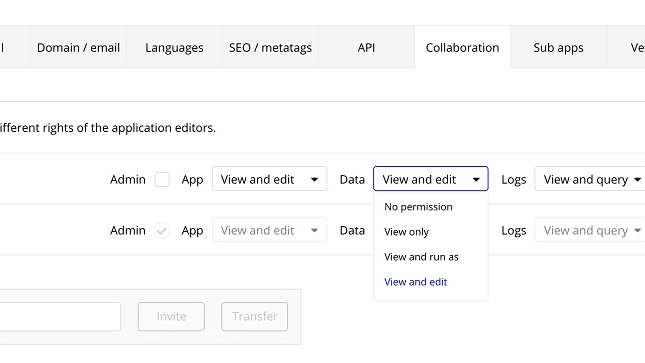
Bubble's collaboration capabilities enable real-time teamwork, offering users the ability to assign roles and permissions, track changes, and leave comments.
When it comes to collaboration tools, Bubble takes the lead with its comprehensive suite of features. Bubble's collaboration capabilities enable real-time teamwork, offering users the ability to assign roles and permissions, track changes, and leave comments. This interactive environment enhances coordination and ensures a seamless development process. For instance, team members can work collaboratively on a web application, providing instant feedback and updates for efficient project management.
In contrast, FlutterFlow prioritizes code management integration with GitHub and GitLab, which, while valuable for version control, may not offer the same level of interactive collaboration as Bubble's feature set. Therefore, Bubble emerges as the preferred choice for those seeking a robust platform to facilitate seamless and efficient teamwork during application development.
Bubble's Creative Freedom Surpasses FlutterFlow for No-Code App Design

Bubble's design interface not only supports responsive layouts but also offers robust animation capabilities, enabling the creation of dynamic and engaging web applications.
When it comes to no-code app design, Bubble takes the lead with its intuitive drag-and-drop builder, offering unmatched creative freedom. Users can craft pixel-perfect designs with ease and precision, allowing them to bring their vision to life. Bubble's design interface not only supports responsive layouts but also offers robust animation capabilities, enabling the creation of dynamic and engaging web applications. For instance, users can seamlessly incorporate animations to enhance user interactions and improve the overall user experience.
On the other hand, while FlutterFlow provides a design interface with support for responsive layouts, it may not offer the same level of creative control and animation capabilities as Bubble. The comparison highlights Bubble's advantage for those seeking a no-code platform that offers unparalleled design flexibility and animation options.
Bubble is Best at One-Click Hosting Compared to FlutterFlow

Bubble's hosting service is designed to scale seamlessly as your site's traffic grows, delivering a secure and production-ready infrastructure from the outset.
In the realm of hosting and deployment, Bubble takes the lead with its one-click hosting feature, offering unparalleled convenience for launching applications instantly. Bubble's hosting service is designed to scale seamlessly as your site's traffic grows, delivering a secure and production-ready infrastructure from the outset. This ensures that your web application remains responsive and available to users as your audience expands. For instance, users can effortlessly deploy their projects with a simple click, confident in the knowledge that Bubble's hosting infrastructure will handle traffic surges effectively.
In contrast, while FlutterFlow offers straightforward deployment, it may not offer the same level of scalability and security as Bubble. This comparison highlights Bubble as the preferred choice for those seeking a hassle-free hosting solution with the assurance of robust scalability and security for their web applications.
Bubble's User-Friendly Approach Surpasses Flutterflow

Bubble's intuitive drag-and-drop interface empowers users to effortlessly craft and deploy web applications, even without prior coding experience
When assessing user-friendliness, Bubble emerges as a notably more accessible platform compared to Flutterflow. Bubble's intuitive drag-and-drop interface empowers users to effortlessly craft and deploy web applications, even without prior coding experience. For beginners, this visual approach provides a gentle learning curve. Additionally, seasoned developers benefit from the interface's efficiency, streamlining repetitive tasks.
Conversely, Flutterflow also integrates drag-and-drop functionality, but leans on familiarity with Flutter's coding principles. This makes it a tad more challenging for newcomers. For instance, creating intricate mobile-responsive designs in Flutterflow may demand a deeper understanding of Flutter's framework, potentially posing hurdles for less-experienced developers.
Flutterflow's Integration Superiority Over Bubble

Flutterflow boasts seamless Firebase integration right out of the box
When comparing integration capabilities, Flutterflow holds a slight advantage over Bubble. Flutterflow boasts seamless Firebase integration right out of the box, simplifying tasks such as database management and authentication. This built-in support allows for a smoother development process. Moreover, Flutterflow offers straightforward API integration options, expanding its potential for integrating with a variety of third-party services.
In contrast, Bubble provides a substantial array of pre-built integrations and offers the flexibility to connect with third-party services through APIs. However, mastering this capability may entail a steeper learning curve compared to the user-friendly integration options available within Flutterflow. As a result, Flutterflow may be the preferred choice for those seeking hassle-free and robust integration possibilities.
08 Bubble vs FlutterFlow: Which is the best for your business?
Bubble is the best tool for you if:
- You want to create web applications without coding, thanks to its intuitive visual interface and no-code approach.
- You need a flexible platform to rapidly prototype and iterate on your app ideas, allowing for quick development and testing.
- You require full control over the design and functionality of your web application, allowing for customizations to meet your unique requirements.
- You want to save development time and costs, as it eliminates the need to hire or rely on developers for building complex web apps.
- You're looking for a scalable solution, capable of handling both simple landing pages and sophisticated web applications as your project grows.
 You want to create web applications without coding, thanks to its intuitive visual interface and no-code approach.
FlutterFlow is the best tool for you if:
- You're a developer or designer seeking a no-code platform to create cross-platform mobile apps with ease and speed.
- You value a robust ecosystem of pre-built widgets and templates, accelerating app development and design workflows.
- You want to harness the power of Google's Flutter framework without extensive coding knowledge, making app creation accessible to a broader audience.
- You're looking for a platform that offers seamless integration with popular databases and APIs, facilitating data management and app functionality.
- You require a platform that supports responsive design, ensuring your mobile apps adapt flawlessly to various screen sizes and orientations.
Bubble
You don't need to be a coder to build software.
30% off on monthly plans for 1 year
Save up to $957
09 Alternatives to Bubble & FlutterFlow

Airtable
Used by 8175 members
$1,000 in credits for 1 year
Save up to $1,000

Webflow
Used by 4660 members
1 year free on a CMS site plan
Save up to $348

Slack
Used by 3696 members
25% off new plan purchases
Save up to $9,000

Base44
Used by 3315 members
10 Promotions on No-Code Development software
Bubble and FlutterFlow are great tools, but Secret offers promo codes with discounts on over 2190+ different SaaS solutions. New deals are added regularly, helping you save money on your online subscriptions. Get access to codes for other No-Code Development software you might want to purchase

Make discounts
3 months free on the Teams plan (240k credits included)

OpenAI - ChatGPT discount code
$300 in free credits across OpenAI's models through LLM API
Webflow free credits
1 year free on a CMS site plan

Auth0 promo
12 months free

Softr coupon code 2026
20% off monthly or annual Professional plan

Mobbin promo code
20% off for 1 year on the Pro plan
Airtable promo code 2026
$1,000 in credits for 1 year

Lovable coupon
15% off annual Pro and Business plans

Deal for Notion
6 months free on the Business plan with Unlimited AI

AWS Activate promo
Up to $100,000 in credits or 20-50% off your monthly spend through an AWS partner (must be spending $100+/month)
Start saving on the best SaaS
Secret has already helped tens of thousands of startups save millions on the best SaaS like Microsoft Teams, Google Workspace & many more. Join Secret now to buy software the smart way.