


If you’re looking for a tool to create your own internal or web app, you’re spoilt for choice. With a range of no-code and low-code solutions on offer, the hard part is choosing the right one for your business. Retool and Bubble are two leaders in this space, each with unique advantages and drawbacks.
To help you select the best platform for your business, we compare Retool vs Bubble, including their key features, differences, and use cases. With this information, you’ll be better equipped to identify the platform that addresses your business needs, priorities, and objectives. Read on to learn more!
- 01 Retool vs Bubble: overview
- 02 What's the difference between Retool and Bubble?
- 03 Retool pros and cons
- 04 Bubble pros and cons
- 05 Retool compared to Bubble
- 06 Bubble compared to Retool
- 07 Features comparison
- 08 Retool vs Bubble: Which is the best for your business?
- 09 Alternatives to Retool & Bubble
- 10 Promotions on Application Development software
Start saving on the best SaaS
Secret has already helped tens of thousands of startups save millions on the best SaaS like Microsoft Teams, Google Workspace & many more. Join Secret now to buy software the smart way.

01 Retool vs Bubble: overview
Retool and Bubble are notable competitors in the realm of no-code and low-code application development platforms, each presenting a distinctive array of features and functionalities.
Retool stands out for its ability to rapidly build internal tools and applications. With its drag-and-drop interface, users can easily connect to a variety of data sources, from databases to APIs, and create custom applications tailored to their business needs. Bubble, in contrast, is renowned for its no-code approach to building web applications. It provides a platform where users can design, develop, and deploy applications without writing a single line of code.
Let's dive deeper into the Retool vs. Bubble comparison to guide you in choosing the most appropriate development platform tailored to your specific business requirements.

Pricing Plan
Retool and Bubble offer free plans. Retool’s paid plans start at $10/month/standard user + $5/month/end user. Bubble’s start at $29/month.

Retool
Bubble
Customer Support
Both platforms offer email service support, as well as a robust user community and online support resources.
Retool
Bubble
Ease of Use
Retool is user-friendly for software developers and those with some technical expertise. Bubble doesn’t require coding knowledge and offers extensive support resources for users.
Retool
Bubble
App builder
Retool is a low-code app builder using pre-built components, templates, and coding. Bubble’s drag-and-drop interface requires no coding skills.
Retool
Bubble
Security
Both platforms take extensive security precautions to protect user data, including SOC 2 Type 11 certification, database monitoring, and advanced DDoS protection.
Retool
Bubble
Customer Reviews
Both platforms receive positive reviews. Users especially like Retool’s ease of use and reliability, while Bubble reviewers note the robust community support available.
Retool
Bubble
AI
Retool AI allows users to add AI blocks to apps and workflows. Bubble users can connect apps to OpenAI’s API and use community-built AI plug-ins.
Retool
Bubble
Version control
Retool’s Releases feature keeps track of versions. Bubble offers basic version control available with all plans. Higher-tier plans include advanced controls.
Retool
Bubble
Integrations
Retool includes 44+ native database and API integrations, including BigQuery, Asana, and Jira. Bubble offers 56+ native integrations, including Amazon, Discord, and WordPress.
Retool
Bubble
Templates
Retool has 435+ native templates, while Bubble offers 1000+ community-built templates.
Retool
Bubble
02 What's the difference between Retool and Bubble?
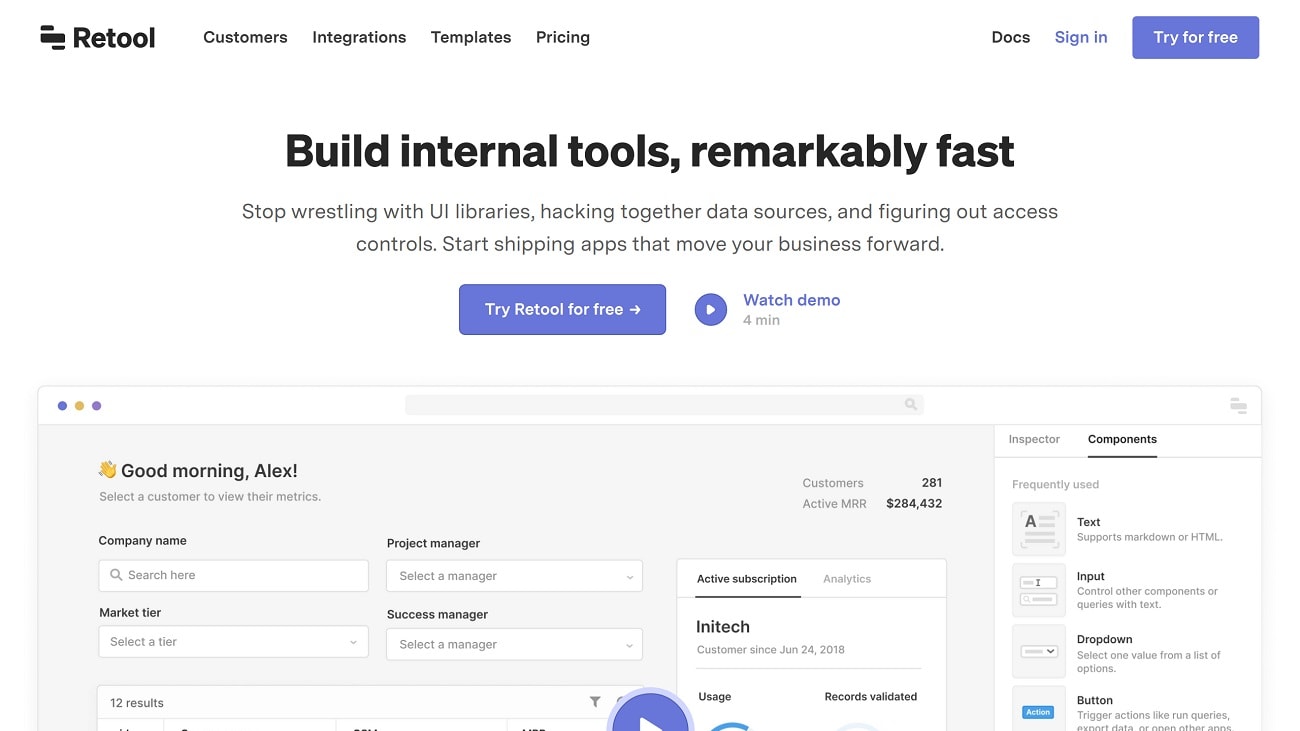
Retool is a low-code platform designed primarily for users with development experience.
Retool
Design and create internal tools for your company

Bubble is a no-code tool. It requires no technical expertise and is often used to build consumer-facing web applications such as SaaS and e-commerce stores.
Bubble
Bubble is a code-free programming language that lets you build and host web applications without engineers.
Retool and Bubble are both no-code/low-code platforms that allow you to build internal and web apps to streamline your business. However, there are some key differences between them. Firstly, the platforms have different target audiences. Retool is a low-code platform primarily designed for users with developer expertise. It mainly caters to enterprises wanting to build internal tools like web and mobile apps and workflows. The platform emphasizes flexibility and customization. For example, users can write their own JavaScript code to customize an app or workflow.
Compared to Retool, Bubble is a no-code tool. It requires no technical expertise and is often used to build consumer-facing web apps like SaaS and e-commerce stores. Although its advanced features can involve an initial learning curve, Bubble provides extensive training resources and a supportive user community. While it may not offer the same level of technical customization as Retool, it is a more user-friendly platform for beginners.
The platforms’ pricing strategy is another fundamental difference. Retool charges per user, for both standard users (users who edit apps or workflows) and end users (users who can’t edit apps or workflows). Its Team plan costs $10/month/standard user plus $5/month/end user. Its Business plan costs $50/month/standard user plus $15/month/end user. If your app has many end users, this can add up and Retool may not be the right tool for you. It’s designed primarily for creating internal business apps with a limited and predictable number of end users, for example, an HR team. In comparison, Bubble charges a flat monthly rate. Its plans start at $29/month, with no additional costs. However, Bubble limits the number of app editors, so pay attention when assessing whether it’s right for you.

Retool
Used by 1102 members
1 year free on the monthly Team or Business plan
Save up to $60,000

Bubble
Used by 1764 members
30% off on monthly plans for 1 year
Save up to $957
03 Retool pros and cons
What are the advantages of Retool?
- Flexibility with data sources: Retool can integrate with nearly any data source, be it databases, RESTful APIs, or third-party platforms. This makes it a versatile tool for various applications.

- Rapid development: The drag-and-drop interface coupled with the ability to use custom JavaScript logic means you can quickly build out powerful applications.
- Customizable components: Retool provides a wide range of UI components, from basic form inputs to complex tables and charts, all of which can be customized to fit the specific needs of the application.
- Granular access control: Retool allows for detailed user permissions and role-based access controls. This ensures that sensitive data and functionality can be properly gated.
- Extensible with code: For developers, Retool doesn’t limit you to just the built-in components and functionalities. You can extend its capabilities by adding custom code when needed.
What are the disadvantages of Retool?
- Learning curve: Although Retool is designed to be user-friendly, it might require some time for users unfamiliar with databases and logic to get fully accustomed to the platform.

- Performance concerns: For complex applications with a large amount of data or intricate workflows, performance might sometimes lag.
- Appearance and theming: While Retool provides a variety of UI components, its theming options can be limited, which might not be suitable for those looking for extensive branding or specific design aesthetics.
- Dependence on external services: Retool is highly reliant on the APIs and databases it integrates with. If there's an issue with an external service, it can directly impact the functionality of the Retool app.
- Cost: For small teams or individual developers, the pricing might seem on the higher side, especially when scaling up with more users and features.
Compare Retool to other tools


Airtable vs Retool

Softr vs Retool
04 Bubble pros and cons
What are the advantages of Bubble?
- True no-code platform: Bubble's visual interface allows users to build entire web applications without writing any code, making it accessible to non-developers and people without a technical background.
- Integrated hosting: Bubble hosts the applications you build on its platform, simplifying the deployment process and reducing the need for external hosting services.
- Extensive plugin ecosystem: Bubble's marketplace offers a wide range of plugins, allowing users to integrate with popular third-party services and add specialized functionality to their applications.
- Responsive design: Bubble provides tools for building responsive web applications, ensuring that applications look and work well on various device sizes.
- Customizable database: Bubble includes a built-in database solution that's visual and user-friendly, letting users set up and manage data structures without the need for external database systems.
What are the disadvantages of Bubble?
- Performance issues: As applications grow in complexity, users might experience performance slowdowns, especially if not optimized well.
- Learning curve: Despite being a no-code platform, there's still a learning curve to understand Bubble's logic, workflows, and best practices.
- Limitations with custom code: While Bubble offers no-code solutions, there might be limitations when trying to implement very specific or intricate features. Incorporating custom code isn't as straightforward as in some other platforms.
- Scalability concerns: For very large-scale applications or those with extremely high traffic, Bubble might not be the ideal solution in terms of performance and reliability.
- Pricing model: Depending on the needs of the application (like the number of data entries, workflows, or concurrent users), the monthly costs can add up, making it potentially pricey for some startups or individual developers.
Compare Bubble to other tools


Bubble vs FlutterFlow

AppGyver vs Bubble

Bildr vs Bubble

Webflow vs Bubble
Bubble vs Airtable
Softr vs Bubble
05 Retool compared to Bubble
Retool and Bubble both cater to the application development landscape but serve different niches. Retool, with its ability to integrate with numerous data sources, is well-suited for rapidly building internal tools, offering a blend of drag-and-drop interface with custom coding flexibility. Bubble, on the other hand, stands out as a true no-code platform, enabling users to design, develop, and deploy full-fledged web applications without writing code.
While Retool excels in connecting to diverse data systems and providing a customizable experience, Bubble offers a comprehensive solution for those looking to build web apps from scratch without technical expertise.
Is Retool better than Bubble?
 Is Retool better than Bubble?
Whether Retool is better than Bubble depends on the specific application needs and the user's technical background. Retool, tailored for creating internal tools, shines in integrating with diverse data sources and offers a combination of drag-and-drop with custom coding capabilities.
Bubble, meanwhile, is a genuine no-code platform designed for building complete web applications, making it ideal for those without coding knowledge. Each has its strengths and is suited for different scenarios. Therefore, the "better" choice hinges on the project's requirements, the desired level of customization, and the user's familiarity with coding concepts.
What is Retool best used for?
Retool is best used for rapidly developing custom internal tools that connect to various data sources. Its strength lies in providing a platform where users can merge the ease of a drag-and-drop interface with the power of custom code. This makes it exceptionally effective for businesses looking to create bespoke administrative interfaces, dashboards, or data manipulation tools that seamlessly integrate with databases, APIs, and third-party services.
By bridging the gap between no-code simplicity and developer flexibility, Retool enables teams to build solutions tailored to their specific operational needs without starting from scratch.
Can Retool replace Bubble?
Retool and Bubble serve distinct purposes in the application development ecosystem. While Retool specializes in rapidly creating custom internal tools, connecting to multiple data sources, Bubble is designed primarily for building web applications from the ground up without coding.
Though there might be some overlap in functionality, completely replacing one with the other could lead to compromises in specific use cases. Retool excels in data-rich interfaces and administrative tasks, whereas Bubble shines in creating user-facing applications. Thus, whether Retool can replace Bubble largely depends on the project's specific requirements and the intended audience for the application.
Is Retool cheaper than Bubble?
The cost comparison between Retool and Bubble is contingent on the specific needs and usage patterns of an organization or individual. Retool's pricing generally factors in features, the number of users, and other premium functionalities, making it potentially cost-effective for teams focused on internal tooling.
Bubble's costs, on the other hand, can vary based on factors like app capacity, number of data entries, and workflows. For smaller projects or startups, Bubble might offer a more economical starting point. However, as applications scale or demand more advanced features, pricing nuances emerge. It's essential to evaluate both platforms based on current and anticipated requirements before determining cost-effectiveness.
Is there a better Application Development software than Retool?
While Retool is renowned for its rapid application development and integration capabilities, it's pivotal to assess if other platforms might cater more precisely to your distinct needs.
Several notable alternatives to Retool in the application development and integration space include Bubble, Kissflow, AppGyver, OutSystems, and Mendix. The decision on the right development platform hinges on your organization's specific goals, budget, and the depth of customization and integration you seek. While Retool shines in creating data-rich internal tools, other platforms might offer more comprehensive no-code solutions, broader application types, or specialized functionalities that resonate more closely with your app development aspirations.

Retool
Premium
Design and create internal tools for your company
1 year free on the monthly Team or Business plan
Save up to $60,000
06 Bubble compared to Retool
Bubble and Retool are both influential players in the application development landscape, yet they cater to distinct needs. Bubble emerges as a go-to for those looking to build full-fledged web applications without delving into code, emphasizing a comprehensive no-code approach.
Retool, meanwhile, specializes in crafting custom internal tools, emphasizing rapid development while offering a blend of drag-and-drop simplicity with deeper coding options. While Bubble seeks to democratize web application creation for a broader audience, Retool aims to streamline and expedite the development of business tools, especially for those wanting tight integration with existing data sources.
Is Bubble better than Retool?
The determination of whether Bubble is better than Retool hinges on the specific application requirements and the user's objectives. Bubble, with its genuine no-code environment, is designed for those aiming to create end-to-end web applications without technical expertise. Retool, on the other hand, shines in building data-centric internal tools, offering both a user-friendly interface and the capacity for custom code.
Essentially, Bubble is tailored for comprehensive web app creation, while Retool excels in bespoke internal tooling. "Better" is subjective, and the most suitable choice depends on the project's nature, the intended user experience, and the depth of customization desired.
What is Bubble best used for?
Bubble is best recognized for enabling users to design, develop, and deploy complete web applications without the need for coding. Its strength is rooted in its user-friendly visual interface, making it accessible even to those without a technical background.
Whether it's startups looking to validate an idea, businesses desiring a unique digital presence, or individuals keen on launching a side project, Bubble provides the tools to bring these web-based visions to life. Its no-code philosophy democratizes app development, allowing for a range of creations from simple websites to intricate platforms with dynamic functionalities and integrated databases.
Can Bubble replace Retool?
Bubble and Retool serve distinct niches within the realm of application development. While Bubble excels at offering a comprehensive no-code environment for building complete web applications, Retool is tailored for rapidly creating custom internal tools that interface with a variety of data sources.
Though some functionalities might overlap, fully replacing one with the other may lead to compromises in certain use cases. Bubble is ideal for user-facing applications with a broader scope, whereas Retool is optimized for internal business solutions and data integrations. Whether Bubble can replace Retool is contingent on the specific objectives and the nature of the application in question.
Is Bubble cheaper than Retool?
When comparing costs between Bubble and Retool, it's crucial to consider the nuances of each platform and the specific needs they address. Bubble's pricing often revolves around factors like application capacity, data storage, and custom domain usage, potentially making it cost-effective for standalone web apps.
Retool, on the other hand, usually structures its pricing based on features, number of users, and integration capabilities, which can be favorable for teams focusing on internal tooling. The "cheaper" option is subjective and largely depends on the nature of the project, its scale, and the required functionalities, making a direct price comparison challenging without context.
Is there a better No-Code Development software than Bubble?
While Bubble is acclaimed for its no-code application development prowess, it's crucial to weigh if there might be platforms more attuned to your distinct requirements.
Several significant alternatives to Bubble in the no-code and low-code application development domain encompass Retool, AppGyver, OutSystems, and Adalo. Your choice of development platform should reflect your organization's distinct goals, budget, and the depth of customization and scalability you envisage. While Bubble stands out in creating comprehensive web applications without code, other platforms could provide different integration options, faster performance metrics, or specialized features that more closely match your application development ambitions.

Bubble
You don't need to be a coder to build software.
30% off on monthly plans for 1 year
Save up to $957
07 Features comparison
Both Retool and Bubble Excel in User-Friendliness

Retool stands out for its highly simplified interface designed for efficiency.
When it comes to ease-of-use, both Retool and Bubble offer intuitive interfaces and user-friendly designs to facilitate the development process. However, there are slight differences that can impact the ease of use for different users.
Retool stands out with its highly streamlined interface designed for efficiency. Its drag-and-drop builder and well-structured UI make it easy for developers to create and modify applications, whether they're beginners or experienced coders. Retool also offers a smaller learning curve than Bubble, allowing users to get their applications up and running quickly with fewer tutorials and guides.
On the other hand, Bubble offers users more freedom and flexibility in the design aspect. This can be a positive factor for those who want more control over the look and feel of their application or those who prioritize aesthetics. However, this open-end structure means it might take a bit longer for some users to navigate and understand all the available features and options.
Retool's Ready-to-Use Modules Surpass Bubble in Quick Deployment and Flexibility

Retool stands out in this aspect with its array of ready-to-use modules, encompassing tables, lists, forms, maps, and even automated workflows
In the realm of rapid application development, the availability of pre-configured modules can significantly expedite the creation process. Retool stands out in this aspect with its array of ready-to-use modules, encompassing tables, lists, forms, maps, and even automated workflows. This suite of tools offers developers unparalleled versatility, especially when contrasted with Bubble, which doesn't provide a directly analogous feature set.
With Retool's modules at their disposal, users can dive straight into the building phase without unnecessary setup or configuration. This not only ensures swifter deployment times but also paves the way for enhanced productivity, as developers can focus on refining functionalities rather than starting from scratch.
Both Retool and Bubble Shine in Facilitating Team Collaboration and Role Management
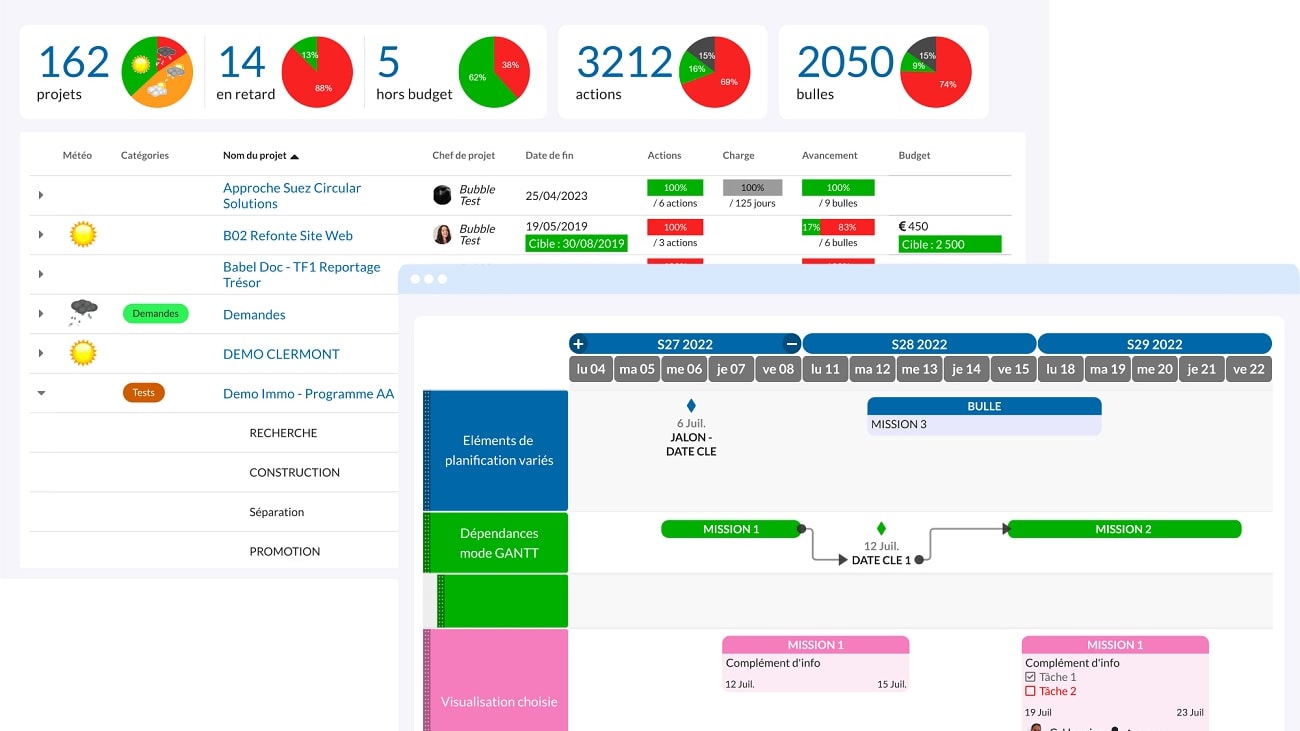
Teams can expect streamlined coordination, enhanced security, and a smooth development process.
When it comes to fostering real-time collaborative work environments, both Retool and Bubble have made significant strides. These platforms have embedded features that promote seamless teamwork, allowing multiple users to simultaneously engage in the development process. Whether it's inviting team members to a project, setting specific roles like 'editor' or 'viewer', or defining granular permissions to protect sensitive data, both tools have got you covered.
Examples include partitioning dashboard access or limiting database modifications. As a result, regardless of opting for Retool or Bubble, teams can anticipate streamlined coordination, heightened security, and a fluid development process, making either choice a win for collaborative projects.
Bubble Takes the Lead Over Retool with Advanced Version Control and Rollback Capabilities
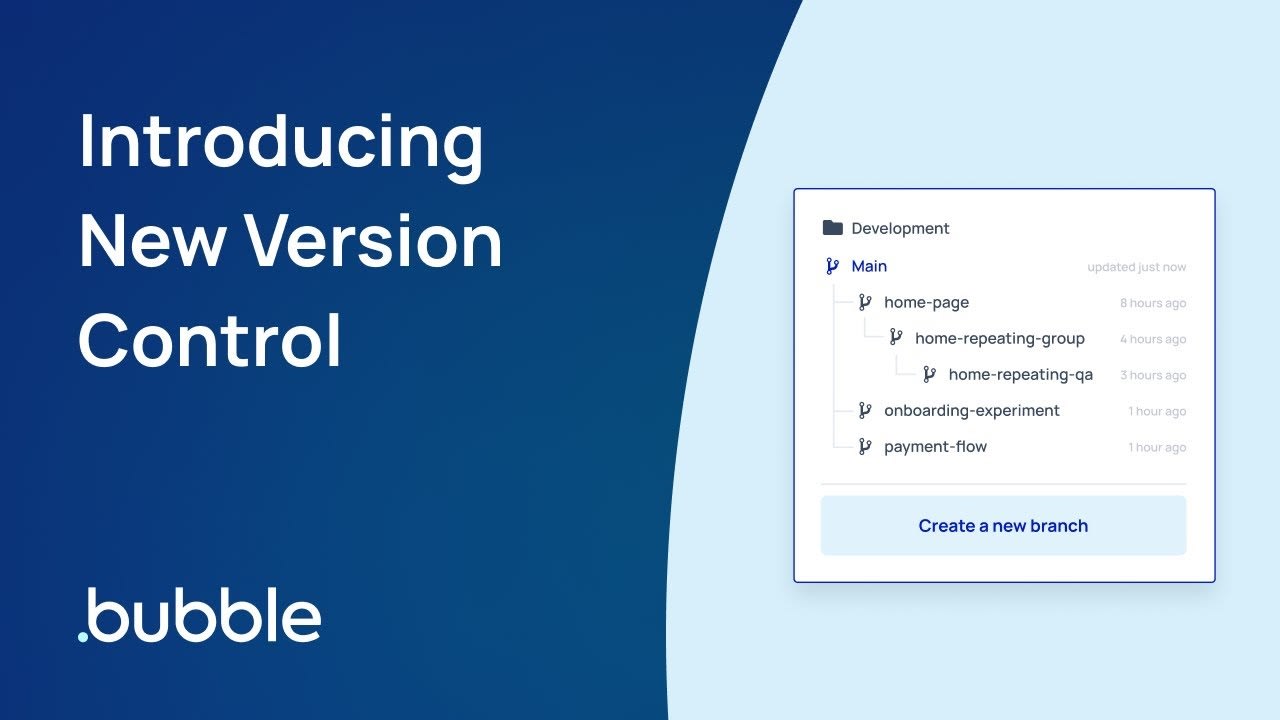
With Bubble, developers can effortlessly save multiple iterations of their applications, facilitating easier testing and evolution of their projects.
In the domain of application development, having robust version control mechanisms can be a game-changer. Bubble distinguishes itself in this regard, offering superior version control and rollback functionalities. With Bubble, developers can effortlessly save multiple iterations of their applications, facilitating easier testing and evolution of their projects. For instance, if a newly added feature proves problematic, the platform provides the option to seamlessly switch back to a former, stable version. This rollback feature is invaluable, as it mitigates disruptions and potential downtimes, ensuring uninterrupted user experiences.
On the contrary, Retool's offering in this aspect is more limited, lacking the same depth in version management that Bubble proudly showcases.
Bubble Surpasses Retool with Its Comprehensive Database Management Capabilities
Bubble offers the flexibility to craft custom data types tailored to specific project needs.
In the competitive world of application development platforms, having a solid database management foundation can set a tool apart. Bubble indeed does so with its advanced database management system. Unlike traditional setups, Bubble offers the flexibility to craft custom data types tailored to specific project needs.
Whether you're looking to link user profiles to their purchase histories or associate products with multiple categories, establishing these relationships becomes intuitive with Bubble. Moreover, its ability to conduct intricate queries ensures that extracting meaningful insights from vast data pools is streamlined. While Retool has its strengths, when it comes to intricate database configurations and operations, Bubble clearly takes the lead.
Bubble Offers a More Extensive Range of Integrations Compared to Retool

Bubble, in particular, stands out with its more extensive range of integration functionalities
Integration capabilities are indispensable in today's digital age, where apps and services are expected to work seamlessly together. Both Retool and Bubble recognize this crucial demand and have made commendable efforts to provide robust integration options to their users.
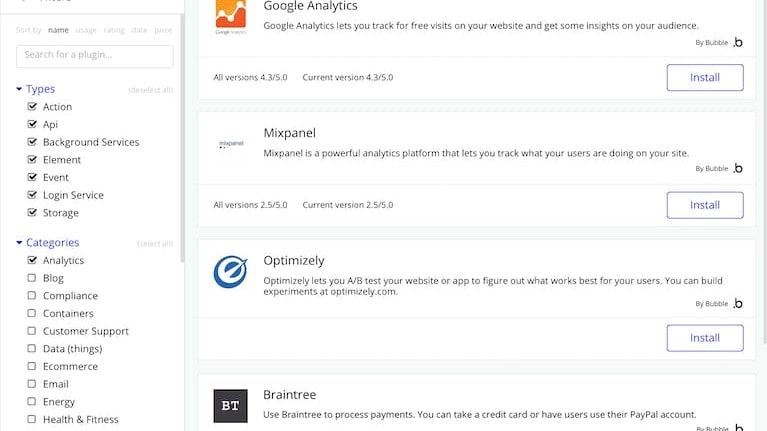
Bubble, in particular, stands out with its more extensive range of integration functionalities. One of its most notable features is the Plugin system, which is intuitive and caters to even those with minimal technical background. With just a few clicks, users can effortlessly link their Bubble apps to renowned services like Google Analytics, Facebook, MailChimp, and even payment gateways like Stripe, broadening the application's functionality and reach in the digital ecosystem.
Bubble Outperforms Retool in Hosting and Scalability with One-Click Solutions

Bubble's infrastructure is built to evolve with your needs
Navigating the complexities of application deployment can be daunting, but Bubble eases this process considerably with its one-click hosting feature. This capability presents a distinct advantage over platforms like Retool, enabling users to swiftly launch applications directly on Bubble's cloud infrastructure. Beyond just initial deployment, Bubble's infrastructure is built to evolve with your needs. As user traffic surges, the platform effortlessly scales resources, ensuring consistent performance and user experience.
In contrast to Retool, where additional considerations might arise for server deployment and operational logistics, Bubble encapsulates these intricacies, freeing creators from potential operational burdens and additional investment in infrastructure management.
08 Retool vs Bubble: Which is the best for your business?
Retool is the best tool for you if:
- You aim for internal tool creation with a drag-and-drop interface, connecting databases, APIs, and external services effortlessly.
- Speed is paramount; you want to build, iterate, and deploy internal apps in hours, not weeks or months.
- Flexibility matters; you desire a platform that seamlessly integrates with almost every modern data source available.
- Security is a top priority, requiring a solution that offers granular permissioning, audit logs, and enterprise-grade protection.
- Collaboration is key, and you need a platform where engineers and non-engineers can co-build and streamline workflows.
 You aim for internal tool creation with a drag-and-drop interface, connecting databases, APIs, and external services effortlessly.
Bubble is the best tool for you if:
- You seek a no-code platform enabling rapid web application development without deep technical expertise.
- Scalability and flexibility matter, and you want seamless growth without switching platforms mid-journey.
- You appreciate a robust ecosystem with plugins, integrations, and community-driven resources for support.
- Iterative development appeals to you; prototype quickly, gather feedback, and refine with minimal friction.
- A cost-effective solution is essential, balancing functionality, ease-of-use, and affordability for startups or solo creators.
Retool
Used by 1102 members
1 year free on the monthly Team or Business plan
Save up to $60,000
Bubble
Used by 1764 members
30% off on monthly plans for 1 year
Save up to $957
09 Alternatives to Retool & Bubble

Notion
Used by 16914 members
6 months free on the Business plan with Unlimited AI
Save up to $12,000

Airtable
Used by 8175 members
$1,000 in credits for 1 year
Save up to $1,000

Galaxy (ex. Meteor Cloud)
Used by 232 members
$600 in credits for 1 year
Save up to $600

OpenClaw
Used by 137 members
Additional 10% off for OpenClaw's hosting on Hostinger
Save up to $48
10 Promotions on Application Development software
Retool and Bubble are great tools, but Secret offers promo codes with discounts on over 2190+ different SaaS solutions. New deals are added regularly, helping you save money on your online subscriptions. Get access to codes for other Application Development software you might want to purchase

OpenAI - ChatGPT free credits
$300 in free credits across OpenAI's models through LLM API

Make coupon code 2026
3 months free on the Teams plan (240k credits included)

Auth0 coupon code
12 months free

Discount for Webflow
1 year free on a CMS site plan

Deal for Mobbin
20% off for 1 year on the Pro plan
Code for Airtable
$1,000 in credits for 1 year

Lovable discounts
15% off annual Pro and Business plans
Notion promo
6 months free on the Business plan with Unlimited AI

AWS Activate coupon code
Up to $100,000 in credits or 20-50% off your monthly spend through an AWS partner (must be spending $100+/month)

Pagemaker discount code
30% off for 1 year
Start saving on the best SaaS
Secret has already helped tens of thousands of startups save millions on the best SaaS like Microsoft Teams, Google Workspace & many more. Join Secret now to buy software the smart way.