





Project management and collaboration tools are essential for streamlining workflows and enhancing team productivity. They help organize tasks, manage projects, and facilitate communication within teams. However, with a wide array of tools available, selecting the right one can be a complex decision.
To simplify your choice, this article compares two of the prominent project management platforms—Fibery vs Airtable. Through a thorough examination of their features, benefits, drawbacks, and key applications, we aim to provide you with the insights needed to determine which tool aligns best with your project management needs. Let’s explore the differences and similarities between Fibery and Airtable to find the best fit for your team’s workflow.
- 01 Fibery vs Airtable: overview
- 02 What's the difference between Fibery and Airtable?
- 03 Fibery pros and cons
- 04 Airtable pros and cons
- 05 Fibery compared to Airtable
- 06 Airtable compared to Fibery
- 07 Features comparison
- 08 Fibery vs Airtable: Which is the best for your business?
- 09 Alternatives to Fibery & Airtable
- 10 Promotions on Productivity software
Start saving on the best SaaS
Secret has already helped tens of thousands of startups save millions on the best SaaS like Microsoft Teams, Google Workspace & many more. Join Secret now to buy software the smart way.

01 Fibery vs Airtable: overview
Fibery and Airtable are prominent players in the realm of project management and collaboration tools, each offering distinct features and benefits to cater to various organizational needs.
Fibery is celebrated for its flexibility and all-in-one approach, combining project management, collaboration, and knowledge management into a single platform. It excels in providing a customizable workspace that integrates various types of data and workflows, making it ideal for teams that need a tailored solution to handle complex projects and processes. On the other hand, Airtable is well-regarded for its user-friendly interface and versatile database capabilities. It combines the simplicity of a spreadsheet with the power of a database, allowing users to easily create and manage tables, views, and relationships, which is particularly advantageous for teams looking for an intuitive and visually appealing tool to organize their projects and workflows.
Now, let’s dive deeper into the Fibery vs. Airtable comparison to help you determine which platform best suits your project management needs and team dynamics.

Positive reviews
Both Fibery and Airtable receive positive reviews. Fibery is praised for its flexibility and deep customization, while Airtable is appreciated for its ease of use and powerful database functionalities.

Fibery
Airtable
Pricing plans
Fibery offers a free trial and paid plans starting at $10/user/month. Airtable has a free plan, with paid plans starting at $20/user/month, offering more advanced features in higher tiers.
Fibery
Airtable
Customer support
Fibery provides email and chat support, known for its responsive and helpful team. Airtable offers extensive documentation, community forums, and prioritized support in higher-tier plans.
Fibery
Airtable
Ease of use
Fibery is user-friendly but can have a learning curve due to its advanced features. Airtable is known for its intuitive interface and easy setup, making it accessible for users of all levels.
Fibery
Airtable
Collaboration features
Both Fibery and Airtable support strong collaboration features, including real-time editing, comments, and team workspaces, enhancing teamwork and project management.
Fibery
Airtable
Mobile app quality
Fibery's mobile app is functional but lacks some features of the desktop version. Airtable's mobile app is highly rated, offering almost all functionalities of its web version, ensuring productivity on the go.
Fibery
Airtable
Customization
Fibery is highly customizable, allowing users to tailor workspaces to their specific needs. Airtable also offers significant customization but focuses more on template-driven setups.
Fibery
Airtable
Reporting and analytics
Fibery provides customizable reports and in-depth analytics, suitable for detailed project tracking. Airtable offers powerful reporting and analytics capabilities with customizable views and data visualization tools.
Fibery
Airtable
Template availability
Fibery offers a variety of templates for different use cases, enhancing productivity. Airtable excels with its extensive library of templates and easy customization, catering to diverse needs.
Fibery
Airtable
Integrations
Fibery integrates with tools like Slack, GitHub, and Zapier. Airtable offers extensive integrations, including Google Workspace, Slack, and Zapier, along with a robust API for custom integrations.
Fibery
Airtable
02 What's the difference between Fibery and Airtable?
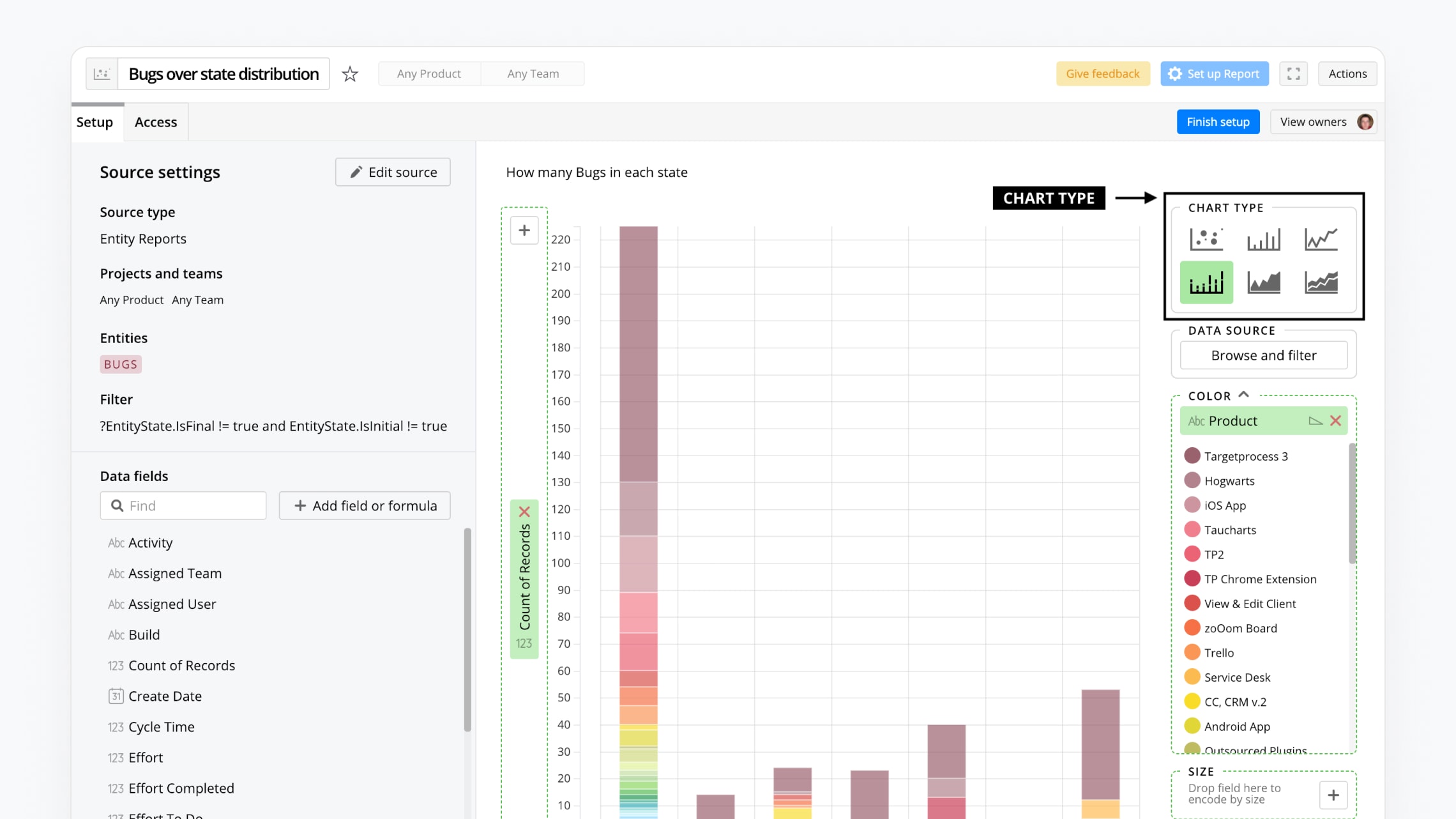
Fibery
All-in-one commercial suite

Airtable
The power of a relational database, without the need to code or use Excel, is enhanced by AI in Airtable to streamline data organization and optimize workflows efficiently.
As project management and collaboration tools, Fibery and Airtable offer robust solutions to enhance your team's workflow and productivity. However, there are key distinctions between the two platforms that may influence your decision on which is best for your organization.
One of the main differences lies in the scope and flexibility of their features. Fibery is an all-in-one work management platform designed to integrate various functions such as project management, knowledge management, and collaboration into a single customizable workspace. Its strength lies in its adaptability, allowing users to create bespoke solutions tailored to their specific workflows. This makes Fibery an excellent choice for teams that require a high degree of customization and integration with multiple data types and processes.
In contrast, Airtable is a powerful, user-friendly platform that combines the simplicity of a spreadsheet with the functionality of a database. Airtable excels in its intuitive interface and versatility, making it easy for users to create and manage tables, views, and relationships between data. This approach is particularly beneficial for teams that need a straightforward yet flexible tool to organize and visualize their projects and tasks.
Another significant difference is in their approach to automation and integrations. Airtable offers robust automation capabilities and integrates seamlessly with a wide range of third-party apps through its extensive API and pre-built integrations. This can streamline workflows by automating repetitive tasks and connecting various tools used by your team. Fibery, while also offering integration options, focuses more on creating a cohesive environment where different types of work can be managed within a single platform, reducing the need for multiple external tools.
Finally, the pricing and free plan offerings vary between the two. Airtable provides a generous free plan with essential features, making it accessible for smaller teams or those just starting. Fibery’s pricing is structured to accommodate growing teams and complex workflows, offering more advanced features and customization options in its higher-tier plans.
In summary, if you need a highly customizable, all-in-one solution, Fibery may be the right choice. If you prefer a user-friendly, versatile database tool with strong automation and integration capabilities, Airtable might be the better fit.

Airtable
Premium
Easily store and organize your data
$1,000 in credits for 1 year
Save up to $1,000
03 Fibery pros and cons
What are the advantages of Fibery?
- Highly customizable: Fibery allows users to create customized workflows and solutions tailored to their specific needs. This flexibility makes it ideal for teams with unique processes and requirements.

- Integrated work management: Fibery combines project management, knowledge management, and collaboration into a single platform, reducing the need for multiple tools and creating a cohesive work environment.
- Adaptability: The platform supports a wide range of data types and can integrate various functions, making it adaptable to different industries and use cases.
- Powerful relational database: Fibery’s ability to create complex relationships between different types of data enables sophisticated project tracking and knowledge management.
- Collaboration features: With built-in collaboration tools, Fibery facilitates effective team communication and information sharing, improving overall productivity.
What are the disadvantages of Fibery?
- Learning curve: Due to its high level of customization and flexibility, new users might find Fibery challenging to learn and set up initially.

- Limited pre-built templates: Compared to some competitors, Fibery offers fewer pre-built templates, which can make initial setup more time-consuming for some users.
- Integration limitations: While Fibery supports integrations, it might not offer as many direct integrations with third-party apps as other platforms like Airtable, potentially requiring additional workaround solutions.
- Cost for advanced features: Advanced features and greater customization options are available in higher-tier plans, which might be costly for smaller teams or startups.
- Mobile app limitations: Fibery’s mobile app is not as fully featured as its desktop version, which can be a limitation for teams that rely heavily on mobile access for their workflows.
Compare Fibery to other tools


Fibery vs Coda


Fibery vs ClickUp

Notion vs Fibery
04 Airtable pros and cons
What are the advantages of Airtable?
- User-friendly interface: Airtable combines the simplicity of a spreadsheet with the power of a database, making it easy for users to create, organize, and manage data without a steep learning curve.
- Versatile and flexible: Airtable supports various data types and views (grid, calendar, gallery, Kanban), allowing users to tailor the platform to suit different project management and collaboration needs.
- Strong integration capabilities: Airtable offers extensive integrations with numerous third-party applications and services, enabling seamless connectivity and automation across different tools used by teams.
- Robust automation features: Airtable includes powerful automation options that help streamline repetitive tasks, improving efficiency and reducing manual effort.
- Generous free plan: Airtable’s free plan provides access to essential features, making it a cost-effective option for small teams or individuals looking to get started with a versatile project management tool.
What are the disadvantages of Airtable?
- Scalability concerns: As teams and projects grow, Airtable’s performance can be impacted, and it may not handle very large datasets as efficiently as dedicated database management systems.
- Complexity with advanced features: While Airtable is user-friendly for basic tasks, leveraging its more advanced features and automations can become complex, requiring a deeper understanding of the platform.
- Limited customization: Compared to platforms like Fibery, Airtable offers less customization in terms of creating highly tailored workflows and integrated solutions for specific needs.
- Cost for higher-tier features: Advanced features and higher usage limits are available in paid plans, which can become expensive for larger teams or those requiring extensive use of Airtable’s capabilities.
- Mobile app limitations: Although Airtable has a mobile app, it does not offer the same level of functionality and ease of use as the desktop version, which can be a drawback for teams that need robust mobile access.
Compare Airtable to other tools


Airtable vs Monday

Airtable vs Asana
Airtable vs Coda

Airtable vs Excel
Airtable vs Notion

Airtable vs Google Sheets
05 Fibery compared to Airtable
Fibery and Airtable serve distinct needs in project management. Fibery excels in its flexibility, integrating project management, knowledge management, and collaboration into a customizable workspace, making it ideal for teams with complex workflows and unique requirements. Its relational database capabilities enable sophisticated data management and project tracking.
Airtable, on the other hand, offers a user-friendly interface that combines the simplicity of spreadsheets with the power of databases. It supports various data views and robust automation, making it suitable for teams seeking an intuitive, versatile tool for organizing and visualizing projects. However, Airtable may lack the deep customization Fibery provides.
Is Fibery better than Airtable?
 Is Fibery better than Airtable?
Determining if Fibery is better than Airtable depends on your specific needs. Fibery offers unparalleled flexibility and customization, making it ideal for teams with complex workflows requiring integrated project management, knowledge management, and collaboration. Its robust relational database capabilities enable advanced data management and sophisticated project tracking.
Conversely, Airtable's strength lies in its user-friendly interface, combining spreadsheet simplicity with database power. It excels in providing versatile data views and robust automation, making it suitable for teams seeking an intuitive and versatile tool for organizing and visualizing projects.
What is Fibery best used for?
Fibery is best used for teams that require a highly customizable and integrated platform to manage complex workflows and diverse data types. It excels in combining project management, knowledge management, and collaboration into a single, cohesive workspace, making it ideal for organizations needing to tailor their processes and systems.
Fibery's relational database capabilities allow for sophisticated data management and seamless integration of various work functions, supporting teams in industries like software development, research, and creative agencies. Its adaptability and depth make it a powerful tool for teams looking to unify their work environment and enhance overall productivity.
Can Fibery replace Airtable?
Fibery can potentially replace Airtable for teams seeking more customization and integrated project management capabilities.
While Airtable offers a user-friendly interface with versatile data organization and automation features, Fibery provides a more flexible and comprehensive solution that integrates project management, knowledge management, and collaboration. Fibery's relational database capabilities allow for advanced data relationships and tailored workflows, making it suitable for complex and unique team requirements. However, for users who prioritize simplicity and ease of use, Airtable might still be preferable.
Is Fibery cheaper than Airtable?
Fibery and Airtable have different pricing structures that can make one more cost-effective than the other depending on the specific needs of a team. Fibery offers more advanced features and customization options in its higher-tier plans, which may be more costly upfront but provide greater value for complex workflows.
Airtable’s pricing structure, along with its user-friendly interface and versatile capabilities, has a generous free plan and competitive pricing for its paid tiers, which might be more affordable for smaller teams or those with straightforward requirements.
Is there a better Productivity software than Fibery?
Determining if there's a "better" software than Fibery depends largely on your specific project management and collaboration needs. Fibery excels in providing a highly customizable workspace that integrates project management, knowledge management, and collaboration, making it ideal for teams with complex and unique workflows.
However, alternatives to Fibery like Airtable, Notion, and Trello may be more suitable for certain users. Airtable offers a user-friendly interface with versatile data organization, Notion provides a powerful all-in-one workspace for notes and task management, and Trello is known for its simplicity and visual project tracking through Kanban boards.
06 Airtable compared to Fibery
Airtable offers a user-friendly interface that combines the simplicity of spreadsheets with the power of databases, making it ideal for teams seeking intuitive data organization and visualization. It excels in providing versatile data views and robust automation, facilitating straightforward project management.
In contrast, Fibery is a more flexible and integrated platform that combines project management, knowledge management, and collaboration into a single workspace. It is highly customizable, allowing teams to tailor workflows and manage complex relationships between different data types. While Airtable is excellent for ease of use and versatility, Fibery is better suited for teams needing deep customization and integration.
Is Airtable better than Fibery?
Determining if Airtable is better than Fibery depends on your specific needs and priorities. Airtable excels with its user-friendly interface and versatile data views, making it ideal for teams seeking straightforward project management and intuitive data organization. Its robust automation capabilities streamline workflows, enhancing productivity.
However, for teams requiring extensive customization and integrated project, knowledge, and collaboration management, Fibery offers a more flexible solution. While Airtable provides ease of use and versatility, Fibery's deep customization and advanced data management capabilities make it better suited for complex workflows and unique team requirements.
What is Airtable best used for?
Airtable is best used for teams that need a versatile and user-friendly platform to organize and manage data. It combines the simplicity of a spreadsheet with the power of a database, making it ideal for project management, content planning, inventory tracking, and customer relationship management.
Airtable’s various data views, such as grid, calendar, gallery, and Kanban, allow teams to visualize their projects in multiple ways. Its robust automation and integration capabilities streamline workflows and connect with other tools, enhancing productivity. Airtable is particularly suited for teams seeking an intuitive and flexible solution for diverse organizational needs.
Can Airtable replace Fibery?
Airtable can potentially replace Fibery for teams that prioritize ease of use and versatile data organization. It offers a user-friendly interface, various data views, and robust automation, making it suitable for straightforward project management and collaboration needs.
However, Airtable lacks the deep customization and integrated approach of Fibery, which combines project management, knowledge management, and collaboration in a single platform. For teams with complex workflows requiring tailored solutions and sophisticated data relationships, Fibery might be a better fit.
Is Airtable cheaper than Fibery?
Airtable generally offers more affordable pricing options compared to Fibery, particularly for smaller teams or those with straightforward project management needs. Airtable provides a generous free plan and competitively priced paid tiers that include essential features and integrations.
In contrast, Fibery's pricing is structured to support its more advanced features and customization capabilities, which can be more costly. Therefore, for teams seeking basic project management and data organization at a lower cost, Airtable is likely the cheaper option.
Is there a better Collaboration software than Airtable?
Determining if there's a superior software to Airtable depends on your specific project management and data organization needs. Airtable excels with its user-friendly interface, versatile data views, and robust automation, making it ideal for diverse organizational tasks.
However, alternatives to Airtable like Fibery, Smartsheet, Asana, Coda, and ClickUp may be more suitable for certain users. Fibery integrates project management with knowledge management for complex workflows, Smartsheet offers powerful capabilities for project planning and resource management, Asana excels in task management and team collaboration, Coda combines documents and spreadsheets into a flexible, all-in-one workspace, and ClickUp features comprehensive project management and collaboration tools.
Airtable
Premium
Easily store and organize your data
$1,000 in credits for 1 year
Save up to $1,000
07 Features comparison
Airtable Edges Out Fibery in Ease-of-Use

When it comes to navigating a SaaS software, usability is key. Comparatively, Airtable edges out Fibery in the ease-of-use category. Airtable's interface is intuitive and user-friendly, allowing users to quickly create and manage databases with minimal training. For example, setting up a project management board in Airtable is as simple as creating a new table, selecting a view (like grid, calendar, or Kanban), and filling in the data.
On the other hand, Fibery, while highly customizable and powerful, has a steeper learning curve due to its advanced features and flexibility. Users often need more time and effort to configure Fibery to suit their specific needs. Therefore, for teams seeking straightforward, easy-to-navigate software, Airtable is the preferable choice.
Airtable Excels Over Fibery in Real-Time Collaboration
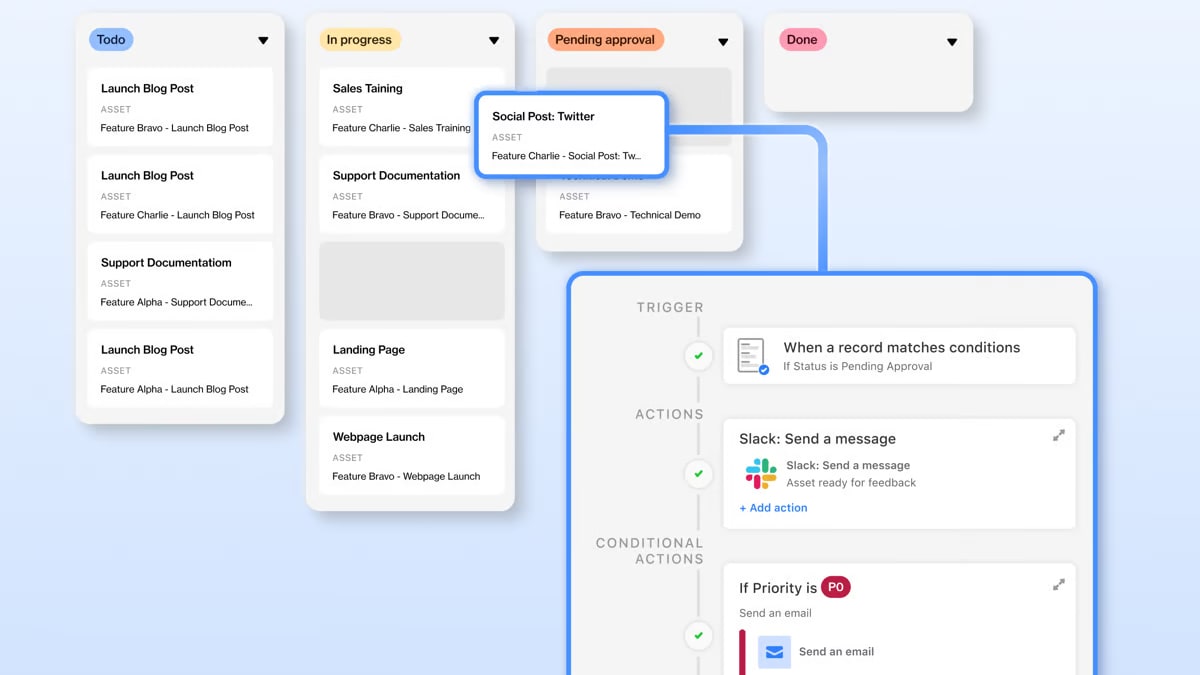
While both tools offer real-time team collaboration, Airtable edges out Fibery in this aspect. Multiple users can simultaneously work on the same base in Airtable, fostering teamwork and productivity by ensuring that everyone has the most updated information. For example, team members can concurrently edit project details, update task statuses, and add new data without any conflicts, all in real-time.
In comparison, Fibery’s collaboration features include comments and mentions within documents and tasks, along with an integrated chat function. However, this might not be as interactive or synchronous as Airtable’s real-time, multi-user editing capabilities, which are designed to facilitate seamless and immediate collaboration across teams.
Both Fibery and Airtable Offer Robust Data Visualization

Both Fibery and Airtable are strong contenders when it comes to data visualization. Users can create custom visualizations, charts, and graphs in both systems for an in-depth view of their data. In Airtable, users can generate dynamic charts, kanban boards, and calendar views, making it easy to track project progress, analyze trends, and communicate insights. For example, sales teams can visualize monthly revenue trends using bar charts or track project deadlines with calendar views.
Similarly, Fibery offers advanced visualization capabilities, including custom reports and dashboards, allowing users to understand patterns and relationships in their data. This is particularly useful for complex projects where visualizing interconnected data helps in strategic decision-making. Both platforms empower users to effectively interpret and present their data, enhancing overall data comprehension and communication.
Fibery Offers Superior Customization Compared to Airtable

In Fibery, users can custom build apps and workflows tailored to their specific processes, replacing most elements of their product stack with just one tool. This involves extensive automation that saves valuable time by streamlining repetitive tasks and integrating various functions into a single platform. For example, a team can create a bespoke project management system that includes task tracking, knowledge management, and collaboration tools all within Fibery.
Although Airtable also offers some level of customization, such as creating different database field types and views, it primarily focuses on data organization. This is not as comprehensive as Fibery’s functional versatility, which allows for deeper customization and more integrated workflows. Airtable's customization is generally limited to adjusting database layouts and automation within pre-set parameters, while Fibery enables the creation of complex, interconnected systems tailored to unique business needs.
Airtable Excels in Task Automation Over Fibery
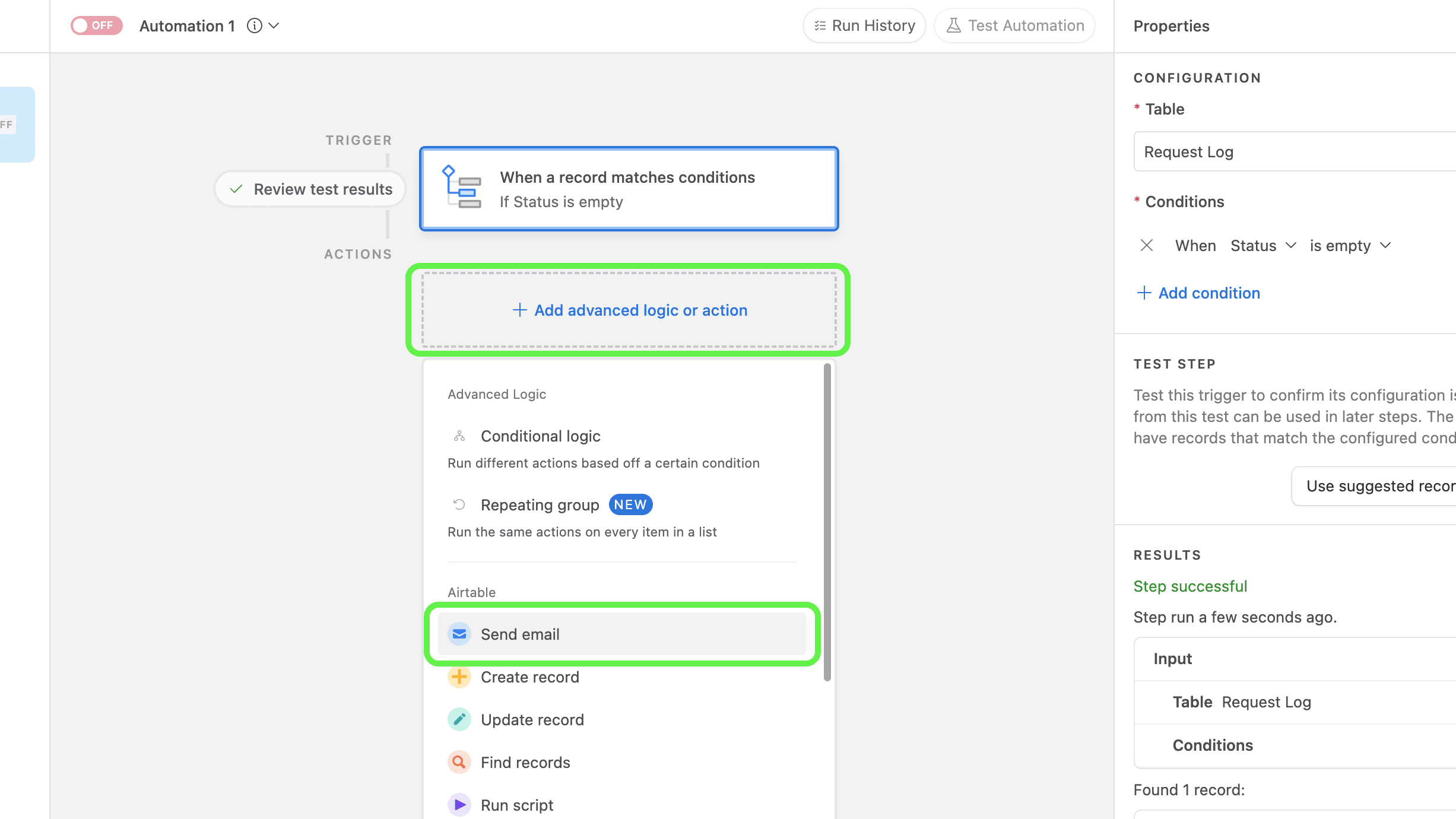
Airtable shines in its ability to automate various tasks and business processes, providing a seamless workflow solution for users. Its features like customized reports, notifications, and reminders contribute to an efficient organizational system where nothing slips through the cracks. For example, users can set up automated email notifications when a task is due or create reminders for team meetings, ensuring that deadlines are met and communication is maintained.
Airtable's powerful scripting and integration with tools like Zapier further enhance its automation capabilities. Fibery, on the other hand, while offering some level of automation through workflows and integrations, does not explicitly detail advanced features like reminders and triggers, making it less comprehensive in this aspect compared to Airtable.
Fibery Excels Over Airtable with Integrated Communication Features

Fibery stands out for its integrated communication features, offering a built-in chat that facilitates real-time team discussions and an integrated email client to handle all email needs. This allows teams to manage project-related conversations and correspondence within the same platform, ensuring seamless communication. For instance, team members can discuss task details directly in the chat while simultaneously tracking project progress.
Additionally, Fibery’s custom templates streamline communication by standardizing responses and updates. Conversely, Airtable does not offer these extensive communication tools, focusing more on collaboration through shared access and updates within the tool itself. While Airtable excels in data organization and real-time collaboration, it relies on external applications for comprehensive communication solutions.
Airtable Shines Brighter Than Fibery in Integration Options
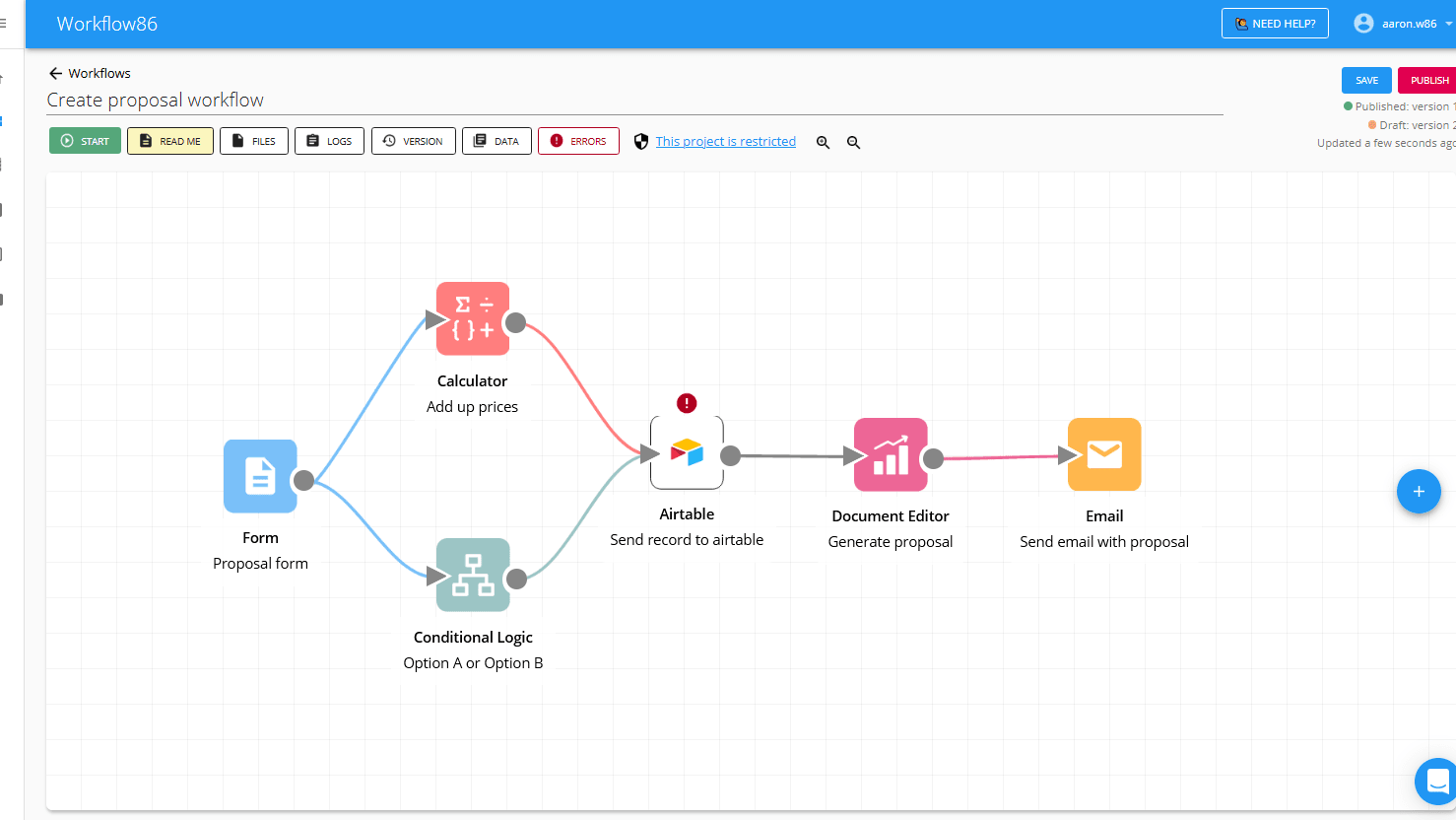
In the world of SaaS, having an array of integration options helps keep your operations streamlined and efficient. Here, Airtable shines brighter than Fibery. Airtable provides extensive integration with numerous applications such as Google Drive, Slack, Mailchimp, Trello, and Zapier. This allows users to seamlessly connect and manage data and workflows across various platforms without needing to switch between apps.
For instance, you can automate tasks by connecting Airtable with communication software like Slack for real-time notifications or with Google Drive for automatic document storage. On the other hand, while Fibery does offer integrations, they are comparatively fewer and can slightly limit your ability to link multiple systems. However, Fibery does maintain strong bi-directional links with integrated apps, ensuring a smooth flow of information back and forth, which is beneficial for maintaining data consistency and accuracy.
08 Fibery vs Airtable: Which is the best for your business?
Fibery is the best tool for you if:
- You need a highly customizable platform that can adapt to complex workflows and specific business processes, allowing you to tailor the tool to your unique requirements.
- Your team requires integrated project management, knowledge management, and communication features within a single platform, reducing the need for multiple tools.
- You prioritize sophisticated data management capabilities with the ability to create complex relationships between different data types for more effective project tracking and organization.
- You want an all-in-one solution that combines task management, real-time collaboration, and detailed project tracking to enhance overall productivity and efficiency.
- Your projects involve extensive documentation and knowledge sharing, and you need a platform that seamlessly integrates these aspects into your workflow.
 You need a highly customizable platform that can adapt to complex workflows and specific business processes, allowing you to tailor the tool to your unique requirements.
Airtable is the best tool for you if:
- You need an intuitive, user-friendly platform that combines the simplicity of spreadsheets with the power of databases, making it easy to organize and manage your data.
- Your team requires versatile data views such as grid, calendar, gallery, and Kanban to visualize projects and tasks in multiple ways, enhancing overall understanding and management.
- You want robust integration capabilities to connect seamlessly with numerous third-party applications, enabling smooth workflows and automation across different tools used by your team.
- Your project management needs include real-time collaboration where multiple users can simultaneously work on the same data, ensuring everyone has the most updated information.
- You prioritize a cost-effective solution with a generous free plan and competitively priced paid tiers that provide essential features for small teams or straightforward project management needs.
Airtable
Premium
Easily store and organize your data
$1,000 in credits for 1 year
Save up to $1,000
09 Alternatives to Fibery & Airtable

Notion
Used by 16967 members
6 months free on the Business plan with Unlimited AI
Save up to $12,000

Slack
Used by 3708 members
25% off new plan purchases
Save up to $9,000

Miro
Used by 3295 members
$1,000 in credits (lifetime validity)
Save up to $1,000

ClickUp
Used by 3270 members
Additional 20% off Unlimited and Business plans for 1 year
Save up to $1,000
10 Promotions on Productivity software
Fibery and Airtable are great tools, but Secret offers promo codes with discounts on over 2190+ different SaaS solutions. New deals are added regularly, helping you save money on your online subscriptions. Get access to codes for other Productivity software you might want to purchase
Notion deal
6 months free on the Business plan with Unlimited AI

Descript discount
35% off annual plans

Make promo
3 months free on the Teams plan (240k credits included)

Promo code for GitHub
$10,000 in credits for 12 months

Google Workspace promo code 2026
20% off Plus plans for 1 year

Zendesk promo code 2026
6 months free (with AI Agents and Copilot)
Slack promo code
25% off new plan purchases

Promo code Intercom
1 year free on the Advanced plan (300 monthly Fin resolutions included)

Google Calendar promo code 2026
20% off Plus plans for 1 year

Promo code for Trello
Free forever for up to 10 users
Start saving on the best SaaS
Secret has already helped tens of thousands of startups save millions on the best SaaS like Microsoft Teams, Google Workspace & many more. Join Secret now to buy software the smart way.