


Discovering the right cloud-based solution can be a pivotal decision for your organization. Tools like file storage, data processing, and cloud computing capabilities can significantly impact your business operations and scalability. However, choosing between Google Drive and Google Cloud can be a daunting task, as both offer distinct advantages and cater to different requirements.
In this article, we'll delve into a comparison of two prominent Google services—Google Drive vs Google Cloud. We'll delve into their features, practical applications, and the key distinctions between them to assist you in making an informed choice about which service best suits your specific business needs. Let's commence by providing an overview of these two Google solutions.
- 01 Google Cloud (GCP) vs Google Drive: overview
- 02 What's the difference between Google Cloud (GCP) and Google Drive?
- 03 Google Cloud (GCP) pros and cons
- 04 Google Drive pros and cons
- 05 Google Cloud (GCP) compared to Google Drive
- 06 Google Drive compared to Google Cloud (GCP)
- 07 Features comparison
- 08 Google Cloud (GCP) vs Google Drive: Which is the best for your business?
- 09 Alternatives to Google Cloud (GCP) & Google Drive
- 10 Promotions on Cloud Computing software
Start saving on the best SaaS
Secret has already helped tens of thousands of startups save millions on the best SaaS like Microsoft Teams, Google Workspace & many more. Join Secret now to buy software the smart way.

01 Google Cloud (GCP) vs Google Drive: overview
Google Drive and Google Cloud are two prominent players in the realm of cloud-based storage and computing services, each designed to cater to distinct sets of requirements.
Google Drive is renowned for its user-friendly file storage and sharing capabilities. It offers an intuitive interface for individuals and businesses to store, synchronize, and collaborate on documents, spreadsheets, presentations, and other files effortlessly. On the other hand, Google Cloud provides a comprehensive suite of cloud computing and infrastructure services, allowing organizations to build, deploy, and scale applications, manage databases, and harness the power of machine learning and data analytics.
Now, let's delve into the Google Drive vs. Google Cloud comparison to assist you in making a well-informed decision when choosing the right service for your specific cloud storage and computing needs.

Customer Reviews
Both Google products are highly rated on Captera, with users generally happy with using either solution thanks to their design philosophy and ease of use.

Google Cloud (GCP)
Google Drive
Customer Support
Generally, users are not overly happy with Google’s customer service for both products, leaving some things to be desired, such as speed in solving issues.
Google Cloud (GCP)
Google Drive
Accessibility
Google Cloud and Google Drive provide seamless cross-device access, allowing users to access their data from various devices anytime, anywhere.
Google Cloud (GCP)
Google Drive
Performance
Both cloud storage options provide dependable performance. Although there might be hiccups, they can be quickly resolved. Moreover, users of Google Cloud have the added benefit of being able to choose the location where their data is stored, which distinguishes them from Google Drive users.
Google Cloud (GCP)
Google Drive
Pricing Plan
Google Cloud is lauded for its value for money, though stacking multiple instances tends to get expensive, according to users. On the other hand, Drive is a great value for money as you can use it for free with a limited storage capacity, which is great if you are a student with limited needs for storage.
Google Cloud (GCP)
Google Drive
Security settings
Google Drive and Google Cloud Storage employ SSL encryption to ensure the security of your data. However, given that Google Cloud Storage is designed for businesses, it incorporates security features such as versioning and access control to ensure the utmost protection of your data.
Google Cloud (GCP)
Google Drive
Storage
Google Drive offers users the convenience of free storage up to 15GB, along with the opportunity to upgrade for a fee. In contrast, Google Cloud Storage is a scalable platform specifically designed to accommodate substantial amounts of data, making it an excellent choice for businesses that require extensive storage capabilities.
Google Cloud (GCP)
Google Drive
Ease of Use
Google uses a minimalist approach when designing its apps, and with these two, it is no different, users in general, report great experience in using either solution, as everything is streamlined and easy to reach.
Google Cloud (GCP)
Google Drive
Integrations
The integration for Google Drive with other Google services is seamless and includes complimentary web-based applications for generating documents and spreadsheets. Google Cloud is designed specifically for businesses providing a range of features compared to Google Drive. Users can make use of data management and organization capabilities by utilizing buckets.
Google Cloud (GCP)
Google Drive
Scalability
Google Drive may not be the most optimal tool for efficiently managing and expanding your file collection. In contrast, Google Cloud provides users with the ability to easily scale their resources to meet their expanding requirements.
Google Cloud (GCP)
Google Drive
02 What's the difference between Google Cloud (GCP) and Google Drive?

Google Cloud's Console, Allowing for Easy Management of Your Google Cloud Projects and Resources
Google Cloud (GCP)
Cloud services by Google

Google Drive's Dashboard, Showing Easy Access to Your Files and Shared Workspaces
Google Drive
Google Drive is a cloud storage and file management platform that enables you to store, share, and collaborate on files from any device. It supports everything from personal documents to full team workflows, all accessible through a simple browser or mobile app.
Google Cloud is a cloud computing platform that offers a range of services for creating and deploying applications, managing data, and running virtual machines. It provides businesses and developers with the infrastructure and tools to build and expand applications in the cloud. By using Google Cloud, users can leverage computing capabilities, advanced analytics, and machine learning features. This platform is specifically designed to meet the needs of businesses and developers who require a flexible infrastructure to support their applications and services.
On the other hand, Google Drive is a cloud based storage service that allows users to securely store, sync and share files across devices. It offers a convenient way to store and access files as long as theres an internet connection available. Google Drive provides users with an amount of free storage space while also offering paid plans for additional storage needs. Its main focus is on individuals, students and small businesses who need an easily accessible storage solution, for their files.
The primary distinction between Google Cloud and Google Drive lies in their core focus and target audience. Google Cloud is primarily designed for businesses and developers who require a robust infrastructure to develop and deploy applications. Conversely, Google Drive is more consumer-oriented, catering to individuals and small businesses in need of convenient file storage and sharing capabilities. In summary, Google Cloud and Google Drive have similar but yet different purposes. Target different groups of users. Businesses and developers who need infrastructure and advanced computing capabilities for their applications prefer Google Cloud. It offers a range of services specifically designed to meet the needs of businesses of all sizes. On the other hand, individual users, students, and small businesses find Google Drive more suitable as it provides a user-friendly cloud storage solution for their files.

Google Cloud (GCP)
Used by 11245 members
$2,000 in credits for 1 year if you never raised funds // $350,000 in credits for 2 years if you did
Save up to $350,000

Google Drive
Used by 984 members
20% off Plus plans for 1 year
Save up to $518
03 Google Cloud (GCP) pros and cons
What are the advantages of Google Cloud (GCP)?
- Scalability: Google Cloud offers excellent scalability, allowing businesses to easily adjust their computing and storage resources to match their needs as they grow.

- Global reach: Google Cloud has data centers in multiple regions worldwide, ensuring low-latency access and redundancy for data and services.
- Advanced services: It provides access to a wide range of cutting-edge services, including machine learning, data analytics, and BigQuery, enabling businesses to leverage advanced technologies.
- Security: Google Cloud has robust security measures in place, including encryption, identity management, and DDoS protection, helping organizations protect their data and applications.
- Pay-as-you-go pricing: Google Cloud's pay-as-you-go pricing model allows businesses to pay only for the resources they use, reducing overall costs and improving cost management.
What are the disadvantages of Google Cloud (GCP)?
- Complexity: The extensive range of services and options can be overwhelming, especially for newcomers, making it challenging to navigate and configure the platform effectively.

- Cost management: While the pay-as-you-go model can be cost-effective, it requires careful monitoring and management to prevent unexpected cost increases.
- Technical expertise: Effective use of Google Cloud often requires a skilled team or external expertise, which may not be readily available to all organizations.
- Vendor lock-in: Extensive reliance on Google Cloud services can result in vendor lock-in, making it challenging to migrate to other cloud providers or on-premises infrastructure.
- Downtime: Although rare, Google Cloud has experienced occasional outages that can impact businesses relying on its services, underscoring the importance of redundancy and disaster recovery planning.
Compare Google Cloud (GCP) to other tools


Google Cloud (GCP) vs Cloudflare

DigitalOcean vs Google Cloud (GCP)

Google Cloud (GCP) vs AWS Activate

Google Cloud (GCP) vs Firebase

Microsoft Azure vs Google Cloud (GCP)

Google Cloud (GCP) vs IBM Cloud
04 Google Drive pros and cons
What are the advantages of Google Drive?
- Free storage: Google Drive offers a generous amount of free storage space (15 GB at the time of my last update), which is often sufficient for personal use and basic file sharing.
- Seamless integration: It integrates seamlessly with other Google Workspace (formerly G Suite) apps like Gmail, Google Docs, and Google Sheets, making collaboration and file sharing easy.
- Accessibility: Google Drive is accessible from any device with an internet connection, allowing you to access your files from anywhere, anytime.
- Real-time collaboration: It supports real-time collaboration, allowing multiple users to edit and comment on documents simultaneously, enhancing productivity.
- File versioning: Google Drive automatically tracks changes to documents, making it easy to revert to previous versions if needed.
What are the disadvantages of Google Drive?
- Limited free storage: While Google Drive offers free storage, it can quickly fill up, and additional storage comes at a cost.
- Privacy concerns: Storing sensitive or confidential data on Google Drive may raise privacy and security concerns, especially for businesses and organizations.
- Dependence on internet: Google Drive relies on an internet connection, so access to your files can be disrupted in the absence of a stable connection.
- File size limitations: Google Drive has file size limits for uploads, which can be a limitation when dealing with very large files.
- Data ownership: Users should be aware that Google's Terms of Service grant the company certain rights over the content stored on Google Drive, which could be a concern for some users or organizations with specific data governance requirements.
Compare Google Drive to other tools


Dropbox vs Google Drive

Google Drive vs Google Workspace
05 Google Cloud (GCP) compared to Google Drive
When comparing Google Cloud and Google Drive, Google Drive stands out for its simplicity and ease of use, making it a compelling option for individuals and teams seeking straightforward cloud-based storage and file sharing. Google Drive offers an intuitive interface for uploading, organizing, and sharing files, making it accessible to users with varying levels of technical expertise.
While both Google Cloud and Google Drive provide powerful cloud solutions, the choice between the two depends on your specific requirements. Google Drive offers a user-friendly, file-centric solution ideal for those who prioritize easy file storage and collaboration without the need for complex infrastructure setup. It excels at tasks like document sharing, team collaboration on presentations, and file version control, providing a straightforward yet robust platform for cloud file management.
Is Google Cloud (GCP) better than Google Drive?
 Is Google Cloud (GCP) better than Google Drive?
The answer depends on your specific cloud computing and file storage needs. Google Cloud and Google Drive each have their strengths and cater to different use cases.
Google Drive shines with its simplicity, easy file management, and user-friendly interface, making it an excellent choice for individuals and teams seeking straightforward cloud-based storage and collaboration. It's akin to a digital file cabinet, making it accessible to users of various technical backgrounds.
The decision between Google Cloud and Google Drive hinges on your unique requirements. If you prioritize effortless file storage, sharing, and collaboration, Google Drive might be the better choice. However, if you require a robust cloud computing platform for tasks such as application development, data analysis, and machine learning, Google Cloud provides a comprehensive suite of services tailored to meet those needs. Ultimately, your choice depends on whether you need basic cloud storage or a more extensive cloud computing infrastructure to power your business operations.
What is Google Cloud (GCP) best used for?
Google Cloud is primarily best suited for cloud computing and infrastructure needs. It offers a comprehensive set of services and tools designed to facilitate tasks like application development, data analysis, machine learning, and high-performance computing.
Google Cloud excels in scenarios such as building and deploying web applications, running scalable and reliable servers, harnessing the power of artificial intelligence and data analytics, and managing complex data storage and processing needs. Organizations can leverage Google Cloud to create robust cloud-based solutions, develop innovative applications, and utilize advanced technologies to drive business growth and efficiency. Whether you're a startup looking to scale quickly or an enterprise seeking to modernize your IT infrastructure, Google Cloud provides the tools and resources to meet a wide range of cloud computing requirements.
Can Google Cloud (GCP) replace Google Drive?
Google Cloud offers a different set of features and capabilities compared to Google Drive, and whether it can replace Google Drive depends on your specific needs.
If your primary use case centers around cloud-based file storage and collaboration, Google Drive remains a highly effective choice. It excels in simple file organization, sharing, and real-time collaboration on documents, making it suitable for tasks like document management, team collaboration, and file sharing.
However, Google Cloud is designed for broader cloud computing and infrastructure needs, including hosting applications, data processing, and machine learning. If your requirements extend to these areas and you're looking for a comprehensive cloud computing platform, Google Cloud can complement Google Drive's file storage capabilities. It can provide the infrastructure and tools necessary for building and deploying applications, running virtual machines, and managing complex computing workloads.
Is Google Cloud (GCP) cheaper than Google Drive?
Google Cloud’s pricing structure proves more complex than that of Google Drive, basing your monthly fee off the specific services and resources you use. While it can be cost-effective for certain use cases, such as scalable cloud computing or hosting applications, it may not be as budget-friendly as Google Drive for simple file storage needs.
In summary, if your primary concern is cost and you have basic file storage and sharing requirements, Google Drive's free plan and affordable storage options may make it a more budget-conscious choice. Google Cloud's cost-effectiveness depends on the complexity and scale of your cloud computing and infrastructure needs.
Is there a better Cloud Computing software than Google Cloud (GCP)?
When it comes to cloud computing and infrastructure solutions, it's crucial to assess whether there might be a more fitting option for your specific needs.
There are several alternatives to Google Cloud, including Amazon Web Services (AWS), Microsoft Azure, IBM Cloud, and Oracle Cloud. Each of these cloud providers offers a range of services and features, and the choice depends on factors such as your application requirements, budget, geographic preferences, and existing technology stack.
The decision to use a particular cloud provider should be based on a comprehensive evaluation of your organization's cloud computing needs, including factors like scalability, specific services required, pricing, and integration with existing systems. While Google Cloud offers robust capabilities, other cloud providers may offer features or solutions that better align with your cloud infrastructure strategy.

Google Cloud (GCP)
Premium
Cloud services by Google
$2,000 in credits for 1 year if you never raised funds // $350,000 in credits for 2 years if you did
Save up to $350,000
06 Google Drive compared to Google Cloud (GCP)
When comparing Google Drive and Google Cloud, Google Drive stands out with its simplicity and ease of use, making it an attractive option for individuals and teams seeking straightforward cloud-based file storage and collaboration. Google Drive provides a user-friendly platform for uploading, organizing, and sharing files, making it accessible to users with varying levels of technical expertise.
While both Google Drive and Google Cloud excel in their respective domains, the choice between the two depends on your specific requirements. Google Drive is an excellent choice for basic file storage and collaboration, while Google Cloud is ideal for those needing a comprehensive cloud computing platform to support advanced IT and development needs.
Is Google Drive better than Google Cloud (GCP)?
Google Drive is a user-friendly file storage and sharing platform, well-suited for individuals and small teams looking for straightforward cloud-based storage and collaboration. It excels at tasks like document sharing, real-time collaboration on files, and easy access to stored documents from anywhere.
Google Cloud, on the other hand, is a comprehensive cloud computing and infrastructure platform designed for more complex IT needs, application development, data processing, and machine learning. It's ideal for businesses and organizations that require a robust cloud computing solution beyond basic file storage.
The choice between Google Drive and Google Cloud depends on your specific needs. Google Drive is an excellent choice for simple file storage and collaboration, while Google Cloud is better suited for advanced IT and development requirements.
What is Google Drive best used for?
Google Drive is best used as a versatile cloud-based file storage and collaboration tool. It excels in helping individuals and teams securely store, manage, and share files, making it an essential platform for document management, team collaboration, and file access across various devices.
With its user-friendly interface and seamless integration with other Google Workspace apps, Google Drive is adaptable to numerous purposes. It facilitates document sharing, real-time collaboration on files, and efficient organization of digital assets. Its accessibility from any device with an internet connection makes it ideal for both personal and professional use, streamlining file management and enhancing collaboration. Whether you're working on documents, sharing media files, or collaborating on presentations, Google Drive's flexibility and accessibility make it a valuable tool for a wide range of file-related tasks.
Can Google Drive replace Google Cloud (GCP)?
Google Drive is primarily designed for straightforward file storage and collaboration. It excels at tasks such as document sharing, real-time collaboration on files, and easy access to stored documents from various devices. It's suitable for individuals and teams looking for a user-friendly file storage solution.
The decision to replace Google Cloud with Google Drive or vice versa depends on your specific requirements. If you primarily need cloud storage and collaboration tools, Google Drive is sufficient. However, if your needs extend to cloud computing, application hosting, and advanced IT capabilities, Google Cloud provides the necessary infrastructure and services.
Is Google Drive cheaper than Google Cloud (GCP)?
The cost comparison between Google Drive and Google Cloud depends on your specific usage and requirements. Google Drive offers a free plan with 15 GB of storage, making it cost-effective for individuals and small teams with basic file storage and sharing needs. Additional storage can be purchased at various price points.
Google Cloud, on the other hand, has a more complex pricing structure based on the specific services and resources you use. In summary, Google Drive can be more cost-effective for basic file storage and collaboration, while Google Cloud's cost-effectiveness depends on the complexity and scale of your cloud computing and infrastructure needs.
Is there a better Document Management software than Google Drive?
When evaluating alternatives to Google Drive, it's important to explore whether there might be a more fitting solution for your specific cloud storage and collaboration needs.
Some notable alternatives to Google Drive in the cloud storage and file sharing space include Dropbox, Microsoft OneDrive, Box, and pCloud.
The choice of cloud storage and collaboration software depends on factors like storage requirements, team collaboration needs, and integration with other tools. While Google Drive offers simplicity and seamless integration with Google Workspace apps, other platforms may provide unique features or pricing structures that align better with your cloud storage and collaboration strategy.

Google Drive
One place for documents, teams, and ideas
20% off Plus plans for 1 year
Save up to $518
07 Features comparison
Google Cloud Provides More Advanced Storage Solutions than Google Drive

With Google Cloud, organizations gain access to a comprehensive suite of storage options that can accommodate a wide array of data types and workloads, enhancing their capabilities for data management and storage.
Google Cloud's storage solutions outshine Google Drive in terms of sophistication and versatility. While Google Drive provides ample cloud storage, its primary focus is on files, documents, and media storage. In contrast, Google Cloud offers a broader range of storage solutions, including Cloud Storage for object storage, Cloud SQL for managed relational databases, and Cloud Bigtable for NoSQL databases.
These storage solutions are not only highly scalable but also known for their durability and reliability, making them ideal for addressing the more intricate storage requirements of enterprises and businesses with complex data needs. With Google Cloud, organizations gain access to a comprehensive suite of storage options that can accommodate a wide array of data types and workloads, enhancing their capabilities for data management and storage.
Google Cloud and Google Drive Offer Comparable Security Features

Google Cloud offers a comprehensive suite of security options, including Identity and Access Management (IAM) to control access, encryption at rest and in transit to protect data confidentiality, and DDoS (Distributed Denial of Service) protection to defend against online attacks.
Both Google Cloud and Google Drive prioritize robust security measures to safeguard user data. Google Cloud offers a comprehensive suite of security options, including Identity and Access Management (IAM) to control access, encryption at rest and in transit to protect data confidentiality, and DDoS (Distributed Denial of Service) protection to defend against online attacks. This array of security features caters to the complex needs of businesses and organizations.
Similarly, Google Drive emphasizes data security, offering measures such as two-factor authentication (2FA) to enhance account protection and customizable sharing permissions to control who has access to shared files and folders. These features bolster the security of data stored and shared through Google Drive.
Google Drive Excels at Real-Time Collaboration Compared to Google Cloud

Google Drive offers a seamless platform for users to collaboratively edit documents, spreadsheets, and presentations in real-time, facilitating effortless teamwork and remote collaboration.
In the realm of real-time collaboration, Google Drive clearly excels over Google Cloud. Google Drive offers a seamless platform for users to collaboratively edit documents, spreadsheets, and presentations in real-time, facilitating effortless teamwork and remote collaboration. Its user-friendly interface and real-time synchronization make it a perfect tool for distributed work environments, enhancing productivity and fostering effective communication among team members.
While Google Cloud does provide collaboration capabilities across its suite of services, it doesn't match the straightforward and intuitive real-time collaboration experience offered by Google Drive. The latter's simplicity and accessibility make it the preferred choice for users seeking a hassle-free and efficient collaborative environment. While Google Cloud offers robust cloud computing and infrastructure solutions, its primary focus lies elsewhere, making Google Drive the go-to option for real-time collaborative document editing and teamwork.
Google Cloud is Best at Offering Comprehensive Networking and Content Delivery Solutions than Google Drive

Google Cloud boasts a sophisticated infrastructure featuring services such as Virtual Private Cloud, Cloud Load Balancing, and a Content Delivery Network (CDN)
In the domain of networking and content delivery, Google Cloud clearly surpasses Google Drive by a substantial margin. Google Cloud boasts a sophisticated infrastructure featuring services such as Virtual Private Cloud, Cloud Load Balancing, and a Content Delivery Network (CDN). These offerings provide businesses with the crucial advantage of high-speed, low-latency connectivity, particularly essential for enterprises with substantial data demands and a global reach. Google Cloud's emphasis on networking and content delivery enables it to cater to a wide range of resource-intensive applications and services.
On the other hand, Google Drive, while highly proficient in file storage and sharing, lacks the advanced networking capabilities and CDN services that Google Cloud provides. Its primary focus remains on document management and collaboration, making it an ideal choice for users with file-centric needs but not optimized for businesses with advanced networking and content delivery requirements.
Google Drive Pulls Ahead of Google Cloud for User-Friendliness

Google Drive's simplicity and accessibility make it an excellent choice for basic file management and collaboration
Both Google Cloud and Google Drive are known for their user-friendly interfaces, but Google Drive has a slight advantage in this regard. Its design is straightforward and intuitive, featuring a simple drag-and-drop functionality that makes file and document management a breeze. The seamless integration of collaborative tools like Google Docs, Sheets, and Slides directly within Drive further enhances the overall user experience.
In contrast, Google Cloud is a more comprehensive platform tailored for intricate computing, storage, and application services. Its extensive range of functionalities can be incredibly powerful but may require a steeper learning curve, particularly for newcomers or individuals not well-versed in cloud computing concepts. While both platforms excel in their respective domains, Google Drive's simplicity and accessibility make it an excellent choice for basic file management and collaboration, whereas Google Cloud caters to more complex cloud computing needs.
Google Cloud’s App Directory Triumphs Over Google Drive
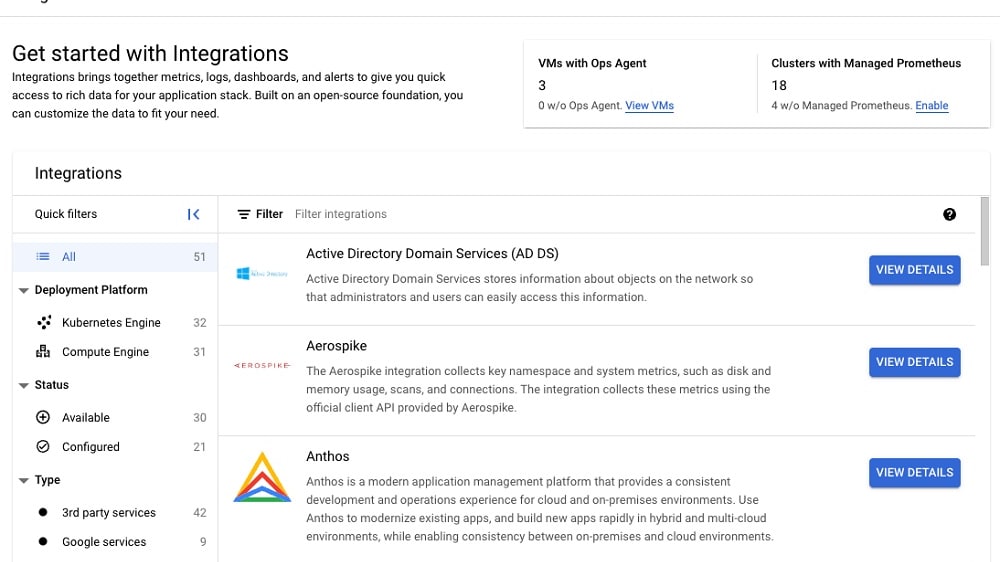
With its robust cloud computing capabilities, Google Cloud enables seamless integration with advanced machine learning tools, analytical applications, and diverse databases.
When it comes to integrations, Google Cloud stands out. While both platforms support integration with popular productivity apps such as Gmail, Google Calendar, and Google Docs, Google Cloud offers a more extensive range. With its robust cloud computing capabilities, Google Cloud enables seamless integration with advanced machine learning tools, analytical applications, and diverse databases. This makes it an invaluable suite of tools for businesses and developers dealing with resource-intensive operations.
In contrast, Google Drive, while highly effective for document storage and sharing, doesn't provide the same breadth of integrations as Google Cloud. It excels in its domain of document collaboration and management, making it an excellent choice for such tasks. However, organizations with more advanced integration needs and resource-intensive computing requirements will find Google Cloud to be the more suitable and versatile option.
Google Drive Offers Better Offline Access Capabilities Compared to Google Cloud

Google Drive enables users to access and edit their files even in the absence of an internet connection, and any modifications made while offline automatically synchronize once the user regains connectivity.
Google Drive distinguishes itself with its offline access and editing capabilities, a feature notably absent from Google Cloud's typical service offerings. Google Drive enables users to access and edit their files even in the absence of an internet connection, and any modifications made while offline automatically synchronize once the user regains connectivity.
This particular feature enhances flexibility for users, particularly those who frequently travel or encounter unreliable internet connections during their work. The ability to work seamlessly offline and have their changes seamlessly integrate when they are back online provides a significant advantage for users in terms of productivity and convenience.
08 Google Cloud (GCP) vs Google Drive: Which is the best for your business?
Google Cloud (GCP) is the best tool for you if:
- Your organization demands powerful cloud computing capabilities, making it a prime choice for application development and scalability.
- Data analytics and machine learning are integral to your business strategy, driving insights and innovation initiatives.
- Your critical workloads and services necessitate a secure, scalable, and adaptable infrastructure to meet dynamic demands effectively.
- You operate on a global scale and require advanced networking features and sophisticated content delivery solutions for seamless worldwide operations.
- Your organization prioritizes comprehensive cloud solutions, making Google Cloud the preferred choice for managing diverse resource-intensive operations efficiently.
 Your organization demands powerful cloud computing capabilities, making it a prime choice for application development and scalability.
Google Drive is the best tool for you if:
- You require a user-friendly cloud storage solution and straightforward file sharing tailored for personal or small team usage.
- Prioritizing real-time collaboration on documents and ubiquitous accessibility aligns with your primary goals.
- Your preference is for hassle-free file management, devoid of intricate cloud computing demands or complexities.
- You operate within budget constraints and find basic productivity tools and storage options to be suitably adequate.
- The security and simplicity of a platform for seamless document organization, sharing, and collaborative teamwork are highly valued.
Google Cloud (GCP)
Used by 11245 members
$2,000 in credits for 1 year if you never raised funds // $350,000 in credits for 2 years if you did
Save up to $350,000
Google Drive
Used by 984 members
20% off Plus plans for 1 year
Save up to $518
09 Alternatives to Google Cloud (GCP) & Google Drive

Google Workspace
Used by 9003 members
20% off Plus plans for 1 year
Save up to $518

DigitalOcean
Used by 6924 members
$200 in credits
Save up to $200

AWS Activate
Used by 6104 members
Up to $100,000 in credits or 20-50% off your monthly spend through an AWS partner (must be spending $100+/month)
Save up to $300,000

Typeform
Used by 4566 members
40% off all annual plans
Save up to $1,236
10 Promotions on Cloud Computing software
Google Cloud (GCP) and Google Drive are great tools, but Secret offers promo codes with discounts on over 2190+ different SaaS solutions. New deals are added regularly, helping you save money on your online subscriptions. Get access to codes for other Cloud Computing software you might want to purchase
Credits for AWS Activate
Up to $100,000 in credits or 20-50% off your monthly spend through an AWS partner (must be spending $100+/month)

Discount for DocSend
90% off your annual DocSend plan
DigitalOcean coupon code 2026
$200 in credits

Box deal
First 2 months free

Discount for OVHcloud
€10,000 in credits for 1 year
Google Workspace promo code 2026
20% off Plus plans for 1 year

Cloudways deal
30% off for 3 months

pdfFiller coupon
First month free

Cloudflare promo code
$5,000 in credits for self-funded startups // $250,000 in credits funded startups

Promo code for ClickUp
Additional 20% off Unlimited and Business plans for 1 year
Start saving on the best SaaS
Secret has already helped tens of thousands of startups save millions on the best SaaS like Microsoft Teams, Google Workspace & many more. Join Secret now to buy software the smart way.