





I don't usually begin my conversation about using Milanote or Notion when someone asks me which one to choose based upon their "features." I usually will begin at the point before "features" even become relevant, i.e., the chaotic phase of working with pieces of information; images, screen shots, partial ideas, sources and reference materials, meeting notes and other types of information and attempting to develop it into a cohesive whole.
While both Milanote and Notion have space to store your content, each will influence how you process and organize your information differently. Milanote promotes visualizing your information as well as your sense making of it, while Notion encourages you to structure the way you complete tasks and execute projects. In this guide, I will provide examples of how to use these tools in specific ways, so you may choose the tool that works best for you and your methods of organizing and executing your ideas, rather than simply developing a product.
Before we dive in, here is one helpful starting point : Notion reviews.
- 01 Milanote vs Notion: overview
- 02 What's the difference between Milanote and Notion?
- 03 Milanote pros and cons
- 04 Notion pros and cons
- 05 Milanote compared to Notion
- 06 Notion compared to Milanote
- 07 Features comparison
- 08 Milanote vs Notion: Which is the best for your business?
- 09 Alternatives to Milanote & Notion
- 10 Promotions on Productivity software
- 11 Milanote vs Notion: Conclusion
Start saving on the best SaaS
Secret has already helped tens of thousands of startups save millions on the best SaaS like Microsoft Teams, Google Workspace & many more. Join Secret now to buy software the smart way.

01 Milanote vs Notion: overview
The features of Milanote and Notion are generally referred to as “all-in-one workspaces.” But what this label doesn’t convey is the fundamental difference between Milanote (optimized for ideation) and Notion (optimized for systems). If your process involves an initial large input and then a direction, a creative concept, a campaign story line, a design mood board; Milanote may seem to be a natural extension of your thinking.
Milanote is a visually organized space based upon boards where you can arrange notes, images, links, and files in a way that makes sense to you. It’s perfect for planning, synthesizing information, and creating a shared “thinking space” among your clients and/or team members. Milanote’s free version is meant to be a basic test of its workflow; there are limits to the number of items you can create/upload – i.e., not good for heavy duty use. The limits of the free version are clearly stated on Milanote’s pricing page.
Notion is a modular workspace designed around pages and databases. When you need to repeat something over and over again, that's when Notion shines. Examples include team wikis, editorial calendars, product road maps, meeting notes that are tied to specific projects, and operational dashboards. Additionally, Notion has AI positioning within its paid plans, and many reviews on our site demonstrate how teams use Notion to organize their content planning, manage permissions, and collaborate.
Here is a side-by-side feature comparison table to help illustrate the differences between Milanote and Notion.

Ease of use
Milanote is almost “instant-on” for visual work. Notion is straightforward once you adopt a structure, but blank-page flexibility can slow onboarding.

Milanote
Notion
Databases and structured tracking
Notion’s databases enable real systems, views, properties, relations. Milanote is better for ideas than for operational tracking at scale.
Milanote
Notion
Templates and repeatable workflows
Notion is stronger for standardizing processes across teams. Milanote’s templates are excellent for creative planning, less for org-wide workflows.
Milanote
Notion
Collaboration and sharing
Both collaborate well, but differently. Milanote is fantastic for sharing boards with clients, Notion excels at internal, cross-team knowledge sharing.
Milanote
Notion
Permissions and governance
Notion is more suitable when governance matters, teamspaces, structured access. Milanote is simpler and board-centric, which can be limiting as organizations grow.
Milanote
Notion
Integrations and ecosystem
Notion benefits from a broader ecosystem and common workflows with other SaaS tools. Milanote covers essentials but isn’t as integration-heavy.
Milanote
Notion
Pricing plan
Milanote’s free plan is limited, item and upload caps, while Notion’s value compounds when it replaces multiple tools. Deals can shift the economics further.
Milanote
Notion
Customer support and customer reviews
Both have strong reputations overall. Notion has a massive knowledge base and community, Milanote’s support is praised for hands-on help in creative workflows.
Milanote
Notion
Visual ideation (boards, moodboards)
Milanote is purpose-built for spatial thinking. Notion can simulate boards, but the experience is page-first rather than canvas-first.
Milanote
Notion
AI assistance
Notion’s paid positioning includes AI to accelerate writing and synthesis. Milanote is more manual by design, often a plus in creative ideation.
Milanote
Notion
02 What's the difference between Milanote and Notion?
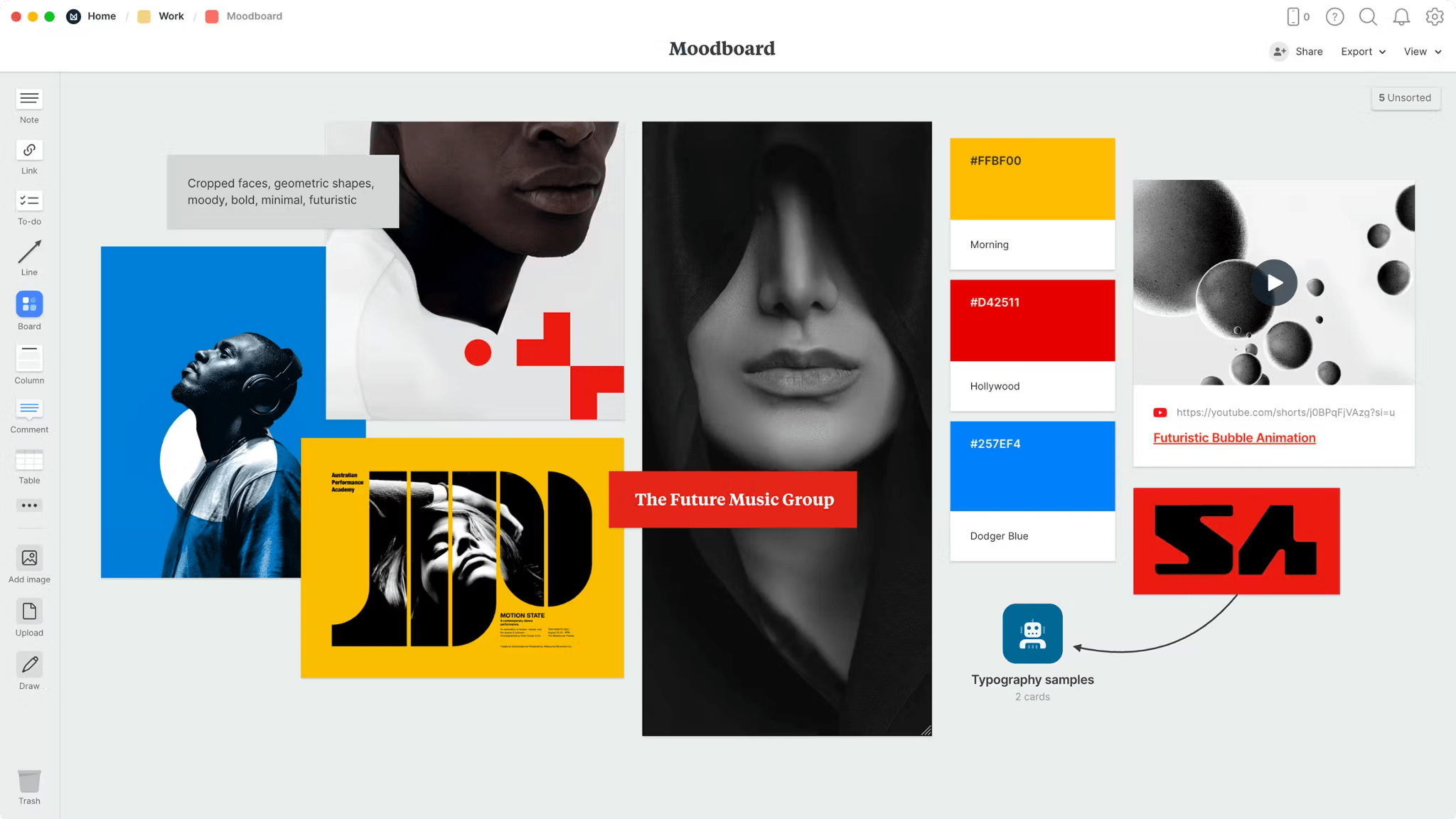
Milanote gives you a visual thinking space for creative work
Milanote
Design your thoughts

Notion is the operational backbone for growing teams
Notion
Knowledge base, project management, note taking, and more. Notion leverages AI to centralize your team's work, facilitate collaboration, ensure proper project follow-up, and boost overall productivity and efficiency.
The biggest difference is that Milanote will help you create and express your ideas in an open form, and notion will help you organize and operate your systems. Milanote is an ideal place to keep your ideas messy for a while, add references to them, group concepts visually and tell a story using your fragments. For designers, strategists, writers and agency people, the visual spatial layout that you use to get to your answers is not "nice to have", it's how you arrive at the answer.
Notion is very different in this sense - it's best used when you need to turn your decisions into operational systems. When you're looking for a single source of truth, specs, meeting minutes, project updates, content inventories, onboarding documentation, etc, Notion's page and database format are better suited to modeling that data and that's one reason Notion becomes the backbone of many organizations when a team outgrows ad-hoc planning.
free plans play a huge role in shaping habits in this comparison, because milanote's free plan is perfect to see what the interface looks like, but milanote has intentionally capped the free version (for example, number of notes or items, number of file uploads) so you'll either be forced to upgrade or go somewhere else. notion's free plan is generally good enough to build a personal system, however, as soon as you want to do something beyond basic collaboration, admin access, or ai, you'll need to consider upgrading to a paid tier.
Notion’s offer is especially relevant if you’re optimizing for budget: Notion promo page highlights a partner deal with months free on a paid plan, with Unlimited AI, which can materially change total cost for eligible teams.

Notion
Organize teamwork and increase productivity
6 months free on the Business plan with Unlimited AI
Save up to $12,000
03 Milanote pros and cons
What are the advantages of Milanote?
- Visual boards that actually support ideation: You can work the way creative work happens, non-linear, reference-heavy, and iterative. That’s hard to replicate in a database-first tool.

- Low-friction capture of mixed media: Notes, images, links, and files can live side by side without forcing you into rigid structure. It’s ideal for research and inspiration gathering.
- Client-friendly sharing: Milanote is excellent for presenting a creative direction as a single artifact. You can invite people to view without requiring an account, which reduces stakeholder friction.
- Great for creative pre-production: If you do brand strategy, content concepts, UX inspiration, or campaign planning, Milanote keeps everything visible and connected.
- Fast onboarding: Most teams “get it” immediately because the interface maps to a physical pinboard, not a complex document system.
What are the disadvantages of Milanote?
- Limited when you need true operational tracking: Once you require fields, statuses, owners, deadlines, and multi-view reporting, you’ll miss Notion-style databases.

- Free plan caps are reached quickly: The limitations are concrete, item limits and upload limits, which can interrupt momentum once you commit to the tool.
- Governance doesn’t scale as far: Board-based organization is great early, but larger organizations often need deeper permissioning and structured information architecture.
- It can become visually noisy: Without conventions, boards can turn into dense collages that are hard to maintain over time.
- Integrations are lighter: Milanote is not typically the “hub” in a complex stack, great for ideation, less for connecting operational data across tools.
04 Notion pros and cons
What are the advantages of Notion?
- Databases that power real systems: This is the difference between a workspace that stores content and one that runs operations, views, filters, and structured properties are a competitive moat.
- All-in-one consolidation: Docs, wikis, tasks, and structured trackers can live in one place, reducing tool sprawl and context switching.
- Template-driven standardization: Notion excels at making quality repeatable, briefs, SOPs, meeting notes, onboarding, and project spaces can all follow consistent patterns.
- Collaboration at scale: Notion is designed for cross-functional visibility, marketing, product, operations, and leadership can work from the same source of truth.
- Strong deal leverage on our site: If you qualify, the offer on Notion promo can significantly reduce costs versus paying list price.
What are the disadvantages of Notion?
- It’s easy to build a mess: Notion’s flexibility is a double-edged sword. Without information architecture, naming conventions, templates, governance, workspaces become inconsistent.
- Onboarding can be slower than Milanote: Users often need a “starter system” to avoid getting stuck in blank-page paralysis.
- Not canvas-native for ideation: You can brainstorm in Notion, but it doesn’t feel like a real moodboard or visual wall in the way Milanote does.
- Permission complexity grows with the organization: As teams expand, you’ll spend time designing access models and avoiding accidental information sprawl.
- Overkill for lightweight personal notes: If your use case is “simple notes with minimal setup,” you might prefer a simpler tool, or Milanote if you think visually.
Compare Notion to other tools


Notion vs Monday


Notion vs Asana

Coda vs Notion

ClickUp vs Notion

Notion vs Slab

Notion vs OneNote
05 Milanote compared to Notion
Milanote has an amazing ability to give you a visual surface for your ideas to develop organically as they come to you, before you are forced to organize them into some sort of structure. Notion does exactly the opposite – it gives you the ability to create structures that can grow with your needs and allow you to execute on multiple projects, collaborate with multiple people, build processes, and eliminate the frustration of not being able to find the most recent versions of your work.
Is Milanote better than Notion?
 Is Milanote better than Notion?
I would say Milanote is better than Notion when the nature of your work is ambiguous (at least initially) and is visually driven – e.g., creating brand mood boards, finding inspirational UX designs, developing a creative strategy for a client, outlining stories, and conceptualizing campaigns. Milanote allows you to group, compare, and collect content in a manner similar to how you might organize a creative agency's studio wall; Notion cannot do this out-of-the-box.
If you rely on having clear direction to achieve daily success and are looking to clarify direction quickly, Milanote is likely to help you get there faster than Notion. Notion can certainly capture the final result, however Milanote tends to help shape that final result more often.
What is Milanote best used for?
Milanote is ideal for all aspects of pre-production for creative work – collecting references, managing research, crafting briefs, and developing a unified direction for your work that you can easily communicate to stakeholders. It excels particularly when you have to maintain visibility of context, resources, notes, and rationale about a particular subject matter in one location.
Additionally, Milanote is a very effective "presentation workspace". If you are consistently receiving feedback from clients, a single collaborative board can dramatically decrease the number of exchanges between you and your client through email threads and disorganized documents.
Can Milanote replace Notion?
Milanote can replace Notion for individual or small team use whose primary workflows consist of ideation, reference management, and light-weight planning. If you don't require structured databases, relationships, or advanced permissioning, Milanote can cover a lot of ground.
However, if your workflow relies on tracking operations, status fields, owners, due dates, and multi-report views, Milanote will not fully replace Notion. Many teams use Milanote for the initial thinking and referencing and Notion for downstream execution and documenting.
Is Milanote cheaper than Notion?
Based on list prices alone, it really depends on how you utilize both products. Milanote may be cost-effective if it enables you to improve the flow of creative output and reduce the amount of time spent searching for references scattered throughout different places. However, Milanote's free plan has limitations regarding items, uploads, etc., which means serious usage will typically lead to purchasing higher tiers of service.
Notion can potentially be "less expensive per outcome" depending upon what types of additional applications you were using prior to switching to Notion. If you are eligible for our promotion, it could further shift the economics, please visit the Notion deal we are offering on our website.
Is there a better Productivity software than Milanote?
If you’re asking this question, you likely want one of two things: either a tool that stays visual but offers more real-time workshop dynamics, or a tool that keeps ideation but adds more structure and automation.
On our Milanote page, you’ll also find a direct path to explore substitutes: check Milanote alternatives and compare based on your workflow constraints, ideation-first versus system-first.
Should you avoid Milanote if you need a 100% free app?
If you need an entirely free application that will remain completely functional without requiring payment, Milanote's free tier will almost definitely not be sufficient for the long term since it is capped. While Milanote is perfect for trying the product and maintaining small boards, creative work grows rapidly, references compound, boards spread out and uploads add up quickly.
If budget is a concern, you should consider validating your workflow using Milanote first and then determine if the savings in time are worth the cost of upgrading or exploring alternatives that fit within your budget requirements.
06 Notion compared to Milanote
Notion is generally a better option than Milanote when you are looking for a platform that works in the way a company's internal platforms work: organized knowledge, repeatable workflows, and a single source of truth. Milanote is very good at creating ideas, however, when work has to be tracked, delegated, and audited, then Notion is going to become the much more compelling option.
Therefore, if your major issue is not "finding new ideas" but "consistently executing," Notion is typically the stronger anchor tool.
Is Notion better than Milanote?
When you have to handle information as a system (tasks, projects, documentation, content flow, etc.) Notion is generally a better option than Milanote. The ability of Notion to create databases and therefore allow you to define what matters, status, owner, priority, due date, and view it all differently (calendar, kanban, table) provides the operational visibility Milanote does not.
When you're developing a business process, not simply a creative direction, Notion is generally a better option for the long term.
What is Notion best used for?
Connected work is the best utilization of Notion; a team wiki, project space, meeting notes that reference decisions, and tracking that remains relevant because it is embedded in the workflow. Notion is especially good for teams where they want to eliminate the "where did I find that document?" anxiety.
If you want an authoritative view of how teams actually use Notion, the feedback on Notion reviews on our site is a useful reality check.
Can Notion replace Milanote?
Notion can replace Milanote if you’re comfortable brainstorming in a structured environment and your ideation is mostly textual, outlines, briefs, lists, drafts. You can also embed assets and build gallery-style collections to support creative work.
However, if you rely on spatial reasoning, arranging references, comparing directions visually, building moodboards, Notion will feel like a workaround. In that case, Milanote stays valuable even if Notion is your main system of record.
Is Notion cheaper than Milanote?
Notion often wins on economics when it replaces multiple tools. Instead of paying separately for documentation, wiki, and lightweight project tracking, Notion can consolidate those capabilities.
If you’re eligible, the price conversation changes again: our Notion promo includes months free on a paid plan with Unlimited AI, which can substantially reduce your effective cost.
Is there a better Collaboration software than Notion?
"Better than Notion" is usually synonymous with "better for doing something." If you desire a project management tool specifically designed for managing projects, you may prefer using a project management tool. If you desire a knowledge base that limits publishing workflows, you may desire a documentation platform.
Additionally, if your primary requirement is ideation-based as opposed to system-based, it would be advisable to determine if a visual tool such as Milanote or a white board platform fits your mind better than a database driven workspace.
Is Notion too much for personal use?
Notion is only overkill for personal use if you expect to use it similar to a basic note-taking app, i.e., one page, a few bullet points, and no organization. There is definitely set-up overhead involved with Notion, and you may find yourself annoyed with the flexibility.
However, if your "personal use" involves working on projects, learning plans, content publishing, job searching, running a side business, client work, etc., Notion can quietly benefit you. A database can convert "I should do this someday" into actionable execution without requiring a separate tool.
Notion
Organize teamwork and increase productivity
6 months free on the Business plan with Unlimited AI
Save up to $12,000
07 Features comparison
Milanote Wins on First-Week Usability

Milanote is the easiest way to start collaborating
If your primary concern is usability, and getting a team to actually utilize the tool, Milanote is generally easier to roll out. Users intuitively understand boards: drop content, rearrange items, group items together, and share the results.
Notion is easy to learn, but it also requires decision-making: where do I put things, who owns the content in a given database, what template should I use, what are the naming conventions? Without an established system in place, Notion may seem like a vast warehouse.
Therefore, Milanote is ideal as an initial workspace for creative teams that seek to generate momentum, not configure the tool.
Notion Outperforms Milanote for Databases and Operational Tracking

Notion is built for structure and scale
Once you begin caring about organized fields such as status, owner, priority, and due dates, Notion surpasses Milanote. Notion provides databases which enable you to manage your information as a system versus managing a collection of boards. The benefits of executing tasks include maintaining an editorial calendar, road maps that remain queryable, and onboarding procedures that remain consistent.
Milanote is able to track ideas; however, it does not provide the same multi-view operational perspective as Notion. In Notion, a single dataset can serve as a calendar for planning, a kanban for execution, and a table for tracking and auditing all from a single set of data without requiring duplication.
If you want to see what this looks like in practice, browse the use cases in Notion reviews.
Notion Is Better for Templates and Standardization

Notion helps you create templates that scale
Notion's template experience revolves around creating operational excellence: each briefing contains the exact same sections, each project goes through the same phases, each meeting note includes the same elements for capturing decisions. Once your work becomes repetitive, templates cease to be optional and become the foundation for scaling.
Milanote templates excel at creating templates for creative assets, briefings, moodboards, brainstorming boards, etc.; however, Milanote does not push you towards establishing standards in the same manner as Notion. Milanote excels at providing flexibility while Notion excels at providing consistency.
If your organization is focused on establishing a level of process maturity, regardless of the extent of the focus, Notion will provide more long-term advantages.
Notion Is Stronger for Cross-Functional Collaboration

You can connect teams through shared data directly on Notion
Notion is designed to be a shared operating layer: teams can reference the same source of truth, link between projects and documentation, and build shared dashboards. For organizations where marketing, product, and operations need to stay aligned, that connectivity is a serious advantage.
Milanote collaboration is excellent for reviewing a board, especially with clients or stakeholders, but it’s less suited to becoming the canonical company knowledge base. Its collaboration model is board-centric, Notion’s is workspace-centric.
If your collaboration problem is alignment across teams, Notion is typically the better architecture.
Milanote Is a Better Fit for Client-Facing Creative Work

Present ideas visually to your clients using Milanote
Milanote excels when the workspace itself becomes part of the final deliverable: a board that clearly articulates the direction, references, and rationale in one location. In the world of creative services, clarity is valuable; it decreases miscommunication, increases approval speed, and creates more precise feedback.
Notion can also be used as a client-facing workspace; however, it is not naturally a visual wall. If the client needs to visualize the concept, see the color palette, references, and shape of the story, Milanote's board metaphor is difficult to match.
For official guidance on how Milanote sharing works, including view-only access, Milanote’s help center is a solid reference: sharing a Milanote board.
Milanote Excels Ahead of Notion for Visual Ideation

Think on the wall, not in folders with Milanote
Milanote was created around the notion that creative thinking is a spatial activity. You do not simply take notes; you organize them, compare references, and allow ideas to emerge visually. Therefore, Milanote's collaboration environment seems to flow particularly well for moodboards, brand research, developing a creative strategy, and preliminary campaign planning.
Notion is capable of storing the same type of information as Milanote, however, it appears to encourage "filing" content away into pages or databases. While filing content is useful for organizing content, it does not support the type of discovery that is possible when using Milanote. When you need a collaborative space to think and generate ideas that behave like a studio wall, Milanote is likely the better choice.
Notion Pulls Ahead on AI-Assisted Workflows

Notion AI is embedded directly into your workspace
Notion was designed to be a collaborative layer: teams can reference the same source of truth, connect project-related content and documentation, and develop shared dashboards. In organizations where marketing, product, and operations teams need to maintain alignment, the ability to create these connections is a significant advantage.
While Milanote collaboration is effective for reviewing boards, especially with clients or stakeholders, it is not ideal for establishing a central company-wide repository of knowledge. Milanote's collaboration approach is centered on the board, whereas Notion's is centered on the workspace.
If you’re optimizing for cost, our Notion promo is worth checking before you commit to list pricing.
08 Milanote vs Notion: Which is the best for your business?
Milanote is the best tool for you if:
- You do visual research and want moodboards that stay coherent as references multiply.
- You need a workspace for ideation-first projects, brand, UX, campaigns, narrative.
- You want fast adoption with minimal setup and minimal governance.
- You often present work in progress to stakeholders and want a client-friendly artifact.
- Your team thinks spatially and wants to “see the work” rather than file it.
 You do visual research and want moodboards that stay coherent as references multiply.
Notion is the best tool for you if:
- You need databases to run ongoing workflows, content, projects, knowledge.
- You want to consolidate a wiki, docs, and trackers into a single operating hub.
- You care about standardization via templates and repeatable processes.
- You need cross-functional visibility across teams and projects.
- You want AI-assisted writing and summarization as part of the workspace experience.
Notion
Organize teamwork and increase productivity
6 months free on the Business plan with Unlimited AI
Save up to $12,000
09 Alternatives to Milanote & Notion

Miro
Used by 3304 members
$1,000 in credits (lifetime validity)
Save up to $1,000

ClickUp
Used by 3272 members
Additional 20% off Unlimited and Business plans for 1 year
Save up to $1,000

Coda
Used by 974 members
7 days free + 15% off annual plans
Save up to $720

Microsoft OneNote
10 Promotions on Productivity software
Milanote and Notion are great tools, but Secret offers promo codes with discounts on over 2190+ different SaaS solutions. New deals are added regularly, helping you save money on your online subscriptions. Get access to codes for other Productivity software you might want to purchase

Make free credits
3 months free on the Teams plan (240k credits included)

Descript deal
35% off annual plans

Airtable promo
$1,000 in credits for 1 year

GitHub offer
$10,000 in credits for 12 months

Google Workspace discounts
20% off Plus plans for 1 year

Zendesk discounts
6 months free (with AI Agents and Copilot)

Slack promotion code
25% off new plan purchases

Promo code for Intercom
1 year free on the Advanced plan (300 monthly Fin resolutions included)

Google Calendar discounts
20% off Plus plans for 1 year

Trello offer
Free forever for up to 10 users
11 Milanote vs Notion: Conclusion
If you are deciding which one to use , either Notion or Milanote , do not ask yourself "which one is better?" Instead, ask: Where does my work begin, and where will it be done?
Milanote excels at the starting point: Milanote transforms disorganization into clarity using visual organization methods. Notion excels at the middle and ending points: Notion transforms clarity into an operational system you can execute, delegate and continuously improve.
As for a practical suggestion: Choose Milanote when your competitive advantage is in creative direction, and/or you have to synthesize a large amount of information, and choose Notion when your competitive advantage is based on being able to provide consistent operations and shared knowledge. Or if you want the best of both worlds: Use Milanote to explore, and create the idea; then document and implement the process in Notion.
To act on this now, you can check the current availability on our side: Milanote promo code page, and the Notion deal page for eligible teams.
Start saving on the best SaaS
Secret has already helped tens of thousands of startups save millions on the best SaaS like Microsoft Teams, Google Workspace & many more. Join Secret now to buy software the smart way.