


Website building is one of the most critical aspects of establishing a strong online presence. However, the choice between different website building platforms can be a complex decision. To begin, you need to consider your specific needs, such as the type of website you want to create and the level of customization required. At the end of the day, you also want a platform that offers robust performance and analytics to measure your website's success.
Fortunately, there are two standout contenders in the website building arena: Softr and WordPress. In this comparison, we'll dive into the key features, differences, and ideal use cases for Softr vs WordPress. By the time you finish reading this article, you'll have a clear understanding of which platform is the perfect fit for your website-building needs.
- 01 Softr vs WordPress.com: overview
- 02 What's the difference between Softr and WordPress.com?
- 03 Softr pros and cons
- 04 WordPress.com pros and cons
- 05 Softr compared to WordPress.com
- 06 WordPress.com compared to Softr
- 07 Features comparison
- 08 Softr vs WordPress.com: Which is the best for your business?
- 09 Alternatives to Softr & WordPress.com
- 10 Promotions on No-Code Development software
Start saving on the best SaaS
Secret has already helped tens of thousands of startups save millions on the best SaaS like Microsoft Teams, Google Workspace & many more. Join Secret now to buy software the smart way.

01 Softr vs WordPress.com: overview
Softr and WordPress represent two prominent players in the realm of website building, each offering unique advantages tailored to different user requirements.
Softr is celebrated for its simplicity and ease of use, making it an excellent choice for individuals and small businesses looking to create stylish and functional websites with minimal technical expertise. It offers a user-friendly platform that excels in providing quick and hassle-free website development. On the other hand, WordPress is a versatile and robust content management system (CMS) suitable for a wide range of websites, from blogs to large-scale e-commerce platforms. It offers extensive customization options and a vast library of plugins and themes.
To make an informed decision between Softr and WordPress, it's essential to assess your specific website needs, technical proficiency, and long-term goals. Softr may be the perfect choice for those seeking a straightforward and rapid website creation process, while WordPress provides a more comprehensive set of tools for users looking to build highly customized and scalable websites.

Security
The security of the WordPress script is not as strong as other CMS platforms. The issue primarily stems from updates and plugins. WordPress offers a wide range of plugins, but they can be vulnerable to hacking. If you fail to update to the latest version, hackers may target the most popular plugins as well. Softr, on the other hand, lacks extensive documentation regarding its security measures, suggesting that security may not be a primary focus for them.

Softr
WordPress.com
Customer Support
Softr has a great customer service team that responds quickly and without too much hassle. WordPress has a huge user base, so the speed of the customer service could be improved.
Softr
WordPress.com
Customer Reviews
Both platforms are highly rated on Capterra, with most of the criticism revolving around responsiveness with WordPress if you use too many plugins and layout in Softr’s case.
Softr
WordPress.com
Responsiveness
Regrettably, Softr's apps currently lack an acceptable level of responsiveness. This contradiction is puzzling, considering that Softr specializes in developing Progressive Web Apps (PWAs) designed to provide a smooth experience across all devices. WordPress sites are usually very responsive but can get bogged down if you decide to go for numerous plug-ins and various themes and templates that are not well-optimized.
Softr
WordPress.com
Ease of Use
Softr leans more on the no-code website building with simple drag-and-drop features. WordPress, on the other hand, is a bit more complex, with its own drag-and-drop system and complex integration options.
Softr
WordPress.com
Integrations
Softr offers integrations with popular tools like Zapier, Airtable, and Stripe for data connectivity and automation. WordPress has a vast ecosystem of plugins, including WooCommerce for e-commerce.
Softr
WordPress.com
Automation sequences
Softr has not demonstrated a clear emphasis on robust automation capabilities. There is no mention of automation or action sequences on their website. If you require complex automation sequences, Softr may not be the optimal choice. WordPress offers automation options through a range of plug-ins, some paid, some free. However, it does not have automation capabilities on its own.
Softr
WordPress.com
Pricing Plan
Softr offers a free plan with affordable pricing tiers, suitable for smaller budgets. WordPress is free, but costs can escalate with hosting, themes, and plugins.
Softr
WordPress.com
Templates
WordPress has thousands of templates that offer completely built-out websites or parts of a website, with prices ranging from free to thousands of dollars. Though there are fewer templates available on Softr, they do include some quality ones
Softr
WordPress.com
Forms
Softr's forms lack the same aesthetic appeal as those of WordPress and offer fewer options for personalization. Regrettably, Softr falls short in the realm of forms. WordPress.com offers a convenient built-in form block that enables you to effortlessly incorporate straightforward contact forms into any section of your website. With this block, you have the flexibility to create various types of forms, including a contact form, event registration form, feedback form, appointment booking form, and more.
Softr
WordPress.com
02 What's the difference between Softr and WordPress.com?
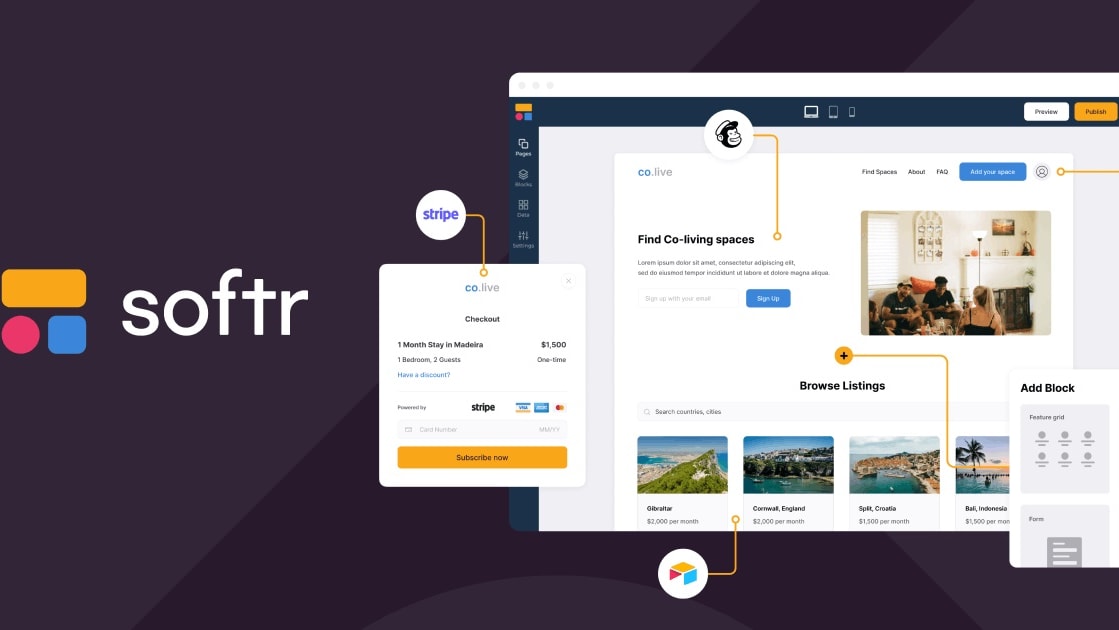
With the Softr plan, you can even have a custom domain; however, it will include Softr branding and have some limitations on data capabilities (up to 200 Airtable records)
Softr
Build business apps with AI — that actually work
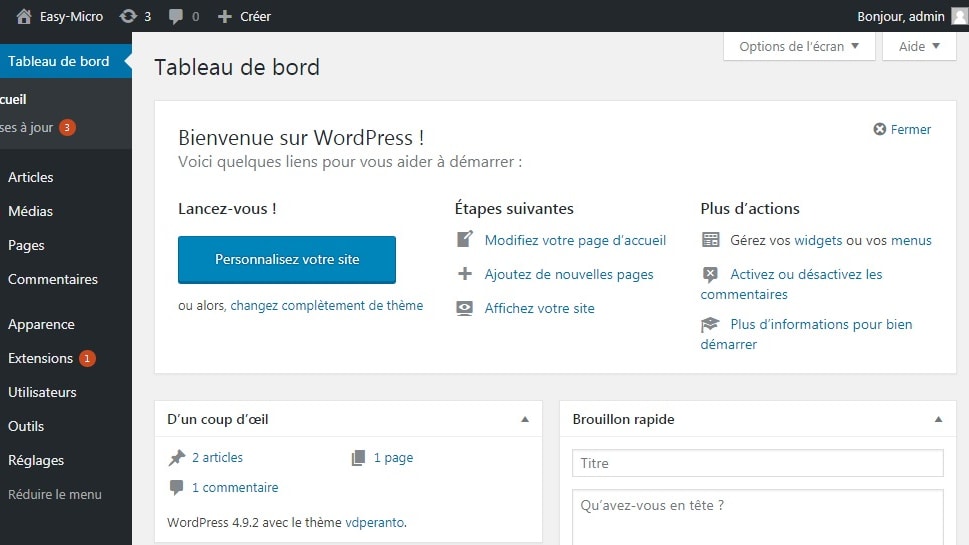
Furthermore, WordPress provides the option to create a website for free using a WordPress domain and offers some content management system (CMS) features.
WordPress.com
WordPress.com is a hosted website builder and content management system that combines flexible design tools with fully managed hosting. It removes the technical burden of servers, security, and updates, so you can focus on publishing, selling, and growing online.
Softr and WordPress have a lot in common as they both serve a similar purpose. Here are some key similarities and differences between the two platforms.
Firstly, both Softr and WordPress are website builders that don't require any knowledge of HTML. You can easily create a website using their builder interfaces without worrying about coding. Moreover, both tools offer hosting services, allowing you to host your website on their platforms. They provide you with a URL and an SSL certificate to ensure browsing. Additionally, they give you the option to have a custom domain, although on WordPress, this may be available with a paid plan.
Furthermore, Softr and WordPress both offer free plans for users to get started. While their paid plans may vary, they provide a version that allows you to begin building your website. With the Softr plan, you can even have a custom domain; however, it will include Softr branding and have some limitations on data capabilities (up to 200 Airtable records). With WordPress, you can avoid any type of branding with the paid version. Furthermore, WordPress provides the option to create a website for free using a WordPress domain and offers some content management system (CMS) features.
These free plans are great for beginners who want to practice before considering an upgrade to premium plans. To sum up, Softr and WordPress have a lot of similarities, as no code website builders. They both offer hosting services and provide plans for users to start building their websites, but where they differ is the overall support you get with WordPress and the strong community and general presence on the web.

Softr
Used by 1377 members
20% off monthly or annual Professional plan
Save up to $333

WordPress.com
Used by 155 members
30% off all monthly plans
Save up to $340
03 Softr pros and cons
What are the advantages of Softr?
- Ease of use: Softr is known for its user-friendly interface and intuitive drag-and-drop builder. Users with little to no technical expertise can quickly create websites and web applications.

- Rapid development: Softr allows you to build websites and web apps quickly. Its templates and pre-built components make it easy to get started and launch your project in no time.
- No code required: Softr is a no-code platform, which means you don't need to write any code to create functional websites and apps. This makes it accessible to a wide range of users.
- Built-in databases: Softr provides built-in database functionality, enabling you to create dynamic and data-driven websites and applications without relying on external database services.
- Integration options: Softr offers integrations with popular tools and services like Zapier, Airtable, and Stripe, making it easier to connect your website or app with other platforms and automate tasks.
What are the disadvantages of Softr?
- Limited customization: While Softr is user-friendly, it may have limitations when it comes to highly customized design and functionality. Users with complex requirements may find it restrictive.

- Template dependency: Softr relies heavily on templates, which can make your website or app look similar to others using the same templates unless you invest significant effort in customization.
- Limited scalability: While Softr is suitable for smaller projects and businesses, it may not be the best choice for large-scale, high-traffic websites or complex web applications.
- Costs can add up: While Softr offers a free plan, more advanced features and custom domains may require a paid subscription, and costs can increase as your needs grow.
- Limited SEO control: Softr may not provide as much control over SEO (search engine optimization) as some other website builders or CMS platforms. This could impact your site's visibility in search engine rankings.
Compare Softr to other tools


Softr vs Webflow

Softr vs Airtable

Softr vs Bubble

Softr vs Glide

Softr vs Adalo

Softr vs Retool
04 WordPress.com pros and cons
What are the advantages of WordPress.com?
- Ease of use: WordPress offers a user-friendly interface and a straightforward dashboard, making it accessible to users with varying levels of technical expertise. Many users find it easy to create and manage content.
- Versatility: WordPress is highly versatile and can be used to create a wide range of websites, from simple blogs to complex e-commerce sites and membership platforms. It offers a vast library of themes and plugins to extend functionality.
- Community and support: WordPress has a large and active user community, which means you can find a wealth of resources, tutorials, and forums for help and support. There are also many developers and agencies specializing in WordPress.
- SEO-friendly: WordPress is known for its SEO capabilities, with various plugins and tools available to optimize your site for search engines. This can help improve your website's visibility in search engine rankings.
- Customization: WordPress allows for extensive customization through themes and plugins. You can tailor your website's design and functionality to meet your specific needs, and there are many third-party developers creating these add-ons.
What are the disadvantages of WordPress.com?
- Security concerns: WordPress can be vulnerable to security threats if not properly maintained. You need to regularly update both the core software and plugins to protect your site from potential vulnerabilities.
- Complexity for beginners: While WordPress is user-friendly, it can still be overwhelming for beginners, especially when dealing with advanced features or troubleshooting issues.
- Performance optimization: As websites grow and accumulate plugins, they can become slower if not optimized correctly. This may require technical knowledge or the assistance of a developer.
- Maintenance required: Ongoing maintenance, updates, and backups are essential for WordPress websites. Neglecting these tasks can lead to issues or security breaches.
- Costs can add up: While WordPress itself is free, costs can add up when you consider expenses like hosting, premium themes, plugins, and potentially hiring developers for customization or troubleshooting.
Compare WordPress.com to other tools


WordPress.com vs Wix
Webflow vs WordPress.com

HubSpot vs WordPress.com

ClickFunnels vs WordPress.com
05 Softr compared to WordPress.com
Softr and WordPress are website-building platforms with distinct advantages. Softr excels in its simplicity and no-code approach, making it ideal for users without technical expertise. It offers rapid development, built-in databases, and integration options. However, its customization options may be limited, and it might not be suitable for large-scale projects.
On the other hand, WordPress is highly versatile, catering to various website types and offering extensive customization through themes and plugins. It boasts a large community and robust SEO capabilities. However, it requires regular maintenance and security attention, and beginners may find it initially complex. The choice depends on your project's specific needs and your technical comfort level.
Is Softr better than WordPress.com?
 Is Softr better than WordPress.com?
Determining whether Softr is superior to WordPress depends on your specific website-building needs. Softr offers a no-code, user-friendly platform known for rapid development and simplicity, making it ideal for individuals and small businesses. It excels in creating websites and web apps quickly without coding.
In contrast, WordPress is a versatile content management system (CMS) with extensive customization options suitable for various websites, including complex ones. However, it may require more technical proficiency and maintenance. The choice hinges on your project's complexity and your willingness to trade advanced features for a user-friendly, no-code approach provided by Softr or vice versa.
What is Softr best used for?
Softr is best suited for creating simple to moderately complex websites and web applications quickly and without the need for extensive coding knowledge. It shines in scenarios where speed of development and ease of use are paramount.
Softr is particularly useful for personal portfolios, small business websites, landing pages, online portfolios, event pages, and MVP (Minimum Viable Product) creation. Its built-in database capabilities make it well-suited for displaying dynamic content. However, for highly customized or large-scale projects, users may find Softr's customization options limiting, and may need to consider more robust alternatives.
Can Softr replace WordPress.com?
Softr and WordPress serve different purposes, so whether Softr can replace WordPress depends on your specific needs. Softr is a no-code website builder known for its ease of use and rapid development capabilities, making it suitable for simpler projects and users without coding skills. It's a good choice for creating straightforward websites and web apps quickly. However, WordPress is a versatile content management system (CMS) with extensive customization options, making it suitable for a wide range of websites, including complex and highly customized ones.
While Softr may work for some projects, it may not fully replace WordPress for those requiring advanced functionality and flexibility.
Is Softr cheaper than WordPress.com?
Comparing the cost of Softr and WordPress can be complex. Softr’s pricing offers a free plan and affordable subscription tiers, making it cost-effective for individuals and small businesses, especially considering its no-code simplicity. In contrast, WordPress itself is free to use, but costs can accumulate for hosting, premium themes, plugins, and potentially hiring developers.
While WordPress can be costlier when factoring in these expenses, it also offers greater flexibility and scalability. The cost comparison ultimately depends on your project's specific needs and whether you're willing to trade advanced features and customization options for a potentially lower upfront cost with Softr.
Is there a better No-Code Development software than Softr?
When it comes to website building software, Softr is a strong contender, but it's essential to explore alternative options to ensure you find the best fit for your specific requirements.
Several noteworthy alternatives to Softr in the website building space include WordPress, Wix, Squarespace, and Weebly.
The choice of the ideal website building software depends on your unique project needs, technical comfort level, and long-term goals. If you're looking for a platform that emphasizes no-code simplicity and rapid development, Softr may be a great choice. However, considering these alternatives can provide valuable insights and help you make an informed decision that aligns with your specific website building needs.

Softr
Build business apps with AI — that actually work
20% off monthly or annual Professional plan
Save up to $333
06 WordPress.com compared to Softr
WordPress and Softr are two distinct website-building platforms. WordPress is a highly versatile content management system (CMS) known for its extensive customization options, making it suitable for a wide range of websites, from blogs to e-commerce. It boasts a large user community, offering various themes and plugins for advanced functionality. However, it requires regular maintenance and may be complex for beginners.
Softr, on the other hand, excels in simplicity and rapid development, making it ideal for those without coding skills. It's best suited for simpler projects and offers a no-code approach. The choice between the two depends on your specific needs and technical comfort level.
Is WordPress.com better than Softr?
Determining whether WordPress is better than Softr depends on your specific website-building needs. WordPress is a versatile content management system (CMS) that offers extensive customization options, making it suitable for a wide range of websites, including complex and highly customized ones. It has a large user community and robust SEO capabilities but requires regular maintenance and may be complex for beginners.
Softr, in contrast, is known for its simplicity and no-code approach, making it suitable for simpler projects and users without coding skills. It excels in rapid development. The choice between the two depends on your project's complexity and your technical proficiency.
What is WordPress.com best used for?
WordPress is best used for creating a wide variety of websites, ranging from blogs and personal portfolios to complex e-commerce platforms and corporate websites. Its versatility and extensive customization options make it a top choice for users looking to tailor their websites to specific needs.
WordPress is particularly advantageous for content-driven sites due to its robust blogging capabilities. Its large library of themes and plugins allows for additional functionality, including SEO optimization, e-commerce integration, and community building. Moreover, its active user community and extensive documentation provide ample support for users of all levels, making WordPress a go-to platform for website creation and management.
Can WordPress.com replace Softr?
WordPress and Softr serve different purposes, so whether WordPress can replace Softr depends on your specific needs. Softr is a no-code website builder known for its ease of use and rapid development capabilities, making it suitable for simpler projects and users without coding skills. It's a good choice for creating straightforward websites and web apps quickly.
On the other hand, WordPress is a versatile content management system (CMS) with extensive customization options, making it suitable for a wide range of websites, including complex and highly customized ones. While WordPress may work for some projects, it may not fully replace Softr for those requiring advanced functionality and a no-code approach.
Is WordPress.com cheaper than Softr?
The cost comparison between WordPress and Softr can vary depending on your specific needs and circumstances. WordPress itself is open-source and free, which can be advantageous for those on a tight budget. However, costs can increase with WordPress’s subscription plans when factoring in expenses such as hosting, premium themes, plugins, and potential developer fees for customization and maintenance.
On the other hand, Softr offers a free plan and affordable pricing tiers, making it cost-effective, especially for individuals and small businesses. Therefore, the decision on which platform is cheaper depends on your project's complexity and how much you're willing to invest in additional features and customization.
Is there a better Website Builder software than WordPress.com?
While WordPress is a popular and versatile content management system (CMS), it's essential to explore alternative website building software options to determine the best fit for your specific requirements.
Several noteworthy alternatives to WordPress in the website building arena include Wix, Squarespace, Joomla, and Drupal.
The choice of the ideal website building software depends on your unique project needs, technical comfort level, and long-term goals. If you seek a platform known for its extensive customization options, a vast library of themes and plugins, and a thriving user community, WordPress may align perfectly with your website-building objectives. Nevertheless, considering these alternatives can provide valuable insights and help you make an informed decision that suits your specific website-building needs.

WordPress.com
The popular way to build and host a website
30% off all monthly plans
Save up to $340
07 Features comparison
Softr's Seamless Payment Integration Outshines WordPress
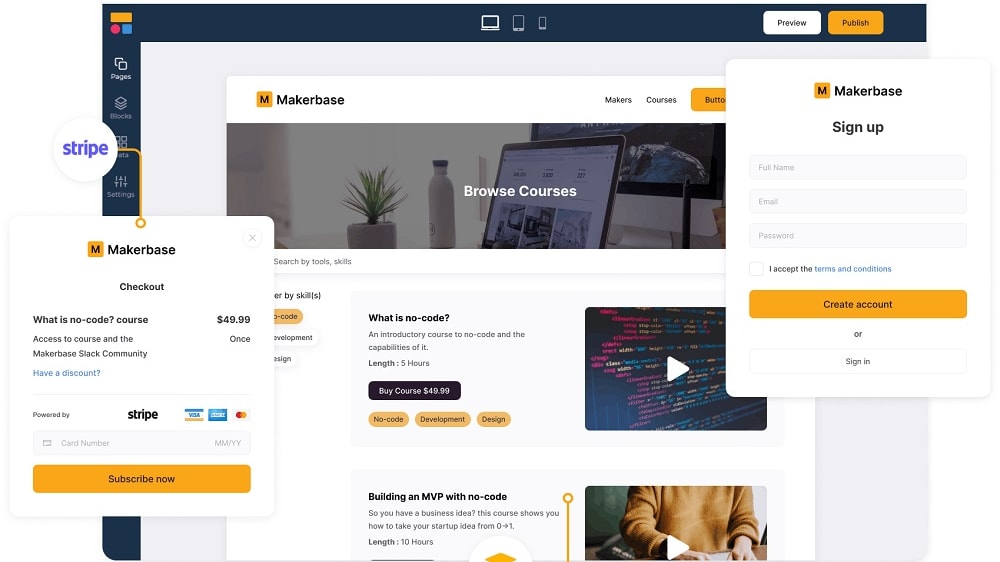
Softr distinguishes itself with its remarkable built-in payment integration feature, offering users a streamlined and secure way to accept payments for products or services directly through their applications
Softr distinguishes itself with its remarkable built-in payment integration feature, offering users a streamlined and secure way to accept payments for products or services directly through their applications. Softr takes care of the complexities of payment processing, including security and compliance requirements.
For instance, with Softr, you can effortlessly create an online store or a membership site, set up payment gateways such as Stripe or PayPal, and start generating revenue without the need for third-party plugins or additional configurations. This seamless payment experience ensures a hassle-free transaction process for your customers.
While WordPress does offer e-commerce functionalities through plugins like WooCommerce, it doesn't provide the same level of seamless, built-in payment integration that Softr offers. Users often need to rely on various plugins and configurations to achieve a similar payment experience, which may not be as user-friendly or efficient.
Softr Provides Greater Customization Possibilities than WordPress

Softr stands out with its extensive customization options, offering users access to a versatile array of 100 building blocks.
Softr stands out with its extensive customization options, offering users access to a versatile array of 100 building blocks. These building blocks empower users to design web applications that align perfectly with their brand identity, enabling customization not only in appearance but also in functionality.
For instance, users can effortlessly incorporate dynamic data tables, interactive forms, and personalized dashboards to create a tailored user experience. Softr's flexibility ensures that each element of the application can be fine-tuned to meet specific project requirements.
On the other hand, while WordPress provides a wide selection of themes, it may not match the level of customization and flexibility offered by Softr's building blocks. Users of WordPress often encounter limitations in achieving a truly unique and customized website, especially when it comes to altering core functionalities.
Softr Surpasses WordPress in User-Friendliness and No-Code Simplicity

Softr's no-code platform is specifically designed with simplicity in mind.
Softr outshines WordPress in terms of user-friendliness, making it an ideal choice for those seeking a hassle-free website-building experience. Softr's no-code platform is specifically designed with simplicity in mind. Its intuitive drag-and-drop builder empowers users, regardless of their technical background, to effortlessly create and launch robust websites and web applications in a matter of hours, all without the need to write a single line of code.
In contrast, WordPress, while powerful, is often associated with a steeper learning curve. Users navigating the WordPress ecosystem may find themselves delving into numerous settings, options, and sometimes even coding to achieve their desired website appearance and functionality.
WordPress's Integration Power Outshines Softr's Convenience

WordPress boasts an extensive plugin ecosystem that opens up a world of possibilities for users.
When it comes to integrations, WordPress takes the lead, surpassing Softr in versatility. WordPress boasts an extensive plugin ecosystem that opens up a world of possibilities for users. Practically every conceivable tool or function can be incorporated into a WordPress site through its vast library of plugins. This allows users to extend their website's functionality far beyond what a typical website or web app offers.
For instance, WordPress users can seamlessly integrate e-commerce capabilities with WooCommerce, enhance SEO performance with Yoast SEO, or implement advanced contact forms using plugins like Contact Form 7. This rich ecosystem makes WordPress an unparalleled choice for those who require a high level of customization and integration.
Softr, while offering valuable direct integrations with tools like MailChimp, Stripe, and Airtable, doesn't match the sheer volume of integrative possibilities available in the WordPress universe. Therefore, for businesses and individuals seeking extensive integration capabilities and a wide array of third-party tools to enhance their online presence, WordPress stands as the superior choice.
Softr's Data-Centric Approach Surpasses WordPress for App Building

Softr distinguishes itself by excelling in harnessing the power of data integration, particularly with platforms like Airtable or Google Sheets
In the realm of application building, both Softr and WordPress offer their unique advantages. However, Softr distinguishes itself by excelling in harnessing the power of data integration, particularly with platforms like Airtable or Google Sheets. This means that the applications you create using Softr are inherently designed to optimize data utilization and performance.
For instance, you can seamlessly create dynamic inventory management systems that pull real-time data from Google Sheets, or develop customer portals that sync with your Airtable database. Softr's data-centric approach ensures that your apps are tailor-made for efficient data processing, which is a capability not inherently supported by WordPress.
While WordPress is a versatile content management system (CMS), its core strength lies in web content management, and it may require additional plugins and customization to achieve the level of data integration and optimization that Softr inherently offers. Therefore, for those seeking to build data-driven applications with ease, Softr stands out as the superior choice.
WordPress Takes the Lead with Robust Backup and Update System

WordPress offers users an invaluable feature—automatic backup and update functionality.
WordPress and Softr both have their merits, but when it comes to automatic backups and updates, WordPress stands out as the superior choice. WordPress offers users an invaluable feature—automatic backup and update functionality. This feature not only provides peace of mind but also enhances security by automatically backing up your website daily and seamlessly delivering software updates.
For instance, WordPress ensures that your site's content, media files, and settings are consistently safeguarded, reducing the risk of data loss due to unforeseen events. Additionally, the platform keeps your website's software up to date, minimizing vulnerabilities that could be exploited by potential security threats.
While Softr addresses data protection concerns effectively, it falls short in comparison to WordPress when it comes to this particular aspect. Therefore, for users who prioritize automated backup and software update mechanisms, WordPress offers a significant advantage, bolstering website security and reliability.
Both Softr and WordPress are Equally Robust in Terms of Intuitive Content Editing

WordPress offers an intuitive block-based editor called Gutenberg, which allows users to create and modify content effortlessly.
Both Softr and WordPress excel in providing users with user-friendly, drag-and-drop interfaces for content editing, simplifying the process of creating and customizing websites and web applications.
For example, Softr's intuitive drag-and-drop builder empowers users to design custom forms, landing pages, and interactive web apps without the need for coding expertise. This ease of use extends to various elements like data tables, image galleries, and navigation menus, making content creation a breeze.
Similarly, WordPress offers an intuitive block-based editor called Gutenberg, which allows users to create and modify content effortlessly. With a wide array of blocks for text, images, videos, and more, users can customize their website's layout and design with ease.
08 Softr vs WordPress.com: Which is the best for your business?
Softr is the best tool for you if:
- You need to create a website or web app quickly and without coding skills, thanks to its no-code approach.
- You want an intuitive drag-and-drop builder that simplifies the design and customization process.
- You value built-in data integration, allowing you to leverage data from sources like Airtable and Google Sheets seamlessly.
- You're working on a project with a tight budget, as it offers an affordable pricing structure, including a free plan.
- You prioritize user-friendliness and a hassle-free website-building experience, making it suitable for beginners and small businesses.
 You need to create a website or web app quickly and without coding skills, thanks to its no-code approach.
WordPress.com is the best tool for you if:
- You require a highly customizable and versatile content management system (CMS) for creating various types of websites, from blogs to e-commerce stores.
- You prefer a platform with a vast library of themes and plugins to extend your website's functionality and design.
- You want a strong SEO foundation, thanks to plugins like Yoast SEO, to improve your website's search engine rankings
- You're willing to invest in maintenance and updates to ensure the security and performance of your website.
- You value a large and active user community, providing extensive resources and support for your website-building needs.
Softr
Used by 1377 members
20% off monthly or annual Professional plan
Save up to $333
WordPress.com
Used by 155 members
30% off all monthly plans
Save up to $340
09 Alternatives to Softr & WordPress.com

Airtable
Used by 8248 members
$1,000 in credits for 1 year
Save up to $1,000

Slack
Used by 3752 members
25% off new plan purchases
Save up to $9,000

Base44
Used by 3315 members

ClickUp
Used by 3277 members
Additional 20% off Unlimited and Business plans for 1 year
Save up to $1,000
10 Promotions on No-Code Development software
Softr and WordPress.com are great tools, but Secret offers promo codes with discounts on over 2200+ different SaaS solutions. New deals are added regularly, helping you save money on your online subscriptions. Get access to codes for other No-Code Development software you might want to purchase

Make promotion
3 months free on the Teams plan (240k credits included)

Shopify free credits
$1/month for the first 3 months + 25% off annual plans

Promo code Webflow
22% off annual plans

Lovable discount
15% off annual Pro and Business plans

Bubble promotion
30% off on monthly plans for 1 year

Deal for Squarespace
Additional 10% off across all plans
Airtable deal
$1,000 in credits for 1 year

Code for Elementor: Website Builder
17% off the annual One Agency plan

Notion discounts
6 months free on the Business plan with Unlimited AI

Weglot deal
14 days free + 15% off annual plans
Start saving on the best SaaS
Secret has already helped tens of thousands of startups save millions on the best SaaS like Microsoft Teams, Google Workspace & many more. Join Secret now to buy software the smart way.