





If you're in search of a versatile platform to streamline your productivity and project management workflows, Taskade and Notion are two standout options worth considering. Both platforms offer a range of features and customization options, making them popular choices among individuals and teams alike.
To assist you in making an informed decision about which platform aligns best with your needs, we'll delve into a comprehensive comparison of Taskade vs Notion. We'll explore their key features, differences in functionality, and ideal use cases. By understanding the strengths and weaknesses of each platform, you'll be better equipped to choose the one that enhances your productivity, collaboration, and organization efforts.
- 01 Taskade vs Notion: overview
- 02 What's the difference between Taskade and Notion?
- 03 Taskade pros and cons
- 04 Notion pros and cons
- 05 Taskade compared to Notion
- 06 Notion compared to Taskade
- 07 Features comparison
- 08 Taskade vs Notion: Which is the best for your business?
- 09 Alternatives to Taskade & Notion
- 10 Promotions on Task Management software
Start saving on the best SaaS
Secret has already helped tens of thousands of startups save millions on the best SaaS like Microsoft Teams, Google Workspace & many more. Join Secret now to buy software the smart way.

01 Taskade vs Notion: overview
Taskade and Notion are two prominent contenders in the realm of productivity and organization tools, each offering a unique set of features and functionalities.
Taskade excels in providing a streamlined platform for task management and collaboration. Its intuitive interface and flexible task organization make it easy for individuals and teams to manage projects effectively. On the other hand, Notion is celebrated for its versatility as an all-in-one workspace. Notion allows users to create databases, wikis, notes, and more, all within a single platform.
To help you navigate the Taskade vs. Notion debate, we'll delve deeper into their key features, differences in functionality, and optimal use cases. By understanding the strengths and weaknesses of each platform, you'll be better equipped to select the one that best aligns with your productivity and organization needs. Let's explore further to guide you in making an informed decision for your workflow.

Collaboration
Taskade shines with real-time synchronization and collaboration, making it ideal for team projects. Notion also supports collaboration but is more suited for asynchronous work.

Taskade
Notion
Note-taking
Notion's rich text editing and media embedding capabilities make it superior for complex note-taking, whereas Taskade is more streamlined for quick, collaborative notes.
Taskade
Notion
Ease of use
Taskade's interface is designed to be user-friendly and straightforward, making it easy for beginners, whereas Notion has a steeper learning curve due to its complexity.
Taskade
Notion
Mobile experience
Taskade and Notion both offer mobile apps, but Taskade's app is sometimes noted for better real-time sync, while Notion's app provides more in-depth features.
Taskade
Notion
Task management
Taskade is specifically built for task management with features like checklists and progress tracking. Notion can be used for task management but requires more setup.
Taskade
Notion
Customer support
Taskade offers reliable support but has fewer resources compared to Notion, which has extensive guides and a more responsive support team.
Taskade
Notion
Template variety
Both offer templates, but Notion's library is more diverse and covers a broader range of use-cases, from simple notes to complex databases.
Taskade
Notion
Pricing plans
Taskade provides a more generous free tier with affordable premium plans, while Notion's free tier is limited, and its full feature set requires a subscription.
Taskade
Notion
Customer reviews
Taskade is often praised for its simplicity and real-time collaboration features, while Notion is lauded for its extensive customization and database capabilities.
Taskade
Notion
Integrations
Taskade has essential integrations, including Gmail, Box, and SurveyMonkey, but is not as extensive as Notion, which offers a wide range of integrations with tools like Datadog, Asana, and Canva, and API access for customization.
Taskade
Notion
02 What's the difference between Taskade and Notion?

Taskade is designed with simplicity and collaboration in mind, offering an intuitive interface tailored for teams to manage tasks and projects seamlessly.
Taskade
The workspace for you and your remote teams

Notion offers a comprehensive all-in-one workspace, enabling users to create databases, wikis, notes, and more within a single platform.
Notion
Knowledge base, project management, note taking, and more. Notion leverages AI to centralize your team's work, facilitate collaboration, ensure proper project follow-up, and boost overall productivity and efficiency.
Taskade and Notion are both powerful productivity platforms aimed at enhancing task management and organization, yet they differ significantly in their approach and target users.
Taskade is designed with simplicity and collaboration in mind, offering an intuitive interface tailored for teams to manage tasks and projects seamlessly. Its focus lies on real-time collaboration and flexible task organization, making it an ideal choice for teams seeking efficient project coordination. Taskade caters to a wide range of users, from individuals managing personal tasks to teams working on complex projects, offering versatility in its application.
In contrast, Notion offers a comprehensive all-in-one workspace, enabling users to create databases, wikis, notes, and more within a single platform. It targets users seeking a centralized hub for information management and workflow optimization. Notion's customizable layouts and extensive integrations make it a preferred choice for individuals and teams looking to streamline their workflow and organize information effectively.
One key difference between Taskade and Notion lies in their pricing models. Taskade offers a variety of plans, including a free tier with basic features, making it accessible to individuals and small teams. Its paid plans offer additional features and collaboration tools at competitive prices, catering to the needs of growing businesses. Notion, on the other hand, operates on a subscription-based model with tiered pricing plans. While it offers a free plan with limited features, its paid plans unlock advanced functionalities and collaboration tools, making it suitable for teams and organizations of all sizes.

Notion
Organize teamwork and increase productivity
6 months free on the Business plan with Unlimited AI
Save up to $12,000
03 Taskade pros and cons
What are the advantages of Taskade?
- Intuitive interface: Taskade boasts a user-friendly interface that makes it easy for individuals and teams to navigate and use effectively, even for those with minimal technical expertise.

- Real-time collaboration: One of Taskade's standout features is its seamless real-time collaboration functionality, allowing team members to work together on tasks and projects simultaneously, fostering greater productivity and efficiency.
- Flexible task organization: Taskade offers a variety of task organization options, including lists, boards, and outlines, giving users the flexibility to structure their tasks in a way that best suits their workflow and preferences.
- Cross-platform compatibility: Taskade is accessible across multiple devices and platforms, including web browsers, desktop applications, and mobile apps, ensuring users can access their tasks and collaborate with team members anytime, anywhere.
- Free tier available: Taskade offers a free tier with basic features, making it accessible to individuals and small teams who are looking for a simple yet effective task management solution without the need for a significant financial investment.
What are the disadvantages of Taskade?
- Limited advanced features: While Taskade excels in simplicity and ease of use, it may lack some of the more advanced features and functionalities offered by competing task management platforms, which could be a drawback for users with more complex project management needs.

- Lack of integration options: Taskade's integration options with other productivity tools and applications may be limited compared to some of its competitors, potentially making it less suitable for users who rely heavily on third-party integrations for their workflow.
- Limited customization: Taskade offers a decent level of customization for task organization, but users may find its customization options somewhat limited compared to other task management platforms, which could be a downside for those who prefer highly tailored solutions.
- Learning curve for new users: While Taskade is generally easy to use, new users may still encounter a learning curve when first getting started with the platform, particularly if they are unfamiliar with task management software or collaboration tools.
- Pricing for advanced features: While Taskade offers a free tier, users looking to access advanced features and collaboration tools may need to upgrade to a paid plan, which could be a drawback for budget-conscious individuals or small teams looking to scale their usage.
Compare Taskade to other tools


Taskade vs Asana


ClickUp vs Taskade

Todoist vs Taskade
04 Notion pros and cons
What are the advantages of Notion?
- Versatility: Notion is highly versatile, serving as an all-in-one workspace where users can create databases, wikis, notes, and more, all within a single platform. Its flexibility allows users to adapt Notion to various workflows and use cases.
- Customization: Notion offers extensive customization options, allowing users to tailor their workspace to suit their specific needs and preferences. From customizable templates to flexible layouts, users have the freedom to design their workspace exactly how they want it.
- Collaboration features: Notion excels in facilitating collaboration among teams with features such as real-time editing, comments, mentions, and sharing. These collaboration tools make it easy for teams to work together on projects and share information seamlessly.
- Integration capabilities: Notion integrates with a wide range of third-party apps and services, enabling users to connect their favorite tools and streamline their workflow. This integration capability enhances productivity by centralizing all relevant information in one place.
- Cross-platform accessibility: Notion is accessible across multiple devices and platforms, including web browsers, desktop applications, and mobile apps. This ensures users can access their workspace and collaborate with team members from anywhere, at any time.
What are the disadvantages of Notion?
- Initial learning curve: Notion's extensive features and customization options can result in a steep learning curve for new users. Navigating the platform and understanding its capabilities may require some time and effort, particularly for users unfamiliar with similar tools.
- Performance issues: Some users have reported occasional performance issues with Notion, such as slow loading times and laggy behavior, especially when working with large databases or complex layouts. These performance issues can disrupt workflow and hinder productivity.
- Pricing structure: Notion's pricing structure may not be suitable for all users, particularly individuals or small teams on a tight budget. While Notion offers a free tier with limited features, unlocking advanced functionalities requires a paid subscription, which may be cost-prohibitive for some users.
- Limited offline functionality: Notion's offline functionality is limited, as users can only access previously viewed pages and documents offline. This can be problematic for users who frequently work in areas with unreliable internet connectivity or prefer to work offline.
- Lack of advanced task management features: While Notion offers basic task management capabilities, it may not be as robust as dedicated task management tools like Taskade or Asana. Users with complex task management needs may find Notion's task management features lacking in comparison.
Compare Notion to other tools


Notion vs Monday
Notion vs Asana

Coda vs Notion
ClickUp vs Notion

Notion vs Slab

Notion vs OneNote
05 Taskade compared to Notion
Taskade and Notion are both popular productivity tools, each offering unique advantages. Taskade excels in simplicity and real-time collaboration, providing an intuitive platform for task management and project coordination.
On the other hand, Notion stands out for its versatility, serving as an all-in-one workspace for creating databases, wikis, and notes within a single platform. While Taskade prioritizes ease of use and seamless collaboration, Notion offers extensive customization options and integration capabilities. The choice between Taskade and Notion depends on individual preferences and specific workflow requirements, with Taskade ideal for streamlined task management and Notion for comprehensive information organization.
Is Taskade better than Notion?
 Is Taskade better than Notion?
Deciding whether Taskade is better than Notion hinges on the user's needs and work style. Taskade's strength lies in its straightforward design and the ability to facilitate immediate teamwork, making it perfect for users seeking a focused and efficient environment for managing tasks and projects.
Notion, however, caters to those who prefer a more expansive toolset, enabling the construction of detailed databases, wikis, and comprehensive notes. Its broad range of integrations and customizability makes it a powerhouse for users who value a robust platform for organizing vast amounts of information.
What is Taskade best used for?
Taskade is best used for streamlined task management and seamless collaboration within teams. Its intuitive interface and real-time editing capabilities make it ideal for organizing tasks, setting deadlines, and assigning responsibilities efficiently. Whether for personal use or team projects, Taskade facilitates smooth communication and coordination, allowing users to stay focused and productive.
With flexible task organization options like lists, boards, and outlines, Taskade adapts to various workflow preferences, ensuring tasks are managed effectively and progress is tracked transparently. Overall, Taskade is a versatile tool suited for individuals and teams seeking simplicity and efficiency in their task management processes.
Can Taskade replace Notion?
While Taskade and Notion both offer powerful productivity features, Taskade's focus on streamlined task management and real-time collaboration may not fully replace Notion's comprehensive workspace capabilities. Notion excels in providing a versatile platform for creating databases, wikis, and notes, catering to a wide range of organizational needs.
However, Taskade's simplicity and intuitive interface make it a strong contender for teams seeking efficient task coordination. Depending on specific workflow requirements, Taskade may complement Notion by enhancing task management efficiency, but it may not fully replace Notion's extensive customization and integration capabilities for comprehensive information organization.
Is Taskade cheaper than Notion?
Taskade’s pricing structure generally offers more cost-effective pricing options compared to Notion. While both platforms provide free versions with basic features, Taskade's paid plans tend to be more affordable, making it a budget-friendly choice for individuals and teams. Taskade's pricing structure typically includes options for monthly or annual subscriptions, with varying tiers to accommodate different needs and budgets.
In contrast, Notion's pricing plans may be higher, particularly for teams or organizations requiring access to advanced features and collaboration tools. Taskade's competitive pricing makes it an attractive option for users seeking a cost-effective solution for task management and collaboration.
Is there a better Task Management software than Taskade?
When exploring alternatives to Taskade for task management and collaboration, it's essential to consider platforms that align more closely with your specific requirements.
Several noteworthy alternatives to Taskade in the task management and collaboration realm include Trello, Asana, Monday.com, Wrike, and ClickUp. The decision on the best task management platform depends on factors such as your team size, project complexity, preferred features, and budget considerations. While Taskade excels in simplicity and real-time collaboration, other platforms may offer additional functionalities, customizable workflows, or integration options that better suit your team's needs and workflow preferences.
06 Notion compared to Taskade
Notion and Taskade are both popular productivity tools, each offering distinct advantages. Notion excels as an all-in-one workspace, providing extensive customization options for creating databases, wikis, and notes within a unified platform. It caters to users seeking comprehensive information organization and flexible workflow management.
Taskade, on the other hand, specializes in streamlined task management and real-time collaboration, offering an intuitive interface for organizing tasks, setting deadlines, and assigning responsibilities efficiently. While Notion prioritizes versatility and customization, Taskade emphasizes simplicity and seamless collaboration.
Is Notion better than Taskade?
Determining if Notion is superior to Taskade largely depends on the user's priorities and the nature of their work. Notion's allure lies in its ability to serve as a versatile workspace, where the depth of customization and the breadth of features allow for a tailored experience, suited to managing complex projects and information storage. This makes it an invaluable tool for users who require a sophisticated platform to organize, collaborate, and integrate various types of content seamlessly.
Conversely, Taskade's appeal is its focus on simplicity and facilitating effective teamwork quickly. For users who prioritize ease of use and efficiency in collaborative settings, Taskade may fall short of Notion's comprehensive capabilities.
What is Notion best used for?
Notion excels as an all-encompassing workspace, ideal for organizing information and managing various types of content within a single platform. It's best used for creating databases, wikis, notes, and project documentation, catering to individuals and teams with diverse organizational needs.
Notion's extensive customization options allow users to tailor their workspace to suit specific workflows, whether for personal productivity, team collaboration, or knowledge management. With its versatile layout and powerful integrations, Notion serves as a centralized hub for consolidating information, fostering collaboration, and optimizing productivity across a wide range of use cases and industries.
Can Notion replace Taskade?
While Notion offers extensive customization and versatility as an all-in-one workspace, it may not entirely replace Taskade's focused task management and collaboration features. Notion excels in organizing information, creating databases, and facilitating team collaboration across various content types.
However, Taskade's strength lies in its simplicity and real-time collaboration specifically tailored for task management. Depending on individual or team needs, Notion can complement Taskade by providing a broader workspace for information organization and project documentation.
Is Notion cheaper than Taskade?
Notion and Taskade offer different pricing structures, making it essential to assess which aligns best with your budget and requirements. Notion’s pricing model provides a free tier with limited features, while its paid plans offer expanded functionality at competitive prices. In contrast, Taskade offers a more straightforward pricing model, including both free and paid plans with varying features and collaboration options.
While Notion's paid plans may offer more comprehensive features, Taskade's pricing may be more cost-effective for individuals or teams seeking basic task management and collaboration tools without additional complexity. Ultimately, the choice between Notion and Taskade depends on your budget and specific needs.
Is there a better Collaboration software than Notion?
When considering alternatives to Notion for comprehensive workspace organization, it's essential to explore platforms that better suit your specific needs.
Several notable alternatives to Notion in the workspace organization space include Evernote, Microsoft OneNote, Google Keep, and Trello. Your choice of workspace organization platform should align with factors such as your preferred organizational structure, collaboration requirements, and integration capabilities. While Notion excels in its versatility and customization options, other platforms may offer simpler interfaces, more specialized functionalities, or better integration with existing tools.
Notion
Organize teamwork and increase productivity
6 months free on the Business plan with Unlimited AI
Save up to $12,000
07 Features comparison
Taskade's Unmatched Mind Mapping Feature Sets It Apart

With Taskade, users can seamlessly create mind maps and share them with teams, enhancing collaboration.
Taskade's exclusive incorporation of mind mapping sets it apart from Notion. Mind mapping is a dynamic tool for visualizing ideas, connecting them, and discerning their interrelationships, making it invaluable for brainstorming, strategic planning, and product design. With Taskade, users can seamlessly create mind maps and share them with teams, enhancing collaboration.
Furthermore, Taskade allows for easy exportation of mind maps as Word or PDF documents, facilitating communication beyond the platform. This distinctive feature elevates Taskade as a comprehensive solution for visual thinkers and collaborative teams seeking innovative ways to conceptualize and communicate ideas.
Notion Outshines Taskade in Data Visualization with Dynamic Database Galleries

Notion's database gallery feature stands out as a superior option for creating dynamic and interactive data galleries.
Notion's database gallery feature stands out as a superior option for creating dynamic and interactive data galleries. Notion users can leverage this feature to present their data in visually engaging formats, enhancing comprehension and analysis. For instance, users can create galleries of images, documents, or project milestones, allowing for intuitive navigation and exploration of data.
While Taskade excels in various other areas, Notion's database gallery feature offers unparalleled versatility and a superior user experience in presenting and interacting with data in a gallery format. This makes Notion the clear winner in data visualization capabilities among the two tools.
Taskade's User-Friendly Design Edges Out Notion's Complexity

Taskade's design is not only casual and playful but also approachable, enabling new users to swiftly navigate its features.
When it comes to ease-of-use, both Taskade and Notion offer intuitive interfaces, yet Taskade holds a slight advantage. Taskade's design is not only casual and playful but also approachable, enabling new users to swiftly navigate its features. For instance, its layout employs manageable, simple-to-understand panels, ensuring content is organized in a clear, uncluttered manner.
Notion, while also user-friendly, presents a steeper learning curve compared to Taskade. Its more business-oriented look and feel, coupled with a broad array of functions and capabilities, may initially overwhelm users, potentially slowing down their onboarding process until they grasp the software's intricacies.
Taskade and Notion Offer Abundant Template Libraries for Streamlined Workflow Initiation

While Notion allows for additional customization of templates to add a personal touch, both tools ultimately provide comparable value in this feature.
Taskade and Notion both offer extensive template libraries curated by experts, catering to a wide range of needs and preferences. These pre-designed templates serve as valuable resources, allowing users to kickstart their work without the need to create structures from scratch. For instance, users can choose from templates for project management, brainstorming, goal setting, and more.
While Notion allows for additional customization of templates to add a personal touch, both tools ultimately provide comparable value in this feature. This rich assortment of templates in Taskade and Notion streamlines workflow initiation, enabling users to start their projects efficiently and effectively.
Taskade's Video Interface Enhances Real-Time Collaboration Beyond Notion's Capabilities
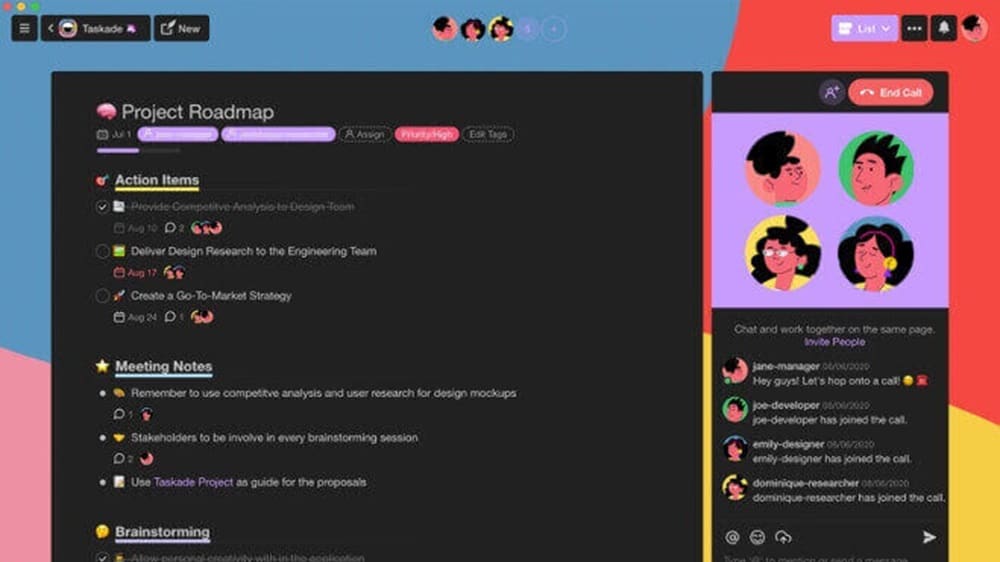
Taskade's video chat functionality allows team members to seamlessly join calls, share screens, documents, or URLs directly within the platform.
Taskade sets itself apart from Notion with its innovative inclusion of a video interface, a feature absent in the latter. Taskade's video chat functionality allows team members to seamlessly join calls, share screens, documents, or URLs directly within the platform.
For example, users can collaborate in real-time by discussing projects, brainstorming ideas, or providing feedback via video calls. This bridges communication gaps and ensures everyone is aligned, thereby enhancing overall productivity. In contrast, Notion lacks this feature, making Taskade the preferred choice for teams seeking enhanced real-time collaboration capabilities through integrated video communication.
Notion Dominates Project Management with Comprehensive Features
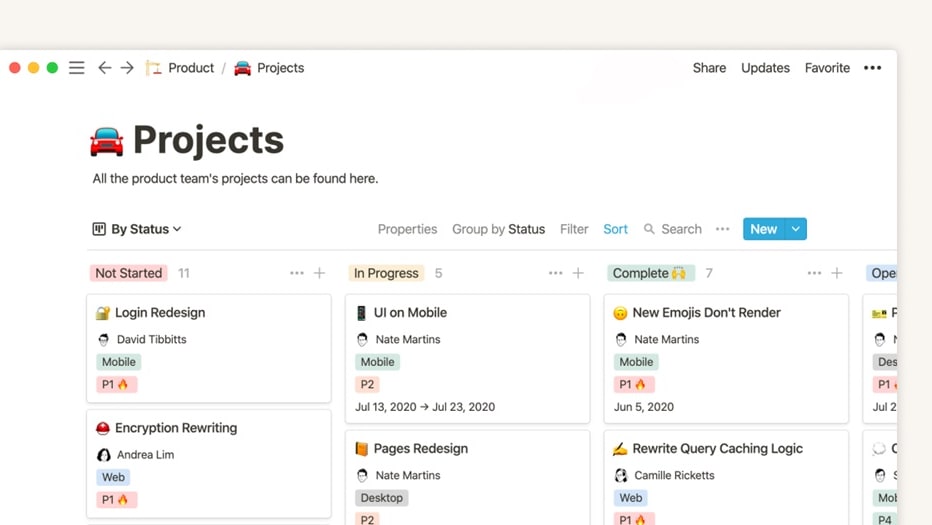
Notion offers a comprehensive suite of tools for managing projects effectively, including the creation of Kanban boards, task assignment, notification setup, and progress tracking, all within a unified platform.
When it comes to project management, Notion emerges as the clear leader. Notion offers a comprehensive suite of tools for managing projects effectively, including the creation of Kanban boards, task assignment, notification setup, and progress tracking, all within a unified platform. For example, users can effortlessly organize tasks, set deadlines, and monitor progress using Notion's versatile project management features.
In comparison, Taskade's campaign management capabilities are competent but lack the depth and breadth of functionalities offered by Notion. This comprehensive offering from Notion gives it a distinct advantage in the realm of project management.
Notion Leads the Pack in Integration Flexibility

Notion boasts an extensive array of integration possibilities, allowing users to seamlessly connect it with numerous leading SaaS platforms.
When evaluating integrations, Notion emerges as the frontrunner. Notion boasts an extensive array of integration possibilities, allowing users to seamlessly connect it with numerous leading SaaS platforms. For instance, users can effortlessly pair Notion with tools such as Slack, Google Drive, Trello, and Dropbox, creating a centralized hub for all project-related work. This broad integration capability positions Notion as a highly convenient solution for businesses managing multiple platforms concurrently.
In contrast, Taskade offers a more limited suite of integrations. While it supports connections with popular platforms like Slack, Google Calendar, and Evernote, the breadth of integrations available doesn't quite match up to Notion's offerings. However, Taskade's minimalist approach to integrations serves to maintain its simplicity and user-friendly nature, ensuring a distraction-free and focused platform for task accomplishment.
08 Taskade vs Notion: Which is the best for your business?
Taskade is the best tool for you if:
- You value simplicity and efficiency in your project management software, preferring a straightforward interface that enables quick task organization, deadline setting, and team collaboration without a steep learning curve.
- Your work requires immediate, real-time collaboration with team members, as Taskade offers seamless communication and task tracking features that ensure everyone stays updated and aligned on projects.
- You're looking for a tool that integrates well into fast-paced work environments, offering quick setup, easy task management, and minimalistic design to focus on getting things done.
- Customization and extensive feature sets overwhelm your workflow, and you need a tool that provides just the essentials for task management, project tracking, and team communication.
- Your team operates remotely and needs a lightweight, web-based platform that supports synchronous and asynchronous communication, enabling efficient project coordination across different time zones.
 You value simplicity and efficiency in your project management software, preferring a straightforward interface that enables quick task organization, deadline setting, and team collaboration without a steep learning curve.
Notion is the best tool for you if:
- You're seeking an all-in-one workspace where you can create, organize, and manage extensive databases, wikis, and notes, all within a highly customizable platform for various projects and teams.
- Your workflow demands a high level of customization and flexibility, allowing you to tailor your workspace with templates, integrations, and tools that fit precisely with your project management style.
- You value having a comprehensive organizational system that can handle complex information structuring, from embedding third-party content to creating interconnected databases for detailed project management.
- Integration with a wide array of other tools and services is critical for your workflow, and you need a platform that can seamlessly connect with other software to enhance productivity.
- The ability to meticulously organize information, manage tasks, and collaborate on documents within a single, versatile platform is essential for your team's productivity and project management strategies.
Notion
Organize teamwork and increase productivity
6 months free on the Business plan with Unlimited AI
Save up to $12,000
09 Alternatives to Taskade & Notion

Airtable
Used by 8195 members
$1,000 in credits for 1 year
Save up to $1,000

ClickUp
Used by 3270 members
Additional 20% off Unlimited and Business plans for 1 year
Save up to $1,000

Todoist
Used by 1857 members
20% off annual plans
Save up to $24

Monday
Used by 1436 members
First month free
Save up to $80
10 Promotions on Task Management software
Taskade and Notion are great tools, but Secret offers promo codes with discounts on over 2190+ different SaaS solutions. New deals are added regularly, helping you save money on your online subscriptions. Get access to codes for other Task Management software you might want to purchase
ClickUp promo
Additional 20% off Unlimited and Business plans for 1 year

Promo codes for Google Workspace
20% off Plus plans for 1 year
Credits for Monday
First month free

Credits for Miro
$1,000 in credits (lifetime validity)
Promo code for Airtable
$1,000 in credits for 1 year

Discount for xTiles
20% off monthly or annual plans

Code for Slack
25% off new plan purchases

Deal for Google Drive
20% off Plus plans for 1 year
Todoist promo code
20% off annual plans

Zoom Meetings coupon code 2026
$20 off per user on the annual Workplace Pro plan
Start saving on the best SaaS
Secret has already helped tens of thousands of startups save millions on the best SaaS like Microsoft Teams, Google Workspace & many more. Join Secret now to buy software the smart way.