


With a Customer Relationship Management (CRM) tool, you can centralize customer data and identify opportunities to move them through the sales funnel. Tracking customers and their interactions with your product or service is critical to sustainable business growth. You can deliver personalized customer experiences and better customer support by analyzing interactions.
When it comes to CRMs on the market, you’re spoilt for choice. While having options is good, finding the best fit for your business can feel overwhelming. To help you break through your analysis paralysis, read on for our detailed comparison of Zoho vs Hubspot including their main features and fundamental differences.
- 01 Zoho vs HubSpot: overview
- 02 What's the difference between Zoho and HubSpot?
- 03 Zoho pros and cons
- 04 HubSpot pros and cons
- 05 Zoho compared to HubSpot
- 06 HubSpot compared to Zoho
- 07 Features comparison
- 08 Zoho vs HubSpot: Which is the best for your business?
- 09 Alternatives to Zoho & HubSpot
- 10 Promotions on CRM software
Start saving on the best SaaS
Secret has already helped tens of thousands of startups save millions on the best SaaS like Microsoft Teams, Google Workspace & many more. Join Secret now to buy software the smart way.

01 Zoho vs HubSpot: overview
Zoho and HubSpot stand out as leading contenders in the domain of customer relationship management (CRM) and marketing automation, each with its unique strengths catering to specific user requirements.
Zoho is distinguished for its comprehensive CRM features, offering a versatile platform that encompasses not only contact management but also sales automation, analytics, and customer support tools. On the contrary, HubSpot provides an all-in-one inbound marketing and sales platform, offering features like CRM, email marketing, automation, content management, and analytics.
Let's delve into the Zoho vs. HubSpot comparison to assist you in making an informed decision when selecting the right CRM and marketing automation platform for your business.

Customer support
Zoho’s paid plans include email, phone, and chat support. Hubspot offers email and chat support with paid plans. Phone support is available with Hubspot’s Professional plan.

Zoho
HubSpot
Automation
Zoho’s workflow automation tools include the automatic assignment of leads. HubSpot offers above-average automation features with an automation builder.
Zoho
HubSpot
Positive reviews
With mainly positive reviews, both have loyal followings. They receive some negative feedback on the learning curve (Zoho) and affordability (HubSpot).
Zoho
HubSpot
Pricing plans
Both offer free CRM tools. Zoho paid plans start at $14/month/user, while Hubspot’s start at $18/month for 2 paid users.
Zoho
HubSpot
Reporting and analytics
Standard reports are available on all Zoho plans. Hubspot offers an extensive range of reports on free and paid plans.
Zoho
HubSpot
Ease of use
Both platforms have advanced features that can involve an initial steep learning curve. Hubspot has a clean, easy-to-navigate user interface.
Zoho
HubSpot
Integrations
Zoho CRM has 800+ integrations including Proposify, Zoom, DocuSign, and Zapier. HubSpot offers 1400+ integrations including Google Calendar, Outlook, Instagram, and Zapier.
Zoho
HubSpot
Email marketing
Both offer limited email marketing features in their CRM suites. Zoho provides a separate platform, Zoho Campaigns, while Hubspot has a stand-alone marketing hub available.
Zoho
HubSpot
Lead management
Both offer strong lead management and capture features. Zoho offers lead scoring and analytics. Hubspot uses machine learning technology to evaluate leads.
Zoho
HubSpot
Pipeline management
Zoho has solid pipeline management features including automation and analytics. Hubspot lets you easily set up and view pipelines in real time.
Zoho
HubSpot
02 What's the difference between Zoho and HubSpot?

Zoho’s Pricing Plans Highlighting its Free Plan for up to 3 Users and List of inclusions
Zoho
All-in-one customer relationship management software

Hubspot’s Pricing Plans with its Free Marketing, Sales, Service, and CMS Tools Highlighted
HubSpot
The HubSpot suite leverages AI to streamline managing your customer throughout their life cycle: from website visits and form completions to phone calls, email exchanges, quote signing, support, and upsells.
While Zoho and HubSpot’s respective CRMs are popular in their own right, there are some differences between them to consider when choosing the tool for your business. Firstly, if you’re looking for a free CRM, you should closely compare the inclusions in their free versions. Zoho’s free plan is more of a pure CRM product. While it offers some email marketing tools, it mainly focuses on CRM features like sales automation, standard analytics, basic customization, and web forms. Access to Zoho’s free version is limited to 3 users. In comparison, HubSpot’s free version is a CRM suite with access to some basic marketing, service, content management system (CMS), and operational tools. These include landing pages, live chat, sales email templates, ticketing, and list segmentation features. While it offers access to a broad range of inclusions, keep in mind the free version limits the level of functionality for these. HubSpot’s free version is available to unlimited users.
Both Hubspot and Zoho offer additional products beyond their CRM. It helps to understand these different product offerings when choosing a platform. Zoho has various apps for sales, marketing, service, finance, email and collaboration, HR, legal, security management, and project management. These help you manage in-app chats, loyalty programs, email and social media marketing campaigns, invoicing, helpdesk, and recruitment, to name a few. You can sign up separately for the tools you want or choose from several suites of tools, including the all-in-one Zoho One.
Hubspot offers separate hubs in addition to its CRM. These include marketing, sales, customer service, CMS, and operations hubs. As we mentioned, Hubspot’s free CRM includes some features from all of these hubs. Compared to Zoho, when you sign up for one hub, Hubspot often gives you access to other hubs’ key features.

Zoho
Used by 1392 members
$3,000 in credits for 1 year
Save up to $3,000

HubSpot
Used by 2763 members
90% off the Professional and Enterprise plans for 1 year
Save up to $7,000
03 Zoho pros and cons
What are the advantages of Zoho?
- Comprehensive suite: Zoho offers a wide range of business applications, including CRM, email marketing, project management, and more, all integrated into a single ecosystem. This comprehensive suite can streamline various business processes.

- Affordability: Zoho provides cost-effective solutions, making it accessible for startups and small businesses with limited budgets. They often offer free plans with essential features, allowing businesses to scale as they grow.
- Customization: Zoho allows users to customize their applications extensively. You can tailor the software to your specific needs, from creating custom fields in the CRM to designing personalized workflows.
- Integration: Zoho offers integrations with popular third-party apps and services, allowing you to connect your CRM and other business tools seamlessly.
- Customer support: Zoho provides various customer support options, including a knowledge base, community forums, and customer service representatives. They offer responsive assistance to help users resolve issues promptly.
What are the disadvantages of Zoho?
- Learning curve: Due to its extensive features and customization options, Zoho can have a steeper learning curve for new users. It may take time to become proficient in using all the tools effectively.

- Limited free plans: While Zoho offers free plans, they often come with limitations, such as a limited number of users or reduced functionality. Scaling up may require a paid subscription.
- Interface complexity: Some users find Zoho's interface to be less intuitive compared to other software, which can make navigation and task execution less straightforward.
- Performance: Depending on the size of your database and usage, Zoho's performance can vary. Some users have reported slower loading times when working with large datasets.
- Customer support response times: While Zoho offers customer support, response times can vary, and users may experience delays in getting assistance, especially with complex technical issues.
Compare Zoho to other tools


Zoho vs Monday

Zoho vs Google Workspace

Zoho vs Salesforce

Zoho vs Xero

Odoo ERP vs Zoho

Zoho vs Zendesk
04 HubSpot pros and cons
What are the advantages of HubSpot?
- All-in-one marketing platform: HubSpot offers a comprehensive suite of marketing, sales, and customer service tools all integrated into one platform. This integration makes it easy for businesses to manage their inbound marketing efforts from a single location.
- User-friendly interface: HubSpot is known for its user-friendly interface and intuitive tools, making it accessible to both beginners and experienced marketers.
- Powerful marketing automation: HubSpot provides robust marketing automation capabilities, allowing users to create and manage automated marketing campaigns, lead nurturing, and personalized content delivery.
- In-depth analytics: HubSpot offers detailed analytics and reporting tools, providing insights into the performance of your marketing efforts. This data can help businesses make data-driven decisions and optimize their strategies.
- Strong community and support: HubSpot has a large and active user community, along with comprehensive customer support resources, including a knowledge base, community forums, and responsive customer support teams.
What are the disadvantages of HubSpot?
- Cost: HubSpot can be relatively expensive, especially for small businesses or startups with limited budgets. The pricing structure may not be feasible for businesses looking for a cost-effective solution.
- Learning curve: While HubSpot's interface is user-friendly, mastering all of its features and capabilities can take time, leading to a steep learning curve for some users.
- Limited customization on lower tiers: The most advanced features and customization options may only be available in higher-priced plans, limiting the functionality of lower-tier plans.
- CRM limitations: While HubSpot offers a CRM, it may not be as feature-rich as standalone CRM solutions like Salesforce, which could be a drawback for businesses with complex sales processes.
- Email deliverability: Some users have reported issues with email deliverability when using HubSpot's email marketing tools. Proper email list management and adherence to best practices are essential to mitigate this.
Compare HubSpot to other tools

Monday vs HubSpot
HubSpot vs Salesforce

Semrush vs HubSpot

Apollo.io vs HubSpot

HubSpot vs WordPress.com

Freshworks vs HubSpot
05 Zoho compared to HubSpot
In the comparison between Zoho and HubSpot, Zoho stands out for its cost-effective approach and user-friendly interface, making it an appealing choice for businesses with budget constraints and those prioritizing ease of use in their CRM and marketing automation endeavors. Zoho's pricing structure, including budget-friendly options and a free plan, caters to startups and small businesses aiming to enhance their customer relationship management without hefty financial commitments.
Zoho also excels in its marketing automation capabilities, enabling users to create tailored workflows and automate responses based on customer interactions. This functionality is particularly advantageous for businesses seeking personalized and targeted engagement with their clientele.
Is Zoho better than HubSpot?
 Is Zoho better than HubSpot?
Determining whether Zoho surpasses HubSpot hinges on your precise business requirements. Zoho's expansive suite of integrated solutions spanning various business functions positions it as a superb choice for companies seeking an all-encompassing and unified software ecosystem.
Zoho's CRM integrates seamlessly with its accounting software, aiding businesses in streamlining both customer relations and financial management. On the other hand, HubSpot's strengths lie in its user-friendly and intuitive features, which are often perceived as more tailored for small to medium-sized enterprises. Its marketing automation tools, for instance, enable precise audience targeting and personalized content delivery, ideal for SMBs aiming to enhance customer engagement.
What is Zoho best used for?
Zoho shines brightest when leveraged by businesses requiring a versatile suite of interconnected tools that span diverse functionalities.
Zoho's CRM can seamlessly integrate with Zoho Books for streamlined customer invoicing and financial management. Furthermore, its HR software can dovetail with the CRM to facilitate efficient employee onboarding and management. In cases where the smooth integration between various systems is paramount, Zoho's extensive software ecosystem proves invaluable.
Therefore, if your company encompasses a spectrum of needs, ranging from customer relationship management to finance and human resources, Zoho emerges as an all-encompassing and synergistic solution for holistic business management.
Can Zoho replace HubSpot?
Replacing HubSpot with Zoho hinges on your precise requirements. Zoho's versatile suite can indeed subsume various standalone platforms, such as CRM, marketing automation, and even project management.
Zoho CRM provides features akin to HubSpot's, allowing you to manage leads, automate marketing, and monitor sales pipelines. However, HubSpot's distinct strength lies in its user-friendly marketing automation tool enriched with advanced analytics. If your business heavily leans on creating sophisticated automated marketing campaigns with in-depth performance analysis, HubSpot's dedicated marketing hub might remain indispensable, even within the expansive realm of Zoho's offerings.
Is Zoho cheaper than HubSpot?
Comparing pricing structures, Zoho’s pricing typically stands out as a more budget-friendly option compared to HubSpot. Zoho is renowned for its cost-effective plans, offering free versions of its products with reasonable limitations.
Zoho CRM's free plan allows businesses to manage basic customer relationships without incurring expenses. In contrast, HubSpot's free plan is often perceived as a trial due to its restricted functionality, primarily aimed at showcasing the platform's capabilities. While HubSpot certainly offers extensive features, its pricing tends to be higher, especially when opting for advanced marketing and sales automation tools.
Is there a better CRM software than Zoho?
While Zoho offers a range of CRM solutions, it's essential to consider alternatives that might better suit your specific needs.
Some notable alternatives to Zoho in the CRM space include HubSpot CRM, Salesforce, Microsoft Dynamics 365, and Freshsales.
The selection of CRM software depends on your business's unique requirements, scale, and desired feature set. For instance, if you require an extensive suite of marketing and sales tools integrated into your CRM, HubSpot CRM might be a superior choice. On the other hand, if your business demands robust enterprise-level capabilities, Salesforce or Microsoft Dynamics 365 could be more suitable options.

Zoho
Premium
All-in-one customer relationship management software
$3,000 in credits for 1 year
Save up to $3,000
06 HubSpot compared to Zoho
HubSpot distinguishes itself with its comprehensive marketing and sales automation suite, making it an appealing choice for businesses seeking an all-in-one solution to elevate their customer relationship management efforts. HubSpot's pricing structure, though often considered at a premium, offers a wide range of features, including CRM, email marketing, automation, content management, and analytics, making it suitable for businesses looking to consolidate their marketing and sales efforts into a unified platform.
One of HubSpot's standout features is its robust marketing automation capabilities, allowing users to create intricate workflows, manage leads, and personalize customer interactions. This feature is particularly valuable for businesses aiming to nurture leads and drive conversions through targeted content and automation.
Is HubSpot better than Zoho?
Determining whether HubSpot outperforms Zoho depends on your distinct business prerequisites. HubSpot is celebrated for its robust inbound marketing approach, offering an all-encompassing suite for marketing automation, lead nurturing, and content management.
HubSpot's marketing hub facilitates creating, tracking, and optimizing inbound campaigns with precision. Conversely, Zoho caters effectively to businesses seeking an extensive array of integrated solutions. Zoho CRM, for instance, can seamlessly connect with Zoho Projects to streamline project management and customer interactions. Therefore, if your organization prioritizes inbound marketing excellence, HubSpot shines, while Zoho excels in providing a diverse suite of interconnected tools, ideal for businesses with multifaceted operational needs.
What is HubSpot best used for?
HubSpot's forte lies in its capacity to streamline multifaceted marketing, sales, and service functions within a unified platform. It excels in inbound marketing and sales software, making it an ideal choice for businesses aspiring to execute inbound methodologies seamlessly.
HubSpot's marketing hub allows companies to create engaging content, attract potential customers, and nurture leads effectively. Its sales hub empowers sales teams with tools for pipeline management, email tracking, and automation. Additionally, the service hub facilitates customer support with ticketing systems and knowledge bases. Consequently, HubSpot emerges as the ultimate solution for organizations dedicated to attracting, engaging, and delighting customers throughout their journey.
Can HubSpot replace Zoho?
The possibility of replacing Zoho with HubSpot largely depends on your specific needs. If your primary focus is on marketing automation, HubSpot can certainly serve as a robust alternative.
HubSpot's marketing automation tools are renowned for their effectiveness in lead nurturing, email marketing, and analytics. However, businesses seeking a more holistic approach with extensive solutions across various business functions might find Zoho's suite of system integrations and applications more beneficial. For example, Zoho offers integrated tools for CRM, accounting, HR, and project management, providing a more comprehensive ecosystem for organizations with diverse operational requirements.
Is HubSpot cheaper than Zoho?
When it comes to pricing, HubSpot’s pricing plans typically carry a higher price tag compared to Zoho. While both platforms do provide free versions, HubSpot's more advanced functionalities are often associated with higher costs.
HubSpot's Marketing Hub, Sales Hub, and Service Hub offer various pricing tiers with progressively more features, making it potentially more expensive as you scale up and require additional capabilities. On the other hand, Zoho is known for its cost-effective solutions, offering a range of reasonably priced plans across its suite of applications, making it an attractive option for businesses looking to optimize their budgets while still benefiting from comprehensive software solutions.
Is there a better CRM software than HubSpot?
While HubSpot is a well-regarded CRM platform, it's crucial to explore other alternatives that may better align with your specific needs and preferences.
Several notable alternatives to HubSpot in the CRM space include Pipedrive, Zoho CRM, Sellsy, and Monday CRM.
The decision hinges on your organization's distinct requirements, objectives, and any specific preferences you may hold. Nevertheless, if you are in search of a CRM system renowned for its fundamental features, meticulous dedication to precision, and a user-friendly interface, HubSpot's CRM might emerge as the optimal choice for your customer management needs.

HubSpot
Premium
CRM, marketing automation & customer service software suite
90% off the Professional and Enterprise plans for 1 year
Save up to $7,000
07 Features comparison
Zoho's Financial Management Tools Outshine HubSpot's

Zoho's robust financial tools equip businesses with comprehensive capabilities, enabling them to create invoices, manage inventory, track stock levels, handle customer subscriptions, and collect online payments seamlessly.
Zoho emerges as the superior choice for effective financial management compared to HubSpot.
Zoho's robust financial tools equip businesses with comprehensive capabilities, enabling them to create invoices, manage inventory, track stock levels, handle customer subscriptions, and collect online payments seamlessly. This wide array of financial features makes Zoho an exceptionally favorable tool for startups and businesses seeking meticulous control over their financial operations. For instance, Zoho Books streamlines accounting processes with features like expense tracking, bank reconciliation, and automated payment reminders.
While HubSpot offers certain financial management capabilities, Zoho's dedicated focus and comprehensive toolset make it the preferred choice for businesses prioritizing efficient financial operations.
HubSpot Leads in Predictive Lead Scoring Compared to Zoho

HubSpot harnesses the power of machine learning to identify high-potential leads, utilizing historical data and behavioral patterns as key indicators.
When it comes to lead scoring, both Zoho and HubSpot offer capabilities, but HubSpot takes it to the next level with predictive lead scoring.
HubSpot harnesses the power of machine learning to identify high-potential leads, utilizing historical data and behavioral patterns as key indicators. This predictive approach empowers businesses to allocate their resources and efforts more effectively, concentrating on leads with the highest likelihood of conversion. For instance, HubSpot's predictive lead scoring can factor in email engagement, website interactions, and other critical data points to rank leads. This advanced functionality significantly enhances sales efficiency and contributes to more targeted lead nurturing strategies, setting HubSpot apart as a powerful tool in lead management and conversion optimization.
HubSpot Surpasses Zoho in User-Friendliness
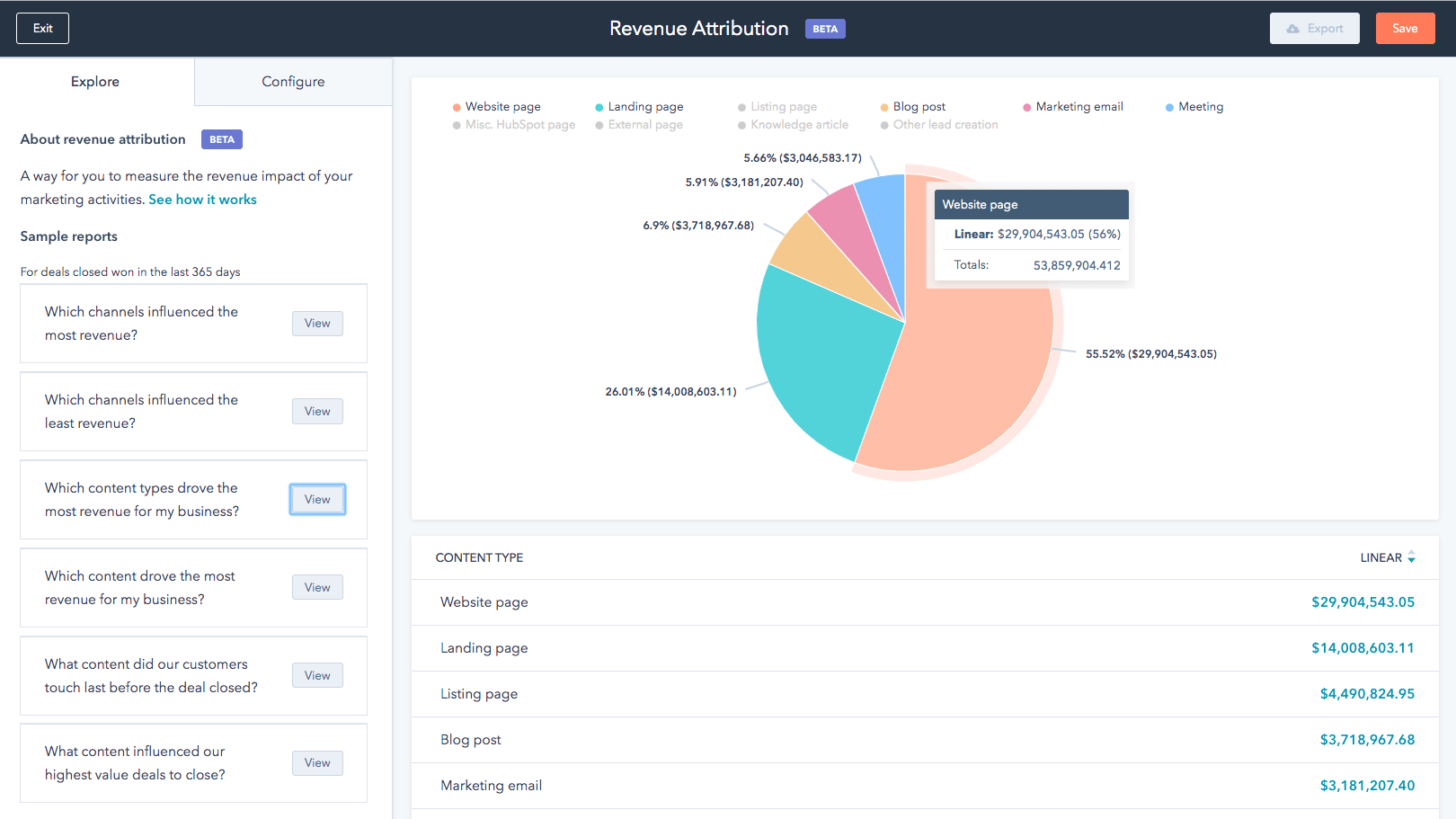
HubSpot's user-centric design focuses on simplifying tasks for users of all levels, from beginners to experts.
HubSpot outshines Zoho in user-friendliness due to its intuitive interface and seamless navigation. HubSpot's user-centric design focuses on simplifying tasks for users of all levels, from beginners to experts. The platform offers a smooth onboarding process, extensive educational resources, and a responsive customer support system.
In contrast, Zoho can sometimes overwhelm users with its extensive features and steeper learning curve. HubSpot's clean dashboard, drag-and-drop functionality, and customizable templates make marketing, sales, and CRM tasks more accessible. This user-friendly approach ensures that teams can quickly adapt and maximize their productivity, ultimately giving HubSpot the edge in usability.
HubSpot Leads the Way in Extensive Third-Party Integrations Compared to Zoho

HubSpot's ecosystem boasts over 1,400+ app integrations, encompassing email marketing tools, social media platforms, customer relationship management systems, and much more.
In today's dynamic digital landscape, the capacity to seamlessly integrate diverse tools and platforms is a decisive advantage. In this regard, while both Zoho and HubSpot offer multiple integration possibilities, HubSpot distinguishes itself with a broader array.
HubSpot's ecosystem boasts over 1,400+ app integrations, encompassing email marketing tools, social media platforms, customer relationship management systems, and much more. This extensive integration potential provides remarkable diversity and flexibility, allowing businesses to fine-tune their workflows according to precise requirements. Conversely, Zoho, although it hosts a respectable range of integrations, cannot match the sheer volume of HubSpot's offerings. Therefore, for businesses prioritizing extensive interconnectivity and customization, HubSpot stands out as the preferred choice.
Zoho Outperforms HubSpot in Comprehensive Project Management Solutions
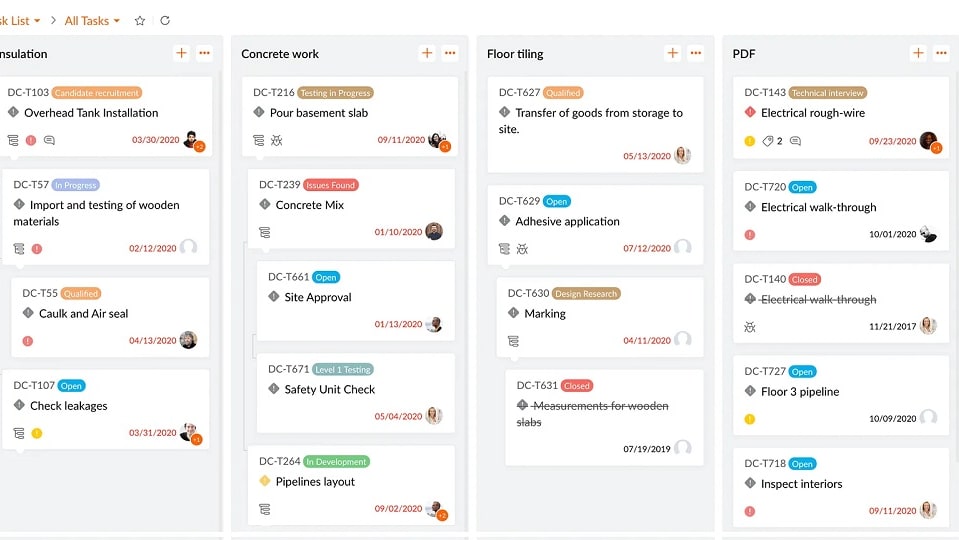
Zoho's project management tools offer businesses a robust platform for efficient project planning, tracking, and collaboration.
Zoho presents a more comprehensive suite of project management tools compared to HubSpot. Zoho's project management tools offer businesses a robust platform for efficient project planning, tracking, and collaboration.
With distinctive features such as Sprints for planning Scrum projects and BugTracker tailored for bug management, Zoho brings added value to startups and businesses primarily engaged in project-based work. For instance, Zoho Projects facilitates the creation of detailed Gantt charts, task dependencies, and timesheets, empowering project managers with powerful tools to ensure project success. While HubSpot provides project management capabilities, Zoho's specialized focus and feature set make it the preferred choice for businesses seeking robust project management solutions.
HubSpot Excels in Sales Pipeline Management Over Zoho
HubSpot empowers businesses to create a crystal-clear visualization of their sales process.
In the domain of sales pipeline management, HubSpot takes the lead over Zoho. While both platforms offer sales pipeline management features, HubSpot's intuitive approach stands out.
HubSpot empowers businesses to create a crystal-clear visualization of their sales process. It allows users to define stages, set milestones, and effortlessly manage deals as they progress through the pipeline. This level of customization and control provides businesses with a comprehensive overview of their sales operations. For instance, HubSpot's Sales Hub offers tools like deal tracking, email tracking, and automated follow-ups, streamlining the entire sales journey. In contrast, while Zoho provides sales pipeline management, HubSpot's user-friendly and feature-rich solution offers a superior sales management experience.
Zoho and HubSpot Share Equal Strength in Automation and Workflows
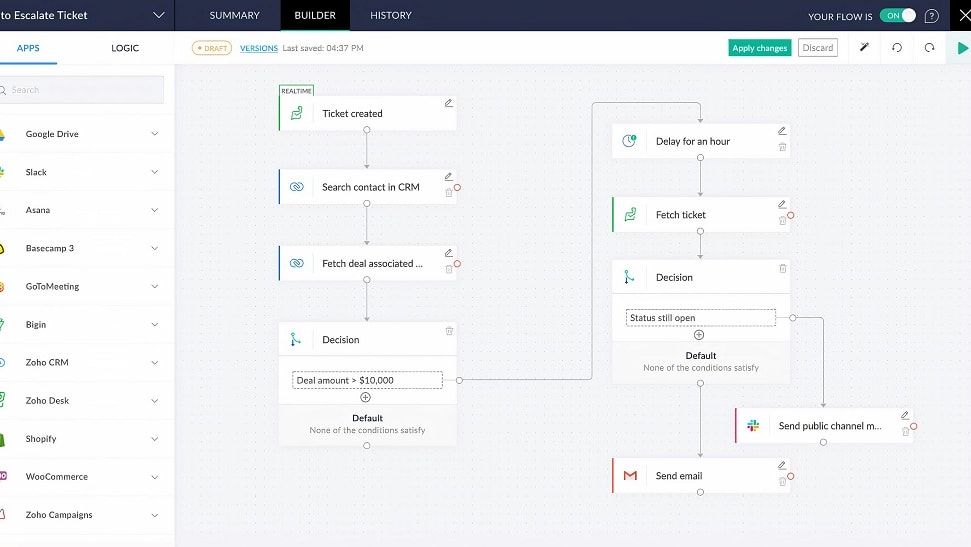
Zoho shine in the realm of automation and workflows, offering businesses the ability to streamline operations by automating repetitive tasks
Both Zoho and HubSpot shine in the realm of automation and workflows, offering businesses the ability to streamline operations by automating repetitive tasks. They excel in automating diverse processes, including social media posting, marketing and transactional emails, as well as lead nurturing and sales workflows. This automation flexibility translates into enhanced productivity and efficiency across various operational aspects.
The choice between the two ultimately hinges on the specific needs and priorities of your business. For instance, HubSpot's robust marketing automation capabilities may be particularly appealing for companies focused on inbound marketing, while Zoho's suite of integrated business tools can provide a comprehensive solution for broader operational needs.
08 Zoho vs HubSpot: Which is the best for your business?
Zoho is the best tool for you if:
- You’re a startup or small business with budget constraints willing to accept comprehensive but fewer features for a more affordable CRM solution
- You’re looking for a unified software system encompassing diverse business functions including CRM, financial management, and HR
- Your business conducts mainly project-based work and you need a tool that offers both a CRM and robust project management features
- You demand a high level of customization to tailor the platform to your business’s unique workflows
- Your business requires financial management tools as well as CRM and sales functions and you’re seeking a solution that offers seamless integration between these different systems
 You’re a startup or small business with budget constraints willing to accept comprehensive but fewer features for a more affordable CRM solution
HubSpot is the best tool for you if:
- You’re looking for an all-in-one marketing and sales platform with an in-built CRM, marketing automation, and analytics
- You’re in the market for a beginner-friendly tool with an easy-to-navigate interface and intuitive tools that don’t involve a very steep learning curve
- You require robust marketing and sales automation tools to support precise segmentation and detailed workflows for your inbound marketing campaigns
- You want a platform with advanced CRM and sales functionalities including predictive lead scoring
- You already use several other third-party software tools and want a CRM solution that integrates flexibly with these
Zoho
Used by 1392 members
$3,000 in credits for 1 year
Save up to $3,000
HubSpot
Used by 2763 members
90% off the Professional and Enterprise plans for 1 year
Save up to $7,000
09 Alternatives to Zoho & HubSpot

Google Workspace
Used by 9006 members
20% off Plus plans for 1 year
Save up to $518

Slack
Used by 3698 members
25% off new plan purchases
Save up to $9,000

Pipedrive
Used by 2865 members
30% off for 12 months
Save up to $3,564

Zendesk
Used by 2597 members
6 months free (with AI Agents and Copilot)
Save up to $50,000
10 Promotions on CRM software
Zoho and HubSpot are great tools, but Secret offers promo codes with discounts on over 2190+ different SaaS solutions. New deals are added regularly, helping you save money on your online subscriptions. Get access to codes for other CRM software you might want to purchase
Code for Pipedrive
30% off for 12 months

folk CRM promo code 2026
14 days free + 20% off annual plans

Promo codes for Notion
6 months free on the Business plan with Unlimited AI
Zendesk coupon code 2026
6 months free (with AI Agents and Copilot)

HighLevel coupon
First month free

Credits for Freshworks
14 days free on Freshdesk

Deal for Attio
14 days free + additional 10% off monthly or annual plans

Clay promotion code
14 days free + 10% off annual plans

Promo code ActiveCampaign
90% off any annual plan for the first year

Deal for Streak
20% off annual plans
Start saving on the best SaaS
Secret has already helped tens of thousands of startups save millions on the best SaaS like Microsoft Teams, Google Workspace & many more. Join Secret now to buy software the smart way.