


When you choose an automation platform, you are not really selecting a "tool." You are actually selecting a "model"—who is going to build workflows, how you are going to handle change, and how predictable your costs will be once usage escalates. Make and n8n both fall into the same category of workflow automation and integration platform as a service (iPaaS); however, they support very different habits: visual ops-driven iteration on one side and engineering-grade extensibility on the other.
In this article, I will be comparing Make vs n8n using a practical lens: builder experience, integration depth, logic and error handling, hosting and security posture, and the pricing mechanics that tend to surprise teams. If you would like to look at deals and planning options while reading you can check out n8n promo code and deals, and you can also compare automation platforms via Zapier vs Make to calibrate Make’s positioning in the ecosystem.
- 01 Make vs n8n: overview
- 02 What's the difference between Make and n8n?
- 03 Make pros and cons
- 04 n8n pros and cons
- 05 Make compared to n8n
- 06 n8n compared to Make
- 07 Features comparison
- 08 Make vs n8n: Which is the best for your business?
- 09 Alternatives to Make & n8n
- 10 Promotions on Business Process Management software
- 11 Make vs n8n: Conclusion
Start saving on the best SaaS
Secret has already helped tens of thousands of startups save millions on the best SaaS like Microsoft Teams, Google Workspace & many more. Join Secret now to buy software the smart way.

01 Make vs n8n: overview
Both Make and n8n are able to automate workflows in applications, trigger events, transform data, use conditional logic and deliver data to other systems. Both platforms are also capable of powering lead routing, data syncing, alerting, enrichment and creating ETL like pipelines, but the "experience" of building and running production automation is much different.
Make is first and foremost a cloud-first, visually driven workflow automation builder, built for rapid delivery and to create an environment where teams (RevOps, marketing Ops, Product Ops) are able to turn a process diagram into a running workflow with the least amount of resistance possible, while living within mainstream SaaS tools.
n8n is a workflow automation platform designed to be flexible and provide developers the most control over the workflow and its logic as well as allow them to host n8n on their own servers which provides them with the control they need around their data, internal integration and/or creating automations that resemble "integration software" rather than "glue."
Below is a direct feature by feature comparison to get the rest of this comparison started.

Workflow builder and UX
Make’s canvas is excellent for mapping data flow and iterating fast. n8n’s editor is powerful too, but feels more “builder for builders” as complexity grows.

Make
n8n
Customer reviews
Both are well-regarded, Make is praised for usability and speed, while n8n is praised for flexibility, self-hosting, and technical control.
Make
n8n
Customer support
Make’s support expectations align well with business teams. n8n is community-forward by default, with paid offerings available for enterprise needs.
Make
n8n
Ease of use
Make is easier for non-technical teams thanks to a guided visual builder. n8n is approachable but gets more technical once you go beyond standard templates.
Make
n8n
Integrations and connector coverage
Make generally wins for ready-to-use connectors and speed. n8n covers a lot and can extend further through code or nodes, which shifts effort to engineering.
Make
n8n
Advanced logic, branching, loops, retries
Both can model complex paths, but n8n is stronger when workflows need code-level control, reusable patterns, or sophisticated failure handling in production.
Make
n8n
Hosting and data control
n8n can be self-hosted, keeping data inside your infrastructure. Make is cloud-first, simpler operations, but less control over data flow and environment design.
Make
n8n
Pricing plan mechanics
Make is credit-based, each module action typically consumes credits. n8n is execution-based, one workflow run equals one execution, plus a self-hosted option.
Make
n8n
Security and compliance readiness
n8n’s self-hosting gives a strong advantage for privacy and governance. Make can meet many business requirements, but can be limiting for strict data residency needs.
Make
n8n
02 What's the difference between Make and n8n?

Make's visual workflow builder for fast and scalable automation
Make
A no-code AI platform for limitless automation

n8n's workflow for advanced automation
n8n
n8n is a powerful automation platform that allows users to seamlessly connect and automate workflows across various apps and services.
The difference between make and n8n can be described as follows: Make will help get visual automation up and running faster than n8n; n8n will help create a system that will allow ops teams to automate workflows with a high level of control and flexibility.
If you are looking to let your ops team get an automation up and running fast and easily maintainable, use make. Using make allows you to build multi-step workflows with routing, filtering, transformation, and integrating without creating a "mini-software project".
If your workflows have characteristics similar to those of systems integration, internal api's, custom authentication, private networks, strict governance and/or complex failures then n8n will most likely be your best choice. n8n is often selected by tech teams due to its ability to offer greater flexibility and a variety of privacy options through self-hosting.
If you've ever thought "we want our automation to be versioned, audited, and deployed as we would a piece of code" then you're probably thinking n8n.
Pricing logic also influences the direction of teams based on how they decide to pay for their automation solutions.
Make charges users credits and each module step usually takes credit. pricing is determined by the complexity and amount of data flowing within a workflow.
n8n has priced its cloud plans per execution, each time a complete run is executed it counts as one execution and does not matter how many steps are in the workflow. This may be a more predictable price plan for complex workflows. n8n also offers a self-hosted community edition at no license cost.

Make
Used by 11555 members
3 months free on the Teams plan (240k credits included)
Save up to $600

n8n
Used by 3409 members
50% off the monthly and annual Business plan for 1 year
Save up to $4,800
03 Make pros and cons
What are the advantages of Make?
- Visual scenario builder that stays readable: The canvas makes it easy to understand data flow, quickly spot bottlenecks, and explain automation logic to stakeholders who don’t read code.

- Fast time-to-value for ops teams: You can ship useful automations quickly using prebuilt modules, especially for common SaaS stacks, CRM, email, support, spreadsheets, and messaging.
- Great automation ergonomics: Building, testing, and iterating feels lightweight. That matters when your workflow changes weekly because the business changes weekly.
- Strong for multi-app orchestration: If your workflows touch many tools, Make’s mapping and modular steps help you implement complex journeys without losing the thread.
- Solid middle ground between no-code and low-code: You can go far without writing code, while still getting enough power for realistic production automation.
What are the disadvantages of Make?
- Costs can scale with workflow complexity: In a credit model, looping over records or adding enrichment steps can increase consumption in ways that are not always intuitive.

- Less control over hosting and data paths: For strict data residency, regulated workloads, or “must stay inside a VPC” requirements, a cloud-first model can be a blocker.
- Very large scenarios can become hard to maintain: If you don’t enforce naming conventions, modular patterns, and documentation, the canvas can evolve into a dense automation map.
- Advanced edge cases may feel constrained: When integrations require unusual authentication, complex payload signing, or private internal services, dev-first platforms can have less friction.
- Governance is mostly process-driven: Teams often need internal QA and change management practices to avoid breaking workflows with small edits.
Compare Make to other tools


Zapier vs Make
04 n8n pros and cons
What are the advantages of n8n?
- Self-hosting for privacy and control: You can run n8n inside your own infrastructure, which is a major advantage for security reviews and sensitive data flows.
- Execution-based pricing can be predictable: On cloud plans, n8n charges by workflow execution rather than step count, which helps when workflows are long but don’t run constantly.
- Developer extensibility: n8n is built for customization, custom logic, custom nodes, and deeper control over how integrations behave.
- Strong for complex logic and error handling: If you’re building resilient automations that need retries, dead-letter patterns, or precise branching, n8n fits naturally.
- Scales into an internal automation platform: With conventions, templates, environment separation, secrets management, n8n can become a durable integration layer, not just a workflow tool.
What are the disadvantages of n8n?
- Higher ownership burden when self-hosted: Updates, monitoring, backups, scaling, and incident response become your responsibility, so the self-hosted option is not “free” in practice.
- Steeper learning curve for non-technical builders: Even with a visual UI, teams bump into technical concepts earlier, webhooks, authentication strategies, deployment choices.
- Support is community-forward by default: Many teams rely on forums and documentation, while enterprise-grade support is typically part of paid offerings.
- Operational rigor becomes necessary at scale: If n8n runs mission-critical workflows, you’ll want engineering-grade governance, testing, staging, rollbacks, which takes time to set up.
- Connector convenience varies by use case: Some teams still need HTTP requests or custom work for niche APIs, fine for developers, slower for ops-only teams.
Compare n8n to other tools


Clay vs n8n

Lovable vs n8n
05 Make compared to n8n
The most significant benefit of Make is that it allows organizations to view their automation capabilities as a business process versus an engineering problem. If you are looking for a way to allow operations teams to continually evolve and improve their processes without having to fight with infrastructure and developers, then Make will be the easier route to go.
n8n offers a completely different benefit; it's the tool to choose when you need your automation to act like software (i.e., portable, manageable, and flexible). The power in this is great but comes at a price, requiring the team using it to perform additional operational work.
Is Make better than n8n?
 Is Make better than n8n?
If the major hurdle in your organization is to get automation working efficiently enough to maintain and deploy workflows rapidly across a standard SaaS platform, then Make will generally provide the best solution. When your organization receives automation requests every day and needs to create and update these workflows, the visual workflow builder and first-and-foremost connector-based architecture in Make will help to speed up the cycle times and keep the responsibility for creating these workflows outside of engineering.
As far as feature comparison, Make typically outperforms n8n in terms of ease-of-use and low-friction workflow iterations. While n8n can achieve similar results to those achieved by Make, it will only become the superior choice if you place greater emphasis on extensibility and control over your automation and are willing to accept the increased operational burden associated with n8n.
What is Make best used for?
Make is ideal for workflows that resemble operational choreography (e.g., CRM updates, lead enrichment, Slack notifications, ticket triage, reporting pipelines, etc.) and multi-step campaign operations. The more your process utilizes mainstream SaaS applications, the more Make appears as an application accelerator.
Additionally, Make is great when you require a workflow to be audited by individuals who are not engineers. In cases where a workflow fails, most ops teams should be able to determine what occurred and correct the issue without involving a software developer.
Can Make replace n8n?
For many organizations, Make will replace n8n as long as they do not require self-hosting of their workflows and the majority of their integration points exist within the same SaaS-based ecosystem. However, when a company requires their workflow(s) to operate internally (i.e., inside their own network), access internal services deeply, or meet specific compliance/privacy regulations, n8n's self-hosted and customizable nature will likely prove difficult to replace with alternative solutions requiring additional custom development elsewhere.
Is Make cheaper than n8n?
Make is going to cost less money when you are looking for a simpler way of managing automation and you're using it inside of some predictable boundaries. The thing you are getting with Make is speed, the reliability you want, and an easy-to-use builder interface which will decrease the amount of time spent by internal people doing the building.
If you are running n8n on your own server, then n8n may be cheaper, as long as you have the capability and experience to maintain and ensure n8n is working properly. You'll need to include the cost of the maintenance and ensuring reliability when evaluating n8n options for saving money. And if you're considering n8n, don’t forget that we also offer n8n promo codes, which can further reduce your overall cost.
Is there a better Business Process Management software than Make?
The definition of "better" will depend upon what you are looking for as part of your workflow; tools that have an execution-based price model may provide better predictability in complex workflows; if you want more control over how your developers automate, then self-hosted or code-first automation platforms will probably offer that; so it really does come down to what is important to you as far as integration depth, cost predictability and/or governance of your automation needs.
A good rule-of-thumb within our community is to think about comparing Make to the other most commonly used alternative (of its type) in the same category, Zapier vs Make. It helps clarify whether you want a visual builder approach or a more linear, rule-based automation style.
Should I learn Make or n8n first?
I would recommend learning Make if you want to be productive quickly and use it to create automation tools that can be used by teams in a business setting.
You will be able to get a feel for the basics of Make (triggers, transformations, branching, data mapping) and how they work together. Plus, you won't have to make any infrastructure choices to start using Make.
I would recommend learning n8n first if you are interested in building automation capabilities as part of an engineering process, or creating internal tools, or implementing automation systems for clients, or designing workflows that include privacy considerations.
You will be able to begin thinking about building automation capabilities as software from the very beginning.

Make
Premium
A no-code AI platform for limitless automation
3 months free on the Teams plan (240k credits included)
Save up to $600
06 n8n compared to Make
In many cases, n8n is the better option when your automation needs are about more than just being productive by “gluing” your workflow together. When your workflows require portability, control over data flow and compatibility with your own in-house applications or services, n8n's method of connecting different components can feel more like building an integration layer, as opposed to using "no-code" software.
Make, however, is still one of the best platforms to use when you need something fast and easy to implement. However, if you need to have complete control over how data flows through your application, want to add custom logic and/or have the ability to create self-governance within your environment that is hosted on-premises; n8n fits well within a mature, larger technology environment.
Is n8n better than Make?
Yes. When you want to have control over all of your workflows, where they run, what happens with your data, how you manage secrets, and how you extend your integrations; then n8n is better than Make. Self hosting is a major differentiator for some security conscious organizations.
If you need to create complex workflows that cannot be optional (internal API's etc.) and require multiple environment deployments, then n8n is better than Make because Make can still do it, but the cost will show up in workarounds and operational friction.
What is n8n best used for?
n8n is most suitable for automation types which have system integrator type behaviors such as orchestration of internal services, robust pipeline creation using webhooks, scheduled job operations with strict error handling, and control of the execution environment. The execution based pricing structure of n8n will work well for teams developing large workflows which should not be charged per action.
If your goal is to develop a standardized process for automations across all of your clients or business units and in addition you require different environments and governance methods n8n can be a good fit.
Can n8n replace Make?
If you and your team are okay with a more technical flow of work, n8n can probably replace Make. n8n can fill most SaaS automation use cases, and where it can't you can usually add a little bit of custom logic (using an HTTP request) to get what you need.
However, if your company has non-technical people shipping changes all day long, then the ability to be easy to use will give Make a major strategic advantage. Then, you would have to train your staff on how to use n8n, create some good templates for them, and include more engineers in the mix before n8n could replace Make.
Is n8n cheaper than Make?
You can be cheaper by self hosting and having a low cost infrastructure compared to workload or you have a clean mapping of your cloud usage to execution allowances.
Make will generally be cheaper even with accounting for the hidden costs of ownership, if the self hosted version of n8n takes extra devops time and you are saving money on the subscription, it could come back at an operational level. If you would like to look into discounts in n8n, start with this n8n promo page.
Is there a better Business Process Management software than n8n?
Not necessarily—n8n is already one of the most flexible options available, especially if you value control, self-hosting, and the ability to treat automation more like software than a tool. Where it can feel less “ideal” is when that flexibility isn’t actually needed.
If your team just wants to get automations running quickly, with minimal setup and without thinking about infrastructure, credentials, or deployment, then simpler, SaaS-first platforms can feel like a better fit day-to-day. They remove a lot of decision-making and overhead, which can matter more than flexibility for operational teams.
On the other hand, if your workflows start to resemble systems—custom APIs, internal tools, strict governance, or evolving logic—then n8n tends to hold up better over time.
What is cheaper, n8n or Make?
If you're using a lower to mid-volume process with a lot of steps, then n8n's execution based pricing will be less expensive for you. This is because each time you execute a workflow in n8n, it counts as one run regardless of the amount of nodes within that workflow. On the other hand, Make's credit model charges by the number of modules (or actions) executed, therefore, the complexity of your workflow, as well as looping (ie., when a node is used multiple times), can greatly increase your overall cost.
If you have an operations group creating small, numerous automated processes; this outcome is dependent upon how well you are able to create efficient triggers, and whether you can group these tasks together into larger batches of work. If your team is able to create optimized Make scenarios on their own; cost will remain under control. Conversely, if your engineering team is able to develop standardized n8n workflows and supporting infrastructure; n8n can be very inexpensive.

n8n
Build smarter workflows
50% off the monthly and annual Business plan for 1 year
Save up to $4,800
07 Features comparison
Make Often Feels Stronger for Customer Support Expectations

Make's customer support options for fast and direct assistance
It's not just how quickly someone responds, but also what avenues the product has established for users to receive that support. Most teams using n8n use their documentation or forum to find answers to common questions and issues, as enterprise level support is usually part of the cost of being an enterprise customer.
A more traditionally "SaaS" style of service and support like Make is ideal when there is a specific team (i.e., ops) that requires immediate, simple and direct support without having to first try and find answers through community-based workflow support options.
Make Excels Ahead of n8n for Ease of Use

Make's intuitive interface for fast, field-mapped workflow automation
Make has been built to have a "tactile" experience with building workflows - drag in modules, map the fields, see the bundle of data as you go along, and build in quick test cycles. The ease of that cycle will matter because many of the opportunities for improvement come from iterative, small changes on an ongoing basis, rather than large projects done once.
Both Make and n8n are visual, however n8n will push you toward a more technical thought process much sooner (credentials, webhook design, etc., particularly when you're self-hosting). If your team likes this type of level of control, then n8n is advantageous. However if you don't like that type of level of control, then it's simply additional overhead.
If you want to enable operational led teams to own their automations without needing constant engineering support, Make generally is the more forgiving daily workhorse.
Make Leads n8n for Plug-and-Play Integrations
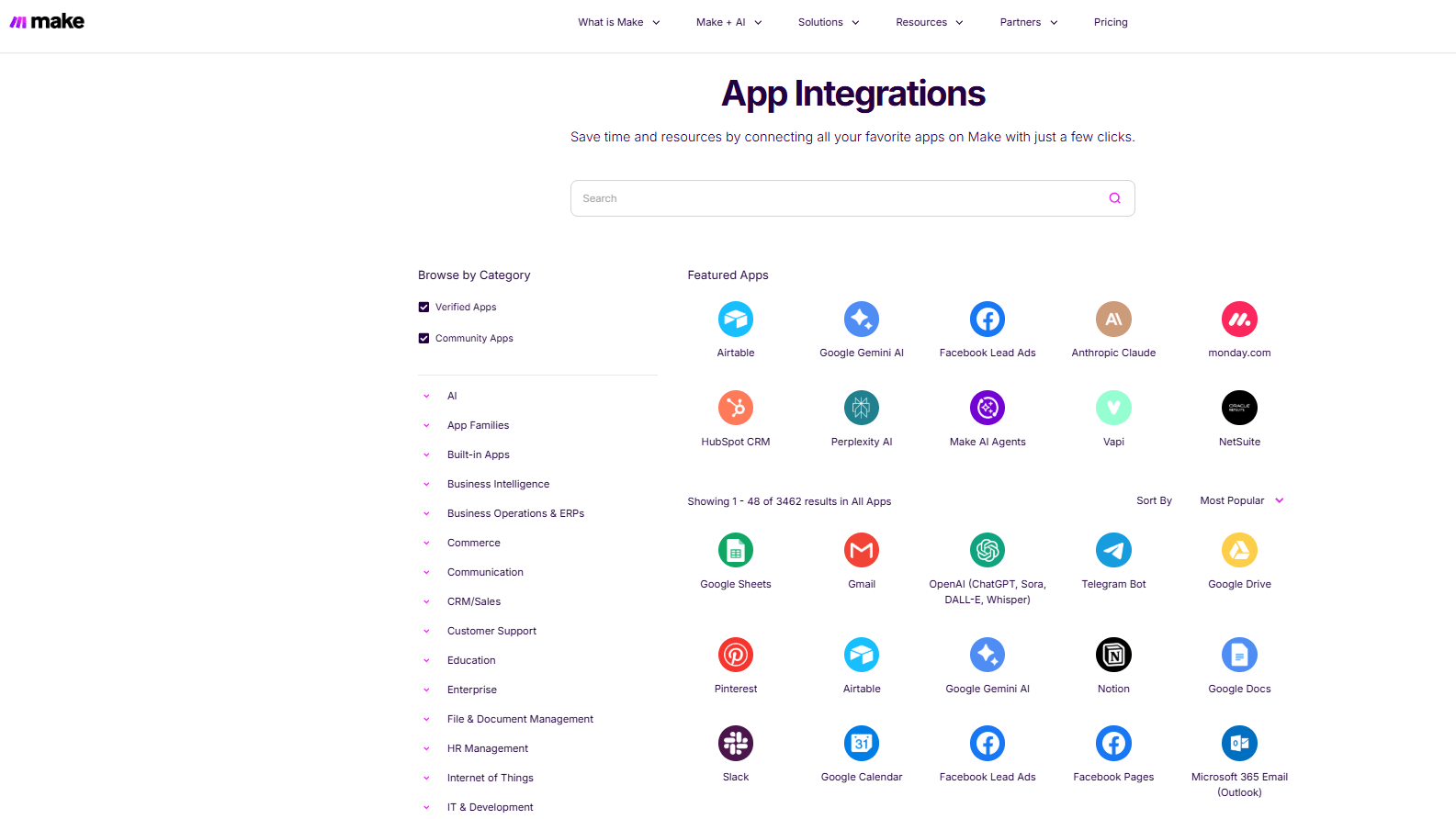
Make's app integration library for connecting thousands of tools
While Make is great at connecting your most common SaaS applications fast and getting data flowing, it excels at providing an easy way to get started with a common SaaS application stack (CRM, Marketing, Support, Spreadsheets, Messaging) for many teams that are building a standard automation stack. Connector first approaches often work best for these types of projects as they provide an easier way to start integrating and then build upon them versus starting by building and then trying to find connectors for each integration.
When using n8n, you will also be able to connect with many different services but you may need to go into low-code or even code depending on how difficult it is to create the connection through n8n due to the lack of a pre-built node or the complexity of an API for the service you wish to use. This is perfectly acceptable if you have engineering support available to help with the technical aspects of creating the connection, however it does require a significant amount of additional work to transition ownership of the workflow to a new team member.
In terms of metrics around the success of an automation project; if shipping a set of automation workflows this week is the primary goal, Make typically allows you to reach that goal faster than other products by reducing the number of detours you need to take.
n8n Pulls Ahead of Make for Advanced Logic and Extensibility

n8n workflow for advanced logic, API integration, and extensible automation systems
When workflows become genuinely complex, multiple failure branches, reusable patterns, custom data shaping, internal APIs, n8n’s builder-for-builders DNA shows. It’s not just about having features, it’s about being able to model reality without fighting the tool.
n8n’s ecosystem is also geared toward extension, and its plans support unlimited workflows and steps, with pricing keyed to executions.
If you expect your automations to evolve into a semi-product, with conventions, versioning, and ownership, n8n is usually the more durable foundation.
n8n Wins for Hosting and Data Control

Run n8n in your own environment or in the cloud
The most useful difference n8n has is self-hosting. This means you can host your workflow anywhere, keep all your data within your company environment, and meet all of your companies internal security policies (or at least fewer than you would have to make) and still allow n8n to manage it.
Make is a "cloud first" application which makes things easier on the operational side, but creates restrictions when trying to meet certain requirements like strict data residency, private networking, or customized governance for certain teams. If you're doing automations with sensitive data, or vendor security audits are something you go through regularly, then n8n's ability to provide flexible hosting options will give you an advantage from a strategic standpoint.
n8n Is More Predictable Than Make for Complex Workflows, Pricing Logic
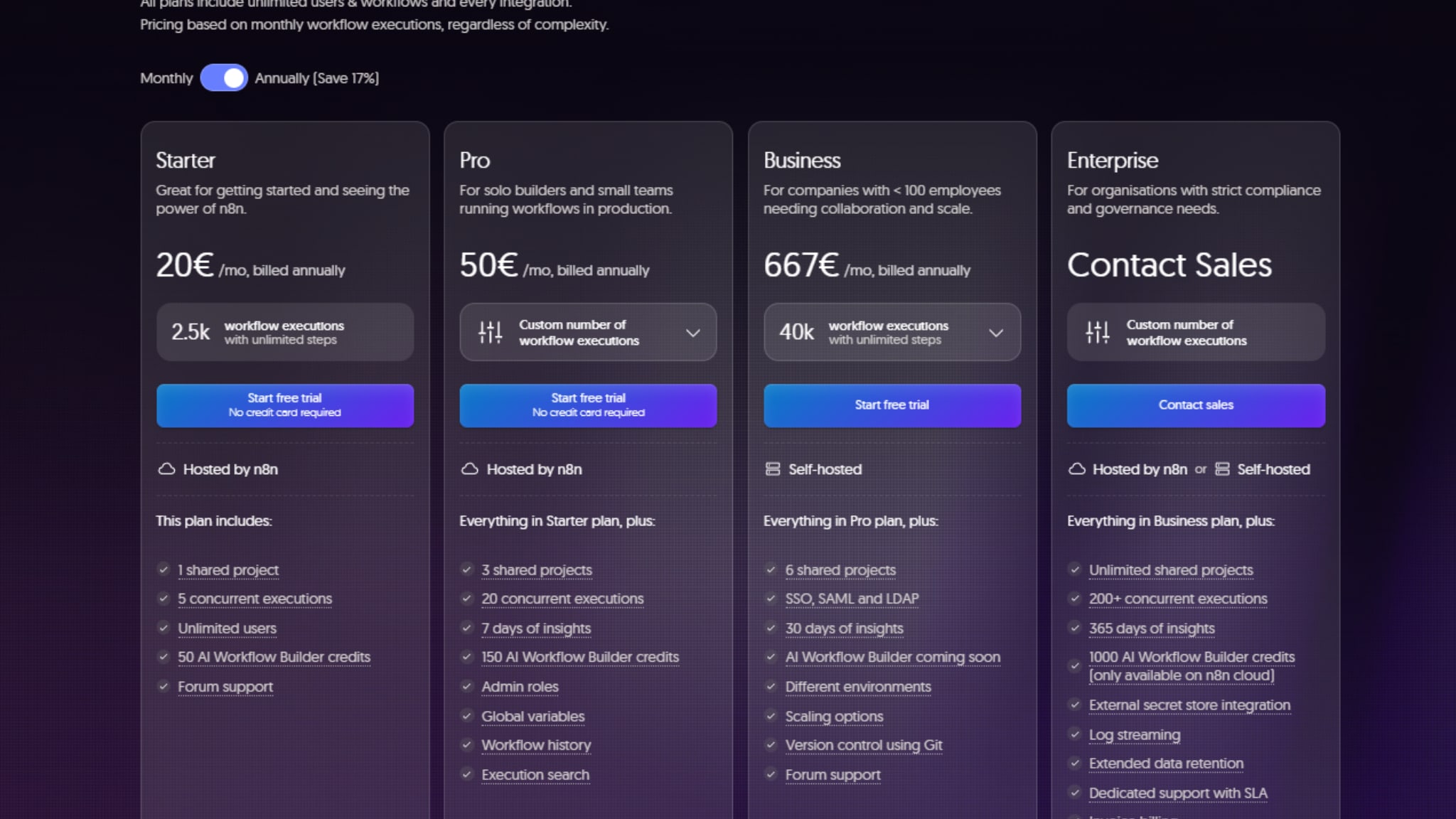
n8n pricing plans based on workflow execution
n8n is more predictable than Make in terms of pricing when it comes to complex workflows, because n8n charges based on execution of your workflow, no matter how many steps are in the workflow. This makes it easier to estimate how much your workflow will cost, especially if your workflow has a lot of steps.
When you know you have a large number of workflows that run at a medium frequency, but each one contains a large number of steps, then n8n will typically appear to be less costly overall compared to Make, even though both platforms charge for their use. If however you expect to need a large number of small to moderate size actions (steps) across a large number of different workflows/scenarios then Make may be competitively priced, so keep an eye on your "credits" used.
n8n Can Be Stronger for Governance in Regulated Contexts, When Self-Hosted

Governance workflows through n8n with approval gates, guardrails, and controlled deployment
Governance means "where does the data go", "who has access to what", and "how do I review changes" when teams discuss governance. Because of its ability to be self-hosted, you have an opportunity to place n8n within the framework of your organization's infrastructure rules, network boundaries, identity systems, logging, and change management.
While Make can still provide some support for your governance practices, they would likely be more at the process level (documentation, access control), as well as your organizations' internal standards for reviewing new scenarios or changes.
If compliance issues continue to arise, being able to host n8n may help limit the number of exceptions you will have to make to your compliance requirements.
08 Make vs n8n: Which is the best for your business?
Make is the best tool for you if:
- You want non-technical teams to build and maintain workflows end-to-end.
- Your automations mostly rely on common SaaS tools and standard integrations.
- You value fast iteration and a visual builder that stays understandable for stakeholders.
- You want a managed cloud experience without running infrastructure.
- You need to scale automation across departments without turning every change into an engineering ticket.
 You want non-technical teams to build and maintain workflows end-to-end.
n8n is the best tool for you if:
- You require self-hosting to keep data in your infrastructure or satisfy privacy requirements.
- You expect to build advanced, reusable, integration-heavy workflows with technical ownership.
- You need to integrate with internal APIs or private services frequently.
- You prefer execution-based pricing for complex workflows with many steps.
- You want automation to become a governed capability that is closer to a platform than a tool.
Make
Used by 11555 members
3 months free on the Teams plan (240k credits included)
Save up to $600
n8n
Used by 3409 members
50% off the monthly and annual Business plan for 1 year
Save up to $4,800
09 Alternatives to Make & n8n

Airtable
Used by 8175 members
$1,000 in credits for 1 year
Save up to $1,000

Slack
Used by 3694 members
25% off new plan purchases
Save up to $9,000

PhantomBuster
Used by 1261 members
25% off any plan for 12 months
Save up to $2,000

Zapier
Used by 652 members
14 days free + 33% off annual plans
Save up to $51
10 Promotions on Business Process Management software
Make and n8n are great tools, but Secret offers promo codes with discounts on over 2190+ different SaaS solutions. New deals are added regularly, helping you save money on your online subscriptions. Get access to codes for other Business Process Management software you might want to purchase

Bonsai promotion
2 months free on annual plans

Xero promo
90% off for 6 months

Stripe Atlas discount
$50 off for the incorporation of your company
Promo code Zapier
14 days free + 33% off annual plans

doola promotion code
20% off your first purchase

Monday coupon
First month free

Asana deal
75% off the annual Starter and Advanced plans for 1 year

FreshBooks discount code
90% off for 3 months

MonsterONE promotion code
30% off for 1 year

Starter Story promo
20% off
11 Make vs n8n: Conclusion
Make is the better option from an operational velocity standpoint and clarity of intent. n8n is the better option from an extendability and control of automation standpoint. Make excels when workflow automation is owned by Operations teams and needs to be continually shipped, understood and changed. n8n excels when workflow automation needs to be treated as software and there is a need to have self-hosted and governed access to data.
Based on my research, I recommend that you determine which operating model fits your organization (i.e., who owns your workflows; how do you ship changes; what does "safe" look like) and then use that information to validate the economics associated with your actual usage patterns. If you wish to take action immediately regarding the cost savings, you may begin using n8n, n8n deals and promo options, and for Make ecosystem context, review our Make promo code
Start saving on the best SaaS
Secret has already helped tens of thousands of startups save millions on the best SaaS like Microsoft Teams, Google Workspace & many more. Join Secret now to buy software the smart way.