





Video platforms are essential tools for businesses looking to effectively communicate and engage with their audience through visual content. Among the myriad of options available, Vimeo and Loom stand out as prominent contenders in the field.
In this comparison, we'll dissect the features, benefits, drawbacks, and primary applications of Vimeo vs Loom. By examining their capabilities closely, you'll gain valuable insights to determine which platform aligns best with your video creation and sharing needs. Let's dive into the details.
- 01 Vimeo vs Loom: overview
- 02 What's the difference between Vimeo and Loom?
- 03 Vimeo pros and cons
- 04 Loom pros and cons
- 05 Vimeo compared to Loom
- 06 Loom compared to Vimeo
- 07 Features comparison
- 08 Vimeo vs Loom: Which is the best for your business?
- 09 Alternatives to Vimeo & Loom
- 10 Promotions on Video software
Start saving on the best SaaS
Secret has already helped tens of thousands of startups save millions on the best SaaS like Microsoft Teams, Google Workspace & many more. Join Secret now to buy software the smart way.

01 Vimeo vs Loom: overview
Vimeo and Loom are prominent contenders in the realm of video software platforms, each bringing distinct features and advantages to the table tailored to diverse video creation and sharing needs.
Vimeo is celebrated for its professional-grade video hosting and customization options. It caters to creators and businesses seeking high-quality video streaming, advanced privacy controls, and customizable player options. On the other hand, Loom shines with its simplicity and ease of use, focusing on quick and effortless video recording and sharing. It's an ideal choice for teams and individuals looking for efficient communication through screen recordings and webcam videos.
Now, let's delve deeper into the Vimeo vs. Loom comparison to help you decide which platform aligns best with your specific video creation and sharing requirements.

Ease of use
Loom is highly rated for its user-friendly interface and the simplicity of recording and sharing videos. Vimeo also offers a user-friendly experience but with a focus on a broader set of video hosting and editing features.

Vimeo
Loom
Video quality
Vimeo is renowned for supporting high-definition and 4K video quality, making it a preferred choice for filmmakers and content creators. Loom prioritizes quick loading and sharing, which may slightly compromise video quality.
Vimeo
Loom
Customer support
Vimeo provides comprehensive support, including a knowledge base, email, and live chat for premium users. Loom offers support primarily via email and their help center, with some users reporting longer response times.
Vimeo
Loom
Integrations
Vimeo integrates with a wide range of applications, such as Adobe Premiere, Final Cut Pro, and various CMS platforms. Loom's integrations are more focused on productivity and communication tools like Slack, Notion, and Asana.
Vimeo
Loom
Privacy & security
Vimeo offers robust privacy controls, including password protection and domain-level privacy. Loom also takes security seriously but its controls are more limited compared to Vimeo's offerings.
Vimeo
Loom
Collaboration tools
Loom's emphasis on communication and collaboration is evident with features like in-video commenting. Vimeo provides collaboration features but they are more geared towards video production rather than team communication.
Vimeo
Loom
Analytics
Vimeo provides detailed analytics for videos which is vital for content creators to understand their audience. Loom offers basic analytics focused on viewing patterns, which is useful for communication but less detailed.
Vimeo
Loom
Positive reviews
Vimeo is well-regarded for its high-quality video playback and community features, while Loom receives praise for its ease of use and efficient communication capabilities through video messaging.
Vimeo
Loom
Content management
Vimeo excels in content management with its ability to organize, tag, and manage a large library of videos. Loom is more focused on ease of creating and sharing content quickly, with less emphasis on management features.
Vimeo
Loom
Pricing plans
Vimeo offers a range of plans, including a free option with basic features and more advanced plans for professionals and businesses. Loom has a free tier as well, but its business plans are considered a bit pricey for the features offered.
Vimeo
Loom
02 What's the difference between Vimeo and Loom?
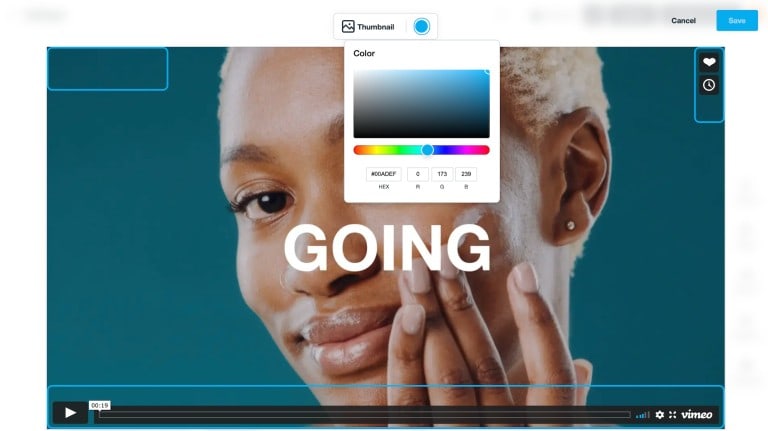
Customize Your Vimeo Video Thumbnails with Easy-to-Use Color Selection Tools for a Perfect, Eye-Catching Preview
Vimeo
Crafting cinema, one frame at a time.

Loom's Platform Enhances Team Collaboration with Asynchronous Video Updates
Loom
You can express your thoughts in less time, sharing quick feedback, or deep communication with just a click. Viewers can interact, comment, and respond to your messages. With Loom, you’ll spend less of your day meeting and emailing and have more space for your best work.
When comparing Vimeo and Loom, it's essential to highlight their differences to determine which platform best suits your video creation and sharing needs. One of the primary distinctions lies in their focus and feature set.
Vimeo is renowned for its professional-grade video hosting capabilities, catering to businesses and creators seeking high-quality video streaming and customization options. With Vimeo, users gain access to advanced privacy controls, customizable player options, and robust analytics tools, making it an ideal choice for those prioritizing presentation quality and branding.
In contrast, Loom excels in simplicity and ease of use, offering quick and effortless video recording and sharing functionalities. Targeting teams and individuals looking for efficient communication through screen recordings and webcam videos, Loom prioritizes speed and convenience. Its intuitive interface allows users to create and share videos seamlessly, making it a popular choice for remote collaboration and asynchronous communication.
Another significant difference between Vimeo and Loom lies in their pricing and plans. While both platforms offer free versions with limited features, Vimeo's paid plans provide access to a wider range of advanced features and customization options, catering to businesses with diverse needs and budgets. On the other hand, Loom's pricing model focuses on simplicity, offering a single paid plan with comprehensive features at a competitive price point.
Whether you prioritize professional-grade video hosting and customization or quick and effortless video communication, understanding these differences will guide you in selecting the platform that best fits your goals.

Loom
The video communication platform for async work
Free forever for up to 10 users
Save up to $750
03 Vimeo pros and cons
What are the advantages of Vimeo?
- High-quality video hosting: Vimeo is known for its support of high-definition and 4K video playback, making it ideal for creators and businesses aiming for professional-quality content delivery.

- Customization options: Vimeo offers extensive customization features, allowing users to tailor the look and feel of their video player, embed settings, and portfolio layout to align with their brand identity.
- Privacy controls: With Vimeo, users have granular control over the privacy settings of their videos, including options for password protection, domain-level privacy, and restricting video embedding, ensuring content remains accessible only to intended audiences.
- Community and networking: Vimeo fosters a vibrant community of creators, providing opportunities for collaboration, feedback, and discovery through features like channels, groups, and forums, enabling users to connect with like-minded individuals and expand their reach.
- Analytics and insights: Vimeo offers robust analytics tools, providing users with valuable insights into their audience engagement, including view counts, play rates, geographic data, and audience retention metrics, empowering creators and businesses to make data-driven decisions to optimize their content strategy.
What are the disadvantages of Vimeo?
- Cost: While Vimeo offers a free basic plan, access to advanced features such as higher storage limits, advanced analytics, and customization options requires a paid subscription, making it less accessible for users with limited budgets.

- Limited social integration: Compared to some other video platforms, Vimeo's social integration capabilities are relatively limited, making it less suitable for businesses and creators seeking to maximize their video's reach through social media channels.
- Search visibility: Vimeo videos may have lower visibility in search engine results compared to other platforms like YouTube, limiting organic discoverability and potentially impacting content visibility and reach.
- Limited monetization options: While Vimeo does offer monetization features such as Vimeo On Demand and Vimeo OTT, the platform's monetization options are more limited compared to other platforms like YouTube, potentially restricting revenue generation opportunities for creators and businesses.
- Learning curve: Despite its user-friendly interface, Vimeo's extensive customization options and advanced features may have a learning curve for new users, requiring time and effort to fully leverage the platform's capabilities effectively.
04 Loom pros and cons
What are the advantages of Loom?
- Ease of use: Loom is renowned for its simplicity and user-friendly interface, allowing users to create and share videos quickly and effortlessly without the need for extensive technical knowledge or training.
- Time efficiency: With Loom, users can streamline communication by recording and sharing video messages, screen recordings, and webcam videos in a matter of minutes, enabling efficient collaboration and remote communication.
- Integration capabilities: Loom seamlessly integrates with popular productivity and communication tools such as Slack, Gmail, Google Drive, and Trello, enhancing workflow efficiency and enabling users to share videos directly within their existing workflows.
- Accessibility: Loom offers a free version with generous features, including unlimited video recording, unlimited storage, and basic editing tools, making it accessible to individuals and teams of all sizes, including those with limited budgets.
- Engagement and personalization: Loom's video messaging capabilities enable users to convey emotion, tone, and context effectively, fostering engagement and personal connection with recipients compared to traditional text-based communication methods.
What are the disadvantages of Loom?
- Limited editing features: While Loom offers basic editing tools such as trimming and cropping, its editing capabilities are relatively limited compared to more advanced video editing software, potentially limiting creative flexibility for users seeking extensive editing options.
- Security concerns: Loom's free version lacks advanced security features such as password protection and access controls, raising concerns about the privacy and security of sensitive video content, particularly for businesses handling confidential information.
- Dependency on internet connection: Loom relies on a stable internet connection for recording and sharing videos, which may pose challenges for users in areas with poor connectivity or when working offline.
- Storage limitations: Although Loom offers unlimited storage for videos, the platform imposes a limit on the number of videos users can store in their account, potentially requiring users to manage their video library to avoid exceeding storage limits.
- Branding restrictions: Loom's branding is prominently displayed in free and lower-tier paid plans, which may detract from a professional appearance for businesses and individuals seeking to maintain a branded presence in their video communications.
Compare Loom to other tools


Snagit vs Loom


Descript vs Loom

Sendspark vs Loom

Loom vs Camtasia

Loom vs Zoom Meetings

VideoAsk vs Loom
05 Vimeo compared to Loom
Vimeo and Loom offer distinct approaches to video creation and sharing. Vimeo, known for its professional-grade hosting and extensive customization options, caters to businesses and creators seeking high-quality video delivery and brand alignment. In contrast, Loom prioritizes simplicity and efficiency, enabling quick and effortless video messaging and screen recording for streamlined communication.
While Vimeo excels in professional presentation and advanced features, Loom shines in ease of use and accessibility. Choosing between them depends on specific needs, with Vimeo ideal for polished content delivery and branding, while Loom offers efficient communication solutions for teams and individuals seeking quick video sharing.
Is Vimeo better than Loom?
 Is Vimeo better than Loom?
Deciding whether Vimeo is better than Loom hinges on the intended use and audience of the video content. Vimeo's platform stands out for those requiring advanced video hosting features, including detailed analytics and enhanced privacy controls, appealing to professional filmmakers and businesses aiming for a sophisticated online presence.
However, for users prioritizing fast, effective communication through video, such as educators, remote teams, and customer support, Loom's straightforward video recording and sharing capabilities offer a practical solution. Ultimately, the choice reflects a balance between the need for professional video management versus immediate and accessible video messaging.
What is Vimeo best used for?
Vimeo is best used for hosting and sharing high-quality video content in a professional setting. It's an ideal platform for businesses, filmmakers, and creators who prioritize presentation quality, customization options, and privacy controls. With Vimeo, users can showcase their work, share promotional videos, host webinars, or even distribute premium content through features like Vimeo On Demand.
Additionally, Vimeo's analytics tools provide valuable insights into audience engagement, helping users make data-driven decisions to optimize their video strategy. Whether for marketing, education, or entertainment purposes, Vimeo offers a reliable and versatile platform for hosting and sharing video content with a focus on quality and professionalism.
Can Vimeo replace Loom?
While Vimeo and Loom serve different purposes in the realm of video creation and sharing, Vimeo can offer some overlapping functionalities to replace certain aspects of Loom's capabilities. Vimeo excels in hosting high-quality video content, offering customization options, and providing analytics insights.
However, it may not entirely replace Loom's unique features such as quick and effortless video messaging, screen recording, and integration with productivity tools. Depending on specific needs, businesses and individuals may find Vimeo suitable for polished video presentations but may still rely on Loom for efficient communication through video messages and screen recordings in collaborative workflows.
Is Vimeo cheaper than Loom?
Comparing Vimeo and Loom in terms of pricing, Vimeo’s pricing generally offers a range of subscription plans tailored to different needs and budgets, including a free basic plan with limited features. However, for advanced functionalities such as increased storage, customization options, and analytics insights, users may need to upgrade to paid plans, which vary in price.
Conversely, Loom offers a single paid plan with comprehensive features at a competitive price point, making it a simpler and potentially more cost-effective option for users seeking efficient video messaging and screen recording capabilities without the need for extensive customization or analytics tools.
Is there a better Video software than Vimeo?
Determining if there's a "better" software than Vimeo depends largely on your specific video creation and sharing needs. Vimeo excels in providing professional-grade video hosting, customization options, and privacy controls, making it ideal for businesses and creators prioritizing presentation quality and brand alignment.
However, alternatives to Vimeo like YouTube, Wistia, Camtasia, and Vidyard offer tailored solutions. YouTube boasts unmatched reach, perfect for widespread content distribution. Wistia focuses on marketing tools and analytics, ideal for businesses aiming to maximize engagement. Camtasia offers robust screen recording and video editing capabilities, catering to creators seeking comprehensive content creation tools. Vidyard provides advanced video analytics and personalized video features, making it a powerful choice for targeted marketing campaigns.
06 Loom compared to Vimeo
Loom and Vimeo are distinct platforms offering unique approaches to video creation and sharing. Loom prioritizes simplicity and efficiency, enabling quick and effortless video messaging and screen recording for streamlined communication. It's ideal for teams and individuals seeking efficient collaboration tools.
In contrast, Vimeo excels in professional-grade video hosting, customization options, and privacy controls, catering to businesses and creators aiming for high-quality content delivery and brand alignment. While Loom shines in ease of use and accessibility, Vimeo offers advanced features and analytics insights, making it suitable for polished video presentations and marketing endeavors.
Is Loom better than Vimeo?
Evaluating whether Loom is superior to Vimeo largely depends on the user's priorities and context of video usage. For those valuing quick, informal communication and the ability to share ideas and feedback instantly, Loom offers a compelling proposition. Its user-friendly interface and focus on direct video messaging make it a go-to for educators, remote teams, and anyone in need of a straightforward, effective communication tool.
On the other hand, Vimeo's strengths lie in its ability to provide a sophisticated platform for video professionals and businesses focused on crafting branded, high-quality video content. Thus, Loom's advantage lies in its simplicity and immediate applicability for day-to-day communication, contrasting Vimeo's emphasis on content quality and brand presentation.
What is Loom best used for?
Loom is best used for streamlined communication through quick and effortless video messaging and screen recording. It caters to teams and individuals seeking efficient collaboration tools for remote work environments. Loom's intuitive interface enables users to create and share video messages, tutorials, and presentations in a matter of minutes, enhancing productivity and clarity in communication.
Whether for conveying complex ideas, providing feedback, or delivering training materials, Loom offers a versatile platform for asynchronous communication that fosters engagement and collaboration. Its accessibility and ease of use make it an indispensable tool for modern workplaces aiming to enhance remote collaboration and communication.
Can Loom replace Vimeo?
While Loom and Vimeo serve distinct purposes in the realm of video creation and sharing, Loom can't entirely replace Vimeo's comprehensive features. Loom excels in quick and effortless video messaging and screen recording for streamlined communication, making it ideal for team collaboration and remote work environments.
However, Vimeo offers professional-grade video hosting, customization options, and analytics insights, catering to businesses and creators aiming for high-quality content delivery and brand alignment. While Loom complements certain aspects of video communication, Vimeo's robust platform remains indispensable for polished video presentations, marketing endeavors, and maintaining a branded online presence.
Is Loom cheaper than Vimeo?
When comparing the pricing of Loom and Vimeo, Loom generally offers a single paid plan with comprehensive features at a competitive price point. This simplicity may make Loom’s pricing appear more cost-effective for users seeking efficient video messaging and screen recording capabilities without the need for extensive customization or analytics tools.
Conversely, Vimeo offers a range of subscription plans tailored to different needs and budgets, including a free basic plan with limited features. However, for advanced functionalities such as increased storage, customization options, and analytics insights, users may need to upgrade to paid plans, which vary in price.
Is there a better Video software than Loom?
Determining if there's a superior software to Loom depends on your specific video communication and collaboration needs. Loom offers efficient video messaging and screen recording capabilities, ideal for streamlined communication in remote work environments.
However, alternatives to Loom like Zoom, Microsoft Teams, Google Meet, and Slack may be more suitable for certain users. Zoom excels in hosting large-scale video conferences, Microsoft Teams integrates seamlessly with other Microsoft Office tools, Google Meet offers robust video conferencing capabilities, and Slack provides comprehensive messaging and collaboration features.
Loom
The video communication platform for async work
Free forever for up to 10 users
Save up to $750
07 Features comparison
Loom Outpaces Vimeo in User-Friendly Video Creation

Loom's Intuitive Dashboard Showcases Easy Navigation for Video Creation and Sharing
Both Vimeo and Loom are acclaimed for their user-friendly interfaces, facilitating effortless video creation and sharing. However, Loom edges ahead in simplicity and intuitiveness. Unlike Vimeo, Loom offers a streamlined recording and sharing process with fewer steps.
For instance, Loom's intuitive browser extension allows for quick video capture and sharing directly from your browser window, eliminating the need for complex software installations. This seamless workflow translates to reduced learning curves, enabling users to swiftly transform their ideas into shareable content. With Loom's intuitive approach, users can focus more on content creation and less on navigating intricate processes.
Vimeo Outshines Loom in Professional Video Hosting

Vimeo's Professional Video Hosting Service Provides Multiple Resolution Options for Download
When it comes to hosting high-quality videos, Vimeo stands out as the superior choice. Renowned for its support of top-notch video resolution, including 4K and HD formats, Vimeo ensures that content retains its professional edge. For example, Vimeo's advanced video compression algorithms maintain exceptional video quality even after compression, preserving intricate details and vibrant colors.
This makes Vimeo the preferred platform for entrepreneurs and creators striving to deliver visually stunning content that captivates audiences. In contrast, while Loom offers video hosting capabilities, its focus lies more on streamlined communication rather than professional-grade video presentation, making Vimeo the clear frontrunner in this aspect.
Vimeo Surpasses Loom in Integration Versatility

Vimeo Integrates Seamlessly with a Number of Applications, Including Google Sheets and HubSpot
When assessing integration capabilities, Vimeo emerges as the frontrunner. Its seamless compatibility with various third-party applications enhances workflow efficiency. For instance, Vimeo integrates flawlessly with professional video editing software such as Adobe Premiere Pro and Final Cut Pro, enabling users to edit and upload videos directly from their preferred editing platforms.
Additionally, Vimeo's integration with cloud storage services like Dropbox facilitates convenient file management and collaboration. This extensive compatibility streamlines the video creation process, empowering users to leverage their preferred tools seamlessly within the Vimeo ecosystem. In comparison, Loom's integration options are more limited, making Vimeo the preferred choice for users seeking versatile integration capabilities.
Loom Leads the Way in Screen Recording

Loom's Screen Recording Feature Displays a Friendly Face While Presenting in an Engaging Way
When it comes to screen recording for tutorials, presentations, or demos, Loom emerges as the top choice. Unlike Vimeo, Loom offers direct and seamless screen recording capabilities, enabling users to effortlessly capture their entire computer screen or specific application windows.
This simplicity streamlines the process of creating instructional content, empowering users to focus on delivering clear and engaging demonstrations without the hassle of third-party software. For example, Loom's intuitive desktop application allows users to initiate screen recordings with just a few clicks, eliminating the need for complex setups or additional tools. With Loom's intuitive approach to screen recording, users can create impactful content with ease.
Vimeo Excels Over Loom in Video Monetization
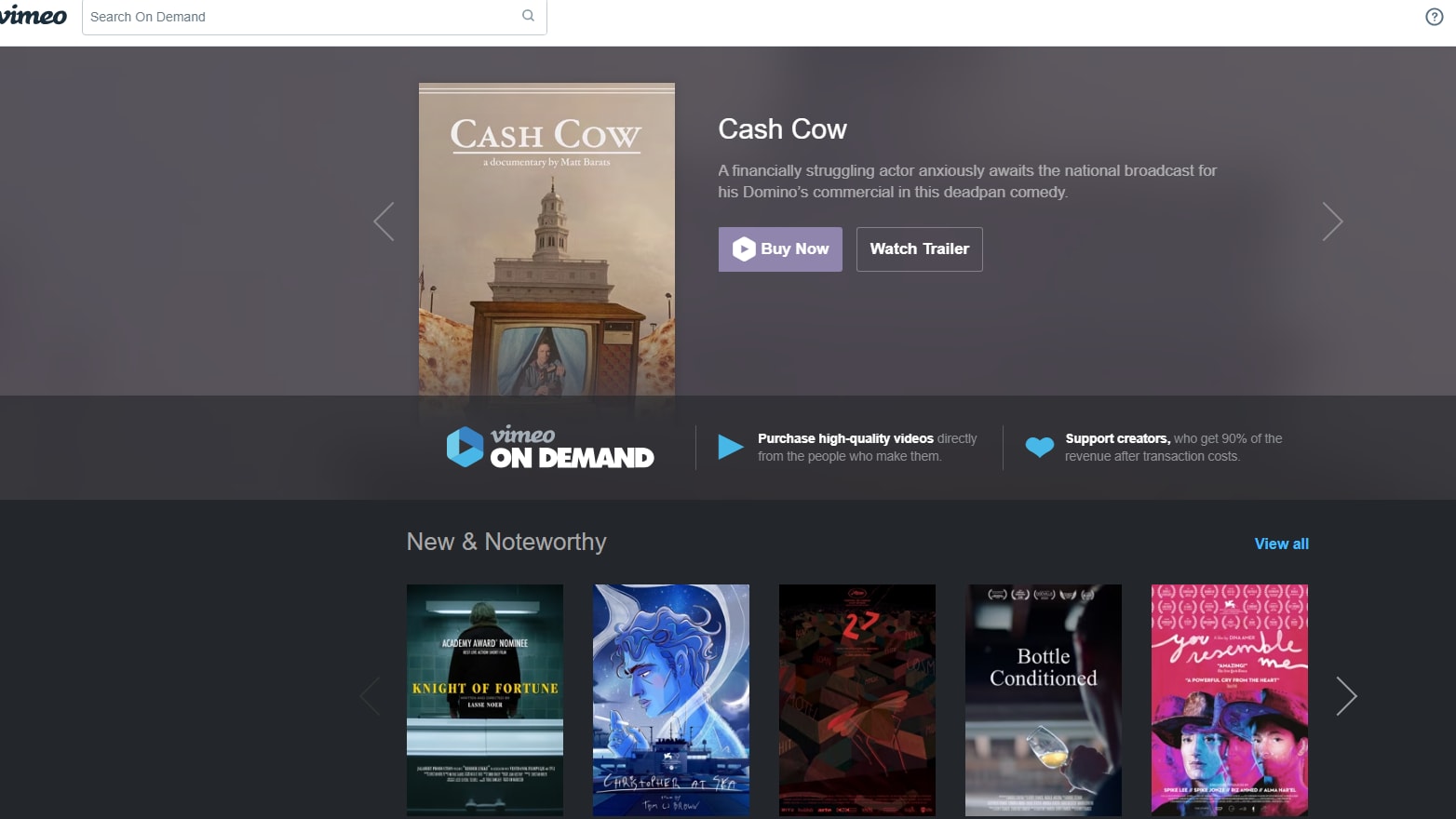
Explore Diverse Stories through Vimeo On Demand and Monetize Your Videos
For entrepreneurs seeking to monetize their video content, Vimeo proves to be the superior choice. Unlike Loom, Vimeo offers a diverse array of monetization options tailored to various business models. For instance, Vimeo's "On Demand" feature enables users to sell videos directly to their audience, allowing entrepreneurs to profit from their content.
Additionally, Vimeo provides subscription channels and pay-per-view models, offering flexible monetization strategies to suit different audience preferences and revenue goals. This versatility empowers entrepreneurs to capitalize on their passion by transforming video content into a lucrative income stream, solidifying Vimeo's position as the go-to platform for video monetization.
Vimeo and Loom Provide Strong Privacy Controls for Secure Content Sharing

Loom Enhances Security with Sharing Options, Allowing You to Control Who Views Your Videos
Protecting content integrity is paramount, and both Vimeo and Loom prioritize robust privacy controls. Vimeo empowers users with options such as password protection for videos, safeguarding sensitive content from unauthorized access. Similarly, Loom offers control over the public or private status of videos, allowing users to restrict access to confidential information.
For instance, Loom's privacy settings enable users to share videos exclusively with designated recipients or within specific teams, ensuring content remains secure. With these sturdy privacy features, both platforms offer peace of mind, allowing users to confidently share sensitive information and exclusive content without compromising security.
Loom Takes the Lead with Mobile Accessibility Over Vimeo's Desktop Dominance

Loom's Mobile App Interface Makes it Easy to Switch Between Camera, Screen, or Audio Recording
In today's mobile-centric landscape, accessibility is key, and Loom emerges as the frontrunner with its dedicated mobile app. This app empowers users to create and view videos on the go, offering unparalleled flexibility and convenience. For instance, Loom's mobile app enables users to record spontaneous moments or provide timely feedback while away from their desktops.
In contrast, while Vimeo boasts an exceptional visual experience on desktops, its absence of a mobile app limits users' ability to engage with content outside of traditional settings. This disparity underscores Loom's edge in catering to the dynamic needs of users in today's fast-paced world.
08 Vimeo vs Loom: Which is the best for your business?
Vimeo is the best tool for you if:
- Your focus is on delivering high-quality, professional-grade video content with the ability to customize the player and embed videos seamlessly into your website or platform.
- You need advanced analytics to understand viewer engagement, track performance, and refine your video strategy based on comprehensive insights into how your content is consumed.
- Privacy and control are paramount, offering password protection, private links, and domain-level restrictions to ensure your videos are viewed only by your intended audience.
- You are looking to create a strong brand identity through your video content, with extensive customization options that allow for a tailored viewing experience that aligns with your brand.
- Integration with professional editing tools and workflows is critical, enabling a seamless transition from editing to distribution and ensuring your videos maintain their quality and integrity.
 Your focus is on delivering high-quality, professional-grade video content with the ability to customize the player and embed videos seamlessly into your website or platform.
Loom is the best tool for you if:
- Quick, efficient communication is key, offering an easy way to create and share video messages, enhancing collaboration among teams, especially for remote or hybrid work environments.
- You value simplicity in video creation and sharing, with a straightforward interface that allows for immediate recording and dissemination of content without a steep learning curve.
- Engaging directly with your audience is important, utilizing features like in-video comments to foster interaction, feedback, and a sense of community among viewers.
- You need a versatile tool for educational purposes, enabling teachers and trainers to create instructional videos that are easily accessible and consumable by students and trainees.
- The ability to capture both screen and camera simultaneously is essential, making it perfect for tutorials, demonstrations, and more personal communication where visual context and facial expressions are important.
Loom
The video communication platform for async work
Free forever for up to 10 users
Save up to $750
09 Alternatives to Vimeo & Loom

Zoom Meetings
Used by 2436 members
$20 off per user on the annual Workplace Pro plan
Save up to $180

Tella (ex. Tella.tv)
Used by 1097 members
30% off monthly or annual plans
Save up to $176

VEED.IO
Used by 299 members
25% off the first year of annual Pro subscriptions
Save up to $336

Adobe Express
Used by 132 members
10 Promotions on Video software
Vimeo and Loom are great tools, but Secret offers promo codes with discounts on over 2190+ different SaaS solutions. New deals are added regularly, helping you save money on your online subscriptions. Get access to codes for other Video software you might want to purchase

Promo code for Descript
35% off annual plans

CapCut coupon
7 days free + 25% off annual plans

Snagit free credits
50% off for 1 year
VEED.IO coupon
25% off the first year of annual Pro subscriptions
Tella (ex. Tella.tv) coupon
30% off monthly or annual plans

Klap coupon
50% off monthly and annual plans for 1 year

Promo code InVideo
50 free AI minutes on all AI plans

Deal for Vmaker
30% off monthly plans or 20% off yearly plans

Code for Navan
Spend $500, Get $500 in Credit for your next booking

Mux coupon code 2026
$500 credits on Mux
Start saving on the best SaaS
Secret has already helped tens of thousands of startups save millions on the best SaaS like Microsoft Teams, Google Workspace & many more. Join Secret now to buy software the smart way.