


Optimizing your online presence is vital for the success of your business, allowing you to enhance visibility, drive traffic, and foster credibility among your audience. However, navigating the intricacies of digital marketing tools can be daunting, especially when choosing between platforms like Loom and Zoom for video communication.
Fortunately, both Loom and Zoom offer robust features to facilitate seamless virtual interactions and collaboration. In this guide, we delve into the specifics of each platform, highlighting their key functionalities and differences, to assist you in determining which aligns best with your business needs. Whether you prioritize ease of use, integration capabilities, or advanced features, we'll help you make an informed decision to optimize your video communication strategy.
- 01 Loom vs Zoom Meetings: overview
- 02 What's the difference between Loom and Zoom Meetings?
- 03 Loom pros and cons
- 04 Zoom Meetings pros and cons
- 05 Loom compared to Zoom Meetings
- 06 Zoom Meetings compared to Loom
- 07 Features comparison
- 08 Loom vs Zoom Meetings: Which is the best for your business?
- 09 Alternatives to Loom & Zoom Meetings
- 10 Promotions on Video software
Start saving on the best SaaS
Secret has already helped tens of thousands of startups save millions on the best SaaS like Microsoft Teams, Google Workspace & many more. Join Secret now to buy software the smart way.

01 Loom vs Zoom Meetings: overview
Loom and Zoom stand as two leading contenders in the realm of video communication tools, each boasting distinct advantages tailored to varying user requirements.
Loom is acclaimed for its simplicity and user-friendly interface, making it effortless for individuals and teams to record and share video messages seamlessly. With its intuitive features and focus on asynchronous communication, Loom is ideal for enhancing productivity and collaboration across distributed teams. Conversely, Zoom is celebrated for its versatility and comprehensive suite of features, catering to a wide range of virtual communication needs. From video conferencing and webinars to screen sharing and remote collaboration, Zoom offers a robust platform designed to facilitate real-time interactions and engagement.
Now, let's dive into the comparison of Loom vs Zoom. We'll explore their distinctive features and functionalities to assist you in selecting the optimal video communication solution for your business needs.

Positive reviews
Loom is highly regarded for its ease of creating and sharing quick videos, while Zoom is appreciated for its reliable video conferencing capabilities.

Loom
Zoom Meetings
Customer support
Loom provides sufficient support through help articles and email, but Zoom offers more comprehensive support options, including live support for paid accounts.
Loom
Zoom Meetings
Security
Loom has good security practices for video sharing, but Zoom has had to implement robust security measures like end-to-end encryption and meeting locks due to its widespread use.
Loom
Zoom Meetings
Mobile app experience
Loom's mobile app is effective for recording and viewing on the go, but Zoom's mobile app provides a full-featured conferencing experience, closely mirroring its desktop application.
Loom
Zoom Meetings
Collaboration tools
Loom allows for asynchronous feedback through comments, while Zoom provides real-time collaboration features such as screen sharing, whiteboarding, and breakout rooms.
Loom
Zoom Meetings
Recording functionality
Loom is designed for easy recording and sharing of videos with features like screen, camera, and mic recording. Zoom offers recording for meetings, but the functionality is more geared towards live session capture.
Loom
Zoom Meetings
Ease of use
Loom's interface is straightforward, making it simple for users to record and share videos. Zoom is user-friendly but has a more complex interface due to its extensive features.
Loom
Zoom Meetings
Integrations
Loom integrates well with productivity tools like Slack and Asana, but Zoom offers a wider range of integrations, including email platforms, calendar systems, and educational tools.
Loom
Zoom Meetings
Pricing plans
Loom offers a free plan with basic features and affordable premium plans. Zoom provides a free tier with a 40-minute limit on group meetings, while its paid plans cater to more extensive business needs.
Loom
Zoom Meetings
Video quality
Loom supports high-quality video recording, but Zoom specializes in high-definition live video conferencing, offering advanced options like virtual backgrounds and touch-up features.
Loom
Zoom Meetings
02 What's the difference between Loom and Zoom Meetings?

Loom's Asynchronous Communication Gives You the Power to Connect with People when it Suits You
Loom
The video communication platform for async work

Zoom's Synchronous Communication Offers Virtual Video Meetings with Different Options to Interact
Zoom Meetings
Zoom helps you work better as a team by centralizing team chat, telephone, whiteboard and videoconference meetings in one place.
Loom and Zoom are both prominent players in the realm of video communication platforms, offering a plethora of features geared towards enhancing remote collaboration and connectivity. While both platforms share fundamental capabilities such as video recording, screen sharing, and real-time messaging, there are notable differences that set them apart.
One of the primary distinctions lies in their approach to communication. Loom emphasizes asynchronous communication, allowing users to record and share videos at their convenience. This asynchronous feature is particularly beneficial for remote teams operating across different time zones or individuals seeking flexibility in their communication methods. On the other hand, Zoom specializes in synchronous communication, offering robust features for live video conferencing, webinars, and virtual meetings. This real-time interaction capability is well-suited for scenarios requiring immediate collaboration and engagement.
Furthermore, the user interfaces of Loom and Zoom exhibit contrasting styles. Loom boasts a simple and intuitive interface, prioritizing ease of use and accessibility. Its streamlined design makes it effortless for users to navigate and utilize its features, making it an attractive option for individuals seeking a straightforward video communication solution. In contrast, Zoom offers a more comprehensive interface with a wide array of settings and options. While this extensive feature set provides flexibility and customization, it may present a steeper learning curve for new users initially.
Another significant difference between Loom and Zoom is their pricing models. Loom offers a freemium model with limited features available for free, while premium plans unlock advanced functionalities such as unlimited video recording and enhanced security measures. In contrast, Zoom offers a tiered pricing structure with various subscription plans catering to different organizational needs, ranging from small businesses to large enterprises.

Loom
Used by 3238 members
Free forever for up to 10 users
Save up to $750

Zoom Meetings
Used by 2429 members
$20 off per user on the annual Workplace Pro plan
Save up to $180
03 Loom pros and cons
What are the advantages of Loom?
- User-friendly interface: Loom offers a simple and intuitive interface, making it easy for users to quickly navigate and utilize its features without extensive training or technical expertise.

- Asynchronous communication: One of Loom's key advantages is its emphasis on asynchronous communication. Users can record videos at their convenience and share them with recipients, allowing for flexibility in communication and avoiding scheduling conflicts.
- Efficient collaboration: Loom enhances collaboration by enabling users to create and share video content seamlessly. Teams can provide feedback, share ideas, and collaborate on projects more effectively through video messages, reducing the need for lengthy email chains or synchronous meetings.
- Versatile recording options: Loom offers various recording options, including screen recording, camera-only recording, and a combination of both. This versatility allows users to choose the most suitable recording mode for their specific needs, whether it's demonstrating a software application, delivering a presentation, or recording a personal message.
- Integration capabilities: Loom integrates with popular productivity and collaboration tools such as Slack, Google Workspace, and Trello, enhancing workflow efficiency and allowing for seamless integration into existing workflows.
What are the disadvantages of Loom?
- Limited editing features: While Loom provides basic editing capabilities such as trimming and cropping, it lacks more advanced editing features found in dedicated video editing software. Users looking to add overlays, annotations, or advanced effects may find Loom's editing capabilities insufficient.

- Limited security features: Loom's security features may be considered somewhat limited compared to other video communication platforms. While it offers password protection and encryption for video recordings, organizations with stringent security requirements may require additional features such as end-to-end encryption or advanced access controls.
- Dependency on internet connection: Loom's functionality relies heavily on a stable internet connection. Users in areas with poor connectivity may experience issues with recording or uploading videos, potentially disrupting workflow and communication.
- Storage limitations: Loom imposes storage limitations on free and lower-tier plans, restricting the amount of video content users can store on the platform. Organizations with extensive video content needs may need to upgrade to higher-tier plans to accommodate larger storage requirements.
- Limited interactivity: While Loom facilitates effective communication through video messages, it may lack the interactivity of live video conferencing platforms. Users seeking real-time interaction and engagement may find Loom's asynchronous communication model less suitable for certain use cases.
Compare Loom to other tools


Snagit vs Loom

Descript vs Loom

Sendspark vs Loom

Vimeo vs Loom

Loom vs Camtasia

VideoAsk vs Loom
04 Zoom Meetings pros and cons
What are the advantages of Zoom Meetings?
- Versatile features: Zoom offers a comprehensive set of features including video conferencing, webinars, screen sharing, virtual backgrounds, breakout rooms, and more. This versatility makes it suitable for various use cases, from team meetings to large-scale webinars.
- Ease of use: Zoom is known for its user-friendly interface, making it easy for both hosts and participants to join meetings and utilize its features without extensive training or technical expertise. The platform's intuitive design contributes to a smooth user experience.
- Reliability and stability: Zoom is renowned for its reliability and stability, providing high-quality audio and video even under challenging network conditions. This reliability is crucial for ensuring seamless communication and collaboration, particularly in remote work environments.
- Cross-platform compatibility: Zoom is compatible with a wide range of devices and operating systems, including Windows, macOS, iOS, and Android. This cross-platform compatibility ensures accessibility for users regardless of their device or location, facilitating seamless collaboration.
- Integration capabilities: Zoom integrates with a variety of productivity and collaboration tools such as Slack, Microsoft Teams, Google Calendar, and others. This integration enhances workflow efficiency by allowing users to schedule meetings, share content, and collaborate seamlessly within their existing tools.
What are the disadvantages of Zoom Meetings?
- Security and privacy concerns: Zoom has faced scrutiny regarding security and privacy issues, including instances of unauthorized access to meetings (commonly referred to as "Zoombombing") and data privacy concerns. While Zoom has implemented measures to address these issues, organizations may still have reservations about using the platform for sensitive communications.
- Meeting duration limits (free plan): The free version of Zoom imposes a 40-minute time limit on group meetings with three or more participants. This limitation can be restrictive for users who require longer meeting durations and may necessitate upgrading to a paid plan.
- Participant engagement challenges: In larger meetings or webinars, participant engagement can be challenging to manage, with some attendees disengaged or distracted. Hosts may need to employ strategies such as breakout rooms or interactive features to enhance participant engagement.
- Overwhelming interface for new users: While Zoom's interface is generally user-friendly, new users may find the extensive array of features and settings overwhelming initially. Navigating through options and customizing settings may require some familiarization for first-time users.
- Dependency on internet connection: Like any online platform, Zoom's functionality is dependent on a stable internet connection. Users in areas with poor connectivity may experience issues with audio or video quality, lagging, or dropped connections, impacting the overall meeting experience.
Compare Zoom Meetings to other tools


Zoom Meetings vs Microsoft Teams

Dialpad vs Zoom Meetings

Zoom Meetings vs Webex

Google Meet vs Zoom Meetings

Zoom Meetings vs ZoomInfo
05 Loom compared to Zoom Meetings
Loom and Zoom are both popular video communication platforms, each with distinct advantages. Loom excels in asynchronous communication, allowing users to record and share videos at their convenience, fostering flexibility in collaboration. Its user-friendly interface and versatile recording options make it ideal for streamlined video messaging.
Conversely, Zoom specializes in real-time interaction, offering comprehensive features for live video conferencing, webinars, and virtual meetings. Its reliability, cross-platform compatibility, and integration capabilities cater to diverse communication needs. While Loom prioritizes simplicity and asynchronous communication, Zoom emphasizes real-time engagement and versatility, catering to different preferences and use cases in the realm of video communication.
Is Loom better than Zoom Meetings?
 Is Loom better than Zoom Meetings?
Deciding whether Loom is better than Zoom hinges on the specific communication requirements of an organization or individual.
While Loom is unrivaled in creating and sharing asynchronous video messages, enhancing remote work and flexibility, Zoom shines in facilitating live interactions, making it indispensable for real-time meetings and collaborative sessions. The choice between Loom and Zoom ultimately rests on the balance between the need for asynchronous communication tools and the demand for live, interactive engagements.
What is Loom best used for?
Loom is best used for asynchronous communication and collaboration, offering a seamless platform for creating and sharing video messages. It's ideal for situations where real-time interaction isn't necessary or feasible, allowing users to record and send video messages at their convenience.
Loom excels in enhancing productivity by enabling teams to provide feedback, share ideas, and collaborate on projects asynchronously. Whether it's delivering updates, explaining processes, or sharing insights, Loom provides a user-friendly interface and versatile recording options to streamline communication across distributed teams. Its simplicity and efficiency make it a valuable tool for fostering collaboration and communication in remote work environments.
Can Loom replace Zoom Meetings?
While Loom and Zoom are both powerful video communication platforms, they serve different purposes and excel in distinct areas. Loom is primarily designed for asynchronous communication, offering the convenience of recording and sharing video messages at one's own pace. It's best suited for scenarios where real-time interaction isn't essential, such as providing updates, delivering tutorials, or sharing insights asynchronously.
On the other hand, Zoom specializes in live video conferencing, webinars, and real-time collaboration, offering robust features for immediate interaction and engagement. While Loom complements Zoom by enhancing asynchronous communication, it doesn't entirely replace the need for Zoom's real-time interaction capabilities.
Is Loom cheaper than Zoom Meetings?
Comparing Loom and Zoom in terms of pricing reveals differences influenced by their respective features and intended uses. Loom offers a straightforward pricing structure, including a free plan with limited features and premium plans with additional functionalities such as unlimited video storage and advanced security measures.
In contrast, Zoom offers a tiered pricing model with both free and paid plans catering to various user needs. While Loom’s pricing may appear more cost-effective for specific use cases, such as asynchronous communication, the overall affordability ultimately depends on factors like the scale of usage, desired features, and organizational requirements.
Is there a better Video software than Loom?
While Loom is widely recognized for its ease of use and efficiency in creating video messages, which helps in enhancing communication within teams and with clients, there are several alternatives that might better align with specific requirements or preferences.
Tools such as Screencast-O-Matic, Camtasia, and Vidyard stand out as notable alternatives to Loom. The best video communication software for your business or personal use will largely depend on various factors, such as the specific features you need, your budget, and the goals you wish to achieve through video messaging. Whether it's for detailed video editing, analytics, or simply efficient communication, exploring these alternatives to Loom can help you find the perfect fit for your requirements.

Loom
The video communication platform for async work
Free forever for up to 10 users
Save up to $750
06 Zoom Meetings compared to Loom
Zoom and Loom are both prominent platforms in the realm of video communication, each catering to distinct communication needs. Zoom specializes in real-time interaction, offering features like live video conferencing, webinars, and virtual meetings. It excels in facilitating immediate collaboration and engagement among participants.
Conversely, Loom focuses on asynchronous communication, allowing users to record and share video messages at their convenience. It's ideal for scenarios where real-time interaction isn't necessary, fostering flexibility in collaboration. While Zoom prioritizes live communication and versatility, Loom complements it by providing a seamless platform for streamlined asynchronous video messaging, catering to different preferences and use cases.
Is Zoom Meetings better than Loom?
Assessing whether Zoom is better than Loom largely depends on the context of use and what one values in a communication tool.
Zoom's strength lies in its ability to bring people together in real-time, making it a go-to for businesses and educators needing robust live video conferencing capabilities. Its comprehensive set of features supports a wide range of interactive possibilities, from large webinars to intimate meetings, offering a versatile platform for live collaboration. In contrast, Loom's appeal is in its simplicity and efficiency for asynchronous video communication, ideal for those who prioritize flexibility and time management.
What is Zoom Meetings best used for?
Zoom is best used for facilitating real-time communication and collaboration, offering a comprehensive platform for video conferencing, webinars, and virtual meetings. It excels in connecting individuals and teams across different locations, enabling seamless interaction through features like screen sharing, chat, and breakout rooms.
Zoom is ideal for various scenarios, including team meetings, client presentations, educational sessions, and social gatherings. Its versatility and reliability make it a preferred choice for businesses, educational institutions, and organizations of all sizes seeking to enhance communication and collaboration among remote participants. Overall, Zoom is best suited for facilitating immediate engagement and interaction in virtual environments.
Can Zoom Meetings replace Loom?
While both Zoom and Loom are powerful video communication platforms, they serve different purposes and excel in distinct areas. Zoom specializes in real-time communication, offering features like video conferencing, webinars, and virtual meetings for immediate interaction and collaboration.
In contrast, Loom emphasizes asynchronous communication, allowing users to record and share video messages at their convenience. While Zoom complements Loom by providing real-time engagement capabilities, it doesn't entirely replace the need for Loom's asynchronous communication features.
Is Zoom Meetings cheaper than Loom?
Determining whether Zoom is cheaper than Loom depends on various factors such as the specific features required and the scale of usage. Zoom’s pricing offers a tiered structure with both free and paid plans tailored to different user needs.
While Zoom's free plan may offer basic functionality, its paid plans unlock additional features such as longer meeting durations and increased participant limits. In contrast, Loom also offers a free plan with limited features, alongside premium plans with advanced functionalities like unlimited video storage and enhanced security measures.
Is there a better Video Conferencing software than Zoom Meetings?
While Zoom is certainly a leading video conferencing tool known for its ease of use and reliability, the market is filled with alternatives to Zoom that might suit different needs more closely.
For example, Microsoft Teams, Slack, Google Meet, Cisco Webex, Skype for Business, and GoToMeeting offer competitive services that can match or even exceed Zoom's functionalities in certain aspects.
The best video conferencing software for your organization will depend on various factors, including the specific features you need, budget constraints, and the particular goals you wish to achieve with your remote communication strategies.

Zoom Meetings
Communication and collaboration platform
$20 off per user on the annual Workplace Pro plan
Save up to $180
07 Features comparison
Loom's Editing Tools Outshine Zoom's Lack of Video Editing Capabilities
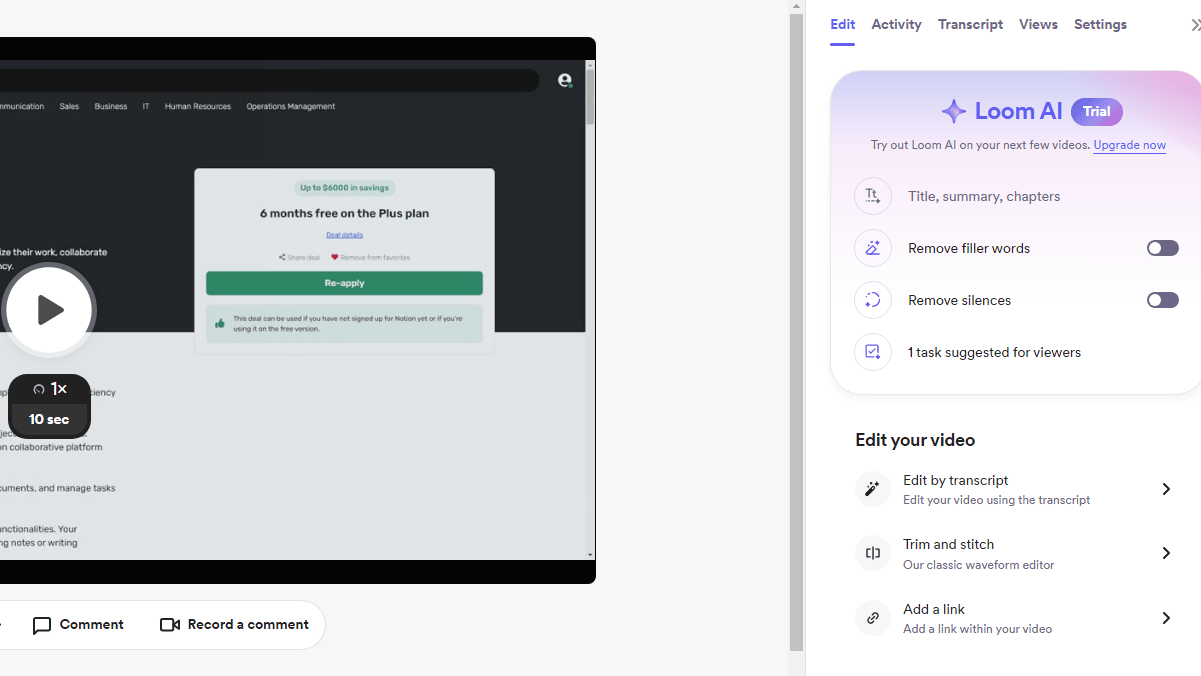
Loom's Video Editing Options, Including AI Transcripts, Trimming, and Stitching
Comparing editing capabilities, Loom surpasses Zoom with its comprehensive suite of video editing tools. While Zoom lacks built-in video editing capabilities, Loom empowers users to refine their videos to perfection with features like trimming, cutting, and adding captions.
For example, users can trim unnecessary sections, cut out mistakes, and enhance clarity by adding captions for increased understanding. This level of customization gives users greater control over their content and the final output, ensuring polished and professional video messages. Loom's editing tools provide users with the flexibility and versatility to create high-quality video content tailored to their specific needs and preferences.
Zoom's Virtual Collaboration Tools Surpass Loom's Focus on Privacy and Branding

Zoom's Online Whiteboards Provides Your Team with the Tools They Need to Collaborate and Brainstorm Fast and Efficiently
While both Loom and Zoom cater to remote teams, Zoom outshines Loom with its more comprehensive set of tools. Zoom offers virtual workspaces and an online whiteboard, facilitating real-time brainstorming and idea-sharing among remote teams. For example, users can collaborate on projects, sketch out ideas, and visualize concepts together in a virtual environment, enhancing teamwork and productivity.
While Loom's privacy controls and custom branding options are distinctive, they may not be as crucial for collaborative work as Zoom's robust features for virtual collaboration. Ultimately, Zoom's emphasis on facilitating real-time collaboration sets it apart as the preferred choice for remote teams seeking comprehensive virtual collaboration capabilities.
Zoom's Integrated Chat Enhances Collaboration Beyond Loom's Video Messaging

You and Your Team Can Continue Conversations Outside of Meetings with Zoom's Chat Feature
Comparing communication features, Zoom's integrated instant messaging service surpasses Loom's video messaging in facilitating collaboration. Zoom's chat feature allows participants to exchange essential information seamlessly before, during, and after meetings, enhancing communication efficiency. For instance, users can share files, links, and updates in real-time, fostering immediate interaction and feedback.
In contrast, while Loom's video messaging offers an innovative approach to communication, it may not match the speed and efficiency of Zoom's text-based chat for quick exchanges of information. Overall, Zoom's integrated chat functionality elevates collaboration to a higher level, providing a more comprehensive solution for communication needs.
Loom and Zoom Provide Comparable Video Conferencing Capabilities

Zoom's Meetings Can Hold Many Different Participants, Including the Use of Collaboration Tools for the Most Effective Engagement
Loom's personalized video messaging and Zoom's real-time team meetings present users with two distinct options for video conferencing. Loom's specialization in personalized video messages offers a unique approach, allowing users to create and share customized videos that can be viewed at any time, enhancing asynchronous communication.
Conversely, Zoom excels in facilitating real-time team meetings, providing features like video conferencing, screen sharing, and collaboration tools for immediate interaction and engagement. Depending on specific needs and circumstances, both platforms offer valuable benefits for video conferencing, catering to different preferences and communication styles.
Loom's User-Friendly Interface Surpasses Zoom's Complexity

Loom's User-Friendly Interface Allows You to Easily Create Videos and Share them with Your Team
Loom stands out as the superior choice for user-friendliness, offering a streamlined interface that prioritizes ease of use and accessibility. Unlike Zoom's extensive feature set, which can overwhelm users with its complexity, Loom provides a straightforward platform for recording and sharing video messages effortlessly. For example, Loom's intuitive recording options allow users to choose between screen recording, camera-only recording, or a combination of both with just a few clicks.
Additionally, Loom's simple sharing capabilities make it easy to distribute videos to recipients without the need for extensive technical knowledge. Overall, Loom's user-friendly interface surpasses Zoom's complexity, providing a seamless experience for users of all skill levels.
Zoom's Extensive Integration Options Outshine Loom's Compatibility
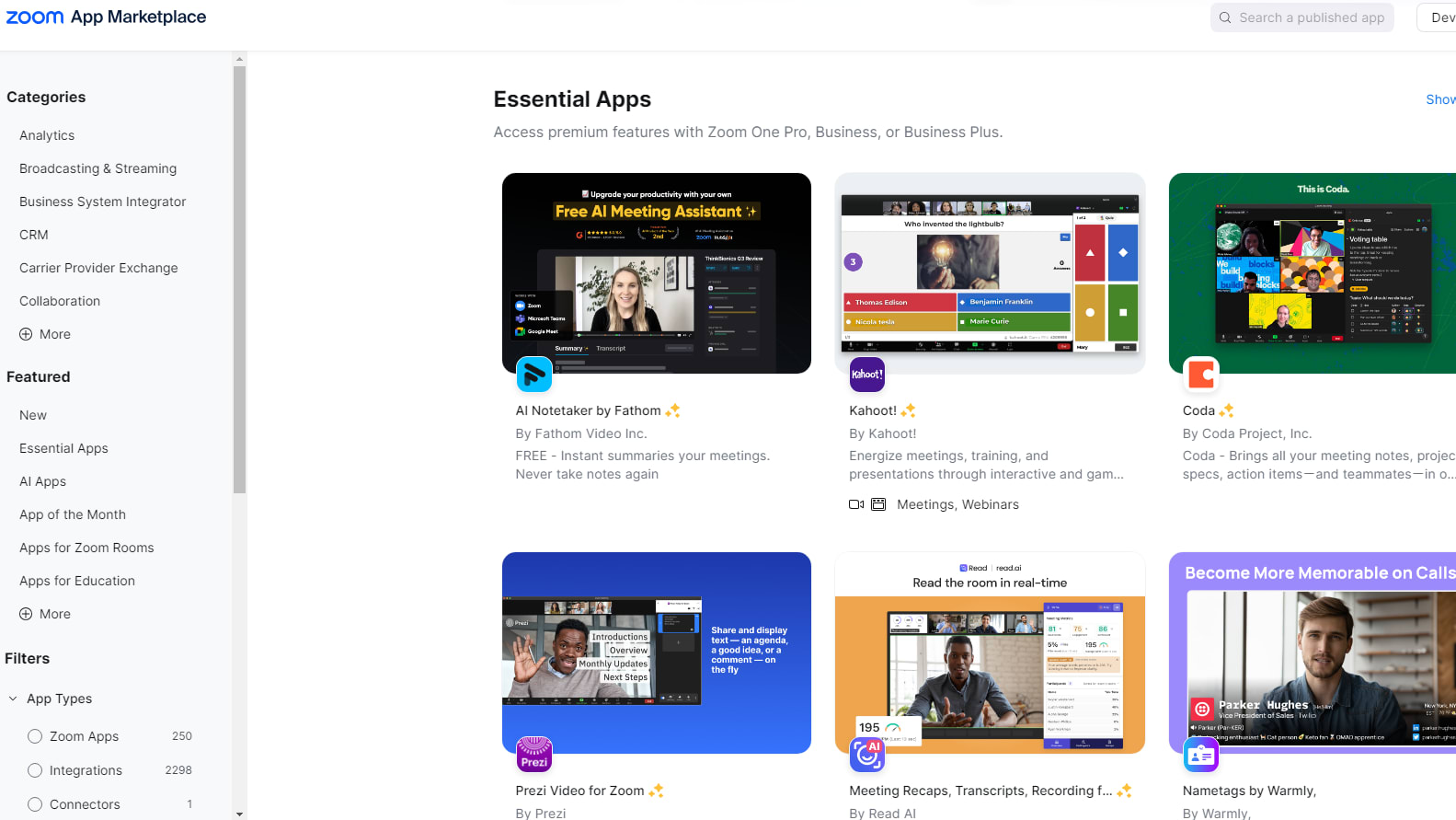
Some of the Integrations Provided by Zoom, Including Coda, Prezi and Many Other Different Categories
Zoom emerges as the frontrunner in integration capabilities when compared to Loom. Zoom offers seamless integration with a wide array of third-party applications and platforms, enhancing workflow efficiency and collaboration. For instance, Zoom integrates effortlessly with popular productivity tools like Slack, Microsoft Teams, and Google Calendar, allowing users to schedule meetings, share content, and collaborate seamlessly within their existing workflows.
Additionally, Zoom's integration with CRMs like Salesforce enables businesses to streamline communication and data management processes. In contrast, Loom's compatibility with external applications is comparatively limited, making Zoom the preferred choice for organizations seeking extensive integration options.
Loom's Specialized Screen Recording Excels Over Zoom's General Capabilities

Capture Your Screen While You Record with Loom and Show Your Audience Exactly What You Want
When comparing screen recording capabilities, Loom's specialized feature outshines Zoom's more general offering. Loom's exclusive focus on screen recording allows users to capture on-screen activities with precision and versatility. Unlike Zoom, Loom enables users to select specific application windows to record, providing greater control and customization.
For example, Loom's screen recording feature is tailored for creating tutorials, presentations, or software demos with ease. Its specialized functionality and comprehensive options make it the preferred choice for users seeking precision and efficiency in screen recording tasks, setting it apart as the superior option for this specific feature.
08 Loom vs Zoom Meetings: Which is the best for your business?
Loom is the best tool for you if:
- You value the ability to communicate asynchronously, allowing team members to watch and respond to video messages on their own schedules, enhancing flexibility and efficiency in collaboration.
- Your primary goal is to create quick, personal video messages that can be easily shared with colleagues or clients, making your communication more engaging and detailed than text alone.
- You're looking for a user-friendly platform that simplifies the process of recording and sharing screen captures or video presentations without the need for live interaction.
- Your team benefits from visual feedback and demonstrations, as Loom enables the recording of detailed walkthroughs and tutorials that can be accessed anytime, anywhere.
- You aim to reduce the number of live meetings yet still maintain a high level of personal interaction and productivity among remote or distributed team members.
 You value the ability to communicate asynchronously, allowing team members to watch and respond to video messages on their own schedules, enhancing flexibility and efficiency in collaboration.
Zoom Meetings is the best tool for you if:
- You require a robust platform for real-time video conferencing, offering features like screen sharing, virtual backgrounds, and breakout rooms to facilitate interactive meetings and webinars.
- Your organization values live collaboration, enabling participants to engage in discussions, share insights, and work together on documents in a seamless, virtual environment.
- You're in need of a reliable and scalable solution for hosting large events, with Zoom's capacity to support thousands of participants simultaneously in a single session.
- You prioritize security in your communications, seeking features such as end-to-end encryption, password-protected meetings, and waiting rooms to ensure the privacy and safety of your virtual interactions.
- Your team benefits from the integration of video conferencing into your daily workflows, with Zoom's compatibility with numerous apps and services enhancing productivity and connectivity across your operations.
Loom
Used by 3238 members
Free forever for up to 10 users
Save up to $750
Zoom Meetings
Used by 2429 members
$20 off per user on the annual Workplace Pro plan
Save up to $180
09 Alternatives to Loom & Zoom Meetings

Descript
Used by 4373 members
35% off annual plans
Save up to $240

Slack
Used by 3737 members
25% off new plan purchases
Save up to $9,000

Tella (ex. Tella.tv)
Used by 1093 members
30% off monthly or annual plans
Save up to $176

InVideo
Used by 994 members
50 free AI minutes on all AI plans
Save up to $28
10 Promotions on Video and Video Conferencing software
Loom and Zoom Meetings are great tools, but Secret offers promo codes with discounts on over 2190+ different SaaS solutions. New deals are added regularly, helping you save money on your online subscriptions. Get access to codes for other Video and Video Conferencing software you might want to purchase
Descript deal
35% off annual plans

Google Workspace discounts
20% off Plus plans for 1 year

Code for CapCut
7 days free + 25% off annual plans

Zoom Video Webinars discount
$20 off per user on the annual Workplace Pro plan

Snagit coupon
50% off for 1 year

Livestorm coupon
Forever Free Plan with 25 live attendees per event

Code for VEED.IO
25% off the first year of annual Pro subscriptions
Slack promotion code
25% off new plan purchases
Code for Tella (ex. Tella.tv)
30% off monthly or annual plans

ZoomInfo promotion
14 days free
Start saving on the best SaaS
Secret has already helped tens of thousands of startups save millions on the best SaaS like Microsoft Teams, Google Workspace & many more. Join Secret now to buy software the smart way.